Production Testing (Manual)
Production Testing is a controlled manual testing activity performed in the live production environment after an application or change has been deployed. Most software testing happens before release in development, QA, staging, or pre-production environments. Those environments are designed to reduce risk while giving testers enough control to validate functionality. However, no non-production environment can perfectly reproduce production. The real environment has actual infrastructure, real configuration, live integrations, production security rules, production data behavior, real monitoring systems, and real user traffic. Because of this, some issues appear only after deployment.
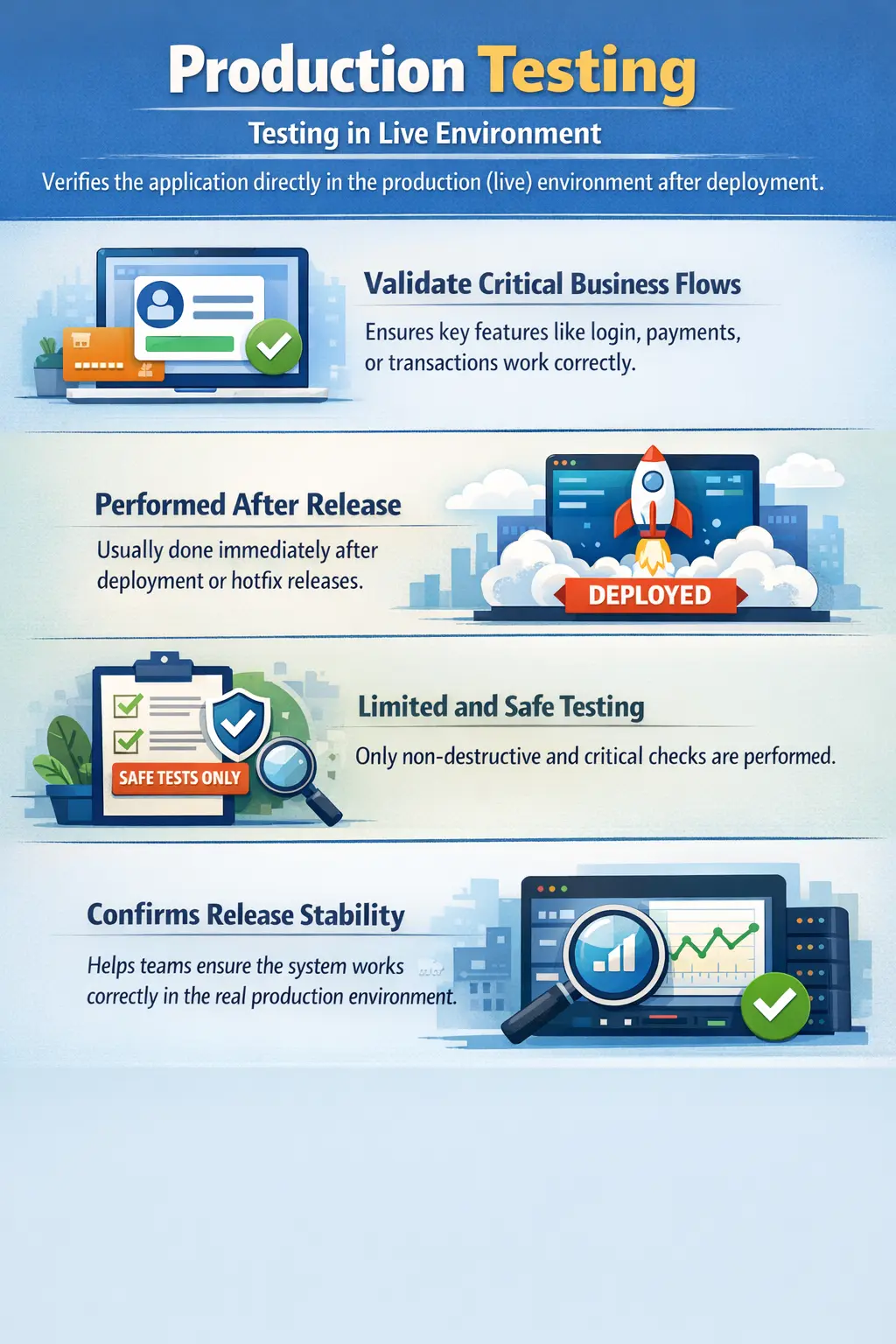
Production testing answers a direct operational question: did the release work correctly in the live environment? This question is different from asking whether the feature worked in QA or staging. A feature may pass all test cases before release and still fail in production because of a missed configuration, incorrect environment variable, unavailable external service, permission mismatch, database migration issue, caching behavior, CDN rule, firewall restriction, or production-only data condition. Production testing helps teams detect these issues quickly before they affect a large number of users.
Manual production testing is not full regression testing. It is not exploratory testing without limits. It is not a place to experiment freely with real customer data. Production is the live system used by real users and business operations, so testing must be small, safe, approved, and carefully controlled. The goal is confidence, not coverage. The testing team validates critical smoke-level workflows, confirms important integrations, checks that the deployment is healthy, and reports issues immediately if anything looks wrong.
When performed correctly, production testing becomes a practical safety layer after deployment. It does not replace pre-production testing, automation, monitoring, rollback planning, or release governance. Instead, it complements them by verifying that the live system is actually working after the change. In modern delivery environments, where releases may happen frequently, production testing is often part of release validation, smoke checks, hotfix verification, blue-green deployment validation, canary rollout checks, and post-release health confirmation.
Understanding Production Testing
Production testing, sometimes called live testing or production validation, refers to carefully planned testing activities performed directly in the production environment. The word “production” is important because this is the environment that serves actual users. Any mistake in this environment can cause business impact, so production testing must be narrower and more disciplined than testing in QA or staging.
The main purpose is to confirm that the deployed application is available, stable, correctly configured, and capable of supporting essential business flows. For example, after an e-commerce release, the team may check that the site loads, users can log in, products display correctly, checkout can be reached, payment integration responds, order confirmation works, and notifications are generated. These checks are not intended to validate every edge case. They confirm that the release is alive and usable.
Production testing is needed because real environments often have differences that are difficult to reproduce elsewhere. A staging environment may use mock services, test credentials, limited data, smaller infrastructure, different network routes, relaxed security rules, or fewer feature flags. Production may use real third-party endpoints, stricter permissions, larger datasets, live cache layers, production load balancers, and real authentication providers. Even small differences can create unexpected behavior.
In mature teams, production testing is usually part of a broader release process. Before deployment, the team completes testing in lower environments. During deployment, DevOps or release teams monitor logs, metrics, and deployment status. After deployment, testers or assigned validators execute a predefined checklist. If checks pass, the release can be considered stable. If checks fail, the team may investigate, disable a feature flag, apply a hotfix, or roll back depending on severity.
Purpose of Production Testing
The first purpose of production testing is deployment validation. A release may contain correct code but still fail because deployment steps were incomplete or incorrect. Files may not be copied, services may not restart, database scripts may fail, build artifacts may mismatch, environment variables may be wrong, or a routing rule may point users to the wrong version. Production testing confirms that the deployed release is actually functioning in the environment where users will access it.
Another purpose is validating critical business workflows. Some workflows are so important that they must be checked immediately after release. These may include login, registration, search, payment, order creation, fund transfer, report generation, appointment booking, subscription renewal, or document upload. If these flows fail in production, business impact can be immediate. A small, controlled validation helps catch serious problems quickly.
Production testing also detects environment-specific issues. These are problems that do not appear in QA because production has different configuration, integrations, scale, security, or data. For example, a payment provider may accept test cards in staging but reject live requests because a production key is missing. A report may load quickly with staging data but fail with production data volume. A role may work in QA but fail in production because real permissions are stricter. Production validation exposes these gaps.
Another purpose is stakeholder confidence. A deployment can create anxiety for product owners, support teams, operations teams, and business users. A clear production validation checklist gives everyone a shared signal that the release is healthy. Instead of assuming success because deployment completed, the team confirms success through targeted live checks.
When Production Testing Is Performed
Production testing is typically performed immediately after a scheduled production deployment. Once the new version is live, testers or release validators execute a small set of approved checks. Timing matters because issues discovered soon after deployment are easier to connect to the release. Early detection also reduces the number of users affected.
It is also performed after hotfixes and emergency patches. Hotfixes often address urgent production issues and may be released faster than normal changes. Because the timeline is compressed, post-deployment validation becomes even more important. The team must confirm that the fix works in production and that the patch did not break a critical related flow.
Production testing is common during phased rollouts, blue-green deployments, canary releases, and feature flag releases. In a blue-green deployment, a new version may be deployed alongside the old version and traffic may gradually switch. In a canary release, only a small percentage of users may receive the new version first. Production testing helps validate the new version before broader exposure.
Many teams perform production testing during low-traffic windows to reduce risk. For systems with global users, the release window may be chosen based on traffic patterns and support availability. The team should ensure that developers, operations staff, QA, and business stakeholders are available during the validation window. Production testing is not just a QA activity; it is a coordinated release activity.
Scope of Manual Production Testing
The scope of production testing must be limited. In lower environments, testers can perform deep validation, negative testing, edge cases, destructive data scenarios, and broad regression. In production, the goal is different. The team should validate only the minimum set of critical checks needed to confirm that the live system is healthy.
Application availability is usually the first check. Testers confirm that the application opens, key pages load, and major services are reachable. If the application itself is unavailable, deeper checks are unnecessary. Availability checks may include web pages, mobile app API responses, admin portals, dashboards, or public endpoints depending on the system.
Authentication is another common production check. Users must be able to log in, maintain a session, and access appropriate pages. If authentication fails after deployment, the business impact can be severe. Testers may use approved test accounts, internal accounts, or synthetic monitoring accounts. They should never use real customer credentials.
Critical business transactions are often included in scope, but they must be performed safely. For an e-commerce application, this may involve placing a test order using an approved test product, internal payment method, or safe cancellation process. For a banking or financial system, production testing may be restricted to read-only checks or special test accounts because the risk of real transaction impact is higher.
Configuration and integration checks are also important. Testers may verify that payment gateways, email services, SMS providers, file storage, reporting services, APIs, feature flags, and third-party systems are connected correctly. These checks should be designed carefully so they do not trigger unwanted customer communication, duplicate transactions, or data changes.
Manual Tester Responsibilities
Manual testers have a serious responsibility during production testing because their actions occur in a live environment. The first responsibility is following an approved production test checklist. The checklist defines exactly what can be tested, how it should be tested, which accounts or data should be used, and what evidence should be captured. Testers should not improvise beyond the approved scope unless they receive explicit authorization.
Testers must use safe test data. Production data belongs to real users and businesses, so it must not be corrupted, deleted, overwritten, or exposed. If a test requires data creation, the data should be clearly marked as test data and should follow the organization’s cleanup rules. If the system supports read-only validation, testers should prefer read-only checks wherever possible.
Another responsibility is communication. Production testing usually happens during a release window, and multiple teams may be watching. Testers should communicate when validation starts, what is being checked, whether each check passes, and whether any issue is found. If a critical issue appears, the tester must report it immediately through the agreed channel rather than waiting until all checks are complete.
Testers should also capture evidence carefully. Screenshots, timestamps, user IDs for test accounts, order IDs for test transactions, environment details, browser or device information, and exact steps can help developers and operations teams investigate quickly. In production, time matters. A clear report can reduce confusion and speed up resolution.
Types of Production Testing
The most common form of production testing is production smoke testing. This is a quick health check performed after deployment. It validates that the application is accessible and that the most critical functions work. Smoke testing in production is shallow but important. If a smoke check fails, it may indicate a deployment problem that requires immediate attention.
Production sanity testing is more targeted. It is usually performed when a specific fix, enhancement, or configuration change has been released. For example, if a hotfix corrects invoice download behavior, the production sanity check may focus only on invoice generation and download using an approved test account. The goal is to confirm that the intended change works in the live environment.
Configuration validation checks whether production settings are correct. Modern applications rely heavily on environment variables, secrets, feature flags, endpoint URLs, permissions, CDN settings, cache rules, and service connections. A feature may fail not because the code is wrong but because a configuration value is missing or incorrect. Production testing often catches this kind of issue.
Read-only data validation is another safe production testing activity. Testers may verify that dashboards, reports, user profiles, product listings, or transaction histories display expected data. These checks are useful because production contains real data volume and real data variety. However, testers must avoid exposing sensitive information and must follow privacy rules.
Production Testing vs UAT
Production testing and User Acceptance Testing are sometimes confused because both relate to confidence before or around release. They are very different activities. UAT is usually performed before release in a pre-production environment by business users or stakeholders. Its purpose is to confirm that the application meets business requirements and is acceptable for release.
Production testing happens after deployment in the live environment. Its purpose is not broad business acceptance. Its purpose is to confirm that the release works correctly in production. UAT may validate complete workflows, business rules, and user scenarios using test data. Production testing validates only a limited set of live checks using approved safe methods.
UAT can include broader exploration because it occurs outside production. Production testing must be narrower because mistakes can affect real users. UAT asks whether the product is acceptable from a business perspective. Production testing asks whether the deployed release is healthy in the real environment. Both are valuable, but they occur at different points and carry different risks.
Best Practices for Production Testing
The most important best practice is planning. Production testing should never be casual or spontaneous. The team should define the checklist before deployment, review it with stakeholders, confirm test accounts and data, agree on communication channels, and prepare rollback or mitigation options. A clear plan reduces confusion during the release window.
Another best practice is keeping the scope small. Production testing should focus on critical paths and deployment-sensitive checks. If the team tries to run full regression in production, the risk becomes too high and the validation window becomes inefficient. Deep testing belongs in lower environments. Production testing should confirm live health.
Testers should use dedicated production-safe test accounts wherever possible. These accounts should have known permissions, should not belong to real customers, and should be monitored. If transactions are performed, the organization should define whether they must be reversed, cancelled, marked as test transactions, or excluded from reporting.
Coordination with DevOps, development, support, and business teams is essential. Production testing often works best when monitoring dashboards, logs, alerts, and user reports are watched at the same time. A tester may notice a UI failure, while operations may see backend errors or latency. Combined signals give a better view of release health.
A rollback or mitigation plan should always exist. Production testing may reveal a critical issue. The team must know what to do next: roll back, disable a feature flag, route traffic to the previous version, apply a hotfix, communicate to users, or keep monitoring. Without a plan, teams may lose valuable time during an incident.
Common Production Defects Found
Configuration mismatches are among the most common production issues. A service URL may point to the wrong endpoint, a feature flag may be disabled, a secret may be missing, or an environment variable may contain an incorrect value. These issues may not appear in QA if QA uses different settings. Production testing helps reveal them quickly.
Permission and role issues are also common. Production users may have more realistic roles and access restrictions than test users in lower environments. A page may work for an admin but fail for a standard user. A report may be visible in staging but hidden in production because of a permission rule. Controlled role-based production checks can catch these issues.
Integration failures may occur when external systems behave differently in production. Payment gateways, identity providers, email services, SMS platforms, tax systems, shipping providers, analytics tools, and document services may all have production-specific behavior. A missing certificate, expired token, blocked IP, or incorrect API key can break an integration after deployment.
Data-related issues may appear because production data is larger, more varied, and messier than test data. A query may time out with production volume. A report may fail when real records contain unexpected values. A user profile page may break for older accounts with legacy fields. These issues show why production validation and monitoring are important even after strong pre-release testing.
Risks of Poor Production Testing
Poor production testing can create serious business risk. If the team skips production validation, a broken release may affect users for longer before anyone notices. If login, payment, search, booking, or reporting fails, the organization may lose revenue, damage customer trust, and increase support workload. Early validation reduces the time between release and detection.
At the same time, careless production testing can be dangerous. Testers may accidentally create real orders, send emails to customers, change customer records, trigger financial transactions, or expose sensitive data. This is why production testing must be controlled. The risk is not only failing to test; the risk is also testing in the wrong way.
Poor communication can make production incidents worse. If testers find an issue but do not report it immediately, teams may continue rollout or expose more users. If teams do not know who owns the decision, they may argue during an incident instead of acting. Production testing should be supported by clear communication paths and decision authority.
Real-Time Example
Consider an e-commerce application that has just deployed a new checkout release. Before the release, the team completed functional testing, regression testing, and UAT in staging. After deployment, the production validation checklist begins. The tester opens the site, confirms that major pages load, logs in with an approved test account, searches for a product, adds it to the cart, reaches checkout, applies an approved test coupon, and verifies that the payment page loads correctly.
If the organization allows a safe test transaction, the tester may place a low-risk test order using a dedicated payment method or sandbox-like production arrangement. The tester then verifies order confirmation, checks whether the confirmation email is received by the test account, and ensures the order can be cancelled or marked appropriately. If real payment is not allowed, the tester stops before payment submission and validates only the safe parts of the flow.
During this validation, the tester also communicates status to the release channel. If checkout fails because the payment gateway key is wrong, the team can respond immediately. They may correct configuration, disable the new checkout flow, or roll back the release. The value of production testing is not that it tests everything. The value is that it checks the most important live signals at the moment they matter most.
Common Mistakes in Production Testing
A major mistake is treating production as another QA environment. It is not. Production contains real users, real business processes, and sensitive data. Running broad regression, destructive tests, heavy load tests, random exploratory testing, or negative testing with unsafe data can create serious damage. Production testing must remain controlled and minimal.
Another mistake is using real customer accounts or modifying real customer data. Even if the tester intends no harm, this can create privacy, compliance, and trust issues. Production validation should use approved accounts and approved data only. If a real data issue must be investigated, it should follow incident and privacy procedures.
Teams also make the mistake of testing without approval or coordination. Production testing should be part of the release plan. Operations teams should know when testing begins. Support teams should know whether test transactions may appear. Business teams should know what is being validated. Lack of coordination creates confusion.
Another mistake is failing to document results. A production validation checklist should show what was tested, who tested it, when it was tested, and what result was observed. If an issue appears later, this record helps the team understand what was confirmed immediately after release and what was not covered.
Interview-Ready Explanation
In interviews, production testing can be explained as limited and controlled validation performed in the live environment after deployment to confirm that critical functionality works correctly. It is not full regression testing. It focuses on smoke-level checks, deployment validation, configuration checks, and critical business flows.
A strong answer should mention that production testing must be performed carefully because real users and real data are involved. The tester should use approved checklists, safe test accounts, non-destructive data, and proper communication. Examples such as login validation, payment gateway checks, order flow validation, email confirmation, and configuration verification show practical understanding.
A concise interview answer could be: Production testing is a controlled testing activity performed in the live environment after a release to verify that deployment was successful and critical workflows are working. It is limited in scope, uses safe test data, and avoids destructive testing because production supports real users and business operations.
Key Takeaway
Production testing confirms that a release works in the environment that matters most: the live system used by real users. It validates deployment success, critical workflows, configurations, and important integrations under real production conditions. Its purpose is confidence, not broad coverage.
Safe production testing requires planning, approval, limited scope, dedicated test data, clear communication, and rollback readiness. When performed correctly, it helps teams detect production-specific issues quickly and reduce business risk after deployment.
Ultimately, production testing is the final live validation checkpoint. It proves that the application does not only work in testing environments but also operates correctly in the real production environment where customer experience and business continuity depend on it.