Domain Testing
Software systems constantly receive input from users, external systems, APIs, configuration files, and databases. Every input field has constraints, acceptable ranges, formats, and business rules. If these inputs are not validated correctly, systems may behave unpredictably, produce incorrect results, or even crash. To systematically validate how a system handles different input values, testers use a structured approach called Domain Testing.
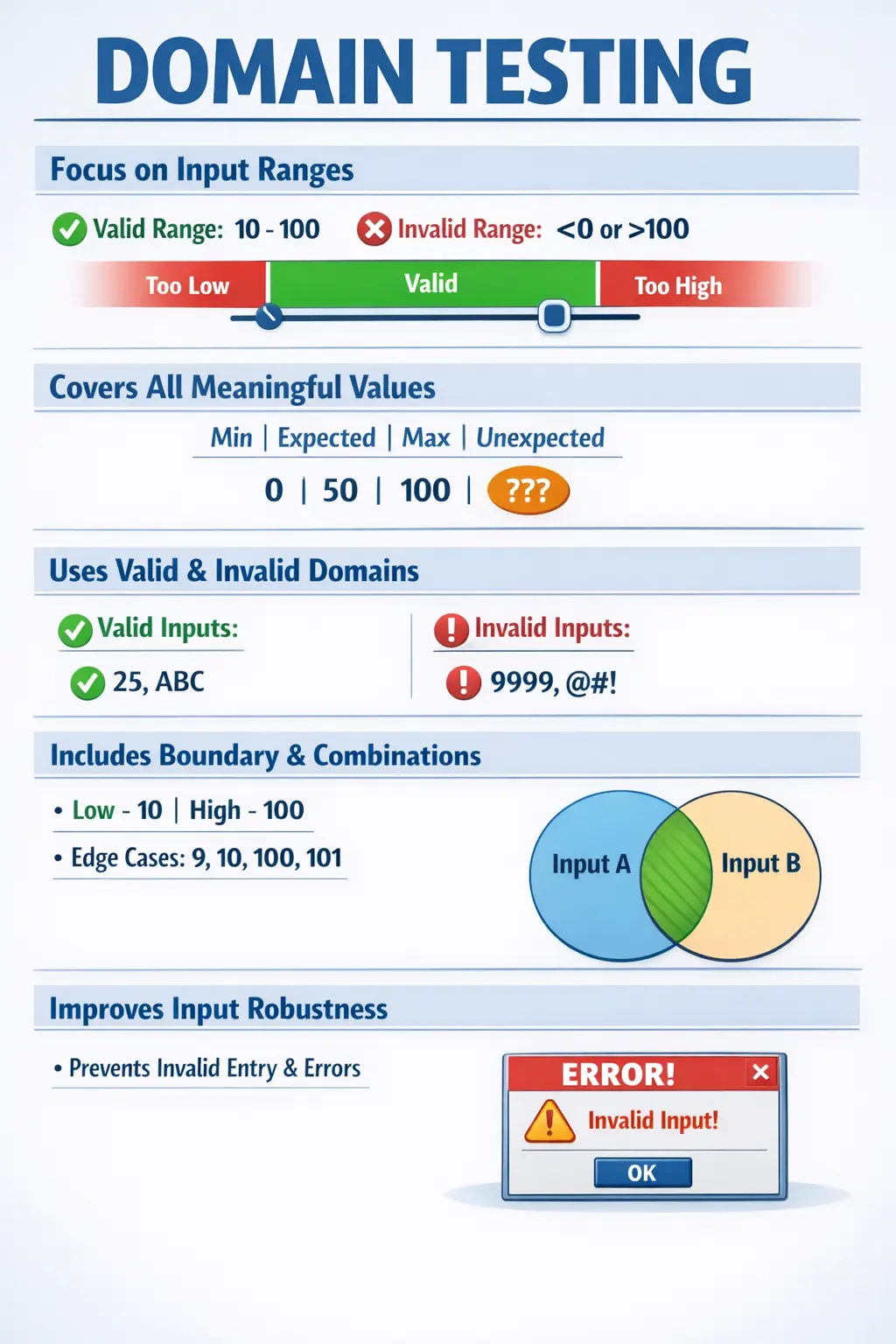
Domain Testing is a test design approach that focuses on validating input domains — including ranges, sets, constraints, and combinations of values — to ensure the system behaves correctly for all meaningful input conditions.
Domain Testing answers a crucial quality question: “Are all valid and invalid input combinations handled correctly?”
For manual testers, domain testing is a powerful technique that improves coverage, reduces edge-case defects, and strengthens validation logic. It goes beyond simple happy path testing and ensures robustness of input handling.
Definition of Domain Testing
Domain Testing is a structured testing technique that evaluates system behavior across the entire range of possible input values. Instead of testing random values, testers analyze the domain of inputs and divide them into logical groups such as valid ranges, invalid ranges, and boundary values.
An input domain refers to the complete set of possible values that an input parameter can accept. Domain testing ensures that each relevant portion of this input space is validated.
Domain testing is especially useful for systems that rely heavily on numerical values, dates, user inputs, configurations, and business rules. It ensures that the system handles valid data correctly and rejects invalid data appropriately.
Unlike exploratory input testing, domain testing is systematic and rule-driven. It reduces guesswork and increases test effectiveness.
Purpose of Domain Testing
The primary purpose of domain testing is to validate business rules tied to input values. Most defects occur not because functionality is missing, but because inputs are handled incorrectly.
Domain testing detects defects caused by invalid, unexpected, or extreme input values. Many production failures occur when systems receive inputs outside expected ranges.
It improves coverage beyond happy path scenarios. Testing only typical valid values is insufficient. Systems must also handle incorrect inputs safely.
Domain testing reduces risk from edge cases and combinations. Boundary conditions and complex input interactions are common sources of defects.
By systematically analyzing input domains, testers ensure comprehensive and intelligent validation coverage.
What Is an Input Domain?
An input domain represents all possible values that an input field or parameter can accept.
For example, if an age field allows values between 0 and 120, then the domain includes all numbers within that range. It may also include invalid values such as negative numbers or values above 120.
A password field may allow lengths between 8 and 20 characters. The domain includes all valid character combinations within that range, as well as invalid shorter or longer values.
A status field may accept only predefined values such as Active, Inactive, or Locked. Any other value falls outside the valid domain.
Understanding input domains is essential because validation logic depends on clearly defined constraints.
Domain testing ensures that all meaningful portions of the input domain are validated.
Core Concepts in Domain Testing
Valid Domain
The valid domain includes all input values that satisfy business rules and constraints. These values should be accepted by the system.
For example, if a loan amount must be between 1000 and 100000, any value within this range belongs to the valid domain.
Testing valid domain values ensures that legitimate inputs are processed correctly.
Invalid Domain
The invalid domain includes input values that violate defined constraints. These inputs should be rejected by the system with appropriate error messages.
For example, negative values for age or alphabetic characters in numeric fields belong to the invalid domain.
Testing invalid domain values ensures proper validation and error handling.
Boundary Conditions
Boundary conditions are values at the edges of input domains. These values are highly defect-prone because validation logic often fails at extremes.
If the valid range is 1 to 100, then 1 and 100 are boundary values. Values such as 0 and 101 are near-boundary invalid values.
Boundary testing is a critical part of domain testing because many validation errors occur at limits.
Combinations
Real-world systems rarely depend on single inputs. They often rely on interactions between multiple inputs.
For example, eligibility for a loan may depend on both income and credit score. Testing only individual inputs may miss defects caused by combined conditions.
Domain testing evaluates interactions between multiple input domains to ensure correct combined behavior.
Relationship with Other Test Design Techniques
Domain testing integrates and extends several fundamental test design techniques.
It builds upon Equivalence Partitioning by dividing input values into logical groups. Instead of testing every value, testers select representative values from each group.
It incorporates Boundary Value Analysis by focusing on edge values within domains.
It extends to combinatorial and pairwise testing when multiple input domains interact.
Domain testing is therefore a comprehensive strategy that combines multiple techniques for stronger coverage.
Manual Tester’s Role in Domain Testing
Manual testers are responsible for designing domain-based test scenarios effectively.
Testers begin by identifying input fields and constraints from requirements and acceptance criteria.
They define valid and invalid domains clearly based on business rules.
They apply equivalence partitioning and boundary value analysis to design optimized test cases.
They evaluate combinations of multiple inputs where applicable.
They validate error messages and system responses for invalid inputs.
Manual testers ensure that input validation is robust and aligned with business expectations.
Real-Time Example
Consider a login system with the following rules:
- Username must contain between 5 and 15 characters.
- Password must contain between 8 and 20 characters.
Domain testing would include:
- Valid username with valid password.
- Valid username with invalid password (too short).
- Invalid username (too long) with valid password.
- Both username and password invalid.
- Boundary combinations such as exactly 5 characters and exactly 8 characters.
- Near-boundary invalid values such as 4-character username or 21-character password.
This systematic approach ensures comprehensive validation coverage.
Domain Testing vs Boundary Value Analysis
Boundary Value Analysis focuses specifically on edge values of input ranges.
Domain testing covers the entire input space, including valid groups, invalid groups, and combinations.
Boundary testing is simpler and narrower in scope.
Domain testing is broader and more comprehensive.
While BVA focuses only on edges, domain testing considers complete logical partitions and their interactions.
Both techniques complement each other, but domain testing provides deeper coverage.
Common Defects Found Through Domain Testing
Incorrect validation rules are common defects discovered through domain testing.
Missing error messages for invalid inputs are frequently identified.
Incorrect handling of combined inputs often leads to logical defects.
Systems may crash when unexpected values are entered.
Improper boundary handling such as accepting values slightly beyond limits is common.
Domain testing helps uncover these defects early.
Domain Testing in Complex Business Rules
In real-world enterprise systems, domain testing becomes critical for complex rules.
Insurance premium calculations depend on age, location, and coverage type.
Banking interest calculations depend on account type, balance range, and duration.
E-commerce discounts depend on coupon codes, order value, and customer category.
Each of these involves multiple interacting domains.
Domain testing ensures logical consistency across combinations.
Complex rule validation requires careful domain analysis.
Risks of Ignoring Domain Testing
Ignoring domain testing leads to fragile systems.
Users may encounter unexpected crashes due to invalid inputs.
Business rules may fail silently, causing incorrect calculations.
Security vulnerabilities may arise from improper input validation.
Production failures often originate from untested edge cases.
Domain testing reduces these risks significantly.
Domain Testing in Agile Environments
In Agile projects, domain testing is applied at the story level.
Testers analyze acceptance criteria and derive domain-based scenarios early.
Boundary and equivalence partitions are discussed during backlog refinement.
Domain testing is incorporated into sprint testing activities.
Continuous collaboration ensures that domains are clarified before development.
Agile teams benefit from early domain analysis.
Practical Strategy for Applying Domain Testing
Start by identifying all input parameters.
Define constraints clearly using requirements and business rules.
Divide inputs into valid and invalid partitions.
Identify boundary values.
Evaluate interactions between related inputs.
Prioritize high-risk combinations.
Document domain-based test scenarios clearly.
Systematic domain analysis improves efficiency and coverage.
Common Mistakes in Domain Testing
Testing inputs only in isolation is a frequent mistake.
Ignoring invalid combinations leads to missed defects.
Missing business-specific constraints reduces test coverage.
Over-testing trivial values wastes effort.
Failing to test boundary-adjacent invalid values leaves gaps.
Effective domain testing requires balanced coverage and intelligent prioritization.
How Testers Identify Input Domains
The first practical step in domain testing is identifying the input domains that exist in the feature. An input domain is not limited to visible form fields. It can include URL parameters, API request values, uploaded files, database-driven options, configuration values, system dates, user roles, account states, and values selected from dropdowns. Testers should look at the entire flow and identify every piece of information that influences system behavior.
Requirements and acceptance criteria are the primary sources for identifying domains. If a user story says that a customer can apply for a loan only when the age is between twenty-one and sixty-five, the age field has a clear numerical domain. If the requirement says that only active customers can apply, customer status becomes another domain. If the requirement says approval depends on income, credit score, and loan amount, each of those values becomes a separate domain that must be analyzed.
Testers should also inspect business rules, validation messages, data dictionaries, design documents, and existing system behavior. Sometimes the requirement does not explicitly list all constraints, but the application still enforces them. For example, a field may accept only ten digits, a date may not allow weekends, or a dropdown may be populated from a master table. These rules define the real domain of the input and must be included in testing.
Domain identification becomes stronger when testers ask clarifying questions. What is the minimum value? What is the maximum value? Are decimals allowed? Are special characters allowed? Is the field mandatory? Are values case-sensitive? Does the rule differ by user role, region, account type, or product category? Each answer helps convert a vague input into a clear and testable domain.
Domain Modeling in Simple Terms
Domain modeling means representing the valid and invalid areas of an input space in a way that helps testers design test cases. It does not have to be complicated. For manual testers, a simple table or checklist is often enough. The goal is to make the domain visible so that important values are not missed.
Consider an age field that accepts values from eighteen to sixty. A simple domain model identifies invalid low values, the minimum valid value, typical valid values, the maximum valid value, and invalid high values. The tester does not need to test every age from eighteen to sixty. Instead, the tester chooses meaningful representatives such as seventeen, eighteen, thirty, sixty, and sixty-one. This gives strong coverage with fewer tests.
Domain modeling also helps when values are categorical instead of numerical. Suppose an account status can be Active, Inactive, Suspended, or Closed. Each status represents a different partition. If a transaction is allowed only for Active accounts, testers must verify that Active is accepted and the other statuses are rejected or handled according to business rules. The domain is not a numeric range, but it still needs structured coverage.
For complex rules, domain modeling may include multiple fields. A loan approval rule may depend on age, income, credit score, employment type, and existing debt. Testing every combination may be impossible, so testers identify meaningful partitions and high-risk combinations. This is where domain testing connects naturally with decision tables and pairwise testing.
Valid Domains in Detail
A valid domain contains values that should be accepted by the system. Testing valid domains confirms that the application supports legitimate user behavior. This is important because validation should not be overly strict. A system that rejects valid values creates user frustration and business loss.
Valid domain testing should include minimum valid values, maximum valid values, and typical values between the limits. For example, if a transfer amount must be between one hundred and fifty thousand, valid tests should include one hundred, a normal amount such as five thousand, and fifty thousand. These values confirm that the lower boundary, normal range, and upper boundary are handled correctly.
Valid domains may also include allowed formats. An email field may accept standard email formats, plus signs, subdomains, or uppercase letters depending on the business rule. A name field may allow spaces, hyphens, or apostrophes. If the application rejects valid real-world values, the defect may not be obvious during happy path testing but can affect real users.
Testers should remember that valid does not always mean common. Some values may be rare but still valid. A customer name with a hyphen, a product quantity at the maximum limit, or a transaction exactly at the allowed cutoff may occur less frequently, but the system must still handle it correctly. Domain testing protects these less common but valid cases.
Invalid Domains in Detail
An invalid domain contains values that should be rejected by the system. Testing invalid domains confirms that the application enforces business rules and protects itself from incorrect, unsafe, or meaningless input. A system should not merely fail when invalid input is entered; it should fail gracefully with clear guidance.
Invalid numerical values include values below the minimum, values above the maximum, negative numbers where only positive values are allowed, decimals where only whole numbers are allowed, and empty values when the field is mandatory. Invalid text values may include too-short strings, too-long strings, unsupported characters, numbers in alphabetic fields, or script-like input that could create security risk.
Invalid domains can also involve invalid states. A customer may try to withdraw money from a closed account, apply a coupon that has expired, book an appointment outside business hours, or access a feature without permission. These are not simply field validation issues; they are domain violations based on business state.
When testing invalid domains, testers should verify more than rejection. They should check that the error message is clear, no partial transaction is saved, no incorrect calculation occurs, and the system remains stable. Good domain testing confirms controlled rejection, not just visible failure.
Boundary Values and Near-Boundary Values
Boundary values are central to domain testing because defects frequently appear at the edges of allowed ranges. Developers often write conditions such as less than, less than or equal to, greater than, or greater than or equal to. A small mistake in these conditions can cause the system to accept invalid values or reject valid values.
If a field accepts values from one to one hundred, the most important values are zero, one, two, ninety-nine, one hundred, and one hundred one. The valid boundary values are one and one hundred. The near-boundary invalid values are zero and one hundred one. The values just inside the boundary, such as two and ninety-nine, can also help confirm that the range is applied correctly.
Date boundaries require special attention. If a discount is valid until December thirty-first, testers should check before the expiration date, exactly on the expiration date, and immediately after the expiration date. Time zone handling can create additional complexity. A feature that works correctly in one region may fail in another if the boundary depends on local time.
Boundary testing is not limited to numbers and dates. It also applies to character length, file size, item count, login attempts, session timeout, upload limits, transaction frequency, and password history. Any limit in the system creates a domain boundary that deserves careful testing.
Domain Testing for Text Fields
Text fields appear simple, but they often contain many hidden domain rules. A name field, address field, description field, comment box, or search field may have length limits, allowed character rules, trimming behavior, case sensitivity, and encoding constraints. Testers should analyze these rules before designing cases.
For text length, testers should check empty input, one character, minimum valid length, maximum valid length, and values exceeding the maximum. If the field is optional, empty input may be valid. If the field is mandatory, empty input should be rejected. This difference must be understood clearly from requirements.
Character rules are equally important. Some fields allow only letters, while others allow numbers, spaces, punctuation, or special characters. Real names and addresses often contain characters that simplistic validation rejects incorrectly. Domain testing should include realistic valid values as well as invalid characters that could break formatting or processing.
Text fields should also be tested for leading spaces, trailing spaces, multiple internal spaces, copied text, uppercase and lowercase variations, and long pasted input. These cases reveal whether the system trims input, preserves formatting, or stores unexpected values. Poor handling of text domains can lead to data quality problems.
Domain Testing for Numeric Fields
Numeric fields are common in financial, inventory, healthcare, education, and administrative systems. Amounts, quantities, scores, ages, percentages, rates, and counts all require precise domain testing. The tester must understand the allowed range, decimal rules, sign rules, rounding behavior, and formatting expectations.
A numeric field may accept only whole numbers or may allow decimals up to a fixed number of places. If a price field allows two decimal places, testers should check values such as 10, 10.1, 10.12, and 10.123. The system should either reject excessive precision or round according to a defined rule. Undefined rounding behavior can create defects in financial systems.
Negative values should be tested carefully. Some fields, such as refund adjustments or account balances, may allow negative values under certain conditions. Others, such as quantity or age, should not. Testers should avoid assuming that negative values are always invalid or always valid. The business rule defines the domain.
Numeric formatting can also matter. Some systems accept commas, currency symbols, leading zeroes, or percentage symbols, while others do not. If the user interface displays formatted values, testers should verify that stored and calculated values remain accurate. A value may look correct on screen but be processed incorrectly internally.
Domain Testing for Date and Time Fields
Date and time fields are defect-prone because they involve calendars, time zones, leap years, cutoffs, business days, holidays, and expiration rules. A simple date field may have more domain rules than it first appears. Testers should identify the earliest allowed date, latest allowed date, date format, and whether past or future dates are permitted.
Common date scenarios include today, yesterday, tomorrow, the first day of a month, the last day of a month, leap day, year-end, and dates exactly at the business cutoff. If an insurance policy starts today, can it start yesterday? If a booking can be made thirty days ahead, is the thirtieth day allowed or rejected? These questions define the domain.
Time-based domains include session timeout, offer expiration, appointment slots, batch processing windows, and transaction cutoffs. Testers should check behavior just before the cutoff, exactly at the cutoff, and just after the cutoff. These values often expose inclusive and exclusive boundary defects.
Time zones create additional risk in distributed applications. A date selected in one region may be stored in another time zone and displayed differently to another user. Domain testing should consider whether business rules are based on user local time, server time, or a standard time zone. This is especially important for global systems.
Domain Testing for Dropdowns and Enumerations
Dropdowns and enumerated fields have a different kind of domain. Instead of accepting a continuous range of values, they accept a defined set. Examples include account type, order status, payment method, customer category, country, state, priority, and approval level. Each allowed value may trigger different behavior.
Testers should verify that every allowed option behaves correctly. If a shipping method dropdown contains Standard, Express, and Same Day, each option may have different price, delivery date, and eligibility rules. Testing only the default option is not enough because each value represents a separate domain partition.
Invalid enumeration values may come from API requests, database corruption, old cached values, or direct manipulation. Even if the user interface prevents invalid selection, backend validation should still reject unsupported values. Domain testing at API or integration level may be needed when enumerations drive business logic.
Dropdown domains can also change over time. A new status may be added, an old option may be retired, or options may differ by user role or region. Testers should verify that dependent workflows, reports, and filters handle all current values correctly.
Testing Combinations of Domains
Many defects appear only when multiple domains interact. A single field may work correctly by itself, but a combination of fields may produce wrong behavior. Domain testing becomes more powerful when testers analyze how input domains influence one another.
Consider an e-commerce discount rule. The discount may depend on customer type, order amount, coupon code, product category, and region. Each input has its own domain, but the final result depends on the combination. Testing only one value at a time may miss conflicts between rules.
Exhaustively testing every combination may be impossible. If five fields each have five meaningful partitions, there are thousands of possible combinations. Testers must use prioritization techniques such as decision tables, pairwise testing, risk-based testing, and business scenario selection. The goal is intelligent coverage, not brute-force testing.
Combination testing should focus on high-risk intersections. These include combinations that affect money, eligibility, access control, compliance, or irreversible actions. If a wrong combination could approve an ineligible loan, expose restricted data, or charge the wrong amount, it deserves strong coverage.
Domain Testing and Error Messages
Domain testing is incomplete if testers verify only whether invalid input is rejected. The quality of the system response matters. A clear error message helps the user correct the input. A vague or misleading message creates frustration and support issues.
Error messages should explain what went wrong and, where appropriate, how to fix it. If a password is too short, the message should state the minimum length. If a file type is unsupported, the message should list supported types. If a transfer amount exceeds the allowed limit, the message should indicate the limit or guide the user to valid action.
Testers should also check that error messages are placed near the relevant field, remain visible long enough, and do not expose technical details. A message such as "Null pointer exception" or "SQL error" is not acceptable for business users. Domain testing should validate graceful and user-friendly error handling.
In multi-field validation, the system should identify all relevant errors or guide the user in a logical order. If five fields are invalid, the user should not have to submit the form five separate times to discover them. Good validation improves usability as well as correctness.
Domain Testing and Security
Input domains are closely connected to security. Many security vulnerabilities begin with improper input validation. If the system accepts values outside the expected domain, attackers may attempt injection, script execution, file upload abuse, or unauthorized access. Manual testers are not always responsible for deep penetration testing, but they should recognize security-sensitive domains.
Text fields, search fields, login forms, upload controls, URL parameters, and API inputs require special attention. Testers should verify that unexpected characters, very long input, unsupported file types, and manipulated values are handled safely. The system should reject unsafe input without crashing or exposing sensitive information.
Role-based domains are also security-related. A user role defines the domain of actions that a user is allowed to perform. If a customer can access administrator functions by changing a URL or request value, the system has a serious domain validation defect. Domain testing should include permission boundaries where applicable.
Security-focused domain testing protects both data and business integrity. Even simple validation gaps can become serious vulnerabilities when exposed in production. For this reason, invalid domain testing should be treated as a quality and security activity.
Domain Testing in API and Backend Validation
Modern applications often validate input at multiple layers. The user interface may restrict values, but backend services and APIs must also validate domains. If validation exists only in the UI, invalid data may still enter the system through APIs, integrations, scripts, or direct service calls.
API domain testing verifies request parameters, payload fields, headers, path variables, query parameters, and authentication-related values. Testers should check valid values, missing values, invalid values, boundary values, unsupported formats, and combinations. The API should return appropriate status codes and meaningful error responses.
Backend validation is especially important for business-critical rules. For example, a front-end form may prevent a user from entering a transfer amount above the limit, but the backend must still enforce the limit. Otherwise, a manipulated request could bypass the UI and perform an invalid transaction.
Domain testing across layers improves confidence that validation is consistent. The UI, API, and database should agree on valid ranges, formats, and business rules. Inconsistent validation across layers is a common source of defects.
Practical Example: Loan Eligibility Domain Testing
A loan eligibility feature provides a strong example of domain testing. Suppose the business rule says that an applicant must be between twenty-one and sixty years old, must have a monthly income of at least three thousand, must have a credit score of seven hundred or above, and must not have an existing defaulted loan. Each condition is an input domain.
The age domain includes invalid low values, the minimum valid age, typical valid ages, the maximum valid age, and invalid high values. The income domain includes values below the threshold, exactly at the threshold, and above the threshold. The credit score domain follows the same pattern. The defaulted-loan status is a categorical domain with values such as yes and no.
Testing each domain separately is useful but insufficient. The applicant may satisfy age and income but fail credit score. Another applicant may satisfy credit score but fail due to an existing defaulted loan. Decision table testing helps cover these combinations clearly. The expected result should be approval only when all required domains satisfy the rule.
This example shows how domain testing supports business rule accuracy. A mistake in any domain can approve an ineligible applicant or reject an eligible one. Both outcomes carry business risk. Domain testing provides structured confidence in the decision logic.
Practical Example: File Upload Domain Testing
File upload features are another strong use case for domain testing. A requirement may state that users can upload PDF and JPG files up to five megabytes. This creates several domains: file type, file size, file name, file content, user permission, and upload state.
Valid file type tests include PDF and JPG. Invalid file type tests include unsupported formats such as EXE, ZIP, DOCX, or PNG if they are not allowed. File size tests should include files below the limit, exactly at five megabytes, and above five megabytes. Boundary testing is important because file size validation often fails at exact limits.
File name testing may include spaces, long names, special characters, duplicate names, and names with multiple dots. Content testing may include empty files, corrupted files, renamed files with misleading extensions, and files that match the extension but not the actual content type. These cases help verify whether validation is robust.
Upload domain testing should also check error messages, progress behavior, retry behavior, storage impact, and permissions. If only a normal PDF upload is tested, many real-world defects may remain hidden. File upload features require broad domain thinking because they combine user input, file system behavior, security, and business rules.
Test Case Design Template for Domain Testing
A simple test case design template helps testers apply domain testing consistently. The first column can list the input field or parameter. The second column describes the business rule or constraint. The third column identifies valid partitions. The fourth column identifies invalid partitions. The fifth column lists boundary values. The sixth column defines expected behavior.
For an age field, the rule may be "age must be between eighteen and sixty." Valid partitions include eighteen to sixty. Invalid partitions include below eighteen, above sixty, blank input, decimals if not allowed, and alphabetic input. Boundary values include seventeen, eighteen, nineteen, fifty-nine, sixty, and sixty-one. Expected behavior defines acceptance or rejection.
For a status field, the rule may be "only Active accounts can transfer money." Valid partition for transfer is Active. Invalid partitions include Inactive, Closed, Suspended, and Locked. Expected behavior should define whether transfer is blocked, what message appears, and whether account balance remains unchanged.
This template turns abstract domain analysis into actionable test cases. It also helps reviewers verify coverage. If a domain has no invalid partition or no boundary values, the gap becomes visible before execution.
Prioritizing Domain Tests
Domain testing can produce many possible cases, so prioritization is essential. Testers should give highest priority to domains that affect money, security, compliance, user access, irreversible actions, and critical business workflows. A defect in these areas has higher impact than a defect in a low-risk optional field.
Frequency of use also matters. Inputs used by most users deserve strong coverage because defects will affect more people. Complexity is another priority signal. A field with multiple rules, dependencies, and calculations deserves more testing than a simple optional comment box.
Historical defects should influence priority. If a module has repeatedly failed around boundary values or validation logic, domain testing should be strengthened there. Past defect patterns are useful evidence of future risk.
Prioritization does not mean ignoring low-risk domains completely. It means selecting depth based on risk. Critical domains get detailed valid, invalid, boundary, and combination coverage. Low-risk domains may receive representative checks. This balance makes testing efficient and defensible.
Best Practices for Domain Testing
The first best practice is to clarify constraints before writing test cases. If the requirement says a value should be "reasonable," "valid," "small," "large," or "fast," the domain is not testable yet. Testers should request measurable limits, allowed values, formats, and examples.
The second best practice is to include both positive and negative coverage. Valid domain tests prove that correct inputs are accepted. Invalid domain tests prove that incorrect inputs are rejected safely. A test suite with only valid values gives incomplete confidence.
The third best practice is to test exact boundaries. Values near boundaries are useful, but exact limits must not be skipped. If the rule says maximum one hundred, value one hundred is just as important as ninety-nine and one hundred one.
The fourth best practice is to test meaningful combinations, not every possible combination. Use business risk, decision logic, and pairwise thinking to select combinations that matter. Exhaustive testing is usually impossible, but intelligent combination testing is practical.
The fifth best practice is to review domain tests with business analysts and developers. Business analysts confirm rule correctness, developers clarify technical constraints, and testers ensure coverage. Collaboration reduces assumptions and improves quality.
Interview Perspective
Domain testing is commonly discussed in testing interviews because it demonstrates strong test design knowledge.
A short answer typically describes domain testing as validating input ranges and combinations.
A detailed answer explains how equivalence partitioning, boundary value analysis, and combinatorial testing are applied.
Interviewers may ask for real-world examples.
Demonstrating domain testing knowledge reflects analytical strength and practical experience.
Key Takeaway
Domain Testing is a structured approach to validating system behavior across valid and invalid input domains.
It ensures that all meaningful input ranges and combinations are handled correctly.
Domain testing prevents defects caused by improper validation, boundary errors, and complex interactions.
Manual testers use domain testing to design intelligent, high-value test cases.
Domain Testing strengthens input robustness and significantly reduces the risk of failures caused by unexpected or poorly handled values.