What Is SQL?
SQL is one of the most important technologies in modern software systems. Almost every major application—whether it is a banking platform, e-commerce website, hospital management system, social media application, or enterprise business tool—depends on databases to store and manage data. SQL serves as the primary language used to interact with those databases. It enables applications and users to create, retrieve, update, delete, and manage structured information efficiently and reliably.
In the world of software engineering, data is at the center of everything. Applications continuously generate, process, and consume massive amounts of information. Without a proper system for organizing and accessing this data, modern applications would become chaotic, unreliable, and nearly impossible to scale. SQL solves this problem by providing a standardized and powerful way to communicate with relational database systems.
SQL stands for Structured Query Language. It is a standard language specifically designed for working with relational databases. SQL allows developers, testers, analysts, administrators, and applications to interact with stored data using well-defined commands and structured queries.
Originally, SQL was developed by IBM and was initially called SEQUEL, which stood for Structured English Query Language. Over time, the name evolved into SQL, and it eventually became the global standard for relational database communication.
Today, SQL is considered a foundational skill in software development, backend engineering, testing, data analytics, and enterprise application architecture. Whether someone works as a Java developer, automation tester, backend engineer, database administrator, or data analyst, understanding SQL is essential.
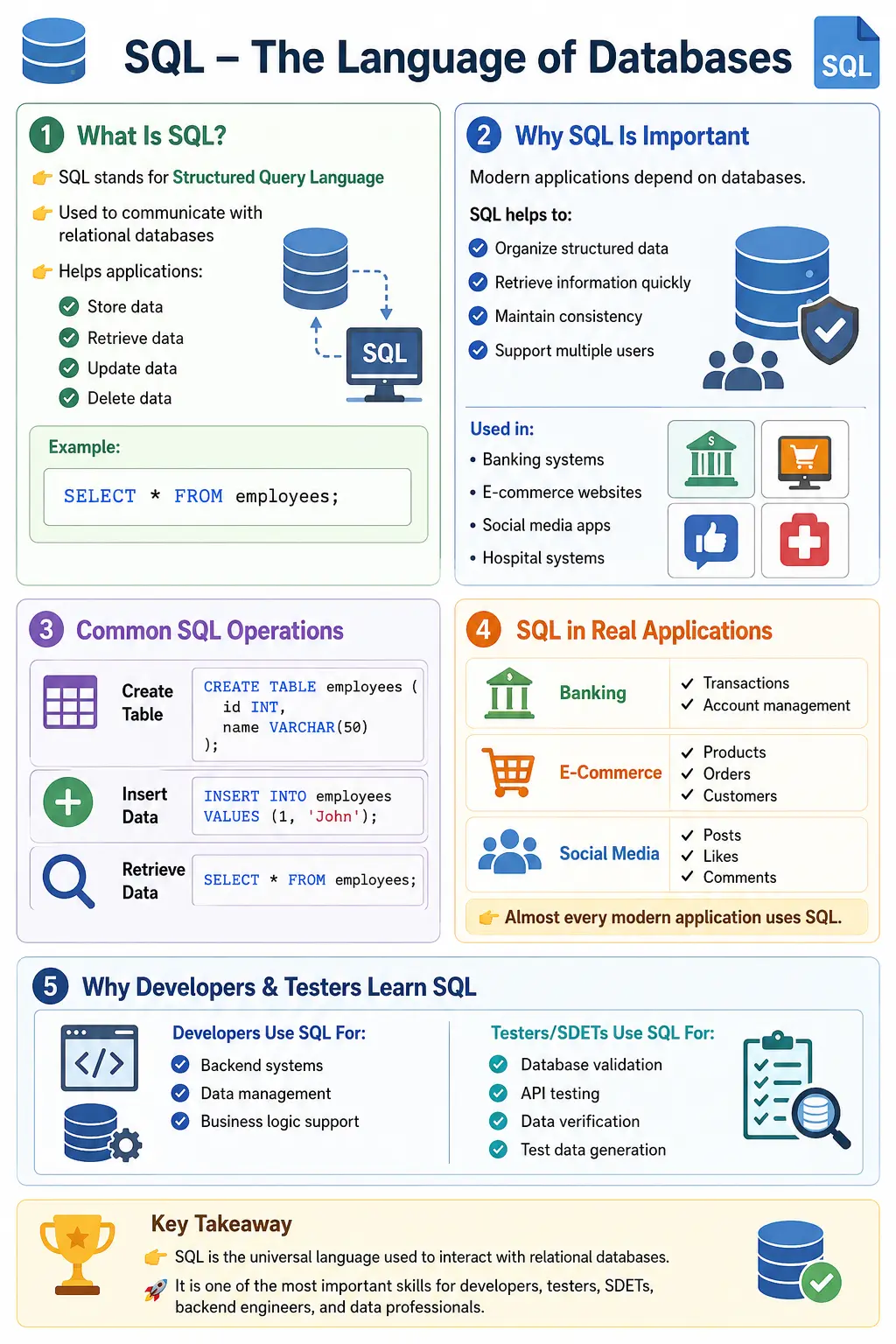
Understanding the Core Purpose of SQL
To understand why SQL exists, it is important to understand the problem databases solve.
Before modern database systems became common, organizations stored data manually in files, spreadsheets, or isolated systems. As data volume increased, several major problems appeared:
- Duplicate records
- Inconsistent information
- Slow retrieval
- Data corruption
- Poor scalability
- Difficulty supporting multiple users simultaneously
Businesses needed a reliable system that could:
- Organize structured data
- Retrieve information quickly
- Maintain relationships between data
- Ensure consistency
- Support large-scale applications
- Handle concurrent users safely
Relational database systems were created to solve these problems, and SQL became the language used to communicate with those systems.
SQL acts as the bridge between applications and databases. Applications send SQL queries to the database engine, and the database processes those queries to return results or modify stored information.
What SQL Actually Does
SQL provides the ability to perform several major categories of operations.
1. Creating Database Structures
SQL can define the structure of a database.
This includes creating:
- Databases
- Tables
- Columns
- Constraints
- Relationships
Example:
CREATE TABLE employees (
    id INT,
    name VARCHAR(50),
    salary DECIMAL(10,2)
);
This command creates a table called employees with three columns.
2. Inserting Data
Once a table exists, SQL can insert records into it.
Example:
INSERT INTO employees
VALUES (1, 'John', 5000);
This stores employee information inside the database.
3. Retrieving Data
One of SQL’s most important responsibilities is retrieving information efficiently.
Example:
SELECT * FROM employees;Output:
1 John 5000The SELECT statement is the most frequently used SQL command because applications constantly retrieve data from databases.
4. Updating Existing Data
SQL can modify records already stored inside tables.
Example:
UPDATE employees
SET salary = 6000
WHERE id = 1;
This updates the salary of a specific employee.
5. Deleting Data
SQL also supports removing records.
Example:
DELETE FROM employees
WHERE id = 1;
This deletes the employee record.
SQL in Real-World Applications
SQL is deeply integrated into modern systems.
Banking Systems
Banks use SQL to manage:
- Customer accounts
- Transactions
- Loans
- Payment history
- Balance calculations
Every ATM transaction typically involves SQL queries behind the scenes.
E-Commerce Platforms
Platforms such as Amazon or Flipkart use SQL for:
- Product catalogs
- Inventory management
- Orders
- Customer information
- Payment tracking
Whenever a user searches for a product, SQL queries retrieve matching records from the database.
Social Media Applications
Applications like Facebook, Instagram, and LinkedIn use SQL databases to manage:
- User profiles
- Posts
- Comments
- Likes
- Relationships
- Notifications
Hospital Management Systems
Hospitals store:
- Patient records
- Appointment schedules
- Prescriptions
- Billing information
- Medical histories
using relational databases accessed through SQL.
Educational Platforms
Learning systems use SQL to manage:
- Students
- Courses
- Exams
- Attendance
- Progress tracking
Almost every educational portal relies heavily on SQL queries.
SQL and Relational Databases
SQL is primarily designed for relational databases.
A relational database organizes information into tables consisting of rows and columns.
Example:
| EmployeeID | Name | Department |
|---|---|---|
| 1 | John | IT |
| 2 | Alice | HR |
In this structure:
- Table → employees
- Rows → individual employee records
- Columns → EmployeeID, Name, Department
Relationships between tables are established using keys such as:
- Primary Key
- Foreign Key
These relationships enable powerful and efficient data organization.
Major SQL Operations
SQL operations are commonly categorized into groups.
Data Definition Language (DDL)
Used to define database structure.
Commands include:
- CREATE
- ALTER
- DROP
- TRUNCATE
Example:
CREATE TABLE students (
    id INT,
    name VARCHAR(50)
);
Data Manipulation Language (DML)
Used to manipulate table data.
Commands include:
- INSERT
- UPDATE
- DELETE
Example:
INSERT INTO students VALUES (1, 'Alice');Data Query Language (DQL)
Used to retrieve information.
Main command:
- SELECT
Example:
SELECT * FROM students;Data Control Language (DCL)
Used for permissions and security.
Commands include:
- GRANT
- REVOKE
These commands help manage database access control.
Transaction Control Language (TCL)
Used for transaction management.
Commands include:
- COMMIT
- ROLLBACK
- SAVEPOINT
These commands ensure database consistency.
SQL Is a Declarative Language
One of SQL’s most important characteristics is that it is declarative.
This means developers specify:
WHAT data they want
not:
HOW the database should retrieve it internally.
Example:
SELECT name FROM employees;This query only states the desired result. The database engine decides:
- Which indexes to use
- Which execution plan is optimal
- How data should be retrieved internally
This abstraction makes SQL extremely powerful and efficient.
SQL Standardization
SQL is standardized by organizations such as:
- ANSI (American National Standards Institute)
- ISO (International Organization for Standardization)
Because of this standardization, SQL syntax remains largely consistent across database systems.
However, many database vendors provide additional extensions.
Examples:
| Database | Extension |
|---|---|
| Oracle | PL/SQL |
| SQL Server | T-SQL |
| PostgreSQL | PostgreSQL extensions |
| MySQL | MySQL-specific functions |
Although vendor-specific features vary, core SQL concepts remain portable.
Popular Databases That Use SQL
Many major database systems rely on SQL.
| Database | Type |
|---|---|
| MySQL | Open Source |
| PostgreSQL | Open Source |
| Oracle Database | Enterprise |
| Microsoft SQL Server | Enterprise |
| SQLite | Lightweight |
| MariaDB | Open Source |
Each system has unique strengths, but all fundamentally use SQL for database interaction.
SQL vs Programming Languages
SQL differs significantly from general-purpose programming languages.
| SQL | Programming Languages |
|---|---|
| Declarative | Procedural/Object-Oriented |
| Database-focused | Application-focused |
| Used for querying | Used for business logic |
| Works with data | Builds applications |
SQL is usually combined with languages such as:
- Java
- Python
- Node.js
- C#
- PHP
For example:
- Java application → sends SQL query → database returns result
This integration forms the backbone of most enterprise systems.
Why SQL Is Important for Developers
Developers rely on SQL heavily.
SQL enables developers to:
- Build data-driven applications
- Retrieve business data
- Store transactions
- Optimize performance
- Implement reporting systems
- Manage backend operations
Without SQL, backend systems would not function efficiently.
Why SQL Is Important for Testers and SDETs
For testers and automation engineers, SQL is equally critical.
Testers use SQL to:
- Validate backend data
- Verify API responses
- Perform database testing
- Validate transactions
- Check data consistency
- Generate test data
Example:
If an API creates a customer record, testers often execute SQL queries to verify that the database contains the correct data.
This makes SQL a core skill for SDETs and QA engineers.
SQL for Data Analysts
Data analysts rely heavily on SQL for:
- Business reporting
- Data analysis
- Dashboard generation
- Trend identification
- Aggregation and filtering
SQL enables analysts to extract insights directly from databases.
Advantages of SQL
SQL became globally dominant because of its advantages.
Easy to Learn
Basic SQL syntax is readable and intuitive.
Example:
SELECT * FROM employees;Even beginners can understand what this query does.
Powerful Data Retrieval
SQL supports:
- Filtering
- Sorting
- Grouping
- Joining tables
- Aggregations
This makes it extremely powerful for complex data operations.
High Performance
Modern database engines optimize SQL queries internally for speed and efficiency.
Standardized Language
SQL works across multiple database systems with minimal syntax changes.
Massive Industry Adoption
Almost every enterprise system uses SQL somewhere in its architecture.
Secure Access Control
SQL supports authentication, authorization, and role management.
Limitations of SQL
Despite its strengths, SQL has limitations.
Designed Mainly for Structured Data
SQL works best with structured relational data.
Unstructured data may require NoSQL systems.
Vendor Differences
Although standardized, databases introduce vendor-specific syntax differences.
Complex Queries Can Become Difficult
Large queries with multiple joins and nested subqueries can become difficult to maintain.
Scaling Challenges
Relational databases can become challenging to scale horizontally compared to some NoSQL systems.
Example of a Real-World SQL Query
Consider this query:
SELECT name, salary
FROM employees
WHERE salary > 5000
ORDER BY salary DESC;
This query:
- Retrieves employee names and salaries
- Filters employees earning above 5000
- Sorts results in descending order
This demonstrates SQL’s ability to retrieve highly specific information efficiently.
Simple SQL Workflow
The interaction flow generally looks like this:
Application/User
       ↓
SQL Query
       ↓
Database Engine
       ↓
Data Processing
       ↓
Result Returned
Applications constantly send SQL queries to databases behind the scenes.
SQL in Modern Architecture
Modern applications heavily depend on SQL-based systems.
Examples include:
- Enterprise applications
- Banking systems
- Microservices
- Cloud platforms
- ERP systems
- CRM platforms
- E-commerce systems
Even highly modern architectures frequently rely on SQL databases for structured transactional data.
How SQL Fits into Application Development
In a real application, SQL usually works behind the scenes. A user may click a login button, place an order, search for a product, update a profile, or download a report, but the visible screen is only one part of the process. Behind that screen, the application often sends a request to a backend service. The backend service applies business logic and then communicates with a database using SQL. The database processes the query, returns data or stores changes, and the application uses that result to continue the user flow.
For example, when a user logs in, the backend may use SQL to verify whether the submitted username exists, whether the account is active, whether the password hash matches, and what roles or permissions the user has. When a customer places an order, SQL may be used to check product availability, create an order record, update inventory, store payment status, and generate order history. The user sees a simple confirmation message, but several SQL operations may have happened safely inside a transaction.
This is why SQL knowledge helps developers understand the complete application flow. Frontend code handles user interaction, backend code handles business rules, and SQL helps the system store and retrieve reliable data. A developer who understands SQL can design better APIs, troubleshoot data issues faster, write efficient queries, and communicate more clearly with database teams.
Tables, Rows, Columns, and Relationships
The relational model is based on a simple but powerful idea: data can be organized into tables. A table represents one kind of entity or concept, such as employees, customers, products, orders, payments, students, courses, or appointments. Each row represents one record, and each column represents one attribute of that record. For example, a customers table may contain customer_id, name, email, phone, status, and created_date columns.
The real strength of relational databases appears when tables are connected. An orders table may contain order information, but it should not repeat every customer detail inside every order row. Instead, it can store a customer_id that refers to the customers table. This relationship keeps data organized and avoids unnecessary duplication. If the customer email changes, it can be updated in the customers table rather than in every order record.
Primary keys and foreign keys support these relationships. A primary key uniquely identifies each row in a table. A foreign key points to a primary key in another table. Together, they help maintain data integrity. For example, an order should belong to a valid customer. A foreign key can prevent the database from storing an order for a customer that does not exist. This kind of rule is important in banking, healthcare, e-commerce, education, and any system where data accuracy matters.
SQL Queries and Business Questions
SQL is useful because it turns business questions into structured queries. A manager may ask, "Which products sold the most this month?" A tester may ask, "Was the order record created after payment?" A support engineer may ask, "Which user accounts were locked today?" A developer may ask, "Which API requests are generating duplicate records?" SQL provides a direct way to answer these questions from stored data.
Simple SQL queries retrieve rows from one table. More advanced queries join multiple tables, filter data, group results, calculate totals, and sort output. For example, an e-commerce report may join customers, orders, order_items, products, and payments to show revenue by product category. A hospital report may join patients, doctors, appointments, prescriptions, and billing tables. The query may look technical, but the purpose is business-focused: retrieve meaningful information from structured data.
This is why SQL remains important even when applications use modern frameworks, cloud services, and microservices. Business decisions still depend on data. If the data is stored in relational databases, SQL is the language that helps retrieve and understand it.
SQL and Data Integrity
Data integrity means stored data remains accurate, consistent, and trustworthy. SQL databases provide several mechanisms to protect integrity. Constraints can prevent invalid values. Primary keys prevent duplicate identities. Foreign keys preserve relationships. NOT NULL constraints ensure required fields are not empty. UNIQUE constraints prevent duplicate values where uniqueness is required, such as usernames or email addresses. CHECK constraints can enforce rules such as salary greater than zero or age within an allowed range.
Transactions also protect integrity. A transaction groups multiple operations into one logical unit. Either all operations succeed, or all changes are rolled back. This is critical in banking and payment systems. If money is transferred from one account to another, the debit and credit should both succeed. If one operation fails, the entire transaction should be rolled back so the data does not become inconsistent.
SQL commands such as COMMIT and ROLLBACK make transaction control possible. COMMIT permanently saves changes, while ROLLBACK cancels changes made in the current transaction. SAVEPOINT can mark an intermediate point inside a transaction. These concepts are important for developers, testers, and database administrators because they explain how systems preserve correctness even when errors occur.
SQL and Performance
SQL is powerful, but query performance depends on how data is structured and how queries are written. A poorly written query can be slow even on a powerful database server. A well-written query with proper indexes can return results quickly even from large tables. Performance becomes especially important in enterprise systems where thousands or millions of users may access data every day.
Indexes are one of the most important performance concepts. An index helps the database find rows faster, similar to how an index in a book helps readers find a topic without reading every page. If users frequently search employees by employee_id or customers by email, indexing those columns can improve retrieval speed. However, indexes are not free. Too many indexes can slow down insert and update operations because the database must maintain the indexes as data changes.
Query design also matters. Selecting only required columns is usually better than selecting everything. Filtering data with proper WHERE conditions reduces unnecessary processing. Joins should use meaningful keys. Large reports may need aggregation, pagination, or optimized views. Developers and testers do not always need to become database tuning experts, but they should understand that SQL performance affects application performance directly.
SQL in API Testing
SQL is extremely useful in API testing. Many APIs create, update, retrieve, or delete backend data. A tester may call an API and receive a successful response, but the response alone may not prove that the database was updated correctly. SQL can be used to verify the backend state after the API executes.
For example, suppose an API creates a new customer. The API may return a 201 Created response and a customer ID. A tester can use SQL to query the customers table and confirm that the customer record exists with the correct name, email, status, and creation date. If an API updates payment status, SQL can verify that the payment table and order table reflect the correct state. If an API deletes a record, SQL can confirm whether the record was removed or marked inactive according to business rules.
This does not mean every API test must directly check the database. In many cases, verifying through another API is enough and keeps tests closer to external behavior. But for database testing, data migration testing, reporting validation, and critical backend workflows, SQL verification is very valuable. SDETs who understand SQL can write stronger validation logic and diagnose failures faster.
SQL in Automation Testing
Automation testers often use SQL beyond API validation. SQL can prepare test data before execution, clean data after execution, verify backend calculations, check audit logs, validate reports, and troubleshoot failed UI tests. In Selenium automation, a UI may show a value that comes from the database. If the value is wrong, SQL can help determine whether the issue is in the UI, API, backend service, or stored data.
For example, if an order total appears incorrectly on a web page, a tester can query order_items, discounts, taxes, and payment tables to understand whether the backend calculated the value correctly. If the database value is correct but the UI displays a different value, the issue may be in frontend rendering or API response mapping. If the database value itself is wrong, the issue may be in backend business logic.
SQL also helps with test data management. Automated tests often need unique users, orders, products, or transactions. SQL scripts can create or verify setup data in controlled test environments. Cleanup queries can remove test records after execution. These practices must be used carefully and only in appropriate environments, but they are common in enterprise testing.
SQL and Security
SQL is also connected to application security. One of the most well-known database security risks is SQL injection. SQL injection happens when user input is improperly combined with SQL queries, allowing attackers to change the meaning of the query. For example, if login input is directly concatenated into a query string, malicious input may bypass authentication or expose data.
Modern applications reduce this risk by using prepared statements, parameterized queries, ORM frameworks, input validation, and proper access controls. Developers should never build SQL queries by blindly concatenating untrusted user input. Testers should understand SQL injection at a conceptual level because it is a common security testing topic and a serious real-world vulnerability.
Database permissions are also important. Applications should use accounts with only the permissions they need. A reporting service may need read access but not delete access. A user-management service may need access to user tables but not payment tables. SQL commands such as GRANT and REVOKE support access control, but security also depends on good database design and operational practices.
SQL Compared with NoSQL
SQL databases are designed mainly for structured relational data. NoSQL databases are often used for document data, key-value data, graph data, wide-column storage, or highly flexible schemas. Examples include MongoDB, Redis, Cassandra, and Neo4j. These systems solve different problems and are not simply replacements for SQL databases.
SQL is usually preferred when data relationships, transactions, consistency, reporting, and structured queries are important. Banking, finance, inventory, order management, employee systems, and enterprise reporting commonly depend on relational databases. NoSQL may be useful when data structure changes frequently, very high horizontal scaling is required, or the application naturally fits a document or key-value model.
Modern systems often use both. An e-commerce application may use a relational database for orders and payments, a document database for product metadata, a cache for session data, and a search engine for product search. Knowing SQL helps professionals understand the structured transactional part of the system, which remains critical in many architectures.
Common Beginner Mistakes in SQL
Beginners often make mistakes that lead to incorrect results or performance problems. One common mistake is using SELECT * everywhere. While it is convenient during learning, production queries should usually select only required columns. Another mistake is forgetting the WHERE clause in UPDATE or DELETE statements. Updating or deleting without a filter can affect every row in a table, which is why these commands must be used carefully.
Another common mistake is misunderstanding NULL. NULL does not mean zero or empty string. It means unknown or missing value. Comparing NULL with the equal operator does not work as beginners expect. SQL uses IS NULL and IS NOT NULL for null checks. Joins are another area of confusion. INNER JOIN, LEFT JOIN, RIGHT JOIN, and FULL JOIN produce different results depending on matching rows. Understanding join behavior is essential for accurate reporting and data validation.
Beginners may also ignore constraints and relationships, treating a database like a spreadsheet. Relational database design is more disciplined. Tables should represent clear entities. Keys should identify records. Relationships should be modeled correctly. Good SQL knowledge includes not only writing SELECT queries but also understanding how data should be organized.
How to Start Learning SQL
The best way to learn SQL is to start with the basics and practice regularly. First understand tables, rows, columns, data types, primary keys, and foreign keys. Then learn SELECT queries with WHERE, ORDER BY, LIMIT, DISTINCT, and aliases. After that, learn INSERT, UPDATE, and DELETE. Once basic querying is comfortable, move to joins, grouping, aggregate functions, subqueries, constraints, indexes, views, and transactions.
Practice should use real examples. Create tables for students, employees, customers, products, orders, and payments. Write queries to find active customers, high-value orders, monthly revenue, duplicate emails, unpaid invoices, and products with low inventory. These examples build practical thinking because they connect SQL syntax to business questions.
For testers and SDETs, practice SQL with testing scenarios. Verify that a user registration creates a database record. Confirm that an API update modifies the correct row. Check whether deleted data is hard deleted or soft deleted. Validate report totals against raw data. This kind of practice makes SQL useful in interviews and real projects.
How a Database Processes an SQL Query
When a database receives an SQL statement, it first parses the syntax and checks whether referenced tables, columns, functions, and permissions are valid. For a query, the database optimizer then evaluates possible execution strategies. It may choose an index scan, a table scan, a join order, or another physical operation based on available indexes, table statistics, predicates, and estimated cost. The database executes the selected plan and returns rows to the application.
This process explains why SQL is called declarative. The query states the required result, while the database decides how to produce it. Two logically equivalent queries can generate different plans, and a plan can change as data volume or statistics change. Developers and testers should learn to inspect execution plans for slow queries, but they should avoid forcing an optimization without evidence. Correct schema design, selective filters, suitable indexes, and current statistics usually provide a stronger foundation.
Practical Review Checklist
- Understand tables, rows, columns, keys, and relationships.
- Use SELECT to retrieve only the columns and rows required.
- Apply WHERE carefully before running UPDATE or DELETE.
- Use joins that reflect valid relationships between tables.
- Handle NULL with IS NULL and IS NOT NULL.
- Protect related changes with appropriate transactions.
- Use parameterized queries instead of concatenating untrusted input.
- Add indexes based on measured query and workload needs.
- Verify database changes when testing critical backend workflows.
- Practice with realistic business questions and data volumes.
Interview Perspective
A short interview answer:
SQL is a standard language used to interact with relational databases for storing, retrieving, updating, and managing structured data.
A more advanced answer:
SQL is a declarative language used for communication with relational database systems. It supports data definition, manipulation, querying, transaction control, and access management. SQL enables efficient management of structured data and is foundational to backend systems, testing, analytics, and enterprise software development.
Key Takeaway
SQL is the universal language of relational databases. It enables applications to organize, retrieve, manipulate, and manage structured data efficiently and reliably. From backend engineering to automation testing and analytics, SQL remains one of the most important technologies in modern software systems.
Strong SQL knowledge improves:
- Backend development
- Database design
- API testing
- Data validation
- Performance optimization
- Enterprise system understanding
Mastering SQL is essential for becoming a strong software engineer, SDET, backend developer, or data professional.