SQL vs Database vs DBMS vs RDBMS
Introduction
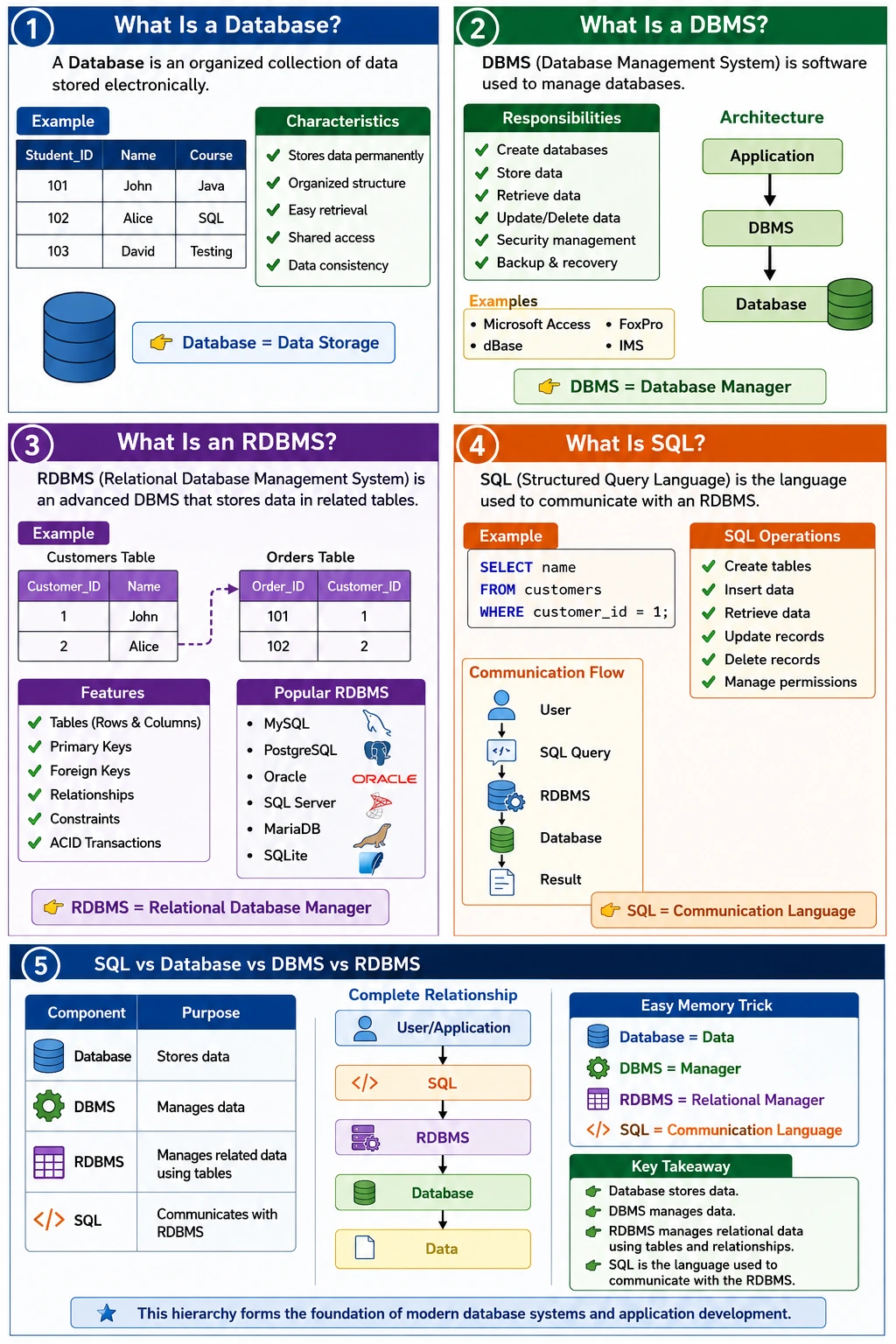
When learning databases, one of the most common sources of confusion is the terminology surrounding SQL, Database, DBMS, and RDBMS. Many beginners use these terms interchangeably because they are closely related and often appear together in software development discussions. However, they represent different concepts and serve different purposes within a data management ecosystem.
Understanding the distinction between these terms is fundamental for developers, testers, database administrators, data analysts, and software engineers. Without a clear understanding, it becomes difficult to understand how applications store information, how data is managed, and how systems communicate with databases. Every modern application—from banking systems and e-commerce platforms to social media applications and enterprise software—relies on these concepts working together.
A simple way to understand their relationship is:
SQL
 ↓
Communicates With
 ↓
RDBMS
 ↓
Manages
 ↓
Database
In this hierarchy:
- The Database stores the actual data.
- The DBMS or RDBMS manages that data.
- SQL is the language used to communicate with the DBMS or RDBMS.
Although these concepts work together, each plays a distinct role. To fully understand modern database systems, it is important to explore each concept individually before comparing them.
Understanding Data Management in Modern Applications
Before discussing databases and SQL, consider a real-world business environment.
Imagine a large bank serving millions of customers. Every day, the bank handles:
- Customer information
- Account details
- Deposits
- Withdrawals
- Loans
- Credit card transactions
- Online banking activities
Managing such enormous amounts of information manually would be impossible.
Organizations require systems that can:
- Store data safely
- Retrieve information quickly
- Maintain consistency
- Support multiple users simultaneously
- Prevent unauthorized access
This need led to the development of databases and database management systems.
What Is a Database?
A database is an organized collection of data stored electronically so that it can be accessed, managed, and updated efficiently. It serves as the central repository where information is permanently stored.
Consider the following example:
| Student_ID | Name | Course |
|---|---|---|
| 101 | John | Java |
| 102 | Alice | SQL |
| 103 | David | Testing |
This collection of student records represents a database.
The database itself is simply the stored information.
It does not actively manage, process, or control the data. It merely contains the information.
Characteristics of a Database
A database possesses several important characteristics.
Organized Storage
Data is stored in a structured and organized manner rather than scattered across multiple files.
Permanent Data Retention
Information remains available even after applications are closed or systems are restarted.
Efficient Retrieval
Users can quickly locate and retrieve specific information when needed.
Reduced Redundancy
Databases help minimize unnecessary duplication of data.
Shared Access
Multiple users and applications can access the same database simultaneously.
Data Consistency
Information remains accurate and synchronized across the system.
These characteristics make databases essential for modern information systems.
Real-World Examples of Databases
Databases are used everywhere.
Banking Systems
Store:
- Customer details
- Account balances
- Transaction history
Hospital Systems
Store:
- Patient records
- Doctor information
- Medical histories
E-Commerce Platforms
Store:
- Products
- Orders
- Customer information
- Inventory
Social Media Applications
Store:
- User profiles
- Posts
- Comments
- Likes
Educational Systems
Store:
- Student information
- Courses
- Examination results
In every case, the database acts as the repository where information resides.
The Problem With Just Having a Database
Imagine having millions of records stored somewhere.
Questions immediately arise:
- How do we retrieve data?
- How do we update records?
- How do we secure information?
- How do multiple users access data simultaneously?
- How do we prevent corruption?
The database alone cannot answer these questions.
A management layer is needed.
This management layer is called a DBMS.
What Is a DBMS?
DBMS stands for Database Management System.
A DBMS is software that manages databases and provides tools for creating, storing, retrieving, updating, deleting, and securing data.
A DBMS acts as the intermediary between applications and stored data.
Without a DBMS:
Application
     ↓
 Raw Files
With a DBMS:
Application
     ↓
   DBMS
     ↓
 Database
The DBMS provides structure, control, and management capabilities.
Responsibilities of a DBMS
A DBMS performs many important tasks.
Database Creation
Allows users to create new databases.
Data Storage
Stores information efficiently.
Data Retrieval
Provides mechanisms to retrieve specific records.
Data Modification
Supports updates and deletions.
Security Management
Controls user permissions and access rights.
Backup and Recovery
Protects data from loss.
Data Integrity
Ensures information remains accurate and valid.
User Management
Supports multiple concurrent users.
These capabilities make DBMS software indispensable in modern computing environments.
Examples of Traditional DBMS
Several systems historically functioned as DBMS solutions.
Examples include:
- Microsoft Access
- dBase
- FoxPro
- IMS
These systems provided database management capabilities but lacked many advanced relational features available today.
Limitations of Traditional DBMS
Although DBMS systems improved data management significantly, they had several limitations.
Limited Relationship Management
Managing relationships between different datasets was difficult.
Higher Redundancy
Duplicate data often existed across files.
Lower Scalability
Large enterprise applications required more advanced solutions.
Weak Data Integrity
Maintaining consistency became challenging as systems grew.
Limited Multi-User Support
Handling concurrent access was less efficient.
These limitations led to the development of a more advanced system: the RDBMS.
What Is an RDBMS?
RDBMS stands for Relational Database Management System.
An RDBMS is an advanced form of DBMS that stores data in related tables and manages relationships between those tables using the relational model proposed by Dr. Edgar F. Codd.
The defining characteristic of an RDBMS is its ability to establish and enforce relationships between data.
Understanding the Relational Model
Consider two tables:
Customers
| Customer_ID | Name |
|---|---|
| 1 | John |
| 2 | Alice |
Orders
| Order_ID | Customer_ID |
|---|---|
| 101 | 1 |
| 102 | 2 |
The Customer_ID column creates a relationship between customers and orders.
This relationship allows the system to answer questions such as:
- Which orders belong to John?
- Which customer placed order 101?
The ability to connect related information across tables is the foundation of the relational model.
Features of an RDBMS
Modern RDBMS platforms provide numerous advanced capabilities.
Table-Based Storage
Data is stored in rows and columns.
Relationships
Tables can be linked through keys.
Primary Keys
Uniquely identify records.
Foreign Keys
Create relationships between tables.
Constraints
Enforce data integrity rules.
ACID Transactions
Guarantee reliable transaction processing.
Data Consistency
Ensure accurate information.
Multi-User Support
Support thousands of concurrent users.
Query Optimization
Improve performance automatically.
Security
Provide advanced access control mechanisms.
These features make RDBMS platforms the dominant choice for enterprise applications.
Popular RDBMS Products
Most modern relational databases are RDBMS products.
Examples include:
- MySQL
- PostgreSQL
- Oracle Database
- Microsoft SQL Server
- MariaDB
- SQLite
These systems manage relational databases and support SQL for data interaction.
What Is SQL?
SQL stands for Structured Query Language.
SQL is the standard language used to communicate with relational databases and perform operations on stored data.
Unlike databases, DBMS, or RDBMS systems, SQL is not software.
It is a language.
What SQL Allows Users to Do
SQL enables users to:
- Create tables
- Insert records
- Retrieve data
- Update records
- Delete records
- Manage permissions
- Control transactions
For example:
SELECT name
FROM customers
WHERE customer_id = 1;
This query retrieves a customer's name from the database.
SQL does not store data.
SQL simply instructs the database system what operation should be performed.
SQL as a Communication Language
Think of SQL as the language used to talk to a database system.
The workflow looks like this:
User
 ↓
SQL Query
 ↓
RDBMS
 ↓
Database
 ↓
Result
The user writes a query.
The RDBMS interprets it.
The database provides the requested data.
The result is returned to the user.
SQL vs Database
A common misunderstanding is believing SQL and databases are the same thing.
They are not.
| SQL | Database |
|---|---|
| Language | Collection of data |
| Used to access data | Used to store data |
| Contains commands | Contains records |
| Does not store data | Stores data permanently |
| Communication mechanism | Data repository |
Example:
Database:
Customers
Orders
Products
SQL:
SELECT * FROM customers;The database stores information.
SQL retrieves it.
Database vs DBMS
These terms are also frequently confused.
| Database | DBMS |
|---|---|
| Collection of data | Software |
| Passive component | Active component |
| Stores information | Manages information |
| Cannot manage itself | Provides management capabilities |
Example:
Database:
Employee RecordsDBMS:
Microsoft AccessThe database contains information.
The DBMS manages that information.
DBMS vs RDBMS
The difference between DBMS and RDBMS is especially important in interviews.
| DBMS | RDBMS |
|---|---|
| General data management | Relational data management |
| Relationships limited | Strong relationships |
| Lower scalability | High scalability |
| More redundancy | Reduced redundancy |
| Fewer constraints | Strong constraints |
| Smaller systems | Enterprise systems |
| Limited concurrency | Multi-user concurrency |
An RDBMS is essentially a more advanced and structured version of a DBMS.
Real-World Banking Example
Consider a banking application.
Database
Stores:
- Customers
- Accounts
- Transactions
- Loans
RDBMS
Manages:
- Relationships
- Transactions
- Security
- Data integrity
SQL
Retrieves information.
Example:
SELECT balance
FROM accounts
WHERE account_number = 12345;
This simple example demonstrates how all four concepts work together.
Complete Relationship Among SQL, Database, DBMS, and RDBMS
The relationship can be visualized as:
User/Application
        ↓
      SQL
        ↓
     RDBMS
        ↓
    Database
        ↓
      Data
Each component has a unique responsibility.
SQL communicates.
RDBMS manages.
Database stores.
Data represents the actual information.
Common Interview Question
Is MySQL a Database or an RDBMS?
Correct Answer:
MySQL is an RDBMS (Relational Database Management System).
Inside MySQL, you create databases.
Those databases contain tables and data.
SQL is used to communicate with MySQL.
Why This Distinction Matters
Understanding these differences helps professionals:
Developers
- Build database-driven applications
- Design scalable systems
- Write optimized queries
Testers and SDETs
- Validate backend data
- Perform database testing
- Verify API responses
Database Administrators
- Manage data efficiently
- Ensure security and performance
Data Analysts
- Extract insights from stored information
The concepts appear throughout software engineering careers.
How These Concepts Work Together in an Application
In a real application, SQL, Database, DBMS, and RDBMS do not operate as separate topics. They work together as parts of one data management flow. The user interacts with an application screen or sends an API request. The backend application receives that request and decides what data operation is needed. The backend then sends an SQL statement to the database management system. The RDBMS interprets the SQL, checks permissions, finds or modifies the required data inside the database, and returns the result to the application.
For example, when a user checks an account balance in a banking application, the user does not directly open the database. The user opens the mobile app and taps the account section. The backend service receives the request, verifies the user, and sends an SQL query to the RDBMS. The RDBMS manages the database where accounts and transactions are stored. The database contains the actual balance records. SQL is simply the instruction language used to ask for that balance.
This relationship is important because it prevents confusion. If someone says "SQL stores data," that is technically incorrect. SQL does not store anything. It is a language. If someone says "MySQL is a database," that is also incomplete. MySQL is an RDBMS, and inside MySQL you create databases. If someone says "a database manages users and permissions," the more accurate statement is that a DBMS or RDBMS provides management features for the database. Clear terminology helps teams communicate correctly.
Database as the Data Container
The database is best understood as the organized container of data. It is where records live. A student database may contain students, courses, marks, attendance, exams, and fee details. A shopping database may contain customers, products, carts, orders, payments, addresses, and invoices. The database is the collection of stored information that the business depends on.
However, a database by itself is not enough. If data is stored but there is no system to query it, secure it, update it, back it up, or allow multiple users to access it safely, the stored data has limited value. That is why the database needs management software. The database contains the information, but the management system controls how that information is used.
This distinction is useful in interviews. When asked what a database is, avoid saying only that it is software. A database is the organized collection of data. The software that manages it is the DBMS or RDBMS. This simple correction shows that you understand the foundation clearly.
DBMS as the Management Layer
A DBMS is the management layer that helps users and applications work with databases. It provides tools to create databases, store records, retrieve information, update values, delete records, manage users, control permissions, back up data, and recover data after failure. Without a DBMS, applications would need to deal with raw files and manual data handling, which would be difficult, risky, and inefficient.
Traditional DBMS systems improved data management by giving structure and control, but they did not always provide strong relational features. Some systems handled data in files, hierarchical structures, or other formats. These systems could manage information, but relationships between different data groups were not as powerful or standardized as in relational systems.
The term DBMS is broader than RDBMS. Every RDBMS is a DBMS because it manages databases, but not every DBMS is an RDBMS because not every DBMS follows the relational model. This is one of the easiest ways to remember the difference. DBMS is the general category. RDBMS is a specific advanced category based on relational tables and relationships.
RDBMS as the Relational Manager
An RDBMS manages relational databases. Its defining feature is the relational model, where data is stored in tables and relationships are created between tables using keys. This model is powerful because real-world data is naturally connected. Customers place orders. Orders contain products. Students enroll in courses. Employees belong to departments. Doctors treat patients. Accounts have transactions.
Instead of storing all information in one large repeated structure, an RDBMS allows data to be separated into related tables. This reduces duplication and improves consistency. For example, customer details can stay in a customers table, while orders can stay in an orders table. The orders table can store customer_id to connect each order to the correct customer. If a customer changes an email address, the update happens in one place instead of across every order record.
RDBMS products also provide strong transaction management, constraints, indexing, query optimization, backup, recovery, and security features. These capabilities are why relational databases remain central in enterprise systems. Banking, finance, healthcare, insurance, inventory, HR, ERP, CRM, and e-commerce applications often rely heavily on RDBMS platforms because they need reliable relationships and consistent transactions.
SQL as the Communication Language
SQL is the language used to communicate with relational database systems. It tells the RDBMS what operation should be performed. SQL can create database structures, insert rows, retrieve records, update values, delete data, manage permissions, and control transactions. It is not the database itself and it is not the software engine. It is the instruction language.
A simple SELECT query asks for data. An INSERT query adds data. An UPDATE query changes data. A DELETE query removes data. CREATE, ALTER, and DROP manage structures. GRANT and REVOKE manage permissions. COMMIT and ROLLBACK control transactions. These commands allow applications and users to interact with relational databases in a structured way.
SQL is declarative, which means the user specifies what result is required rather than exactly how the database should produce it. When a developer writes a SELECT query, the RDBMS decides the execution plan, chooses indexes, reads pages, joins tables, and returns the result. This separation makes SQL powerful because developers can focus on the data requirement while the database engine handles execution details.
Example: Online Shopping System
An online shopping system is a practical way to understand all four terms. The database stores tables such as customers, products, carts, orders, order_items, payments, shipments, and reviews. The RDBMS manages these tables, enforces relationships, handles transactions, controls access, and optimizes queries. SQL is used by the backend application to ask the RDBMS to insert orders, update inventory, retrieve product details, and generate reports.
When a customer places an order, the application may use SQL to check whether the customer exists, fetch product prices, verify stock quantity, insert a new order, insert order items, update inventory, create payment records, and store shipment details. The database stores the actual rows. The RDBMS ensures that relationships and transactions are managed safely. SQL carries the commands from the application to the RDBMS.
If payment succeeds but the order is not created, the issue may involve transaction handling. If inventory is reduced without an order, the data may become inconsistent. If a report shows wrong revenue, the SQL query may have incorrect joins or filters. Understanding the distinction between database, RDBMS, and SQL helps professionals diagnose such issues correctly.
Example: Hospital Management System
A hospital management system also demonstrates the difference clearly. The database stores patient records, doctors, departments, appointments, prescriptions, lab tests, bills, insurance details, and medical history. The RDBMS manages the relationships between those tables. A patient can have many appointments. A doctor can handle many patients. A prescription belongs to a patient and may be connected to an appointment. SQL is used to retrieve and update this information.
When a receptionist books an appointment, the application may use SQL to check doctor availability, create an appointment record, update the schedule, and link the appointment to the patient. When a doctor opens a patient profile, SQL retrieves medical history, previous prescriptions, test results, and appointment notes. The RDBMS ensures the records are related correctly and that access rules are enforced.
This matters because healthcare data must be accurate and secure. A database stores the medical information, but the RDBMS manages integrity, security, and relationships. SQL allows the application to work with the data. Confusing these terms can lead to weak explanations in interviews and weak understanding in real projects.
Where NoSQL Fits in This Discussion
When learning DBMS and RDBMS, many learners also hear about NoSQL databases. NoSQL systems are database systems designed for use cases that may not fit the traditional relational model. They may store documents, key-value pairs, graph relationships, or wide-column data. Examples include MongoDB, Redis, Cassandra, and Neo4j. These systems are not usually called RDBMS because they do not primarily manage data through relational tables.
NoSQL does not mean SQL is outdated. It means different database models exist for different problems. Relational databases are strong when structured data, relationships, transactions, consistency, and reporting are important. NoSQL systems may be useful when flexible schemas, high-scale distributed writes, caching, graph traversal, or document-style storage is required.
Modern systems may use both. An e-commerce platform may use an RDBMS for orders and payments, a document database for product metadata, a cache for sessions, and a search engine for product search. SQL, Database, DBMS, and RDBMS remain core concepts even in modern architectures because relational systems continue to manage critical structured data.
Why Developers Must Understand the Difference
Developers build applications that store and retrieve data constantly. Understanding the difference between SQL, Database, DBMS, and RDBMS helps developers design better systems. They can decide what data belongs in which table, how relationships should be modeled, where constraints should be applied, how transactions should be handled, and which queries need optimization.
If a developer treats the database like a flat file, the design may create duplicate data and inconsistent records. If a developer does not understand the RDBMS role, they may ignore constraints, indexes, and transactions. If a developer does not understand SQL, they may write inefficient queries or depend completely on ORM-generated SQL without knowing how to debug performance problems.
Strong database understanding also improves API development. Most APIs either read or write data. When a customer API returns incorrect data, the developer must understand whether the issue is in SQL query logic, table relationships, service mapping, database state, or application validation. Clear terminology leads to clearer debugging.
Why Testers and SDETs Must Understand the Difference
Testers and SDETs use these concepts frequently during backend validation, API testing, database testing, automation debugging, and report verification. When an API creates a record, testers may use SQL to confirm the record exists in the database. When a UI displays a value incorrectly, testers may query the database to identify whether the backend stored the correct value. When a report total is wrong, testers may inspect the SQL logic or validate raw data.
Knowing the difference also helps testers communicate defects clearly. Instead of saying "SQL is wrong" for every data issue, a tester can say that the database contains duplicate records, the RDBMS constraint is missing, the SQL query joins the wrong table, or the DBMS permissions are blocking access. Precise language makes defect reports more useful to developers and database teams.
Automation testers also need this clarity when building frameworks. SQL queries may be used for test data setup, cleanup, and backend assertions. The framework connects to an RDBMS product such as MySQL, PostgreSQL, Oracle, or SQL Server. The database contains the test records. SQL is the query language. Understanding this flow prevents confusion in design and troubleshooting.
Common Beginner Misunderstandings
A common beginner misunderstanding is saying that SQL is a database. SQL is not a database. It is a language. Another misunderstanding is saying that MySQL is a database. MySQL is an RDBMS product. Inside MySQL, users create databases. Those databases contain tables, rows, and data. Another misunderstanding is assuming DBMS and RDBMS are always the same. RDBMS is a relational type of DBMS, but DBMS is the broader term.
Some beginners also believe that a database can manage itself. A database is the stored collection of data, while the management features come from the DBMS or RDBMS. Others think SQL is used only for retrieving data. In reality, SQL can define structures, insert data, update records, delete records, manage permissions, and control transactions.
These misunderstandings are easy to fix once the hierarchy is clear. Data is the actual information. A database stores organized data. A DBMS manages databases. An RDBMS manages relational databases using tables and relationships. SQL communicates with the RDBMS to perform operations. This hierarchy should be memorized and understood deeply.
Interview-Ready Comparison
In interviews, the best answer is concise but complete. You can say that a database is an organized collection of data, a DBMS is software that manages databases, an RDBMS is a DBMS that stores data in related tables and enforces relationships, and SQL is the language used to communicate with relational database systems. This answer clearly separates storage, management, relational management, and communication.
If the interviewer asks for an example, use MySQL. MySQL is an RDBMS. Inside MySQL, you create a database such as company_db. Inside that database, you create tables such as employees and departments. The rows inside those tables are the actual data. SQL commands such as SELECT, INSERT, UPDATE, and DELETE are used to work with that data.
If the interviewer asks why RDBMS is preferred in enterprise systems, mention relationships, keys, constraints, transactions, consistency, concurrency, security, and query optimization. If the interviewer asks why SQL is important, explain that applications, testers, analysts, and administrators use SQL to communicate with relational databases and manage structured information.
Summary
Although SQL, Database, DBMS, and RDBMS are closely related, they are fundamentally different concepts.
A Database is a collection of stored data.
A DBMS is software that manages databases.
An RDBMS is an advanced DBMS that stores data in related tables and enforces relationships.
SQL is the language used to communicate with the RDBMS and manipulate data.
In the simplest possible terms:
Database = Data

DBMS = Manager

RDBMS = Relational Manager

SQL = Communication Language
Understanding this hierarchy provides the foundation for learning SQL, database design, normalization, query optimization, database testing, backend development, and enterprise application architecture.