Role of SQL in Modern Applications
Modern software applications generate and process enormous amounts of data every second. Whether someone transfers money through a banking app, places an order on an e-commerce website, posts content on social media, books a flight ticket, or accesses a hospital management portal, data operations are constantly happening behind the scenes. Managing this data efficiently, securely, and reliably is one of the most important responsibilities of modern software systems. SQL plays a central role in solving this challenge.
SQL acts as the communication bridge between applications, users, and database systems. It allows applications to store, retrieve, manipulate, secure, and analyze structured data efficiently. Modern applications are heavily data-driven, and SQL is the language that powers much of this data interaction. From enterprise systems to cloud-native microservices, SQL remains one of the foundational technologies in modern software architecture.
Understanding the role of SQL in modern applications is critical for developers, testers, backend engineers, SDETs, architects, and data professionals because almost every business system depends on database operations.
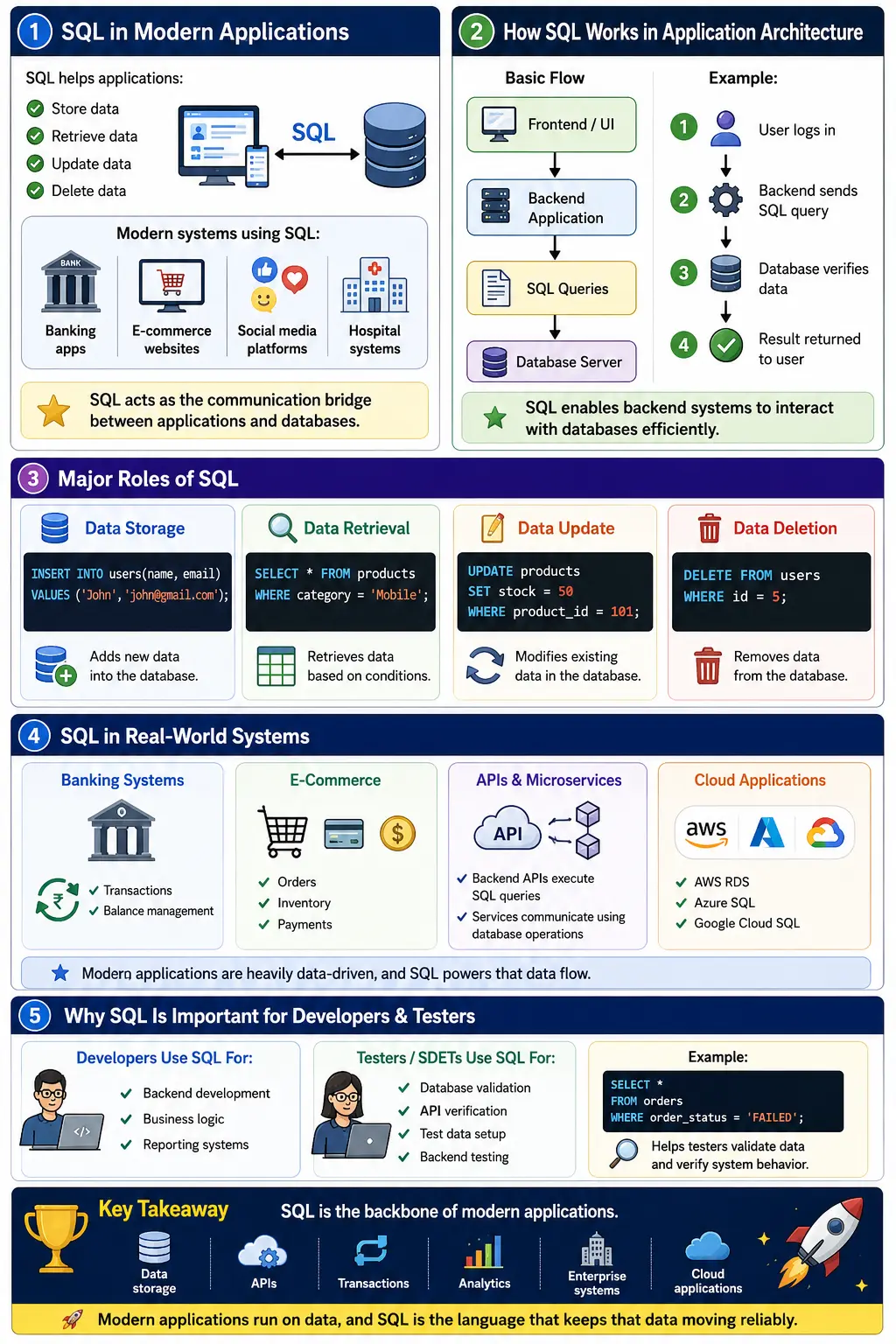
Understanding SQL in Application Architecture
To understand SQL’s importance, it is necessary to understand where it fits inside modern application architecture.
A typical modern application flow looks like this:
Frontend/UI
    ↓
Backend Application
    ↓
SQL Queries
    ↓
Database Server
    ↓
Data Storage & Retrieval
The frontend layer represents what users interact with. This could be:
- A web browser
- Mobile app
- Desktop application
- API client
The backend layer contains application logic, security rules, workflows, validations, and business operations.
The database layer stores structured information permanently.
SQL acts as the communication language between the backend application and the database server.
For example:
- User logs into an e-commerce application
- Backend receives login request
- Backend sends SQL query to database
- Database verifies credentials
- Database returns result
- Backend sends response to frontend
Without SQL, backend systems would not be able to efficiently interact with relational databases.
SQL as the Backbone of Data Storage
One of SQL’s most fundamental responsibilities is storing structured data.
Modern applications manage enormous datasets including:
- Customer records
- Transactions
- Orders
- Inventory
- Payments
- Messages
- Analytics
- Employee information
SQL databases organize this information into tables, rows, and columns.
Examples include:
| Application | Stored Data |
|---|---|
| Banking System | Accounts, balances, transactions |
| E-Commerce Platform | Products, orders, customers |
| Social Media | Users, posts, comments |
| Hospital System | Patients, prescriptions |
| HR Software | Employees, payroll |
Example SQL query:
INSERT INTO users(name, email)
VALUES ('John', 'john@gmail.com');
This command inserts user information into the database.
Data storage is one of the most critical operations in any application because applications cannot function reliably without persistent storage.
SQL for Data Retrieval
Modern applications continuously retrieve information from databases.
Every time users:
- Search products
- View profiles
- Check balances
- Open dashboards
- View reports
- Track orders
SQL queries retrieve relevant information.
Example:
SELECT * FROM products
WHERE category = 'Mobile';
This query fetches all mobile products from the products table.
Efficient retrieval is one of SQL’s greatest strengths. Database engines optimize SQL queries internally using indexes, caching, execution plans, and query optimization techniques.
Without efficient retrieval mechanisms, modern applications would become slow and unusable.
SQL for Data Manipulation
Applications constantly modify existing data.
Examples include:
- Updating user profiles
- Changing passwords
- Modifying inventory
- Updating order statuses
- Processing transactions
SQL supports these operations using commands such as UPDATE.
Example:
UPDATE products
SET stock = 50
WHERE product_id = 101;
This query updates inventory stock values.
Real-world applications depend heavily on data manipulation because business data continuously changes.
SQL for Data Deletion
Applications also remove outdated or unnecessary data.
Examples include:
- Deleted user accounts
- Cancelled orders
- Expired sessions
- Temporary cache records
SQL supports deletion operations.
Example:
DELETE FROM users
WHERE id = 5;
This query removes a user record.
Deletion operations must be handled carefully because data loss can be permanent.
SQL and Relationships Between Data
One of the most powerful capabilities of relational databases is relationship management.
Modern applications rarely store isolated data. Instead, information is interconnected.
Example relationships:
- One customer can place many orders
- One order can contain many products
- One student can enroll in many courses
- One doctor can treat many patients
SQL manages these relationships using:
- Primary Keys
- Foreign Keys
- JOIN operations
Example:
SELECT customers.name, orders.order_id
FROM customers
INNER JOIN orders
ON customers.id = orders.customer_id;
This query retrieves customer names and their orders.
Relational modeling is one of SQL’s biggest advantages in enterprise systems.
SQL in API-Driven Systems
Modern applications rely heavily on APIs.
When a mobile app or frontend requests information, backend APIs often execute SQL queries internally.
Typical flow:
Client Request
      ↓
REST API / Backend
      ↓
SQL Query
      ↓
Database
      ↓
JSON Response
Example flow:
- Mobile app requests user profile
- Backend receives request
- SQL query fetches user data
- Database returns result
- API sends JSON response to client
SQL is therefore deeply integrated into modern API architectures.
SQL and Authentication Systems
Modern applications require secure authentication and authorization systems.
SQL databases store:
- Usernames
- Password hashes
- Roles
- Permissions
- Access control information
Example:
SELECT role
FROM users
WHERE username='admin';
Applications use this information to determine:
- Login access
- User permissions
- Role-based authorization
- Security restrictions
SQL therefore plays a critical role in application security.
SQL and Transaction Management
Some systems require highly reliable transaction handling.
Examples include:
- Banking transfers
- Online payments
- Ticket booking
- Stock trading
These systems cannot tolerate partial failures.
SQL databases provide transaction management features such as:
- COMMIT
- ROLLBACK
- SAVEPOINT
Example:
BEGIN TRANSACTION;

UPDATE accounts
SET balance = balance - 1000
WHERE id = 1;

UPDATE accounts
SET balance = balance + 1000
WHERE id = 2;

COMMIT;
This ensures money transfer consistency.
If failure occurs midway, the transaction can roll back safely.
Transaction reliability is one of the major reasons SQL databases dominate enterprise systems.
SQL for Reporting and Analytics
Businesses heavily depend on SQL for analytics and reporting.
SQL supports:
- Aggregation
- Filtering
- Grouping
- Sorting
- Reporting queries
Example:
SELECT department,
AVG(salary)
FROM employees
GROUP BY department;
This query calculates average salary by department.
Applications use SQL reporting for:
- Revenue analysis
- Sales reports
- KPI dashboards
- Customer insights
- Financial analytics
SQL remains one of the most important technologies in business intelligence.
SQL in Real-Time Applications
Modern applications often operate in real time.
Examples include:
- ATM systems
- Ride-booking apps
- Food delivery systems
- Inventory management
- Live ticket booking
These systems require:
- Fast retrieval
- Concurrent user support
- Real-time updates
SQL databases are optimized for handling such operations efficiently.
SQL in Web Applications
Major web applications rely heavily on SQL databases.
Examples include:
- Amazon
- Netflix
- Booking platforms
SQL stores:
- User accounts
- Product catalogs
- Recommendations
- Watch history
- Orders
- Comments
Web applications continuously interact with SQL databases behind the scenes.
SQL in Mobile Applications
Mobile applications also depend heavily on SQL.
Examples:
- Banking apps
- Food delivery apps
- Social media apps
SQL manages:
- User preferences
- Notifications
- Transactions
- User data
Even offline mobile apps frequently use lightweight SQL databases such as SQLite.
SQL in Enterprise Systems
Enterprise applications rely extensively on SQL databases.
Examples:
- ERP systems
- CRM platforms
- HRMS software
- Supply chain systems
SQL handles:
- Payroll
- Inventory
- Customer management
- Procurement
- Employee records
Enterprise software depends heavily on SQL consistency and reliability.
SQL in Cloud Applications
Cloud platforms heavily support SQL databases.
Examples include:
- AWS RDS
- Azure SQL
- Google Cloud SQL
Benefits include:
- Scalability
- Automated backups
- High availability
- Disaster recovery
- Global access
Cloud-native applications continue to rely heavily on SQL databases.
SQL in Microservices Architecture
Modern systems increasingly use microservices architecture.
Each microservice may have:
- Independent database
- Dedicated schema
- Service-specific queries
Example:
| Microservice | Database |
|---|---|
| User Service | User DB |
| Payment Service | Payment DB |
| Order Service | Order DB |
SQL databases remain central even in distributed architectures.
SQL and ORM Frameworks
Modern applications often use ORM (Object Relational Mapping) tools.
Examples:
- Hibernate
- JPA
- Entity Framework
- Sequelize
ORM tools abstract SQL syntax for developers.
However:
SQL still executes underneath.
Even developers using ORMs must understand SQL because:
- Query optimization matters
- Complex joins still require SQL understanding
- Performance debugging often involves SQL analysis
SQL knowledge remains essential.
SQL in Testing and Automation
SQL is extremely important for testers and SDETs.
Automation engineers use SQL for:
- Backend validation
- API verification
- Database testing
- Data setup
- Data cleanup
Example:
SELECT *
FROM orders
WHERE order_status='FAILED';
This helps testers validate backend states.
Strong SQL skills significantly improve testing effectiveness.
SQL in Big Data and Analytics Platforms
Even modern analytics platforms rely heavily on SQL-like querying.
Examples include:
- Snowflake
- BigQuery
- Redshift
- Apache Hive
SQL is widely used for:
- Data warehousing
- ETL operations
- Analytics pipelines
- Dashboard generation
Despite the rise of NoSQL systems, SQL continues to dominate analytics workloads.
Why SQL Remains Relevant
Even with newer database technologies, SQL remains dominant because:
- Structured data is everywhere
- SQL is standardized
- Mature ecosystem exists
- Strong consistency support
- Excellent reporting capabilities
- Enterprise reliability
Most enterprise systems still rely heavily on SQL databases.
Real-World Example - E-Commerce Order Processing
Consider an e-commerce checkout process.
When a user places an order:
- SQL verifies customer information
- SQL fetches product details
- SQL checks inventory
- SQL creates order records
- SQL updates stock quantities
- SQL stores payment transactions
- SQL generates invoice records
All of these operations involve SQL queries and transactions working together.
Advantages of SQL in Modern Applications
SQL provides several major advantages.
Reliable Data Management
Relational databases ensure structured and consistent storage.
High Performance
Optimized database engines execute queries efficiently.
Strong Consistency
ACID properties provide reliable transaction management.
Security Support
SQL databases support authentication and authorization systems.
Reporting Capabilities
SQL excels at analytics and reporting.
Scalability
Modern SQL systems support large-scale enterprise workloads.
Standardization
SQL works across multiple platforms with similar syntax.
Challenges of SQL Systems
Despite its strengths, SQL systems also have challenges.
Complex Scaling
Horizontal scaling can become difficult for massive workloads.
Query Optimization
Poor queries can severely impact performance.
Vendor Differences
Database vendors introduce proprietary extensions.
Maintenance Overhead
Large database systems require administration and monitoring.
How SQL Supports Business Workflows
Modern applications are built around business workflows, and SQL often supports each stage of those workflows. A banking application does not simply display a balance. It must verify the customer, check account status, calculate available funds, store transaction history, apply limits, and maintain audit records. An e-commerce application does not simply show a product page. It must read product details, check inventory, apply discounts, create orders, update payment status, and generate invoices. SQL is commonly involved in all of these steps.
This makes SQL more than a storage language. It is part of the business execution layer. The application may contain the business rules in Java, Python, C#, Node.js, or another backend technology, but those rules usually depend on reliable database reads and writes. If the database returns wrong information, the application makes wrong decisions. If a write operation fails, the workflow may remain incomplete. If a transaction is not handled correctly, users may see inconsistent results.
For this reason, backend developers, testers, automation engineers, and architects need to understand how SQL participates in workflows. When a defect appears in production, the root cause may not be visible on the screen. The real issue may be an incorrect query, missing relationship, wrong join, failed transaction, duplicate record, or data synchronization problem. SQL knowledge helps teams investigate such issues with confidence.
SQL and Backend Services
Backend services are responsible for processing requests from users, mobile apps, web pages, APIs, batch jobs, and other systems. These services often use SQL to fetch and update persistent data. A backend service may receive a request to create a customer, validate the input, check whether the email already exists, insert a new row, create related profile data, and return a response. Each of those database operations may be performed through SQL directly or through a framework that generates SQL internally.
In many enterprise applications, backend code uses repositories, DAO classes, ORM frameworks, or service layers to organize database access. Even when developers do not write raw SQL for every operation, SQL still executes inside the database. Understanding SQL helps developers read generated queries, optimize slow operations, fix data issues, and design better table relationships.
SQL also supports backend reliability. Services can use transactions to ensure that related database operations succeed together. They can use constraints to reject invalid data. They can use indexes to improve search speed. They can use views and stored procedures in systems where database-side logic is part of the architecture. The backend and SQL database must work together cleanly for the application to behave correctly.
SQL and Data Consistency
Data consistency is one of the major reasons SQL databases remain important in modern applications. Many business systems cannot tolerate inconsistent data. A payment should not be marked successful if the order was not created. Inventory should not be reduced if checkout failed. A bank transfer should not debit one account without crediting another. A hospital record should not connect a prescription to the wrong patient. SQL databases provide strong mechanisms to reduce these risks.
Consistency is supported through constraints, keys, relationships, and transactions. Primary keys identify records uniquely. Foreign keys ensure that relationships point to valid records. Unique constraints prevent duplicate values where duplicates are not allowed. NOT NULL constraints ensure required data is present. Transactions allow multiple related operations to be committed together or rolled back together.
In real projects, many defects are data consistency defects. A tester may see an order on the UI but not find it in the order history. A report may show totals that do not match transaction details. An API may return success, but the database may contain only partial data. SQL helps identify where consistency failed and whether the problem is in application logic, transaction handling, database constraints, or asynchronous processing.
SQL and Search, Filtering, and Sorting
Most applications give users ways to search, filter, and sort data. An e-commerce user filters products by category, price, rating, and brand. A banking user filters transactions by date and type. A recruiter filters candidates by skill, location, and experience. An admin user sorts records by status, created date, priority, or owner. SQL powers many of these operations through WHERE, ORDER BY, GROUP BY, LIKE, joins, and aggregate functions.
Search and filtering must be both correct and fast. If filtering is wrong, users may see incorrect results. If sorting is wrong, reports and dashboards become misleading. If queries are slow, the application feels slow even when the frontend is well designed. SQL query design directly affects the user experience because users wait for results produced by database operations.
Indexes, pagination, careful query design, and appropriate database modeling help applications handle search and filtering at scale. For example, a product listing page should not load every product in the database when the user sees only the first page of results. SQL can return only the required page of records, sorted and filtered according to user choices. This is a practical example of SQL improving both performance and usability.
SQL and Audit Trails
Many enterprise applications need audit trails. An audit trail records who changed what, when the change happened, and what the previous or new value was. Banking, healthcare, insurance, finance, HR, government, and compliance-heavy systems depend on audit data. SQL databases often store audit records in dedicated tables or history tables.
Audit data helps teams investigate incidents and prove accountability. If a user's role changes, an audit record can show who made the change. If a payment status is updated, audit logs can show the sequence of events. If sensitive data is accessed, audit tables can support compliance checks. SQL queries help retrieve and analyze this history.
For testers, audit validation is an important real-world use case. A UI or API may update a record successfully, but the system may also be expected to create an audit entry. SQL can verify whether the audit table captured the correct user, timestamp, action, and data reference. This is one reason SQL is important for SDETs and QA engineers working on enterprise projects.
SQL and Data Migration
Modern applications often go through data migration. A company may move from an old system to a new system, upgrade database schemas, merge customer records after an acquisition, migrate from on-premises databases to cloud databases, or redesign tables for a new product architecture. SQL is heavily used in such migration projects.
Migration work involves extracting data, transforming it, loading it into new structures, validating counts, checking relationships, identifying duplicates, and confirming that business-critical records moved correctly. SQL queries are used before, during, and after migration. Teams compare source and target data, check totals, validate sample records, and confirm that constraints are not broken.
Testing data migration requires strong SQL skills. A tester may need to verify that the number of active customers in the old database matches the number in the new database, that order history remains connected to the right customer, that dates and amounts are transformed correctly, and that invalid records are handled according to migration rules. SQL is the natural tool for these checks.
SQL and Reporting Accuracy
Reports and dashboards are only useful when the underlying data is accurate. Business leaders use reports to make decisions about revenue, inventory, customers, operations, risk, and performance. If SQL queries behind reports are incorrect, decisions may be based on misleading information. This makes SQL quality important not only for developers but also for business users.
Reporting queries often involve joins, filters, grouping, aggregations, date ranges, and business rules. For example, a monthly revenue report may need to include successful payments, exclude cancelled orders, handle refunds, apply currency conversion, and group results by product category. A simple-looking number on a dashboard may depend on a complex SQL query.
Testers validate reporting accuracy by comparing report output with database results. They may check whether totals match detailed records, whether filters work correctly, whether date boundaries are handled properly, and whether role-based access affects report visibility. SQL enables this validation and helps teams catch errors before reports are used for business decisions.
SQL and Application Performance Monitoring
Application performance is not only a frontend issue. A page can have clean HTML, optimized CSS, and fast JavaScript, but still load slowly because the backend query is inefficient. Slow SQL queries are a common cause of performance problems in enterprise applications. Monitoring tools often show query duration, database locks, connection pool usage, slow statements, and resource consumption.
Developers use SQL knowledge to analyze execution plans, add or adjust indexes, rewrite inefficient joins, reduce unnecessary columns, and improve query filters. Database administrators monitor server health, storage, memory, locks, and replication. Testers and performance engineers use SQL to prepare data volume, validate database state, and investigate bottlenecks during load tests.
In modern systems, performance work is collaborative. Backend developers, DBAs, testers, and DevOps engineers all need visibility into database behavior. SQL provides the common language for understanding what the application asks the database to do and how efficiently the database responds.
SQL and Secure Data Access
Security in modern applications includes protecting data from unauthorized access, incorrect modification, exposure, and injection attacks. SQL databases support security through users, roles, privileges, grants, revokes, schemas, views, encryption options, and auditing. Application security also depends on how SQL is used in code.
One of the most important security concerns is SQL injection. SQL injection happens when untrusted input is combined with SQL text in an unsafe way. Attackers may try to change a query's meaning, bypass login, retrieve sensitive records, or modify data. Prepared statements, parameterized queries, input validation, and ORM protections help prevent this risk.
Secure data access also means giving applications only the permissions they need. A reporting service may require read access but not delete access. A customer-facing service should not have unrestricted access to administrative tables. Test environments should protect sensitive production-like data. SQL knowledge helps teams understand and validate these controls.
SQL in Cloud-Native and Distributed Systems
Cloud-native systems often use managed SQL services such as AWS RDS, Azure SQL, Google Cloud SQL, Amazon Aurora, Cloud Spanner, and managed PostgreSQL or MySQL offerings. These platforms provide automated backups, monitoring, scaling options, replication, high availability, and disaster recovery features. Even though infrastructure is managed by the cloud provider, SQL remains central to how applications work with structured data.
Distributed systems may use separate databases for separate services. This improves service ownership but introduces new design questions. How should data be synchronized between services? Which service owns which data? Should a service query another service's database directly? How are transactions handled across services? In microservice architecture, the preferred design is usually that each service owns its data and exposes behavior through APIs rather than allowing direct database access from other services.
SQL continues to matter in these architectures because each service still needs reliable storage, queries, constraints, and reporting. Teams may also build data warehouses or analytics pipelines that combine data from many service databases. SQL is commonly used in those analytical layers as well.
How Testers Use SQL in Real Projects
Testers use SQL to validate what is not always visible through the user interface. A form submission may show a success message, but SQL can verify whether the correct row was inserted. A status update may appear on a page, but SQL can verify whether related tables were updated consistently. A report may display a total, but SQL can verify whether the total is calculated from the right records.
SQL also helps testers create and clean test data. For example, a tester may need an active customer with no orders, a user with a locked account, an order with failed payment, or a product with zero inventory. In a controlled test environment, SQL can help prepare such data quickly. Cleanup queries can remove temporary data after execution so future tests are not affected.
Automation testers and SDETs use SQL in frameworks for backend validation, API response verification, precondition setup, postcondition checks, and report validation. Strong SQL skills make a tester more effective because they can investigate failures beyond what the UI shows. They can identify whether a defect belongs to frontend rendering, API response mapping, backend logic, database update, or data setup.
Practical Guidelines for Using SQL in Applications
Good SQL usage follows practical guidelines. Design tables around clear business entities. Use primary keys and foreign keys where relationships matter. Add constraints for important rules. Use indexes for frequent search and join columns, but avoid unnecessary indexes. Select only required columns instead of using SELECT * in production queries. Use transactions for related operations that must succeed together. Use parameterized queries to prevent SQL injection.
Applications should keep database access organized. SQL should not be scattered randomly throughout the codebase. Repository classes, DAO classes, ORM mappings, query builders, or service layers should provide a clear structure. Configuration should separate database URLs, credentials, and environment values from business logic. Sensitive values should be managed securely.
Teams should also review SQL changes carefully. A small query change can affect performance, reporting, security, and data correctness. Database changes should be tested with realistic data volumes and migration scripts should be validated before release. SQL is powerful, so it deserves the same engineering discipline as application code.
Interview Perspective
A short interview answer:
SQL plays a critical role in modern applications by enabling efficient storage, retrieval, manipulation, security, and analysis of structured data.
A stronger engineering answer:
SQL acts as the communication layer between applications and relational databases. It powers backend systems, APIs, authentication, reporting, transaction management, analytics, and enterprise workflows. Modern applications rely heavily on SQL for reliable, scalable, and consistent data operations.
Key Takeaway
SQL is the backbone of modern data-driven applications. It powers critical operations across banking systems, e-commerce platforms, enterprise applications, APIs, analytics systems, and cloud architectures. SQL enables applications to store, retrieve, manipulate, secure, and analyze structured data efficiently and reliably.
Even as technology evolves, SQL remains one of the most important and widely used technologies in modern software engineering.
One-Line Insight
👉 Modern applications run on data, and SQL is the language that keeps that data moving reliably.