XPath vs CSS Selector
Choosing between XPath and CSS Selector is a strategic decision that directly impacts test stability, performance, and maintainability. Both are powerful; the correct choice depends on what you need to express. In Selenium, teams typically default to CSS selectors and escalate to XPath only when required.
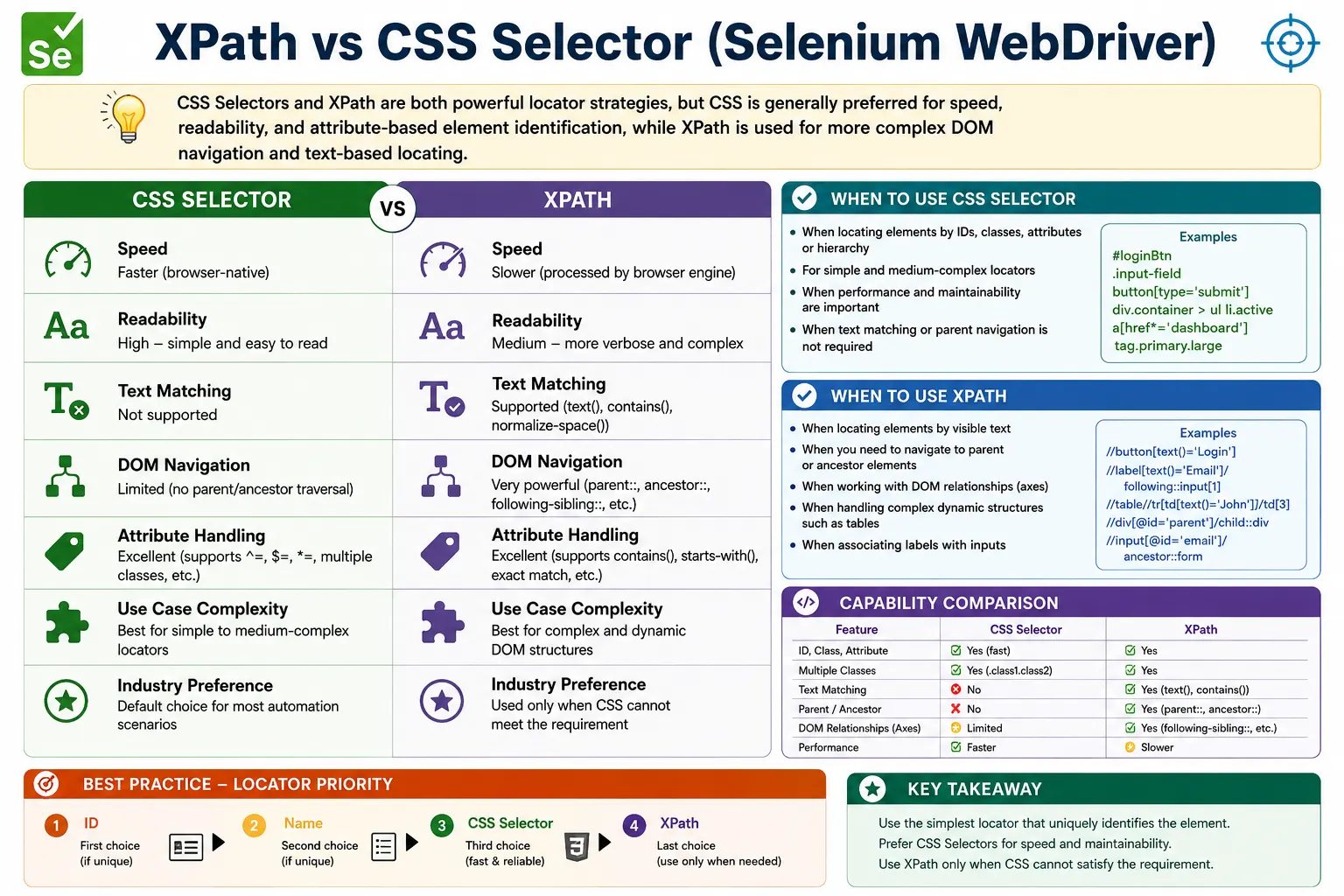
Understanding XPath vs CSS Selector in Selenium
XPath and CSS Selector are two of the most important locator strategies in Selenium WebDriver. Both are used to find elements in the browser DOM, and both can be used to build reliable test automation when they are chosen correctly. The difference is not that one is always good and the other is always bad. The real difference is what each locator strategy can express. CSS selectors are fast, concise, and excellent for attribute-based element identification. XPath is more powerful for visible text, parent traversal, ancestor lookup, and complex relationships. A strong Selenium tester understands both and chooses the simplest reliable locator for the situation.
Locator choice affects far more than one line of test code. A locator that is easy to read, easy to debug, and stable across normal UI changes reduces long-term maintenance. A locator that is copied from browser tools without thought can create flaky tests even if it works the first time. XPath and CSS Selector should be treated as design choices. The goal is not to show that a tester knows advanced syntax. The goal is to make the automation suite survive changing data, dynamic rendering, repeated components, and normal frontend refactoring.
In many Selenium teams, the practical default is to try simple locators first. If the element has a stable id, use By.id. If it has a stable name, use By.name. If a clean attribute, class combination, or data attribute is available, CSS Selector is usually a strong choice. XPath becomes necessary when CSS cannot express the requirement, such as locating a button by visible text, moving from a label to its input through DOM relationships, or selecting a table row by cell content. This decision flow keeps locators simple without ignoring XPath's strengths.
Core Difference Between XPath and CSS Selector
CSS Selector Focuses on Attributes and Downward Structure
CSS Selector is designed to select elements using the same syntax that browsers use for styling rules. It can match tags, ids, classes, attributes, partial attribute values, descendants, direct children, and certain sibling relationships. This makes CSS very effective for elements that expose stable HTML attributes. A selector such as input[name='email'] or button[data-test='save'] is short, readable, and efficient. It communicates the identity of the element without unnecessary complexity.
CSS is especially good when the page has stable automation hooks. Data attributes such as data-testid, data-qa, or data-test work very well with CSS selectors. They are usually independent of styling and layout, so they survive redesigns better than generated classes or long structural paths. If a team can add stable data attributes to important elements, CSS selectors often become the cleanest locator strategy for most page interactions.
CSS also handles multiple classes naturally. A selector such as button.btn.primary means a button with both btn and primary classes. Selenium's By.className locator cannot express multiple classes in the same way, but CSS can. CSS partial attribute operators also support dynamic attribute patterns. The *= operator checks contains, ^= checks starts with, and $= checks ends with. These features cover many practical dynamic locator needs without requiring XPath.
XPath Focuses on Relationships and Text-Aware Selection
XPath is a path language for navigating the document tree. In Selenium, XPath can locate elements by attributes, text, functions, hierarchy, and axes. Its biggest advantage is expressiveness. XPath can match visible text, normalize whitespace, move upward to a parent or ancestor, move sideways to siblings, and locate a container based on a child element. These capabilities are essential for complex forms, tables, grids, repeated cards, and dynamic web applications where attributes alone are not enough.
XPath is often required when the element itself has no stable locator but a nearby element does. For example, an input may have a generated id while its label has stable visible text. XPath can locate the label and move to the related input. A table row may need to be found by customer name and then the Edit button inside that row must be clicked. XPath can express that relationship directly. CSS cannot match visible text or move to ancestors, so XPath is the natural tool for these cases.
The risk with XPath is overuse and over-complexity. Because XPath can express many things, beginners sometimes use it for everything, including simple id and attribute matches. They may also copy absolute XPath from browser tools, producing locators tied to the full DOM path. That kind of XPath is fragile. XPath is powerful when it is written around stable text, attributes, and relationships. It is weak when it mirrors today's DOM structure without understanding page intent.
When CSS Selector Is the Better Choice
Stable IDs, Names, Classes, and Data Attributes
CSS Selector is usually the better choice when the element can be identified through stable attributes. A login field with id username, an email field with name email, a button with data-test submit, or a product card with data-testid product-card can be located cleanly with CSS. These selectors are compact and easy to read. They also fit well inside Page Object Model classes because the page object can store a concise By.cssSelector value and expose a meaningful action method.
CSS is also strong when classes are semantic and stable. A selector such as button.login-submit or div.product-card button.add-to-cart can be reliable when those class names describe component purpose rather than visual styling. The caution is that styling classes and generated framework classes are often poor locator hooks. Classes such as mt-2, col-md-6, text-center, or hashed Material UI classes may change during design or build updates. Stable data attributes are usually better than styling classes for automation.
Attribute-based CSS selectors are also useful for dynamic values when part of the value is stable. For example, input[id^='user_'] can handle ids that begin with a stable prefix, and a[href*='profile'] can match links whose href contains a stable path segment. These selectors give CSS some dynamic capability similar to common XPath functions. If the requirement is only partial attribute matching, CSS is often simpler than XPath.
Simple Hierarchy and Scoped Searches
CSS is a good choice when the locator needs simple downward structure. A selector such as form#loginForm input[name='username'] finds a username field inside a specific form. A selector such as div.product-card button.add-to-cart finds a button inside a product card. These are clear and maintainable when the parent context is stable. CSS descendant and direct child selectors allow testers to narrow the search without writing a long path.
Scoped WebElement searches make CSS even stronger. A test or page object can first locate a container, then use a short CSS selector inside it. For repeated cards, rows, panels, or modal dialogs, this avoids global ambiguity. The child selector only needs to be unique inside the selected container. This pattern often produces cleaner code than one large XPath because the relationship is expressed through page object steps rather than a single complex locator string.
CSS also supports sibling combinators, such as adjacent sibling and general sibling. These can help in simple form layouts where a label is immediately followed by an input. However, CSS sibling support is limited compared with XPath axes. If the relationship requires visible text, ancestor traversal, or complex movement through the DOM, XPath is usually more appropriate.
When XPath Is the Better Choice
Visible Text Matching
XPath is the better choice when the most reliable clue is visible text. CSS selectors cannot directly select an element by the text displayed between its tags. XPath can use text(), contains(text()), and normalize-space() to locate buttons, links, headings, labels, alerts, and messages by what the user sees. This is valuable for user-facing validation, menu items, error messages, and content-driven workflows.
Text matching should still be used carefully. If text is likely to change due to translation, content updates, or personalization, it may not be the best locator hook. But when visible text is stable and meaningful, XPath makes the locator expressive. A button with normalized text Submit or a tab with text Billing can be easier to understand than a selector based on a generic class. XPath is not better because it is more complex; it is better here because it can express the actual user-visible clue.
Parent and Ancestor Traversal
XPath is also better when a locator must move upward in the DOM. CSS can select descendants and some siblings, but it cannot start from a child and select its parent or ancestor. XPath axes such as parent:: and ancestor:: make this possible. This matters when a child element is easy to identify but the desired container is not. For example, an error text may identify an alert, but the test may need the whole alert container. XPath can locate the text and move to the ancestor alert element.
Parent and ancestor traversal is also common in tables and cards. A test may locate a cell containing a user name, move to the parent row, and then click an action button inside that row. This relationship is difficult or impossible to express with CSS alone when the anchor is visible text. XPath can express it clearly. This is why XPath remains essential even in teams that prefer CSS selectors for simpler locators.
Complex Dynamic Relationships
XPath is stronger for complex DOM relationships because it supports axes and functions. It can move from a label to a following input, from an input to a following error message, from a table cell to a row, from a row to a button, or from a heading to a related section. These relationship-based locators are often more stable than raw indexes because they follow meaningful page structure. XPath is therefore a good fit for complex dynamic UIs where attributes are missing, duplicated, or generated.
The key is to use relative, readable XPath rather than copied absolute XPath. XPath should identify stable attributes, visible text, and relationships. It should avoid unnecessary full DOM paths. A good XPath says find the input following the Email label or the Edit button in the row containing John. A bad XPath says find the second button inside the third div inside the fourth section because that is where the button happens to be today. The first expresses intent; the second expresses layout.
Performance and Maintainability
Performance Is Real but Often Misunderstood
CSS selectors are commonly described as faster because browsers are optimized for CSS querying. That is often true, especially for simple selectors. However, in real Selenium suites, the difference between a reasonable CSS selector and a reasonable XPath is usually less important than locator reliability. A stable XPath that finds the correct element quickly is better than a brittle CSS selector that causes waits and retries. The biggest performance cost often comes from locator failure, not from the selector language itself.
This does not mean performance should be ignored. Prefer simple CSS selectors when they express the requirement clearly. Avoid unnecessarily complex XPath for simple id and attribute matches. But do not sacrifice correctness for theoretical speed. The fastest locator is not useful if it clicks the wrong element. Selenium automation should optimize for stable, readable, intention-revealing locators first, and then avoid unnecessary complexity.
Maintainability Depends on Simplicity and Intent
Maintainability is the real deciding factor in most projects. A locator should be easy to understand during code review and easy to debug after a failure. CSS often wins for simple locators because the syntax is short. XPath wins when it expresses a relationship that CSS cannot. Both can be maintainable when used properly, and both can be fragile when over-engineered.
A good rule is to choose the simplest locator that survives normal UI change. If a CSS selector based on a data attribute is enough, use CSS. If XPath is needed to identify a row by text and click a related button, use XPath. Avoid cleverness for its own sake. Automation code is read and maintained over time, so clarity is an engineering requirement, not a style preference.
Decision Framework for Real Projects
Start with the Most Stable Direct Locator
The practical decision order is simple. First look for a stable id. If it exists, By.id is usually best. Next look for a stable name. Then look for stable data attributes, semantic classes, or attributes that can be expressed cleanly with CSS. If those options cannot express the requirement, move to XPath. This order prevents unnecessary complexity while keeping XPath available for the cases where it is truly needed.
This framework also encourages collaboration with developers. If a page lacks stable locator hooks, adding data attributes may be better than writing complex locators. A stable automation hook can reduce test maintenance dramatically. Testability is part of application quality. Selenium engineers should not always work around poor markup silently; sometimes the right solution is improving the markup.
Use CSS for Attribute-Based Locators
If the page provides attributes such as data-test, aria-label, name, type, href, placeholder, or stable class names, CSS is usually a clean solution. CSS selectors support exact attribute matches and partial attribute matches. They also combine tags, classes, ids, and attributes naturally. For form fields, buttons, menus, links, and cards with stable hooks, CSS keeps the locator short and understandable.
Use XPath for Text and Relationships
If the locator depends on visible text, parent traversal, ancestor traversal, label-to-input mapping, table row selection by cell value, or complex relationships, XPath is usually the right solution. It can express what CSS cannot. This does not mean XPath should be long. It should still be relative, scoped, and readable. XPath is a precision tool for relationship-based locating.
Common Mistakes
Using XPath Everywhere
One common mistake is using XPath everywhere simply because it can do many things. This leads to verbose locators for simple elements that could be found with id, name, or CSS. It also increases the chance of copied absolute XPath appearing in the framework. XPath should be used where its capabilities are needed, not as a default for every element.
Using CSS When Text Matching Is Required
The opposite mistake is forcing CSS onto requirements that need visible text. If the only stable clue is a button label or table cell text, XPath is the right tool. Trying to fake text matching with broad class selectors can make the test weaker. Locator choice should follow the requirement, not a team preference taken too far.
Copying Fragile Locators from DevTools
Browser developer tools can generate CSS selectors and XPath expressions, but generated locators often describe the current DOM rather than stable intent. They may include long paths, layout containers, generated classes, or indexes. Generated locators can be useful starting points for inspection, but they should be reviewed and rewritten before being added to an automation framework.
XPath vs CSS Selector in Page Object Model
Centralizing Locator Decisions
Page Object Model helps manage locator strategy by keeping selectors inside page classes. Test methods should describe actions and assertions, not locator syntax. A page object can use CSS for simple attributes and XPath for text or relationships without exposing that detail to every test. This makes the suite easier to maintain because locator changes are localized.
A strong page object does not blindly use one locator strategy. It chooses per element. The username input may use CSS. The error message next to a label may use XPath. A product card may use CSS if it has a data attribute, while a table row by visible text may use XPath. This mixed strategy is normal and healthy. The consistency should be in the decision rules, not in forcing one syntax everywhere.
Reviewing Locator Quality
During code review, locators should be checked for uniqueness, readability, and resilience. A CSS selector should not depend on generated styling classes. An XPath should not be an absolute path copied from DevTools. Both should avoid unnecessary indexes. Reviewers should ask whether the locator would survive a harmless layout change, whether it could match the wrong element, and whether another strategy would be simpler. This review discipline prevents flaky tests from entering the suite.
Interview Perspective
Short Interview Answer
CSS selectors are generally faster and more readable for id, class, and attribute-based locators. XPath is more powerful because it supports visible text, parent and ancestor traversal, axes, and complex relationship-based locating. Use CSS by default for simple locators and XPath when CSS cannot express the requirement.
Detailed Interview Answer
In Selenium, CSS Selector and XPath are both locator strategies. CSS Selector is browser-native, concise, and excellent for stable attributes, classes, ids, data attributes, and simple hierarchy. XPath is more expressive and supports text matching, normalize-space, contains, parent and ancestor axes, following-sibling, and table row selection by cell value. In real projects, the best practice is to prefer simple stable locators first, use CSS for most attribute-based cases, and use XPath when text or DOM relationship traversal is required.
Real-Time Example Answer
If I need to locate a login button with data-test='login-button', I would use CSS because it is short and stable. If I need to locate the Edit button in the row where the customer name is John, I would use XPath because CSS cannot find the row by visible text and then navigate to the related button. This shows the real difference: CSS is best for clean attributes, while XPath is best for text and relationships.
Final Practical Recommendation
Default to Simplicity
The best locator is the simplest reliable locator that communicates intent. Start with id and name when they are stable. Use CSS selectors for attributes, classes, data attributes, and downward structure. Use XPath when the locator requires text, parent traversal, ancestor traversal, axes, or table relationships. Avoid using either strategy as a matter of habit without considering the page.
Choose Stability Over Cleverness
A locator should survive normal UI change. It should not depend on irrelevant wrapper divs, generated class names, or arbitrary indexes. CSS and XPath can both be stable when written well. CSS can be fragile if it uses layout classes. XPath can be fragile if it uses absolute paths. Stability comes from choosing stable clues and meaningful relationships, not from the selector type alone.
The key takeaway is that XPath vs CSS Selector is not a competition where one wins every time. It is a decision about expression. CSS is the clean default for fast, readable, attribute-based locators. XPath is the advanced option for visible text, upward traversal, and complex relationships. A skilled Selenium tester knows both and uses each where it makes the test clearer, more stable, and easier to maintain.
Team Standards for Locator Choice
In professional automation teams, the decision between XPath and CSS Selector should also become part of the framework standard. A written convention helps new testers make consistent choices and helps reviewers evaluate pull requests quickly. For example, the team may agree to use By.id and By.name when stable, CSS selectors for data attributes and class combinations, and XPath only for visible text, table relationships, parent traversal, or label-based field lookup. This standard prevents random locator style changes from one test class to another.
A locator standard should still allow judgment. Some pages are well designed for CSS selectors because they expose stable test hooks. Other pages are legacy screens with poor attributes but stable labels and table values, making XPath more practical. The standard should guide the default choice without blocking the right solution. The real measure of a locator is whether another engineer can understand it, whether it matches the intended element uniquely, and whether it survives ordinary UI changes without constant repair.
Over time, reviewing locator failures can improve the standard. If many CSS selectors break because they depend on generated classes, the team should move toward data attributes. If many XPath locators break because they were copied as absolute paths, the team should enforce relative XPath with meaningful anchors. Locator strategy is not a one-time decision; it evolves with the application, the framework, and the team's experience.
1. Core Difference (At a Glance)
| Criteria | CSS Selector | XPath |
|---|---|---|
| Speed | Faster (browser-native) | Slower |
| Readability | High | Medium |
| Text matching | Not supported | Supported |
| Parent/ancestor traversal | Not supported | Supported |
| Partial attribute match | Supported | Supported |
| Relationship logic (axes) | Limited | Very powerful |
| Complexity handling | Medium | High |
| Industry preference | Default choice | Advanced scenarios |
2. When to Use CSS Selector (Preferred)
Use CSS Selector when:
- You can locate elements by ID, class, or attributes
- You need performance and simplicity
- You do not need text matching
- You do not need to traverse up the DOM
Typical CSS Use Cases:
- Login fields and buttons
- Forms with stable attributes
- Buttons with multiple classes
- Dynamic IDs with predictable patterns
Why teams prefer CSS:
- Cleaner syntax
- Faster execution
- Easier maintenance
3. When XPath Is Mandatory
Use XPath when:
- You must locate elements by visible text
- You need parent/ancestor traversal
- You must use DOM relationships
- Attributes are missing or duplicated
- You need conditional logic (and, or, not)
Typical XPath Use Cases:
- Error/success message validation
- Label means input mapping
- Table row actions by cell value
- Complex dynamic UIs (React/Angular)
4. Capability Comparison (Critical)
4.1 Text Matching
- CSS: Not possible
- XPath:
text(),contains(text()),normalize-space()
Verdict: XPath wins.
4.2 Parent / Ancestor Traversal
- CSS: Cannot go upward
- XPath:
parent::,ancestor::
Verdict: XPath wins.
4.3 Attribute Matching
- CSS:
*=,^=,$=(clean and fast) - XPath:
contains(),starts-with()
Verdict: CSS is simpler and faster.
4.4 Multiple Class Matching
- CSS: Native support
- XPath: Requires
contains(@class, ...)
Verdict: CSS wins.
5. Stability & Maintenance
| Stability Factor | CSS Selector | XPath |
|---|---|---|
| Short & readable | Yes | Sometimes |
| Resistant to layout changes | Yes | Sometimes |
| Risk of over-complexity | Low | High |
| Learning curve | Easier | Steeper |
Rule: The simpler the locator, the more stable the test.
6. Real-Project Decision Rule (Very Important)
Follow this order:
- 1. ID
- 2. Name
- 3. CSS Selector
- 4. XPath
Do not start with XPath unless the requirement forces you to.
7. Common Mistakes
- Using XPath everywhere "because it can do anything"
- Using CSS when text matching is required
- Writing long, fragile XPath copied from DevTools
- Ignoring performance impact at scale
8. Interview Perspective
Short Answer: CSS selectors are faster and more readable, while XPath is more powerful and supports text and relationship-based locating.
Real-Time Answer: In Selenium, we prefer CSS selectors for performance and maintainability. XPath is used when CSS cannot express the requirement, such as text-based validation or parent traversal. Choosing the right locator improves test stability and reduces maintenance.
9. Final Recommendation (Golden Rule)
- Default means CSS Selector
- Escalate means XPath only when needed
- Never over-engineer locators
- Stability > Cleverness
- The best locator is not the most powerful one-it is the simplest one that survives UI change.
10. Practical CSS vs XPath Examples
10.1 Locate by ID
Valid: CSS (Preferred)
driver.findElement(By.cssSelector("#username"))
      .sendKeys("admin");
XPath Equivalent
driver.findElement(By.xpath("//input[@id='username']"))
      .sendKeys("admin");
Interview Note: Use By.id() instead when possible.
10.2 Locate by Class
CSS
driver.findElement(By.cssSelector(".login-btn")).click();XPath
driver.findElement(By.xpath("//button[@class='login-btn']")).click();10.3 Multiple Classes
CSS (Cleaner)
driver.findElement(By.cssSelector("button.btn.primary")).click();XPath
driver.findElement(
    By.xpath("//button[contains(@class,'btn') and contains(@class,'primary')]")
).click();
Winner: CSS (cleaner syntax)
10.4 Partial Attribute Match
CSS
driver.findElement(By.cssSelector("input[id*='user']"))
      .sendKeys("admin");
XPath
driver.findElement(By.xpath("//input[contains(@id,'user')]"))
      .sendKeys("admin");
Verdict: Equivalent power
10.5 Text Matching (XPath Wins)
Invalid: CSS (Not Supported)
// Cannot select by textValid: XPath
driver.findElement(By.xpath("//button[text()='Login']"))
      .click();
Interview Favorite: XPath required for text-based selection.
10.6 Parent Navigation (XPath Only)
Invalid: CSS
// Cannot go to parentValid: XPath
driver.findElement(
    By.xpath("//input[@id='username']/parent::div")
);
10.7 Sibling Navigation
CSS
driver.findElement(By.cssSelector("label + input"))
      .sendKeys("admin");
XPath
driver.findElement(
    By.xpath("//label/following-sibling::input")
).sendKeys("admin");
10.8 Direct Child Selection
CSS
driver.findElement(By.cssSelector("form#loginForm > input"));XPath
driver.findElement(By.xpath("//form[@id='loginForm']/input"));10.9 Dynamic ID Handling
CSS
driver.findElement(By.cssSelector("div[id^='menu_']"));XPath
driver.findElement(By.xpath("//div[starts-with(@id,'menu_')]"));10.10 Table Row by Text (XPath Required)
Invalid: CSS (Cannot use text())
Valid: XPath
driver.findElement(
    By.xpath("//tr[td[text()='John']]")
);
10.11 nth-child vs Index
CSS
driver.findElement(By.cssSelector("ul#menu li:nth-child(2)"))
      .click();
XPath
driver.findElement(By.xpath("(//ul[@id='menu']/li)[2]"))
      .click();
10.12 Complex Nested Structure
CSS (Cleaner)
driver.findElement(
    By.cssSelector("div.card > div.card-body > button.primary")
).click();
XPath
driver.findElement(
    By.xpath("//div[@class='card']/div[@class='card-body']//button[contains(@class,'primary')]")
).click();
10.13 Handling Extra Spaces in Text (XPath Only)
driver.findElement(
    By.xpath("//button[normalize-space()='Submit']")
).click();
10.14 Excluding Elements
CSS
driver.findElement(By.cssSelector("button:not(.disabled)"))
      .click();
XPath
driver.findElement(
    By.xpath("//button[not(contains(@class,'disabled'))]")
).click();
10.15 Performance Perspective (Interview)
- CSS means Slightly faster, simpler
- XPath means More powerful, supports text and axes
10.16 When to Use CSS
- ✔ ID, class, attributes
- ✔ Dynamic attribute matching
- ✔ Cleaner framework code
- ✔ Performance-critical scripts
10.17 When to Use XPath
- ✔ Need
text() - ✔ Need parent/ancestor navigation
- ✔ Complex table logic
- ✔ Dynamic DOM traversal
10.18 Real-World Strategy (Industry Practice)
- 1. Try ID
- 2. Try Name
- 3. Try CSS
- 4. Use XPath when necessary
10.19 Invalid: Common Interview Mistake
By.cssSelector("//input[@id='username']"); // Invalid: XPath syntax10.20 Final Interview Summary
CSS:
- ✔ Faster
- ✔ Cleaner
- Invalid: No parent navigation
- Invalid: No text()
XPath:
- ✔ Text support
- ✔ Axes support
- ✔ Powerful DOM traversal
- Invalid: Slightly verbose