Why TestNG in Selenium Java
As Selenium automation projects grow, simply writing Java programs is not enough. A few browser commands inside a main() method may work for learning, but real automation needs structure, repeatable execution, setup and cleanup, assertions, reporting, grouping, data-driven testing, retry control, failure screenshots, and CI/CD integration. TestNG solves these problems by giving Selenium Java projects a mature testing framework around the browser automation code.
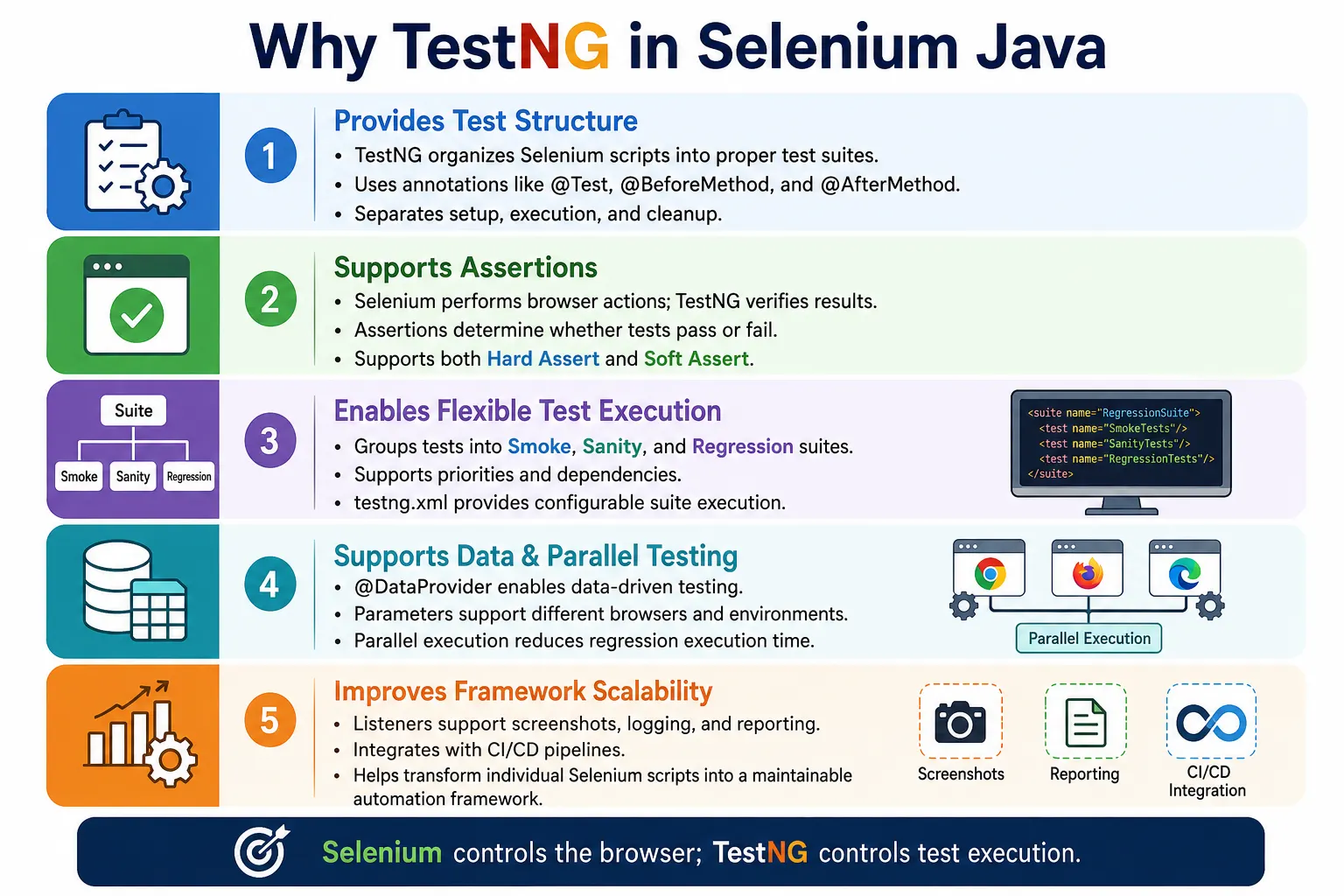
TestNG is one of the most widely used testing frameworks in Java-based Selenium automation. It helps teams convert individual Selenium scripts into organized, maintainable, and scalable test suites. Selenium controls the browser, but TestNG controls how tests are defined, executed, grouped, parameterized, reported, retried, and integrated into build pipelines. This separation is important: Selenium is the browser automation library, while TestNG is the test execution framework.
In enterprise automation, TestNG is useful because it supports both simple and advanced test needs. Beginners can start with @Test, @BeforeMethod, @AfterMethod, and assertions. As the framework grows, teams can add groups, DataProviders, listeners, parallel execution, XML suites, retry analyzers, and CI reports. That growth path is the main reason TestNG remains popular in Selenium Java projects.
1. Why Was TestNG Created?
Java developers originally used JUnit heavily for unit testing. JUnit worked well for developer-focused unit tests, but automation engineers needed more control for large functional test suites. UI automation often requires browser setup, browser cleanup, test categorization, dependencies, parameterization, parallel execution, and richer reporting. Early versions of JUnit had limitations in several of these areas.
TestNG was created to provide a more flexible and feature-rich testing framework. The name TestNG means "Test Next Generation." It was designed to support unit testing, functional testing, integration testing, and end-to-end test automation. For Selenium users, that flexibility became especially valuable because browser tests usually require more execution control than simple unit tests.
- More lifecycle annotations for setup and cleanup.
- Built-in support for test dependencies.
- Built-in grouping for smoke, sanity, and regression suites.
- DataProvider support for data-driven testing.
- XML suite configuration for flexible execution.
- Parallel execution support.
- Listener support for reports, screenshots, and logging.
2. What Problem Does TestNG Solve?
Without TestNG, a Selenium test may be written as a plain Java program. That is fine for a first script, but it does not scale. A main method does not provide a clean way to run hundreds of tests, mark tests as passed or failed, generate reports, run only smoke tests, retry temporary failures, or execute tests in parallel.
public class LoginTest {

    public static void main(String[] args) {

        WebDriver driver = new ChromeDriver();

        driver.get("https://example.com");

        driver.findElement(By.id("username"))
              .sendKeys("admin");

        driver.findElement(By.id("password"))
              .sendKeys("admin123");

        driver.findElement(By.id("login"))
              .click();

        driver.quit();
    }
}
This script opens the browser and performs login, but it does not behave like a real test framework. There is no separate setup method, no teardown method, no assertion, no report, no grouping, no data provider, and no execution control. If this pattern is repeated across a large project, maintenance becomes difficult quickly.
3. Benefits of TestNG
TestNG provides the missing structure around Selenium code. It allows teams to write test methods, run them automatically, verify results with assertions, organize them into groups, pass data into them, execute them in parallel, and produce reports after execution.
- Test annotations such as
@Test,@BeforeMethod, and@AfterMethod. - Assertions for pass and fail decisions.
- Priorities and dependencies for controlled execution.
- Groups for smoke, sanity, regression, and feature suites.
- Parameters and DataProviders for flexible inputs.
- Parallel execution for faster regression runs.
- Listeners for screenshots, logging, and reporting.
- Retry mechanisms for known temporary failures.
- HTML reports for execution results.
4. Easy Test Organization
One of the first benefits of TestNG is separating setup, test execution, and cleanup. In Selenium, every test usually needs a browser before execution and cleanup after execution. TestNG lifecycle annotations make this separation clear.
@BeforeMethod
public void setup() {

    driver = new ChromeDriver();
}

@Test
public void loginTest() {

    driver.get("https://example.com");
}

@AfterMethod
public void tearDown() {

    driver.quit();
}
This design is cleaner than placing everything inside one method. The setup code runs before each test method, the test contains the actual scenario, and the teardown code closes the browser afterward. This pattern improves readability and prevents duplicate setup code across tests.
5. Automatic Test Execution
In plain Java, you must call test methods manually from main(). With TestNG, methods annotated with @Test are discovered and executed by the TestNG runner. This allows tests to be run from IDEs, Maven, Gradle, CI pipelines, or TestNG XML suite files.
@Test
public void loginTest() {
}

@Test
public void searchTest() {
}

@Test
public void checkoutTest() {
}
Each method is treated as a separate test case. TestNG records whether each test passed, failed, or skipped. This automatic result tracking is a major improvement over simple Java execution.
6. Rich Annotation Support
TestNG annotations define the lifecycle of a test suite. These annotations allow setup and cleanup at different levels: suite, test, class, method, and individual test method. This gives automation architects control over when browser sessions, test data, configuration, and reports are initialized and cleaned up.
@BeforeSuiteruns before the entire suite.@BeforeTestruns before a TestNG XML test block.@BeforeClassruns before the first method in a class.@BeforeMethodruns before every test method.@Testmarks a method as a test.@AfterMethodruns after every test method.@AfterClass,@AfterTest, and@AfterSuitehandle cleanup at broader levels.
For Selenium, @BeforeMethod and @AfterMethod are commonly used to create and quit browsers for each test. This keeps tests isolated and reduces dependency between test methods.
7. Multiple Test Methods
TestNG allows one class to contain multiple test methods. Each method can represent one scenario, such as login, search, logout, checkout, or profile update. This encourages smaller and clearer tests instead of one long script that does everything.
@Test
public void loginTest() {
}

@Test
public void searchTest() {
}

@Test
public void logoutTest() {
}
Small test methods are easier to debug. If searchTest() fails, the report shows that specific scenario. If one huge test fails, the team must inspect logs to determine which business step caused the failure.
8. Assertions
Selenium can perform actions, but a test also needs verification. TestNG assertions decide whether the actual result matches the expected result. Without assertions, a Selenium script may perform steps but never prove that the application worked correctly.
Assert.assertEquals(
        driver.getTitle(),
        "Dashboard"
);

Assert.assertTrue(
        driver.findElement(By.id("logo"))
              .isDisplayed()
);
Assertions are what turn automation actions into test validation. A login test should not only click Login. It should verify that the dashboard appears, the username is shown, or a successful login indicator is present.
9. Hard Assert and Soft Assert
TestNG supports hard assertions through the Assert class. A hard assertion stops the test immediately when it fails. This is useful when the next steps depend on the assertion passing. For example, if login fails, checkout steps should not continue.
@Test
public void hardAssertExample() {
    Assert.assertEquals(
            driver.getTitle(),
            "Dashboard"
    );

    driver.findElement(By.id("logout")).click();
}
TestNG also supports soft assertions through SoftAssert. Soft assertions allow multiple checks to run and then report all failures at the end when assertAll() is called.
@Test
public void softAssertExample() {
    SoftAssert softAssert = new SoftAssert();

    softAssert.assertEquals(
            driver.getTitle(),
            "Home"
    );

    softAssert.assertTrue(
            driver.findElement(By.id("logo"))
                  .isDisplayed()
    );

    softAssert.assertAll();
}
Soft assertions are useful for checking several independent UI elements on the same page. Hard assertions are better when one failed check makes the rest of the test invalid.
10. Test Priorities
TestNG allows test methods to have priorities. Lower priority values run first. This can be useful for demonstration, learning, or a few ordered checks. However, priorities should not become the main design strategy for a large framework because overuse creates hidden dependencies between tests.
@Test(priority = 1)
public void login() {
}

@Test(priority = 2)
public void search() {
}

@Test(priority = 3)
public void logout() {
}
In enterprise automation, tests should be independent whenever possible. If tests must run in a business sequence, consider whether they are really separate tests or steps within one scenario.
11. Test Dependencies
TestNG supports dependencies using dependsOnMethods. A dependent test runs only if the method it depends on passes. This is useful when a test truly cannot run without a previous condition.
@Test
public void login() {
}

@Test(dependsOnMethods = "login")
public void verifyDashboard() {
}
Dependencies should be used carefully. If many tests depend on one test, one failure can skip a large part of the suite. For regression testing, independent tests are usually more reliable and easier to run in parallel.
12. Test Groups
Groups are one of the most practical TestNG features for Selenium projects. They allow tests to be categorized and executed selectively. For example, a team can run smoke tests after every deployment and full regression tests overnight.
@Test(groups = {"smoke"})
public void loginTest() {
}

@Test(groups = {"regression"})
public void paymentTest() {
}
Common groups include smoke, sanity, regression, critical, login, checkout, payment, API, UI, and release. Groups help teams avoid running every test for every change while still maintaining useful coverage.
13. Parameterization
TestNG parameters allow values to be passed from testng.xml into test methods or setup methods. This is useful for browser selection, environment URLs, usernames, feature flags, and execution modes.
@Parameters("browser")
@BeforeMethod
public void setup(String browser) {
    if (browser.equalsIgnoreCase("chrome")) {
        driver = new ChromeDriver();
    }
}
Parameterization makes the same test suite reusable across different browsers and environments. Instead of changing Java code, the team changes execution configuration.
14. Data-Driven Testing
@DataProvider is a major reason TestNG is popular in Selenium. It allows the same test method to run multiple times with different input data. This is ideal for login data, search keywords, form validation, role-based scenarios, and boundary values.
@DataProvider(name = "loginData")
public Object[][] getData() {
    return new Object[][] {
            {"admin", "admin123"},
            {"user", "user123"}
    };
}

@Test(dataProvider = "loginData")
public void loginTest(
        String username,
        String password
) {
    driver.findElement(By.id("username"))
          .sendKeys(username);

    driver.findElement(By.id("password"))
          .sendKeys(password);
}
Data-driven testing reduces duplicate code. Instead of writing separate tests for every data combination, one test method can run against many data sets. In larger frameworks, DataProviders can read from Excel, CSV, JSON, databases, or factories.
15. Parallel Execution
Parallel execution is one of the most important TestNG features for large Selenium suites. UI tests are slower than unit tests because they use real browsers. Running tests one by one can make regression execution take hours. Parallel execution reduces total time by running tests, classes, or suites at the same time.
<suite parallel="tests" thread-count="2">

    <test name="Chrome">
        ...
    </test>

    <test name="Edge">
        ...
    </test>

</suite>
Parallel execution requires careful framework design. Each test thread must have its own WebDriver instance. Shared state must be avoided. Test data must be isolated. Screenshot names must be unique. When done correctly, parallel execution significantly improves CI/CD feedback time.
16. Thread-Safe WebDriver Setup
When tests run in parallel, a single shared WebDriver object is dangerous. One test may close the browser while another test is still using it. A common approach is to use ThreadLocal<WebDriver> so every thread has its own driver instance.
private ThreadLocal<WebDriver> driver =
        new ThreadLocal<>();

@BeforeMethod
public void setup() {
    driver.set(new ChromeDriver());
}

@Test
public void testOne() {
    driver.get().get("https://example.com");
}

@AfterMethod
public void tearDown() {
    driver.get().quit();
}
This pattern becomes important once TestNG parallel execution is enabled. Without thread-safe driver management, failures can look random and difficult to debug.
17. Reporting
TestNG generates execution reports after a suite runs. The default output appears in the test-output folder and includes reports such as index.html and emailable-report.html. These reports show passed tests, failed tests, skipped tests, execution time, and method details.
test-output/
   ↓
index.html
   ↓
emailable-report.html
Default reports are useful, but many enterprise frameworks integrate TestNG with richer reporting tools such as ExtentReports, Allure, or CI dashboards. TestNG listeners make that integration easier.
18. Listener Support
Listeners allow custom behavior during test execution. A listener can run code when a test starts, passes, fails, skips, or finishes. In Selenium frameworks, listeners are often used to capture screenshots, write logs, update reports, and send notifications.
public class TestListener implements ITestListener {

    @Override
    public void onTestFailure(ITestResult result) {

        System.out.println("Test Failed");
    }
}
Listeners keep failure handling out of test methods. Instead of adding screenshot code to every test, the listener captures screenshots whenever any test fails.
19. Retry Failed Tests
TestNG supports retry logic through IRetryAnalyzer. Retry should be used carefully. It can help with temporary environment issues, but it should not hide real application defects or weak synchronization. A retry should be limited, logged, and visible in reports.
public class RetryAnalyzer implements IRetryAnalyzer {

    private int count = 0;
    private static final int maxRetry = 1;

    @Override
    public boolean retry(ITestResult result) {
        if (count < maxRetry) {
            count++;
            return true;
        }
        return false;
    }
}
Retry is not a replacement for good waits, stable locators, clean test data, or reliable environments. Use it only where the team understands the reason.
20. Integration with Selenium
TestNG works naturally with Selenium because Selenium tests need setup, execution, verification, and cleanup. TestNG provides the structure, and Selenium provides browser control.
@BeforeMethod
public void setup() {

    WebDriverManager.chromedriver().setup();

    driver = new ChromeDriver();
}

@Test
public void verifyLogin() {

    driver.get("https://example.com");
}

@AfterMethod
public void tearDown() {

    driver.quit();
}
This pattern is the foundation of many Java Selenium frameworks. It can later be extended with Page Objects, configuration readers, waits, listeners, screenshots, logs, and reports.
21. Integration with CI/CD
TestNG works well with CI/CD tools such as Jenkins, GitHub Actions, Azure DevOps, Bamboo, and GitLab CI. Build tools can run TestNG suites automatically. Reports can be archived. Failures can block deployments. Smoke suites can run after deployment, and regression suites can run on a schedule.
- Scheduled executions.
- Pull request validation.
- Smoke testing after deployment.
- Parallel regression pipelines.
- Automated report publishing.
- Failure notifications to teams.
22. Real Project Example
A real regression suite may contain login tests, search tests, order tests, payment tests, report tests, and user management tests. Running all tests after every small code change may be expensive. With TestNG, the team can group tests and choose execution scope based on risk.
For example, smoke tests may run after every deployment. Payment tests may run before a release. Full regression may run nightly. Browser compatibility tests may run in parallel across Chrome and Edge. Failed tests may capture screenshots through listeners. Data-driven tests may use DataProviders. This is how TestNG turns a set of Selenium scripts into a controlled automation suite.
23. JUnit vs TestNG
Both JUnit and TestNG are Java testing frameworks, and both can be used with Selenium. TestNG became popular in Selenium automation because it offers strong built-in support for features that automation teams often need: groups, XML suites, DataProviders, dependencies, listeners, and parallel execution.
- JUnit is widely used for unit testing and modern JUnit versions are powerful.
- TestNG is commonly used in Selenium Java automation frameworks.
- TestNG has built-in DataProvider support.
- TestNG groups are convenient for smoke and regression suites.
- TestNG XML files make suite configuration flexible.
- TestNG parallel execution is practical for browser automation.
The choice depends on the project, team skill, and framework design. For many Selenium Java interview and enterprise automation contexts, TestNG remains a familiar and expected tool.
24. Base Test Class
Most Selenium TestNG frameworks use a base test class. The base class handles driver setup and teardown, browser configuration, window maximization, timeouts, and common initialization. Test classes extend the base class and focus on test scenarios.
public class BaseTest {

    protected WebDriver driver;

    @BeforeMethod
    public void setup() {
        driver = new ChromeDriver();
        driver.manage().window().maximize();
    }

    @AfterMethod
    public void tearDown() {
        driver.quit();
    }
}
public class LoginTest extends BaseTest {
@Test
public void loginTest() {
driver.get("https://example.com/login");
driver.findElement(By.id("username"))
.sendKeys("admin");
driver.findElement(By.id("password"))
.sendKeys("admin123");
driver.findElement(By.id("loginBtn"))
.click();
}
}This design removes duplicate driver setup from every test class and makes framework maintenance easier.
25. TestNG XML Suite Configuration
One of the strongest TestNG features for Selenium automation is the testng.xml suite file. This file lets teams define what tests should run without changing Java code. A suite can include specific classes, packages, groups, parameters, listeners, and parallel execution settings. This is useful because the same automation code can support different execution needs: smoke testing, regression testing, cross-browser testing, release testing, and CI pipeline validation.
For example, a smoke suite can include only high-priority login, search, and checkout tests. A nightly regression suite can include all major modules. A browser compatibility suite can run the same tests across Chrome and Edge by passing browser parameters. This flexibility is much harder to maintain if execution is controlled only by Java code.
<suite name="Smoke Suite">
    <test name="Smoke Tests">
        <groups>
            <run>
                <include name="smoke"/>
            </run>
        </groups>

        <classes>
            <class name="tests.LoginTest"/>
            <class name="tests.CheckoutTest"/>
        </classes>
    </test>
</suite>
This configuration-driven execution is valuable in enterprise teams. QA engineers, SDETs, DevOps engineers, and release managers can run the right suite for the right purpose without editing test classes. It also makes CI jobs easier to manage because each job can point to a different TestNG XML file.
26. Data Strategy with TestNG
Test data management is one of the biggest challenges in Selenium automation. TestNG helps through DataProviders and parameters, but the framework still needs a clear strategy. Small data sets can be written directly inside a DataProvider. Larger data sets can come from Excel, CSV, JSON, databases, or API setup calls. The key is to separate test logic from test data so tests are easier to maintain.
For example, a login test may need valid users, invalid users, locked users, expired users, and role-based users. Writing separate test methods for every user type creates duplication. A DataProvider can pass each user type into one clean test method. The test remains focused on behavior, while the data source controls coverage.
However, DataProviders should not be abused. If every row represents a completely different business scenario, separate tests may be clearer. Data-driven testing works best when the workflow is the same and only the input data changes. If the workflow changes significantly for each row, forcing everything into one DataProvider can make the test harder to read and debug.
27. Listener-Based Screenshot and Reporting Design
TestNG listeners are extremely useful in Selenium frameworks because they allow cross-cutting behavior to be handled in one place. Screenshot capture is the classic example. Instead of writing screenshot code in every catch block, a listener can capture a screenshot when any test fails. It can also log the test name, attach screenshots to reports, update ExtentReports or Allure, and record execution status.
This design keeps test methods clean. A test should say what business flow is being verified. It should not contain repeated code for report updates, screenshot paths, browser metadata, or failure notifications. Listener logic can handle those framework concerns consistently across the entire suite.
Listeners also help with skipped tests, retry tracking, and result cleanup. For example, if a retry analyzer reruns a failed test, a listener can mark the first attempt as retried and show the final status clearly in the report. Without listener-level reporting, retry results can become confusing.
28. TestNG and Page Object Model
TestNG works especially well with the Page Object Model. TestNG provides the execution structure, while Page Objects provide reusable page actions. A test method should not contain raw locators for every field and button. Instead, it should call methods such as loginPage.login(), homePage.search(), or cartPage.checkout(). This keeps tests readable and reduces duplication.
A typical Selenium TestNG framework may have a base test class, driver factory, configuration reader, Page Object classes, utility classes, listener classes, and test classes. TestNG connects these pieces during execution. The base class prepares the driver. The test class calls Page Objects. Utilities handle waits and screenshots. Listeners capture results. Reports show the outcome.
This architecture is much more maintainable than plain Selenium scripts. When a locator changes, only the Page Object is updated. When screenshot logic changes, only the listener or utility changes. When browser setup changes, only the driver factory or base class changes. TestNG supports this separation by giving the framework predictable lifecycle hooks.
29. TestNG in Real CI Pipelines
In CI/CD pipelines, TestNG is often executed through Maven or Gradle. A Jenkins job, GitHub Actions workflow, or Azure DevOps pipeline can run a command that triggers the TestNG suite. The build can publish TestNG reports, archive screenshots, and fail the pipeline if critical tests fail. This makes automation part of the delivery process instead of a manual activity.
For example, a pipeline may run smoke tests after every deployment to a QA environment. If smoke tests pass, the pipeline may allow further testing or deployment. If smoke tests fail, the pipeline stops and the report shows which scenario failed. Nightly jobs may run full regression suites with parallel execution. Release pipelines may run browser compatibility suites before production deployment.
TestNG fits this model because it supports selective execution, XML configuration, groups, reports, and integration with build tools. These features are why TestNG remains relevant even when Selenium frameworks become large and complex.
30. Scalable Framework Mindset
The real reason to use TestNG is not just annotations. The real reason is scalability. A small team can write ten tests manually, but a growing product may need hundreds or thousands of automated checks. At that scale, execution control matters. Reporting matters. Data management matters. Parallel execution matters. Failure diagnosis matters. TestNG provides the foundation for those needs.
When designing a TestNG framework, think beyond the first test. Ask how the framework will run in CI, how failures will be reported, how data will be supplied, how browsers will be managed, how tests will be grouped, and how parallel execution will be handled. Good TestNG usage is not only about writing @Test. It is about designing an execution system that stays maintainable as the suite grows.
This is also why TestNG is frequently discussed in Selenium interviews. Interviewers are not only checking whether you know an annotation name. They want to know whether you understand how real automation suites are executed, organized, reported, and maintained over time.
31. Common Beginner Mistakes
- Putting all automation code inside one test method.
- Depending heavily on priorities instead of designing independent tests.
- Ignoring setup and teardown annotations.
- Hardcoding test data instead of using DataProviders or parameters.
- Not using assertions to verify actual results.
- Using one shared WebDriver object during parallel execution.
- Not using listeners for screenshots and reporting.
- Retrying tests without fixing synchronization problems.
- Quitting the browser before capturing failure evidence.
32. Best Practices
- Use
@BeforeMethodand@AfterMethodfor browser setup and cleanup. - Keep test methods independent whenever possible.
- Use assertions to verify expected results.
- Use
@DataProviderfor data-driven testing. - Use groups for smoke, sanity, and regression execution.
- Use listeners for logging, screenshots, and report updates.
- Enable parallel execution only after WebDriver handling is thread-safe.
- Keep WebDriver setup in a reusable base class or driver factory.
- Integrate TestNG execution with CI/CD pipelines.
33. Interview Perspective
A short interview answer is: TestNG is a Java testing framework that provides annotations, assertions, test grouping, dependencies, parameterization, DataProvider, parallel execution, listeners, retry support, and reports, making it very useful for Selenium automation.
A stronger real-time answer is: in my Selenium framework, I use TestNG because it gives structure to test execution. I use lifecycle annotations for setup and cleanup, assertions for validation, DataProvider for data-driven tests, groups for smoke and regression suites, listeners for screenshots and reports, and parallel execution for faster CI feedback. These features make Selenium tests scalable, maintainable, and suitable for enterprise automation.
34. Key Takeaway
TestNG transforms Selenium scripts into a structured automation framework. Selenium controls the browser, while TestNG controls test execution, lifecycle, data, grouping, reporting, and parallelism. That combination is why TestNG is widely used in Java-based Selenium automation.
The main value of TestNG is scalability. It allows a team to move from one script to hundreds of tests without losing organization. With annotations, assertions, DataProviders, groups, listeners, retries, reports, and CI/CD integration, TestNG provides the execution backbone that serious Selenium frameworks need.