Utility Classes in Selenium Framework
Utility Classes are reusable helper classes that contain common functions used across a Selenium automation framework. Instead of writing the same wait logic, screenshot code, file reading logic, JavaScript execution, alert handling, window switching, date generation, or random data creation in many test classes and page objects, these repeated operations are centralized into focused utility classes. Utility classes keep Selenium frameworks clean, reusable, maintainable, and scalable.
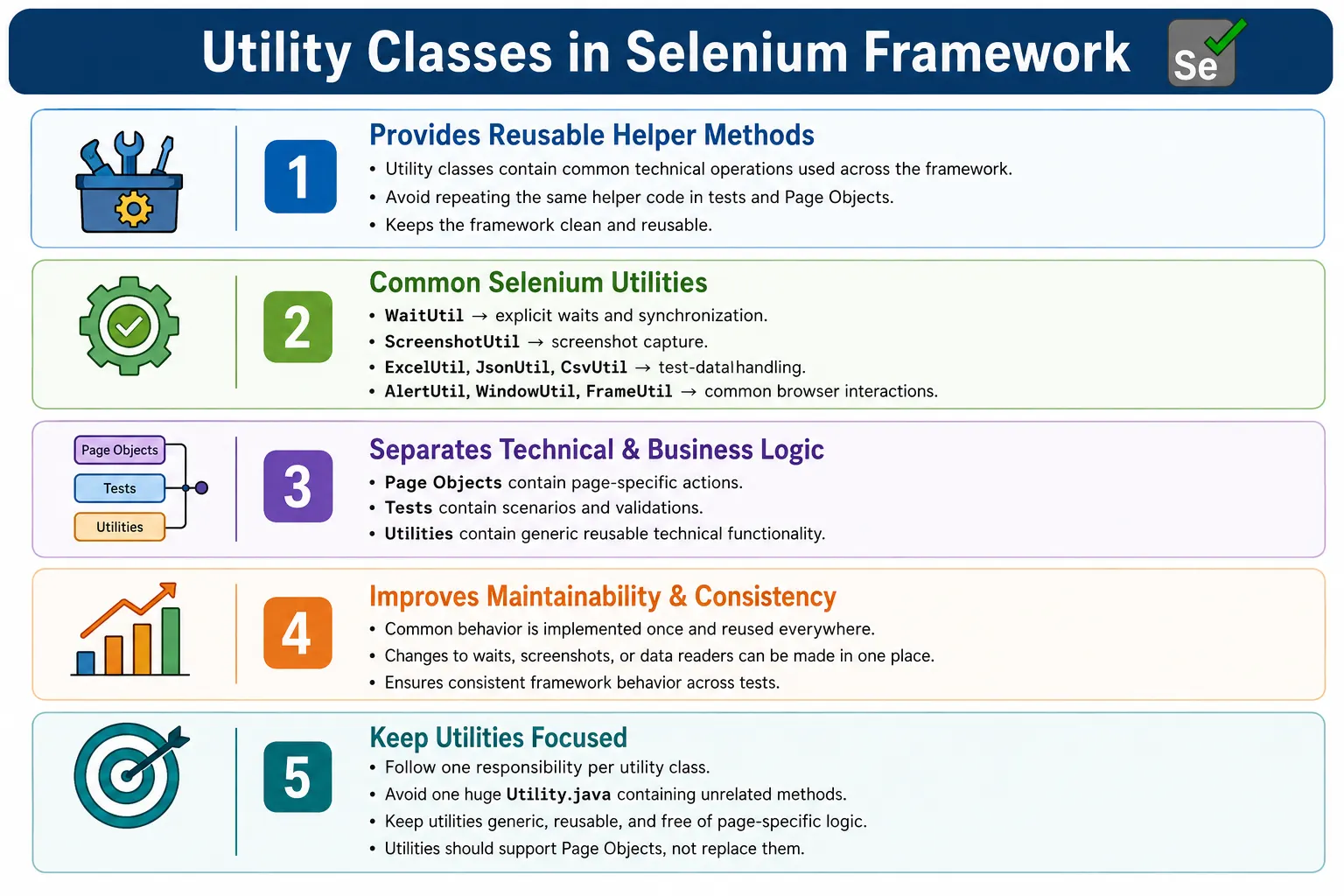
In a real Hybrid Framework, utility classes are not optional decoration. They are part of the framework backbone. Page objects use utilities to wait for elements, scroll to elements, click safely, and read messages. Test classes use utilities for data preparation, file checks, and assertions support. Listeners use utilities for screenshots and reports. BaseTest may use utilities for configuration and driver setup. When utilities are designed well, the framework becomes easier to extend because common behavior is written once and reused consistently.
1. What Are Utility Classes?
A Utility Class is a class that contains reusable methods for common tasks that are not specific to one page or one test case. A login page is page-specific. A checkout page is page-specific. A wait method is not page-specific. A screenshot method is not page-specific. A JSON reader is not page-specific. These generic operations belong in utility classes.
Utility classes help separate technical support logic from business test logic. A test should not need to know how screenshots are copied to a folder. A page object should not need to create a new explicit wait every time in a different style. A configuration consumer should not know how a properties file is loaded. These details can be centralized in utilities.
- Waiting for elements.
- Taking screenshots.
- Reading Excel files.
- Reading JSON or CSV files.
- Handling alerts, frames, and windows.
- Executing JavaScript operations.
- Generating dates and random data.
- Handling files and downloads.
- Reading configuration values.
2. Why Do We Need Utility Classes?
Automation frameworks become expensive to maintain when repeated code is scattered everywhere. Suppose multiple test classes need screenshots. Without a ScreenshotUtil, every class may repeat the same TakesScreenshot code. If the screenshot folder changes later, every class must be updated. If the naming strategy changes, every copy must be corrected. This is exactly the kind of duplication a framework should avoid.
Without Utility Classes
  LoginTest has screenshot code
  SearchTest has screenshot code
  CartTest has screenshot code
  CheckoutTest has screenshot code
  Each implementation may be different
With a utility, the framework exposes one reusable method such as ScreenshotUtil.capture(driver, fileName). Every class calls the same method. If the screenshot logic changes, the change is made in one place. This is the practical value of utility classes: they reduce duplication and standardize common behavior.
3. Problems Without Utility Classes
Without utilities, frameworks usually develop inconsistent helper code. One page object may wait for visibility. Another may use a hard wait. Another may click without waiting. One test may save screenshots as PNG. Another may save them with a timestamp. One class may read Excel in one way, while another reads it differently. These differences create random failures and make debugging harder.
No Utility Layer
  Duplicate Wait Code
  Duplicate Screenshot Code
  Duplicate Scroll Code
  Duplicate Alert Code
  Duplicate File Code
  Inconsistent Framework Behavior
Utility classes solve this by giving the framework a single trusted implementation for repeated technical tasks. They also make code reviews easier because reviewers can focus on business logic instead of repeated low-level Selenium code.
4. Core Idea
The core idea is centralization of common helper behavior. Tests and page objects should call utilities instead of reimplementing the same code. This keeps framework code shorter and clearer. If a method is generic, reusable, and not tied to one page, it is a good candidate for a utility class.
Every Test
  Should Not Own Helper Code

Utility Classes
  Provide Reusable Methods
    Used Across Framework
However, centralization does not mean creating one large Utility class with everything inside it. A good framework uses focused utilities, such as WaitUtil, ScreenshotUtil, ExcelUtil, JsonUtil, WindowUtil, AlertUtil, and JavaScriptUtil.
5. Framework Architecture
In framework architecture, utility classes usually sit below tests and page objects. Tests call page objects. Page objects use utilities when they need waits, JavaScript, dropdown handling, or other support. Utilities use WebDriver or Java APIs to perform technical operations. The browser remains the final execution target.
Tests
  Page Objects
    Utility Classes
      WebDriver
        Browser
Utilities support every layer, but they should not control the whole framework. They are helpers, not owners of business flow. This distinction keeps utilities reusable and prevents them from becoming tangled with application-specific behavior.
6. Common Utility Classes
Selenium frameworks commonly contain several utility classes. Each utility should have a clear responsibility. WaitUtil handles waits. ScreenshotUtil handles screenshots. ExcelUtil handles Excel reading and writing. JsonUtil handles JSON parsing. ConfigReader handles properties files. JavaScriptUtil handles script execution. AlertUtil handles alerts. WindowUtil handles window switching. FileUtil handles files and downloads.
WaitUtilfor explicit waits and synchronization.ScreenshotUtilfor capturing screenshots.ExcelUtilfor reading and writing Excel data.JsonUtilfor parsing JSON test data.CsvUtilfor reading CSV datasets.ConfigReaderfor configuration properties.JavaScriptUtilfor JavaScript actions.AlertUtilfor alert handling.WindowUtilfor window switching.FrameUtilfor frame switching.DropDownUtilfor Select dropdowns.FileUtilfor download and file validation.DateUtilandRandomDataUtilfor dynamic values.
7. Wait Utility
Wait utilities are among the most important Selenium utilities because timing issues are common in UI automation. Instead of creating WebDriverWait objects differently in every page class, a WaitUtil can expose common methods such as waitForVisibility, waitForClickable, waitForPresence, and waitForInvisibility.
public class WaitUtil {

    public static void waitForVisibility(WebDriver driver, WebElement element) {
        WebDriverWait wait = new WebDriverWait(driver, Duration.ofSeconds(20));
        wait.until(ExpectedConditions.visibilityOf(element));
    }
}
A strong WaitUtil helps reduce flaky tests. It also encourages explicit waits instead of hard sleeps. The waiting strategy becomes consistent across the framework.
8. Screenshot Utility
Screenshot utilities capture browser state when a test fails or when evidence is needed. Screenshot code should be reusable because many framework areas may need it: TestNG listeners, BaseTest teardown, debug helpers, or reporting integration.
public class ScreenshotUtil {

    public static void capture(WebDriver driver, String fileName) throws IOException {
        File screenshot = ((TakesScreenshot) driver)
                .getScreenshotAs(OutputType.FILE);

        Files.copy(
                screenshot.toPath(),
                Paths.get("screenshots", fileName + ".png"),
                StandardCopyOption.REPLACE_EXISTING
        );
    }
}
In real frameworks, screenshot names usually include test name, timestamp, browser, or failure status so files do not overwrite each other during repeated or parallel execution.
9. Excel Utility
Excel utilities are common in data-driven Selenium frameworks. ExcelUtil reads test data from spreadsheets and returns values to tests or DataProviders. It may also write results back to Excel in some frameworks, although many teams prefer reports for execution results.
String username = ExcelUtil.getCellData("Login.xlsx", "Login", 1, 0);Excel utilities should handle missing files, missing sheets, empty cells, numeric values, string values, and date values cleanly. Poor Excel handling can cause data-driven tests to fail for technical reasons rather than application defects.
10. JSON and CSV Utilities
JSON utilities are useful when test data has structure. A user object may contain name, email, address, role, and expected message. JSON can represent this better than a flat spreadsheet. Libraries such as Jackson or Gson are commonly used in Java frameworks.
JsonNode node = JsonUtil.readJson("login.json");CSV utilities are useful for lightweight tabular data. CSV files are easy to version-control and review in Git. A CsvUtil can read rows and return datasets for DataProvider usage.
List<String[]> data = CsvUtil.readCSV("Login.csv");The choice between Excel, JSON, and CSV should depend on data complexity, team skill, and maintainability.
11. JavaScript Utility
JavaScript utilities wrap common JavaScriptExecutor operations. They may scroll to an element, click through JavaScript, highlight an element, get page title, return page ready state, or set a value when normal Selenium interaction is not practical.
public void jsClick(WebElement element) {
    JavascriptExecutor js = (JavascriptExecutor) driver;
    js.executeScript("arguments[0].click();", element);
}
JavaScript utilities should be used carefully. JavaScript click can bypass real user behavior, so normal Selenium click should be preferred unless there is a clear reason. A utility makes the operation reusable, but the team still needs discipline about when to use it.
12. Alert, Window, Frame, and Dropdown Utilities
AlertUtil can accept, dismiss, read text from, or type into JavaScript alerts. WindowUtil can switch to windows by title or URL. FrameUtil can switch by index, name, ID, or WebElement. DropDownUtil can select options by visible text, value, or index. These utilities reduce repeated Selenium switching code.
AlertUtil.acceptAlert(driver);
WindowUtil.switchToWindow(driver, "Dashboard");
FrameUtil.switchToFrame(driver, "paymentFrame");
DropDownUtil.selectByText(countryDropdown, "India");
These utilities are especially useful in applications with complex UI interactions because switching code can become repetitive and error-prone.
13. Date, Random Data, and File Utilities
DateUtil helps generate today's date, future dates, formatted dates, and timestamp strings. Booking, reporting, invoice, and scheduling applications often need dynamic dates. RandomDataUtil helps generate unique emails, usernames, phone numbers, or IDs for registration and form testing.
String today = DateUtil.today();
String email = RandomDataUtil.email();
FileUtil handles file operations such as creating folders, verifying downloads, checking file existence, deleting temporary files, moving files, and renaming files. File utilities are important in upload and download automation because browser downloads are outside normal DOM interaction.
14. ConfigReader Utility
ConfigReader is often treated as a utility because it reads configuration from properties files or environment-specific files. It returns values such as browser, URL, timeout, environment, headless mode, and download path.
String url = ConfigReader.get("url");
String browser = ConfigReader.get("browser");
Configuration should be separated from test data. The application URL and browser are configuration. Login usernames and product names are test data. Keeping this separation clean makes frameworks easier to maintain.
15. Folder Structure
Utility classes should live in a dedicated package or folder. This makes them easy to find and prevents helper methods from being scattered across tests and page objects. A typical framework may have a utilities package with focused classes.
AutomationFramework
  utilities
    WaitUtil.java
    ScreenshotUtil.java
    ExcelUtil.java
    JsonUtil.java
    CsvUtil.java
    AlertUtil.java
    WindowUtil.java
    JavaScriptUtil.java
    ConfigReader.java
    DateUtil.java
  tests
  pages
  base
  driver
This structure helps enforce the idea that utilities are shared framework support code, not page-specific behavior.
16. Utility Flow
The flow usually starts from the test class or page object. The page object needs a common operation, such as waiting for an element. It calls WaitUtil. WaitUtil uses WebDriver and Selenium expected conditions. The browser action becomes stable and reusable.
Test Class
  Page Object
    Utility Class
      WebDriver
        Browser
This flow hides repetitive implementation details. The page object remains readable because it calls meaningful utility methods instead of writing long technical code every time.
17. Utility Classes vs Page Objects
Utility classes and page objects solve different problems. Utility classes provide generic helper methods. Page objects represent specific pages or components. A screenshot method belongs in a utility. A login method belongs in LoginPage. A wait method belongs in WaitUtil. A checkout method belongs in CheckoutPage.
| Utility Class | Page Object |
|---|---|
| Generic helper methods. | Page-specific methods. |
| Reusable across framework. | Represents one page or component. |
| Examples include screenshot, wait, Excel, and JavaScript. | Examples include login, checkout, product, and home page. |
18. Utility Classes vs BaseTest
BaseTest controls test lifecycle. Utility classes provide reusable helper operations. BaseTest may call utilities, but it should not become a utility container. Browser setup and cleanup belong in BaseTest. Screenshot capture may belong in ScreenshotUtil. Waiting behavior may belong in WaitUtil. Excel reading belongs in ExcelUtil.
| BaseTest | Utility Class |
|---|---|
| Framework initialization. | Reusable helper methods. |
| Browser setup and cleanup. | Screenshot, wait, Excel, JSON, and file handling. |
| Runs through TestNG lifecycle annotations. | Called whenever common behavior is needed. |
19. Utility Classes vs DriverFactory
DriverFactory creates WebDriver instances. Utility classes perform helper operations after the driver exists. A utility should not normally decide which browser to create. That is DriverFactory's responsibility. A screenshot utility uses the driver. It does not create the driver.
| Utility Class | DriverFactory |
|---|---|
| Performs helper operations. | Creates WebDriver instances. |
| Examples include screenshot, wait, alert, and file operations. | Examples include ChromeDriver, FirefoxDriver, EdgeDriver, and remote driver. |
| Supports test and page logic. | Supports browser lifecycle setup. |
20. Element Utility
Many frameworks create an ElementUtil that wraps common element operations such as click, type, getText, isDisplayed, and waitForVisible. This can reduce repeated element handling code in page objects. ElementUtil is useful when it remains generic and does not contain page-specific locators.
public class ElementUtil {

    private WebDriver driver;
    private WebDriverWait wait;

    public ElementUtil(WebDriver driver) {
        this.driver = driver;
        wait = new WebDriverWait(driver, Duration.ofSeconds(10));
    }

    public void click(By locator) {
        wait.until(ExpectedConditions.elementToBeClickable(locator)).click();
    }

    public void type(By locator, String value) {
        WebElement element = wait.until(
                ExpectedConditions.visibilityOfElementLocated(locator)
        );
        element.clear();
        element.sendKeys(value);
    }
}
This utility can make page objects shorter. However, the page object should still define page-specific actions. Utility classes should not replace page objects.
21. Retry and Stability Utilities
Some frameworks include retry utilities for specific unstable operations, such as handling stale elements. These utilities should be used carefully. Retrying every failure can hide real defects. Retrying a known transient issue may be useful if the logic is controlled and logged clearly.
public void retryClick(By locator) {
    for (int i = 0; i < 3; i++) {
        try {
            driver.findElement(locator).click();
            return;
        } catch (StaleElementReferenceException e) {
            // retry
        }
    }
}
If retry logic is used, it should be centralized and visible in logs. Silent retry behavior can make failures harder to understand.
22. Static vs Instance Utility Methods
Many utility methods are static because they are stateless. For example, DateUtil.today or RandomDataUtil.email can be static. ScreenshotUtil.capture can also be static if all required inputs are passed as parameters. Static methods are simple and convenient for small stateless operations.
Instance-based utilities are better when a class needs dependencies such as WebDriver, WebDriverWait, configuration, logging context, or report context. ElementUtil often works well as an instance utility because it can hold driver and wait references. Forcing every utility to be static can make testing and dependency management harder in larger frameworks.
23. Common Beginner Mistakes
A common beginner mistake is putting utility methods inside page objects. For example, LoginPage should not contain a generic screenshot method. Another mistake is creating many duplicated helper methods with slightly different names, such as wait, waitForElement, waitUntilVisible, and waitForVisibility, all doing the same thing. This creates confusion and inconsistent usage.
- Putting generic utilities inside page objects.
- Creating duplicate helper methods with different names.
- Creating one huge Utility class that contains everything.
- Making utilities depend on specific pages.
- Making every method static without considering dependencies.
- Using utilities to hide poor test design.
- Using JavaScript utility methods when normal Selenium actions should be used.
- Not logging important utility failures.
24. Best Practices
Enterprise frameworks should keep utilities generic, focused, and reusable. One responsibility per utility class is a strong rule. WaitUtil should not read Excel. ExcelUtil should not click elements. ScreenshotUtil should not know page-specific behavior. Clear responsibility makes utilities easier to maintain and test.
- Keep each utility class focused on one responsibility.
- Make reusable methods generic enough to work across all pages.
- Avoid page-specific locators inside utility classes.
- Use explicit waits inside utilities instead of hard sleeps.
- Keep utilities stateless where practical.
- Use instance utilities when dependencies are required.
- Handle exceptions and logging appropriately.
- Write unit tests for complex utilities.
- Organize utilities in a dedicated package.
25. Real Enterprise Framework
In a real enterprise Selenium framework, tests use page objects, page objects use utilities, utilities use WebDriver or Java APIs, and DriverFactory manages browser creation. Utility classes sit in the middle as the reusable toolkit for repeated technical operations.
Tests
  Page Objects
    Utilities
      WaitUtil
      ExcelUtil
      JsonUtil
      ScreenshotUtil
      JavaScriptUtil
      AlertUtil
      WindowUtil
      ConfigReader
      DateUtil
        DriverFactory
          Browser
This structure allows the framework to grow without duplicating helper code. When a new page is added, it can reuse the same utilities. When a new test is added, it can rely on the same helper layer.
26. Utility Classes and Maintainability
Maintainability is the biggest benefit of utility classes. If the screenshot naming format changes, ScreenshotUtil changes once. If the wait timeout changes, WaitUtil changes once. If Excel reading needs to support blank cells, ExcelUtil changes once. This is much better than updating dozens of page objects and test classes.
Utilities also make framework behavior consistent. Every page waits the same way. Every screenshot is saved the same way. Every JSON file is read the same way. Consistency reduces debugging time because engineers do not need to learn a different helper style in every class.
27. Utility Classes and Reporting
Utilities often support reporting. ScreenshotUtil may capture files that reports attach. DateUtil may generate report timestamps. FileUtil may verify generated report files. Logging utilities may write step details. However, reporting behavior should be designed carefully so utilities do not become tightly coupled to one reporting tool unless that is intentional.
A practical approach is to let utilities return useful results and let listeners or report managers attach those results to reports. For example, ScreenshotUtil can return the screenshot path. The listener can attach that path to Extent Reports or Allure. This keeps ScreenshotUtil reusable even if the reporting tool changes later.
28. Utility Classes and Parallel Execution
Parallel execution affects utility design. Utilities should not store shared mutable state unless it is thread-safe. A static file name can cause screenshots to overwrite each other. A shared WebDriver reference can cause one test to affect another. A shared data object can create unpredictable failures.
For parallel frameworks, utility methods should receive the correct driver instance as a parameter or use a safe driver provider. File names should include test name, timestamp, thread ID, or unique identifier. Utilities should avoid global state unless carefully controlled. This is important because a utility bug can affect many tests at once.
29. Designing Utility Method Names
Utility method names should be clear, consistent, and action-oriented. A method name should tell the caller what the method does without needing to inspect the implementation. Names such as waitForVisibility, waitForClickable, captureScreenshot, switchToWindowByTitle, selectByVisibleText, readJsonFile, and generateRandomEmail are easier to understand than vague names such as handle, process, doClick, commonWait, or utilityMethod.
Consistent naming also prevents duplicate methods. If one engineer creates waitForVisible and another creates waitUntilDisplayed for the same behavior, the framework becomes confusing. Teams should agree on naming conventions for utilities. For example, wait methods can start with waitFor, screenshot methods can start with capture, data reader methods can start with read, and verification helper methods can start with is or get depending on return type.
30. Utility Classes and Exception Handling
Exception handling inside utilities should be thoughtful. A utility should not hide failures silently. If a click fails because an element is not clickable, the framework should provide a useful message. If Excel reading fails because a sheet is missing, the error should mention the file and sheet name. If a screenshot cannot be saved, the failure should show the destination path. Good exception messages save debugging time.
At the same time, utilities should not catch every exception and return false without context. That makes failures harder to investigate. A better pattern is to catch exceptions only when the utility can add meaningful context, perform cleanup, or convert the failure into a framework-specific exception. Otherwise, allow the exception to fail the test clearly. Automation failures should be visible and diagnosable.
31. Utility Classes and Unit Testing
Some utility classes can and should be unit tested. DateUtil, RandomDataUtil, ConfigReader, JsonUtil, CsvUtil, and FileUtil often contain logic that can be tested without opening a browser. Unit tests for these utilities help catch framework bugs early. For example, a ConfigReader test can verify that required keys are loaded. A JsonUtil test can verify that invalid JSON fails with a useful message. A DateUtil test can verify expected date formats.
Browser-dependent utilities, such as WaitUtil or JavaScriptUtil, are harder to unit test because they depend on WebDriver and browser state. Still, their behavior can be reviewed through integration tests or framework smoke tests. The key idea is that utilities are production code inside the test framework. If they are complex, they deserve validation.
32. Utility Governance in Large Teams
Large teams need governance around utilities. If every engineer adds new utility methods without review, the utilities package becomes messy. Duplicate methods appear. Method names become inconsistent. Some utilities become page-specific. Others use different exception handling styles. Over time, the utility layer becomes harder to trust.
A practical governance approach is to review utility changes carefully. Before adding a new utility method, the team should ask whether a similar method already exists, whether the method is generic, whether it belongs in the proposed class, whether the method name is clear, and whether it introduces shared state. Utility classes affect the whole framework, so they should be treated as shared framework assets.
33. Utility Anti-Patterns
The most common utility anti-pattern is the giant Utility.java class. This class starts with a few helper methods and slowly grows into hundreds of unrelated methods. It may contain waits, Excel reading, screenshots, JavaScript, date formatting, database access, file handling, random data, and assertions all in one place. This class becomes difficult to maintain because it has no clear responsibility.
Another anti-pattern is page-aware utilities. A utility method named clickLoginButton or enterCheckoutAddress is not a generic utility. It belongs in a page object or business flow class. Utilities should support pages, not become hidden page objects. A third anti-pattern is using utilities to bypass bad design. If tests are unreadable because everything is hidden behind generic helpers, the framework may become harder to understand rather than easier.
34. Utility Classes in CI/CD
Utilities play an important role in CI/CD execution. ScreenshotUtil must save files to paths that work on build agents. FileUtil must handle workspace directories correctly. ConfigReader must read environment values from pipeline parameters when needed. Report-related utilities must create folders if they do not exist. Download verification utilities must wait for files reliably instead of assuming local machine timing.
CI environments are less forgiving than developer laptops. Paths may be different, browsers may run headless, downloads may behave differently, and tests may run in parallel. Utilities should be written with these realities in mind. A utility that works only on one local machine is not enterprise-ready.
35. Interview Perspective
A short interview answer is: utility classes are reusable helper classes that contain common functions used throughout a Selenium framework, such as waits, screenshots, Excel handling, JSON parsing, alerts, windows, JavaScript operations, file handling, and configuration reading.
A stronger real-time answer is: in my Selenium Hybrid Framework, I use separate utility classes such as WaitUtil, ScreenshotUtil, ExcelUtil, JsonUtil, JavaScriptUtil, AlertUtil, WindowUtil, FileUtil, DateUtil, RandomDataUtil, and ConfigReader. These classes centralize common functionality so that Page Objects and test classes remain focused on business logic. This reduces duplicate code, improves maintainability, and makes the framework easier to extend when new requirements are added.
36. Utility Classes Workflow
The workflow starts with a test class or page object needing a common operation. Instead of writing the implementation directly, it calls a utility method. The utility performs the technical work using WebDriver, Java APIs, or external libraries. The result returns to the page object or test.
This workflow also makes onboarding easier. A new automation engineer can learn the framework faster because common operations have standard locations and standard method names. Instead of searching through many page classes to understand how screenshots, waits, file checks, and data readers work, the engineer can inspect the utilities package and reuse the same patterns.
Test Class
  Page Object
    Utility Class
      WebDriver
        Browser
This workflow keeps the framework clean because the same helper implementation is reused everywhere.
37. Key Takeaway
Utility classes are the reusable toolkit of a Selenium automation framework. They centralize common operations such as waits, screenshots, data reading, JavaScript actions, alerts, windows, frames, dropdowns, dates, random data, files, and configuration. They reduce code duplication, improve readability, simplify maintenance, and support scalable enterprise automation.
Common Operations
  Utility Classes
    WaitUtil
    ScreenshotUtil
    ExcelUtil
    JsonUtil
    CsvUtil
    ConfigReader
    JavaScriptUtil
    AlertUtil
    WindowUtil
    DateUtil
      Reusable Across Framework
The most important rule is to keep utilities generic and focused. One responsibility per utility class keeps the framework clean. Utility classes should support page objects and tests, not replace them. When designed carefully, they become a core component of every maintainable Selenium Hybrid Framework.