Thread.sleep() Drawbacks
Thread.sleep() is a hard-coded, time-based pause that forces the test thread to wait for a fixed duration. While simple, it is one of the most harmful practices in Selenium automation and a leading cause of slow, flaky, and unreliable test suites.
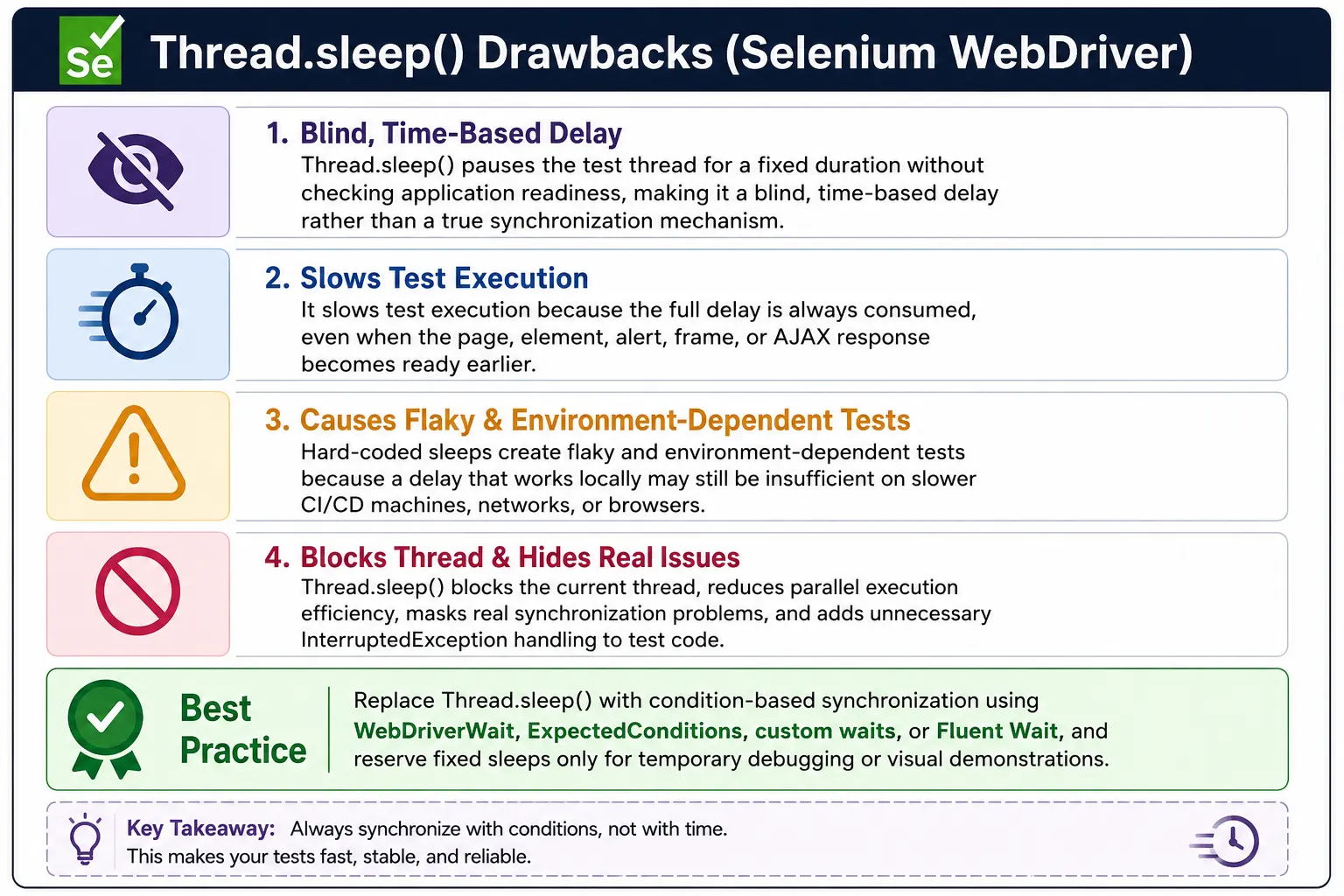
Understanding Thread.sleep() Drawbacks in Selenium
Thread.sleep() is one of the easiest commands to add to a Selenium test, and that is exactly why it becomes a problem in many automation projects. It pauses the current Java thread for a fixed amount of time. During that pause, Selenium does not check whether the page is ready, whether an element is visible, whether a spinner has disappeared, whether an alert has appeared, or whether a button has become clickable. It simply waits because the script told it to wait. This is blind waiting, not synchronization.
In a small demo script, Thread.sleep() may appear harmless. A tester clicks a button, sleeps for two seconds, and then checks the result. If the application is fast and the environment is stable, the script may pass. The problem appears when the same pattern is used in a real suite. Different machines run at different speeds. CI servers may be slower than local laptops. Network calls may take longer during peak usage. JavaScript rendering may vary between browsers. A fixed pause cannot adapt to any of these conditions.
Professional Selenium frameworks avoid Thread.sleep() because automation should wait for application state, not for arbitrary time. If the next action requires a button to be clickable, the test should wait for clickability. If the next step depends on a loading overlay disappearing, the test should wait for invisibility. If the next verification needs success text, the test should wait for that text. Condition-based waits are faster, more reliable, and easier to debug than fixed sleeps.
What Thread.sleep() Actually Does
It Pauses the Test Thread
Thread.sleep(milliseconds) tells Java to pause the current thread for the specified duration. If the code says Thread.sleep(5000), the test thread is blocked for five seconds. The browser may finish loading after one second, but the test still waits the remaining four seconds. The browser may take eight seconds to finish, but the test still continues after five seconds and may fail. The pause is disconnected from the application.
This behavior is fundamentally different from WebDriverWait. WebDriverWait checks a condition repeatedly until the condition is met or the timeout expires. If the condition is met early, the wait ends early. Thread.sleep() never ends early because it does not know what condition matters. It is a stopwatch, not a readiness check.
It Does Not Inspect the Browser
While the thread is sleeping, Selenium does not inspect the DOM. It does not ask whether the target element is present. It does not verify visibility. It does not check enabled state. It does not detect overlays. It does not wait for text, attributes, frames, alerts, windows, URLs, or titles. The test is simply idle. This is why Thread.sleep() is a poor synchronization mechanism.
Good synchronization requires feedback from the browser. The test should observe the state of the page and make a decision. Thread.sleep() removes that feedback loop. It assumes that time alone is enough to make the page ready. In dynamic applications, that assumption is often wrong.
Why Thread.sleep() Makes Tests Slow
It Always Waits the Full Duration
The most obvious drawback is wasted time. If a script uses Thread.sleep(5000) after loading a page, it always waits five seconds. It does not matter if the login button became clickable after half a second. When sleeps are repeated across many steps, the wasted time becomes significant. A few seconds may not seem important in one test, but it becomes costly across hundreds of tests.
Imagine a suite with fifty sleeps of two seconds each. That is one hundred seconds of guaranteed delay, even on the fastest possible run. If the suite runs on every commit, every pull request, and every nightly build, the wasted time becomes expensive. It slows feedback for developers, testers, and release teams. Automation should shorten feedback cycles, not stretch them with unnecessary pauses.
It Hurts CI Pipeline Efficiency
CI pipelines are sensitive to execution time. Slow tests delay merge decisions and release validation. When Thread.sleep() is used heavily, pipeline time grows without improving reliability. Worse, teams often increase sleep durations when failures occur. A two-second sleep becomes five seconds, then ten seconds. The suite becomes slower, but the underlying synchronization problem remains.
Condition-based waits solve this more intelligently. A WebDriverWait with a ten-second timeout does not always wait ten seconds. It waits until the condition appears. If the page is ready quickly, the test continues quickly. If the page is slow, the wait gives it time. This is why explicit waits improve both speed and stability.
Why Thread.sleep() Causes Flaky Tests
Fixed Time Cannot Handle Variable Performance
Web applications do not always respond at the same speed. Backend calls may be fast in one run and slow in another. A browser may render quickly on a powerful laptop and slowly on a shared CI runner. A grid node may be under load. A cloud test environment may have network latency. Thread.sleep() assumes that one fixed duration is always enough. That assumption leads to flaky tests.
If the sleep is too short, the test fails because the application is not ready. If the sleep is too long, the test passes but wastes time. There is no perfect fixed duration because the application speed is not fixed. That is the core reason Thread.sleep() is unreliable. It tries to solve a state problem with a time guess.
Local Success Does Not Guarantee CI Success
Many Thread.sleep() problems are discovered only after tests move from local execution to CI. A tester may run a script locally and see it pass every time. Then the same script fails in the pipeline. The difference is often environment speed. Local machines may have more resources, shorter network paths, and visible browser sessions. CI systems may run headless, parallel, remote, or under resource constraints.
A sleep that works locally may not work in CI. Increasing the sleep may make CI pass temporarily, but it makes local and CI runs slower. It also does not guarantee future stability. The better fix is to replace the sleep with a condition that works in both environments.
Thread.sleep() Masks Real Synchronization Problems
It Hides the Root Cause
When a test fails because an element is not ready, adding Thread.sleep() may make the failure disappear for a while. But it does not explain why the element was not ready. Was a spinner still visible? Was the button disabled? Did an overlay block the click? Did an AJAX call fail? Did the page navigate to the wrong location? Sleep hides these questions instead of answering them.
Strong automation identifies the readiness signal and waits for it directly. If a loader blocks interaction, wait for the loader to disappear. If a button becomes enabled after validation, wait for enabled or clickable state. If data appears after an API response, wait for the data rows or final message. This approach fixes the root synchronization problem rather than hiding it behind a delay.
It Encourages Weak Framework Design
A framework filled with sleeps often lacks clear page readiness methods. Test authors add delays wherever failures occur instead of improving page objects and wait utilities. Over time, the suite becomes hard to read and harder to maintain. Nobody knows which sleeps are still necessary, which are obsolete, and which are hiding product issues. Removing them later becomes risky because they are scattered throughout the codebase.
A professional framework centralizes synchronization. It uses helper methods such as waitForVisible, waitForClickable, waitForOverlayToDisappear, waitForText, waitForUrlContains, and waitForFrame. These helpers make timing rules explicit and reusable. Thread.sleep() does the opposite. It spreads timing guesses across tests.
Thread.sleep() vs Explicit Wait
Time-Based Waiting vs Condition-Based Waiting
The essential difference is that Thread.sleep() is time-based while explicit wait is condition-based. Thread.sleep() says, "pause for this many milliseconds." Explicit wait says, "continue when this condition is true, or fail if it does not become true in time." That difference changes the quality of the test. A condition-based wait is connected to the application. A sleep is disconnected from it.
For example, before clicking a login button, Thread.sleep() guesses when the button might be ready. An explicit wait checks whether the button is clickable. Before reading a result message, Thread.sleep() guesses when the message might appear. An explicit wait checks for the message text. The condition-based version is more meaningful, faster when the app is fast, and more reliable when the app is slow.
Failure Quality Is Different
When a sleep-based test fails, the failure often appears at the next Selenium command. The message may say that an element was not found, not interactable, stale, or intercepted. The sleep itself provides no explanation. It simply ended. When an explicit wait fails, the timeout condition gives more information. It tells you what state did not occur: visibility, clickability, text presence, alert presence, frame availability, or invisibility.
This makes explicit waits better for debugging. A timeout waiting for a spinner to disappear points to a possible loading problem. A timeout waiting for clickability points to disabled state, overlay, or locator issues. A timeout waiting for text points to application behavior or data issues. Thread.sleep() gives none of that context.
Common Places Where Thread.sleep() Is Misused
After Page Load
Many scripts call driver.get() and then sleep for several seconds before interacting with the page. This is unreliable because page readiness depends on what the next step needs. The document may be loaded, but a login form may still be rendering. Or the form may be ready almost immediately. A better approach is to wait for the first meaningful element on the page, such as the username field or login button.
Page Object Model can handle this cleanly. A page object may have a waitForPageReady method that waits for the page heading, primary form, or key action button. This gives the framework a page-specific readiness signal instead of using the same sleep after every navigation.
After Clicking Buttons
Another common misuse is sleeping after every click. The test clicks Save, sleeps for three seconds, and then checks the message. The right wait depends on what the click triggers. If it triggers a spinner, wait for the spinner to disappear. If it triggers a toast, wait for the toast. If it triggers navigation, wait for the URL or destination heading. If it updates a table, wait for the table state.
This makes the wait tied to the behavior of the feature. It also makes failures clearer. If the success message never appears, the wait tells you exactly what was missing. A sleep only delays the failure.
Before Handling Alerts, Frames, and Windows
Alerts, frames, and windows are browser context changes. Sleeping before switching to them is fragile. A JavaScript alert may appear immediately or after a server response. A payment frame may load after a third-party script completes. A new tab may open with slight delay. Selenium has explicit conditions for these cases: alertIsPresent, frameToBeAvailableAndSwitchToIt, and numberOfWindowsToBe.
These conditions are better than sleeps because they wait for the actual context. The test switches only when the alert, frame, or window exists. This prevents errors caused by switching too early and avoids unnecessary waiting when the context appears quickly.
When Thread.sleep() Might Be Acceptable
Debugging and Visual Observation
There are rare cases where Thread.sleep() is acceptable temporarily. A tester may add a short sleep while debugging to observe the browser, record a demonstration, inspect animation behavior, or pause before taking a manual screenshot. In these cases, the sleep is not part of the synchronization strategy. It is a temporary development aid.
Temporary sleeps should not be committed to production automation. If they are committed as a short-term workaround, they should be marked clearly and removed quickly. Otherwise, temporary debugging code becomes permanent technical debt.
Very Rare Non-Observable Transitions
Occasionally, an application may have a transition with no reliable observable signal. For example, a visual animation may need to finish before a screenshot comparison, but the DOM state may not change. Even then, the first choice should be to find a better signal, such as animation class removal, computed style, overlay disappearance, or element location stability. Sleep should be the last resort, not the default.
If a sleep is truly unavoidable, keep it isolated in a named helper that explains why it exists. Do not scatter raw Thread.sleep() calls throughout tests. Isolation makes the exception visible and easier to remove later.
Better Alternatives to Thread.sleep()
WebDriverWait with ExpectedConditions
The main replacement for Thread.sleep() is WebDriverWait with ExpectedConditions. It can wait for elements to be visible, clickable, present, selected, invisible, updated with text, or changed through attributes. It can also wait for alerts, frames, windows, titles, and URLs. These conditions cover most Selenium synchronization needs and should be used before considering custom logic.
For example, replace a sleep before clicking with elementToBeClickable. Replace a sleep before reading a message with visibilityOfElementLocated or textToBePresentInElementLocated. Replace a sleep before switching to a frame with frameToBeAvailableAndSwitchToIt. These replacements make tests both faster and more reliable.
Custom Wait Logic
Some pages require application-specific waits. A table may need rows loaded, a dashboard may need widgets rendered, a loader may need to disappear and content may need to populate afterward, or text may need to become stable. Custom wait logic handles these cases. It uses WebDriverWait or Fluent Wait with a lambda condition that checks the actual readiness state.
Custom waits should be deterministic and centralized. They should not contain hidden sleeps. They should return success only when the application is truly ready. This is how teams replace guesswork with business-aware synchronization.
Fluent Wait for Advanced Cases
Fluent Wait is useful when the framework needs custom polling intervals or ignored exceptions. It can handle dynamic components that re-render, elements that appear inconsistently, and transient stale or no-such-element exceptions during polling. Fluent Wait should be used selectively because it adds complexity, but it is far better than Thread.sleep() for unstable UI behavior.
The decision is simple: use ExpectedConditions for normal waits, custom wait logic for application-specific readiness, and Fluent Wait when polling or exception handling needs fine control. All three are condition-based. Thread.sleep() is not.
Impact on Framework Scalability
Sleep-Based Suites Do Not Scale Well
A suite with many Thread.sleep() calls becomes slow as it grows. Each new test adds more fixed waiting. Parallel execution can reduce total wall-clock time, but sleeps still block individual test threads. In cloud or grid environments, blocked test sessions consume resources while doing nothing. This increases execution cost and reduces throughput.
Condition-based waits scale better because they continue as soon as the condition appears. They still allow time for slow operations, but they do not force every fast operation to wait the maximum delay. This matters when a suite grows from a few smoke tests to hundreds or thousands of regression tests.
Maintainability Gets Worse Over Time
Sleeps also create maintenance problems. When a test fails, teams may increase the sleep. When the page becomes faster, nobody removes the sleep. When the UI changes, old sleeps remain even if they no longer relate to the current behavior. Over time, the suite accumulates delays that nobody understands. This is a common sign of a weak automation framework.
A maintainable framework uses named wait helpers and page readiness methods. These methods explain what the test is waiting for. They can be reviewed, improved, reused, and debugged. Thread.sleep() has no such meaning. It only says "wait here."
Interview Perspective on Thread.sleep() Drawbacks
Short Interview Answer
Thread.sleep() pauses execution for a fixed time and is not recommended for Selenium synchronization because it does not check application readiness.
Detailed Interview Answer
In Selenium automation, Thread.sleep() creates blind waiting. It always waits the full duration even if the application is ready earlier, and it proceeds after that duration even if the application is still not ready. This makes tests slow, flaky, environment-dependent, and hard to maintain. In real projects, it should be replaced with explicit waits, ExpectedConditions, custom waits, or Fluent Wait depending on the application state that needs to be synchronized.
Real Project Explanation
In a real framework, I would avoid Thread.sleep() in test code. Before clicking, I would wait for clickability. After submitting a form, I would wait for the success message, URL change, or loader disappearance. For dynamic tables, I would wait for rows or a no-results message. For frames, alerts, and windows, I would use the appropriate ExpectedConditions. If a temporary pause is needed for debugging, I would remove it before committing the automation code.
The key takeaway is that Thread.sleep() is guessing. It does not know whether the application is ready, and it does not provide useful failure information. Reliable Selenium automation waits for conditions, not time. When teams replace sleeps with meaningful synchronization, their suites become faster, more stable, easier to debug, and better suited for CI and large-scale regression testing.
How to Remove Thread.sleep() from an Existing Suite
Audit Sleeps Before Replacing Them
Removing Thread.sleep() from an existing Selenium suite should be done thoughtfully. The first step is to audit where sleeps are used and why they were added. Some sleeps may appear after navigation, some after clicks, some before reading text, and some before switching frames or alerts. Each sleep is a clue that the original author saw a timing problem. Replacing all sleeps blindly with one generic wait may not solve the underlying issue.
A useful audit groups sleeps by purpose. Sleeps before clicks usually become clickability waits or overlay disappearance waits. Sleeps after form submissions usually become success-message, URL-change, or loader invisibility waits. Sleeps before table checks usually become row-count or no-results waits. Sleeps before frame or alert handling become frame and alert ExpectedConditions. This grouping turns cleanup into a structured framework improvement rather than a risky search-and-replace operation.
Replace Sleeps with Named Helpers
The best replacement is usually a named helper method. Instead of placing raw WebDriverWait code everywhere, create methods such as waitForVisible, waitForClickable, waitForLoaderToDisappear, waitForTextToContain, waitForResultsToLoad, waitForFrameAndSwitch, and waitForAlert. These names explain the readiness state and make page objects easier to read. They also allow timeout values and diagnostic logging to be controlled from one place.
Named helpers also help teams enforce standards. During code review, a reviewer can question any new sleep and ask what condition should replace it. Over time, the suite develops a clear synchronization vocabulary. New test authors learn to wait for states instead of adding pauses. This creates long-term stability, not just a one-time cleanup.
Refactor Page Objects, Not Only Test Methods
If sleeps are removed only from test methods, synchronization may still remain scattered. Page objects should own most waits because they understand their page elements and workflows. A page method that clicks Save should wait for the Save button to be clickable before the click and wait for the resulting state after the click. A search method should wait for input readiness, trigger the search, and then wait for results or a no-results message. Tests should not need to know those timing details.
This refactoring improves test readability. Instead of seeing sleep, click, sleep, assert, a test can read like a user workflow: search for a product, open the first result, add it to the cart, and verify the cart count. The page objects handle the synchronization behind those business actions. This is the direction a professional Selenium framework should move.
Measure the Improvement
After replacing sleeps, measure suite duration and flakiness. A healthy cleanup usually reduces execution time because condition-based waits stop as soon as the page is ready. It should also reduce random failures because tests wait for real readiness signals. If failures increase, that is useful feedback. It may mean a replacement wait is too weak, too strict, or not aligned with the page behavior.
Track the number of sleeps remaining in the codebase as a quality metric. The target does not always need to be absolute zero during a transition, but every remaining sleep should have a documented reason. When a team treats Thread.sleep() as technical debt, synchronization quality improves steadily. The result is a faster, cleaner, and more trustworthy automation suite.
In professional Selenium frameworks, Thread.sleep() is strongly discouraged.
1. What Thread.sleep() Does
Definition:
Thread.sleep(milliseconds) pauses the entire execution thread for a fixed amount of time-regardless of whether the application is ready earlier or not.
Key characteristic:
- Blind waiting (no condition checking)
2. Why Thread.sleep() Is a Bad Synchronization Tool
2.1 No Awareness of Application State
- Sleeps even if the element is already ready
- Proceeds even if the app is still not ready
This leads to:
- Unnecessary delays
- Random failures
2.2 Makes Tests Slow and Inefficient
- Always waits the full duration
- Accumulates across test steps
- Increases execution time dramatically in CI pipelines
2.3 Causes Flaky Tests
- Works on fast machines
- Fails on slow networks or CI
- Timing-dependent instead of state-dependent
2.4 Breaks Scalability
- Longer suites means exponential delays
- Parallel execution suffers
- Infrastructure cost increases
2.5 Masks Real Synchronization Problems
- Hides underlying timing issues
- Encourages lazy automation practices
- Delays fixing root causes (loaders, overlays, DOM refresh)
3. Thread.sleep() vs Proper Waits
| Aspect | Thread.sleep() | Explicit Wait |
|---|---|---|
| Wait type | Time-based | Condition-based |
| Efficiency | Poor | High |
| Reliability | Low | High |
| Performance | Slow | Fast |
| Best practice | Invalid: No | Valid: Yes |
Rule:
Sleeping is guessing. Waiting is knowing.
4. Common Scenarios Where Thread.sleep() Is Misused
- Waiting for page load
- Waiting for AJAX calls
- Waiting for spinners
- Waiting before clicking
- Waiting for animations
All these have better, deterministic alternatives.
5. When (If Ever) Thread.sleep() Is Acceptable
Rare and limited cases:
- One-time debugging
- Demo scripts
- Visual observation during development
- Temporary workaround (to be removed)
Never commit Thread.sleep() to production automation.
6. Enterprise Alternatives to Thread.sleep()
Replace with:
- WebDriverWait + ExpectedConditions
- Custom wait logic
- Fluent Wait (edge cases)
- Wait for loaders/overlays to disappear
- Wait for attributes/text/state changes
7. Common Beginner Mistakes
- Using Thread.sleep() after every action
- Increasing sleep time when tests fail
- Mixing sleeps with explicit waits
- Using sleeps to avoid understanding app behavior
These lead to fragile automation.
8. Interview Perspective
Short Answer:
Thread.sleep() pauses execution for a fixed time and is not recommended for synchronization in Selenium.
Real-Time Answer:
In Selenium, Thread.sleep() causes blind waiting, making tests slow and flaky because it does not check application readiness. In real projects, we replace it with explicit waits that synchronize based on UI conditions.
9. Key Takeaway
- Thread.sleep() is blind waiting
- Causes slow, flaky, non-scalable tests
- Masks real synchronization issues
- Replace with condition-based waits
If your test sleeps, it's guessing. If it waits, it's synchronized.
10. Practical Scenarios: Thread.sleep() Drawbacks and Better Waits
10.1 Static Delay After Page Load
Invalid: Using Thread.sleep()
driver.get("https://example.com");
Thread.sleep(5000);  // Always waits 5 seconds
driver.findElement(By.id("loginBtn")).click();
Important: Drawback:
- Always waits full 5 seconds
- Slows down test execution
Valid: Better:
WebDriverWait wait = new WebDriverWait(driver, Duration.ofSeconds(10));
wait.until(ExpectedConditions.elementToBeClickable(By.id("loginBtn"))).click();
10.2 Waiting for Spinner
Invalid: Using Thread.sleep()
Thread.sleep(3000);
driver.findElement(By.id("submit")).click();
Important: Drawback: Spinner may take 1 sec or 10 sec means unreliable.
Valid: Better:
wait.until(ExpectedConditions.invisibilityOfElementLocated(By.id("spinner")));10.3 Waiting for Ajax Content
Invalid: Using Thread.sleep()
Thread.sleep(4000);
System.out.println(driver.findElement(By.id("result")).getText());
Important: Drawback: If Ajax takes longer, test fails.
Valid: Better:
wait.until(ExpectedConditions.visibilityOfElementLocated(By.id("result")));10.4 Handling Alert
Invalid: Using Thread.sleep()
driver.findElement(By.id("delete")).click();
Thread.sleep(2000);
driver.switchTo().alert().accept();
Important: Drawback: Alert may appear earlier or later.
Valid: Better:
Alert alert = wait.until(ExpectedConditions.alertIsPresent());
alert.accept();
10.5 Frame Switching
Invalid: Using Thread.sleep()
Thread.sleep(3000);
driver.switchTo().frame("paymentFrame");
Important: Drawback: Frame might not be ready.
Valid: Better:
wait.until(ExpectedConditions.frameToBeAvailableAndSwitchToIt("paymentFrame"));10.6 Waiting for URL Change
Invalid: Using Thread.sleep()
driver.findElement(By.id("goDashboard")).click();
Thread.sleep(5000);
Important: Drawback: Waste of time.
Valid: Better:
wait.until(ExpectedConditions.urlContains("dashboard"));10.7 Waiting for Title Change
Invalid: Using Thread.sleep()
Thread.sleep(4000);
System.out.println(driver.getTitle());
Valid: Better:
wait.until(ExpectedConditions.titleContains("Home"));10.8 Waiting for Element to Appear
Invalid: Using Thread.sleep()
Thread.sleep(3000);
driver.findElement(By.id("profile")).click();
Important: Drawback: Hard-coded wait creates flaky tests.
Valid: Better:
wait.until(ExpectedConditions.visibilityOfElementLocated(By.id("profile"))).click();10.9 Waiting for Dropdown Population
Invalid: Using Thread.sleep()
Thread.sleep(5000);
driver.findElement(By.xpath("//option[text()='India']")).click();
Important: Drawback: Options might not load in 5 seconds.
Valid: Better:
wait.until(d -> d.findElements(By.cssSelector("#country option")).size() > 1);10.10 Infinite Scroll
Invalid: Using Thread.sleep()
((JavascriptExecutor)driver).executeScript("window.scrollTo(0,document.body.scrollHeight)");
Thread.sleep(4000);
Important: Drawback: Arbitrary wait.
Valid: Better:
wait.until(d -> d.findElements(By.className("item")).size() > 20);10.11 Toast Message Handling
Invalid: Using Thread.sleep()
Thread.sleep(2000);
driver.findElement(By.id("save")).click();
Important: Drawback: Toast might disappear before 2 seconds.
Valid: Better:
wait.until(ExpectedConditions.visibilityOfElementLocated(By.className("toast-success")));10.12 Stale Element Retry
Invalid: Using Thread.sleep()
WebElement el = driver.findElement(By.id("profile"));
Thread.sleep(2000);
el.click();
Important: Drawback: Element becomes stale.
Valid: Better:
wait.until(ExpectedConditions.refreshed(
    ExpectedConditions.elementToBeClickable(By.id("profile"))
)).click();
10.13 Slow Execution (Performance Impact)
Invalid: Using Thread.sleep()
Thread.sleep(2000); // Used 50 times in suiteImportant: Drawback: 50 × 2 seconds = 100 seconds wasted.
Valid: Better: Replace with targeted waits.
10.14 Parallel Execution Issue
Invalid: Using Thread.sleep()
Thread.sleep(5000);Important: Drawback: Blocks current thread and reduces parallel efficiency.
10.15 InterruptedException Handling
Invalid: Using Thread.sleep()
try {
    Thread.sleep(3000);
} catch (InterruptedException e) {
    e.printStackTrace();
}
Important: Drawback: Adds unnecessary try-catch clutter.
10.16 Test Flakiness
Invalid: Using Thread.sleep()
Thread.sleep(2000);
driver.findElement(By.id("confirm")).click();
Important: Drawback: Sometimes fails, sometimes passes.
10.17 Environment Dependency
Invalid: Using Thread.sleep()
Thread.sleep(4000);Important: Drawback: Works locally, fails in CI/CD on slower servers.
10.18 Cannot Handle Dynamic Conditions
Invalid: Using Thread.sleep()
Thread.sleep(3000);Important: Drawback: Cannot wait until a real condition becomes true.
10.19 Mixed With Explicit Wait (Bad Practice)
Invalid: Using Thread.sleep()
Thread.sleep(2000);
wait.until(ExpectedConditions.visibilityOfElementLocated(By.id("btn")));
Important: Drawback: Doubles waiting unnecessarily.
10.20 Professional Replacement Pattern
Instead of:
Thread.sleep(5000);Use reusable utility:
public WebElement waitForVisible(By locator) {
    WebDriverWait wait = new WebDriverWait(driver, Duration.ofSeconds(10));
    return wait.until(ExpectedConditions.visibilityOfElementLocated(locator));
}
11. Summary: Why Thread.sleep() Is Bad
| Problem | Impact |
|---|---|
| Static delay | Slows execution |
| Not condition-based | Flaky tests |
| Blocks thread | Poor parallel performance |
| Environment dependent | CI failures |
| Hard to maintain | Messy framework |
12. When Thread.sleep() Is Acceptable
Very rare cases:
- Debugging
- Demo videos
- Temporary troubleshooting