TestNG XML in Selenium Java
The testng.xml file is the configuration file used by TestNG to control how tests are executed. In a Selenium Java framework, Java classes contain test logic, page objects contain browser interactions, and assertions validate application behavior. The testng.xml file sits above all of that and decides which tests should run, how they should be grouped, which parameters should be passed, whether execution should be parallel, and which listeners should be attached to the run.
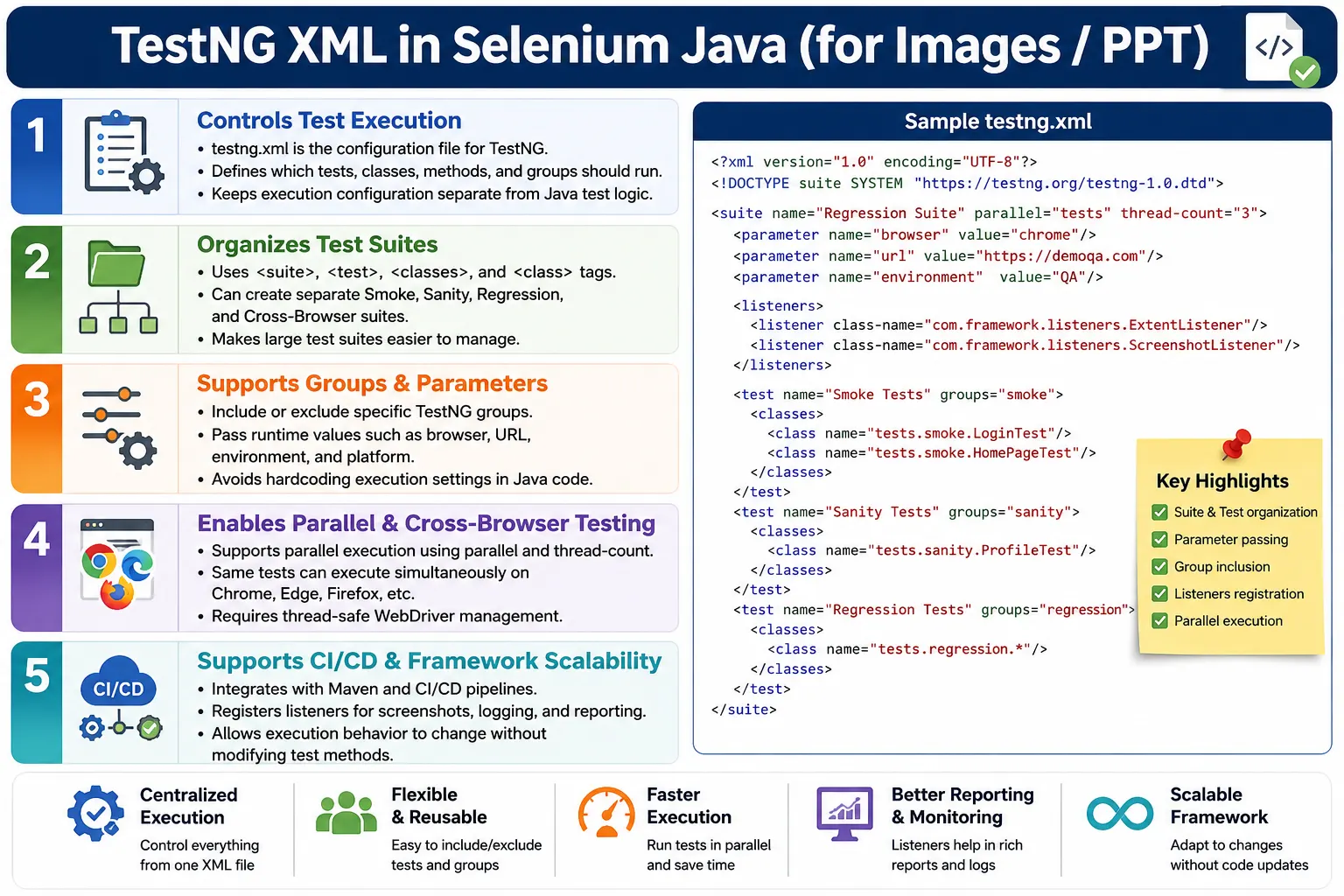
This separation is one of the main reasons TestNG is widely used in automation frameworks. A tester can change execution behavior without editing Java test methods. A smoke suite can run only critical tests. A regression suite can run all stable groups. A cross-browser suite can run the same tests in Chrome, Edge, and Firefox. A CI pipeline can call a specific XML file and execute the required suite consistently.
1. What Is testng.xml?
testng.xml is an XML configuration file that tells TestNG what to execute. It can define test suites, test blocks, classes, methods, packages, groups, parameters, listeners, and parallel execution settings. Instead of selecting tests manually or hardcoding execution decisions in Java, the execution plan is described in XML.
In real projects, this file is usually placed at the project root or inside a dedicated folder such as test-suites, suites, or src/test/resources. Teams often maintain multiple XML files, each with a clear purpose. For example, one file may run smoke tests, another may run regression tests, and another may run cross-browser tests.
2. Why testng.xml Is Needed
Without testng.xml, test execution becomes scattered. A tester may run test classes individually from the IDE. Browser values may be hardcoded. Group execution becomes harder to control. Parallel execution requires more configuration inside code or build tools. CI/CD integration becomes less predictable because there is no single suite file describing what must run.
With testng.xml, execution becomes centralized. The same file can be used from the IDE, Maven, Jenkins, GitHub Actions, Azure DevOps, or another CI tool. This improves consistency because the suite definition is no longer dependent on a tester remembering which classes or groups to run manually.
3. Basic Structure
The basic structure of a TestNG XML file is hierarchical. At the top is the suite. Inside the suite are one or more test blocks. Inside a test block, you can define parameters, groups, packages, classes, and methods. Listeners can be registered at suite level so reporting, screenshots, retries, and logging apply consistently.
Suite
  Test
    Parameters
    Groups
    Classes
      Methods
  Listeners
This structure matters because TestNG reads the XML from the suite downward. Suite-level settings can apply broadly. Test-level settings can override some suite-level values. Class and method configuration allows fine control over what gets executed.
4. Basic testng.xml Example
A minimal TestNG XML file includes a suite, a test, and at least one class. The class name should include the full package name of the Java test class.
<!DOCTYPE suite SYSTEM "https://testng.org/testng-1.0.dtd">

<suite name="Automation Suite">
    <test name="Login Test">
        <classes>
            <class name="tests.LoginTest"/>
        </classes>
    </test>
</suite>
When this file runs, TestNG looks for the class tests.LoginTest, identifies TestNG annotations inside it, and executes the eligible test methods. The XML does not contain browser actions or assertions. It only controls execution.
5. Understanding Core Tags
The most important XML tags are <suite>, <test>, <classes>, <class>, <methods>, <groups>, <parameter>, and <listeners>. Each one has a specific job, and understanding these tags is enough to handle most TestNG execution requirements.
<suite>defines the complete execution suite.<test>defines a logical execution block inside a suite.<classes>contains one or more Java test classes.<class>points to a specific Java class.<methods>includes or excludes individual test methods.<groups>includes or excludes grouped tests.<parameter>passes runtime values to Java code.<listeners>registers listener classes for reporting and events.
6. The Suite Tag
The <suite> tag is the top-level container. Every TestNG XML file starts with a suite. The suite can have a name, parallel execution settings, thread count, and other execution-level attributes.
<suite name="Regression Suite">
    <test name="Regression Tests">
    </test>
</suite>
The suite name appears in reports, logs, and execution output. Use meaningful names such as Smoke Suite, Regression Suite, Cross Browser Suite, or API Suite. Clear names help when the same framework has many execution files.
7. The Test Tag
The <test> tag represents a logical execution unit inside a suite. A suite can contain one test block or many test blocks. In cross-browser execution, each browser is often represented as a separate test block so each block can receive a different browser parameter.
<suite name="Suite">
    <test name="Chrome Test">
    </test>

    <test name="Edge Test">
    </test>
</suite>
A test block can contain its own parameters, groups, classes, and packages. This makes it possible to run the same class with different configurations in the same suite.
8. Running Multiple Classes
The <classes> tag contains one or more <class> entries. Each class entry must point to the fully qualified Java class name. Fully qualified means the package name and class name together.
<classes>
    <class name="tests.LoginTest"/>
    <class name="tests.SearchTest"/>
    <class name="tests.CheckoutTest"/>
</classes>
This is useful for building a focused suite from selected classes. For example, a smoke XML may include login, home page, search, and checkout validation classes. A regression XML may include many more classes.
9. Running Specific Methods
Sometimes you do not want to execute an entire class. You may want only one or two methods. The <methods> tag lets you include specific methods inside a class.
<class name="tests.LoginTest">
    <methods>
        <include name="validLogin"/>
        <include name="invalidLogin"/>
    </methods>
</class>
This gives fine control, but it should be used carefully. If XML files contain too many method-level rules, they become difficult to maintain. In larger frameworks, groups are usually better than listing many individual methods.
10. Excluding Methods
TestNG also supports method exclusion. If a class should run except for one unstable or irrelevant method, the method can be excluded.
<class name="tests.LoginTest">
    <methods>
        <exclude name="logoutTest"/>
    </methods>
</class>
Exclusion can be useful temporarily, but it should not become a hidden way to ignore failing tests. If a method is excluded because of a real defect or automation issue, the reason should be tracked.
11. Running Groups
Groups are one of the strongest TestNG features. Tests can be tagged using the groups attribute in Java, and testng.xml can decide which groups to run.
@Test(groups = {"smoke"})
public void validLogin() {
}
<groups>
<run>
<include name="smoke"/>
</run>
</groups>This separates test classification from execution. A method can be marked as smoke, regression, sanity, or critical in Java. The XML file decides which category to run for a particular pipeline.
12. Including Multiple Groups
A test block can include multiple groups. This is useful when a suite should run smoke and sanity tests together, or when a release validation suite should include multiple important categories.
<groups>
<run>
<include name="smoke"/>
<include name="sanity"/>
</run>
</groups>Group names are case-sensitive. If Java uses Smoke and XML uses smoke, the group may not run as expected. Teams should define naming conventions and use them consistently.
13. Excluding Groups
Excluding groups is useful when a suite should run broadly but skip known categories. For example, a suite may run all tests except unstable, manual-only, or production-risk tests.
<groups>
<run>
<exclude name="unstable"/>
</run>
</groups>As with method exclusion, group exclusion should be intentional. If a group is permanently excluded from every run, it may indicate that the group definition is no longer useful.
14. Passing Parameters
The <parameter> tag passes runtime values from XML to Java code. This is commonly used for browser, URL, environment, platform, grid URL, username type, or execution mode.
<parameter name="browser" value="chrome"/>
<parameter name="url" value="https://example.com"/>@Parameters({"browser", "url"})
@BeforeMethod
public void setup(String browser, String url) {
driver.get(url);
}Parameters are best used for configuration values. They should not replace DataProvider when the goal is data-driven testing. Browser and URL are configuration; login credentials and search terms are test data.
15. Suite-Level and Test-Level Parameters
Parameters can be placed at suite level or test level. Suite-level parameters apply broadly. Test-level parameters can override values for a specific test block.
<suite name="Automation Suite">
<parameter name="browser" value="chrome"/>
<test name="Edge Test">
<parameter name="browser" value="edge"/>
<classes>
<class name="tests.LoginTest"/>
</classes>
</test>
</suite>This structure is common in cross-browser suites. A common URL may be defined at suite level, while each test block passes a different browser value.
16. Parallel Execution by Tests
Parallel execution allows TestNG to run multiple test blocks at the same time. The setting parallel="tests" means separate <test> blocks can run concurrently.
<suite name="Parallel Suite" parallel="tests" thread-count="2">
<test name="Chrome Test">
<parameter name="browser" value="chrome"/>
<classes>
<class name="tests.LoginTest"/>
</classes>
</test>
<test name="Edge Test">
<parameter name="browser" value="edge"/>
<classes>
<class name="tests.LoginTest"/>
</classes>
</test>
</suite>This is one of the most common cross-browser patterns. However, it requires thread-safe WebDriver management. If the framework uses one shared static driver, parallel execution will cause browser sessions to interfere with each other.
17. Parallel by Classes and Methods
TestNG can also run by classes or methods. With parallel="classes", classes can execute at the same time. With parallel="methods", test methods can execute concurrently.
<suite name="Parallel Classes" parallel="classes" thread-count="3">
<test name="Regression Tests">
<classes>
<class name="tests.LoginTest"/>
<class name="tests.SearchTest"/>
<class name="tests.CartTest"/>
</classes>
</test>
</suite>Method-level parallelism is more aggressive and can expose shared data problems quickly. Use it only when tests are independent and the framework is designed for concurrency.
18. Registering Listeners
Listeners are registered through <listeners>. They can listen to test events and perform actions such as logging, screenshot capture, report updates, retry decisions, and custom result handling.
<listeners>
<listener class-name="listeners.TestListener"/>
</listeners>Registering listeners in XML keeps reporting and event handling centralized. Instead of adding listener annotations to many classes, one XML file can attach the listener to the entire suite.
19. Complete Framework Example
A realistic framework XML often combines listeners, parameters, groups, classes, and parallel execution. The file below shows a suite that runs Chrome smoke tests and Edge regression tests in parallel.
<suite name="Selenium Automation Suite" parallel="tests" thread-count="2">
<listeners>
<listener class-name="listeners.TestListener"/>
</listeners>
<parameter name="url" value="https://example.com"/>
<test name="Chrome Smoke Test">
<parameter name="browser" value="chrome"/>
<groups>
    <run>
        <include name="smoke"/>
    </run>
</groups>
<classes>
<class name="tests.LoginTest"/>
<class name="tests.HomeTest"/>
</classes>
</test>
<test name="Edge Regression Test">
<parameter name="browser" value="edge"/>
<groups>
<run>
<include name="regression"/>
</run>
</groups>
<classes>
<class name="tests.SearchTest"/>
<class name="tests.CheckoutTest"/>
</classes>
</test>
</suite>This type of XML is CI-friendly because a build job can call the file directly. The Java tests remain reusable because they do not hardcode the browser, URL, or suite type.
20. Maven Execution
In Maven-based Selenium projects, testng.xml is commonly executed using the Maven Surefire Plugin. A direct command may look like this:
mvn test -DsuiteXmlFile=testng.xmlThe Surefire Plugin can also be configured in pom.xml to point to a suite file.
<plugin>
    <groupId>org.apache.maven.plugins</groupId>
    <artifactId>maven-surefire-plugin</artifactId>
    <version>3.2.5</version>
    <configuration>
        <suiteXmlFiles>
            <suiteXmlFile>testng.xml</suiteXmlFile>
        </suiteXmlFiles>
    </configuration>
</plugin>
This allows the same suite to run consistently from command line and CI. Many teams use Maven profiles to select different XML files for smoke, regression, and cross-browser execution.
21. CI/CD Usage
CI/CD tools usually call Maven or Gradle, and the build tool runs the selected TestNG XML file. This is why suite files should be stable, version-controlled, and clearly named. Jenkins, GitHub Actions, Azure DevOps, GitLab CI, and Bamboo can all run the same suite file.
CI Job
  Maven Command
    testng.xml
      Suite Execution
        Reports
        Logs
        Screenshots
For example, a pull request pipeline may run testng-smoke.xml. A nightly pipeline may run testng-regression.xml. A release pipeline may run testng-crossbrowser.xml. The XML files make these execution choices explicit.
22. Multiple XML Files in a Framework
Enterprise frameworks rarely depend on only one XML file. Multiple suite files make execution easier to manage because each file has one purpose.
testng-smoke.xmlfor critical high-confidence checks.testng-sanity.xmlfor focused build verification.testng-regression.xmlfor broad regression coverage.testng-crossbrowser.xmlfor browser compatibility validation.testng-api.xmlfor API suite execution when TestNG is used for API automation.testng-ui.xmlfor full UI automation execution.
This approach is cleaner than maintaining one huge XML file with many commented blocks. Each XML file should be readable enough that a new team member can understand what it runs.
23. testng.xml vs Java Code
Java code and XML have different responsibilities. Java implements test behavior. XML controls test execution. Keeping this separation clear improves maintainability.
- Java code contains browser actions, page object usage, assertions, waits, and business validation.
testng.xmlcontains suite names, class selection, group selection, parameters, listeners, and parallel settings.- Java code answers what the test does.
testng.xmlanswers how the test run is organized.
If execution configuration is hardcoded in Java, changing the suite requires code changes. If test logic is pushed into XML, the XML becomes unreadable. The best framework keeps the boundary clean.
24. testng.xml vs DataProvider
testng.xml and DataProvider are often confused by beginners because both can pass values. Their purpose is different. XML parameters are best for runtime configuration. DataProvider is best for data-driven testing.
testng.xmlpasses values such as browser, URL, environment, platform, and execution mode.- DataProvider supplies datasets such as usernames, passwords, form values, product names, and expected results.
testng.xmlcontrols the test run.- DataProvider repeats a test method with multiple data rows.
A practical rule is simple: if the value configures the run, use XML parameters. If the value is business input for test validation, use DataProvider.
25. Common Beginner Mistakes
Most TestNG XML issues are caused by small naming and syntax errors. Because XML is strict, a missing closing tag or incorrect class name can prevent the suite from running.
- Using
LoginTestinstead of the full class name such astests.LoginTest. - Using a method name in XML that does not match the Java method exactly.
- Using group names inconsistently, such as
Smokein Java andsmokein XML. - Passing a parameter named
browserbut readingBrowserin Java. - Forgetting to register listeners after creating report or screenshot listener classes.
- Enabling parallel execution before the WebDriver framework is thread-safe.
- Keeping passwords or sensitive credentials directly inside XML files.
- Commenting and uncommenting large blocks instead of maintaining separate suite files.
26. Debugging testng.xml Issues
When a suite does not run, first validate the XML structure. Confirm that tags are properly closed, class names include packages, method names match Java, and group names match exactly. Then confirm that the file is actually being used by Maven or the IDE. Sometimes the XML is correct, but the build is pointing to a different suite file.
If parameters are null, check the parameter names in XML and Java. TestNG parameter matching is name-based, so spelling matters. If parallel execution behaves incorrectly, check driver management first. Many parallel failures come from shared static driver variables, shared page object instances, or shared test data.
27. Best Practices
- Keep each XML file focused on one execution purpose.
- Use meaningful suite and test names because they appear in reports.
- Use full package names for classes.
- Prefer groups for suite selection instead of long method include lists.
- Use XML parameters for browser, URL, environment, platform, and execution mode.
- Use DataProvider for business test data.
- Register listeners centrally when the listener applies to the whole suite.
- Use parallel execution only after thread-safe driver setup is complete.
- Keep sensitive values out of XML and use secure CI variables when needed.
- Store suite files in source control and review changes carefully.
28. Enterprise Suite Design
In a mature framework, testng.xml files are part of execution architecture. They should align with how the team releases software. If the team has pull request validation, nightly regression, release validation, and cross-browser certification, the XML suite files should reflect those workflows.
For example, testng-pr-smoke.xml may run a fast subset of stable smoke tests. testng-nightly-regression.xml may run the full regression suite. testng-release-crossbrowser.xml may run critical flows across multiple browsers. This naming makes CI jobs easier to understand and prevents accidental execution of the wrong suite.
Suite design should also consider reporting. If one XML file contains too many unrelated test blocks, the report becomes harder to interpret. A clean suite structure makes it easier to see which browser, environment, group, or module failed.
29. XML File Organization
Good TestNG XML organization prevents confusion as the automation framework grows. A small project can keep testng.xml in the project root, but a larger project usually benefits from a dedicated folder. Common folder names include suites, test-suites, or src/test/resources/suites. The exact folder is less important than consistency. Everyone on the team should know where suite files live and what each file is meant to execute.
File names should describe the execution purpose. Names such as testng1.xml, new-suite.xml, or final.xml become useless after a few weeks. Names such as testng-smoke.xml, testng-regression.xml, testng-crossbrowser.xml, and testng-payment-module.xml communicate intent immediately. This matters when CI jobs, release pipelines, and developers all depend on the same files.
XML files should also avoid large commented blocks. If a file has many commented classes, old browser settings, and abandoned group combinations, nobody knows which part is reliable. It is cleaner to create separate focused XML files than to keep one large file that people edit manually before every run.
30. Parameter Strategy
Parameters are powerful, but they should be used with a clear strategy. The most common parameters are browser, url, environment, platform, headless, and gridUrl. These values control how the test run is configured. They should not be mixed with large business datasets such as customer records, product names, or payment inputs.
A reliable framework usually reads parameters in a setup method and then passes them into driver initialization, configuration loading, and environment selection. For example, the XML may pass environment=qa, and the framework may map that to the correct base URL, database, service endpoint, and credentials from a secure configuration source. This keeps XML readable while allowing the framework to remain flexible.
When multiple XML files use the same parameter names, CI integration becomes easier. A Jenkins job can override or select values consistently. If one file uses browser, another uses browserName, and another uses Browser, the framework becomes harder to automate. Parameter names should be standardized just like method names and package names.
31. Group Strategy
Groups should represent meaningful execution categories, not random labels. Common group names include smoke, sanity, regression, critical, checkout, login, api, and ui. A test can belong to more than one group when it serves multiple purposes. For example, a successful login test can be both smoke and regression.
The danger is overusing groups until they become unclear. If every test has five or six groups without a convention, XML files become difficult to reason about. The team should define what each group means. A smoke group should contain tests that are stable, quick, and critical. A regression group should contain broader validation. A module group should represent a functional area. This gives testng.xml a clean way to select test intent.
Groups work best when they are reviewed during test creation. A new test should not be added to smoke just because it is important. It should be added only if it is stable, fast, and suitable for frequent execution. This keeps smoke suites useful and prevents them from slowly turning into full regression suites.
32. Parallel Execution Readiness
Adding parallel and thread-count to XML is easy. Making the framework ready for it is the hard part. Parallel execution requires independent WebDriver sessions, independent test data, independent reports, and reliable cleanup. If these are not ready, parallel execution creates random failures that are difficult to reproduce.
A thread-safe Selenium framework usually avoids a single shared static driver. It may use ThreadLocal<WebDriver> or another execution-context pattern so each thread has its own browser instance. Page objects should use the driver belonging to the current test. Screenshots and logs should include unique names so parallel tests do not overwrite each other's evidence.
Test data also matters. If several parallel tests use the same user, cart, order, file name, or email address, failures may occur because tests are competing for the same state. Before enabling parallel execution in testng.xml, check whether tests can run independently. If not, fix the framework and data first, then increase thread count gradually.
33. Listener Strategy
Listeners are often used for screenshots, Extent Reports, Allure integration, retry logic, logging, and custom status handling. Registering listeners through testng.xml is useful when the listener should apply to the entire suite. It keeps listener configuration visible and avoids adding annotations repeatedly to test classes.
A listener should not become a place for test logic. It should react to test events. For example, on test failure it can capture a screenshot, record the test name, attach logs, and update the report. It should not decide how to perform login or which page object to use. Keeping listeners focused makes them reusable across multiple XML suites.
In CI/CD, listeners are especially valuable because failed builds need evidence. If a suite fails in Jenkins at midnight, the report should show the failed test, browser, environment, parameter values, screenshot, and exception details. XML listener registration helps make that evidence collection consistent across all executions.
34. Security and Configuration Hygiene
Because testng.xml is usually committed to source control, it should not contain secrets. Avoid storing real passwords, tokens, production credentials, database passwords, or customer data in XML. If sensitive values are required, pass them through CI secret variables, environment variables, encrypted configuration, or a secure test configuration service.
XML files should also avoid production-risk configuration unless the suite is specifically designed for production-safe validation. A wrong URL or environment value can make automation run against the wrong system. Clear naming and CI safeguards help prevent this. For example, a production smoke suite should be separate from normal QA regression files and should contain only read-only or carefully controlled tests.
Configuration hygiene also includes removing stale parameters and unused classes. If a parameter is no longer read by Java code, remove it. If a class no longer exists, remove it. If a group is obsolete, clean it up. A clean XML file reduces execution surprises.
35. Review Checklist
Before committing a TestNG XML change, review it like code. Confirm that the suite name is meaningful, class names are fully qualified, group names match Java annotations, parameters match Java method names, listeners exist in the correct package, and parallel settings match framework capability. Also confirm that the suite can run from command line, not only from the IDE.
For release-critical suites, run the XML locally or in a test branch before merging. A broken XML file can block an entire CI pipeline. Small syntax mistakes, package changes, or renamed test methods are easy to miss during manual editing. XML validation and a quick Maven run can prevent unnecessary build failures.
As frameworks grow, suite files become operational assets. Treat them with the same care as test classes. A well-maintained XML file tells the team exactly what automation coverage is being executed and why.
36. Interview Perspective
A short interview answer is: testng.xml is the TestNG configuration file used to control test execution. It defines suites, tests, classes, methods, groups, parameters, listeners, and parallel execution settings without changing Java test code.
A stronger real-time answer is: in my Selenium framework, I use multiple TestNG XML files to manage smoke, regression, cross-browser, and CI executions. The XML files pass runtime parameters such as browser, URL, and environment, include or exclude groups, configure parallel execution, and register listeners for reporting and screenshots. This keeps test execution configuration separate from test logic and makes the framework easier to run from Maven and CI/CD pipelines.
37. Key Takeaway
The testng.xml file is the central execution controller of a TestNG-based Selenium framework. It does not replace Java test code, page objects, assertions, or DataProviders. Instead, it organizes how those tests are selected and executed.
Use Java code for test implementation. Use testng.xml for suite control, groups, parameters, listeners, and parallel settings. Use DataProvider for repeated business datasets. When these responsibilities are separated cleanly, the framework becomes easier to maintain, easier to run in CI/CD, and easier to scale across browsers, environments, and release pipelines.