TestNG Parameters in Selenium Java
TestNG Parameters allow values from testng.xml to be passed into Java test methods and configuration methods at runtime. Instead of hardcoding values such as browser name, application URL, environment, username, language, country, timeout, or headless mode directly inside Java code, you can define those values externally and let TestNG inject them into the method. This makes Selenium frameworks more flexible, reusable, and easier to run across different execution conditions.
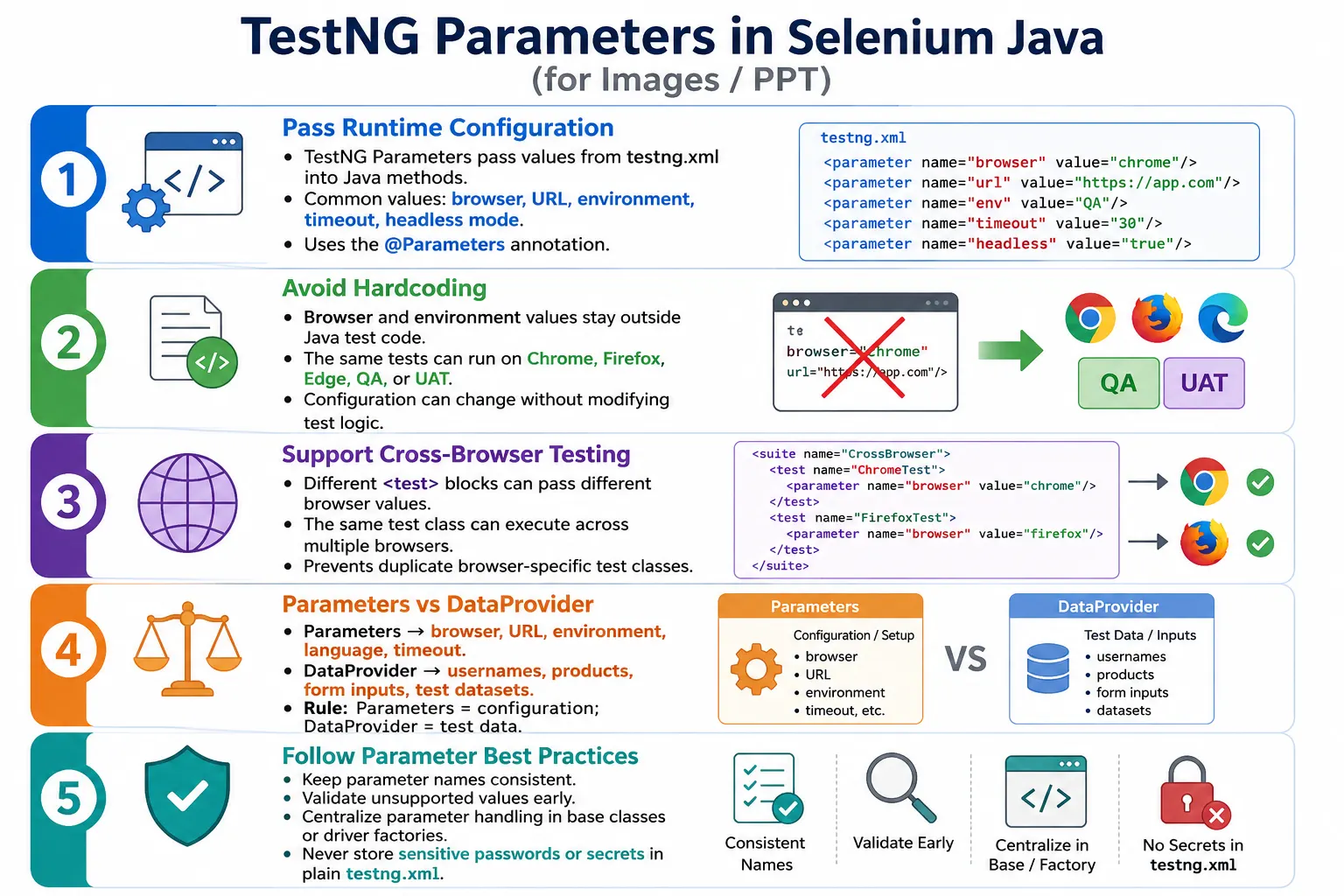
Parameterization is especially important in Selenium automation because the same tests often need to run against different browsers, URLs, environments, and execution modes. A login test should not need separate Java classes for Chrome, Firefox, Edge, QA, UAT, and staging. The test logic can remain the same while TestNG parameters provide the runtime configuration.
The key idea is simple: Java code should describe the test behavior, while external configuration should describe where and how the test runs. TestNG Parameters support that separation. They are best used for configuration values, while @DataProvider is usually better for business test data and multiple input datasets.
1. What Are TestNG Parameters?
TestNG Parameters are values defined in testng.xml and injected into methods using the @Parameters annotation. The method receives the value as a normal Java argument. This allows the same compiled test code to behave differently based on execution configuration.
Instead of hardcoding:
String browser = "Chrome";You can define the value in XML:
<parameter name="browser" value="Chrome"/>Then receive it in Java:
@Parameters("browser")
@Test
public void launchBrowser(String browser) {

    System.out.println(browser);
}
When the test runs, TestNG reads the XML parameter and passes Chrome into the method.
2. Why Parameters Are Needed
Without parameters, configuration values are hardcoded. If a test uses new ChromeDriver(), changing the browser to Firefox requires editing Java code. If the application URL is hardcoded, moving from QA to UAT requires code changes. This is not scalable for real automation frameworks.
With TestNG parameters, the same Java code can run with different values. For example, the Java setup method can receive the browser name from XML. The XML file decides whether the execution uses Chrome, Firefox, or Edge. This is cleaner because execution configuration changes without modifying test logic.
- Run the same test in different browsers.
- Switch between QA, UAT, DEV, staging, or production-like URLs.
- Pass environment names into tests.
- Control headless mode or timeout values.
- Support CI/CD pipelines without Java code changes.
3. Real Project Scenario
Imagine a framework that needs to run login tests in Chrome, Firefox, and Edge. A weak design creates separate classes such as LoginTestChrome, LoginTestFirefox, and LoginTestEdge. That duplicates test logic and makes maintenance harder. If the login flow changes, three classes must be updated.
A better design has one LoginTest class. The browser is supplied through TestNG parameters. The same class runs in Chrome, Firefox, or Edge depending on the XML configuration. This is one of the most common real-world uses of TestNG parameters.
4. Basic Syntax
The XML defines the parameter. The Java method declares @Parameters and accepts a method argument with a matching position. The parameter name in XML and the name inside @Parameters must match exactly.
<suite name="Suite">

    <test name="Chrome Test">

        <parameter
            name="browser"
            value="Chrome"/>

        <classes>
            <class name="tests.LoginTest"/>
        </classes>

    </test>

</suite>
@Parameters("browser")
@Test
public void launchBrowser(String browser) {
System.out.println(browser);
}The output is Chrome. The value comes from XML, not from hardcoded Java code.
5. Single Parameter Example
A common single parameter is the application URL. This lets the same test open different environments without changing the test class.
<parameter
    name="url"
    value="https://example.com"/>
@Parameters("url")
@Test
public void openApplication(String url) {
driver.get(url);
}If tomorrow the test must run against UAT, the XML value changes. The Java method remains unchanged.
6. Multiple Parameters
TestNG can pass multiple parameters into the same method. The names inside @Parameters are listed as an array, and the method arguments receive values in the same order.
<parameter
    name="browser"
    value="Chrome"/>

<parameter
    name="url"
    value="https://example.com"/>
@Parameters({"browser", "url"})
@Test
public void launch(
String browser,
String url
) {
System.out.println(browser);
driver.get(url);
}This prints the browser and opens the supplied URL. Multiple parameters are common in base setup methods.
7. Parameter Order
The order in @Parameters must match the method parameters. TestNG injects values by position. If the order is wrong, the values can be assigned incorrectly even though the code compiles.
Correct:
@Parameters({"browser", "url"})
public void launch(
        String browser,
        String url
) {
}
Incorrect:
@Parameters({"browser", "url"})
public void launch(
        String url,
        String browser
) {
}
In the incorrect example, the browser value is received in the URL variable and the URL value is received in the browser variable. This can cause confusing failures.
8. Parameters with @BeforeMethod
Using parameters with @BeforeMethod is very common in Selenium. Browser setup usually happens before each test method, and the browser name can be supplied from XML.
@BeforeMethod
@Parameters("browser")
public void setup(String browser) {

    if (browser.equalsIgnoreCase("Chrome")) {

        driver = new ChromeDriver();

    } else if (browser.equalsIgnoreCase("Firefox")) {

        driver = new FirefoxDriver();
    }
}
Each test automatically receives the browser value before execution. This makes the setup method flexible and reusable.
9. Parameters with @BeforeClass
Parameters can also be used with @BeforeClass. This is useful when the browser or resource is created once for the class instead of once per method.
@BeforeClass
@Parameters("browser")
public void setup(String browser) {

    System.out.println(browser);
}
Use @BeforeClass when class-level setup is appropriate. If every test needs a fresh browser, @BeforeMethod is usually better.
10. Cross-Browser Example
Cross-browser execution is one of the strongest uses of TestNG parameters. The same test class can be included in multiple XML <test> blocks, each with a different browser parameter.
<suite name="CrossBrowser">

    <test name="Chrome">
        <parameter
            name="browser"
            value="Chrome"/>
        <classes>
            <class name="tests.LoginTest"/>
        </classes>
    </test>

    <test name="Firefox">
        <parameter
            name="browser"
            value="Firefox"/>
        <classes>
            <class name="tests.LoginTest"/>
        </classes>
    </test>

</suite>
@Parameters("browser")
@Test
public void browserTest(String browser) {
System.out.println(browser);
}The same test class runs once with Chrome and once with Firefox. This avoids duplicate browser-specific test classes.
11. Browser Selection with switch
A practical setup method usually validates the browser value and creates the correct driver. A switch statement keeps the logic readable.
@Parameters("browser")
@BeforeMethod
public void setup(String browser) {

    switch (browser.toLowerCase()) {

        case "chrome":
            WebDriverManager.chromedriver().setup();
            driver = new ChromeDriver();
            break;

        case "firefox":
            WebDriverManager.firefoxdriver().setup();
            driver = new FirefoxDriver();
            break;

        case "edge":
            WebDriverManager.edgedriver().setup();
            driver = new EdgeDriver();
            break;

        default:
            throw new IllegalArgumentException(
                    "Unsupported browser: " + browser
            );
    }
}
The default case is important. If someone passes an unsupported browser name, the framework should fail early with a clear message instead of failing later with a confusing null driver error.
12. Passing URL
URL is another common parameter. It allows the same suite to run against QA, UAT, staging, or local environments.
<parameter
    name="url"
    value="https://example.com"/>
@Parameters("url")
@Test
public void openSite(String url) {
driver.get(url);
}This is better than hardcoding URLs in every test class. When the environment changes, only configuration changes.
13. Passing Username and Password
TestNG parameters can pass credentials, but this must be handled carefully. It is fine for simple learning examples, but real frameworks should avoid storing sensitive passwords directly in testng.xml.
<parameter
    name="username"
    value="admin"/>

<parameter
    name="password"
    value="admin123"/>
@Parameters({"username", "password"})
@Test
public void login(
String username,
String password
) {
driver.findElement(By.id("username"))
.sendKeys(username);
driver.findElement(By.id("password"))
.sendKeys(password);
}In enterprise automation, credentials should usually come from secure configuration management, environment variables, secret stores, or CI secret variables.
14. Environment Parameter
An environment parameter tells the test which target environment is being used. This can influence URL selection, test data, feature flags, credentials, or reporting labels.
<parameter
    name="environment"
    value="QA"/>
@Parameters("environment")
@Test
public void execute(String env) {
System.out.println(env);
}Environment values should be validated. A typo such as QAA should fail clearly rather than silently running against the wrong configuration.
15. Optional Parameters
TestNG supports default values through @Optional. If the parameter is missing from XML, TestNG uses the optional value instead of failing.
@Parameters("browser")
@Test
public void launch(
        @Optional("Chrome")
        String browser
) {

    System.out.println(browser);
}
If browser is not supplied in XML, the value becomes Chrome. Optional parameters are useful for defaults, but do not overuse them. Some missing configuration should fail loudly.
16. Missing Parameter
If a required parameter is not provided and no @Optional value exists, TestNG throws an exception. This is usually good because it prevents unclear execution.
@Parameters("browser")
public void setup(String browser) {
}
org.testng.TestNGException:
Parameter 'browser' is required but not supplied.When this happens, check the parameter name, XML location, and case sensitivity. browser and Browser are different names.
17. Complete Example
The following example passes both browser and URL into the setup method. The browser is created based on the parameter, and the application URL is opened before the test runs.
<suite name="Suite">

    <test name="Login">

        <parameter
            name="browser"
            value="Chrome"/>

        <parameter
            name="url"
            value="https://example.com"/>

        <classes>
            <class name="tests.LoginTest"/>
        </classes>

    </test>

</suite>
public class LoginTest {
WebDriver driver;
@BeforeMethod
@Parameters({"browser", "url"})
public void setup(
String browser,
String url
) {
if (browser.equalsIgnoreCase("Chrome")) {
driver = new ChromeDriver();
}
driver.get(url);
}
@Test
public void login() {
System.out.println("Executing Login");
}
@AfterMethod
public void tearDown() {
driver.quit();
}
}This pattern is the foundation of many Selenium TestNG frameworks.
18. Parameters vs Hardcoding
Hardcoding is simple at the beginning but becomes painful as the framework grows. A hardcoded URL or browser forces code changes for every environment variation. Parameterization keeps execution details outside test logic.
driver.get("https://example.com");driver.get(url);The parameterized version is easier to maintain, easier to run in CI, and safer when the same tests need to run across multiple environments.
19. Parameters vs DataProvider
Parameters and DataProvider are both forms of parameterization, but they solve different problems. Parameters are usually for configuration. DataProvider is usually for test data and repeated execution.
- Parameters come from
testng.xml. - DataProvider values come from a Java method or external data source.
- Parameters usually drive one execution configuration.
- DataProvider usually runs the same test multiple times with different data rows.
- Parameters are best for browser, URL, environment, language, timeout, and headless mode.
- DataProvider is best for usernames, search terms, form inputs, datasets, and business scenarios.
A common mistake is passing hundreds of usernames through XML parameters. That is test data, not configuration, and it belongs in a DataProvider or external test data source.
20. Parameters with Parallel Execution
Parameters are useful with parallel execution. Each XML <test> block can have its own browser value. When TestNG runs tests in parallel, each test block receives its own parameter values.
<suite
    parallel="tests"
    thread-count="2">

    <test name="Chrome">
        <parameter
            name="browser"
            value="Chrome"/>
    </test>

    <test name="Firefox">
        <parameter
            name="browser"
            value="Firefox"/>
    </test>

</suite>
This allows Chrome and Firefox execution at the same time. The framework must still manage WebDriver instances safely, usually with separate driver objects per thread.
21. Suite-Level Parameters
Parameters can be defined at suite level. Suite-level parameters are useful when the same value applies to every test in the suite, such as a common browser, URL, or environment.
<suite name="Automation Suite">
    <parameter
        name="browser"
        value="chrome"/>
    <parameter
        name="url"
        value="https://example.com"/>
</suite>
Suite-level parameters reduce duplication. Instead of repeating the same URL in every XML test block, define it once at the suite level.
22. Test-Level Parameters
Test-level parameters are defined inside a specific XML <test> block. They are useful when different test blocks need different values.
<test name="ChromeTest">
    <parameter
        name="browser"
        value="chrome"/>
</test>
Test-level parameters can override broader values when needed. This is useful for cross-browser suites where each XML test block represents a different browser.
23. Timeout Parameter
Parameters can pass numeric values as strings, then Java code can convert them. Timeout is a common example.
@Parameters("timeout")
@Test
public void waitTest(String timeout) {

    int seconds =
            Integer.parseInt(timeout);

    WebDriverWait wait =
            new WebDriverWait(
                    driver,
                    Duration.ofSeconds(seconds)
            );
}
When converting parameter values, validate them carefully. A non-numeric timeout value will cause a parsing error.
24. Headless Parameter
A headless parameter can control whether the browser runs with UI or without UI. This is useful because local debugging may use visible browsers, while CI may use headless mode.
<parameter
    name="headless"
    value="true"/>
The setup code can read this value and add browser options accordingly. This keeps CI behavior configurable without modifying Java code.
25. Base Test Using Parameters
Most frameworks centralize parameter handling in a base test class or driver factory. Test classes should not repeat browser setup logic. The base class reads browser and URL, creates the driver, opens the application, and handles cleanup.
public class BaseTest {

    protected WebDriver driver;

    @Parameters({"browser", "url"})
    @BeforeMethod
    public void setup(
            String browser,
            String url
    ) {

        driver = new ChromeDriver();
        driver.manage().window().maximize();
        driver.get(url);
    }

    @AfterMethod
    public void tearDown() {

        driver.quit();
    }
}
Real frameworks would add browser selection, options, driver management, logging, and error handling, but the idea remains the same.
26. Real Project Example
A framework may run against QA using Chrome today and UAT using Edge tomorrow. Only XML changes. Java code remains stable.
QA
 ↓
Chrome
 ↓
https://qa.example.com
UAT
↓
Edge
↓
https://uat.example.comThis flexibility is valuable in CI/CD pipelines because the same suite can run against different environments based on pipeline configuration.
27. Sensitive Data Warning
Although parameters can pass usernames and passwords, sensitive information should not be stored casually in testng.xml. XML files are often committed to source control. Passwords, tokens, API keys, and secret credentials should be stored securely.
Better options include environment variables, CI secret variables, secure vaults, encrypted configuration, or secure runtime injection. TestNG parameters can still pass a username or environment name, while the actual password is resolved securely by the framework.
28. Parameter Validation
Parameter values should be validated early. If the browser value is unsupported, fail immediately with a clear message. If the URL is blank, fail before launching the test. If timeout is not numeric, fail with a configuration error.
Validation avoids confusing downstream failures. A bad browser name should not become a NullPointerException later. A missing URL should not become a browser navigation failure with no context.
29. Parameter Scope and Override Rules
TestNG parameters can be defined at different XML levels. A parameter can be declared at suite level when all tests should use the same value. It can also be declared at test level when a specific <test> block needs a different value. Understanding this scope is important because large frameworks often combine common defaults with specific overrides.
For example, a suite-level URL may point to the QA environment, while each test-level block may override the browser value. This keeps the XML compact. The URL is declared once, and the browser changes per test block. If one test block needs a different URL, it can override that value locally.
This scope-based configuration is useful, but it should be documented. If parameters are scattered across suite, test, and class areas without a convention, debugging becomes harder. A clear framework rule such as "common environment values live at suite level, browser values live at test level" helps the whole team.
30. Parameters in CI/CD Pipelines
In CI/CD, TestNG parameters are often controlled indirectly. A Jenkins job, GitHub Actions workflow, Azure DevOps pipeline, or Maven command may choose a specific TestNG XML file. That XML file contains browser, URL, environment, and execution mode values. This allows the same codebase to run in different pipeline stages.
For example, a pull request pipeline may run Chrome against QA. A nightly regression pipeline may run Chrome and Edge against UAT. A release validation pipeline may run a production-like URL in headless mode. The Java test code stays the same. Only the execution configuration changes.
This is one of the biggest reasons parameters matter in enterprise frameworks. They make test execution portable. Developers can run locally with one XML file, QA can run in a shared environment with another, and CI can run scheduled jobs with another.
31. Parameters and Browser Options
Parameters can control browser options as well as browser type. A common example is headless execution. Local debugging may use a visible browser, while CI may run headless. Another example is window size. CI jobs should use consistent dimensions so responsive layouts behave predictably.
A framework may use parameters such as headless, browserWidth, browserHeight, and incognito. These values are read during setup and converted into browser options. This allows test behavior to adapt without changing code.
However, option parameters should be controlled carefully. Too many browser-option parameters can make execution confusing. Use parameters for options that genuinely change by environment or pipeline. Keep default behavior simple.
32. Parameters and Configuration Files
TestNG parameters do not have to replace all configuration files. Many mature frameworks use both. TestNG XML may pass high-level values such as environment and browser. A configuration reader then uses the environment value to load the correct URL, API base path, credentials key, or timeout profile from a properties, JSON, YAML, or secure config source.
For example, XML may pass environment=QA. The framework then reads QA-specific values from a configuration file. This avoids putting every URL, username, timeout, and service endpoint directly inside testng.xml. It also allows sensitive values to stay outside plain XML.
This hybrid approach is often cleaner than using XML for everything. TestNG parameters control execution selection, while configuration files hold environment details.
33. Parameters in Parallel Cross-Browser Testing
Parallel cross-browser testing is a common use case for TestNG parameters. Each XML <test> block can represent a browser. The same class is listed under multiple blocks, and each block passes a different browser value. When parallel="tests" is enabled, TestNG can run those browser blocks at the same time.
This pattern works only if the framework is thread-safe. Each parallel test must receive its own WebDriver instance. If a static shared driver is used, Chrome and Firefox tests may interfere with each other. The parameter value may be correct, but the driver management may still be wrong.
For reliable parallel execution, combine TestNG parameters with a driver factory and ThreadLocal driver management. Parameters decide which browser to create. The driver factory creates it. Thread-safe storage prevents tests from sharing the wrong browser.
34. Parameters and Test Data Boundaries
One common framework mistake is using parameters for all data. Parameters are excellent for configuration, but they are not ideal for large business datasets. If a test must run with ten usernames, ten products, or many search keywords, a DataProvider is better. XML becomes hard to read when it contains many business data rows.
A useful boundary is this: if the value controls where or how the test runs, use a parameter. If the value controls what business scenario is being tested, use DataProvider or a test data source. Browser, URL, environment, language, and headless mode are configuration. Login datasets, form values, product names, and boundary values are test data.
This separation keeps framework configuration clean and keeps business data scalable.
35. Parameter Naming Conventions
Parameter names should be stable and easy to understand. Use names such as browser, url, environment, headless, timeout, and language. Avoid vague names such as value1, mode, or data unless the meaning is obvious in context.
Choose a case convention and keep it consistent. Many teams use lowercase names in XML and Java annotations. For example, always use browser, not a mix of Browser, browserName, and BROWSER. Consistency prevents missing-parameter errors and makes the framework easier to maintain.
36. Troubleshooting Parameter Issues
When parameters fail, the cause is usually simple: the name does not match, the parameter is missing, the parameter is defined in the wrong XML scope, the method argument order is wrong, or the value is invalid. Start by checking the TestNG error message. It often says which parameter is missing.
If the wrong value reaches the method, check the order inside @Parameters. If the parameter is present but not visible, check whether it is declared at suite level or test level and whether the relevant class is inside that XML scope. If the value is present but causes setup failure, validate browser names, URLs, numeric conversions, and boolean parsing.
Adding a short startup log is useful. Log browser, URL, environment, headless mode, and timeout at the beginning of every test run. This makes configuration problems obvious in CI reports.
37. End-to-End Parameterized Execution Flow
A complete parameterized execution flow starts before the browser is created. First, the CI job or developer chooses a TestNG XML file. That XML file defines values such as browser, URL, environment, and headless mode. TestNG reads the XML and injects those values into the setup method. The setup method validates the values, creates the correct browser, applies browser options, opens the requested URL, and then runs the test method.
After the test completes, the teardown method closes the browser. The report should show which parameters were used. If a failure happens, the screenshot, logs, and report should identify the browser and environment. This is important because a failure in Edge on UAT may not reproduce in Chrome on QA. Parameter visibility in reports makes debugging faster.
A strong framework treats parameters as part of execution metadata. At the beginning of the run, it logs the browser, version, URL, environment, headless setting, timeout, and test suite name. This turns parameters from hidden configuration into visible diagnostic information. When a pipeline fails, the team can immediately see how the test was executed.
38. Parameters and Release Validation
Parameters are also useful during release validation. The same smoke suite can be executed against QA early in the sprint, UAT before sign-off, and a production-like environment before deployment. The business flow stays the same, but the target environment changes through parameters.
This avoids copying tests for every environment. It also reduces the risk of environment-specific code branches inside test methods. A test should not contain repeated conditional logic such as "if QA use this URL, if UAT use that URL." That logic belongs in configuration. The test should focus on the expected business behavior.
When combined with groups, parameters become even more powerful. A pipeline can run the Smoke group with environment=QA, the Regression group with environment=UAT, and a Critical group with browser=Edge. This gives flexible release coverage without changing Java code.
39. Common Beginner Mistakes
- Using mismatched parameter names such as
browserin XML andBrowserin Java. - Putting parameters in the wrong order inside
@Parameters. - Hardcoding values even after adding parameters.
- Forgetting
@Optionalwhen a default value is expected. - Passing large business datasets through XML parameters instead of DataProvider.
- Storing sensitive passwords directly in
testng.xml. - Not validating unsupported browser or environment values.
- Duplicating parameter handling in every test class instead of using a base class.
40. Best Practices
- Use parameters for configuration values such as browser, URL, environment, language, country, timeout, and headless mode.
- Use
@Optionalonly when a sensible default exists. - Keep parameter names consistent and case-safe.
- Validate unsupported values early.
- Use DataProvider for business test data and multiple datasets.
- Keep sensitive values out of plain XML files.
- Define common parameters at suite level and override at test level only when needed.
- Centralize parameter handling in base classes, driver factories, or configuration utilities.
41. Common Parameters Used
browserurlenvironmentusernamelanguagecountrytimeoutheadlessdownloadFolder
42. Interview Perspective
A short interview answer is: TestNG Parameters allow values to be passed from testng.xml into test or configuration methods using the @Parameters annotation. They are commonly used for browser, URL, and environment configuration.
A stronger real-time answer is: in my Selenium framework, I use TestNG Parameters for runtime configuration such as browser type, application URL, environment, language, and headless mode. This allows the same test suite to run against Chrome, Firefox, or Edge and across QA, UAT, or staging without modifying Java code. I use DataProvider for business test data and keep sensitive values in secure configuration rather than plain XML.
43. Key Takeaway
TestNG Parameters provide runtime configuration for Selenium tests. They externalize values such as browser, URL, environment, timeout, and execution mode so test code stays reusable across environments and browsers.
Remember the distinction: parameters are best for configuration values, while DataProvider is best for test datasets. Use parameters to control how and where tests run, validate parameter values early, and centralize parameter handling in framework setup code for maintainability.