TestNG Groups in Selenium Java
TestNG Groups allow you to organize, categorize, and selectively execute test cases based on logical group names. Instead of running every Selenium test in the project every time, groups let you run only the tests that are relevant for a specific purpose, such as smoke testing, sanity testing, regression testing, payment testing, API testing, UI testing, or release validation.
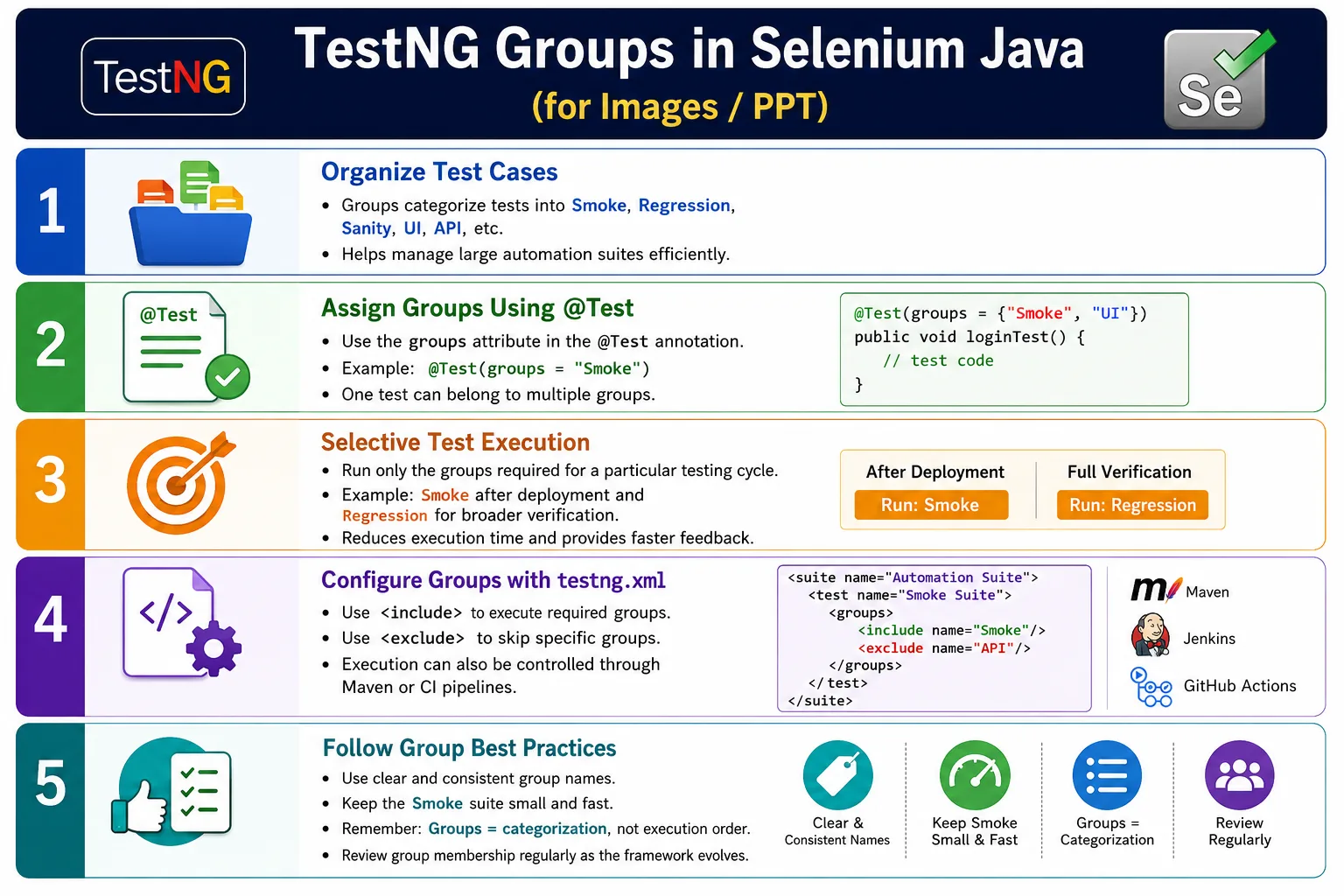
This feature becomes important as automation grows. A small project may have ten tests, and running all of them is easy. A large Selenium framework may have hundreds or thousands of tests across login, search, cart, checkout, payment, reports, admin, profile, and notifications. Running all tests after every small code change is inefficient. TestNG Groups solve this by allowing selected execution without duplicating test code.
Groups are not about execution order. They are about categorization. A test can belong to one group or multiple groups. The same login test can be part of both smoke and regression suites. The same payment test can be part of regression, payment, and critical groups. This makes suite management flexible and scalable.
1. What Are TestNG Groups?
A TestNG Group is a logical collection of related test methods identified by a group name. The group name is assigned inside the @Test annotation. Later, TestNG can include or exclude tests based on these names through testng.xml, Maven configuration, IDE execution, or CI pipeline settings.
@Test(groups = "Smoke")
public void loginTest() {
}
In this example, loginTest() belongs to the Smoke group. If the Smoke group is selected for execution, this test runs. If only the Regression group is selected and this test does not belong to Regression, it does not run.
2. Why Groups Are Needed
Suppose a Selenium framework has login tests, search tests, cart tests, checkout tests, payment tests, order tests, report tests, and admin tests. The total suite may contain 500 test cases. Before every deployment, the team may only need to verify the most critical functionality. Running all 500 tests can take too long, but running 25 carefully selected smoke tests may be enough for deployment confidence.
Full framework
    ↓
500 tests
    ↓
Need quick deployment check
    ↓
Run Smoke group
    ↓
25 critical tests
This is where groups are useful. They reduce execution time, improve feedback speed, and help teams run the right test set for the right situation.
3. Real Project Scenario
In an e-commerce application, the framework may contain tests for login, search, product details, cart, wishlist, checkout, payment, orders, reports, and admin. Not all of these tests are equally important for every execution cycle. A commit build may run only smoke tests. A nightly build may run full regression. A payment release may run payment and checkout groups. A UI refresh may run UI-focused tests.
Smokefor the most critical end-to-end flows.Regressionfor full application verification.Sanityfor focused checks after small changes.Paymentsfor payment gateway and transaction tests.Adminfor back-office workflows.UIfor browser-based interface tests.APIfor API-level tests in the same TestNG framework.Criticalfor release-blocking business flows.
4. Basic Syntax
The simplest group declaration uses the groups attribute of @Test. The group name can be any string, but it should follow a project naming convention.
@Test(groups = "Smoke")
public void loginTest() {

    System.out.println("Login Test");
}
Group names are case-sensitive. Smoke, smoke, and SMOKE are three different groups. This is why naming consistency is important.
5. Multiple Groups
A single test can belong to multiple groups. This is useful when a test is important in more than one execution context. For example, login may be part of both smoke and regression. Payment may be part of regression, payment, and critical groups.
@Test(groups = {"Smoke", "Regression"})
public void loginTest() {
}
This test runs when either the Smoke group or the Regression group is selected. This avoids duplicating the same test method in different suites.
6. Example Project
Consider a small project with login, payment, and search tests. The login and search tests are marked as Smoke, while payment is marked as Regression.
@Test(groups = "Smoke")
public void loginTest() {
}

@Test(groups = "Regression")
public void paymentTest() {
}

@Test(groups = "Smoke")
public void searchTest() {
}
If the Smoke group runs, TestNG executes loginTest() and searchTest(). If Regression runs, it executes paymentTest(). If both groups are included, all three tests run.
7. Creating a Smoke Group
A smoke group should contain the minimum set of tests required to confirm that the application is stable enough for further testing. Smoke tests should be small, fast, and critical. They are often run after deployment or before deeper regression execution.
public class LoginTests {

    @Test(groups = "Smoke")
    public void verifyLogin() {

        System.out.println("Login Test");
    }

    @Test(groups = "Smoke")
    public void verifyLogout() {

        System.out.println("Logout Test");
    }
}
Do not put every test into Smoke. If Smoke becomes too large, it loses its purpose. A smoke suite should answer: is the build basically usable?
8. Creating a Regression Group
The regression group usually contains broad coverage across the application. It is often larger and slower than smoke. Regression tests verify that existing functionality still works after changes.
@Test(groups = "Regression")
public void verifyPayment() {
}

@Test(groups = "Regression")
public void verifyRefund() {
}
Regression groups are commonly executed nightly, before release, or after major code changes. They are usually not run after every small commit unless the suite is very fast or heavily parallelized.
9. Creating Multiple Groups for One Test
Some tests naturally belong to multiple categories. Search may be part of Smoke because it is critical, and also part of Regression because it must be covered in full-suite execution.
@Test(groups = {"Smoke", "Regression"})
public void verifySearch() {
}
This is one of the strongest uses of groups. The same test method participates in multiple suites without duplicate code or separate copies.
10. Running Groups Using testng.xml
Groups are commonly executed through testng.xml. The XML file defines which groups should be included or excluded, and which classes are part of the suite.
<!DOCTYPE suite SYSTEM "https://testng.org/testng-1.0.dtd">

<suite name="SmokeSuite">

    <test name="SmokeTests">

        <groups>
            <run>
                <include name="Smoke"/>
            </run>
        </groups>

        <classes>
            <class name="tests.LoginTests"/>
            <class name="tests.SearchTests"/>
        </classes>

    </test>

</suite>
Only tests belonging to the Smoke group execute. This makes suite execution configurable without modifying Java code.
11. Running Multiple Groups
TestNG allows multiple groups to be included in the same suite. For example, a deployment validation suite may run both Smoke and Sanity groups.
<groups>
    <run>
        <include name="Smoke"/>
        <include name="Sanity"/>
    </run>
</groups>
Any test belonging to either included group can run, as long as its class is included in the suite. Remember that group inclusion works together with class or package inclusion.
12. Excluding Groups
Exclusion is useful when you want to run a broad set of tests but skip a category. For example, you may run regression but exclude database-heavy tests, payment tests, or tests not suitable for a certain environment.
<groups>
    <run>
        <exclude name="Regression"/>
    </run>
</groups>
This tells TestNG not to execute tests in the excluded group. Exclusion must be used carefully because it can remove important coverage if the XML is not reviewed.
13. Include and Exclude Together
Includes and excludes can be combined. For example, a team may want to run Smoke tests but exclude Payment tests if the payment gateway is unavailable in a certain environment.
<groups>
    <run>
        <include name="Smoke"/>
        <exclude name="Payment"/>
    </run>
</groups>
The result is Smoke tests except tests that are also in the Payment group. This gives powerful execution control, but it requires clean group naming and clear documentation.
14. Grouping UI, API, and Database Tests
Many modern automation projects contain more than UI tests. A TestNG framework may include Selenium UI tests, REST API tests, database checks, and integration tests. Groups allow these test types to coexist while still being executed separately.
@Test(groups = "API")
public void createEmployee() {
}

@Test(groups = "UI")
public void loginUI() {
}

@Test(groups = "Database")
public void verifyDatabaseConnection() {
}
This helps CI pipelines run API tests quickly, UI tests selectively, and database tests only when required. It also improves ownership because teams can identify which type of test failed.
15. @BeforeGroups
@BeforeGroups runs before tests in a specified group. It is useful when one group needs special setup that other groups do not need. For example, a Payment group may need payment test data, while an Admin group may need admin login setup.
@BeforeGroups("Smoke")
public void beforeSmoke() {

    System.out.println("Before Smoke");
}
Use this annotation only for group-specific setup. Do not place general browser setup here. Browser setup usually belongs in @BeforeMethod, @BeforeClass, or a base test class.
16. @AfterGroups
@AfterGroups runs after the specified group finishes. It can clean up group-specific data, release resources, or log group completion.
@AfterGroups("Smoke")
public void afterSmoke() {

    System.out.println("After Smoke");
}
Group-level cleanup should remain focused. If cleanup is needed after every test, use @AfterMethod. If cleanup is needed once per class, use @AfterClass. Choose the lifecycle level that matches the resource being cleaned.
17. Complete BeforeGroups and AfterGroups Example
The following example shows setup and cleanup around Smoke group tests.
public class LoginTests {

    @BeforeGroups("Smoke")
    public void setup() {

        System.out.println("Before Smoke");
    }

    @Test(groups = "Smoke")
    public void loginTest() {

        System.out.println("Login");
    }

    @Test(groups = "Smoke")
    public void logoutTest() {

        System.out.println("Logout");
    }

    @AfterGroups("Smoke")
    public void cleanup() {

        System.out.println("After Smoke");
    }
}
The output is group setup, group tests, and group cleanup. This is useful when group-specific preparation is truly required.
18. Banking Application Example
In a banking application, groups can represent business modules and execution scope. Login may be part of Smoke. Transfers and withdrawals may belong to Transactions. Statement downloads may belong to Reports. Critical money movement tests may belong to Critical.
@Test(groups = "Smoke")
public void login() {
}

@Test(groups = "Transactions")
public void transferMoney() {
}

@Test(groups = "Transactions")
public void withdrawMoney() {
}

@Test(groups = "Reports")
public void downloadStatement() {
}
This grouping helps the team run targeted suites. If only report functionality changed, the Reports group can be executed. If a release is near, Smoke, Critical, and Regression groups may run.
19. Cross-Browser Groups
Groups can be used for browser-specific execution, although browser selection is often better handled through parameters. Still, some teams use groups for browser-specific tests when a feature behaves differently in Chrome, Firefox, Edge, or Safari.
@Test(groups = "Chrome")
public void chromeTest() {
}

@Test(groups = "Firefox")
public void firefoxTest() {
}
For most frameworks, a cleaner design is to use the same test group and pass the browser through TestNG parameters. Use browser groups only when the test itself is genuinely browser-specific.
20. Environment Groups
Some teams create groups for QA, UAT, staging, or production-safe tests. This can be useful when certain tests should not run in specific environments. For example, destructive data cleanup tests may run in QA but not UAT. Payment tests may run only in sandbox environments.
@Test(groups = "QA")
public void qaTest() {
}

@Test(groups = "UAT")
public void uatTest() {
}
Environment grouping should be used with caution. In many cases, environment should be configuration, while groups should represent test category. A clear team convention prevents confusion.
21. Dependencies with Groups
Groups can be combined with dependencies. For example, a Smoke test may require login before search. TestNG supports dependsOnMethods along with groups.
@Test(groups = "Smoke")
public void login() {
}

@Test(
    groups = "Smoke",
    dependsOnMethods = "login"
)
public void search() {
}
Use dependencies carefully. Groups categorize tests; dependencies control execution based on another method. Overusing dependencies can make suites fragile and reduce parallel execution benefits.
22. Groups vs Priorities
Groups and priorities solve different problems. Groups categorize tests so selected categories can run. Priorities control method execution order. If you use priorities to simulate smoke or regression execution, the design is wrong. Use groups for suite selection and priorities only when order is genuinely required.
- Groups organize tests logically.
- Priorities control sequential order.
- Groups help run selected test categories.
- Priorities still run tests based on ordering rules.
- Groups are better for large suite management.
23. Groups vs DependsOnMethods
Groups and dependencies are also different. A group says what category a test belongs to. A dependency says one test should run only if another test passes. A smoke group can contain many independent tests. A dependent test has an execution relationship with another method.
- Groups provide independent categorization.
dependsOnMethodscreates execution dependency.- Groups are used for selective execution.
- Dependencies are used when one test truly relies on another.
24. Enterprise Regression Example
In a real enterprise regression suite, the same application may have many modules: login, search, cart, checkout, payment, orders, reports, profile, admin, and notifications. Smoke may include login, search, and checkout. Sanity may include login, payment, and logout. Full regression may include all major flows. Groups allow the same test methods to participate in multiple suites without duplication.
For example, login() can belong to Smoke, Sanity, Regression, and Critical. payment() can belong to Regression, Payment, and Critical. downloadReport() can belong to Regression and Reports. The suite becomes flexible because execution is configured by group names.
25. Groups in CI/CD
Groups are highly useful in CI/CD pipelines. A pull request can trigger a small Smoke group. A deployment pipeline can run Smoke and Sanity. A nightly pipeline can run Regression. A release pipeline can run Critical, Payment, and CrossBrowser groups. This gives faster feedback without abandoning full coverage.
For example, every code commit does not need the complete regression suite. It may run only smoke tests to confirm the application is not badly broken. Full regression can run at night or before release. This test selection strategy improves pipeline efficiency.
26. Naming Conventions
Group names should be meaningful and consistent. Because TestNG group names are case-sensitive, inconsistent naming creates execution problems. If one test uses Smoke and another uses smoke, they are different groups. A smoke suite that includes Smoke will not run tests marked smoke.
Choose one convention and follow it. Some teams use title case such as Smoke and Regression. Others use lowercase such as smoke and regression. Either is fine, but mixing styles is not.
27. Avoid Too Many Groups
Groups are powerful, but too many overlapping groups can make suite management difficult. If every test has five or six group names, it becomes hard to know what will run. Keep the group model simple enough for the whole team to understand.
A practical group structure may include Smoke, Regression, Sanity, UI, API, Payments, Admin, Critical, and Integration. Add more only when there is a real execution need.
28. Designing a Smoke Group
A smoke group should be small enough to run quickly and strong enough to detect major build failures. It should not try to prove every detail of the application. Its purpose is to answer whether the build is testable and whether critical business paths are alive. A good smoke group usually includes login, basic navigation, one or two core transactions, and logout or session validation.
For example, an e-commerce smoke group may include successful login, product search, add to cart, checkout page launch, and logout. It may not include every coupon scenario, every report, every admin setting, or every payment failure path. Those belong to regression or feature-specific groups.
Smoke tests should also be stable. If a smoke group fails frequently because of weak locators, unstable data, or environment issues, teams stop trusting it. Since smoke suites are often used as release gates, they should be carefully maintained and reviewed.
29. Designing a Regression Group
A regression group has a broader goal. It verifies that existing functionality continues to work after changes. Regression tests can cover positive flows, negative flows, edge cases, module-level workflows, cross-module integrations, and business rules. This group is usually larger than smoke and may run less frequently.
Regression groups are often executed nightly, before releases, after large merges, or during sprint-end validation. They may be split further into module groups such as Login, Search, Cart, Payment, Reports, and Admin. This allows teams to run full regression when needed or targeted regression when a specific module changes.
Good regression grouping requires balance. If regression includes every low-value UI check, it becomes slow and noisy. If it includes too little, it misses defects. Review regression membership periodically based on defect history, business risk, and execution time.
30. Groups with Maven and Build Tools
In real projects, groups are often executed through Maven, Gradle, or CI job configuration rather than manually from the IDE. The build tool points to a TestNG XML file or passes group parameters to the test runner. This allows different pipelines to run different group combinations.
For example, a Maven command may run a smoke XML suite after deployment, while another command runs a regression suite overnight. The Java test code does not change. Only the execution configuration changes. This separation is important for maintainability because release engineers can control execution scope without editing test classes.
When using build tools, name suite files clearly. Examples include testng-smoke.xml, testng-regression.xml, testng-payment.xml, and testng-api.xml. Clear file names reduce mistakes in CI jobs and make execution intent obvious.
31. Groups and Test Ownership
Groups can also support ownership. For example, payment tests may be owned by one team, admin tests by another team, and reports tests by a third team. Group names make it easier to identify which area failed and who should investigate. This is especially useful in large organizations where multiple teams contribute to the same automation repository.
Ownership should not replace good test names and reports, but it helps triage. A failed Payments group is immediately more informative than a random list of failed methods. If reports also show class names, method names, screenshots, and logs, the team can route failures quickly.
32. Groups and Risk-Based Testing
Risk-based testing means running tests based on business risk and change impact. TestNG Groups support this well. Critical money movement tests can belong to a Critical group. Frequently used workflows can belong to Smoke. High-risk modules can have feature-specific groups. When a change affects a module, the team can run the matching group plus smoke tests.
This strategy is more efficient than always running everything. If a small text change happens on a reports page, the team may run Smoke and Reports. If payment gateway code changes, the team may run Smoke, Payments, Critical, and Regression. Groups provide the execution flexibility needed for this kind of decision.
33. Group Documentation
As the framework grows, group names should be documented. A short README or framework guide should explain what each group means, when it runs, and who maintains it. Without documentation, new team members may create duplicate groups or misuse existing ones.
For example, if the framework already has Payments, someone may accidentally create Payment, payment, or payment-tests. All of those are different group names. Documentation and code review prevent this kind of drift.
34. Groups in Parallel Execution
Groups can be combined with parallel execution. A CI job may run the Regression group in parallel across multiple threads or browsers. This can greatly reduce execution time, but the framework must be thread-safe. Each test should have its own WebDriver instance, test data should be isolated, and shared state should be avoided.
Parallel group execution is powerful because teams can run broader coverage faster. However, it can expose weak test design. Tests that depend on execution order, shared data, shared browser sessions, or global mutable variables may fail unpredictably. Before enabling parallel execution for a group, confirm that tests in that group are independent enough to run safely.
35. Maintaining Groups Over Time
Groups should not be set once and forgotten. Application features change, test stability changes, release priorities change, and business risk changes. A test that was once critical may become less important. A new workflow may need to be added to smoke. A flaky test may need fixing before it can remain in a release-gating group.
Review group membership periodically. Check whether smoke tests are still fast and meaningful. Check whether regression tests still cover current business flows. Check whether groups are becoming too large or too fragmented. Good group maintenance keeps the automation suite useful over time.
36. Choosing the Right Group for a Test
When adding a new test, do not randomly assign groups. Start by asking what purpose the test serves. If it verifies the most critical path required after deployment, it may belong to Smoke. If it verifies broad existing behavior, it likely belongs to Regression. If it checks a recently changed feature, it may belong to Sanity or a feature-specific group. If it verifies a payment flow, it may also belong to Payments or Critical.
A test can belong to multiple groups, but every group should have a reason. For example, a successful login test may belong to Smoke, Regression, and Critical because login is required for most user workflows. A rare admin report export test may belong only to Regression and Reports. This intentional assignment keeps execution predictable and prevents groups from becoming meaningless labels.
During code review, group selection should be reviewed just like locators and assertions. If a test is added to Smoke, reviewers should ask whether it is truly critical and fast. If a test is excluded from Regression, reviewers should ask whether important coverage is being missed. Group quality directly affects release confidence.
37. Common Beginner Mistakes
- Using inconsistent group names such as
Smoke,smoke, andSMOKE. - Putting every test into one group.
- Using priorities instead of logical groups.
- Forgetting to update
testng.xml. - Creating too many overlapping groups.
- Using groups to hide unstable tests instead of fixing them.
- Adding environment names as groups without a clear convention.
- Using
@BeforeGroupsfor general browser setup.
38. Best Practices
- Use meaningful group names such as
Smoke,Regression,Sanity,API, andUI. - Keep group naming consistent across the project.
- Use multiple groups when a test legitimately belongs to more than one suite.
- Keep smoke suites small and fast.
- Use regression groups for broad application verification.
- Configure group execution through
testng.xml, Maven, Gradle, or CI jobs. - Use
@BeforeGroupsand@AfterGroupsonly for group-specific setup and cleanup. - Review groups regularly so suite definitions stay meaningful.
39. Common Group Structure
A typical Selenium TestNG project may use a small set of stable group names. The exact names depend on the application and release process.
SmokeRegressionSanityUIAPIDatabasePaymentsAdminCriticalIntegration
This structure supports both technical and business-based execution. The team can run UI tests, API tests, payment tests, smoke tests, or full regression depending on the need.
40. Interview Perspective
A short interview answer is: TestNG Groups are used to logically organize test methods so selected categories, such as Smoke or Regression tests, can be executed independently.
A stronger real-time answer is: in my Selenium framework, I use TestNG Groups to organize tests into suites such as Smoke, Regression, Sanity, API, UI, Payment, and Critical. This allows us to execute only the required set of tests during different stages of the release cycle. For example, every code commit triggers the Smoke group, nightly builds execute Regression, and payment-related changes trigger Payment and Critical groups. We manage group execution through testng.xml, Maven, and CI/CD pipeline configuration.
41. Key Takeaway
TestNG Groups allow Selenium tests to be categorized and executed efficiently. They make large automation suites easier to manage by separating test selection from test code. A test can belong to multiple groups, which means the same method can participate in smoke, regression, critical, or feature-specific suites without duplication.
Groups are best used for logical organization and selective execution. They are different from priorities and dependencies. Use groups to decide what category of tests should run, use priorities only when order is required, and use dependencies only when one test genuinely depends on another.