TestNG Assertions in Selenium Java
Assertions are one of the most fundamental features of TestNG. They are used to compare the actual result produced by the application with the expected result defined by the test. An assertion is the statement that decides whether a test has passed or failed. Without assertions, a Selenium script may open a browser, enter text, click buttons, and navigate pages, but it does not truly validate application behavior.
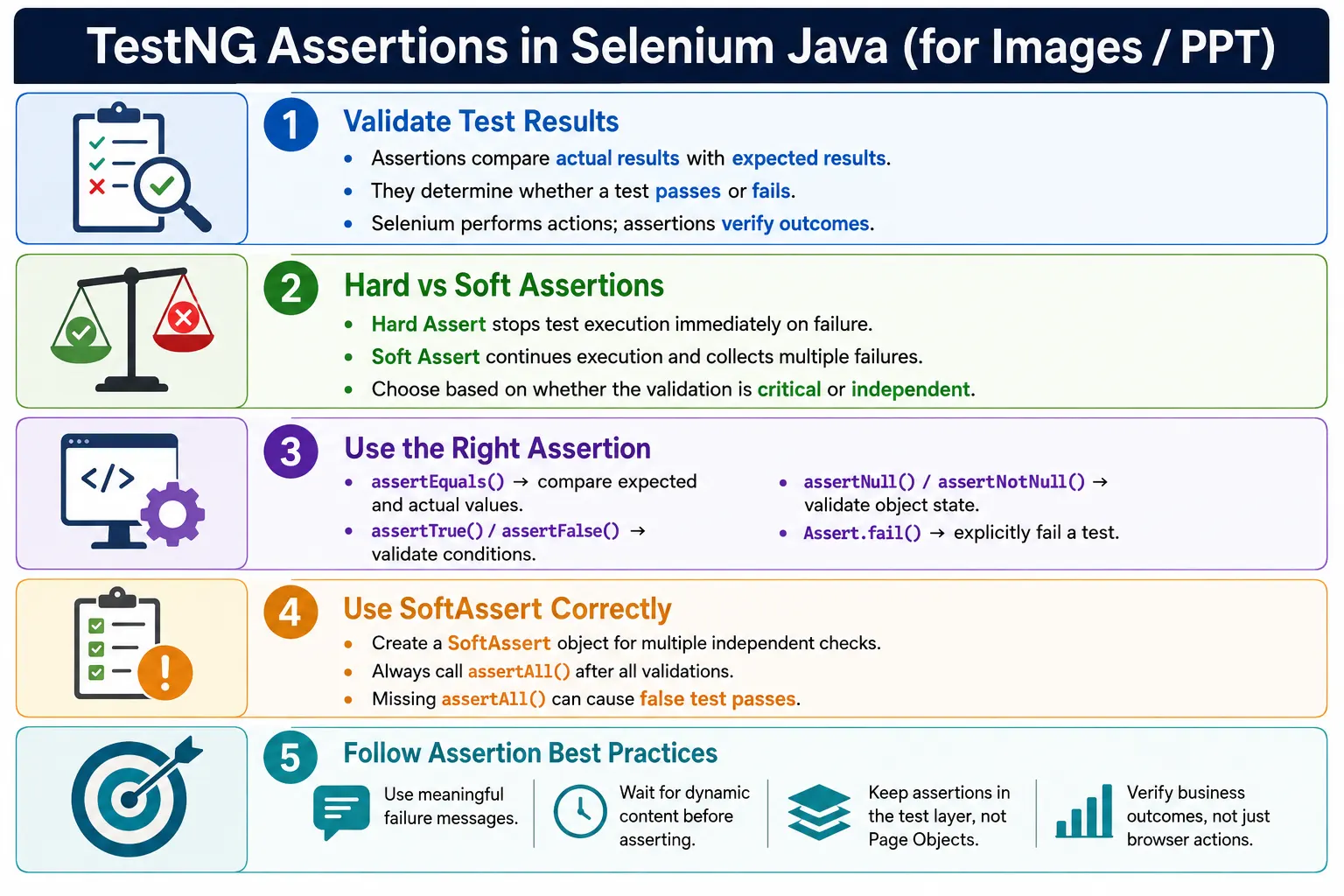
This distinction is important for every automation engineer. Selenium performs actions. TestNG assertions verify outcomes. A browser automation script that only performs actions is not a meaningful test. A test becomes valuable when it proves that the application did what it was supposed to do. Assertions are the verification layer that turns browser automation into test automation.
In real Selenium frameworks, assertions are used to verify login success, page title, current URL, success messages, error messages, table values, button state, checkbox selection, order totals, dashboard widgets, downloaded data, and business outcomes. Good assertions are clear, close to the behavior being verified, and written with helpful failure messages so failures are easy to diagnose.
1. What Is an Assertion?
An assertion is a verification statement that compares an expected value with an actual value. If the comparison succeeds, the test continues and may pass. If the comparison fails, TestNG marks the test as failed. In other words, an assertion is the decision point in a test.
Get actual result
        ↓
Compare with expected result
        ↓
Match?
   ↓        ↓
 Pass      Fail
For example, after login, the expected result may be that the page title is Dashboard. The actual result comes from the browser using driver.getTitle(). The assertion compares both values.
Assert.assertEquals(
        driver.getTitle(),
        "Dashboard"
);
If the title is exactly Dashboard, the assertion passes. If the title is different, the assertion fails and TestNG reports the test as failed.
2. Why Assertions Are Needed
Consider a Selenium script that enters a username, enters a password, and clicks the Login button. The script performs the login action, but it does not prove that login was successful. The application may show an error message, remain on the same page, navigate to the wrong page, or crash after clicking Login. Without an assertion, the test does not know.
driver.findElement(By.id("username"))
      .sendKeys("admin");

driver.findElement(By.id("password"))
      .sendKeys("admin123");

driver.findElement(By.id("login"))
      .click();
This code performs actions. The validation comes afterward:
Assert.assertEquals(
        driver.getTitle(),
        "Dashboard"
);
Now the test verifies the outcome. The assertion confirms whether the application reached the expected dashboard page. This is why every meaningful automated test should include one or more clear validations.
3. Assertion Class
TestNG provides the Assert class for hard assertions. It contains commonly used assertion methods such as assertEquals(), assertNotEquals(), assertTrue(), assertFalse(), assertNull(), assertNotNull(), assertSame(), assertNotSame(), assertThrows(), and fail().
import org.testng.Assert;Assert.assertEquals(actual, expected);The conventional order is actual first and expected second. TestNG accepts values as parameters, but keeping a consistent order makes failure messages easier to read and keeps the framework style predictable.
4. Types of Assertions
TestNG supports two major assertion styles: hard assertions and soft assertions. Hard assertions stop test execution immediately when they fail. Soft assertions collect failures and continue execution until assertAll() is called.
- Hard Assertions are used when failure should stop the test immediately.
- Soft Assertions are used when multiple independent validations should be checked before reporting failures.
Both styles are useful. The decision depends on the business importance of the validation and whether later checks depend on earlier checks passing.
5. Hard Assertions
A hard assertion immediately stops the current test method if it fails. This is the most common assertion style in Selenium automation. It is appropriate for critical validations, such as verifying that login succeeded before continuing to dashboard actions.
Assert.assertEquals(
        driver.getTitle(),
        "Dashboard"
);

System.out.println("Next Step");
If the title assertion fails, Next Step is not printed. TestNG marks the test as failed and stops executing the rest of the method. This behavior protects the test from continuing in an invalid state.
6. Soft Assertions
A soft assertion allows the test method to continue even if one assertion fails. Failures are collected internally and reported when assertAll() is called. Soft assertions are useful when validating multiple independent UI elements on a page, such as dashboard widgets, labels, buttons, and links.
SoftAssert softAssert =
        new SoftAssert();

softAssert.assertEquals(
        driver.getTitle(),
        "Dashboard"
);

System.out.println("Next Step");

softAssert.assertAll();
If the title check fails, the test still prints Next Step. The test fails only when assertAll() is executed. This allows multiple checks to be evaluated in one test, giving a fuller picture of page quality.
7. Required Imports
For TestNG assertions, the most common imports are the hard assertion class and the soft assertion class. Selenium element classes and collections may be needed depending on the validations.
import org.testng.Assert;
import org.testng.asserts.SoftAssert;
For Selenium examples involving lists or elements, you may also use imports such as:
import java.util.List;
import org.openqa.selenium.By;
import org.openqa.selenium.WebElement;
8. assertEquals()
assertEquals() verifies that two values are equal. It is one of the most commonly used assertion methods in Selenium tests. It can compare strings, numbers, booleans, objects, collections, and other values.
String actual =
        driver.getTitle();

String expected =
        "Dashboard";

Assert.assertEquals(actual, expected);
This assertion passes only if both values match. For page titles, messages, totals, and exact labels, assertEquals() is usually the right choice.
9. assertEquals() for Integers and Counts
Assertions are not limited to text. They are also useful for verifying counts, totals, row numbers, product quantities, search result sizes, and link counts.
int actual = 10;

Assert.assertEquals(actual, 10);
List<WebElement> links =
driver.findElements(By.tagName("a"));
Assert.assertEquals(
links.size(),
10
);Count assertions are common in table testing, search result testing, menu validation, and shopping cart scenarios.
10. assertEquals() with Message
A custom failure message makes debugging easier. When an assertion fails, TestNG includes the message in the failure output. This is especially useful when a test has multiple assertions.
Assert.assertEquals(
        driver.getTitle(),
        "Dashboard",
        "Page title mismatch."
);
Good messages explain the business expectation. Instead of writing failed, write something like Dashboard title mismatch after successful login. A useful message reduces the time needed to understand a report.
11. assertNotEquals()
assertNotEquals() verifies that two values are different. It is useful when the test expects the application not to remain in a previous state. For example, after login, the page title should not still be Login.
Assert.assertNotEquals(
        driver.getTitle(),
        "Login"
);
This assertion is useful, but positive validation is often stronger. Verifying that the title equals Dashboard is usually more meaningful than verifying it is not Login.
12. assertTrue()
assertTrue() verifies that a boolean condition is true. It is commonly used with Selenium methods such as isDisplayed(), isEnabled(), and isSelected().
WebElement logo =
        driver.findElement(By.id("logo"));

Assert.assertTrue(
        logo.isDisplayed()
);
Use assertTrue() when the condition itself expresses the expected behavior clearly. For example, the logo should be displayed, the checkout button should be enabled, or the agreement checkbox should be selected.
13. assertTrue() with Message
A message makes boolean assertions easier to understand when they fail. Without a message, the report may only say that a condition was expected to be true. With a message, it explains what condition failed.
Assert.assertTrue(
        logo.isDisplayed(),
        "Logo is not displayed."
);
This is especially important for UI tests because many boolean conditions may be checked in one scenario.
14. assertFalse()
assertFalse() verifies that a condition is false. It is useful for validating that a loader disappeared, an error message is not displayed, a disabled condition is not active, or a user is no longer on a login page.
Assert.assertFalse(
        driver.getCurrentUrl().contains("login")
);
Be careful when checking hidden elements. If an element is not present in the DOM, findElement() can throw NoSuchElementException. In those cases, use findElements() or an explicit wait for invisibility instead of a direct displayed check.
15. assertNull() and assertNotNull()
assertNull() verifies that an object is null. assertNotNull() verifies that an object is not null. These assertions are useful for object-level checks, returned values, API response fields, framework utilities, and page object methods.
String value = null;

Assert.assertNull(value);
WebElement button =
driver.findElement(By.id("submit"));
Assert.assertNotNull(button);In Selenium UI tests, assertNotNull() is less common than visibility or enabled checks. An element reference can be non-null but still not visible or usable. Choose the assertion that matches the business expectation.
16. assertSame() and assertNotSame()
assertSame() verifies that two references point to the same object. assertNotSame() verifies that they are different object references. These are reference checks, not content equality checks.
String s1 = "Hello";
String s2 = s1;

Assert.assertSame(s1, s2);
String s1 = new String("Hello");
String s2 = new String("Hello");
Assert.assertNotSame(s1, s2);These methods are less common in Selenium UI automation than assertEquals() and assertTrue(), but they are useful in Java-level validation and framework utility tests.
17. fail()
Assert.fail() forces a test to fail. It is useful when a path that should not happen is reached, or when exception handling confirms an unacceptable condition.
Assert.fail("Login should not succeed.");For example, in a negative login test, if invalid credentials allow successful login, the test can explicitly fail with a clear reason.
18. assertThrows()
assertThrows() verifies that a specific exception is thrown. It is useful for Java-level tests and some negative Selenium validations. For example, you may verify that searching for a missing element throws NoSuchElementException.
Assert.assertThrows(
        NoSuchElementException.class,
        () -> driver.findElement(By.id("missing"))
);
Use this carefully in UI tests. In many Selenium scenarios, a wait or absence check is clearer than expecting an exception as normal behavior.
19. Hard Assertion Example
The following test opens an application and verifies the title. If the assertion fails, the statement after it will not execute.
@Test
public void verifyLogin() {

    driver.get("https://example.com");

    Assert.assertEquals(
            driver.getTitle(),
            "Dashboard"
    );

    System.out.println("Login Successful");
}
Hard assertions are ideal when the rest of the test depends on the current validation passing. If the title is wrong, continuing to dashboard actions would not be meaningful.
20. Soft Assertion Example
Soft assertions are useful when validating several independent UI elements. For example, a dashboard page may have a logo, profile section, logout button, menu, title, and notification panel. If one fails, you may still want to check the others and report all failures together.
@Test
public void verifyHomePage() {

    SoftAssert softAssert =
            new SoftAssert();

    softAssert.assertTrue(
            driver.findElement(By.id("logo"))
                  .isDisplayed()
    );

    softAssert.assertEquals(
            driver.getTitle(),
            "Dashboard"
    );

    System.out.println("Continuing Test");

    softAssert.assertAll();
}
The call to assertAll() is mandatory. Without it, TestNG may report the test as passed even when soft assertions failed.
21. Multiple Hard Assertions
Multiple hard assertions can be used in a test, but execution stops at the first failure. This is correct when each later assertion depends on earlier validation.
Assert.assertTrue(
        driver.findElement(By.id("logo"))
              .isDisplayed()
);

Assert.assertEquals(
        driver.getTitle(),
        "Dashboard"
);

Assert.assertTrue(
        driver.findElement(By.id("menu"))
              .isDisplayed()
);
If the logo assertion fails, the title and menu assertions do not execute. This is useful when the missing logo indicates the page may not be loaded correctly.
22. Multiple Soft Assertions
Soft assertions allow all checks to execute before reporting failures. This is useful for page-level UI verification where the checks are independent.
SoftAssert softAssert =
        new SoftAssert();

softAssert.assertTrue(
        driver.findElement(By.id("logo"))
              .isDisplayed()
);

softAssert.assertEquals(
        driver.getTitle(),
        "Dashboard"
);

softAssert.assertTrue(
        driver.findElement(By.id("menu"))
              .isDisplayed()
);

softAssert.assertAll();
This gives richer feedback. Instead of fixing one failed assertion and rerunning to discover another, the team can see multiple page-level issues in one run.
23. The assertAll() Mistake
The most common SoftAssert mistake is forgetting assertAll(). If assertAll() is not called, TestNG does not fail the test for collected soft assertion failures.
SoftAssert softAssert =
        new SoftAssert();

softAssert.assertEquals(
        driver.getTitle(),
        "Dashboard"
);

// Missing assertAll()
This can produce a false pass, which is dangerous. Always call assertAll() at the end of a soft assertion test method. A good framework review should catch this mistake.
24. Assertions in Page Object Model
In clean Page Object design, Page Objects should usually perform actions and return information. Test classes should contain assertions. This keeps responsibilities clear. Page Objects describe how to interact with a page. Tests describe what should be verified.
Bad design:
public void verifyTitle() {

    Assert.assertEquals(
            driver.getTitle(),
            "Dashboard"
    );
}
Better design:
public String getPageTitle() {

    return driver.getTitle();
}
Test class:
Assert.assertEquals(
        loginPage.getPageTitle(),
        "Dashboard"
);
This makes Page Objects reusable across positive tests, negative tests, smoke tests, and different assertion strategies.
25. Real Project Example: Login Validation
After clicking Login, a test should verify a meaningful outcome. It may check the dashboard URL, welcome message, user profile icon, or logout button. The best assertion depends on the application behavior.
driver.findElement(By.id("login"))
      .click();

Assert.assertTrue(
        driver.getCurrentUrl()
              .contains("dashboard")
);

Assert.assertTrue(
        driver.findElement(By.id("welcome"))
              .isDisplayed()
);
This validates that the user reached the expected post-login state. It is stronger than only checking that the Login button was clicked.
26. Real Project Example: Shopping Cart
Assertions are essential in e-commerce testing. After adding products to a cart, the test may verify total price, item count, checkout button state, discount calculation, and shipping message.
String total =
        driver.findElement(By.id("total"))
              .getText();

Assert.assertEquals(total, "$250");

Assert.assertTrue(
        driver.findElement(By.id("checkout"))
              .isEnabled()
);
This kind of validation checks business behavior, not just UI navigation. Good automation should verify important business outcomes.
27. Assertion Messages
Meaningful failure messages are a best practice. They explain the expected behavior and make reports easier to read. This matters when tests run in CI and failures are reviewed by people who did not write the test.
Assert.assertEquals(
        driver.getTitle(),
        "Dashboard",
        "Dashboard title mismatch after login."
);
Do not write vague messages such as wrong or failed. Write messages that explain the business expectation.
28. Actual vs Expected Order
The conventional style is to pass actual first and expected second. TestNG can compare values either way, but consistency helps readability and failure messages.
Assert.assertEquals(
        actual,
        expected
);
If a team uses one consistent style across the framework, code reviews and debugging become easier. The common Selenium convention is actual value from the browser first, expected value from the test data or requirement second.
29. Critical vs Independent Validations
Choosing between hard and soft assertions depends on whether the validation is critical for continuing. If login fails, the test should stop. If a dashboard page has ten independent widgets, soft assertions may be better because all widget failures can be reported together.
A practical rule is this: use hard assertions for navigation, authentication, payment confirmation, order creation, and state changes that the rest of the test depends on. Use soft assertions for independent visual or informational checks on the same page.
30. Assertions and Explicit Waits
Assertions should usually happen after the application reaches the expected state. If the page is still loading, an assertion may fail even though the application would become correct a moment later. Use explicit waits before assertions when the application behavior is asynchronous.
WebElement message =
        wait.until(
                ExpectedConditions
                        .visibilityOfElementLocated(
                                By.id("message")
                        )
        );

Assert.assertEquals(
        message.getText(),
        "Login Successful"
);
This pattern avoids false failures caused by timing. Wait for the condition that makes the assertion meaningful, then assert the result.
31. Framework Assertion Utility
Some frameworks create reusable assertion utility methods for common validations. This can reduce duplication, but it should not hide the assertion intent. A useful assertion utility includes a clear message and keeps the expected value visible.
public void verifyTitle(String expected) {

    String actual =
            driver.getTitle();

    Assert.assertEquals(
            actual,
            expected,
            "Title verification failed."
    );
}
Use assertion utilities for repeated framework-level validations such as title, URL, success message, or element visibility. Avoid creating overly generic utilities that make tests harder to read.
32. Assertion Strategy in Real Frameworks
A strong Selenium framework needs an assertion strategy, not just random assertion calls. The team should agree on what should be verified in each type of test. A smoke test may verify only the most critical business outcome. A regression test may verify deeper functional details. A UI validation test may verify labels, widgets, buttons, and layout-related visibility. Without a strategy, tests either assert too little or assert too much.
Too few assertions make automation weak. A test may click through an application without proving anything important. Too many assertions can make tests brittle and hard to read. If one test checks every label, color, count, link, and message on a large page, it becomes difficult to understand the main purpose of the test. A better approach is to align assertions with the test objective.
For example, a login test should mainly verify successful authentication and navigation to the authenticated area. A dashboard UI test can verify dashboard widgets separately. An order placement test should verify order creation, confirmation number, and order status. Each test should assert the business expectation it owns.
33. Assertions and Business Outcomes
The best assertions verify business outcomes rather than only technical actions. Clicking a button is not an outcome. A success message, changed order status, updated balance, created record, downloaded file, or displayed dashboard is an outcome. Selenium tests become more valuable when assertions are tied to what the user or business expects.
For example, after adding an item to a cart, a weak assertion may only verify that the cart icon is visible. A stronger assertion verifies that the cart count increased, the item name is present, the quantity is correct, and the total price is accurate. The right level of validation depends on the test scope, but the assertion should prove behavior, not just activity.
This is especially important in interview discussions. When asked about assertions, do not only list methods such as assertEquals() and assertTrue(). Explain how you decide what to assert. That shows real automation maturity.
34. Assertions with Dynamic Content
Modern web applications load data asynchronously. A page may display a spinner, fetch data through APIs, update a table, and then show final content. If an assertion runs too early, it can fail even though the application would become correct a moment later. This is not an assertion problem alone; it is a synchronization problem.
The correct pattern is to wait for the relevant state and then assert. If you expect a success message, wait for the success message to be visible. If you expect a table row count, wait until the table has loaded. If you expect a URL change, wait until the URL contains the expected path. Then perform the assertion.
wait.until(
        ExpectedConditions
                .urlContains("dashboard")
);

Assert.assertTrue(
        driver.getCurrentUrl()
              .contains("dashboard"),
        "Dashboard URL was not loaded."
);
This combination of wait and assertion makes the test more stable. The wait handles timing. The assertion verifies correctness.
35. Assertions and Negative Testing
Assertions are equally important in negative testing. A negative test verifies that the application handles invalid input correctly. For example, invalid login should not navigate to the dashboard. It should show a clear error message and keep the user unauthenticated.
driver.findElement(By.id("login"))
      .click();

Assert.assertTrue(
        driver.findElement(By.id("error"))
              .isDisplayed(),
        "Error message was not shown for invalid login."
);

Assert.assertFalse(
        driver.getCurrentUrl().contains("dashboard"),
        "Invalid user should not reach dashboard."
);
Negative tests often need both positive and negative assertions. They verify that the correct error appears and that the incorrect success state does not occur.
36. Assertions in Data-Driven Tests
Data-driven tests need careful assertion messages because the same test runs multiple times with different data. If a failure message does not include the data context, debugging becomes harder. When using DataProvider, include the username, role, search keyword, product name, or expected scenario in the assertion message where appropriate.
Assert.assertEquals(
        actualMessage,
        expectedMessage,
        "Message mismatch for user: " + username
);
This makes reports more useful. Instead of only knowing that a login validation failed, the team can see which data row failed. This is important when one test method runs dozens of times with different inputs.
37. Assertion Placement in Test Flow
Assertions should be placed after meaningful actions and state changes. If a test performs five actions and asserts only at the very end, debugging may be harder because the failure could have started earlier. If a test asserts after every tiny action, it may become noisy. The balance is to assert after important checkpoints.
For example, in a checkout test, useful checkpoints may include cart page loaded, item added, shipping selected, payment submitted, and order confirmed. These assertions help identify which stage failed without overloading the test with unnecessary checks.
Good assertion placement also improves report quality. When a failure occurs, the failed assertion should point close to the business step that broke.
38. Assertions and CI Reports
In CI pipelines, assertion failures are often reviewed from reports rather than from an open browser. That means the assertion message must be useful by itself. A failure message such as expected true but found false is technically correct but not helpful. A message such as Checkout button should be enabled after selecting shipping method is much better.
When assertion failures are paired with screenshots, logs, and current URL, the team can diagnose faster. The assertion says what failed. The screenshot shows what the user saw. The log shows what the test did. Together they form a complete failure story.
39. Common Beginner Mistakes
- Writing Selenium scripts without any assertions.
- Forgetting
assertAll()when usingSoftAssert. - Using soft assertions for critical validations that should stop the test.
- Putting assertions inside Page Objects instead of test classes.
- Using vague failure messages.
- Comparing values before waiting for the page state to become stable.
- Using too many unrelated assertions inside one test method.
- Checking implementation details instead of business outcomes.
- Using
assertTrue()with complex conditions that are hard to debug.
40. Best Practices
- Use hard assertions for critical validations.
- Use soft assertions when multiple independent validations should be reported together.
- Always call
assertAll()at the end of soft assertion tests. - Provide meaningful failure messages.
- Keep assertions in the test layer when using Page Object Model.
- Verify business outcomes instead of only intermediate UI actions.
- Use explicit waits before asserting dynamic content.
- Keep assertion order consistent as actual first and expected second.
- Avoid excessive assertions that make tests hard to understand.
41. Hard vs Soft Assertions
Hard assertions and soft assertions solve different problems. Hard assertions protect the test from continuing after a critical failure. Soft assertions improve reporting when several independent checks should be evaluated together. Neither is always better. The correct choice depends on test intent.
- Hard assertion stops execution immediately on failure.
- Soft assertion continues execution and reports failures at
assertAll(). - Hard assertion is best for critical flow validations.
- Soft assertion is best for grouped UI checks and dashboard verification.
- Soft assertion requires discipline because missing
assertAll()can create false passes.
42. Common Assertion Methods
assertEquals()verifies equality.assertNotEquals()verifies inequality.assertTrue()verifies that a condition is true.assertFalse()verifies that a condition is false.assertNull()verifies that an object is null.assertNotNull()verifies that an object is not null.assertSame()verifies that references point to the same object.assertNotSame()verifies that references point to different objects.fail()forces test failure.
43. Interview Perspective
A short interview answer is: TestNG assertions validate actual results against expected results and determine whether a test passes or fails. TestNG provides hard assertions through Assert and soft assertions through SoftAssert.
A stronger real-time answer is: in my Selenium framework, I use hard assertions for critical business validations such as login success, page navigation, payment confirmation, and order creation. For pages with multiple independent UI checks, such as dashboards or profile pages, I use SoftAssert so all validations execute before failures are reported. I always call assertAll(), use meaningful failure messages, wait for dynamic content before asserting, and keep assertions in the test layer rather than inside Page Objects.
44. Key Takeaway
Assertions are the verification layer of Selenium automation. Selenium actions interact with the browser, but assertions prove whether the application behaved correctly. A Selenium script without assertions is only automated activity. A Selenium test with clear assertions is meaningful validation.
Use hard assertions when the test should stop after a critical failure. Use soft assertions when multiple independent validations should be collected before reporting. Always call assertAll() for soft assertions, use helpful failure messages, and verify business outcomes rather than only browser actions. This makes automation reports more trustworthy and much easier to debug during daily execution and release validation cycles consistently.