TestNG Annotations in Selenium Java
Annotations are one of the most powerful features of TestNG. They define when and how methods should be executed during a test run. Instead of manually calling setup, test, and cleanup methods, TestNG automatically invokes methods marked with annotations at the correct point in the execution lifecycle. This makes Selenium automation code more organized, readable, reusable, maintainable, and scalable.
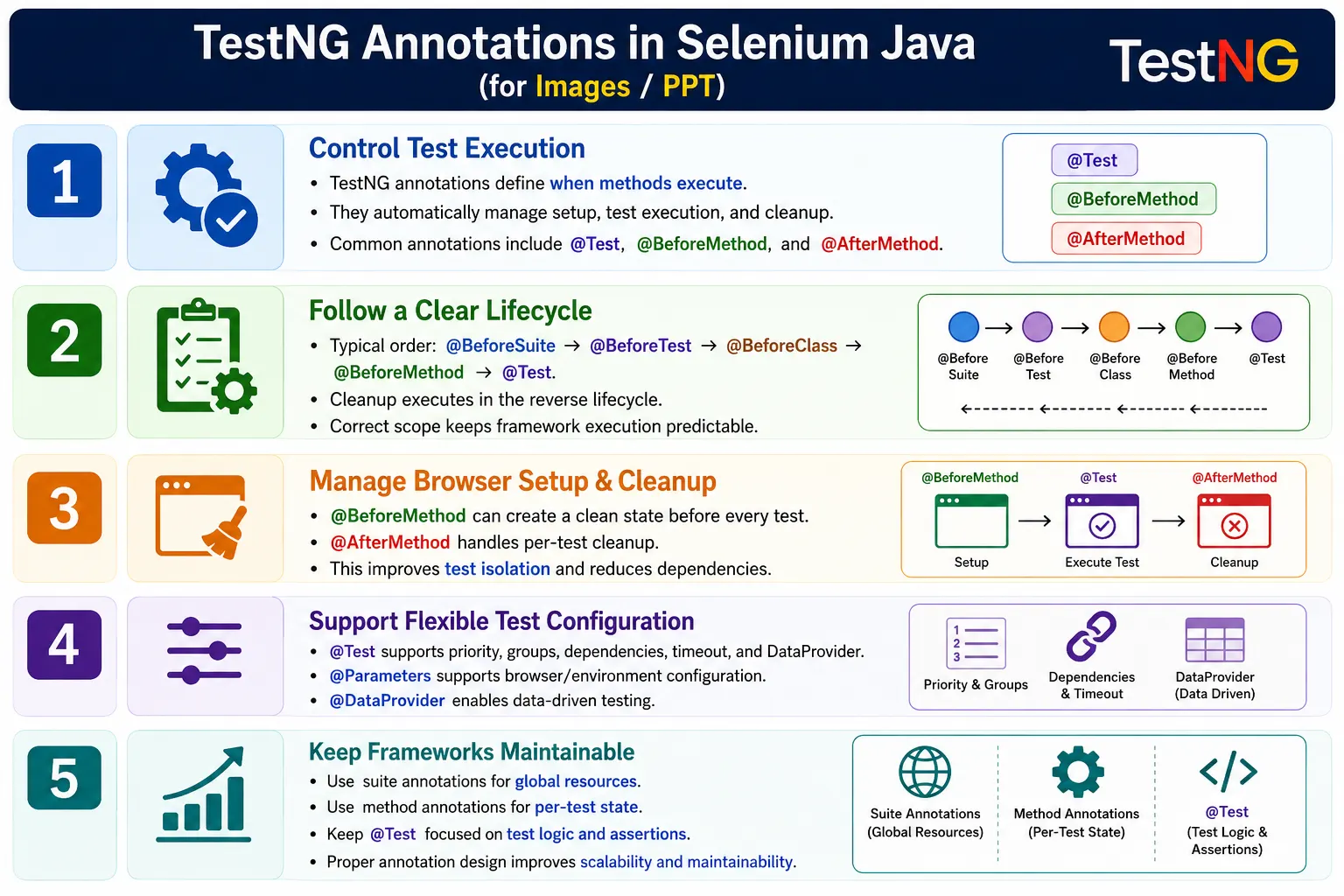
In Selenium Java frameworks, annotations are not just syntax. They are the structure that controls browser launch, application navigation, test execution, cleanup, reporting, and suite-level initialization. A beginner may see annotations as simple labels such as @Test or @BeforeMethod, but in real projects they define the execution contract of the entire automation framework.
Understanding TestNG annotations is essential because a wrong annotation choice can create serious framework problems. Launching a browser in the wrong lifecycle method can slow down execution or break parallel runs. Closing the browser too early can prevent screenshots. Using suite-level setup for test-level state can create test dependency. Good annotation usage separates responsibilities clearly and keeps test code focused on validation.
1. What Are TestNG Annotations?
A TestNG annotation is a special Java annotation prefixed with @. It tells TestNG when a method should run. TestNG reads these annotations during execution and calls the matching methods automatically. The programmer does not manually call setup(), loginTest(), or tearDown(). TestNG controls the lifecycle.
@BeforeMethod
public void setup() {
}

@Test
public void loginTest() {
}

@AfterMethod
public void tearDown() {
}
In this example, @BeforeMethod runs before each test method, @Test marks the actual test case, and @AfterMethod runs after each test method. This is the most common Selenium TestNG pattern because each test can start from a clean browser or clean application state.
2. Why Are Annotations Needed?
Without annotations, test execution must be controlled manually. A plain Java program may call setup, test, and cleanup methods from main(). That may work for one script, but it becomes difficult to maintain when a project has many test classes and hundreds of scenarios.
public static void main(String[] args) {

    setup();
    loginTest();
    tearDown();
}
This approach has several problems. Execution is manual. Reporting is weak. Test discovery is missing. Setup and cleanup are easy to forget. Running selected tests is difficult. Scaling to CI/CD is awkward. TestNG annotations solve these problems by allowing TestNG to discover, order, and execute methods based on lifecycle rules.
@BeforeMethod
public void setup() {
}

@Test
public void loginTest() {
}

@AfterMethod
public void tearDown() {
}
With this structure, the framework knows what belongs to setup, what belongs to test logic, and what belongs to cleanup. This separation is the foundation of maintainable Selenium automation.
3. Complete List of Important TestNG Annotations
TestNG provides annotations for suite-level, test-level, group-level, class-level, method-level, and actual test execution. Each annotation has a specific purpose. Choosing the correct one depends on how often the method should run and what kind of state it manages.
@BeforeSuiteruns before the entire TestNG suite.@AfterSuiteruns after the entire TestNG suite.@BeforeTestruns before each<test>section intestng.xml.@AfterTestruns after each<test>section.@BeforeGroupsruns before specified groups.@AfterGroupsruns after specified groups.@BeforeClassruns once before the first test method in a class.@AfterClassruns once after all test methods in a class.@BeforeMethodruns before every@Testmethod.@AfterMethodruns after every@Testmethod.@Testmarks a method as a test case.
4. Execution Hierarchy
The annotation lifecycle follows a predictable hierarchy. Suite-level setup runs first. Then test-level setup runs. Then class-level setup runs. Then method-level setup runs before each test method. Cleanup happens in reverse order.
@BeforeSuite
      ↓
@BeforeTest
      ↓
@BeforeClass
      ↓
@BeforeMethod
      ↓
@Test
      ↓
@AfterMethod
      ↓
@BeforeMethod
      ↓
@Test
      ↓
@AfterMethod
      ↓
@AfterClass
      ↓
@AfterTest
      ↓
@AfterSuite
This hierarchy is one of the most common interview topics in TestNG. It also matters practically. If you know the hierarchy, you know where to place configuration loading, browser setup, page navigation, test cleanup, and report flushing.
5. @BeforeSuite
@BeforeSuite runs once before the entire TestNG suite starts. It is suitable for global initialization that should happen only one time for the whole execution. Typical use cases include loading framework configuration, initializing reports, reading environment variables, preparing global test data, creating database connections, or printing execution metadata.
@BeforeSuite
public void beforeSuite() {

    System.out.println("Before Suite");
}
In Selenium frameworks, @BeforeSuite is usually not the best place to launch a browser for every test. Browser sessions are usually test-specific or class-specific. Suite-level setup is better for framework-level resources that are independent of one browser instance.
6. @AfterSuite
@AfterSuite runs once after the entire suite finishes. It is commonly used to flush reports, close global resources, send email reports, archive logs, release database connections, or print final execution summaries.
@AfterSuite
public void afterSuite() {

    System.out.println("After Suite");
}
Report flushing is a common use case. If the framework uses ExtentReports or another reporting library, the report should usually be flushed after all tests are complete, not after every single method.
7. @BeforeTest
@BeforeTest runs before each <test> section in testng.xml. This annotation is sometimes confusing because the word "test" here refers to the TestNG XML <test> tag, not an individual @Test method.
<suite name="Cross Browser Suite">
    <test name="Chrome Tests">
    </test>

    <test name="Edge Tests">
    </test>
</suite>
@BeforeTest
public void beforeTest() {
System.out.println("Before Test tag");
}This annotation can be useful for test-level configuration such as selecting an environment, setting browser parameters, or preparing data for a specific XML test block. Use it carefully in parallel execution because multiple <test> blocks may run in different threads depending on configuration.
8. @AfterTest
@AfterTest runs after a TestNG XML <test> section completes. It is useful for cleanup tied to a specific XML test block. For example, if one <test> block runs Chrome tests and another runs Edge tests, test-level cleanup may happen separately for each block.
@AfterTest
public void afterTest() {

    System.out.println("After Test tag");
}
In many Selenium frameworks, method-level or class-level cleanup is more common than test-level cleanup. Still, understanding @AfterTest is important when reading or designing XML-driven suites.
9. @BeforeClass
@BeforeClass runs once before the first test method in a class. It is commonly used for expensive one-time class setup such as launching a browser, initializing Page Objects, creating reusable objects, or opening a module page that all tests in the class share.
@BeforeClass
public void beforeClass() {

    driver = new ChromeDriver();
}
Using @BeforeClass for browser setup means all test methods in that class may share the same browser session. This can be efficient, but it also means tests may influence each other if state is not reset carefully. If test isolation is more important, @BeforeMethod may be better for driver setup.
10. @AfterClass
@AfterClass runs once after all test methods in a class finish. It is often paired with @BeforeClass. If the browser is launched once for the class, @AfterClass can close it once after the class completes.
@AfterClass
public void afterClass() {

    driver.quit();
}
Be careful with screenshots. If a test fails and the framework captures screenshots in @AfterMethod or a listener, the browser should still be alive at that point. Closing the browser in @AfterClass generally supports that flow because it happens after method-level failure handling.
11. @BeforeMethod
@BeforeMethod runs before every @Test method. This is one of the most used annotations in Selenium frameworks because it helps create a clean state for each test. It can launch a browser, open the application, maximize the window, initialize Page Objects, clear cookies, or navigate to a starting page.
@BeforeMethod
public void setup() {

    driver.get("https://example.com");
}
If there are three test methods, @BeforeMethod runs three times. This is useful when every test should be independent. It reduces hidden dependencies and makes tests safer for parallel execution.
12. @AfterMethod
@AfterMethod runs after every test method. It is commonly used for per-test cleanup such as deleting cookies, logging out, resetting state, capturing screenshots on failure, or quitting the browser when each test owns its own driver session.
@AfterMethod
public void tearDown() {

    driver.manage().deleteAllCookies();
}
For screenshots, a listener is often cleaner than placing screenshot logic directly in @AfterMethod. However, @AfterMethod is still useful because it receives test result information when configured with ITestResult.
13. @Test
@Test marks a method as a test case. TestNG executes methods annotated with @Test and records their results as passed, failed, or skipped. Methods without @Test are not treated as test cases unless they are lifecycle methods or called by other methods.
@Test
public void verifyLogin() {

    driver.get("https://example.com/login");
}
A good @Test method should focus on one test scenario. It should call Page Object methods, perform assertions, and avoid unnecessary setup or cleanup details. Those responsibilities belong to lifecycle methods and framework utilities.
14. @BeforeGroups
@BeforeGroups runs before the first test method belonging to a specified group. This is useful when a specific group requires special setup that other groups do not need. For example, smoke tests may need a small setup step, or payment tests may need payment gateway test data.
@BeforeGroups("smoke")
public void beforeSmoke() {

    System.out.println("Before Smoke");
}
Group-level annotations should be used carefully. If group setup becomes too complex, it may be clearer to create separate test classes or suite configuration. Group hooks are useful, but they can become hard to track if overused.
15. @AfterGroups
@AfterGroups runs after all test methods in a specified group complete. It can be used to clean up group-specific resources, reset data, or log group completion.
@AfterGroups("smoke")
public void afterSmoke() {

    System.out.println("After Smoke");
}
In most Selenium projects, method-level and class-level cleanup are more common. Group-level cleanup is useful only when the group has its own shared state or external setup.
16. Complete Annotation Example
The following example shows how multiple annotations work together in one class. It demonstrates suite-level setup, class-level browser launch, method-level page opening, test execution, method cleanup, class cleanup, and suite reporting.
public class LoginTest {

    @BeforeSuite
    public void beforeSuite() {
        System.out.println("Before Suite");
    }

    @BeforeClass
    public void beforeClass() {
        System.out.println("Launch Browser");
    }

    @BeforeMethod
    public void beforeMethod() {
        System.out.println("Open Login Page");
    }

    @Test
    public void loginTest() {
        System.out.println("Executing Login Test");
    }

    @AfterMethod
    public void afterMethod() {
        System.out.println("Logout");
    }

    @AfterClass
    public void afterClass() {
        System.out.println("Close Browser");
    }

    @AfterSuite
    public void afterSuite() {
        System.out.println("Generate Report");
    }
}
The output follows the TestNG lifecycle. Suite setup runs once, class setup runs once, method setup runs before the test, method cleanup runs after the test, class cleanup runs once, and suite cleanup runs at the end.
17. Multiple Test Methods
When a class has multiple @Test methods, @BeforeMethod and @AfterMethod execute around each one. This is one of the most important concepts for Selenium test isolation.
@Test
public void login() {
}

@Test
public void search() {
}
BeforeMethod
Login
AfterMethod
BeforeMethod
Search
AfterMethodThis behavior allows every test to begin with a known state. If a previous test changes cookies, page data, or browser state, method-level setup can reset the environment before the next test starts.
18. Real Project Selenium Example
A real Selenium project usually combines annotations with WebDriver setup and Page Object initialization. The setup method may configure ChromeDriver, maximize the window, set timeouts, and create Page Objects. Test methods then call Page Object actions.
@BeforeClass
public void setup() {

    WebDriverManager.chromedriver().setup();

    driver = new ChromeDriver();

    driver.manage().window().maximize();
}

@BeforeMethod
public void openApplication() {

    driver.get("https://example.com");
}

@Test
public void verifyLogin() {
}

@Test
public void verifySearch() {
}

@AfterClass
public void closeBrowser() {

    driver.quit();
}
This example launches the browser once per class and opens the application before every test method. That design may be efficient when tests are independent enough to share the browser. If stronger isolation is required, driver setup can move to @BeforeMethod and driver quit can move to @AfterMethod.
19. @Test Attributes
The @Test annotation supports useful attributes that control execution behavior. These attributes help with ordering, skipping, grouping, repetition, timeouts, expected exceptions, and dependencies. They are powerful, but they should be used intentionally.
prioritycontrols order when ordering is needed.enabled = falsedisables a test.descriptiondocuments the test purpose.timeOutfails a test if it exceeds a time limit.invocationCountruns a test multiple times.dependsOnMethodsmakes one test depend on another method.groupsassigns a test to one or more groups.dataProviderconnects a test to data-driven input.
20. Priority Attribute
priority controls the order in which tests run. Lower priority values run earlier. This can be useful for demonstrations or very limited ordered flows, but it should not become the backbone of a regression framework.
@Test(priority = 1)
public void login() {
    System.out.println("Login");
}

@Test(priority = 2)
public void logout() {
    System.out.println("Logout");
}
Overusing priority creates fragile suites because tests start depending on order. Independent tests are easier to run in parallel and easier to debug.
21. enabled Attribute
enabled = false disables a test method. This can be useful temporarily when a feature is not ready or a test is under maintenance. However, disabled tests should be tracked. A disabled test that nobody remembers is lost coverage.
@Test(enabled = false)
public void skippedTest() {
    System.out.println("This test will not execute");
}
In enterprise projects, disabled tests should usually have a reason in comments, issue tracking, or reporting. Otherwise, teams may forget why the test is disabled.
22. description Attribute
The description attribute provides a human-readable purpose for the test. It can improve reports and make test intent clearer.
@Test(description = "Verify successful login")
public void loginTest() {
    System.out.println("Login Test");
}
Descriptions are useful when reports are read by business analysts, product owners, or manual testers. They make automated test output easier to understand.
23. timeOut Attribute
The timeOut attribute fails a test if it runs longer than the specified number of milliseconds. This can prevent tests from hanging indefinitely. However, it should be used carefully because UI tests can vary based on environment speed.
@Test(timeOut = 5000)
public void pageLoadTest() {
    driver.get("https://example.com");
}
For Selenium, explicit waits are usually better for page readiness. Test-level timeout is useful as a safety limit, not as the main synchronization strategy.
24. invocationCount Attribute
invocationCount runs a test multiple times. It is useful for repeated checks, stability validation, or learning. In production, repeated execution should have a clear reason because it increases execution time.
@Test(invocationCount = 3)
public void repeatTest() {
    System.out.println("Executing Test");
}
If a test is repeated to handle flakiness, that is usually a sign that the underlying issue should be fixed. Use retry analyzers for controlled retry and root-cause analysis for recurring instability.
25. dependsOnMethods Attribute
dependsOnMethods makes one test method depend on another. If the depended-on method fails, the dependent method is skipped. This is useful when one action genuinely requires another, but overuse can create fragile chains.
@Test
public void login() {
    System.out.println("Login Successful");
}

@Test(dependsOnMethods = "login")
public void dashboard() {
    System.out.println("Dashboard Loaded");
}
For most regression tests, it is better to make each test prepare its own required state. Dependencies are helpful in limited cases but should not replace good test design.
26. groups Attribute
groups assigns tests to named categories. This is very useful for Selenium suites because teams often need to run only smoke, sanity, regression, payment, login, or release tests.
@Test(groups = "smoke")
public void loginTest() {
    System.out.println("Smoke Test");
}
Groups allow selective execution through TestNG XML or build configuration. This makes automation more practical in CI/CD because not every pipeline needs to run every test.
27. @Parameters
@Parameters allows values from testng.xml to be passed into setup or test methods. It is commonly used for browser name, environment URL, username, password, execution mode, or feature flags.
@Parameters("browser")
@BeforeMethod
public void setup(String browser) {
    System.out.println(browser);
}
This allows the same test code to run in different environments or browsers without code changes. The execution configuration controls the values.
28. @DataProvider
@DataProvider supports data-driven testing. It returns a two-dimensional object array and runs the test once for each row of data. This is especially useful for login tests, form validation, search tests, and role-based scenarios.
@DataProvider(name = "users")
public Object[][] getData() {
    return new Object[][] {
            {"admin", "admin123"},
            {"user", "user123"}
    };
}

@Test(dataProvider = "users")
public void login(String user, String pass) {
    System.out.println(user + " " + pass);
}
DataProviders reduce duplicate test methods. They are best used when the workflow is the same and only the input data changes.
29. Annotation Design in Real Frameworks
In a real Selenium framework, annotations should be selected based on state ownership. Suite-level annotations should own global framework resources. Class-level annotations should own class-specific resources. Method-level annotations should own per-test state. Test methods should own assertions and scenario logic.
A common design is to initialize reports in @BeforeSuite, load configuration in @BeforeSuite, create WebDriver in @BeforeMethod, open the application in @BeforeMethod, execute the scenario in @Test, capture failure evidence in a listener or @AfterMethod, quit the browser in @AfterMethod, and flush reports in @AfterSuite.
This design gives strong isolation because each test gets its own driver. It also works well with parallel execution when the driver is managed through ThreadLocal or a proper driver factory.
30. Browser Lifecycle Strategy
One of the most important Selenium decisions is where to create and quit the browser. If the browser is created in @BeforeMethod and quit in @AfterMethod, every test gets a fresh browser. This gives strong isolation and reduces test dependency. It is usually the safest design for parallel execution and CI pipelines, although it can be slightly slower because every test starts a new browser.
If the browser is created in @BeforeClass and quit in @AfterClass, all tests in the class share one browser. This can be faster, but it requires careful cleanup between test methods. Cookies, local storage, logged-in state, and page navigation can leak from one test to another. This model is acceptable only when the test class is intentionally designed around shared browser state.
Creating the browser in @BeforeSuite is usually a bad idea for Selenium UI tests because one browser session would be shared across the whole suite. That creates dependency, prevents clean parallel execution, and makes failure recovery difficult. Suite-level annotations are better for reports and configuration, not per-test browser state.
31. Parallel Execution and Annotation Scope
Parallel execution changes how annotations should be used. In sequential execution, a shared class-level driver may appear to work. In parallel execution, shared state can fail unpredictably. Two tests may try to use the same browser at the same time. One test may quit the browser while another test is still running. These failures often look like random Selenium exceptions, but the real cause is incorrect annotation scope and driver sharing.
For parallel TestNG execution, method-level setup with thread-safe driver management is usually preferred. Each test method should get its own WebDriver instance, stored safely through a driver manager or ThreadLocal. The @BeforeMethod annotation creates the driver for the current test thread, and @AfterMethod quits only that thread's driver.
When using annotations in parallel suites, also make screenshot names, report entries, and test data thread-safe. Annotation methods run for each test context, but shared static variables can still create conflicts. Good annotation design must be paired with good framework state management.
32. Annotation Methods vs Listeners
Annotation methods and listeners serve different purposes. Annotation methods are best for lifecycle actions such as browser setup, opening the application, cleanup, and report initialization. Listeners are better for cross-cutting concerns such as screenshot capture on failure, logging test status, updating reports, and handling retry results.
For example, screenshots can be captured in @AfterMethod using ITestResult, but a listener is often cleaner because it separates reporting logic from lifecycle setup. If every test class has screenshot code in @AfterMethod, the logic becomes duplicated. If a listener handles screenshots centrally, all tests follow the same reporting behavior.
A practical framework often uses both. @BeforeMethod creates the driver. @AfterMethod quits the driver. A listener captures screenshots and updates reports when a test fails. @BeforeSuite starts the report, and @AfterSuite flushes it. This keeps responsibilities clean.
33. Clean Test Method Design
Good annotation usage keeps test methods clean. A test method should not launch the browser, read configuration, create reports, open logs, capture screenshots, and then perform the scenario. Those responsibilities belong to lifecycle hooks and framework utilities. The test method should express the behavior being verified.
@Test
public void validUserCanLogin() {
    loginPage.open();
    loginPage.login("admin", "admin123");
    Assert.assertTrue(
            dashboardPage.isDisplayed()
    );
}
This test is readable because the annotation methods handle setup and cleanup outside the test. If the browser setup changes later, the test method does not change. If screenshot behavior changes, the listener changes. This separation is exactly why TestNG annotations are valuable in Selenium frameworks.
34. Common Beginner Mistakes
- Launching the browser inside every
@Testmethod. - Closing the browser inside test methods instead of cleanup annotations.
- Putting setup code inside each test instead of
@BeforeMethodor@BeforeClass. - Confusing
@BeforeClasswith@BeforeMethod. - Using
@BeforeSuitefor browser initialization needed by every class. - Using priorities to create long dependent test chains.
- Disabling tests without tracking why they are disabled.
- Forgetting that
@BeforeTestrefers to the XML<test>tag. - Capturing screenshots after quitting the browser.
35. Best Practices
- Use
@BeforeSuiteand@AfterSuitefor one-time framework initialization and cleanup. - Use
@BeforeClassand@AfterClassfor class-level shared resources. - Use
@BeforeMethodand@AfterMethodfor per-test state and browser lifecycle when isolation is required. - Keep
@Testmethods focused on test logic and assertions. - Use priority only when execution order is genuinely required.
- Use dependencies only when one test truly relies on another.
- Use DataProvider for data-driven testing instead of duplicating test methods.
- Organize tests with groups such as smoke, sanity, and regression.
- Use listeners for cross-cutting concerns like screenshots, logs, and reporting.
36. Annotation Comparison
A simple way to remember annotations is by scope. Suite annotations affect the whole execution. Test annotations affect XML <test> blocks. Class annotations affect one Java class. Method annotations affect every test method. The @Test annotation marks the actual test case.
@BeforeSuite: once per suite, used for configuration and reports.@BeforeTest: once per XML test block, used for test-level setup.@BeforeClass: once per class, used for browser or page object setup when shared.@BeforeMethod: before every test, used for clean state and application launch.@Test: actual test logic.@AfterMethod: after every test, used for cleanup or failure handling.@AfterClass: once per class, used for class-level teardown.@AfterTest: once per XML test block, used for test-level cleanup.@AfterSuite: once per suite, used for report flush and global cleanup.
37. Interview Perspective
A short interview answer is: TestNG annotations control the execution flow of tests. They automate setup, test execution, and cleanup by running annotated methods at predefined stages of the TestNG lifecycle.
A stronger real-time answer is: in my Selenium framework, I use @BeforeSuite to initialize reports and configuration, @BeforeMethod to create the browser and open the application before each test, @Test for test logic, @AfterMethod for cleanup and driver quit, and @AfterSuite to flush reports. I use listeners for screenshots and logging so annotation methods stay focused on lifecycle management.
38. Key Takeaway
TestNG annotations automate the full test lifecycle. They separate setup, execution, and cleanup responsibilities so Selenium frameworks remain clean, reusable, and easy to maintain. The correct annotation depends on scope: suite level, XML test level, class level, method level, group level, or individual test case level.
The most important rule is to place code at the right lifecycle level. Use suite annotations for global resources, class annotations for class-level setup, method annotations for per-test state, and @Test only for test logic and assertions. This design keeps automation stable as the framework grows and makes failures easier to understand in local runs, CI pipelines, and parallel executions. Clean annotation design also makes onboarding easier because new team members can quickly see where setup, execution, cleanup, and reporting responsibilities live safely over time.