Switching Frames by WebElement in Selenium Java
1. Introduction
Switching frames by WebElement is one of the most reliable ways to handle frames and iFrames in Selenium Java. A frame or iFrame loads a separate document inside the current page. Selenium starts in the main document, so it cannot directly find elements inside a frame until the test switches into that frame. WebElement-based switching solves this by first locating the frame element like any other element, then passing that frame element to Selenium's frame-switching API.
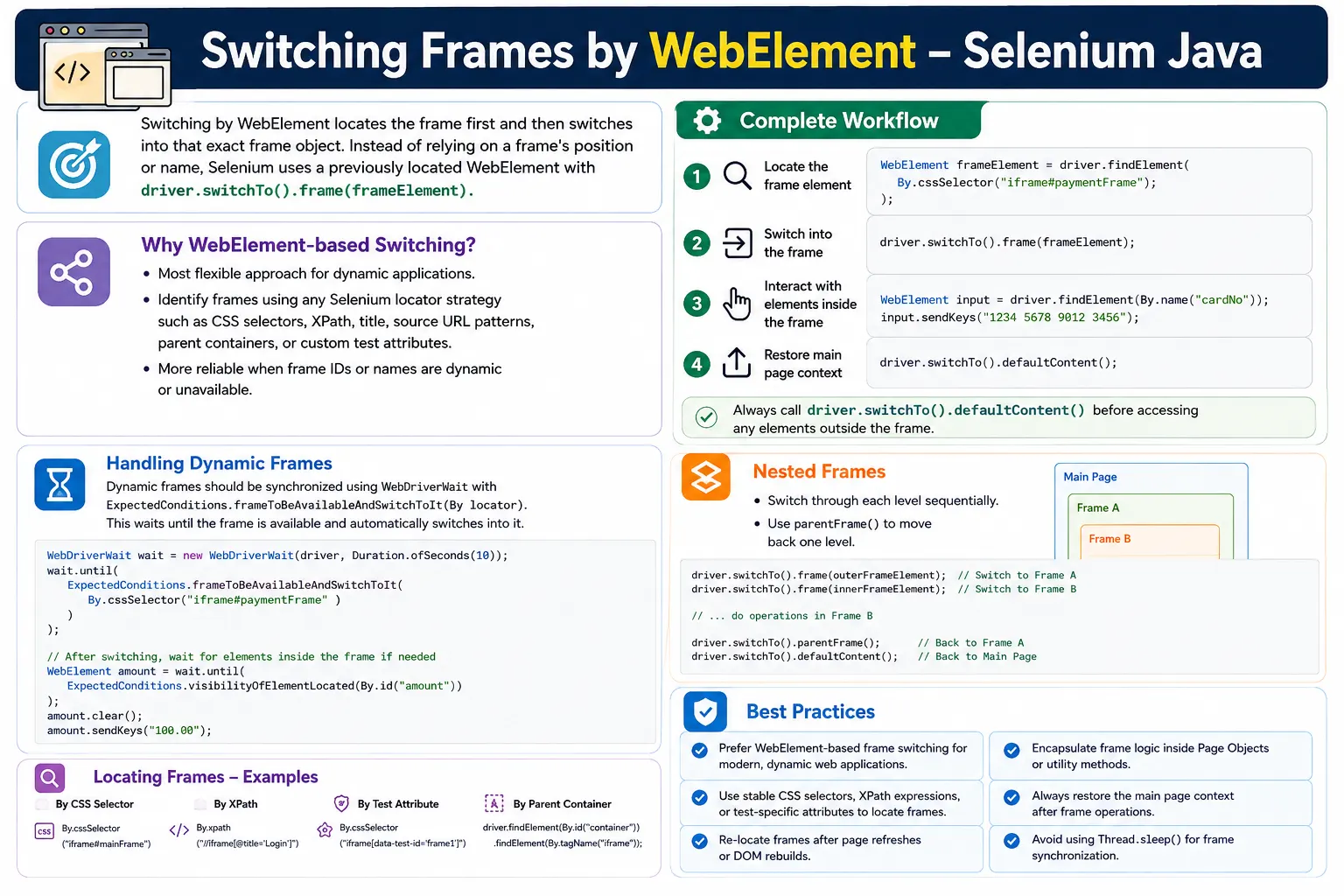
Among the common frame-switching techniques, index-based switching is the least preferred, name or ID switching is good when stable attributes exist, and WebElement switching is usually the best practice for dynamic applications. It gives the tester the flexibility to identify the frame with CSS selectors, XPath, title attributes, source URL patterns, parent containers, or test-friendly attributes.
This matters in real projects because embedded content is often dynamic. Payment providers may generate frame IDs. Report viewers may render different frame structures. Rich text editors may rebuild their editable iFrame. A WebElement approach gives the automation framework more control over how the correct frame is identified.
2. What Is WebElement-Based Frame Switching?
WebElement-based frame switching means the test first locates the frame element in the current DOM and then switches into that located frame. Instead of telling Selenium "enter frame zero" or "enter a frame named loginFrame", the test says "enter this exact frame element that I located."
WebElement frame =
        driver.findElement(By.id("loginFrame"));

driver.switchTo().frame(frame);
This makes the frame selection explicit. The locator decides which frame is selected. If the locator is stable and meaningful, the frame switch becomes readable and maintainable.
3. Basic Syntax
The syntax has two steps: locate the frame and switch into it.
WebElement frame =
        driver.findElement(locator);

driver.switchTo().frame(frame);
After this call succeeds, Selenium's current context becomes the frame document. All following element searches happen inside that frame until the test switches back to the main page or parent frame.
4. Required Imports
Practical WebElement frame switching commonly uses element classes, locators, waits, dropdown support, and lists.
import org.openqa.selenium.By;
import org.openqa.selenium.WebDriver;
import org.openqa.selenium.WebElement;
import org.openqa.selenium.support.ui.ExpectedConditions;
import org.openqa.selenium.support.ui.Select;
import org.openqa.selenium.support.ui.WebDriverWait;
import java.time.Duration;
import java.util.List;
The wait imports are important because a frame can exist later than the main page. Waiting for the frame before switching avoids timing failures.
5. Basic Example
Consider a login field inside an iFrame.
<iframe id="loginFrame">
    <input id="username">
</iframe>
The Selenium code locates the frame as a WebElement, switches into it, and then enters the username.
WebElement frame =
        driver.findElement(By.id("loginFrame"));

driver.switchTo().frame(frame);

driver.findElement(By.id("username"))
      .sendKeys("admin");
The important idea is that username is not searched until Selenium is inside the frame. If the switch is missing, the same locator can fail even when the element is visible in browser developer tools.
6. Complete Login Example
A complete login frame may contain username and password fields.
<iframe id="loginFrame">
    <input id="username">
    <input id="password">
</iframe>
WebElement loginFrame =
driver.findElement(By.id("loginFrame"));
driver.switchTo().frame(loginFrame);
driver.findElement(By.id("username"))
.sendKeys("admin");
driver.findElement(By.id("password"))
.sendKeys("admin123");This code works because Selenium is operating inside loginFrame when the input fields are located. The frame WebElement identifies the frame; the inner locators identify elements inside it.
7. Switching Back to Main Page
After finishing frame work, return to the main document using defaultContent(). This is a critical habit in every frame test.
WebElement frame =
        driver.findElement(By.id("loginFrame"));

driver.switchTo().frame(frame);

driver.findElement(By.id("username"))
      .sendKeys("admin");

driver.switchTo().defaultContent();

driver.findElement(By.id("logout"))
      .click();
Without defaultContent(), Selenium remains inside the frame. A main-page locator such as logout would fail because Selenium is still searching inside the frame document.
8. Why WebElement Switching Is Better Than Index
Index-based switching depends on frame order. A test such as driver.switchTo().frame(1) does not explain which frame is selected, and the frame order can change when developers add hidden or third-party frames.
WebElement switching is more explicit. The locator describes the frame target. A variable such as paymentFrame or reportFrame makes the test easier to understand during review and debugging.
9. Why WebElement Switching Can Be Better Than Name or ID
Name or ID switching is good when the frame has a stable name or ID. But many modern applications generate dynamic attributes. A payment frame might be called frame_12345 today and frame_67890 tomorrow. A direct name or ID switch can fail in that situation.
WebElement switching lets the test locate the frame by a stable pattern instead.
WebElement frame =
        driver.findElement(
                By.cssSelector("iframe[src*='payment']")
        );

driver.switchTo().frame(frame);
This works when the ID changes but the frame source URL remains predictable.
10. Switching Using CSS Selector
CSS selectors are commonly used for WebElement frame switching.
WebElement frame =
        driver.findElement(
                By.cssSelector("iframe.payment-frame")
        );

driver.switchTo().frame(frame);
CSS is usually fast and readable. It is a good choice when the frame has a stable class, id, data attribute, title, or parent-child relationship that CSS can describe cleanly.
11. Switching Using XPath
XPath is useful when the frame must be located through text relationships, ancestor structures, or attributes that are easier to express with XPath.
WebElement frame =
        driver.findElement(
                By.xpath("//iframe[@title='Payment']")
        );

driver.switchTo().frame(frame);
XPath can be powerful, but keep it stable. Avoid brittle absolute XPath values that depend on every wrapper element in the page.
12. Wait and Switch Using WebElement
A safer approach waits until the frame element is present or visible before switching.
WebDriverWait wait =
        new WebDriverWait(driver, Duration.ofSeconds(10));

WebElement frame =
        wait.until(
                ExpectedConditions
                        .visibilityOfElementLocated(
                                By.id("loginFrame")
                        )
        );

driver.switchTo().frame(frame);
This reduces failures caused by dynamic loading. The wait finds the frame element only after the expected condition is satisfied.
13. Best Selenium Practice: Wait and Switch Directly
Selenium also provides frameToBeAvailableAndSwitchToIt(), which can wait and switch in one step.
new WebDriverWait(driver, Duration.ofSeconds(10))
        .until(
                ExpectedConditions
                        .frameToBeAvailableAndSwitchToIt(
                                By.id("loginFrame")
                        )
        );
This is often the cleanest option because it waits for the frame and changes context automatically. After this succeeds, Selenium is already inside the frame.
14. Reusable Utility Method
A reusable utility keeps frame switching consistent across a framework.
public static void switchToFrame(
        WebDriver driver,
        By locator) {

    WebDriverWait wait =
            new WebDriverWait(driver, Duration.ofSeconds(10));

    WebElement frame =
            wait.until(
                    ExpectedConditions
                            .visibilityOfElementLocated(locator)
            );

    driver.switchTo().frame(frame);
}
The test can call this method with a frame locator instead of repeating wait logic everywhere.
15. Enter Text Inside WebElement Frame
WebElement frame =
        driver.findElement(By.id("profileFrame"));

driver.switchTo().frame(frame);

driver.findElement(By.id("firstName"))
      .sendKeys("Suresh");

driver.switchTo().defaultContent();
This pattern is common for embedded profile forms, login widgets, and account settings pages.
16. Click Button Inside WebElement Frame
WebElement frame =
        driver.findElement(By.id("buttonFrame"));

driver.switchTo().frame(frame);

driver.findElement(By.id("submitBtn")).click();

driver.switchTo().defaultContent();
If the click changes the main page, switch back before validating main-page messages or buttons.
17. Checkbox and Dropdown Inside WebElement Frame
WebElement frame =
        driver.findElement(By.id("settingsFrame"));

driver.switchTo().frame(frame);

driver.findElement(By.id("agree")).click();

Select select =
        new Select(driver.findElement(By.id("country")));

select.selectByVisibleText("India");

driver.switchTo().defaultContent();
Standard HTML controls behave normally once Selenium is inside the correct frame context.
18. Nested Frames Using WebElement
Nested frames must be entered one level at a time. Locate the parent frame, switch into it, then locate the child frame inside the parent context.
WebElement parentFrame =
        driver.findElement(By.id("parentFrame"));

driver.switchTo().frame(parentFrame);

WebElement childFrame =
        driver.findElement(By.id("childFrame"));

driver.switchTo().frame(childFrame);

driver.findElement(By.id("save")).click();
The child frame is not visible from the main document. It becomes locatable only after Selenium enters the parent frame.
19. Return to Parent Frame
Use parentFrame() to move one level up in a nested frame structure.
driver.switchTo().parentFrame();This returns from the child frame to the parent frame. To return all the way to the main page, use defaultContent().
20. Switch Between Two Frames
When switching between sibling frames, return to default content before entering the second frame.
WebElement menuFrame =
        driver.findElement(By.id("menuFrame"));

driver.switchTo().frame(menuFrame);

driver.switchTo().defaultContent();

WebElement contentFrame =
        driver.findElement(By.id("contentFrame"));

driver.switchTo().frame(contentFrame);
Selenium cannot reliably move from one sibling frame to another unless it returns to the parent context first.
21. Count and Switch to First iFrame WebElement
For quick debugging, you can collect all iFrames and switch to the first one.
List<WebElement> frames =
        driver.findElements(By.tagName("iframe"));

driver.switchTo().frame(frames.get(0));
This is not a preferred production strategy, but it is useful while exploring an unfamiliar page.
22. Loop Through iFrames as WebElements
List<WebElement> frames =
        driver.findElements(By.tagName("iframe"));

for (WebElement frame : frames) {
    driver.switchTo().defaultContent();
    driver.switchTo().frame(frame);

    System.out.println("Switched to one iframe");
}
This can help with debugging, but be careful. A stored frame WebElement can become stale if the page reloads or rebuilds frame nodes.
23. Find Element by Searching All iFrames
List<WebElement> frames =
        driver.findElements(By.tagName("iframe"));

for (WebElement frame : frames) {
    driver.switchTo().defaultContent();
    driver.switchTo().frame(frame);

    if (driver.findElements(By.id("submit")).size() > 0) {
        driver.findElement(By.id("submit")).click();
        break;
    }
}
This is a troubleshooting technique, not a long-term test design. Once the correct frame is known, build a stable locator for that frame.
24. Real Project Example: Payment Gateway
Most payment providers use iFrames to isolate card fields. WebElement switching is useful when the payment frame can be identified by a source URL, title, or provider-specific attribute.
WebElement paymentFrame =
        driver.findElement(By.id("paymentFrame"));

driver.switchTo().frame(paymentFrame);

driver.findElement(By.id("cardNumber"))
      .sendKeys("4111111111111111");

driver.findElement(By.id("cvv"))
      .sendKeys("123");

driver.switchTo().defaultContent();
For payment tests, use official test card data and test environments. Avoid depending on unstable third-party markup when an official testing flow is available.
25. Real Project Example: Rich Text Editor
Editors such as TinyMCE or CKEditor often place the editable document body inside an iFrame.
WebElement editorFrame =
        driver.findElement(By.id("editorFrame"));

driver.switchTo().frame(editorFrame);

driver.findElement(By.tagName("body"))
      .sendKeys("Automation Notes");

driver.switchTo().defaultContent();
After typing, return to default content before clicking toolbar buttons if the toolbar is outside the frame.
26. Real Project Example: Embedded Dashboard
WebElement reportFrame =
        driver.findElement(
                By.cssSelector("iframe.report")
        );

driver.switchTo().frame(reportFrame);

driver.findElement(By.id("export")).click();

driver.switchTo().defaultContent();
Embedded dashboards can be slow. Wait for the frame and then wait for important dashboard elements inside it.
27. Handle Alert Inside WebElement Frame
WebElement frame =
        driver.findElement(By.id("alertFrame"));

driver.switchTo().frame(frame);

driver.findElement(By.id("alertButton")).click();

driver.switchTo().alert().accept();

driver.switchTo().defaultContent();
The button belongs to the frame context, while the alert belongs to the browser context. After handling the alert, restore frame context deliberately.
28. Verify Element Exists After Switching
WebElement frame =
        driver.findElement(By.id("loginFrame"));

driver.switchTo().frame(frame);

boolean exists =
        driver.findElements(By.id("username")).size() > 0;

System.out.println("Username exists: " + exists);
Use this style for optional checks. For required fields, prefer explicit waits and assertions.
29. NoSuchFrameException
NoSuchFrameException can occur if the WebElement does not represent a valid frame, if the frame disappeared before switching, or if the frame is not available at the moment of switching.
The fix is to use a proper frame locator, wait for the frame, and avoid storing frame elements too early. For dynamic frames, locate the frame immediately before switching.
30. StaleElementReferenceException
A frame WebElement can become stale when the page refreshes or a JavaScript component rebuilds the frame.
WebElement frame =
        driver.findElement(By.id("frame"));

driver.navigate().refresh();

driver.switchTo().frame(frame);
This can fail because the stored frame element belongs to the old DOM. Locate the frame again after reload.
WebElement frame =
        driver.findElement(By.id("frame"));

driver.switchTo().frame(frame);
31. Timing Issues Inside the Frame
Switching to the frame does not guarantee that every element inside it is ready. The frame document may load first, while inner fields or buttons appear later. After switching, wait for the specific element you need.
driver.switchTo().frame(frame);

wait.until(
        ExpectedConditions.visibilityOfElementLocated(
                By.id("username")
        )
);
This two-layer waiting strategy is common: wait for the frame, then wait for the element inside the frame.
32. Page Object Model Example
public class LoginPage {

    private WebDriver driver;
    private By loginFrame = By.id("loginFrame");
    private By username = By.id("username");

    public LoginPage(WebDriver driver) {
        this.driver = driver;
    }

    public void enterUsername(String user) {
        WebElement frame =
                driver.findElement(loginFrame);

        driver.switchTo().frame(frame);
        driver.findElement(username).sendKeys(user);
        driver.switchTo().defaultContent();
    }
}
This keeps frame handling inside the page object instead of scattering it across tests.
33. Safer Page Object Method
A stronger page object waits for the frame and restores context in a finally block.
public void enterUsername(String user) {
    try {
        wait.until(
                ExpectedConditions
                        .frameToBeAvailableAndSwitchToIt(
                                loginFrame
                        )
        );

        driver.findElement(username).sendKeys(user);
    } finally {
        driver.switchTo().defaultContent();
    }
}
This prevents context leakage when an exception occurs during the frame action.
34. Reusable Safe Utility
public void insideFrame(
        By frameLocator,
        Runnable action) {

    try {
        wait.until(
                ExpectedConditions
                        .frameToBeAvailableAndSwitchToIt(
                                frameLocator
                        )
        );

        action.run();
    } finally {
        driver.switchTo().defaultContent();
    }
}
This utility allows the framework to run frame actions safely and return to the main document afterward.
35. Dynamic Frame Locators
Dynamic applications often generate frame IDs. WebElement switching becomes valuable because the frame can be located by a stable pattern rather than an exact ID.
By paymentFrame =
        By.cssSelector("iframe[src*='payment']");

insideFrame(paymentFrame, () -> {
    driver.findElement(By.id("cardNumber"))
          .sendKeys("4111111111111111");
});
This is more maintainable than hardcoding a generated ID that changes between sessions.
36. Locating Frames by Parent Container
Sometimes a frame does not have a stable ID, name, or title, but the surrounding section is stable. In that case, locate the frame through its parent container. This is a strong use case for WebElement-based switching because Selenium does not require the frame itself to have a perfect identifier. It only requires the test to locate the correct frame element.
WebElement reportFrame =
        driver.findElement(
                By.cssSelector(
                        "section.report-panel iframe"
                )
        );

driver.switchTo().frame(reportFrame);
This strategy makes the locator depend on the page structure that has business meaning. A report frame inside the report panel is clearer than the first or second frame on the page. It also avoids failures caused by unrelated hidden frames added elsewhere in the DOM.
37. Locating Frames by Title or Source
Many embedded tools expose useful title or src attributes. A payment frame may have a title such as Payment. A map frame may have a source URL that contains a map provider name. A document viewer may have a source URL that contains the document service path.
WebElement paymentFrame =
        driver.findElement(
                By.cssSelector(
                        "iframe[title='Payment']"
                )
        );

driver.switchTo().frame(paymentFrame);
When using src, prefer stable partial matching rather than a full URL if the URL contains tokens, timestamps, session IDs, or environment-specific values. A locator that depends on a temporary token will break quickly.
38. Frame WebElement Lifetime
A frame WebElement is a reference to a node in the current DOM. It is not a permanent pointer to the concept of a frame. If the page refreshes, a component re-renders, or JavaScript replaces the iFrame element, the old WebElement reference becomes invalid.
This is why frame elements should be located close to the point of use. Avoid storing frame WebElements as long-lived class fields. Store the locator, not the element. A locator can be used again after reload; an old WebElement cannot.
private By paymentFrame =
        By.cssSelector("iframe[src*='payment']");
Keeping the locator in the page object and locating the frame when needed is usually safer than keeping a cached frame element.
39. Frames That Reload After Actions
Some frames reload as part of normal user interaction. A report viewer may reload after a filter changes. A payment frame may refresh after validating card information. A rich text editor may rebuild its iFrame after switching from visual mode to source mode.
When a frame reloads, switch back to default content and wait for the fresh frame again. Do not continue using element references from the old frame. This applies to both the frame WebElement and elements inside it.
driver.switchTo().defaultContent();

wait.until(
        ExpectedConditions
                .frameToBeAvailableAndSwitchToIt(
                        paymentFrame
                )
);
The test should model the page lifecycle. If the application replaces the frame, the automation must re-enter the new frame context.
40. WebElement Switching and Third-Party Frames
Third-party frames are common in real applications. Payment processors, identity providers, chat widgets, video players, maps, document signing tools, and analytics dashboards are often embedded through iFrames. WebElement switching is helpful because those frames may not have names or IDs chosen by your team.
For third-party frames, focus your test on the integration behavior your application owns. Verify that the frame appears, supported test data can be entered, and your application receives the expected result. Avoid over-testing the provider's internal UI unless your team has a supported contract with that provider.
If the provider changes markup frequently, isolate those selectors in one page object. A future selector change should not force edits across many test classes.
41. WebElement Switching with Page Factory
Older Selenium frameworks may use Page Factory. Be careful when storing frame elements with Page Factory because the frame may be looked up before it is ready or may become stale after page changes. A locator-based method is often more predictable.
If Page Factory is already used in the project, avoid caching dynamic frame elements. Prefer methods that locate and switch when the action is performed. Dynamic frame handling benefits from fresh lookup and explicit waits.
The principle is the same regardless of framework style: the frame should be found when the test is ready to enter it, not much earlier during page object construction.
42. WebElement Switching in CI
CI environments expose frame timing problems more often than local machines. Third-party frames may load slower. Network access may be different. Browser security settings may block content. A headless browser may use a smaller viewport, causing the embedded component to render differently.
When a frame switch fails in CI, log the frame locator, current URL, number of frames, and visible attributes for each frame. Screenshots are also valuable because they show whether the embedded area rendered at all. The goal is to determine whether the problem is a locator issue, a timing issue, a network issue, or an environment issue.
Stable browser configuration also helps. Use a consistent window size in headless runs, and keep test environments configured to allow required third-party test frames.
43. Assertions After WebElement Frame Actions
A frame switch is not the test objective. It is only the path to the target interaction. After performing an action inside a frame, assert the user-visible result. If you enter card details, verify that the payment state changes. If you edit rich text, verify the saved content. If you click export inside a report frame, verify the export behavior.
Many frame workflows produce results outside the frame. In those cases, switch back to default content before asserting. This keeps the assertion in the correct context and avoids false failures caused by searching the wrong document.
44. Choosing Between WebElement and Direct Wait Switching
There are two common styles. One style locates the frame WebElement and then calls driver.switchTo().frame(frame). Another style passes a frame locator directly to frameToBeAvailableAndSwitchToIt(). Both are valid.
Use the direct wait style when the locator is enough and you simply need to enter the frame. Use the explicit WebElement style when you want to inspect the frame, log its attributes, validate it, or pass it through a utility. In either case, the important engineering goal is the same: switch only after the frame is available and restore context after the action.
45. Framework Design Guidance
In an enterprise framework, frame switching should not appear randomly in test methods. Tests should describe user behavior, while page objects or helper utilities manage frame context. A test step such as checkoutPage.enterCardDetails() is cleaner than several lines of frame switching and field entry code in the test itself.
Good frame helpers should support waiting, switching, logging, context restoration, and nested frame navigation. They should also make failures understandable. A failure message saying "payment frame was not available using locator iframe[src*='payment']" is far more useful than a generic element not found error.
46. Nested Frame Utility Design
Nested frames are where WebElement-based switching shows its real value. A nested frame path can be represented as a sequence of locators. The utility switches to default content, enters the first frame, then locates and enters the next frame from inside the first one. This makes the nesting explicit and avoids accidental assumptions about frame index.
public void switchToNestedFrames(
        By parentFrame,
        By childFrame) {

    driver.switchTo().defaultContent();

    wait.until(
            ExpectedConditions
                    .frameToBeAvailableAndSwitchToIt(
                            parentFrame
                    )
    );

    wait.until(
            ExpectedConditions
                    .frameToBeAvailableAndSwitchToIt(
                            childFrame
                    )
    );
}
This kind of utility is more maintainable than writing repeated frame calls in every test. If the parent frame locator changes, the page object or utility can be updated without changing the test logic.
47. Locator Quality for Frame WebElements
The quality of WebElement-based switching depends on the quality of the frame locator. A strong frame locator points to one specific embedded area and remains stable when unrelated layout changes happen. A weak locator is generic, over-dependent on position, or tied to generated values.
Good frame locators often use stable IDs, meaningful classes, titles, source URL patterns, data attributes, or a stable parent container. Weak locators often use absolute XPath, numeric indexes, or auto-generated values. If a locator matches multiple frames, the test may switch into the wrong one without making the problem obvious.
During code review, frame locators deserve careful attention. If the frame is important enough to automate, it is important enough to identify clearly. When the application is under your team's control, asking developers for a stable test attribute is often the cleanest long-term solution.
48. Failure Messages and Logging
Frame failures can be hard to diagnose if the framework only reports NoSuchElementException. A better framework logs the frame locator, the current URL, the number of available frames, and the attributes of visible frames when switching fails. This context helps separate locator problems from timing problems.
For example, if the expected payment frame is missing, the log should show whether any payment-related frame existed. If the frame existed but the inner card field was missing, the problem is inside the provider frame rather than the main application. Clear logging saves time during CI failure analysis.
49. Security and WebElement Frame Switching
Many frames exist for security reasons. Payment fields may be isolated so the main application never directly handles card numbers. Authentication widgets may be isolated so credentials are managed by an identity provider. Document viewers may sandbox untrusted files. WebElement switching should respect these boundaries.
Avoid JavaScript shortcuts that bypass user-like behavior unless there is a controlled test-only reason. Switching into the frame and interacting with visible fields is closer to how a real user works. For protected third-party widgets, use official testing hooks, test environments, and supported test data.
50. Debugging Checklist
- Confirm the target element is inside a frame.
- Inspect the frame attributes and choose a stable locator.
- Wait for the frame before switching.
- Wait for inner elements after switching.
- Return to default content after frame work.
- Re-locate the frame after refresh or reload.
- Use
parentFrame()for nested frame navigation. - Keep frame logic inside page objects or utilities.
51. Common Beginner Mistakes
- Storing the frame WebElement too early.
- Using a stale frame reference after page reload.
- Forgetting
defaultContent(). - Switching to the parent frame but expecting to be on the main page.
- Waiting for the frame but not waiting for elements inside it.
- Using a locator that matches the wrong frame.
- Looping through every frame as a permanent framework strategy.
- Mixing frame, alert, and window contexts without clear restoration.
52. Best Practices
- Prefer WebElement-based frame switching for dynamic applications.
- Use stable CSS selectors, XPath, title, source, or data attributes.
- Use
frameToBeAvailableAndSwitchToIt()when possible. - Avoid index-based switching in production suites when frame order can change.
- Re-locate frames after refreshes or JavaScript rebuilds.
- Restore context with
defaultContent()after frame actions. - Use
parentFrame()only when you intentionally need the parent frame. - Hide frame details behind page object methods.
- Log frame locators and attributes for CI failures.
- Do not use fixed sleeps as a replacement for explicit waits.
53. Interview Perspective
A short interview answer is: WebElement-based frame switching means locating the frame as a WebElement and passing it to driver.switchTo().frame(frameElement). It is considered reliable because the frame can be identified by a stable locator instead of DOM order.
A stronger real-time answer is: I prefer WebElement-based switching for dynamic applications because it supports CSS, XPath, and test-friendly locators. I usually combine it with frameToBeAvailableAndSwitchToIt() or an explicit wait, then restore context using defaultContent(). If a frame reloads, I re-locate the frame before switching again to avoid stale references.
54. Key Takeaway
Switching frames by WebElement is the most flexible frame-switching strategy in Selenium Java. It avoids the fragility of index-based switching and handles cases where name or ID values are missing, duplicated, or dynamic. The locator can describe the frame in a way that matches the real page structure.
The reliable workflow is to locate or wait for the frame, switch into it, interact with elements inside it, and restore the main page context afterward. For nested frames, switch through each level in order. For frames that reload, re-locate the frame before switching again.
In enterprise Selenium frameworks, WebElement-based frame switching is usually preferred because it provides the best balance of readability, stability, and maintainability. It also keeps future frame changes easier to handle.