StaleElementReferenceException in Selenium Java
StaleElementReferenceException is one of the most common Selenium exceptions in modern web applications. It occurs when Selenium tries to interact with a WebElement that was found earlier, but that specific DOM node is no longer attached to the current page document. The element may look identical on the screen, but internally the browser has removed the old node and created a new one.
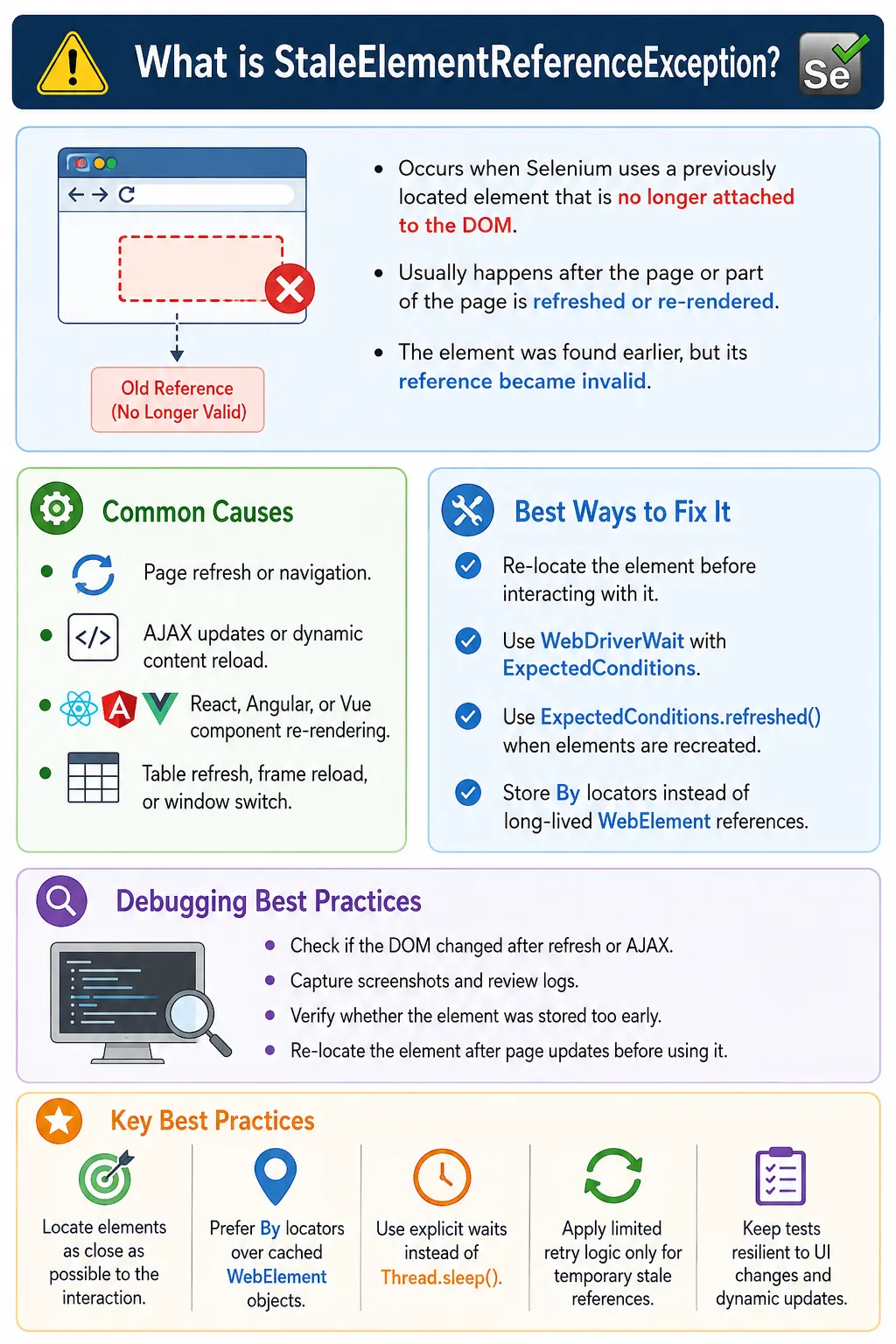
This exception is different from NoSuchElementException. In NoSuchElementException, Selenium cannot find the element in the first place. In StaleElementReferenceException, Selenium did find the element earlier, but the stored reference became invalid after the DOM changed. This distinction is important because the solution is different. For stale elements, the usual fix is to locate the element again after the DOM update.
Stale element failures are especially common in Single Page Applications, React applications, Angular applications, Vue.js applications, AJAX-heavy pages, dynamic dashboards, live tables, auto-refreshing widgets, and applications that update parts of the page without a full reload. Stable Selenium frameworks must understand how DOM updates affect stored element references.
1. What Is StaleElementReferenceException?
A StaleElementReferenceException is thrown when Selenium attempts to use a previously located element that has been removed, replaced, or recreated in the DOM. The stored Java object still exists in your test code, but the actual browser-side DOM node it points to is gone.
WebElement loginButton =
        driver.findElement(By.id("login"));

driver.navigate().refresh();

loginButton.click();
After the page refresh, the original login button no longer exists as the same DOM node. A new button may appear with the same ID and same text, but the old WebElement reference is stale. Selenium throws an exception because it cannot operate on an element that is no longer attached to the document.
2. Why It Occurs
When Selenium locates an element, it stores a reference to a specific DOM node. If the DOM changes and that node is removed, the reference becomes invalid. This can happen after page refresh, AJAX updates, navigation, component re-rendering, frame reloads, table refreshes, or window context changes.
The key idea is that Selenium references are not just locator definitions. A WebElement is a handle to a particular element instance in the browser. If the application removes that instance and creates another one, the old handle cannot be reused.
3. Understanding DOM Refresh
A stale element can be confusing because the page may look the same before and after the change. For example, this button can appear before refresh:
<button id="login">
    Login
</button>
After refresh, the same markup may appear again:
<button id="login">
    Login
</button>
Visually and structurally, it looks identical. But the browser removed the old node and created a new node. Selenium's old reference still points to the removed node. The fix is to locate the button again after the refresh.
4. Basic Example
The most basic stale element example is locating an element, refreshing the page, and then using the old element reference.
WebElement login =
        driver.findElement(By.id("login"));

driver.navigate().refresh();

login.click();
This code fails because login belongs to the old page instance. The correct approach is to refresh first, then locate the element again.
driver.navigate().refresh();

WebElement login =
        driver.findElement(By.id("login"));

login.click();
5. Cause: Page Refresh
A full page refresh invalidates all previously stored elements. Any WebElement found before refresh should be treated as unusable afterward.
WebElement button =
        driver.findElement(By.id("submit"));

driver.navigate().refresh();

button.click();
The solution is simple: locate again after refresh.
driver.navigate().refresh();

button =
        driver.findElement(By.id("submit"));

button.click();
6. Cause: AJAX Updates
Many modern applications update only part of the page. A table may refresh after a filter is applied. A dashboard widget may reload after a date range changes. A search result list may be replaced after an API call. These updates can recreate DOM nodes without refreshing the whole page.
WebElement row =
        driver.findElement(By.id("employee"));

driver.findElement(By.id("refresh"))
      .click();

row.click();
If the refresh button reloads the employee table, the old row becomes stale. Locate the row again after the AJAX update completes.
driver.findElement(By.id("refresh"))
      .click();

row =
        driver.findElement(By.id("employee"));

row.click();
7. Cause: React, Angular, and Vue Re-rendering
JavaScript frameworks such as React, Angular, and Vue often re-render components. A component may look unchanged to the user, but the framework may replace DOM nodes internally. This is why stale element issues are common in modern web applications.
For example, clicking Save may trigger validation, state updates, API calls, and component re-rendering. The old Save button may be removed and a new Save button may be inserted. If your test stored the button before the state update and tries to use it afterward, the reference can become stale.
8. Cause: Page Navigation
Elements from one page cannot be used after navigating to another page. If the test stores a search field from page one and then navigates to page two, the old element reference is no longer valid.
WebElement search =
        driver.findElement(By.id("search"));

driver.navigate().to(url2);

search.sendKeys("Laptop");
The search element belongs to the previous page. Locate the relevant element again after navigation.
9. Cause: Window Switching
When switching windows or tabs, previously stored elements from the old window may not be usable in the new context. A stale reference can occur if the element belonged to a different browsing context or if the page updated during the switch.
WebElement payment =
        driver.findElement(By.id("payment"));

driver.switchTo().window(childWindow);

payment.click();
After switching, locate the element in the active window. Do not reuse elements captured from a different window context.
10. Cause: Frame Reload
Frames and iframes can reload independently. If an element inside a frame is stored and then the frame reloads, the element reference becomes stale. This can happen in payment frames, embedded login frames, document viewers, and third-party widgets.
The correct approach is to switch to the frame after it is available, wait for the element inside the frame, and locate it fresh before interacting. If the frame reloads, switch and locate again.
11. Cause: Dynamic Table Refresh
Dynamic tables are a classic stale element source. If a table reloads after filtering, sorting, pagination, or refresh, all previously stored rows and cells may become stale. Even if row text appears identical, the old row object may no longer be valid.
driver.findElement(By.id("reload"))
      .click();

driver.findElement(By.xpath("//tr[1]"))
      .click();
This works because the row is located after the table refresh. Avoid storing table rows before the action that refreshes the table.
12. Best Solution: Locate Element Again
The most reliable solution is to locate the element as close as possible to the moment of interaction. Instead of storing a WebElement for a long time, store the locator and call findElement() when needed.
// Better for dynamic pages
driver.findElement(By.id("submit"))
      .click();
This does not mean you should never use WebElement variables. It means you should avoid keeping them across page refreshes, AJAX updates, navigation, frame reloads, or component re-rendering.
13. Using Explicit Wait
Explicit waits help by locating the element when the expected condition is satisfied. For clicking, use elementToBeClickable().
WebDriverWait wait =
        new WebDriverWait(
                driver,
                Duration.ofSeconds(10)
        );

WebElement button =
        wait.until(
                ExpectedConditions
                        .elementToBeClickable(
                                By.id("submit")
                        )
        );

button.click();
This waits for a usable element reference. It is much better than storing the element early and using it after page changes.
14. Using ExpectedConditions.refreshed()
Selenium provides ExpectedConditions.refreshed() for cases where the element may be recreated in the DOM. It wraps another expected condition and retries when stale references occur during evaluation.
WebDriverWait wait =
        new WebDriverWait(
                driver,
                Duration.ofSeconds(10)
        );

WebElement button =
        wait.until(
                ExpectedConditions.refreshed(
                        ExpectedConditions
                                .presenceOfElementLocated(
                                        By.id("submit")
                                )
                )
        );

button.click();
This is useful when a section refreshes and Selenium needs a fresh element reference after the DOM update.
15. Explicit Wait Ignoring Stale Element
Another useful pattern is configuring WebDriverWait to ignore StaleElementReferenceException while waiting. This is helpful when a dynamic element may become stale during polling.
WebDriverWait wait =
        new WebDriverWait(driver, Duration.ofSeconds(10));

wait.ignoring(StaleElementReferenceException.class)
    .until(
            ExpectedConditions.elementToBeClickable(
                    By.id("submit")
            )
    )
    .click();
This does not hide failures forever. It ignores stale references during the wait until the timeout expires. If a stable clickable element never appears, the wait still fails.
16. Retry Logic
Limited retry logic can help with transient stale references. The key word is limited. Never use infinite retries. A retry utility should attempt the action a small number of times and fail clearly if the element remains stale.
public void clickWithRetry(By locator) {

    int attempts = 0;

    while (attempts < 3) {

        try {

            driver.findElement(locator)
                  .click();

            return;

        } catch (StaleElementReferenceException e) {

            attempts++;
        }
    }

    throw new RuntimeException(
            "Unable to click after retries."
    );
}clickWithRetry(By.id("submit"));Retry logic should be used to handle occasional DOM replacement, not to mask unstable application behavior or poor synchronization.
17. Simple Exception Handling
A simple retry can be written with try-catch, but it should not be scattered throughout test methods. Use it to understand the concept, then move retry logic into a reusable utility.
try {

    driver.findElement(By.id("submit"))
          .click();

} catch (StaleElementReferenceException e) {

    driver.findElement(By.id("submit"))
          .click();
}
This works only for simple transient cases. A framework helper is better for real projects because it can log, retry, screenshot, and fail consistently.
18. Logging the Exception
When a stale element occurs, log it clearly. A warning may be appropriate if the framework retries successfully. An error may be appropriate if all retries fail.
try {

    driver.findElement(By.id("submit"))
          .click();

} catch (StaleElementReferenceException e) {

    logger.warn(
            "Element became stale. Retrying...",
            e
    );
}
Logging stale occurrences helps identify unstable pages. If the same element becomes stale frequently, the test or application may need a better synchronization strategy.
19. Screenshot on Exception
Screenshots can help when stale element issues are difficult to reproduce. A screenshot may show a loading spinner, refreshed table, modal update, or page transition that explains why the element changed.
catch (StaleElementReferenceException e) {

    ScreenshotUtil.captureScreenshot(
            driver,
            "StaleElement"
    );

    throw e;
}
For occasional retry success, a screenshot may not be needed. For repeated failures, screenshot and logs are useful debugging evidence.
20. Page Object Model Best Practice
A common Page Object mistake is storing WebElement fields for long periods. This can create stale references in dynamic applications. Prefer storing By locators and locating elements inside methods.
// Less preferred on dynamic pages
private WebElement loginButton;

// Preferred
private By loginButton =
        By.id("login");

public void clickLogin() {

    driver.findElement(loginButton)
          .click();
}
Each method call finds a fresh element. This is safer when components re-render or page state changes between actions.
21. Real Project Example: Dashboard Refresh
Dashboards often refresh widgets after filters, date range changes, or manual refresh actions. Locate dashboard elements after the refresh, not before.
driver.findElement(By.id("refresh"))
      .click();

WebElement dashboard =
        wait.until(
                ExpectedConditions
                        .visibilityOfElementLocated(
                                By.id("dashboard")
                        )
        );

dashboard.click();
The wait returns a fresh visible element after the dashboard is ready.
22. Real Project Example: Employee Table
Employee tables are often refreshed by filtering, sorting, and pagination. Do not store rows before the table reloads. Locate rows after the update.
driver.findElement(By.id("reload"))
      .click();

driver.findElement(By.xpath("//table//tr[1]"))
      .click();
For stronger code, wait until the table update completes and then locate the row.
23. Retry sendKeys()
Stale element issues can occur while typing into fields if the form re-renders. A limited retry can relocate the field and type again.
for (int i = 0; i < 3; i++) {

    try {

        driver.findElement(By.id("username"))
              .sendKeys("admin");

        break;

    } catch (StaleElementReferenceException e) {

    }
}
In a real framework, this should be wrapped in a utility with logging and a clear failure after retries.
24. Retry getText()
Reading text from dynamic messages or table cells can also produce stale references. Locate and read inside the retry block.
String text = "";

for (int i = 0; i < 3; i++) {

    try {

        text = driver.findElement(By.id("message"))
                     .getText();

        break;

    } catch (StaleElementReferenceException e) {

    }
}

System.out.println(text);
This pattern is useful for dynamic labels, toast messages, and table cells that refresh during execution.
25. Retry getAttribute()
Attribute reads can also fail if the element is replaced. The solution is the same: locate again and retry in a controlled way.
String value = "";

try {

    value = driver.findElement(By.id("username"))
                  .getAttribute("value");

} catch (StaleElementReferenceException e) {

    value = driver.findElement(By.id("username"))
                  .getAttribute("value");
}
Do not store the old element and retry the same stale reference. The retry must locate again.
26. Generic Retry Utility
A generic utility can return a stable element after retrying. It should locate inside the loop and stop after a fixed number of attempts.
public WebElement retryFindElement(By locator) {

    for (int i = 0; i < 3; i++) {

        try {

            return driver.findElement(locator);

        } catch (StaleElementReferenceException e) {

        }
    }

    throw new RuntimeException(
            "Unable to locate stable element."
    );
}
retryFindElement(By.id("username"))
.sendKeys("admin");For actions such as click, sendKeys, and getText, separate utility methods may be clearer than a generic element-returning method.
27. NoSuchElementException vs StaleElementReferenceException
NoSuchElementException means Selenium could not find the element. StaleElementReferenceException means Selenium found the element earlier, but that particular DOM node is no longer valid.
NoSuchElementException: element was not found initially.StaleElementReferenceException: element was found, then the DOM changed.NoSuchElementExceptionis usually fixed with correct locator, wait, frame, or window context.StaleElementReferenceExceptionis usually fixed by locating the element again after the DOM update.
28. Why Cached Elements Are Risky
Some Page Factory patterns cache elements. Cached elements can be risky in dynamic applications because the cached reference may become stale after re-rendering. If a page is static, caching may work. If the page updates frequently, cached element references can create intermittent failures.
In modern UI automation, storing locators is often safer than storing long-lived element objects. The locator remains valid even if the DOM node changes, because Selenium can search again when needed.
29. Do Not Use Infinite Retry Loops
Retry logic must have limits. An infinite retry loop can hang the test suite and waste CI time. If the application keeps replacing the element or never reaches a stable state, the test should fail clearly after a reasonable number of attempts.
A good retry utility logs each retry, captures evidence when all retries fail, and throws a meaningful exception. Silent retries make debugging harder because they hide instability.
30. Stale Elements in PageFactory
Older Selenium frameworks often use PageFactory with @FindBy annotations. PageFactory can make page classes look clean, but it can also encourage teams to think in terms of stored element fields. In dynamic applications, that habit can create stale references if elements are initialized early and then reused after the page changes.
PageFactory does not automatically solve DOM re-rendering. If a component is replaced after a save, refresh, filter, or route change, the element reference may still become stale. Teams using PageFactory should be careful with cached elements and should avoid patterns that keep old element references alive longer than necessary.
For highly dynamic applications, many teams prefer storing By locators and locating elements inside action methods. This gives better control over waits, retries, and error logging. The page object remains readable, but the framework avoids long-lived references.
31. Stale Elements in Dynamic Dropdowns
Dynamic dropdowns are another common source of stale element failures. Some dropdowns rebuild their option list every time the user types, scrolls, or opens the menu. If the test stores an option and then the list refreshes, that option reference becomes stale.
The safer pattern is to open the dropdown, wait for the current options, locate the option, and click it immediately. If typing in a search box refreshes the option list, locate the desired option after the search results finish updating.
driver.findElement(By.id("countryDropdown"))
      .click();

WebElement option =
        wait.until(
                ExpectedConditions
                        .elementToBeClickable(
                                By.xpath("//li[text()='India']")
                        )
        );

option.click();
If the dropdown is built by React or Angular, the option element may be recreated during filtering. Use a fresh locator after every dropdown update.
32. Stale Elements in Search Results
Search result pages often replace result cards after every query, filter, sort, or pagination action. If your test stores the first result before applying a filter, that stored result may become stale after the filter is applied. This is similar to dynamic table refresh, but it is common in e-commerce, job portals, admin dashboards, and reporting tools.
A stable approach is to perform the search or filter action first, wait for a result container to refresh, and then locate the result card. If there is a loading indicator, wait for it to disappear before reading or clicking results.
driver.findElement(By.id("searchBox"))
      .sendKeys("Laptop");

driver.findElement(By.id("searchButton"))
      .click();

WebElement firstResult =
        wait.until(
                ExpectedConditions
                        .visibilityOfElementLocated(
                                By.cssSelector(".result-card")
                        )
        );

firstResult.click();
The key is timing. Locate the result after the results are updated, not before.
33. Waiting for Old Element to Become Stale
Sometimes you know that an element should be replaced. In that case, Selenium provides stalenessOf(), which waits until a specific old element is detached from the DOM. This is useful when clicking a refresh button should replace a table, panel, or result list.
WebElement oldTable =
        driver.findElement(By.id("employeeTable"));

driver.findElement(By.id("refresh"))
      .click();

wait.until(
        ExpectedConditions.stalenessOf(oldTable)
);

WebElement newTable =
        wait.until(
                ExpectedConditions
                        .visibilityOfElementLocated(
                                By.id("employeeTable")
                        )
        );
This pattern is powerful because it explicitly waits for the old element to go away before locating the new element. It is often cleaner than blind retries.
34. Combining Staleness and Fresh Locate
For predictable refresh flows, the best pattern is often two-step synchronization: wait for the old element to become stale, then wait for the new element to appear. This confirms that the refresh actually happened and that the new DOM is ready.
This approach works well for tables, widgets, cards, and panels that visibly update. It avoids interacting with an old element while the update is in progress. It also avoids clicking too early before the new element is available.
WebElement oldMessage =
        driver.findElement(By.id("statusMessage"));

driver.findElement(By.id("save"))
      .click();

wait.until(ExpectedConditions.stalenessOf(oldMessage));

WebElement newMessage =
        wait.until(
                ExpectedConditions
                        .visibilityOfElementLocated(
                                By.id("statusMessage")
                        )
        );

String text = newMessage.getText();
The old message and new message may have the same ID, but they are different DOM nodes. Selenium must locate the new node.
35. Framework Click Helper for Dynamic Pages
A framework click helper can reduce stale element issues by accepting a locator instead of a WebElement. The helper waits, locates, clicks, and retries if a stale reference appears during the action.
public void safeClick(By locator) {

    for (int attempt = 1; attempt <= 3; attempt++) {

        try {

            wait.until(
                    ExpectedConditions
                            .elementToBeClickable(locator)
            ).click();

            return;

        } catch (StaleElementReferenceException e) {

            logger.warn(
                    "Stale element during click. Attempt: "
                    + attempt,
                    e
            );
        }
    }

    throw new RuntimeException(
            "Unable to click stable element: " + locator
    );
}
This helper relocates through the locator on each attempt. It does not retry the same stale element. That is the most important part of stale element retry design.
36. Framework Text Helper for Dynamic Pages
The same principle applies to reading text. The helper should accept a locator, wait for visibility, and read text from a fresh reference. If the element becomes stale during the read, retry with a new lookup.
public String getTextSafely(By locator) {

    for (int attempt = 1; attempt <= 3; attempt++) {

        try {

            return wait.until(
                    ExpectedConditions
                            .visibilityOfElementLocated(locator)
            ).getText();

        } catch (StaleElementReferenceException e) {

            logger.warn("Text element became stale.", e);
        }
    }

    throw new RuntimeException(
            "Unable to read stable text: " + locator
    );
}
This is useful for toast messages, status labels, dynamic counts, and table cells.
37. Why Reusing WebElement Parameters Can Be Risky
Some utility methods accept WebElement as a parameter. This can be convenient, but it can also be risky for dynamic pages. If the element was found before a DOM update and then passed into a utility, the utility cannot locate it again because it does not know the original locator.
For dynamic applications, prefer utility methods that accept By locators. A locator can be reused to find a fresh element. A stale WebElement cannot repair itself. This is why many robust Selenium frameworks build action utilities around locators rather than element objects.
38. Stale Element Anti-Patterns
Several coding patterns make stale element failures more likely. One anti-pattern is locating all page elements at the beginning of a test and using them later after several actions. Another is storing table rows before sorting or filtering. Another is keeping page object element fields that survive across page refreshes. Another is retrying the same WebElement after it already became stale.
The common problem is relying on old DOM references. Modern applications change the DOM often. Selenium code should be written with that reality in mind.
39. Stale Elements in CI and Flaky Tests
Stale element failures often appear more frequently in CI/CD than on a local machine. CI agents may be slower, browsers may run headless, network calls may take longer, and page updates may happen at slightly different times. A test that accidentally works locally because the page updates quickly may fail in CI when the element is replaced between locate and click.
This is why stale element failures are often labeled as flaky tests. The same test may pass in one run and fail in another, depending on timing. The fix is not to add random sleeps. The fix is to remove the timing gap between locating and interacting, use waits that match the application behavior, and re-locate after DOM-changing actions.
When investigating CI stale failures, review logs, screenshots, browser console errors, and timing around AJAX updates. If the stale failure always happens after clicking refresh, applying a filter, saving a form, or changing tabs, that action is probably recreating the element. Add synchronization around that exact DOM update.
40. When Retry Logic Is Not Enough
Retry logic can reduce transient stale failures, but it should not be the only solution. If an element becomes stale every time, retries simply hide the fact that the test is interacting at the wrong time. In that situation, the better fix is to wait for the old element to become stale, wait for the new element to appear, and then interact.
Retry utilities should be treated as a safety layer, not the main synchronization strategy. The main strategy should be understanding what action changes the DOM and waiting for the correct post-change state. This creates more deterministic tests and cleaner failure messages.
A useful rule is this: if stale element retry happens rarely, a retry helper is acceptable. If retry happens frequently for the same element, investigate and add a more precise wait or improve the page object flow.
41. Designing Tests Around DOM Changes
Stable tests are designed around expected DOM changes. If a test clicks a Save button and the page re-renders, the test should assume old elements are invalid after Save. If a test changes a table filter, it should assume old rows are invalid after filtering. If a test navigates to another route in a Single Page Application, it should assume old page elements are invalid after navigation.
This mindset changes how you write Selenium code. Instead of locating elements early and reusing them, you locate them at the point of action. Instead of storing rows, cards, buttons, and labels across page transitions, you store locators and use waits after transitions. This approach matches how modern web applications behave.
42. Debugging Checklist
- Check whether the page refreshed after locating the element.
- Check whether an AJAX update recreated the element.
- Check whether a React, Angular, or Vue component re-rendered.
- Check whether a table, card, or list refreshed before interaction.
- Check whether the test stored a
WebElementtoo early. - Check whether the element is inside a frame that reloaded.
- Check whether navigation or window switching occurred.
- Check logs and screenshots around the stale failure.
43. Common Mistakes
- Storing
WebElementreferences for long periods. - Using stored elements after page refresh.
- Using stored table rows after table reload.
- Using cached elements in dynamic Page Objects.
- Ignoring AJAX and component re-rendering.
- Retrying the same stale element instead of locating again.
- Using infinite retry loops.
- Failing to log or screenshot repeated stale failures.
44. Best Practices
- Store locators with
Byinstead of long-livedWebElementfields. - Locate elements immediately before interacting with them.
- Re-locate elements after page refreshes, AJAX updates, and table reloads.
- Use explicit waits for dynamic content.
- Use
ExpectedConditions.refreshed()when elements are recreated. - Use
ignoring(StaleElementReferenceException.class)when appropriate in waits. - Implement limited retry logic for transient stale references.
- Avoid unnecessary refreshes and repeated DOM-changing actions.
- Log stale occurrences and capture screenshots for difficult failures.
- Design Page Object methods to locate elements at action time.
45. Interview Perspective
A short interview answer is: StaleElementReferenceException occurs when Selenium tries to use a previously located element after the DOM has changed, making that stored element reference invalid.
A stronger real-time answer is: in modern web applications, stale element failures usually happen after AJAX updates, React or Angular re-rendering, page refreshes, navigation, frame reloads, or dynamic table refreshes. My preferred solution is to avoid caching WebElement objects, store By locators instead, locate elements just before interacting with them, and use explicit waits, ExpectedConditions.refreshed(), or limited retry logic when DOM updates are expected.
46. Key Takeaway
StaleElementReferenceException means the element was found earlier, but that exact DOM node no longer exists. The screen may look the same, but Selenium's stored reference points to an old node that the browser has removed.
The most effective prevention is to avoid reusing old WebElement references. Store locators, locate elements near the moment of interaction, and re-locate after refreshes or dynamic updates. For known DOM refresh behavior, use explicit waits, ExpectedConditions.refreshed(), and limited retry utilities.
Stable Selenium automation depends on respecting how dynamic web pages update the DOM. When the page changes, your element reference may need to change too.