Selenium Grid Architecture
Selenium Grid is the Selenium component used for distributed test execution. It allows automated Selenium tests to run on multiple machines, browsers, browser versions, and operating systems at the same time. Instead of executing an entire regression suite sequentially on one computer, Selenium Grid distributes test sessions to available nodes and reduces overall execution time. This makes it a core part of enterprise automation frameworks, cross-browser testing strategies, and CI/CD pipelines.
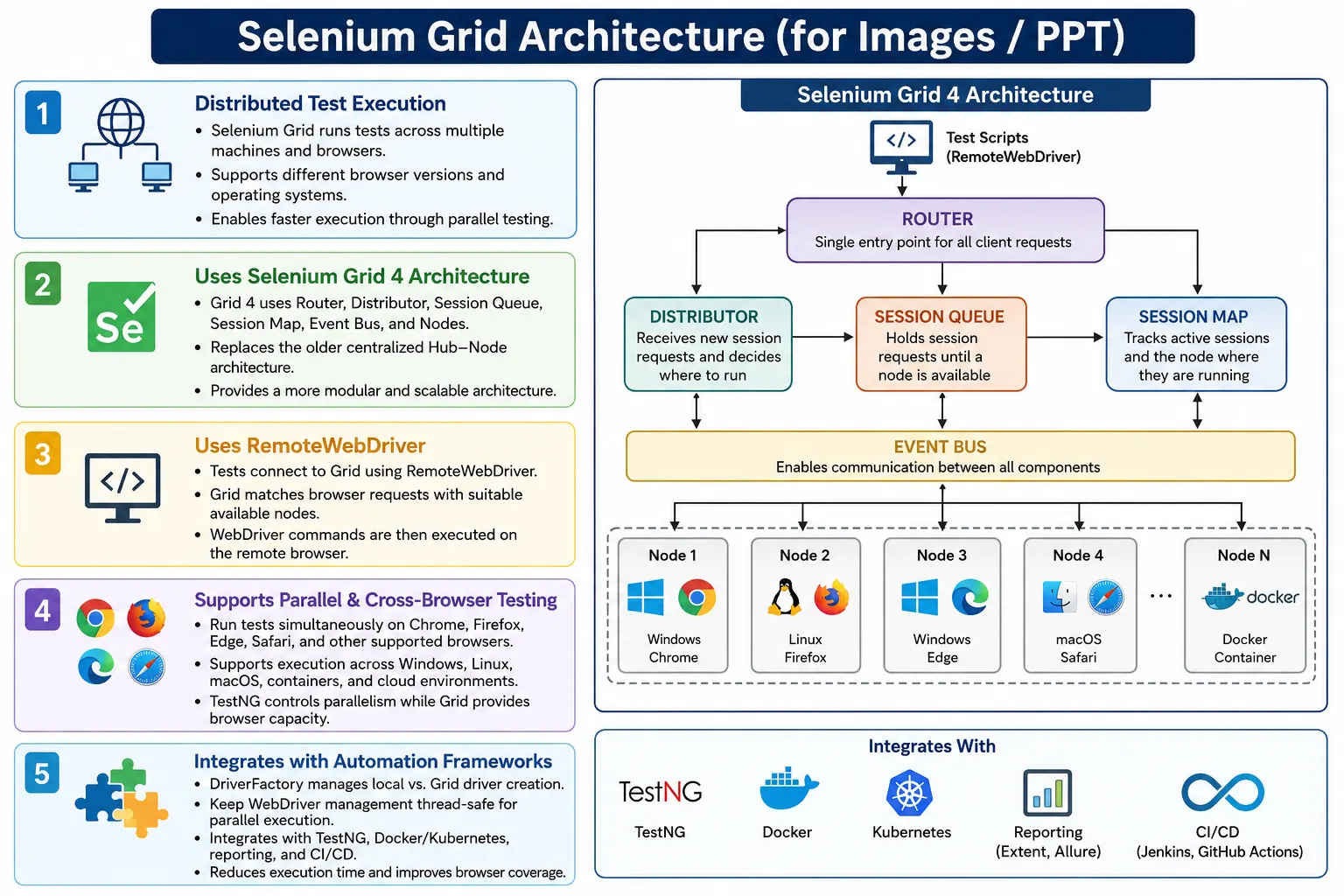
The main value of Selenium Grid is scale. A single local machine can run tests, but it is limited by CPU, memory, installed browsers, operating system, and execution speed. A grid allows the framework to request a browser session remotely. The test code runs from one place, but the browser may run on another machine, container, cloud grid, or operating system. This separation gives teams better coverage and faster feedback.
1. What Selenium Grid Means
Selenium Grid is a distributed test execution system. It receives browser session requests from Selenium tests, finds a machine that can satisfy the requested browser capabilities, creates the browser session on that machine, and routes WebDriver commands between the test and the browser. The test code still uses WebDriver APIs, but instead of launching a local browser directly, it communicates with a remote Grid endpoint.
In simple local execution, a test creates new ChromeDriver() and Chrome opens on the same machine where the test runs. In Grid execution, the test creates a RemoteWebDriver, sends a request to the Grid URL, and the Grid launches Chrome, Firefox, Edge, Safari, or another browser on an available node. The test sends commands remotely and receives results back through the Grid.
2. Why Selenium Grid Is Needed
Modern web applications are expected to work across multiple browsers and platforms. A team may need to verify Chrome, Firefox, Edge, Safari, Windows, Linux, macOS, mobile browsers, and multiple browser versions. Running all combinations sequentially on one machine is slow and often impractical. Selenium Grid allows those combinations to run in parallel.
Consider a suite with 500 tests where each test takes 30 seconds. Sequential execution takes about 250 minutes. If the same suite is distributed across five machines, each machine may handle around 100 tests, reducing the total time significantly. The exact time depends on test balance, node capacity, browser startup time, and network latency, but the execution cycle becomes much faster than a single-machine run.
3. Problems Without Selenium Grid
Without Grid, test execution is usually limited to the browser and operating system available on the local machine. A Windows laptop can easily run Chrome and Edge, but it cannot run Safari the same way a macOS machine can. A local machine may not have all required browser versions. It may also become overloaded when too many browsers run at once.
Another problem is feedback time. If a regression suite takes several hours, teams may avoid running it frequently. Slow feedback delays defect discovery. Grid execution shortens the cycle and makes it practical to run smoke, regression, cross-browser, or release validation suites more often.
4. Core Idea of Selenium Grid
The core idea is to separate test execution from browser execution. Test scripts send browser requests to the Grid. The Grid identifies a suitable browser environment and creates a remote session. After that, all browser commands are routed to the correct remote browser.
Test Scripts
  Selenium Grid
    Node 1: Chrome on Windows
    Node 2: Firefox on Linux
    Node 3: Safari on macOS
      Browser Execution
This model allows one framework to run against many browser environments without rewriting test logic. The driver creation layer changes, but page objects, test methods, assertions, and reporting remain mostly the same.
5. Selenium Grid Architecture Overview
At a high level, Selenium Grid receives session requests and distributes them to available nodes. A node is a machine or container capable of running browsers. A node may support one browser or multiple browsers depending on configuration. The Grid keeps track of available capacity and routes commands to the correct browser session.
Test Scripts
  Grid Endpoint
    Router
      Distributor
        Available Node
          Browser Session
            Results Returned to Test
Selenium Grid 4 introduced a more distributed architecture than Selenium Grid 3. Understanding the difference is useful for interviews and real framework design because Grid 4 is the recommended architecture for new projects.
6. Selenium Grid 3 Architecture
Selenium Grid 3 used a hub and node model. The hub was the central server. Nodes registered themselves with the hub. Test scripts sent requests to the hub. The hub selected a suitable node and routed commands to that node.
Test Script
  Hub
    Node 1
    Node 2
    Node 3
The hub was responsible for receiving requests, matching browser capabilities, assigning sessions, and routing commands. This model was simpler to understand, but it was more centralized. As test scale increased, the hub could become a bottleneck or single point of concern.
7. Selenium Grid 4 Architecture
Selenium Grid 4 introduced a more modular and distributed architecture. Instead of one hub doing most responsibilities, Grid 4 divides responsibilities among components such as Router, Distributor, Session Queue, Session Map, Event Bus, and Nodes. This makes the architecture more scalable, flexible, and suitable for distributed deployments.
Router
  Distributor
    Session Queue
    Session Map
    Event Bus
      Nodes
Grid 4 can still be started in a simple standalone mode for local usage, but internally it follows this improved component model. For enterprise usage, these components can be deployed in a more distributed way using machines, containers, Docker, or Kubernetes.
8. Router
The Router is the entry point for WebDriver requests in Selenium Grid 4. Test scripts send requests to the Grid URL, and the Router decides where those requests should go. If the request is for a new browser session, the Router works with the session creation flow. If the request is for an existing session, it routes the command to the correct place using session information.
From the framework perspective, the Router is usually hidden behind the Grid endpoint. The test code simply points RemoteWebDriver to a URL such as http://localhost:4444 or a remote Grid URL. Internally, the Router handles request routing.
9. Distributor
The Distributor is responsible for assigning new sessions to appropriate nodes. When a test requests Chrome, Firefox, Edge, Safari, or another browser, the Distributor checks available nodes and matches the request against node capabilities. If a matching node has capacity, the session is assigned there.
Request: Chrome on Windows
  Distributor checks nodes
    Node has Chrome and capacity
      Session assigned
The Distributor is the component that makes browser matching practical. If the request asks for Safari but only Chrome nodes are available, the session cannot start until a suitable node exists or the request times out.
10. Session Queue
The Session Queue holds new session requests when no suitable node is immediately available. This is important in busy grids where many tests start at the same time. Instead of failing instantly, requests can wait in the queue until a matching node becomes free.
The queue helps manage load, but it also reveals capacity issues. If tests remain queued for a long time, the Grid may not have enough nodes, the requested browser may not be available, or parallel execution may be configured too aggressively for the infrastructure.
11. Session Map
The Session Map tracks which session ID belongs to which node and browser. After a browser session starts, every WebDriver command includes a session ID. The Grid uses the Session Map to route commands to the correct running browser.
Session ID
  Running Node
    Browser Instance
      Command Routing
This is essential because many tests may run at the same time. The Grid must not send a click command from one test to another test's browser. The Session Map keeps routing correct.
12. Event Bus
The Event Bus handles communication between Grid components. It supports messages such as node registration, node status updates, and internal component communication. This helps the distributed Grid architecture stay coordinated.
In everyday framework code, automation engineers usually do not interact directly with the Event Bus. However, understanding its role helps explain why Grid 4 is more modular than Grid 3. Components communicate through events instead of relying on one central hub to do everything.
13. Nodes
A node is a machine, virtual machine, container, or environment capable of running browser sessions. A node can run Chrome on Windows, Firefox on Linux, Edge on Windows, Safari on macOS, or browser containers in Docker. Nodes register their capabilities with the Grid so the Distributor knows what they can run.
Node 1
  Windows
  Chrome
  Edge

Node 2
  Linux
  Firefox

Node 3
  macOS
  Safari
Node capacity matters. A machine may be able to run one browser session or several sessions depending on CPU, memory, browser type, and test behavior. Overloading nodes can cause slow execution and flaky failures.
14. Test Execution Flow
The test execution flow starts with the test framework creating a RemoteWebDriver. The request goes to the Grid Router. The Distributor finds a suitable node. The node launches the browser. The session ID is tracked. The test sends commands to the browser through the Grid until execution completes.
Test Script
  RemoteWebDriver
    Router
      Distributor
        Node
          Browser
            Execution
              Results
From the test code's point of view, WebDriver commands are still familiar: get(), findElement(), click(), sendKeys(), and assertions. The difference is that the browser is remote.
15. Browser Capability Matching
Capability matching is the process of matching a test request to a node that can satisfy it. A request may include browser name, browser version, platform, or additional options. The Distributor checks available nodes and assigns the session to a matching one.
Requested:
  Browser: Chrome
  Platform: Windows

Available:
  Node 1: Chrome on Windows
  Node 2: Firefox on Linux

Selected:
  Node 1
If no matching node exists, the session waits or fails depending on configuration and timeout. Many Grid problems are capability mismatch problems, so browser configuration must be accurate.
16. Parallel Execution
Selenium Grid enables parallel execution, but the test runner must also be configured for parallelism. TestNG controls how many tests run at the same time. Grid provides the remote browser capacity. Both sides must be configured correctly.
Without Grid:
  Test 1
  Test 2
  Test 3

With Grid:
  Test 1, Test 2, Test 3 run together
Running against Grid without enabling TestNG parallel execution will not produce the expected speed improvement. The framework may still use a remote browser, but tests will run one after another unless the test runner starts them in parallel.
17. RemoteWebDriver
RemoteWebDriver is the WebDriver implementation used to connect Selenium tests to a remote browser environment. Instead of creating a local browser driver, the framework creates a remote driver using a Grid URL and browser options.
ChromeOptions options =
        new ChromeOptions();

WebDriver driver =
        new RemoteWebDriver(
                new URL(
                        "http://localhost:4444"
                ),
                options
        );
This code asks the Grid to create a Chrome session. The Grid finds an available node with Chrome support and returns a session. After that, the test uses the driver normally.
18. Local Driver vs Remote Driver
A local driver launches the browser on the same machine where the test runs. A remote driver launches the browser through a remote Selenium server or Grid. A strong framework usually supports both modes through configuration.
Local Mode
  new ChromeDriver()

Remote Mode
  new RemoteWebDriver(gridURL, options)
This flexibility is useful because developers may run tests locally during development, while CI/CD pipelines run tests remotely on Grid. The same tests should work in both modes.
19. DriverFactory Role
In enterprise frameworks, driver creation is centralized in a DriverFactory. The factory reads configuration values such as execution mode, browser, grid URL, browser version, and platform. Based on those settings, it creates either a local driver or a remote driver.
ConfigReader
  DriverFactory
    Local Driver or RemoteWebDriver
      Test Execution
This keeps test classes clean. Tests should not know whether the browser is local or remote. They should simply ask the framework for a driver and execute the scenario.
20. Cross-Browser Testing
Selenium Grid is widely used for cross-browser testing. A single framework can run the same suite against Chrome, Firefox, Edge, Safari, and other supported browsers. This helps catch browser-specific issues such as rendering differences, JavaScript behavior differences, file upload behavior, alerts, downloads, and layout problems.
Cross-browser testing should be planned carefully. Not every test needs to run on every browser every time. Many teams run smoke tests across all supported browsers and full regression on the primary browser, then schedule broader browser coverage nightly or before release.
21. Cross-Platform Testing
Grid also supports cross-platform execution. Tests can run on Windows, Linux, macOS, containers, and cloud environments depending on node availability. This is important when the application must support multiple operating systems or browser combinations that cannot all run on one machine.
Safari testing is a common example because Safari support usually requires macOS. A Windows-only local setup cannot fully validate Safari behavior. Selenium Grid or cloud grid providers make that coverage practical.
22. Cloud Selenium Grid
Cloud providers such as BrowserStack, Sauce Labs, LambdaTest, and TestingBot offer hosted Selenium Grid infrastructure. Instead of maintaining local nodes, teams send remote driver requests to the cloud provider. The provider supplies browser and operating system combinations.
Local Test
  Cloud Grid
    Remote Browser
      Execution Results
Cloud grids reduce infrastructure maintenance and provide broad browser coverage. The tradeoffs include cost, network dependency, provider-specific capabilities, and data security considerations. For many teams, cloud grids are simpler than maintaining large local Grid infrastructure.
23. Docker and Kubernetes
Selenium Grid can be deployed with Docker containers. Browser nodes can run as containers, making setup repeatable and easier to scale. Kubernetes can be used for larger deployments where browser nodes need to scale dynamically based on test demand.
Containerized Grid deployments are useful because they reduce machine-specific setup problems. Instead of manually installing browsers and drivers on many machines, teams can use images that already contain the required browser environment. This improves consistency across CI/CD runs.
24. Integration with TestNG
TestNG controls parallel execution in many Selenium Java frameworks. Selenium Grid provides the browser infrastructure, but TestNG decides how many tests, classes, methods, or suites run at the same time. The testng.xml file is usually configured with parallel mode and thread count.
TestNG
  Parallel Tests
    RemoteWebDriver
      Selenium Grid
        Multiple Nodes
The thread count should match Grid capacity. If TestNG starts 20 tests in parallel but the Grid has only five browser slots, many sessions will wait in the queue. If the thread count is too high, tests may become slow or unstable.
25. Integration with Hybrid Framework
In a hybrid Selenium framework, Grid is part of the execution layer. Configuration decides whether execution is local or remote. DriverFactory creates the correct driver. TestNG controls parallelism. Page objects execute business actions. Reports capture results. This keeps Grid usage separate from test logic.
ConfigReader
  DriverFactory
    RemoteWebDriver
      Selenium Grid
        Browser
          Test Result
A well-designed framework can switch from local execution to Grid execution by changing configuration values rather than modifying test classes.
26. Advantages of Selenium Grid
The major advantages are parallel execution, faster feedback, cross-browser coverage, cross-platform coverage, better resource utilization, scalability, CI/CD friendliness, and cloud execution support. Grid allows teams to run more tests in less time and validate more browser combinations than a single machine can handle.
Grid also supports better team productivity. Developers and testers do not need to install every browser combination locally. CI/CD pipelines can run distributed suites automatically. Release validation becomes faster and more repeatable.
27. Limitations of Selenium Grid
Selenium Grid adds infrastructure complexity. Self-hosted Grid requires machines, containers, network setup, node maintenance, browser updates, driver compatibility, monitoring, and capacity planning. Remote execution can also introduce network latency. Debugging failures may be more complex because the browser runs on another machine.
Grid does not automatically make bad tests stable. Tests still need good waits, stable locators, isolated test data, and reliable assertions. Parallel execution can expose hidden problems such as shared test data, static driver variables, and non-thread-safe framework code.
28. Selenium Grid 3 vs Grid 4
Selenium Grid 3 used the Hub and Node architecture. Selenium Grid 4 uses Router, Distributor, Session Queue, Session Map, Event Bus, and Nodes. Grid 4 is more modular and scalable and is the recommended architecture for new Selenium projects.
Grid 3
  Hub
    Nodes

Grid 4
  Router
  Distributor
  Session Queue
  Session Map
  Event Bus
  Nodes
For interviews, it is useful to explain both. Grid 3 is easier to visualize, but Grid 4 is the modern architecture. Most current Selenium projects should use Grid 4 unless there is a specific legacy reason.
29. Common Beginner Mistakes
A common mistake is using new ChromeDriver() while expecting tests to run on Grid. Grid execution requires RemoteWebDriver. Another mistake is using an incorrect Grid URL. The default local Grid endpoint is commonly http://localhost:4444. If the URL is wrong, sessions cannot be created.
Other mistakes include requesting a browser that no node supports, not registering nodes, forgetting to enable TestNG parallel execution, using static WebDriver variables in parallel runs, overloading nodes with too many sessions, and failing to archive remote execution evidence such as screenshots and reports.
30. Best Practices
Use Selenium Grid 4 for new projects. Centralize browser creation in DriverFactory. Use RemoteWebDriver for Grid execution. Configure TestNG parallel execution carefully. Keep browsers and drivers updated. Monitor node health. Match thread count to Grid capacity. Use Docker or Kubernetes for scalable deployments when appropriate. Consider cloud grids when broad browser coverage is needed.
Make the framework thread-safe. Avoid shared mutable WebDriver state. Use thread-local driver management when running in parallel. Keep test data isolated. Capture screenshots and reports for remote failures. Store Grid URL, browser, platform, and execution mode in configuration instead of hardcoding them in tests.
31. Real Enterprise Architecture
A real enterprise architecture often begins with a developer push to a Git repository. A Jenkins pipeline starts a TestNG suite. DriverFactory reads configuration and creates a RemoteWebDriver. Selenium Grid receives the request and assigns a browser on an available node. Tests run in parallel, and reports are generated after execution.
Developer Push
  Git Repository
    Jenkins Pipeline
      TestNG Suite
        DriverFactory
          RemoteWebDriver
            Selenium Grid
              Windows + Chrome
              Linux + Firefox
              Windows + Edge
              macOS + Safari
                Extent Reports
This architecture supports fast feedback and broad coverage. It also keeps local developer machines simpler because heavy browser execution happens on Grid infrastructure.
32. Troubleshooting Grid Issues
When Grid execution fails, start with the basics. Verify that the Grid is running. Check the Grid URL. Confirm that nodes are registered. Confirm that requested browser capabilities match available nodes. Check whether sessions are stuck in the queue. Review node logs. Confirm that the browser and driver versions are compatible.
For framework-related issues, check whether the driver is thread-safe, whether TestNG parallel settings are correct, whether test data is shared across parallel tests, and whether reports attach screenshots to the correct test. Many problems blamed on Grid are actually framework thread-safety or test data isolation problems.
33. Interview Perspective
A short interview answer is: Selenium Grid is a distributed test execution system that allows Selenium tests to run in parallel across multiple machines, browsers, browser versions, and operating systems using RemoteWebDriver.
A stronger real-time answer is: in my Selenium hybrid framework, I use RemoteWebDriver to execute tests on Selenium Grid. DriverFactory reads browser, execution mode, and Grid URL from configuration and creates either a local driver or remote driver. TestNG controls parallel execution, while Selenium Grid distributes tests to available nodes that match the requested capabilities. This reduces execution time and supports cross-browser and cross-platform validation. For large browser coverage, a cloud grid such as BrowserStack or Sauce Labs can also be used.
34. Selenium Grid Architecture Workflow
The Selenium Grid workflow starts with the TestNG suite. The framework asks DriverFactory for a driver. DriverFactory creates a RemoteWebDriver. The request goes to the Router. The Distributor finds a suitable node. The node starts the browser session. Commands are routed to the browser until execution completes.
TestNG Test Suite
  DriverFactory
    RemoteWebDriver
      Router
        Distributor
          Available Node
            Browser
              Execute Test
                Results and Reports
This workflow is the foundation of scalable Selenium automation. It allows a single framework to execute across many browsers and platforms without changing test logic.
35. Grid Capacity Planning
Capacity planning is one of the most important practical parts of Selenium Grid usage. A grid is useful only when its node capacity matches the parallel execution demand. If TestNG starts too many tests but the Grid has too few browser slots, tests will wait in the Session Queue. If too many sessions are forced onto weak nodes, browsers may become slow, unstable, or memory-starved. This can create flaky failures that look like application issues but are actually infrastructure issues.
Capacity should be planned based on machine resources, browser type, test behavior, and expected execution time. Chrome and Edge sessions can consume significant memory. Tests that open heavy pages, download files, upload files, or run long workflows may require more resources than simple login tests. A good starting point is to run a smaller thread count, observe CPU and memory usage, and increase gradually until the Grid reaches a stable balance.
Thread count and node slot count should be aligned. If a Grid has ten stable browser slots, setting TestNG thread count to fifty will not make execution five times faster. It will create a queue and may increase timeout risk. The best Grid setup is not always the largest setup; it is the setup that gives reliable speed without overloading infrastructure.
36. Thread Safety in Grid Execution
Selenium Grid often exposes framework thread-safety problems. A framework that works locally with one browser may fail when several tests run in parallel. The most common issue is a shared static WebDriver variable. If multiple tests overwrite the same driver reference, one test may send commands to another test's browser. This causes confusing failures and unreliable reports.
Parallel Grid execution should use thread-local driver management. Each test thread should have its own WebDriver instance. Reporting should also be thread-safe, especially when using Extent Reports. Screenshots must attach to the correct test. Test data should be isolated so parallel tests do not modify the same user, cart, order, or database record at the same time.
Thread safety is not only a technical detail. It directly affects trust in automation results. If a report shows failures caused by shared state or mixed browser sessions, the team may blame Grid incorrectly. A stable framework must be designed for parallel execution before Grid can provide reliable benefits.
37. Local Grid, Docker Grid, and Cloud Grid
Teams can use Selenium Grid in different ways. A local Grid is useful for learning and small internal execution. It may run on one machine or a few machines with registered nodes. A Docker-based Grid is more repeatable because browser environments are containerized. It reduces manual setup and makes CI/CD integration cleaner. Kubernetes-based Grid deployments are useful when organizations need dynamic scaling and infrastructure automation.
Cloud Grid providers are useful when teams need broad browser and operating system coverage without maintaining infrastructure. Providers such as BrowserStack, Sauce Labs, LambdaTest, and TestingBot offer many browser combinations, real devices, dashboards, logs, screenshots, and video recording. This saves infrastructure effort, but it introduces cost, network dependency, vendor-specific capabilities, and data security considerations.
The best choice depends on project needs. A small team may start with standalone Grid or Docker Grid. A large enterprise with many browser combinations may prefer cloud execution. A company with strict data policies may prefer self-hosted Grid. The framework should keep driver creation configurable so moving between local, Docker, self-hosted, and cloud Grid execution does not require rewriting tests.
38. Reporting and Debugging in Grid
Reporting becomes more important when tests run on Grid because the browser is not always visible to the tester. A local failure can be watched directly. A remote Grid failure may happen on another machine, container, or cloud browser session. Reports should capture browser name, platform, Grid URL, node information if available, screenshots, exception details, and execution time.
Screenshots are especially important for Grid failures. If a test fails in a remote Chrome session, the screenshot may be the only visual evidence of what happened. Cloud providers may also provide video recordings and network logs, which can be linked or referenced in reports. For self-hosted Grid, screenshots and logs should be archived with the report in CI/CD.
Debugging Grid failures requires separating application failures, automation failures, and infrastructure failures. If many tests fail with session creation errors, the Grid may be unavailable or overloaded. If failures happen only on one browser, it may be a cross-browser issue. If failures happen randomly across nodes, node health, network latency, or resource pressure may be involved. A good report helps make these differences visible.
39. Key Takeaway
Selenium Grid Architecture provides the foundation for scalable and distributed automation testing. It allows tests to run on multiple browsers, operating systems, machines, containers, or cloud environments in parallel. This reduces execution time, increases browser coverage, and supports enterprise-level CI/CD automation.
Automation Tests
  Selenium Grid
    Chrome on Windows
    Firefox on Linux
    Edge on Windows
    Safari on macOS
      Parallel Execution
        Faster Feedback
The most important points are simple: use RemoteWebDriver for Grid execution, use Selenium Grid 4 for new projects, understand Router, Distributor, Session Queue, Session Map, Event Bus, and Nodes, configure TestNG parallel execution correctly, centralize driver creation in DriverFactory, keep the framework thread-safe, and integrate Grid execution with reports and CI/CD pipelines. When implemented well, Selenium Grid turns a slow local suite into a scalable distributed automation system.