Screenshot Naming Strategy in Selenium Java
A screenshot naming strategy defines how screenshot files are named and organized during Selenium test execution. It may look like a small framework detail, but it has a major impact on debugging, reporting, CI artifact review, and long-term maintainability. A screenshot is useful only when the team can quickly understand which test created it, when it was created, why it was created, and which execution context it belongs to.
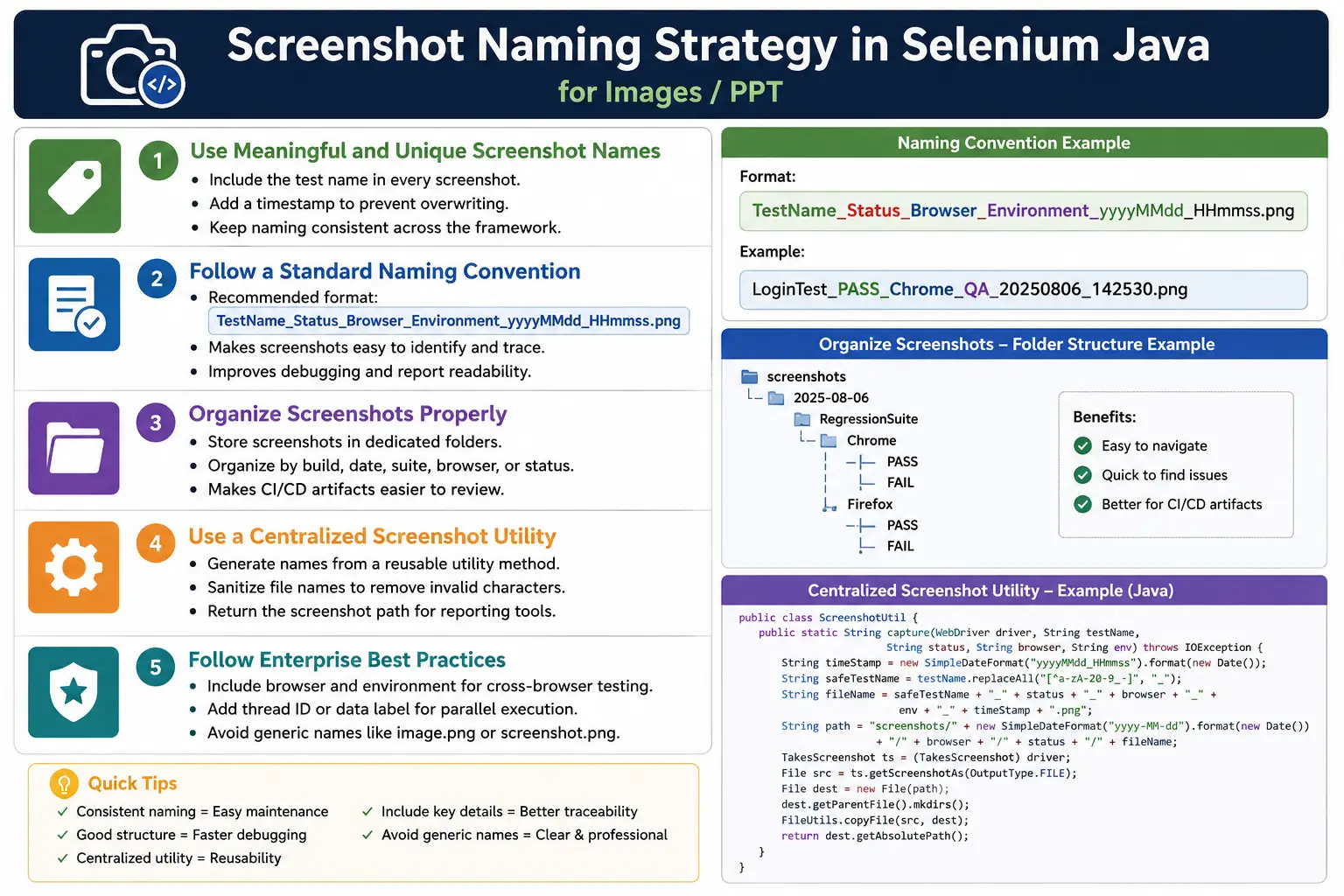
In beginner Selenium scripts, screenshots are often saved with generic names such as image.png, failure.png, or screenshot.png. That works for one local experiment, but it breaks down immediately in a real suite. The next screenshot overwrites the previous one. A CI run may generate dozens of screenshots with unclear names. Testers waste time opening files one by one to find the right evidence. A proper naming strategy prevents those problems.
In enterprise automation frameworks, screenshots usually follow a structured convention. The name may include the test method, execution status, browser, environment, build number, thread ID, scenario name, and timestamp. The goal is not to make names unnecessarily long. The goal is to make each screenshot unique, readable, traceable, report-friendly, and easy to archive.
1. What Is a Screenshot Naming Strategy?
A screenshot naming strategy is a standardized approach for generating meaningful and unique screenshot file names. Instead of saving every screenshot as image.png, the framework generates a name that explains the context. For example, LoginTest_FAIL_Chrome_QA_20260701_104530.png immediately tells you that the screenshot belongs to the login test, the test failed, it ran on Chrome, it ran in the QA environment, and it was captured at a specific time.
A good strategy is consistent across the framework. Every test should not invent its own style. If one class saves LoginFailure.png, another saves login_error_final.png, and another saves Screenshot1.png, the evidence becomes hard to manage. A framework utility should generate screenshot names centrally so all screenshots follow the same rules.
2. Why Naming Strategy Is Important
The first reason is uniqueness. If every screenshot uses the same name, newer files overwrite older files. This destroys evidence. A failure that happened earlier in the run may no longer have a screenshot because another failure replaced it. Adding a timestamp or unique identifier prevents this.
The second reason is traceability. When a failed test appears in a report, the screenshot name should make it easy to connect the image to that test. A file named CheckoutTest_FAIL_Firefox_UAT_20260701_111015.png is far easier to understand than failure.png. Traceable names reduce investigation time, especially when reports and artifacts contain many images.
The third reason is maintainability. As a framework grows, screenshot volume grows. Naming and folder structure must scale with the suite. Without a strategy, screenshot folders become cluttered and unreliable. With a strategy, screenshots become searchable, sortable, and report-friendly.
3. Characteristics of a Good Screenshot Name
A good screenshot name should contain enough information to identify the screenshot without opening it. The exact fields depend on the framework, but common fields include test name, timestamp, test status, browser name, environment, thread ID, and build number.
- It should be unique so screenshots do not overwrite each other.
- It should include the test or scenario name for traceability.
- It should include a timestamp for ordering and uniqueness.
- It may include status such as PASS, FAIL, or SKIP.
- It may include browser name for cross-browser execution.
- It may include environment name for DEV, QA, UAT, or PROD-like runs.
- It may include build number or CI job identifier for pipeline traceability.
- It should avoid spaces and unsafe special characters.
4. Static Naming Strategy
The simplest naming strategy is a static file name, such as LoginTest.png. This is easy to implement, but it is not reliable for repeated runs. If the same test runs again, the old screenshot is replaced. Static names are acceptable only for temporary learning examples or when the file is intentionally overwritten as a latest snapshot.
String fileName = "LoginTest.png";In real automation projects, avoid static screenshot names for failures. Failure evidence should be preserved, not overwritten silently.
5. Timestamp Naming Strategy
A timestamp is the most common way to make screenshot names unique. The simplest timestamp is System.currentTimeMillis(). It gives a numeric value based on the current time in milliseconds, which makes overwriting unlikely.
String fileName =
        "LoginTest_"
        + System.currentTimeMillis()
        + ".png";
This produces names such as LoginTest_1768456789345.png. The name is unique, but it is not very readable for humans. You can tell it is a timestamp, but you cannot easily see the date and time without converting it. For debugging and report review, a formatted date-time is usually better.
6. Date-Time Naming Strategy
A date-time naming strategy is more readable than milliseconds. It uses a format such as yyyyMMdd_HHmmss. This gives names that sort naturally and are easy to interpret. For example, LoginTest_20260701_104530.png clearly shows the capture date and time.
DateTimeFormatter formatter =
        DateTimeFormatter.ofPattern(
                "yyyyMMdd_HHmmss"
        );

String fileName =
        "LoginTest_"
        + LocalDateTime.now().format(formatter)
        + ".png";
This style is recommended for most frameworks. It is readable, sortable, and unique enough for normal execution. If multiple screenshots can be captured within the same second, add milliseconds, thread ID, or a small unique suffix.
7. Test Method Name Strategy
Using the test method name makes screenshots traceable to the exact test. In TestNG, the method name can be taken from ITestResult. This is much better than hardcoding names inside each test.
String fileName =
        result.getName()
        + "_"
        + System.currentTimeMillis()
        + ".png";
This may produce verifyLogin_1768456789345.png. In a report, the failed method and screenshot name line up clearly. This is one of the simplest and most useful naming patterns.
8. Test Class and Method Strategy
In large suites, method names alone may not be unique. Two classes may both have a method called verifyLogin. Adding the class name makes the screenshot more specific.
String fileName =
        this.getClass().getSimpleName()
        + "_"
        + methodName
        + ".png";
This produces names such as LoginTests_verifyValidLogin.png. In listeners, you can retrieve class and method details from the test result. This is helpful when screenshots are stored in one shared folder.
9. Test Status Naming
Adding status helps separate screenshots by execution result. For example, LoginTest_FAIL.png immediately tells you why the screenshot exists. If the framework captures screenshots for skipped or successful tests, status becomes even more useful.
String fileName =
        "LoginTest_FAIL.png";
Status alone does not guarantee uniqueness. Use status together with timestamp or another unique field.
10. Status Plus Timestamp
A strong basic pattern is test name, status, and timestamp. It is short, readable, and unique.
String fileName =
        "LoginTest_FAIL_"
        + LocalDateTime.now().format(formatter)
        + ".png";
This produces names such as LoginTest_FAIL_20260701_103522.png. It works well when tests run on one browser and one environment. If you run cross-browser or multi-environment tests, add those fields too.
11. Browser Name Strategy
Browser name is important in cross-browser testing. The same test may fail on Firefox but pass on Chrome. If the screenshot does not include the browser, the artifact may be ambiguous.
String browser = "Chrome";

String fileName =
        "LoginTest_"
        + browser
        + ".png";
Browser names are usually stored in configuration, test parameters, or driver capabilities. Use a consistent value such as Chrome, Firefox, or Edge.
12. Browser Plus Timestamp
Browser plus timestamp is a good pattern for cross-browser evidence. It clearly shows which browser created the screenshot and when.
String fileName =
        "LoginTest_Chrome_"
        + LocalDateTime.now().format(formatter)
        + ".png";
For example, LoginTest_Chrome_20260701_103522.png is useful when comparing failures across browsers.
13. Environment Naming
Environment names are useful when the same tests run against DEV, QA, UAT, staging, or production-like systems. A screenshot from QA and a screenshot from UAT may look similar but represent different deployments. Including the environment avoids confusion.
String environment = "QA";

String fileName =
        "LoginTest_"
        + environment
        + ".png";
Environment values should come from configuration, not hardcoded strings scattered across tests. This keeps naming consistent across local and CI execution.
14. Environment Plus Browser
Combining environment and browser is useful for distributed test execution. A screenshot named LoginTest_QA_Chrome.png immediately tells the reviewer which system and browser were involved.
String fileName =
        "LoginTest_QA_Chrome.png";
Again, this should normally be combined with timestamp to avoid overwriting files.
15. Build Number Strategy
In CI/CD, build number helps trace screenshots back to the pipeline execution that produced them. Jenkins provides BUILD_NUMBER. Other CI tools provide similar environment variables.
String build =
        System.getenv("BUILD_NUMBER");

String fileName =
        "Build_"
        + build
        + "_LoginTest.png";
If the environment variable is missing during local execution, use a fallback value such as Local. This prevents null values from appearing in screenshot names.
16. Thread ID Strategy
Thread ID is useful in parallel execution. Multiple tests can fail at the same time, and some may generate screenshots with the same test name and timestamp second. Adding thread ID reduces collision risk and helps map the screenshot to a running thread.
String fileName =
        "LoginTest_Thread_"
        + Thread.currentThread().getId()
        + ".png";
Thread ID is usually not needed for small serial suites. It becomes useful when running parallel tests by method, class, browser, or data set.
17. UUID Strategy
A UUID guarantees uniqueness, but it is not very readable. A file named f47ac10b-58cc-4372-a567-0e02b2c3d479.png is unique but does not explain anything about the test. Use UUID only as a suffix if uniqueness is more important than readability.
String fileName =
        "LoginTest_"
        + java.util.UUID.randomUUID()
        + ".png";
For most frameworks, test name plus date-time is better. Add UUID only when collisions are a real risk.
18. Complete Enterprise Naming Strategy
A complete enterprise strategy includes the main traceability fields: test name, status, browser, environment, and date-time. This is descriptive without being too complex.
TestName_Status_Browser_Environment_yyyyMMdd_HHmmss.pngExample:
LoginTest_FAIL_Chrome_QA_20260701_103522.pngThis format is easy to read, easy to sort, and useful in reports. It tells the reviewer what failed, where it failed, and when it failed.
19. Folder Structure Strategy
File names are only one part of the strategy. Folder structure also matters. If all screenshots go into one folder, the folder can become crowded quickly. Organized folders make artifact review easier.
screenshots
|
|-- Pass
|-- Fail
|-- Skipped
|-- Chrome
|-- Firefox
Some teams organize by status. Some organize by browser. Some organize by suite. The best structure depends on how reports are reviewed and archived.
20. Date-Based Folder Structure
Date-based folders are useful for local execution and CI archives. Each day or run gets its own folder, making cleanup and review easier.
screenshots
|
|-- 2026-07-01
|-- 2026-07-02
|-- 2026-07-03
Date folders work especially well when combined with build numbers. For example, screenshots/20260701/Build_125 keeps all evidence for a run together.
21. Test Suite Folder Strategy
If tests are grouped by suite, screenshot folders can follow the same structure. Smoke, regression, sanity, and API-related UI checks can each have their own folder.
screenshots
|
|-- Smoke
|-- Regression
|-- Sanity
This helps teams review failures by execution type. A smoke failure may need immediate release attention, while a lower-priority regression screenshot may be reviewed later.
22. Screenshot Utility for Naming
A naming method should be reusable. Do not build screenshot names manually in every test. A utility method keeps the pattern consistent.
public static String generateScreenshotName(
        String testName) {

    DateTimeFormatter formatter =
            DateTimeFormatter.ofPattern(
                    "yyyyMMdd_HHmmss"
            );

    return testName
            + "_"
            + LocalDateTime.now().format(formatter)
            + ".png";
}
This method gives a simple and reliable starting point. Later, it can be extended with browser, environment, and status.
23. Screenshot Utility with Browser
When cross-browser execution is used, include browser name in the utility method. This prevents browser-specific failures from being mixed together.
public static String generateScreenshotName(
        String testName,
        String browser) {

    DateTimeFormatter formatter =
            DateTimeFormatter.ofPattern(
                    "yyyyMMdd_HHmmss"
            );

    return testName
            + "_"
            + browser
            + "_"
            + LocalDateTime.now().format(formatter)
            + ".png";
}
Output may look like LoginTest_Chrome_20260701_103522.png. This is clear and still reasonably short.
24. TestNG Listener Example
TestNG listeners are a common place to apply screenshot naming. The listener knows the test result and can include status in the name.
@Override
public void onTestFailure(
        ITestResult result) {

    String fileName =
            result.getName()
            + "_FAIL_"
            + System.currentTimeMillis();

    ScreenshotUtil.captureScreenshot(
            driver,
            fileName
    );
}
In a mature framework, replace raw milliseconds with a formatted date-time and add browser/environment when available.
25. Cucumber Scenario Naming
In Cucumber, scenario names are often used in screenshot names. This is helpful because business-readable scenario names appear in reports. However, scenario names may contain spaces and special characters, so they should be sanitized before becoming file names.
@After
public void tearDown(
        Scenario scenario)
        throws IOException {

    if (scenario.isFailed()) {

        String fileName =
                scenario.getName()
                + "_FAIL_"
                + System.currentTimeMillis();

        ScreenshotUtil.captureScreenshot(
                driver,
                fileName
        );
    }
}
Before saving, convert spaces to underscores and remove unsafe characters. This keeps file paths portable across Windows, Linux, and CI environments.
26. Sanitizing Screenshot Names
File names should avoid spaces, slashes, colons, quotes, brackets, and other characters that can cause problems across operating systems. Use underscores or hyphens. A simple sanitizing method can clean test names before they become file names.
public static String sanitize(String value) {
    return value
            .replaceAll("[^a-zA-Z0-9_-]", "_")
            .replaceAll("_+", "_");
}
This converts names such as Login Test (Final) into safer names. Clean names are especially important when screenshots are archived by CI tools or opened on different operating systems.
27. Recommended Comparison
Different naming strategies offer different levels of traceability. Static names are weak. Timestamp names are unique but not always descriptive. Enterprise names are the most useful for large frameworks.
Login.pngis simple but not recommended because it can be overwritten.Login_1768456789345.pngis unique but less readable.Login_20260701_104530.pngis readable and recommended.Login_FAIL.pngis descriptive but not unique.Login_Chrome_20260701.pngis good for cross-browser execution.Login_FAIL_Chrome_QA_20260701_104530.pngis best for enterprise traceability.
28. Real Project Naming Examples
Real project screenshot names should tell a story quickly. A login failure may be saved as LoginTest_FAIL_Chrome_QA_20260701_104530.png. A checkout failure may be saved as CheckoutTest_FAIL_Firefox_UAT_20260701_111015.png. A successful search checkpoint may be saved as SearchTest_PASS_Edge_DEV_20260701_113025.png.
These names are longer than image.png, but they are far more useful. When a tester opens the screenshot folder, the context is visible before opening the image.
29. CI/CD Naming Strategy
In CI/CD, include build number, job name, or run ID when possible. This helps connect a screenshot to a specific pipeline execution. If the same test fails across multiple builds, build-aware names prevent confusion.
String build =
        System.getenv("BUILD_NUMBER");

if (build == null) {
    build = "Local";
}

String fileName =
        "Build_"
        + build
        + "_LoginTest_FAIL.png";
For GitHub Actions, you might use environment variables such as run number or workflow name. The exact variable depends on the CI tool, but the strategy is the same: include enough execution context to trace the artifact.
30. Complete Screenshot Utility with Naming Strategy
A complete utility can generate the name, create the folder, capture the screenshot, copy the file, and return the path. Returning the path makes report attachment easier.
public String captureScreenshot(
        WebDriver driver,
        String testName,
        String status,
        String browser,
        String environment)
        throws IOException {

    DateTimeFormatter formatter =
            DateTimeFormatter.ofPattern(
                    "yyyyMMdd_HHmmss"
            );

    String fileName =
            sanitize(testName)
            + "_"
            + status
            + "_"
            + browser
            + "_"
            + environment
            + "_"
            + LocalDateTime.now().format(formatter)
            + ".png";

    Path destination =
            Paths.get("screenshots", fileName);

    Files.createDirectories(destination.getParent());

    File src =
            ((TakesScreenshot) driver)
                    .getScreenshotAs(OutputType.FILE);

    Files.copy(
            src.toPath(),
            destination,
            StandardCopyOption.REPLACE_EXISTING
    );

    return destination.toString();
}
This is the type of utility that can be used from TestNG listeners, Cucumber hooks, JUnit extensions, or base framework methods.
31. Path Strategy and File Name Strategy
Do not confuse file naming with folder path strategy. A filename identifies the screenshot. A folder path organizes screenshots. Both should be intentional. For example, the folder may represent the build and date, while the filename represents the test, status, browser, environment, and timestamp.
screenshots/Build_125/20260701/LoginTest_FAIL_Chrome_QA_104530.pngThis keeps file names shorter while still preserving build context in the path. It also makes CI artifact browsing easier.
32. Keeping Names Short Enough
Screenshot names should be descriptive, but not absurdly long. Extremely long paths can cause problems on some systems and make reports messy. Include only fields that help your team investigate failures. If build number is already part of the folder path, it may not need to be repeated in every file name.
A practical rule is to include test name, status, browser, environment, and time in the file name. Put build number, suite name, or date in the folder path if that keeps the overall structure cleaner.
33. Parallel Execution Naming
Parallel execution makes screenshot naming more important. When tests run one after another, timestamp and test name may be enough. When tests run in parallel, multiple tests can fail in the same second. Data-driven tests may also run the same method many times with different inputs. If the screenshot naming strategy is weak, collisions become possible.
For parallel execution, add one or more extra fields. Thread ID is simple. Browser name is important when running the same test on multiple browsers. Data set ID is useful when the same test method runs with different data. If a framework uses TestNG data providers, include a meaningful data label if possible, not only the method name.
String fileName =
        testName
        + "_"
        + browser
        + "_Thread_"
        + Thread.currentThread().getId()
        + "_"
        + LocalDateTime.now().format(formatter)
        + ".png";
This may look longer, but it prevents confusing evidence. In a parallel framework, a screenshot from the wrong browser or wrong data row can waste investigation time. A stronger name makes the artifact reliable.
34. Data-Driven Test Naming
Data-driven tests often execute the same method with many data combinations. For example, verifyLogin may run with valid credentials, invalid password, locked user, expired password, and empty username. If each failure screenshot is named only with the method name, the screenshot does not explain which data set failed.
When possible, include a safe data label in the screenshot name. Avoid including sensitive data such as real passwords, full account numbers, tokens, or personally identifiable information. Use labels like InvalidPassword, LockedUser, or EmptyUsername instead.
String dataLabel = "InvalidPassword";

String fileName =
        "verifyLogin_"
        + dataLabel
        + "_FAIL_"
        + LocalDateTime.now().format(formatter)
        + ".png";
This approach makes screenshots easier to understand while keeping sensitive data out of file names. File names are often visible in reports and CI artifacts, so they should be treated as shareable metadata.
35. Security and Privacy in Screenshot Names
Screenshot names should not contain sensitive information. This is an important point in enterprise automation. File names may be stored in reports, shared in emails, archived in CI, uploaded to artifact servers, or retained for months. Avoid including passwords, tokens, customer IDs, patient IDs, bank account numbers, full email addresses, or internal secrets.
If a test needs traceability to data, use an internal safe label or masked value. For example, use UserType_Admin instead of a real username, or AccountType_Savings instead of a real account number. Screenshot names should help debugging without leaking private information.
- Do not include passwords, API keys, or tokens.
- Do not include full customer or patient identifiers.
- Use safe labels for data-driven tests.
- Mask or shorten values if traceability is required.
- Remember that CI artifacts may be visible to many team members.
36. Screenshot Names in Reports
Reports are one of the main consumers of screenshot names. If screenshots are attached to Extent Reports, Allure, or custom HTML reports, the file name may appear as a link, label, or attachment title. A readable name helps the report user understand the failure without opening multiple artifacts.
When using report tools, keep the screenshot file name and report label aligned. For example, if the file is named CheckoutTest_FAIL_Chrome_QA_20260701_111015.png, the report can show a shorter label such as CheckoutTest failure screenshot, while the actual file remains fully traceable. This gives a clean report and strong artifact metadata.
String path =
        ScreenshotUtil.captureScreenshot(
                driver,
                testName,
                "FAIL",
                browser,
                environment
        );

test.fail("Failure screenshot")
        .addScreenCaptureFromPath(path);
Returning the screenshot path from the utility is what makes this integration clean. The listener captures the screenshot, receives the path, and passes that path to the reporting tool.
37. Cleanup and Archive Strategy
A naming strategy should also consider what happens after execution. Screenshots can accumulate quickly. A CI suite that runs every commit can create hundreds or thousands of screenshots over time. If screenshots are never cleaned or archived, storage usage grows and artifact folders become difficult to navigate.
There are two common approaches. One approach is to clean the screenshot folder before every local run so only the latest evidence remains. Another approach is to create a new folder per run and archive it in CI. For failure investigation, per-run folders are better because they preserve execution context. For local debugging, cleaning before each run may be simpler.
Do not delete failure screenshots before they are attached to reports or archived as CI artifacts. The cleanup step should happen at the start of a run, or after artifacts are safely published. If cleanup happens too early, reports may contain broken screenshot links.
38. Local vs CI Naming
Local execution and CI execution may need slightly different naming context. Locally, test name, status, browser, and timestamp may be enough. In CI, build number, job name, branch name, or run ID may be useful. Rather than hardcoding CI-specific fields into every screenshot name, design the utility to accept optional values.
String buildNumber =
        System.getenv("BUILD_NUMBER");

if (buildNumber == null) {
    buildNumber = "Local";
}
This creates a portable strategy. Local runs remain readable, and CI runs gain extra traceability. The same utility can work in both places.
39. Final Recommended Format
For most Selenium Java frameworks, a practical final format is TestName_Status_Browser_Environment_yyyyMMdd_HHmmss.png. If the framework runs parallel data-driven tests, add a sanitized data label or thread ID. If the framework runs in CI, put build number in the folder path or include it in the file name when needed.
screenshots/Build_125/Regression/LoginTest_FAIL_Chrome_QA_20260701_104530.pngThis structure is expressive but still manageable. It gives the test name, failure status, browser, environment, date, time, build context, and suite context. A reviewer can understand the artifact without opening the report first.
40. Common Beginner Mistakes
- Using generic names such as
image.pngorscreenshot.png. - Using the same screenshot name for every failure.
- Omitting timestamps and overwriting previous screenshots.
- Saving all screenshots into one crowded folder.
- Using spaces or unsafe special characters in file names.
- Hardcoding browser or environment names incorrectly.
- Using UUID-only names that are unique but not readable.
- Not returning the screenshot path for report attachment.
- Ignoring parallel execution and thread-related collisions.
41. Best Practices
- Use test name and timestamp as the minimum naming strategy.
- Include status for failure, skipped, or checkpoint screenshots.
- Include browser name when running cross-browser tests.
- Include environment name when running against multiple environments.
- Use underscores or hyphens instead of spaces.
- Sanitize scenario names and method names before using them as file names.
- Use ISO-like date formats such as
yyyyMMdd_HHmmssfor sorting. - Organize screenshots into folders by date, build, suite, or status.
- Return the screenshot path from utility methods.
- Keep the naming strategy consistent across the whole framework.
42. Interview Perspective
A short interview answer is: a screenshot naming strategy ensures every screenshot has a unique and meaningful file name, usually including the test name and timestamp. This prevents overwriting and makes screenshots easier to trace during debugging.
A stronger real-time answer is: in my automation framework, screenshots are named using a consistent format such as TestName_Status_Browser_Environment_yyyyMMdd_HHmmss.png. For example, LoginTest_FAIL_Chrome_QA_20260701_104530.png. This makes each screenshot unique, readable, report-friendly, and easy to connect with CI execution. I also sanitize names, avoid spaces, use organized folders, and return the screenshot path so reports can attach the image.
43. Key Takeaway
A screenshot naming strategy is not just about file names. It is about making test evidence usable. A good name prevents overwriting, improves traceability, supports reports, and helps testers quickly identify when, where, and why a screenshot was captured.
The recommended format for many Selenium Java frameworks is TestName_Status_Browser_Environment_yyyyMMdd_HHmmss.png. This format is descriptive, unique, and suitable for CI/CD artifacts. If the framework is smaller, at minimum use test name plus timestamp.
Well-named screenshots save debugging time. Poorly named screenshots become clutter. A consistent naming strategy turns screenshots into reliable evidence instead of random image files.