Reusable Components in Selenium Framework
Reusable Components are common user interface sections or functional blocks that appear on multiple web pages in an application. Instead of duplicating Selenium locators and methods for these shared sections inside every Page Object, the common UI block is extracted into a separate component class and reused wherever that block appears. Reusable Components are an advanced implementation of the Page Object Model and are widely used in enterprise Selenium Hybrid Frameworks.
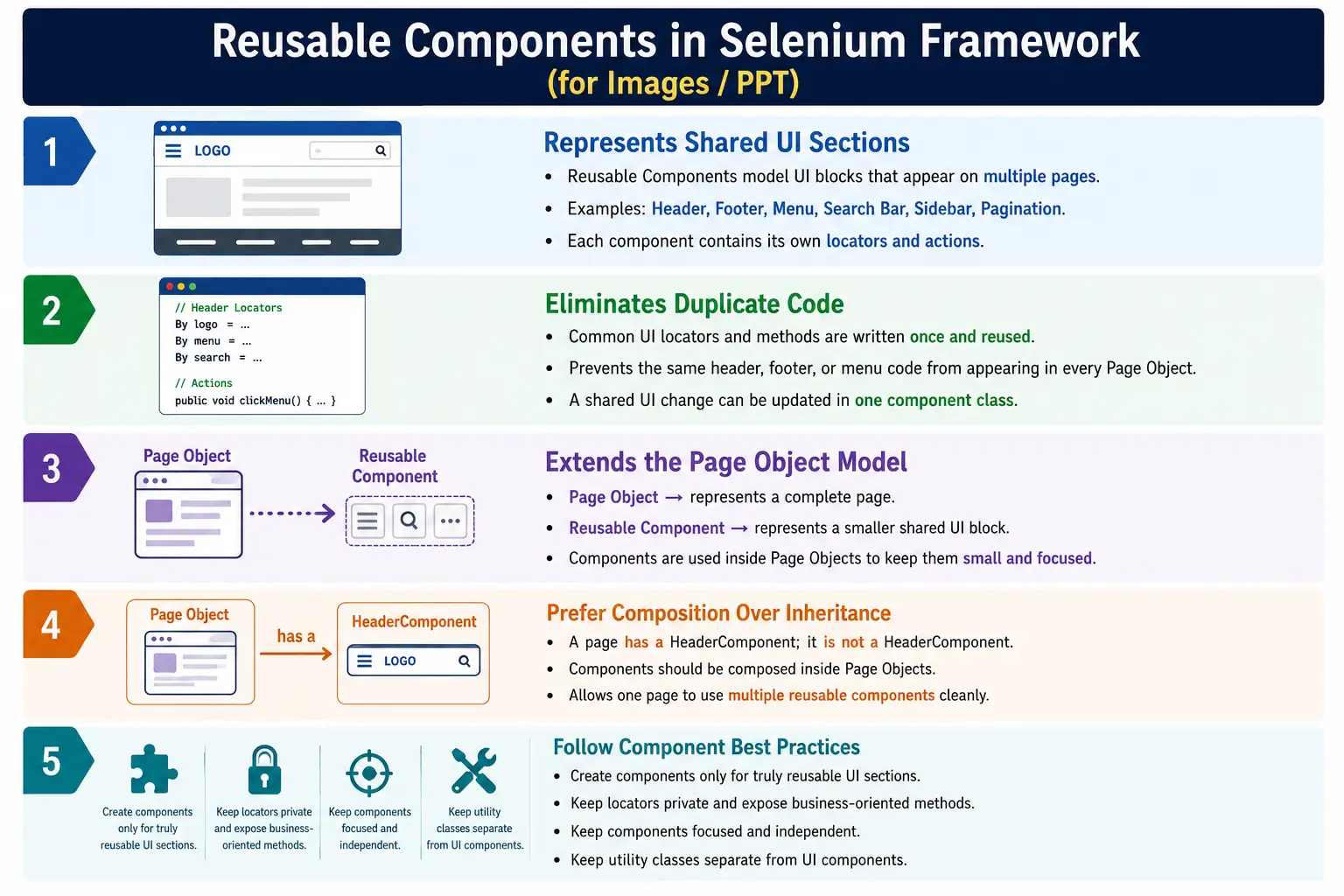
Modern web applications rarely have completely unique pages. Many pages share the same header, footer, navigation menu, search bar, sidebar, profile menu, notification panel, cookie banner, shopping cart icon, pagination control, upload widget, or table section. If every Page Object defines these common sections separately, the framework becomes repetitive and difficult to maintain. Reusable Components solve this problem by modeling shared UI blocks as independent classes with their own locators and business methods.
1. What Are Reusable Components?
A Reusable Component is a Java class that represents a common part of the application's user interface or functionality that appears on multiple pages. It is smaller than a full Page Object. A Page Object usually represents a complete page, such as HomePage, ProductPage, CartPage, or CheckoutPage. A component represents a smaller shared section, such as HeaderComponent, FooterComponent, SearchComponent, MenuComponent, ProfileComponent, CookieBanner, or PaginationComponent.
The component owns the locators and actions related to that shared UI section. For example, HeaderComponent may know how to perform a search, open the cart, open the profile menu, and log out. FooterComponent may know how to open privacy policy, terms, contact, and careers links. SearchComponent may know how to enter a keyword, submit search, clear search, and verify placeholder text.
- Header and navigation menu.
- Footer links.
- Search bar.
- Sidebar menu.
- User profile dropdown.
- Notification or toast panel.
- Cookie consent banner.
- Shopping cart icon.
- Pagination and table controls.
2. Why Do We Need Reusable Components?
Reusable Components are needed because shared UI sections create duplicate code if they are modeled inside every page. Consider an e-commerce application with Home Page, Product Page, Cart Page, Checkout Page, and Profile Page. Every page may contain the same header, search bar, cart icon, and user menu. If every Page Object defines those locators and actions separately, a small header change can require updates in many files.
Without Reusable Components
  HomePage has header code
  ProductPage has header code
  CartPage has header code
  CheckoutPage has header code
  ProfilePage has header code
With reusable components, the common header is modeled once. Every page composes or exposes the same HeaderComponent. If the search locator changes, HeaderComponent is updated once. This greatly reduces maintenance cost and improves consistency.
With Reusable Components
  HeaderComponent
    Used by HomePage
    Used by ProductPage
    Used by CartPage
    Used by CheckoutPage
3. Problems Without Reusable Components
Without reusable components, Page Objects become larger than necessary. A HomePage may contain locators for home-specific content and shared header content. A ProductPage may contain product-specific locators and the same header locators. A CartPage may repeat the same search and profile menu methods. This duplication is easy to ignore in a small framework but becomes painful in enterprise automation.
The main problem appears when the shared UI changes. If the search box ID changes, every page that duplicated the search locator must be updated. If the profile menu behavior changes, every duplicate profile method must be fixed. The same logic may also drift over time, with one page using one wait strategy and another page using another strategy for the same header element.
4. Core Idea
The core idea is to model common UI sections once and reuse them through composition. Instead of every page owning its own header implementation, create a HeaderComponent and let pages use that component. Instead of every page owning its own footer links, create a FooterComponent. Instead of every page repeating pagination logic, create a PaginationComponent.
Every Page
  Should Not Own Its Own Header

Shared Header
  Becomes HeaderComponent
    Used by Multiple Page Objects
This keeps Page Objects focused on page-specific behavior. Components handle common UI behavior. Utilities handle generic technical helpers. The framework becomes cleaner because each class type has a clear responsibility.
5. Real-World Analogy
A real-world analogy is reusable parts in a product design. Many car models may use similar engines, steering systems, dashboards, or braking systems. The shared part is designed once and reused in many models. If the shared part improves, multiple models benefit. Similarly, websites reuse headers, menus, footers, search bars, profile dropdowns, and notification panels across many pages.
In Selenium framework design, reusable components give the same benefit. A common UI block is built once, tested once, and reused across page objects. This makes automation code more modular and easier to maintain.
6. Common Reusable Components
The most common reusable components are application layout elements and repeated widgets. Header, footer, navigation menu, sidebar, search bar, profile menu, notification panel, cookie banner, shopping cart icon, pagination, modal dialog, calendar, table, upload widget, and download widget are all good candidates if they appear on multiple pages.
HeaderComponentfor logo, search, cart, and profile actions.FooterComponentfor footer links and copyright text.MenuComponentfor navigation menus.SearchComponentfor shared search behavior.SidebarComponentfor dashboard side navigation.NotificationComponentfor toast messages.CookieBannerfor accepting or rejecting cookies.PaginationComponentfor next, previous, and page count actions.TableComponentfor common table interactions.ModalDialogfor reusable modal behavior.
7. Example Application
In an online shopping application, Home Page, Product Page, Cart Page, Checkout Page, and Profile Page may all share the same header and footer. The header may contain the logo, search box, profile menu, cart icon, and category menu. The footer may contain About Us, Privacy Policy, Terms, Contact, and Careers links.
Home Page
  Header
  Search Bar
  Footer

Product Page
  Header
  Search Bar
  Footer

Cart Page
  Header
  Footer
These shared areas should not be repeated across every page object. HeaderComponent, SearchComponent, and FooterComponent can be created once and reused.
8. Header Component
A HeaderComponent represents common header behavior. It may include search, profile, cart, logout, logo, and navigation actions. The component receives WebDriver through its constructor and initializes its locators like a normal Page Object.
public class HeaderComponent {

    private WebDriver driver;

    @FindBy(id = "search")
    private WebElement searchBox;

    @FindBy(id = "profile")
    private WebElement profile;

    @FindBy(id = "cart")
    private WebElement cart;

    public HeaderComponent(WebDriver driver) {
        this.driver = driver;
        PageFactory.initElements(driver, this);
    }

    public void search(String product) {
        searchBox.sendKeys(product);
        searchBox.submit();
    }

    public void openCart() {
        cart.click();
    }
}
This component can now be used by multiple page objects instead of repeating the same header locators everywhere.
9. Using a Component Inside a Page
A Page Object can contain reusable components as fields or expose them through methods. This is composition: the page has a component. The page does not inherit from the component. Composition is preferred because a page may contain many components.
public class HomePage {

    public HeaderComponent header;

    public HomePage(WebDriver driver) {
        header = new HeaderComponent(driver);
    }
}homePage.header.search("Laptop");This usage keeps the HomePage class smaller. Header behavior is available, but it is not duplicated inside HomePage.
10. Navigation, Footer, and Search Components
A navigation menu component can contain methods such as openElectronics, openBooks, openFashion, openOrders, and openSettings. A footer component can contain methods such as openPrivacyPolicy, openContact, openTerms, and getFooterText. A search component can contain methods such as searchProduct, clearSearch, getSearchPlaceholder, and verifySearchResultsHeader.
public class FooterComponent {

    public void openPrivacyPolicy() {
    }

    public void openContact() {
    }
}
These components are small, focused, and reusable. They reduce Page Object size and improve maintainability.
11. Component Hierarchy
Components can sometimes contain smaller reusable components. For example, HeaderComponent may contain SearchComponent and ProfileMenuComponent. This is useful when a shared UI block has its own internal structure. However, component hierarchy should be used carefully. Too many nested components can make test code harder to follow.
HomePage
  HeaderComponent
    SearchComponent
    ProfileMenuComponent
  FooterComponent
The goal is readability. If a nested component makes code clearer, use it. If it makes simple actions difficult to trace, keep the design simpler.
12. Folder Structure
Reusable components should usually live in a dedicated components package. Page Objects should live in a pages package. Tests should live in tests. Utilities should live in utilities. This structure makes framework intent clear.
AutomationFramework
  pages
    HomePage.java
    LoginPage.java
    CartPage.java
  components
    HeaderComponent.java
    FooterComponent.java
    MenuComponent.java
    SearchComponent.java
  tests
  utilities
A separate components package also helps prevent shared UI code from being hidden inside random page classes.
13. Framework Architecture
Reusable components sit between Page Objects and Selenium interactions. A test calls a Page Object. The Page Object uses a component. The component uses WebDriver to interact with the browser. Utilities may support both Page Objects and components.
Test
  Page Object
    Reusable Component
      Utility Class
        WebDriver
          Browser
This design keeps framework layers clean. Components are UI abstractions. Utilities are technical helpers. Page Objects represent full pages. Tests express business validations.
14. Benefits
Reusable Components eliminate duplicate locators and duplicate methods for shared UI sections. They make Page Objects smaller and easier to read. They improve maintainability because shared UI changes are updated in one place. They improve debugging because common component behavior is centralized. They also make framework design closer to the real structure of the application.
- Eliminates duplicate shared UI code.
- Improves maintainability when common sections change.
- Keeps Page Objects smaller.
- Improves readability and organization.
- Supports high reuse across multiple pages.
- Makes debugging shared UI behavior easier.
- Encourages better Page Object design.
- Fits naturally into Hybrid Frameworks.
15. Example Without Components
Without components, HomePage, ProductPage, and CartPage may all define the same search, cart, and profile locators. The code may look similar in every class. This duplication increases maintenance work.
HomePage
  search locator
  cart locator
  profile locator

ProductPage
  search locator
  cart locator
  profile locator
If the profile locator changes, both pages must be updated. If there are ten pages, ten files may need edits. This is exactly what reusable components prevent.
16. Example With Components
With components, HomePage and ProductPage both reuse HeaderComponent. The header locators and actions exist once. The pages remain focused on their own page-specific behavior.
HomePage
  HeaderComponent

ProductPage
  HeaderComponent

CartPage
  HeaderComponent
Only one implementation exists for the shared header. This is cleaner and easier to maintain.
17. Reusable Components vs Page Objects
A Reusable Component represents a common UI block. A Page Object represents a complete page. HeaderComponent is a component. HomePage is a Page Object. FooterComponent is a component. CheckoutPage is a Page Object. The distinction matters because components should not become full pages, and pages should not duplicate shared components.
| Reusable Component | Page Object |
|---|---|
| Represents common UI block. | Represents a complete page. |
| Shared across pages. | Usually one class per page. |
| Examples include header, footer, search bar, and menu. | Examples include login page, home page, and checkout page. |
18. Reusable Components vs Utility Classes
Reusable Components and utility classes are different. A component represents UI elements and user interactions. A utility class provides generic helper methods. HeaderComponent can contain WebElements and methods such as search or openCart. ScreenshotUtil should not contain page elements. WaitUtil should not know about the header. ExcelUtil should not know about menus.
| Reusable Component | Utility Class |
|---|---|
| Represents UI elements. | Provides generic helper methods. |
| Contains locators or WebElements. | Usually no page-specific elements. |
| Examples include search box, header, and menu. | Examples include wait, screenshot, Excel, and JSON helpers. |
19. Reusable Components vs POM
Reusable Components extend Page Object Model. They do not replace POM. Page Objects model complete pages. Components model shared parts of pages. A page can contain several components. This makes POM more flexible and less repetitive.
| Component | Page Object |
|---|---|
| Smaller reusable UI block. | Complete page abstraction. |
| Examples include header, footer, and menu. | Examples include home, login, checkout, and product pages. |
| Used inside Page Objects. | Used directly by test classes. |
20. Real Project Example
In an e-commerce framework, HomePage, ProductPage, CartPage, CheckoutPage, and ProfilePage may all use HeaderComponent and FooterComponent. ProductPage may additionally use ProductDetailsComponent. CartPage may use CartSummaryComponent. CheckoutPage may use AddressComponent, PaymentComponent, and OrderSummaryComponent.
HomePage
  HeaderComponent
  MenuComponent
  SearchComponent
  FooterComponent

ProductPage
  HeaderComponent
  MenuComponent
  ProductDetailsComponent
  FooterComponent
This structure mirrors how modern web applications are built: pages are assembled from reusable sections.
21. Common Beginner Mistakes
A common beginner mistake is putting header locators inside every Page Object. Another mistake is creating one huge component called EverythingComponent. Components should be focused. Header, menu, search, footer, modal, and table should usually be separate components. Another mistake is mixing utilities and components, such as placing screenshot methods inside HeaderComponent. Screenshots belong in ScreenshotUtil.
- Duplicating header or footer code in every page.
- Creating one giant component that handles everything.
- Mixing utility methods into component classes.
- Creating components for elements used on only one page.
- Making components depend too heavily on one specific page.
- Exposing raw locators publicly instead of business methods.
- Using inheritance where composition would be cleaner.
22. Best Practices
Create components only for shared UI sections. Keep components independent when possible. Use composition instead of inheritance. Keep Page Objects small. Give every component one responsibility. Keep utilities separate from components. Use meaningful business methods such as logout, search, acceptCookies, openCart, nextPage, or closeModal. Initialize components inside Page Objects or expose them through methods.
- Create separate component classes for repeated UI sections.
- Keep component locators private.
- Expose business-oriented methods.
- Reuse components across multiple Page Objects.
- Keep components independent of specific pages where practical.
- Use components only when the UI block is actually reused.
- Combine components with POM for maintainable design.
- Do not place generic utilities inside components.
23. Composition Over Inheritance
Reusable components should usually be used through composition, not inheritance. A HomePage has a HeaderComponent. A ProductPage has a HeaderComponent. The page should not extend HeaderComponent because the page is not a header. Inheritance creates an "is-a" relationship. Composition creates a "has-a" relationship. For components, "has-a" is usually correct.
public class DashboardPage {

    private WebDriver driver;

    public DashboardPage(WebDriver driver) {
        this.driver = driver;
    }

    public HeaderComponent header() {
        return new HeaderComponent(driver);
    }
}
This design is flexible because a page can expose many components without being forced into an inheritance chain.
24. Component Method Design
Component methods should describe user behavior, not low-level locator operations. A HeaderComponent method named logout is clearer than clickProfileThenClickLogout. A SearchComponent method named search is clearer than typeIntoSearchBoxAndSubmit. The method should represent what the user is trying to do.
Good component methods hide UI details and expose meaningful actions. This keeps tests readable. A test that says dashboard.header().logout reads like a real user action. A test that clicks raw locators from the page is harder to understand and maintain.
25. Component Initialization Strategy
Components can be initialized as fields inside page objects or returned from methods. Field initialization is convenient when the component is used often. Method-based initialization can keep page construction lighter and create components only when needed. Both approaches can work if the team is consistent.
public class HomePage {

    public SearchComponent search() {
        return new SearchComponent(driver);
    }
}
The important point is that all components receive the same driver instance used by the page. Components should not create their own driver. Driver lifecycle belongs to BaseTest and DriverFactory.
26. Reusable Components and Waits
Components often need waits because shared UI sections may load asynchronously. A header profile menu may appear after login. A notification panel may appear after an action. A modal dialog may animate into view. Components can use WaitUtil or an ElementUtil to wait for visibility, clickability, or disappearance.
Wait logic should be consistent. If every component writes its own wait code in a different way, the framework becomes inconsistent. A better design lets components use common utilities for wait behavior while keeping component methods focused on UI actions.
27. Reusable Components and Parallel Execution
Components are safe for parallel execution when they use the correct WebDriver instance. Each test thread should have its own driver. Page Objects and components created inside that test should use that same driver. Components should not store global static WebDriver references because that can cause one test to affect another.
When using ThreadLocal driver management, the page object should receive the current thread's driver and pass it to components. This keeps component actions isolated to the correct browser session.
28. Real Enterprise Architecture
In a real enterprise architecture, tests call Page Objects, Page Objects expose components, components perform shared UI actions, utilities support technical operations, and WebDriver controls the browser. This layered design is clean and maintainable.
Test Classes
  Page Objects
    HeaderComponent
    FooterComponent
    MenuComponent
    SearchComponent
    ProfileComponent
      Utilities
        WebDriver
          Browser
This architecture is common in large Hybrid Frameworks because it keeps page classes smaller and shared UI behavior centralized.
29. Deciding Component Boundaries
One of the most important design decisions is deciding where a component starts and ends. A component should represent a stable and meaningful UI block. HeaderComponent is meaningful because it groups logo, search, cart, and profile behavior. FooterComponent is meaningful because footer links usually belong together. PaginationComponent is meaningful because next, previous, page count, and page size controls work together. A random single button that appears only once usually does not need its own component.
A good boundary is based on reuse and responsibility. If the same section appears on several pages and has its own behavior, it is a strong component candidate. If a group of elements belongs only to one page and is tightly tied to that page's main workflow, it may be better inside the Page Object. Over-componentizing can make the framework harder to follow, while under-componentizing creates duplication. The goal is a practical balance.
30. Component State and Page State
Components should avoid assuming too much about the page state. A HeaderComponent may be visible only after login. A CookieBanner may appear only for first-time visitors. A NotificationComponent may exist only after a save action. The component should provide methods that handle its own expected behavior clearly, but it should not silently assume that every page is in the correct state.
For example, CookieBanner can expose isDisplayed and acceptCookies methods. The test or page object can decide whether accepting cookies is part of the scenario. NotificationComponent can expose getMessage and waitForMessage. HeaderComponent can expose isUserLoggedIn or openProfileMenu if those actions are truly part of the shared header behavior. Clear methods make component state easier to reason about.
31. Components and Reporting
Reusable components can improve reporting when methods are named around business actions. A report step such as "search product from header" is more useful than "click element." If the framework logs component actions, failures become easier to locate. A failed step inside HeaderComponent suggests a shared header issue. A failed step inside PaginationComponent suggests a table or listing navigation issue.
However, components should not directly own reporting implementation unless the framework intentionally designs them that way. It is often better for components to perform actions and let listeners, wrappers, or reporting utilities record results. This keeps components reusable and prevents them from being tightly coupled to one reporting library.
32. Components and Test Data
Components sometimes need data, but they should not usually read data files directly. SearchComponent may need a keyword. LoginComponent may need username and password. UploadComponent may need a file path. These values should be passed into component methods by the test or page object. The component should perform the UI action, not decide where the data comes from.
This keeps data-driven design clean. ExcelUtil, JsonUtil, CSV readers, or DataProviders supply data. Tests pass the data into Page Objects or components. Components use the values on the UI. If components start reading Excel or JSON directly, the framework layers become tangled and harder to maintain.
33. Components and Maintenance
The biggest maintenance benefit appears when shared UI changes. If the header search box changes from an input field to a custom search widget, only HeaderComponent or SearchComponent needs to change. All pages that use that component benefit automatically. If a footer link changes, FooterComponent changes once. If a cookie banner button changes, CookieBanner changes once.
Maintenance also improves because common behavior is tested repeatedly through many flows. If HeaderComponent has a bug, it will likely be exposed quickly because many tests use it. That shared usage is useful, but it also means component changes should be reviewed carefully. A mistake in a shared component can break many tests at once.
34. Components in CI/CD
Reusable components make CI/CD failures easier to classify. If many tests fail at the same shared header action after a deployment, the issue may be a header locator change or a common layout defect. If only one page fails, the problem may be page-specific. Component-based design gives failure patterns more meaning because shared UI code is centralized.
In CI environments, components should use reliable waits and avoid assumptions about timing. Shared UI sections may load differently in headless browsers or under pipeline load. Components that rely on hard sleeps can make the whole suite slow and flaky. Using WaitUtil or ElementUtil inside components gives more reliable execution.
35. Component Anti-Patterns
A common anti-pattern is using components as a way to hide every locator in the application. If every small element becomes a component, test code becomes fragmented. Another anti-pattern is making components inherit from each other without a clear reason. A HeaderComponent should not extend FooterComponent. Components should be composed where needed.
Another anti-pattern is exposing raw WebElements publicly from components. Tests should not reach into header.searchBox and interact with the element directly. The component should expose meaningful methods such as search, openCart, or logout. This protects the framework from locator leakage and keeps tests business-focused.
36. Interview Perspective
A short interview answer is: Reusable Components are shared Page Object classes that represent common UI sections such as headers, footers, menus, search bars, profile menus, and cookie banners. They reduce duplicate code and improve maintainability by allowing multiple Page Objects to reuse the same functionality.
A stronger real-time answer is: in my Selenium Hybrid Framework, I create reusable components for common UI sections such as the application header, navigation menu, footer, search bar, and notification panel. These components encapsulate their own locators and business methods and are composed inside multiple Page Objects. For example, both HomePage and ProductPage use the same HeaderComponent to perform searches and navigate to the cart. This keeps Page Objects smaller, avoids duplicated locators, and makes maintenance easier when shared UI elements change.
It is also useful to mention that reusable components are not the same as utilities. Components model repeated UI sections, while utilities provide generic helper methods. This distinction shows that the framework design is organized by responsibility rather than by convenience. That clarity matters in long-running projects.
37. Reusable Components Workflow
The workflow starts from the test class. The test uses a Page Object. The Page Object exposes a reusable component. The component performs its UI action using WebDriver and supporting utilities. The browser reflects the action.
This workflow also improves collaboration inside automation teams. One engineer can improve HeaderComponent while another works on ProductPage or CheckoutPage. As long as the component interface remains stable, page classes and tests continue to use the same shared behavior. This makes component-based design useful for large teams where several people maintain the same framework.
Test Class
  Page Object
    Reusable Component
      WebDriver
        Browser
This workflow keeps tests readable and keeps shared UI behavior reusable across the application.
38. Key Takeaway
Reusable Components extract shared UI functionality from Page Objects into dedicated classes. They represent repeated UI blocks such as headers, footers, menus, search bars, profile panels, cookie banners, modals, tables, pagination, uploads, and notifications. They reduce duplicate locators and methods, improve maintainability, make Page Objects smaller, and extend the Page Object Model for enterprise frameworks.
Shared UI
  Reusable Component
    Header
    Footer
    Menu
    Search
    Profile
      Used by Multiple Page Objects
The most important rule is to use components for UI sections that truly appear on multiple pages. Keep components independent, focused, and business-oriented. Use composition instead of inheritance. Keep utilities separate. When designed carefully, reusable components make Selenium Hybrid Frameworks cleaner, more scalable, easier to extend, and easier to maintain over time.