Retry Mechanism in Selenium Framework
Retry Mechanism in Selenium Framework is a controlled framework feature that automatically re-executes a failed test case a limited number of times before marking it as failed permanently. In Selenium automation, retry is usually added to reduce noise from short-lived problems such as browser startup failures, temporary network delays, Selenium Grid node issues, application environment instability, and rare timing problems that disappear on a second attempt.
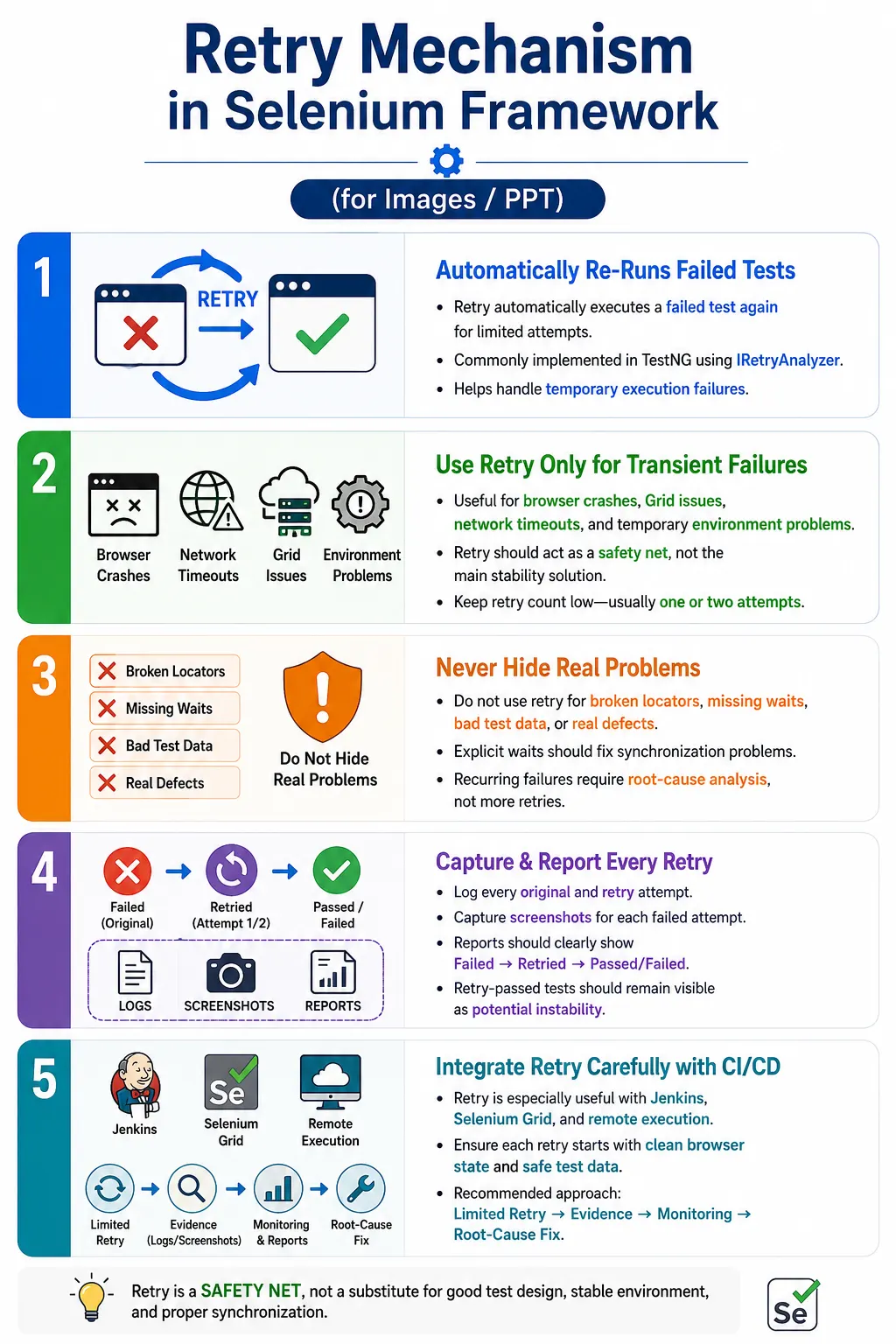
Retry is useful, but it must be handled carefully. A retry mechanism should never become a way to hide bad locators, missing waits, broken test data, real application defects, or poor framework design. If a test passes only because it is retried repeatedly, the automation suite is not truly stable. Retry should be treated as a safety net for known transient failures, not as a replacement for good synchronization, stable locators, independent data, and reliable test design.
1. What Retry Mechanism Means
Retry Mechanism means rerunning a failed test automatically for a fixed number of attempts. If the first execution fails and retry count is available, the framework executes the same test again. If the test passes during retry, the final result may be considered passed depending on the reporting and framework policy. If all retry attempts fail, the test is marked failed permanently.
First Run  - FAIL
Retry 1    - FAIL
Retry 2    - PASS
Final      - PASS
This behavior helps reduce false failures caused by temporary interruptions. However, the report should still show that the test needed a retry. A test that passes after retry is not as healthy as a test that passes on the first attempt. Mature frameworks make retry attempts visible.
2. Why Retry Mechanism Is Needed
Selenium tests interact with real browsers and real environments. Unlike pure unit tests, browser automation depends on UI rendering, JavaScript execution, network calls, test data, browser versions, drivers, Grid nodes, and application servers. Any short interruption in these layers can cause a temporary failure that may not represent a product defect.
For example, a Grid node may fail to create a session once and then recover. A remote environment may respond slowly for a few seconds. A browser may crash during startup. A network call may time out only once. In such cases, a limited retry can prevent unnecessary build failure while still preserving evidence that the first attempt failed.
3. What Retry Should Not Do
Retry should not be used to hide real defects. If an assertion fails because the application shows the wrong result, retrying the test does not fix the application. If a locator is broken, retrying usually only repeats the same failure. If a test lacks explicit waits, retry may temporarily pass but leaves the synchronization problem unresolved.
A dangerous mindset is: the test is flaky, so add retry. The correct mindset is: the test is flaky, so investigate the root cause, fix synchronization, fix locator design, isolate data, or stabilize the environment. Retry can reduce noise while investigation happens, but it should not become the permanent solution.
4. Retry Execution Flow
The retry flow starts when a test is executed. If the test passes, it is marked passed. If the test fails, the framework checks whether retry attempts are still available. If retry is available, the test is rerun. If no retry attempts remain, the test is marked failed. This flow must be predictable and limited.
Execute Test
  Test Failed?
    No
      Mark Passed
    Yes
      Retry Count Available?
        Yes
          Re-run Test
        No
          Mark Failed
The retry count should be low. In most Selenium frameworks, one or two retries are enough. More retries usually hide instability and increase execution time.
5. TestNG Retry Mechanism
TestNG supports retry using the IRetryAnalyzer interface. This interface provides a retry() method that returns true if TestNG should execute the failed test again. The retry analyzer tracks how many times the test has already been retried.
import org.testng.IRetryAnalyzer;
import org.testng.ITestResult;

public class RetryAnalyzer implements IRetryAnalyzer {

    private int count = 0;
    private static final int maxRetryCount = 2;

    @Override
    public boolean retry(ITestResult result) {

        if (count < maxRetryCount) {
            count++;
            return true;
        }

        return false;
    }
}
In this example, the original run plus two retry attempts can execute the test up to three times. The retry analyzer returns false after the maximum retry count is reached.
6. Applying Retry to a Test
The simplest way to apply retry is to add the retry analyzer directly to the TestNG test annotation. This is easy for demonstration and targeted tests, but it becomes repetitive in larger frameworks if every test method needs the same annotation.
@Test(retryAnalyzer = RetryAnalyzer.class)
public void verifyLogin() {

    Assert.assertEquals(
            "Dashboard",
            "Login"
    );
}
If this test fails, TestNG invokes the retry analyzer and reruns the test until the retry count is exhausted or the test passes. This direct approach is clear, but enterprise frameworks usually prefer a listener-based approach so retry can be configured globally.
7. Retry Count Example
If maxRetryCount is set to 2, the test can run three times in total: the original execution, retry 1, and retry 2. This distinction is important. Retry count usually means additional attempts after the original run, not total executions.
maxRetryCount = 2

Execution 1
  Original Run

Execution 2
  Retry 1

Execution 3
  Retry 2
Keeping retry count low protects build time and prevents unstable tests from being hidden by repeated execution. A test that needs five retries is not healthy enough for a trusted regression suite.
8. Retry with TestNG Listener
Instead of adding retry analyzer to every test method, a TestNG annotation transformer can apply it automatically. This is useful in frameworks where retry policy should be consistent across many tests.
import org.testng.IAnnotationTransformer;
import org.testng.annotations.ITestAnnotation;

import java.lang.reflect.Constructor;
import java.lang.reflect.Method;

public class RetryListener implements IAnnotationTransformer {

    @Override
    public void transform(
            ITestAnnotation annotation,
            Class testClass,
            Constructor testConstructor,
            Method testMethod) {

        annotation.setRetryAnalyzer(
                RetryAnalyzer.class
        );
    }
}
The listener can be registered in the TestNG suite XML. After registration, retry is applied automatically based on the transformer.
<listeners>
    <listener class-name="listeners.RetryListener"/>
</listeners>
9. Retry in a Hybrid Framework
In a Selenium hybrid framework, retry usually sits at the TestNG layer. TestNG runs the test, the test uses page objects, page objects use WebDriver, and reports capture results. If the test fails, TestNG asks the retry analyzer whether it should rerun the test. The retry analyzer does not replace page objects, waits, or driver management. It only controls rerun behavior.
TestNG
  RetryAnalyzer
    Failed Test
      Retry Execution
        Final Result
The framework must still clean up properly between attempts. If the browser state from the first failed attempt remains corrupted, the retry may fail for the wrong reason. Base test setup and teardown should ensure each attempt starts from a known state.
10. Retry with Screenshots
Screenshots are important when retry is enabled. If the first attempt fails and the second attempt passes, the team still needs evidence from the failed attempt. Otherwise, the root cause disappears from visibility. The framework should capture screenshots on every failed attempt, not only on the final failed result.
@Override
public void onTestFailure(ITestResult result) {

    ScreenshotUtil.capture(
            DriverManager.getDriver(),
            result.getName()
    );
}
Screenshot names should include test name, timestamp, and attempt number when possible. This makes it easier to compare attempt 1 with retry attempt 2.
11. Retry with Extent Reports
Retry attempts should be clearly logged in Extent Reports or any reporting system used by the framework. If a test failed once and then passed, the report should not simply show a clean pass without context. A meaningful report might show verifyLogin - Attempt 1 - Failed and verifyLogin - Attempt 2 - Passed.
This distinction matters because a suite with many retry passes is not fully stable. It may technically pass the pipeline, but it signals flakiness. Good reporting helps the team identify which tests need stabilization.
12. Retry and Flaky Tests
Retry can reduce noise from flaky tests, but it does not fix flaky tests. If a test fails intermittently because of missing waits, bad data, weak locators, shared state, or thread safety issues, retry only masks the symptom. The root cause remains and may become worse as the suite grows.
A retry mechanism should be paired with flaky test monitoring. Tests that pass after retry should be tracked. Repeated retry passes should trigger investigation. The long-term goal is to reduce the number of retry-dependent tests, not normalize them.
13. Retry for Specific Exceptions
Advanced retry mechanisms can retry only for specific exception types. This is better than retrying every failure blindly. For example, a temporary TimeoutException or WebDriverException may be retryable, while a clear assertion failure may represent a real product defect.
Throwable throwable =
        result.getThrowable();

if (throwable instanceof TimeoutException ||
        throwable instanceof WebDriverException) {

    return count++ < maxRetryCount;
}
This approach requires judgment. Some timeout failures are caused by application defects or missing waits, so they should not be ignored forever. Exception filtering improves retry discipline, but root cause analysis is still required.
14. When Retry Is Useful
Retry may be acceptable for temporary browser crashes, Selenium Grid session creation failures, short network timeouts, brief environment instability, external service delays, and isolated CI/CD infrastructure interruptions. These failures may disappear on a second attempt because the underlying issue was temporary.
Retry is especially useful in distributed execution. When tests run across remote Grid nodes, containers, cloud browsers, and CI agents, occasional infrastructure interruptions can happen. A low retry count can protect the pipeline from rare false failures without hiding repeated instability.
15. When Retry Is Not Useful
Retry is not useful for wrong expected results, broken business logic, invalid test data, permanently broken locators, missing features, incorrect assertions, functional defects, and application errors that occur every time. In these cases, retry simply wastes time and delays proper investigation.
For example, if the application calculates tax incorrectly, retrying the test will not fix the calculation. If the test expected Dashboard but the application correctly shows Home after a requirement change, the test should be updated. Retry is not a substitute for requirement alignment.
16. Common Beginner Mistakes
Common beginner mistakes include retrying every failure blindly, using retry instead of explicit waits, hiding real application bugs, not logging retry attempts, not limiting retry count, ignoring repeated retry failures, and treating a retry pass as fully stable. These mistakes make the suite look healthier than it really is.
Another mistake is enabling retry globally without team agreement. If retry changes build status, reporting, or quality gates, the whole team should understand the policy. Retry affects how test results are interpreted.
17. Best Practices
Keep retry count low, usually one or two. Retry only known transient failures where practical. Log every retry attempt. Capture screenshots and logs for failed attempts. Do not retry clear assertion failures without strong reason. Track flaky tests separately. Fix root causes instead of depending on retry. Use retry mainly in CI/CD, Grid, or remote execution contexts where transient infrastructure failures are more likely.
Also make retry configurable. A framework can enable retry in Jenkins but disable it during local debugging. This helps developers see failures immediately while allowing CI to tolerate rare infrastructure hiccups.
18. Retry Mechanism vs Explicit Wait
Retry mechanism and explicit waits solve different problems. Explicit waits handle synchronization within a test step. They wait for a condition such as element visibility or clickability before continuing. Retry mechanism reruns the whole failed test after a failure occurs. A framework should use explicit waits as a standard practice and retry only as a limited safety net.
Explicit Wait
  Waits for condition inside test
  Improves step stability
  Should be standard

Retry Mechanism
  Re-runs failed test
  Handles temporary execution failure
  Should be limited
19. Retry Mechanism vs Flaky Test Fix
Retry is a temporary workaround. A real flaky test fix removes the root cause. If a test fails because an element is clicked before it becomes clickable, the real fix is an explicit wait. If a test fails because shared data is modified by another test, the real fix is data isolation. If a test fails because of a dynamic locator, the real fix is locator optimization.
Retry can reduce build noise while the team works on the fix, but it should not be celebrated as the fix itself. A stable framework should need fewer retries over time.
20. Retry and CI/CD Pipelines
CI/CD pipelines are where retry mechanisms are most commonly used. Jenkins or another pipeline tool may run Selenium tests on shared agents, remote browsers, containers, and Grid infrastructure. These systems can have brief availability or timing issues. Retry can prevent a full pipeline failure for a one-time infrastructure issue.
However, CI reports should preserve retry information. If a build passed only after multiple retries, the team should know. Some teams mark such builds as unstable, while others allow the build to pass but track retry metrics separately. The policy depends on release risk and team maturity.
21. Retry and Test Data
Retry can behave badly when tests mutate data. If the first attempt partially creates a user, order, or transaction and then fails, the retry may run against altered data. This can cause duplicate record failures, invalid state, or misleading results. Retry-safe tests should either clean up data, generate unique data, or reset state before each attempt.
For example, a registration test should not reuse the exact same email address on retry if the first attempt may have created the account. A retry-safe design generates unique data per attempt or checks and resets state before rerun.
22. Retry and Browser State
Browser state also matters. If the first attempt fails after leaving the browser on an error page, the retry should not continue from that corrupted state unless the test is explicitly designed to do so. Most frameworks should create a clean browser session or reset to a known starting point before retry execution.
This is why setup and teardown design matters. Retry is more reliable when each test attempt starts independently. Shared browser sessions can make retries less predictable.
23. Retry Metrics
Retry metrics help teams understand automation health. Useful metrics include how many tests retried, which tests retried most often, which exception types caused retries, how often retry passed, and whether retries are increasing over time. These metrics reveal hidden instability.
A suite that passes with zero retries is much healthier than a suite that passes after twenty retry attempts. Both may show green status, but they do not carry the same confidence. Mature reporting makes this difference visible.
24. Retry Configuration
Retry count should not be hardcoded in multiple places. A framework can store retry count in a configuration file, Maven property, Jenkins parameter, or environment variable. This allows different execution modes to use different policies. Local debugging may use zero retries. CI smoke execution may use one retry. Nightly regression may use one or two retries depending on infrastructure stability.
local.retry.count = 0
ci.retry.count = 1
grid.retry.count = 2
Configuration should still be controlled. Increasing retry count should not be the default response to unstable tests.
25. Retry Report Clarity
Retry reporting must be clear enough that stakeholders understand the result. If a test fails once and passes on retry, the final status may be pass, but the report should show the failed attempt. If screenshots were captured for failed attempts, they should be linked. If logs show exception details, they should be preserved.
Without clarity, retry creates confusion. Developers may wonder why Jenkins showed failure logs while the final suite status is pass. QA leads may miss growing flakiness. Managers may overestimate automation stability. Transparent retry reporting prevents this.
26. Real Enterprise Architecture
In a real enterprise Selenium framework, retry integrates with TestNG, listeners, BaseTest, DriverManager, screenshot utilities, report managers, and Jenkins. TestNG controls retry execution. DriverManager provides the correct browser instance. Screenshot utilities capture evidence. Report managers log attempts. Jenkins archives the final reports and screenshots.
TestNG
  RetryAnalyzer
    Listener
      BaseTest
        DriverManager
          Screenshot Utility
            Extent Reports
              Jenkins
This architecture keeps retry behavior centralized instead of scattering retry logic across test methods.
27. Common Governance Rules
A team should define governance rules for retry. For example, retry count must be one or two only. Assertion failures should not be retried unless approved. Any test that passes after retry more than a defined threshold should be reviewed. Retry attempts must be logged. Screenshots must be captured for failed attempts. Flaky tests should be tracked separately from product defects.
These rules prevent retry from becoming a silent quality risk. Retry is acceptable only when it is visible, limited, and actively monitored.
28. Interview Perspective
A short interview answer is: Retry Mechanism in Selenium is used to automatically rerun failed tests for a limited number of attempts, usually implemented in TestNG using IRetryAnalyzer. It helps handle temporary failures but should not hide real defects or poor test design.
A stronger real-time answer is: in my Selenium framework, I implement retry using TestNG's IRetryAnalyzer. I keep the retry count low, usually one or two attempts, and use it only for transient failures such as browser crashes, Selenium Grid issues, or temporary environment instability. I do not use retry to hide assertion failures or missing waits. Retry attempts are logged in Extent Reports, screenshots are captured for failed attempts, and repeatedly flaky tests are tracked and fixed separately.
29. Retry Mechanism Workflow
The workflow starts with normal test execution. If the test passes, execution ends. If it fails, the retry analyzer checks whether retry is available. If yes, the test is rerun. If no retry remains, the final failed status is recorded.
Failed Test
  Retry Analyzer
    Retry Available?
      Yes
        Re-run Test
      No
        Mark Failed
30. Retry and TestNG Result Cleanup
One practical issue in TestNG retry implementation is result cleanup. When a test fails first and passes during retry, TestNG may still keep information about the earlier failed attempt depending on listeners, reports, and suite configuration. If the reporting layer is not designed carefully, the final output may show both failed and passed entries for the same test. This creates confusion because the build may look failed even though the retry passed.
Frameworks often handle this by cleaning duplicate failed results after retry or by reporting retry attempts in a separate, clearly labeled way. The right approach depends on the reporting goal. If the team wants the final suite status to be pass when retry passes, duplicate failed entries should not incorrectly fail the build. If the team wants full transparency, the report should show that the first attempt failed and the retry passed, while still calculating final status according to policy.
This is why retry should be designed together with reporting, not added as an isolated class. Retry affects how results are interpreted, how screenshots are attached, how Jenkins reads reports, and how stakeholders understand suite health.
31. Retry and Jenkins Build Status
Jenkins build status can become misleading if retry is not integrated carefully. A retry-passed test may still leave failed XML entries in Surefire or TestNG reports. Jenkins may then mark the build unstable or failed even though the final TestNG result appears passed. This is a common problem when teams add retry quickly without validating CI report behavior.
After enabling retry, run a controlled test where the first attempt fails and the retry passes. Then inspect Jenkins test results, Surefire reports, TestNG reports, Extent Reports, console logs, and archived screenshots. Confirm that the build status matches the team's intended policy. If Jenkins still counts earlier failed attempts as final failures, the reporting or cleanup logic needs adjustment.
Some teams intentionally mark retry-passed builds as unstable because retry means the suite was not perfectly clean. Other teams allow the build to pass but publish retry metrics. Either approach can work if it is intentional, documented, and understood by the team.
32. Retry Attempt Naming Strategy
Retry attempts should be named clearly in screenshots, logs, and reports. If every failed screenshot is named only with the test method, the retry attempt may overwrite the previous screenshot. This destroys useful evidence. A better naming strategy includes test name, attempt number, browser, timestamp, and sometimes environment.
verifyLogin_attempt1_chrome_20260710_104500.png
verifyLogin_attempt2_chrome_20260710_104511.png
This naming strategy helps when analyzing intermittent failures. A tester can compare the first failure screenshot with the retry result and see whether the failure was caused by a loader, wrong page, popup, blank screen, stale data, or real application behavior.
33. Retry-Safe Test Design
A test is retry-safe when rerunning it does not create incorrect side effects. Read-only tests are usually easier to retry. Tests that create, update, delete, submit, purchase, approve, or cancel data are harder. If the first attempt partially completes an action and then fails during assertion, the retry may run against already-changed data.
For example, a test that creates a user may fail after the user is created but before the confirmation message is validated. On retry, creating the same user again may fail because the email already exists. The retry failure is then caused by test design, not the original issue. Retry-safe design uses unique data, cleanup hooks, state checks, idempotent setup, or API-based data reset.
Before enabling retry on important transactional tests, ask whether the test can be safely rerun. If not, fix the setup and cleanup design first. Retry should not make data state unpredictable.
34. Retry Policy by Test Type
Not all tests should have the same retry policy. A smoke test that checks critical login, search, and checkout behavior may have a stricter policy because it is used as a release gate. A large nightly regression suite may allow one retry for known infrastructure instability. A local developer run may disable retry completely so the developer sees failures immediately.
Retry policy can also vary by test category. UI tests running on Selenium Grid may use one retry. API setup tests may not use retry unless the external service is known to have temporary failures. Data validation tests with clear assertions should usually avoid retry. Destructive workflows should be reviewed carefully before retry is enabled.
Local Debug Run
  Retry Count = 0

CI Smoke Run
  Retry Count = 1

Nightly Grid Regression
  Retry Count = 1 or 2
35. Retry and Parallel Execution
Parallel execution adds another layer of complexity. Each retry attempt must use the correct thread-local WebDriver instance, report object, screenshot path, and test context. If retry logic is not thread-safe, one test's retry can interfere with another test's browser session or report node.
A parallel Selenium framework should use ThreadLocal<WebDriver> for driver management and thread-safe reporting patterns for Extent Reports. Retry attempt logs should attach to the correct test. Screenshot capture should use the correct driver for that thread. Shared counters inside retry analyzers should be instance-based or otherwise safely managed so retry counts do not leak between tests.
Before enabling retry in a parallel suite, run a small parallel test set with forced failures. Confirm that each failed test retries independently and that screenshots and report entries are attached to the correct method.
36. Retry Configuration from Maven or Jenkins
Enterprise frameworks often make retry configurable through Maven or Jenkins. This avoids code changes when different pipelines need different retry behavior. For example, Jenkins can pass -Dretry.count=1, and the retry analyzer can read that value. Local runs can default to zero retries.
mvn clean test -Dretry.count=1The retry analyzer can read the property and apply it consistently. This gives the team control without editing code. However, the value should be bounded. A pipeline should not accidentally pass a retry count of ten and hide a failing suite. The framework can enforce a maximum allowed retry count.
37. Retry Dashboard and Trend Analysis
Retry becomes more valuable when retry trends are tracked. A dashboard can show how many tests required retry, which tests retried most often, which exception types triggered retry, and whether retry counts are increasing over time. This turns retry from a hidden workaround into a measurable stability indicator.
For example, if verifyCheckoutWithCreditCard() passes only after retry three times in a week, that test should be investigated. If many tests retry due to TimeoutException, the application environment may be slow or waits may be weak. If retries happen only on one browser, there may be a browser-specific issue.
Trend analysis prevents retry from becoming invisible technical debt. The goal is not only to pass today's build. The goal is to improve suite reliability over time.
38. Retry Anti-Patterns
A retry anti-pattern is a use of retry that makes automation quality worse. One anti-pattern is retrying all failures without classification. Another is increasing retry count whenever the suite becomes unstable. Another is hiding retry attempts from reports. Another is treating retry-passed tests as equally stable as first-attempt passes.
Another common anti-pattern is using retry to compensate for missing waits. If a test fails because an element is not ready, add a proper explicit wait. Do not rely on rerunning the entire test. Retry is much more expensive than waiting correctly at the step level.
A final anti-pattern is ignoring repeatedly flaky tests because they eventually pass. A test that repeatedly needs retry is telling the team something. It may reveal test design weakness, application performance issues, data instability, or infrastructure problems. That signal should be used.
39. Practical Review Checklist
Before enabling retry in a Selenium framework, review several points. Is retry count low and configurable? Are retry attempts logged? Are screenshots captured for failed attempts? Are retry-passed tests visible in reports? Are assertion failures retried or excluded by policy? Is test data retry-safe? Is browser state reset between attempts? Does Jenkins interpret final results correctly? Are flaky tests tracked separately?
If these questions are answered, retry can be useful. If not, retry may create more confusion than value. The best retry implementations are boring, predictable, transparent, and limited.
40. Key Takeaway
Retry Mechanism is a safety net for temporary failures, not a substitute for stable locators, explicit waits, independent test data, clean browser state, and good framework design. It can reduce false failures in CI/CD and Grid execution, but it must be limited, logged, and monitored.
Retry Mechanism
  Limited Attempts
  Clear Logs
  Screenshots
  Exception Filtering
  Flaky Test Tracking
    Reliable Framework Feedback
The most important practices are to keep retry count low, avoid retrying clear assertion failures, capture evidence for failed attempts, report retry attempts transparently, isolate test data and browser state, use retry mainly for transient infrastructure issues, and fix recurring flakiness at the root cause. A good retry mechanism protects the pipeline from rare false failures while still keeping automation quality visible.