Real-Time Automation Challenges in Selenium
Real-Time Automation Challenges in Selenium are the practical technical, architectural, operational, and team-level problems that appear while designing, developing, maintaining, and executing automation frameworks in enterprise projects. Demo projects usually contain a few stable pages, simple locators, predictable data, and one browser. Real projects are different. They include dynamic user interfaces, changing requirements, multiple environments, distributed teams, CI/CD pipelines, browser updates, third-party integrations, parallel execution, and large regression suites.
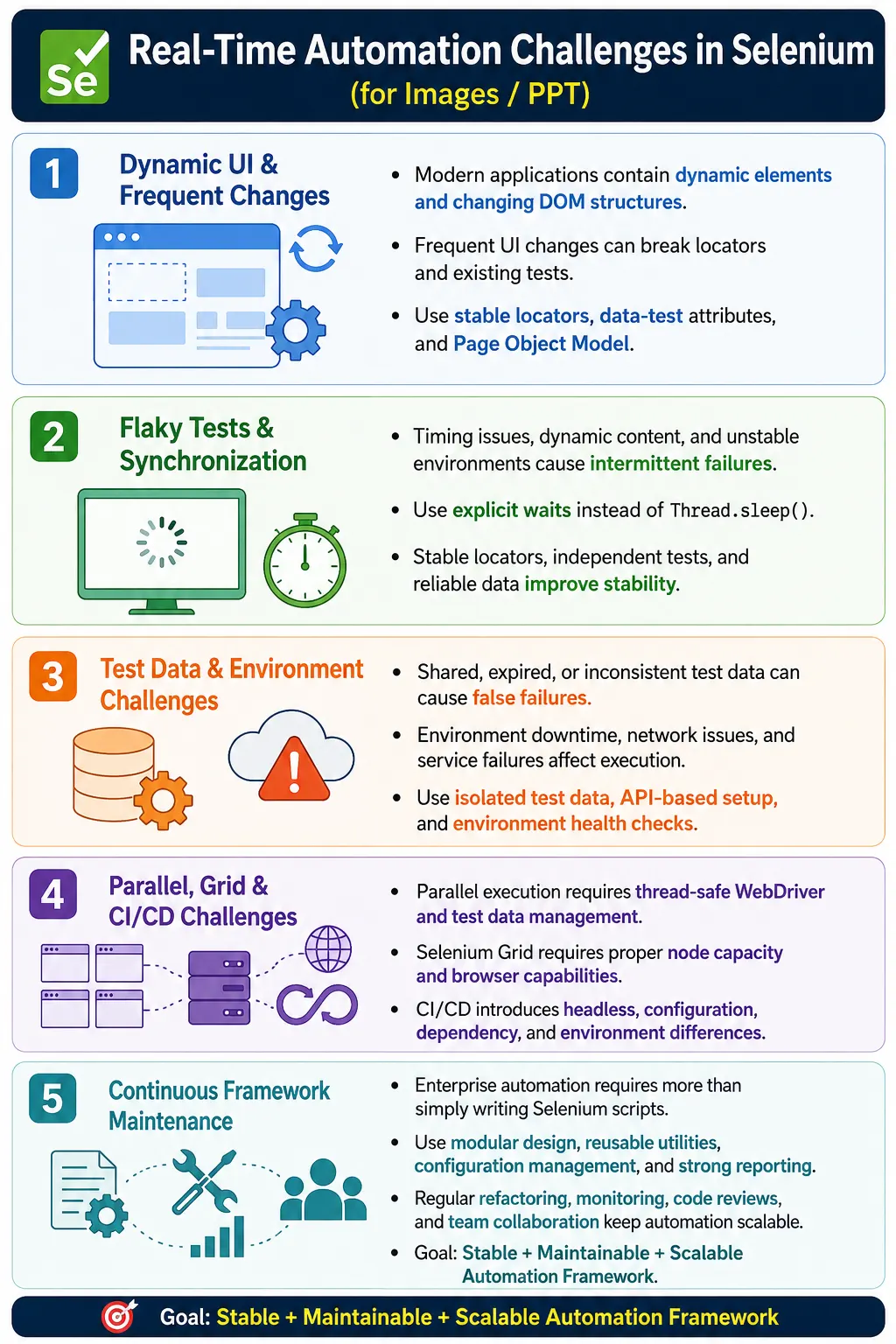
An experienced automation engineer is expected not only to write Selenium scripts, but also to identify these challenges early and design frameworks that reduce their impact. Real-world automation is a continuous engineering effort. The framework must adapt as the application grows, the team changes, the browser ecosystem changes, and the delivery process becomes faster.
1. What Real-Time Automation Challenges Mean
Real-Time Automation Challenges are the issues encountered while implementing Selenium automation in production-like enterprise environments. These challenges are different from theoretical examples because they come from real systems, real users, real release pressure, and real infrastructure. The application may change every sprint. Test data may be shared. Environments may be unstable. Browser versions may update automatically. CI jobs may run in parallel. These conditions create problems that simple tutorials do not show.
Simple Demo Project
  Few Stable Tests
  One Browser
  Predictable Data

Enterprise Project
  Dynamic Application
  Frequent Releases
  Thousands of Tests
  Complex Automation Challenges
2. Why Automation Challenges Occur
Modern applications are frequently updated, built using JavaScript frameworks, distributed across microservices, deployed continuously, and expected to work across browsers, devices, regions, and user roles. Each of these factors increases automation complexity. A page may render elements after API calls. A button may be hidden behind a feature flag. A test may pass in Chrome and fail in Firefox. A service dependency may be unavailable in the QA environment.
Automation challenges also occur because automation interacts with the whole product ecosystem. Selenium tests depend on UI, browser, application server, database, network, authentication, test data, Grid infrastructure, CI pipeline, and reporting tools. A failure in any layer can make a Selenium test fail.
3. Types of Automation Challenges
Common categories include application challenges, Selenium-specific challenges, framework challenges, test data challenges, environment challenges, CI/CD challenges, browser challenges, reporting challenges, performance challenges, security restrictions, and team collaboration challenges. Classifying the challenge helps the team solve it in the correct layer.
For example, a flaky click may be an application animation issue, a missing wait, a popup issue, a weak locator, or an environment slowdown. Calling everything a Selenium problem is not helpful. Each category needs a different solution.
4. Core Idea
The core idea is that real projects require more than writing scripts. They require framework design, change handling, maintenance strategy, scalable execution, CI/CD integration, test data management, reporting, monitoring, and continuous improvement. Automation must be treated as a software engineering system.
Write Script
  Execute
    Done

Real Project
  Develop Framework
    Handle Changes
      Maintain Tests
        Scale Automation
          Continuous Improvement
5. Dynamic Web Elements
Dynamic elements are one of the most common real-time challenges. Modern applications often generate IDs, classes, and DOM structures dynamically. An element may have id="user_876452" today and id="user_234981" tomorrow. A hardcoded locator based on the full dynamic value fails when the generated part changes.
Solutions include stable CSS selectors, relative XPath, partial attribute matching, data-test attributes, and Page Object Model. The best long-term solution is often collaboration with developers to add stable automation hooks such as data-test or data-testid. This makes automation less dependent on generated UI structure.
6. Frequent UI Changes
Developers frequently update buttons, menus, layouts, CSS, HTML structure, and component behavior. Without Page Objects, a single locator change may require updates in many test classes. This creates high maintenance cost and increases the chance of inconsistent fixes.
Without Page Objects
  100 Tests
    100 Updates

With Page Objects
  Update One Locator
    All Related Tests Fixed
Page Object Model reduces the impact of UI changes by centralizing locators and page actions. It does not eliminate maintenance, but it makes maintenance focused and predictable.
7. Flaky Tests
Flaky tests pass sometimes and fail sometimes without a meaningful application change. They reduce trust in automation because the team cannot easily tell whether a failure represents a real defect. Common causes include timing issues, dynamic content, poor synchronization, shared test data, unstable environments, and parallel execution problems.
Solutions include explicit waits, stable locators, independent tests, reliable test data, screenshots, logs, and flaky test monitoring. Retry can be used as a limited safety net, but it should not hide recurring failures. Flaky tests should be treated as defects in the automation suite.
8. Synchronization Problems
Synchronization problems happen when Selenium acts before the application is ready. The page may show a loading spinner, an element may appear later, a button may become enabled after validation, or a table may load after an API call. If Selenium clicks too early, failures such as NoSuchElementException, TimeoutException, or ElementClickInterceptedException can occur.
The solution is to use WebDriverWait and meaningful expected conditions instead of fixed Thread.sleep(). Wait for application states such as element visibility, clickability, loader disappearance, title changes, URL changes, and data rendering. Synchronization should be built into page objects and reusable wait utilities.
9. Browser Compatibility
A test may pass in Chrome and fail in Firefox, Edge, or Safari. Browser rendering, timing, downloads, security rules, and JavaScript behavior can differ. Cross-browser issues are common in real applications, especially when CSS, file downloads, popups, or browser-specific features are involved.
Solutions include cross-browser testing, Selenium Grid, centralized DriverFactory, browser-specific options, and clear browser support policy. Not every test needs to run on every browser in every pipeline, but critical workflows should be validated across supported browsers.
10. Browser Version Updates
Browser updates can break automation unexpectedly. Chrome may update automatically, but the driver may be outdated. This can lead to SessionNotCreatedException or browser startup failures. CI machines and local machines may also have different browser versions.
Solutions include Selenium Manager, WebDriverManager, controlled CI images, regular dependency updates, and version monitoring. Browser and driver compatibility should be part of framework maintenance, not an emergency activity after builds start failing.
11. Test Data Management
Test data is one of the hardest enterprise challenges. Duplicate records, shared users, expired accounts, database pollution, missing products, locked accounts, and inconsistent environment data can all cause failures. A test may fail not because the application is broken, but because the data is no longer valid.
Solutions include API-based setup, database cleanup where approved, unique test data generation, independent test accounts, read-only reference data, and environment refresh strategies. Data must be designed for parallel execution and repeatable CI runs.
12. Environment Instability
Automation environments may be unavailable, slow, partially deployed, or connected to unstable services. Server downtime, slow network, database outage, API failure, and deployment mismatch can make Selenium tests fail. These are not Selenium defects, but they still affect automation reliability.
Solutions include environment health checks, monitoring, clear deployment coordination, retry for transient infrastructure issues, and environment isolation. A test pipeline should ideally verify environment health before running a large suite.
13. Third-Party Dependencies
Applications often depend on payment gateways, email servers, SMS providers, maps APIs, identity providers, and other external services. Third-party outages or rate limits can fail automation even when the application code is correct. Tests that depend directly on real external services are often slow and unstable.
Solutions include mock services, stubs, sandbox environments, service virtualization, and test-friendly integration contracts. Critical end-to-end tests can still validate real integrations, but not every regression test should depend on an external service being perfect.
14. CAPTCHA and MFA
CAPTCHA, OTP, biometric authentication, and MFA are intentionally designed to prevent automated access. Selenium should not try to bypass these protections in production-like ways. Attempting to automate CAPTCHA directly is unreliable and usually against the purpose of the feature.
Solutions include test environment bypass, mock authentication, special automation accounts, feature flags, API token setup, or controlled OTP retrieval in non-production environments. Security teams should approve the approach.
15. File Upload and Download
File upload and download introduce OS, browser, and timing challenges. Native OS dialogs cannot be handled directly by Selenium in the same way as web elements. Download completion timing can be inconsistent. File names may be dynamic. CI agents may use different paths from local machines.
Solutions include using sendKeys() with file input elements for upload, browser download preferences for download, project-relative file paths, download verification utilities, and waits that check file existence and completion. Avoid hardcoded local paths.
16. Popups and Modals
Unexpected popups, cookie banners, promotional modals, notification dialogs, and overlays can block execution. They may appear only for new sessions, specific regions, specific users, or after application updates. These interruptions commonly cause click interception failures.
Solutions include waiting for overlays to disappear, closing known dialogs conditionally, handling cookie banners in setup, and designing page objects that detect expected modals. Do not hide real product issues, but handle known UI interruptions consistently.
17. Frames and Multiple Windows
Nested iframes, embedded widgets, payment pages, reports, and new browser tabs create context-switching challenges. Selenium must switch to the correct frame or window before interacting with elements inside it. If the test is in the wrong context, locators fail even when they are correct.
Solutions include proper frame switching, window handle management, reusable frame utilities, and clear page object methods. Context switching should be explicit and easy to review.
18. Parallel Execution Issues
Parallel execution is important for speed, but it introduces thread-safety challenges. Common problems include shared WebDriver instances, static variables, shared test data, report conflicts, same screenshot names, and non-thread-safe utilities. These problems often appear only when tests run in parallel.
Solutions include ThreadLocal<WebDriver>, thread-safe utilities, independent data, unique report entries, unique screenshot names, and careful listener design. Parallel execution should be enabled only after the framework is designed for it.
19. CI/CD Challenges
A common real-world issue is: tests work locally but fail in Jenkins. Possible causes include headless execution, missing browser dependencies, environment differences, permissions, file paths, different Java or Maven versions, network restrictions, and Grid configuration. Local machines and CI agents are not always equivalent.
Solutions include environment-independent configuration, relative paths, headless-friendly browser options, containerized execution, Maven-based execution, Jenkins parameters, and strong reporting artifacts. CI failures should be debugged with screenshots, logs, environment details, and console output.
20. Selenium Grid Challenges
Selenium Grid introduces distributed execution challenges. Nodes may be unavailable, browsers may not match requested capabilities, network latency may increase, sessions may time out, or Grid may become overloaded. If thread count exceeds Grid capacity, tests may queue or fail.
Solutions include node monitoring, health checks, auto-scaling where available, proper capability configuration, sensible thread count, and Grid dashboards. Grid capacity should match suite demand.
21. Reporting Challenges
Poor reporting makes debugging difficult. Missing screenshots, unclear logs, no environment details, and weak failure messages increase investigation time. In enterprise automation, reports are not decoration; they are debugging tools and communication tools.
Solutions include Extent Reports, screenshots on failure, business-level logging, stack traces, browser and environment details, execution duration, retry status, and archived artifacts in CI/CD. Reports should answer what failed, where it failed, why it likely failed, and what evidence is available.
22. Framework Maintenance
As projects grow from 500 tests to 3,000 tests, maintenance increases. Without modular design, duplicated code, inconsistent utilities, weak page objects, and hardcoded values make the framework expensive to update. A framework that worked for a small team may not scale to enterprise needs.
Solutions include modular framework design, reusable utilities, Page Object Model, code reviews, refactoring, naming standards, configuration management, and framework documentation. Maintenance should be planned, not postponed indefinitely.
23. Team Collaboration
Multiple engineers working on the same framework can introduce duplicate utilities, coding inconsistencies, merge conflicts, inconsistent locator strategies, and different reporting styles. Collaboration becomes a challenge when standards are missing.
Solutions include coding standards, Git workflow, pull request reviews, framework guidelines, reusable templates, and shared ownership. Automation code should be reviewed like application code because it is part of the delivery system.
24. Performance Challenges
Slow execution is a real automation challenge. Causes include sequential tests, excessive waits, poor locators, repeated UI setup, unnecessary navigation, heavy screenshots, and full regression runs for every commit. Slow suites reduce feedback speed and increase infrastructure cost.
Solutions include parallel execution, Selenium Grid, headless browsers, explicit waits, optimized locators, API-based setup, targeted suites, efficient reports, and runtime monitoring. Speed should improve without sacrificing reliability.
25. Security Restrictions
Applications may implement Content Security Policy, rate limiting, IP restrictions, anti-bot mechanisms, session protections, and strict authentication flows. These controls can affect automation. Test code should not bypass security casually or use unsafe shortcuts.
Solutions include dedicated test environments, approved automation accounts, collaboration with security teams, stable test data, and clearly documented security exceptions. Automation should respect security design while still enabling testability in non-production environments.
26. Advantages of Addressing Challenges
Addressing real-time challenges leads to stable automation, faster execution, easier maintenance, better CI/CD integration, fewer flaky tests, higher team confidence, faster releases, and clearer defect reporting. It also makes automation a trusted engineering asset instead of a fragile script collection.
Teams that handle these challenges systematically spend less time firefighting and more time expanding meaningful coverage.
27. Common Beginner Mistakes
Common mistakes include assuming every failure is an application bug, using Thread.sleep(), hardcoding browser and URL values, ignoring framework design, avoiding refactoring, ignoring communication, using weak locators, sharing test data, and running everything manually from the IDE.
Another beginner mistake is solving every issue inside test code. Many real-time challenges require collaboration with developers, DevOps engineers, security teams, business analysts, or environment owners. Automation engineers must know when the solution belongs outside the script.
28. Enterprise Best Practices
Enterprise teams should use Page Object Model, reusable utilities, explicit waits, stable locators, independent tests, externalized configuration, Selenium Grid for scalability, CI/CD integration, flaky test monitoring, continuous refactoring, coding standards, code reviews, and close collaboration with development and DevOps teams.
Best practices should be enforced through framework structure, pull requests, documentation, and training. A standard that is not followed consistently will not protect the framework.
29. Real Enterprise Architecture
A real enterprise Selenium architecture usually connects Git, Jenkins, Maven, TestNG, DriverFactory, Selenium Grid, reporting, and team review. A developer pushes code. Jenkins triggers a Maven build. TestNG executes suites. DriverFactory creates local or remote browser sessions. Selenium Grid distributes execution. Extent Reports capture results. The team reviews failures and improves the suite.
Developer
  Git Repository
    Jenkins Pipeline
      Maven Build
        TestNG
          DriverFactory
            Selenium Grid
              Extent Reports
                Team Review
30. Challenge vs Solution
Dynamic elements are handled with stable locators and data-test attributes. Frequent UI changes are handled with Page Object Model. Flaky tests are handled with explicit waits and synchronization improvements. Browser compatibility is handled with cross-browser testing. Driver mismatch is handled with Selenium Manager or WebDriverManager. Test data issues are handled with API setup and isolated data. Slow execution is handled with parallel execution and Grid. Poor debugging is handled with reports, screenshots, and structured logging.
The key is to match the solution to the challenge. Adding retry for a bad locator does not solve the locator problem. Increasing timeout for an environment outage does not fix environment stability. Correct diagnosis leads to correct architecture.
31. Testability as a Team Responsibility
One important real-time lesson is that testability is not only the automation engineer's responsibility. Developers can add stable data-test attributes. DevOps engineers can provide stable environments and Grid infrastructure. Business analysts can clarify expected behavior. Security teams can provide approved automation accounts. Automation becomes stronger when testability is considered by the whole team.
If automation engineers are forced to work around every limitation alone, the framework becomes full of fragile shortcuts. Collaborative testability creates cleaner automation and faster delivery.
32. Monitoring and Continuous Improvement
Real-time challenges do not disappear permanently. They evolve with the product. A framework needs monitoring and continuous improvement. Track flaky tests, execution duration, retry rates, failure categories, slow tests, broken locators, environment downtime, and Grid capacity. These metrics show where improvement is needed.
Continuous improvement also includes refactoring page objects, removing duplication, improving reports, updating dependencies, reviewing waits, cleaning test data, and revising suite strategy. A healthy framework changes with the application.
33. Interview Perspective
A short interview answer is: real-time automation challenges are practical issues encountered while implementing Selenium automation in enterprise environments. These include dynamic elements, flaky tests, synchronization problems, browser compatibility, test data management, CI/CD integration, Selenium Grid execution, and framework maintenance.
A stronger real-time answer is: in enterprise projects, the biggest automation challenges are maintaining stability as the application evolves. Dynamic locators, frequent UI changes, flaky tests, synchronization issues, browser updates, and environment instability are common. We address these by using Page Object Model, explicit waits, stable data-test locators, ThreadLocal<WebDriver> for parallel execution, configuration-driven frameworks, Selenium Grid for scalability, API-based test data setup, and comprehensive reporting with screenshots and logs. Regular code reviews and refactoring keep the automation suite maintainable as the project grows.
34. Real-Time Automation Challenge Workflow
The workflow starts when an automation failure or risk appears. The team identifies the challenge category, such as locator, synchronization, test data, environment, browser, framework, or CI/CD. Then the appropriate solution is applied in the correct layer. This prevents random fixes and improves long-term stability.
Automation Failure
  Identify Challenge
    Locator
    Synchronization
    Test Data
    Environment
    Browser
    Framework
    CI/CD
      Apply Appropriate Solution
        Stable Automation Framework
35. Release Pressure and Automation Quality
One real-time challenge that is often ignored in tutorials is release pressure. When teams are close to a release, there is pressure to make the build green quickly. This can lead to poor decisions such as disabling failing tests, increasing timeouts blindly, adding retries for real defects, or changing assertions without confirming requirements. These shortcuts may help one release, but they damage automation trust over time.
A mature team handles release pressure with clear rules. If a test fails, classify it. If it is a product defect, raise it and let the release decision happen transparently. If it is an automation defect, fix the script or quarantine it with an owner and timeline. If it is an environment issue, document evidence and involve the environment owner. The goal is to avoid hiding risk just to get a green report.
Automation quality depends on discipline during stressful moments. A framework is trusted when the team believes the results are honest. Green builds created by hiding failures are worse than red builds with clear root causes.
36. Ownership of Automation Failures
In enterprise projects, automation failures need ownership. If nobody owns flaky tests, broken page objects, failing CI jobs, test data cleanup, or Grid instability, the framework slowly becomes unreliable. Automation is not a one-time deliverable; it is a maintained product used by the team.
Ownership can be divided by feature area, framework layer, or pipeline responsibility. For example, one engineer may own DriverFactory and Grid integration, another may own reporting, and feature teams may own page objects for their modules. Clear ownership reduces delays because failures are routed to the right person quickly.
Ownership also helps with accountability. If a test is flaky for several builds, it should not remain in the suite forever without action. Someone should investigate, fix, quarantine, or remove it based on team policy.
37. Dependency and Tool Upgrade Challenges
Selenium frameworks depend on many tools: Selenium Java, TestNG, Maven plugins, WebDriverManager or Selenium Manager, browser drivers, reporting libraries, logging libraries, JSON libraries, Apache POI, and CI/CD plugins. These dependencies change over time. Upgrades can fix problems, but they can also introduce breaking changes.
A real-time challenge is keeping dependencies current without destabilizing the framework. Teams should avoid random upgrades directly in the main branch. A safer approach is to upgrade intentionally, run smoke tests, validate Grid execution, verify reports, check browser compatibility, and then merge. Dependency management should be planned.
Ignoring upgrades forever is also risky. Very old libraries may become incompatible with modern browsers, CI agents, or security policies. The practical answer is controlled upgrade governance.
38. Handling Legacy Automation Code
Many enterprise teams inherit existing automation frameworks. The framework may contain old Selenium syntax, duplicated utilities, hardcoded data, weak locators, inconsistent waits, large test classes, and poor reports. Rewriting everything from scratch is not always possible because the suite may already support releases.
The practical approach is incremental refactoring. Start with the highest pain areas: flaky tests, duplicated login flows, weak locators, poor data setup, and missing reports. Improve the framework while continuing to deliver test coverage. Replace old patterns gradually with page objects, reusable utilities, configuration management, and cleaner reporting.
Legacy automation should be treated carefully. Large unplanned rewrites can stop delivery. Small consistent improvements usually produce safer progress.
39. Communication with Developers
Many Selenium challenges cannot be solved by testers alone. Dynamic locators need developer-provided stable attributes. Hard-to-automate authentication may need test environment support. Slow pages may need performance investigation. Broken APIs may need backend owners. If automation engineers work in isolation, they often create fragile workarounds.
Strong communication with developers improves testability. Automation engineers should explain why stable hooks are needed, show evidence from failures, and participate in story discussions when testability risks exist. Developers should understand that testability is part of delivery quality.
This collaboration is especially important in agile teams where UI changes happen frequently. If developers know which attributes are used by automation, they can avoid breaking them accidentally or communicate changes early.
40. Communication with DevOps Teams
CI/CD, Grid, browser containers, environment variables, permissions, file paths, and network access often belong to DevOps or platform teams. Automation engineers need a working relationship with those teams. A test that fails only in Jenkins may require CI image updates, browser installation, permissions, proxy settings, or Grid capacity changes.
Good collaboration includes clear logs, reproducible commands, environment details, and timestamps. Instead of saying "Jenkins failed," provide the Maven command, browser version, failure screenshot, Grid URL, and console error. This helps DevOps teams investigate efficiently.
41. Automation Scaling Strategy
Scaling automation is more than adding more tests. As the suite grows, the team needs suite organization, parallel execution, Grid capacity, reporting strategy, code ownership, data management, and maintenance discipline. A framework that works for 100 tests may struggle at 3,000 tests if scaling was not considered.
Scaling strategy includes splitting suites by purpose, tagging tests correctly, measuring runtime, monitoring flaky tests, archiving reports, maintaining test data, and reviewing framework architecture. Without this strategy, execution becomes slow and maintenance becomes expensive.
Successful scaling is gradual. Add tests, measure impact, improve infrastructure, refactor utilities, and review stability. Do not wait until the suite becomes unmanageable.
42. Failure Triage Process
Large teams need a failure triage process. When a CI build fails, someone should review the report, classify failures, identify duplicates, separate product defects from automation defects, assign owners, and decide whether rerun is justified. Without triage, failures sit unresolved or are rerun repeatedly without learning anything.
A useful triage classification includes product defect, automation defect, test data issue, environment issue, Grid issue, flaky test, and requirement change. This classification helps trend analysis. If many failures are environment-related, improving locators will not help. If many failures are locator-related, environment work is not the priority.
43. Balancing Coverage and Maintainability
More tests do not always mean better automation. A suite with thousands of duplicated, brittle, slow tests may provide less value than a smaller, well-designed suite with strong coverage of critical workflows. Real-time automation requires balancing coverage with maintainability.
Teams should avoid automating every tiny UI variation through Selenium when lower-level tests can cover the logic faster. Selenium should focus on workflows, integrations, browser behavior, and user-critical paths. This keeps the suite meaningful and maintainable.
44. Automation Metrics
Metrics help teams understand framework health. Useful metrics include pass rate, failure categories, flaky test count, retry count, average execution time, slowest tests, defect detection rate, maintenance effort, test coverage by feature, and CI stability. Metrics should guide improvement, not become vanity numbers.
For example, if pass rate is high but many tests pass only after retries, the suite is not as stable as it appears. If execution time is growing every sprint, optimization is needed. If many failures are data-related, data strategy should be improved.
45. Key Takeaway
Real-Time Automation Challenges are inevitable in enterprise Selenium projects. The key to success is not avoiding challenges, but building a robust automation framework and development process that can adapt to changing applications, environments, infrastructure, browsers, and business requirements.
Enterprise Automation
  Dynamic UI
  Flaky Tests
  Browser Changes
  Test Data
  Parallel Execution
  CI/CD
  Selenium Grid
  Reporting
  Framework Maintenance
    Reliable and Scalable Automation
The most important practices are to use reusable design, stable locators, explicit waits, independent data, scalable execution, configuration management, strong reports, CI/CD integration, and continuous refactoring. Real-world automation is more complex than demo scripts, and successful teams treat Selenium automation as a maintainable engineering system.