Reading Data from Properties File in Selenium Java
A properties file is one of the simplest and most useful configuration files in a Selenium Java automation framework. It stores values as key-value pairs and is commonly used for browser name, application URL, environment, timeout, execution mode, headless setting, language, and other framework-level configuration. Instead of hardcoding these values inside Java classes, the framework reads them from a .properties file at runtime.
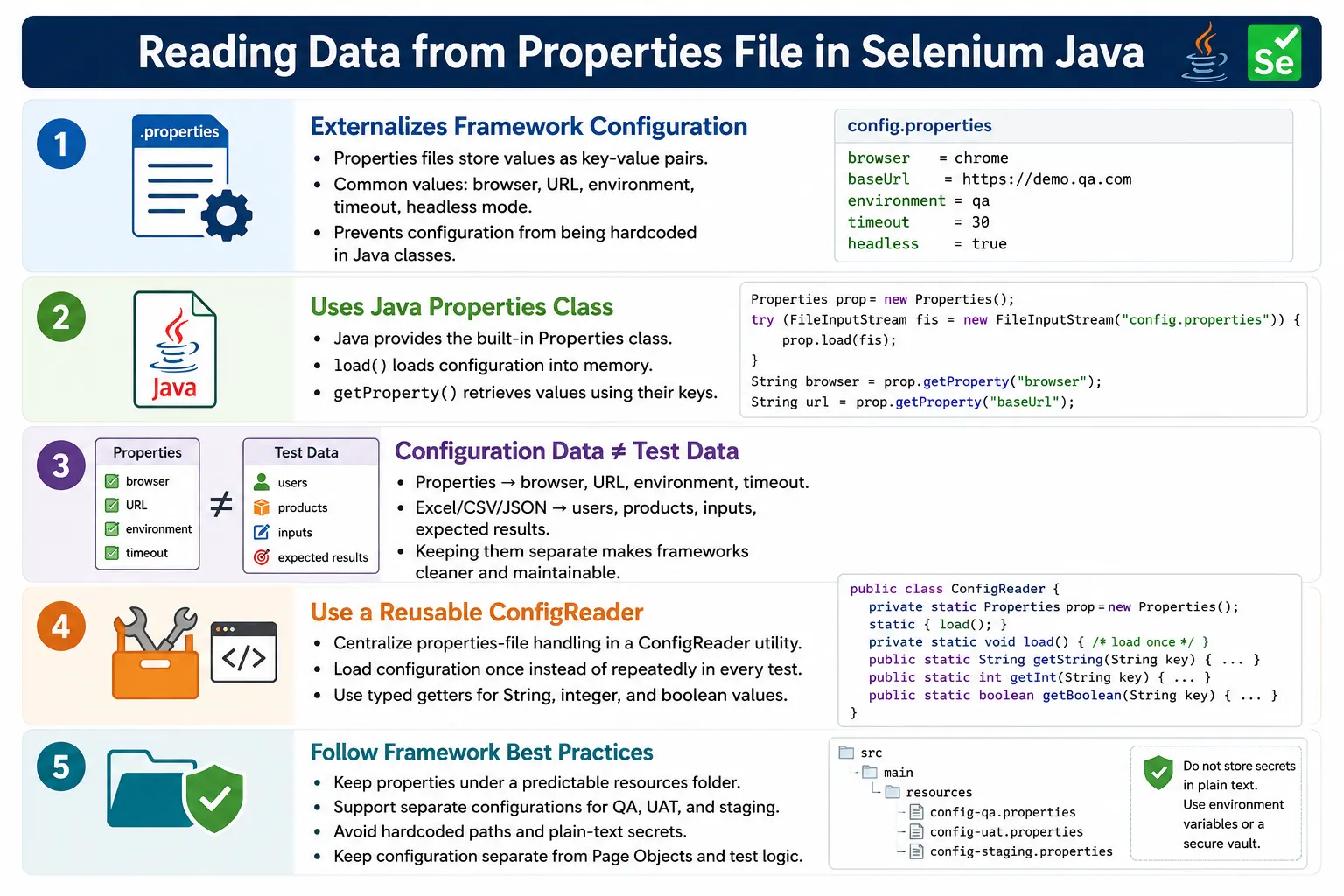
Properties files are often confused with test data files, but their purpose is different. Excel, CSV, JSON, and databases are usually used for test data such as usernames, passwords, products, search keywords, quantities, and expected results. Properties files are better suited for configuration data: values that control how the framework runs. This distinction keeps Selenium projects cleaner and easier to maintain.
1. What Is a Properties File?
A properties file is a plain text file with a .properties extension. It stores information in key=value format. Java provides the built-in Properties class to load and read these values. Because the file is plain text, it is easy to edit, review, and version control.
browser=chrome
url=https://example.com
username=admin
password=admin123
timeout=20
headless=false
environment=QA
In this example, browser, url, timeout, and environment are keys. Their corresponding values are chrome, https://example.com, 20, and QA. Java reads these values as strings, and the framework can convert them to boolean, integer, enum, or other types when needed.
2. Why Use a Properties File?
The main reason to use a properties file is to avoid hardcoding configuration values. If the application URL is hardcoded in every test, changing from QA to UAT requires code edits. If the browser name is hardcoded in the driver factory, switching from Chrome to Firefox requires code changes. Configuration should be externalized so the same test code can run in different environments with different settings.
// Hardcoded
driver.get("https://example.com");
// Config-driven
driver.get(config.getProperty("url"));This makes the framework more flexible. The same code can run against QA, UAT, staging, or production-like environments simply by changing the properties file or the selected environment configuration. It also makes framework behavior easier to understand because important execution settings are visible in one place.
3. Configuration Data vs Test Data
A properties file should primarily store configuration data. Configuration data controls the framework and environment. Test data drives business scenarios. Mixing both can make the framework confusing. For example, browser and url are framework configuration. productName and expectedErrorMessage are usually test data.
| Configuration Data | Test Data |
|---|---|
| Browser | Username |
| Application URL | Password |
| Environment | Product name |
| Timeout | Search keyword |
| Headless mode | Expected message |
There are exceptions. Some projects store default credentials in properties files for smoke tests or framework login setup. That can be acceptable for non-sensitive test-only accounts, but business test data should usually live in dedicated test data sources.
4. Where to Keep the Properties File
In Maven projects, properties files are commonly kept under src/main/resources or src/test/resources. The choice depends on how the framework is structured. For Selenium test frameworks, src/test/resources is often appropriate because the configuration belongs to test execution. Some teams use src/main/resources for shared framework configuration.
AutomationFramework
  src
    test
      resources
        config.properties
  pages
  tests
  utilities
  pom.xml
A predictable location helps local execution and CI execution. Avoid storing the file on a desktop path or user-specific folder. A path that works only on one machine will fail on another machine or build server.
5. Java Classes Required
Java provides the Properties class in java.util. To read from a file path, FileInputStream from java.io is commonly used. The basic imports are simple.
import java.io.FileInputStream;
import java.util.Properties;
The Properties object stores all loaded key-value pairs. The load() method reads the file content into memory. After loading, values can be retrieved using getProperty().
6. Loading a Properties File
The basic loading process creates a Properties object, opens a file stream, and calls load(). Without calling load(), the object remains empty and every key lookup returns null.
FileInputStream file =
        new FileInputStream(
                "src/test/resources/config.properties"
        );

Properties properties =
        new Properties();

properties.load(file);

file.close();
This works, but modern Java code should prefer try-with-resources because it closes the stream automatically even if an exception occurs.
7. Using try-with-resources
Try-with-resources is the recommended way to read a properties file. It reduces resource leaks and avoids manually closing the file stream.
Properties properties =
        new Properties();

try (FileInputStream file =
             new FileInputStream(
                     "src/test/resources/config.properties")) {

    properties.load(file);
}
After the block finishes, the file stream is closed automatically. The properties object remains available in memory and can be used by the framework.
8. Reading Property Values
Once the file is loaded, values are read using getProperty(). Keys are case-sensitive. If the file has browser=chrome, then getProperty("browser") returns chrome. But getProperty("Browser") returns null because the key does not match.
String browser =
        properties.getProperty("browser");

String url =
        properties.getProperty("url");

String environment =
        properties.getProperty("environment");
For optional values, Java allows a default value. This is useful when a property can be missing but the framework has a safe fallback.
String browser =
        properties.getProperty("browser", "chrome");
9. Reading Boolean and Integer Values
Properties values are strings by default. If a timeout is stored as 30, Java reads it as the string "30". Convert it to an integer before using it in a wait. If headless=true, convert it to boolean.
int timeout =
        Integer.parseInt(
                properties.getProperty("timeout")
        );

boolean headless =
        Boolean.parseBoolean(
                properties.getProperty("headless")
        );
Production frameworks should validate these values. If timeout=abc, Integer.parseInt() will fail. A good ConfigReader can fail early with a clear message such as Invalid integer value for key: timeout.
10. Complete Basic Example
The following example loads a properties file and prints values. This is the simplest working flow.
FileInputStream file =
        new FileInputStream(
                "src/test/resources/config.properties"
        );

Properties properties =
        new Properties();

properties.load(file);

System.out.println(
        properties.getProperty("browser")
);

System.out.println(
        properties.getProperty("url")
);

file.close();
If the file contains browser=chrome and url=https://example.com, the output will be chrome and https://example.com.
11. Using Properties in Selenium
In Selenium, the most common property is the application URL. Instead of hardcoding driver.get(), read the URL from configuration.
driver.get(
        properties.getProperty("url")
);
This lets the same test run against different environments by changing the file. QA can use https://qa.example.com, UAT can use https://uat.example.com, and production-like validation can use another approved URL.
12. Browser Selection Example
Properties files are often used by DriverFactory to decide which browser to launch. The browser value can be changed without editing Java code.
String browser =
        properties.getProperty("browser");

switch (browser.toLowerCase()) {
    case "chrome":
        driver = new ChromeDriver();
        break;

    case "firefox":
        driver = new FirefoxDriver();
        break;

    case "edge":
        driver = new EdgeDriver();
        break;

    default:
        throw new IllegalArgumentException(
                "Unsupported browser: " + browser
        );
}
This code belongs in a driver factory or setup layer, not in every test. Centralizing browser creation keeps the framework consistent.
13. Login Example
Some teams store a default test account in properties for smoke tests or framework setup. If the credentials are non-sensitive and only used in a test environment, this can be practical. The page object still should not read the properties file directly. The test or setup layer can read values and pass them to the page object.
loginPage.login(
        properties.getProperty("username"),
        properties.getProperty("password")
);
For broader login testing with many users, Excel, CSV, JSON, database, or TestNG DataProvider is usually better. Properties files are better for default configuration values than large datasets.
14. Creating a ConfigReader Utility
A reusable ConfigReader prevents every test from loading the file separately. The utility loads configuration once and exposes getter methods.
public class ConfigReader {

    private Properties properties;

    public ConfigReader() throws Exception {
        properties = new Properties();

        try (FileInputStream file =
                     new FileInputStream(
                             "src/test/resources/config.properties")) {

            properties.load(file);
        }
    }

    public String getProperty(String key) {
        return properties.getProperty(key);
    }
}
This simple utility can be improved with validation, defaults, typed getters, classpath loading, and environment-specific file selection.
15. Static ConfigReader
Many Selenium frameworks use a static config reader so configuration is loaded once and accessed globally. This is convenient, but it should be designed carefully. Static access is fine for immutable configuration loaded at startup, but avoid changing property values during execution.
public class ConfigReader {

    private static Properties properties;

    static {
        try {
            properties = new Properties();

            try (FileInputStream file =
                         new FileInputStream(
                                 "src/test/resources/config.properties")) {

                properties.load(file);
            }
        } catch (Exception e) {
            throw new RuntimeException(e);
        }
    }

    public static String get(String key) {
        return properties.getProperty(key);
    }
}
Usage is simple: ConfigReader.get("url"). In larger frameworks, typed methods such as getBrowser(), getBaseUrl(), and getTimeout() may be clearer than passing raw key strings everywhere.
16. Typed Getter Methods
Typed getter methods make configuration safer. Instead of every class converting strings manually, the ConfigReader can provide methods that return the correct type. This avoids repeated parsing logic and gives the framework one place to validate values.
public static int getTimeout() {
    return Integer.parseInt(
            properties.getProperty("timeout", "20")
    );
}

public static boolean isHeadless() {
    return Boolean.parseBoolean(
            properties.getProperty("headless", "false")
    );
}
This design is cleaner than calling Integer.parseInt(ConfigReader.get("timeout")) throughout the framework. It also makes default values explicit.
17. Multiple Environment Files
Enterprise projects often have different URLs and settings for QA, UAT, staging, and production-like environments. One approach is to create separate property files.
config-qa.properties
config-uat.properties
config-staging.properties
Each file can contain environment-specific values.
url=https://qa.example.com
browser=chrome
timeout=20
environment=QA
The framework can load the required file based on a system property, CI parameter, Maven profile, or TestNG parameter. This makes environment switching controlled and repeatable.
18. Selecting Environment at Runtime
A common pattern is to pass an environment name from the command line and load the corresponding properties file. For example, if the user passes qa, the framework loads config-qa.properties. If the user passes uat, it loads config-uat.properties.
String env =
        System.getProperty("env", "qa");

String filePath =
        "src/test/resources/config-" + env + ".properties";
This allows CI pipelines to choose the target environment without changing Java code. The same automation suite can run in different environments by changing execution parameters.
19. Properties File vs Excel
| Properties File | Excel |
|---|---|
| Configuration data | Test data |
| Key-value pairs | Rows and columns |
| Small datasets | Large tabular datasets |
| Browser, URL, timeout | Users, products, expected results |
Read with Properties |
Read with Apache POI |
Using the right file type keeps the framework clear. Do not force properties files to behave like spreadsheets. Do not use Excel for simple browser and URL configuration unless there is a specific reason.
20. Properties File vs TestNG Parameters
TestNG parameters are passed through testng.xml. Properties files are regular configuration files read by Java. Both can provide configuration, but they fit different needs.
| Properties File | TestNG Parameters |
|---|---|
| File-based configuration | XML-based configuration |
| Can be shared across tools | Tied to TestNG execution |
| Good for framework-wide settings | Good for suite-specific values |
| Read using Java | Injected by TestNG |
Many frameworks use both. TestNG may pass the environment name, and ConfigReader may load the corresponding properties file.
21. Real Project Flow
config.properties
  ConfigReader
    BaseTest
      DriverFactory
        Page Objects
          Selenium WebDriver
            Browser
This flow keeps configuration centralized. BaseTest can read URL, browser, timeout, and execution mode. DriverFactory can create the browser based on config. Page objects do not need to know where configuration values came from.
22. Handling Missing Properties
Missing properties should be handled clearly. If url is required and missing, the framework should fail at startup with a meaningful error. Silent null values create confusing failures later, such as driver.get(null) or unsupported browser errors.
public static String getRequired(String key) {
    String value = properties.getProperty(key);

    if (value == null || value.trim().isEmpty()) {
        throw new RuntimeException(
                "Missing required config key: " + key
        );
    }

    return value;
}
This small validation makes configuration problems easier to diagnose. Failing early is better than failing halfway through a test.
23. Avoiding Hardcoded Paths
Hardcoded absolute paths are a common beginner mistake. A path such as C:\Users\John\Desktop\config.properties will fail on another machine. Use project-relative paths or load files from the classpath.
Classpath loading is often cleaner for resource files because it works when the project is packaged or executed from different working directories. The exact implementation depends on project structure, but the main idea is to avoid user-specific file locations.
24. Security Considerations
Do not store real production credentials, access tokens, API keys, or sensitive personal information in a plain text properties file committed to source control. For test-only local examples, simple values are fine. For enterprise projects, secrets should come from CI secret variables, environment variables, encrypted files, or a secret manager.
If a properties file contains default non-sensitive test credentials, make sure they belong to a safe test environment and cannot access real customer data. Configuration convenience should not create a security risk.
25. Loading from the Classpath
Using file paths is easy to understand, but classpath loading is often more portable. When a properties file is placed under a resources folder, it can be loaded through the class loader. This avoids depending on the current working directory. It also works better when tests are executed from an IDE, Maven, CI server, or packaged test runner.
InputStream input =
        ConfigReader.class
                .getClassLoader()
                .getResourceAsStream("config.properties");
If the file is not found, getResourceAsStream() returns null. A good ConfigReader should check this and throw a clear error. Silent failures make configuration problems harder to debug.
if (input == null) {
    throw new RuntimeException(
            "config.properties file not found"
    );
}
Classpath loading is especially useful in Maven projects because resources are copied to the test classpath during build execution. It makes the framework less sensitive to where the command is run from.
26. Runtime Overrides
Properties files provide defaults, but modern automation frameworks often need runtime overrides. A developer may want to run locally on Chrome, while CI may need Edge or headless Chrome. QA may run against a QA URL, while staging pipelines run against a staging URL. Runtime overrides allow the same framework to adapt without editing the properties file each time.
Java system properties are commonly used for this. For example, a Maven command can pass -Dbrowser=edge or -Denv=uat. The ConfigReader can check the system property first and fall back to the properties file if no override exists.
public static String get(String key) {
    String systemValue = System.getProperty(key);

    if (systemValue != null && !systemValue.trim().isEmpty()) {
        return systemValue;
    }

    return properties.getProperty(key);
}
This pattern gives flexibility while preserving default configuration. Local users can rely on config.properties. CI jobs can override selected values without modifying files in the repository.
27. ConfigReader and BaseTest Integration
In a typical Selenium framework, ConfigReader is used by BaseTest and DriverFactory. BaseTest controls setup and teardown. DriverFactory creates the correct browser. The properties file supplies configuration values used by both layers.
@BeforeMethod
public void setup() {
    String browser =
            ConfigReader.get("browser");

    driver =
            DriverFactory.createDriver(browser);

    driver.get(
            ConfigReader.get("url")
    );
}
This keeps test classes clean. Individual tests do not need to know how the browser is created or where the URL comes from. They can focus on scenario execution and assertions. Page objects receive the driver after setup and should not read configuration unless there is a strong reason.
28. ConfigReader and DriverFactory
DriverFactory is one of the best places to use properties such as browser, headless mode, remote execution flag, grid URL, and browser options. Instead of spreading browser setup logic across tests, DriverFactory reads configuration and returns a ready WebDriver instance.
public static WebDriver createDriver(String browser) {
    boolean headless =
            ConfigReader.getBoolean("headless");

    if (browser.equalsIgnoreCase("chrome")) {
        ChromeOptions options =
                new ChromeOptions();

        if (headless) {
            options.addArguments("--headless=new");
        }

        return new ChromeDriver(options);
    }

    throw new IllegalArgumentException(
            "Unsupported browser: " + browser
    );
}
This is cleaner than having every test decide browser options. It also makes future changes easier. If headless execution needs a new argument, one driver factory method can be updated.
29. Properties for Timeouts and Waits
Timeout values are often stored in properties files. A framework may have explicit wait timeout, page load timeout, script timeout, polling interval, and retry timeout. These values may vary by environment. A local run may be fast, while a remote grid or CI environment may need slightly longer waits.
explicitWait=20
pageLoadTimeout=60
pollingInterval=500
Read these values through typed getters and use them in wait utilities. Avoid hardcoding wait duration in every page object. Central timeout configuration makes synchronization easier to tune.
WebDriverWait wait =
        new WebDriverWait(
                driver,
                Duration.ofSeconds(
                        ConfigReader.getInt("explicitWait")
                )
        );
30. Properties for Local and Remote Execution
Many frameworks support both local browser execution and remote Selenium Grid execution. Properties can control the mode.
execution=local
gridUrl=http://localhost:4444/wd/hub
If execution is local, DriverFactory creates a local browser. If execution is remote, DriverFactory creates a RemoteWebDriver using the configured grid URL. This allows the same test suite to run locally during development and remotely during CI execution.
When this is implemented well, engineers do not need separate code branches for local and remote runs. Configuration decides the execution mode.
31. Properties and Parallel Execution
Properties are usually read-only during test execution, so they are safe to share across parallel tests if the framework loads them once and does not mutate them. Problems appear when tests try to change global properties while other tests are running. Configuration should be immutable after startup.
For parallel execution, WebDriver instances should be thread-specific, but configuration can usually be shared. For example, every thread may read the same browser name, base URL, timeout, and environment. The key rule is that one test should not modify configuration used by another test.
If tests require different configurations in the same run, prefer separate suites, separate TestNG XML files, or explicit test parameters rather than mutating a global ConfigReader during execution.
32. Validating Configuration at Startup
Configuration validation should happen early. Before launching tests, the framework should confirm that required keys exist and values are valid. Required keys may include browser, url, environment, and explicitWait. Valid values may include supported browsers such as chrome, firefox, and edge.
Early validation prevents confusing failures. If browser=chromee, the framework should fail with Unsupported browser: chromee before tests start. If url is missing, it should fail with Missing required config key: url. Clear messages save debugging time.
Validation is also useful in CI. A pipeline should fail quickly if a required environment variable or properties value is missing. Fast failure is better than running a long suite with invalid setup.
33. Organizing Large Configuration
As frameworks grow, one properties file can become crowded. Browser settings, environment URLs, database settings, API base URLs, report settings, timeouts, and retry settings may all accumulate. At some point, it may be cleaner to split configuration by purpose or by environment.
config
  config-qa.properties
  config-uat.properties
  browser.properties
  timeout.properties
  report.properties
Do not split too early, though. A small framework can use one simple file. Split configuration only when it improves clarity. The goal is readability, not unnecessary complexity.
34. Properties in CI/CD
CI/CD pipelines commonly pass values such as environment, browser, headless mode, grid URL, and build name. The framework can combine properties files with CI variables. For example, config.properties supplies defaults, while the pipeline overrides browser and env.
This pattern supports repeatable execution. Developers can run tests locally with default values. CI can run the same tests with pipeline-specific values. Release pipelines can run against a staging environment without changing repository files.
Secrets should be handled by CI secret storage, not committed properties files. The properties file can contain keys such as apiToken=${API_TOKEN} only if the framework resolves them securely, but plain secrets should be avoided.
35. Properties and Page Objects
Page objects should generally not read properties files directly. A page object should model page behavior, not framework configuration. If a login page needs username and password, pass those values from the test or setup layer. If a page needs a timeout, use wait utilities configured by the framework rather than reading properties inside the page.
This separation keeps POM clean. Configuration belongs to framework setup. Page objects belong to page interaction. Test data belongs to tests or data providers. Mixing these concerns makes the framework harder to maintain.
36. Properties File Maintenance
Properties files should be maintained with the same care as framework code. Key names should follow a consistent naming convention. For example, choose either baseUrl or base.url and use that style consistently. Avoid having similar keys such as url, appUrl, and applicationURL in the same framework unless they represent clearly different values.
Comments can be useful in properties files when they explain why a value exists. For example, a comment above timeout values can explain that CI is slower than local execution. However, comments should not contain secrets, old passwords, disabled production URLs, or confusing outdated notes. Configuration files should stay clean because they are often the first place engineers check when a run behaves differently from expected.
It is also useful to keep a sample configuration file when secrets or local-only values are excluded from source control. A file such as config.sample.properties can show the required keys without exposing sensitive values. New team members can copy it, fill in safe local values, and run the framework without guessing required configuration.
37. Choosing Good Property Names
Good property names are specific, readable, and stable. A key named browser is clear. A key named b is not. A key named explicitWaitSeconds is clearer than a generic key named time. When property names are clear, the ConfigReader code becomes easier to understand and framework setup is easier to troubleshoot.
For related values, prefixes can help. Browser-related keys can start with browser., timeout values can start with timeout., and report values can start with report.. This is not required for small frameworks, but it becomes useful as configuration grows. The important point is consistency. A clean naming convention prevents accidental duplicate configuration and reduces confusion during code reviews.
38. Common Beginner Mistakes
- Hardcoding absolute file paths.
- Forgetting to call
properties.load(file). - Using misspelled or wrongly cased keys.
- Ignoring missing required properties.
- Loading the file repeatedly in every test method.
- Mixing configuration data with large business test datasets.
- Storing sensitive credentials in plain text.
- Putting ConfigReader logic inside page objects.
- Not converting timeout and boolean values safely.
- Changing properties during parallel execution.
39. Enterprise Best Practices
Keep configuration separate from test data. Store properties files in a predictable resources folder. Create a reusable ConfigReader utility. Load the file once during framework initialization. Use typed getter methods for booleans and integers. Validate required keys before tests start. Use environment-specific property files when needed. Avoid hardcoded paths and avoid storing secrets in source control.
Configuration should be treated as part of framework design. If configuration is messy, every layer above it becomes harder to maintain. A clean properties strategy makes the framework easier to run locally, in CI, on Selenium Grid, and across different environments.
Review configuration changes carefully because a small value change can affect the entire automation run. A wrong URL, unsupported browser value, or invalid timeout can make many unrelated tests fail even when the application and test code are correct.
40. Interview Perspective
A short interview answer is: a properties file stores configuration values as key-value pairs. In Selenium, it is commonly used to externalize settings such as browser, URL, timeout, and environment. Java reads it using the Properties class.
A stronger real-time answer is: in my Selenium framework, I keep configuration values like browser type, application URL, execution environment, headless mode, and timeouts in a config.properties file under the resources folder. I use a reusable ConfigReader class to load the file once during framework initialization and access values throughout the tests. For QA, UAT, and staging, I can use separate properties files or select the environment at runtime. Sensitive values are handled through secure configuration mechanisms rather than plain text files.
41. Key Takeaway
Properties files externalize framework configuration. They are best for values such as browser, URL, environment, timeout, headless mode, and execution settings. They are not a replacement for large business test data sources such as Excel, CSV, JSON, or databases.
A clean Selenium framework reads properties through a reusable ConfigReader, validates required keys, converts values safely, and keeps configuration separate from page objects and test logic. This makes tests easier to configure, easier to run in different environments, and easier to maintain in real automation projects.