Reading Data from JSON in Selenium Java
Reading test data from JSON is a modern and practical approach in Selenium Data-Driven Testing. JSON, or JavaScript Object Notation, stores data in a structured format that is easy for humans to read and easy for programs to parse. Unlike Excel, which is mainly tabular, JSON can represent objects, arrays, nested objects, and complex data structures. This makes it useful for UI automation, API automation, configuration-style datasets, and cross-platform test frameworks.
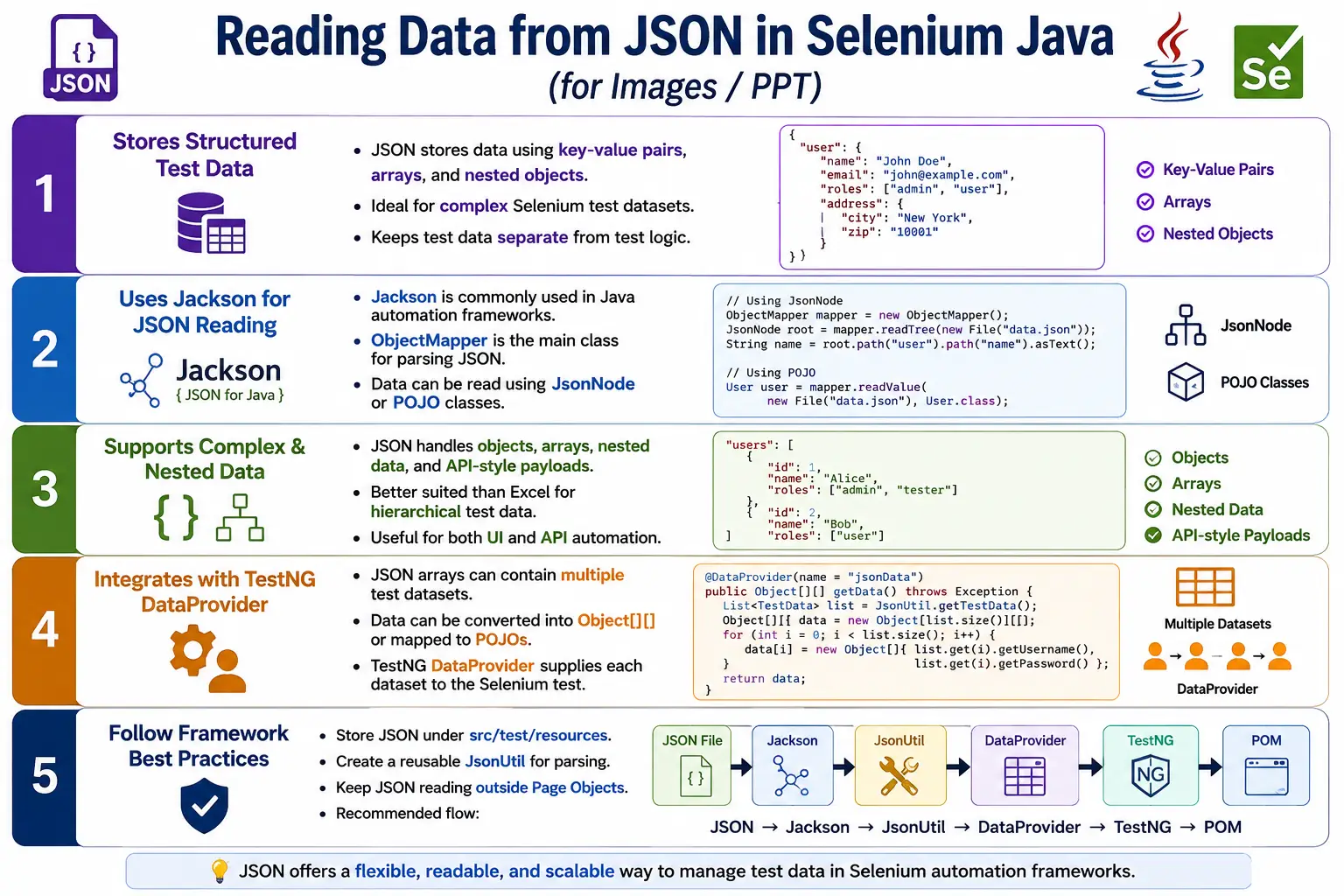
In Java Selenium projects, JSON is commonly read using libraries such as Jackson, Gson, or JSON.simple. Jackson is the most common choice in enterprise Java automation because it is powerful, widely used, and supports both tree-based reading with JsonNode and object mapping with POJO classes. A clean framework can read JSON once, convert it into test data, pass it through TestNG DataProvider, and use Page Object methods without hardcoding values in test scripts.
1. What Is JSON?
JSON is a lightweight data-interchange format that stores information using key-value pairs, arrays, and nested objects. It is language independent and is heavily used by REST APIs, configuration files, web applications, mobile applications, and automation frameworks.
{
  "username": "admin",
  "password": "admin123"
}
In this example, username and password are keys. Their values are admin and admin123. Selenium tests can read these values and pass them to page object methods, just as they would pass values from Excel, CSV, or DataProvider.
2. Why Read Data from JSON?
JSON helps keep test data separate from test logic. Instead of writing loginPage.login("admin", "admin123") inside the test, the values can be stored in a JSON file and read dynamically. This makes the test more reusable and the data easier to change.
JSON is especially useful when data is not flat. A registration scenario may include user details, address details, preferences, expected messages, and account status. A payment scenario may include card details, billing address, currency, amount, and expected response. Representing this kind of structured data in JSON is cleaner than forcing it into spreadsheet columns.
3. Why JSON Over Excel?
Excel is excellent for simple rows and columns. JSON is better for hierarchical and object-like data. If your test data is a simple login table with username and password, Excel or CSV may be fine. If your data has nested objects, arrays, and API-style payloads, JSON is usually a better fit.
| JSON | Excel |
|---|---|
| Hierarchical data | Tabular data |
| Objects and arrays | Rows and columns |
| API friendly | Business-user friendly |
| Good for nested data | Good for simple datasets |
| Read with Jackson or Gson | Read with Apache POI |
4. Jackson Maven Dependency
Jackson is commonly used for reading JSON in Java projects. Add jackson-databind to the Maven pom.xml file.
<dependency>
    <groupId>com.fasterxml.jackson.core</groupId>
    <artifactId>jackson-databind</artifactId>
    <version>2.18.2</version>
</dependency>
The exact version may change as libraries are updated, but ObjectMapper remains the main class used for reading and writing JSON with Jackson.
5. Project Structure
JSON test data should be stored in a predictable resources folder. A common Maven structure is src/test/resources/testdata.
AutomationFramework
  src
    test
      resources
        testdata
          login.json
          users.json
          products.json
  pages
  tests
  utilities
  pom.xml
This structure keeps data separate from test classes and page objects. It also works well in local execution and CI pipelines.
6. ObjectMapper
ObjectMapper is the main Jackson class used to parse JSON. It can read JSON into a tree structure, map JSON into Java objects, and write Java objects back to JSON.
ObjectMapper mapper =
        new ObjectMapper();
Most JSON utilities in Java automation frameworks start with an ObjectMapper. For simple reading, the mapper can return a JsonNode. For structured data, it can return a POJO object or a list of objects.
7. Reading JSON as JsonNode
JsonNode represents JSON as a tree. This is useful when you want to access values dynamically by key.
ObjectMapper mapper =
        new ObjectMapper();

JsonNode node =
        mapper.readTree(
                new File("src/test/resources/testdata/login.json")
        );
After reading the file, values can be accessed using node.get("key"). This approach is simple and works well for small files or flexible datasets.
8. Reading Individual Values
For a JSON file with username and password, values can be read using asText().
String username =
        node.get("username").asText();

String password =
        node.get("password").asText();
If the JSON contains admin and admin123, these values can be passed directly to a Selenium page method.
9. Complete Basic Example
ObjectMapper mapper =
        new ObjectMapper();

JsonNode node =
        mapper.readTree(
                new File("src/test/resources/testdata/login.json")
        );

String username =
        node.get("username").asText();

String password =
        node.get("password").asText();

System.out.println(username);
System.out.println(password);
This is the simplest way to read JSON values. In production framework code, file handling and parsing should be moved to a reusable utility class.
10. Using JSON in Selenium
After reading JSON values, pass them to Selenium page objects. Page objects should not be responsible for reading the file. They should receive data as parameters.
loginPage.login(
        node.get("username").asText(),
        node.get("password").asText()
);
This keeps the page object clean. The test or DataProvider manages data. The page object manages page interaction.
11. JSON Array Example
Most data-driven tests need multiple datasets. JSON arrays are useful for this. Each object in the array can represent one test execution.
[
  {
    "username": "admin",
    "password": "admin123"
  },
  {
    "username": "user",
    "password": "user123"
  },
  {
    "username": "guest",
    "password": "guest123"
  }
]
This structure maps naturally to TestNG DataProvider because each object can become one row of test data.
12. Reading JSON Arrays
ObjectMapper mapper =
        new ObjectMapper();

JsonNode users =
        mapper.readTree(
                new File("src/test/resources/testdata/users.json")
        );

for (JsonNode user : users) {
    System.out.println(
            user.get("username").asText()
    );

    System.out.println(
            user.get("password").asText()
    );
}
The loop reads each user object and prints the username and password. A DataProvider can use the same array to build Object[][].
13. Nested JSON Objects
JSON can represent nested data cleanly. A login object may contain username and password inside a parent object.
{
  "login": {
    "username": "admin",
    "password": "admin123"
  }
}
String username =
node.get("login")
.get("username")
.asText();This is one of the main strengths of JSON. It can model real business objects better than flat files when data becomes complex.
14. Complex JSON Example
{
  "environment": "QA",
  "browser": "chrome",
  "users": [
    {
      "username": "admin",
      "password": "admin123"
    },
    {
      "username": "user",
      "password": "user123"
    }
  ]
}
This file includes configuration-like values and user test data. In a clean enterprise framework, configuration is often kept in properties files and business test data is kept in JSON. However, JSON can technically support both. The important point is to keep the framework rules clear.
15. Mapping JSON to POJO
For structured data, mapping JSON to Java objects is often cleaner than manually reading every field with JsonNode. A POJO class represents the structure of the JSON file.
public class LoginData {

    private String username;
    private String password;

    public String getUsername() {
        return username;
    }

    public String getPassword() {
        return password;
    }

    public void setUsername(String username) {
        this.username = username;
    }

    public void setPassword(String password) {
        this.password = password;
    }
}
ObjectMapper mapper =
new ObjectMapper();
LoginData data =
mapper.readValue(
new File("src/test/resources/testdata/login.json"),
LoginData.class
);POJO mapping is common in enterprise frameworks because it makes data access type-friendly and easier to read.
16. JSON With DataProvider
JSON data can be supplied to TestNG tests using a DataProvider. The utility reads the JSON array and converts it into Object[][].
@DataProvider(name = "jsonData")
public Object[][] jsonData() throws Exception {
    JsonNode users =
            JsonUtil.read("src/test/resources/testdata/users.json");

    Object[][] data =
            new Object[users.size()][2];

    for (int i = 0; i < users.size(); i++) {
        data[i][0] =
                users.get(i).get("username").asText();

        data[i][1] =
                users.get(i).get("password").asText();
    }

    return data;
}
The test method receives username and password from JSON, just like it would receive values from Excel or CSV.
17. Selenium Test Using JSON Data
@Test(dataProvider = "jsonData")
public void login(String username,
                  String password) {

    LoginPage loginPage =
            new LoginPage(driver);

    DashboardPage dashboard =
            loginPage.login(username, password);

    Assert.assertTrue(
            dashboard.isDashboardDisplayed()
    );
}
The test does not care whether data came from JSON, Excel, CSV, or database. It receives values and calls page object methods. That separation keeps the framework flexible.
18. Creating a JsonUtil Class
A reusable JsonUtil avoids repeating Jackson parsing logic in every test. It can read a file, return a JsonNode, return a mapped POJO, or return DataProvider-ready arrays.
public class JsonUtil {

    private static final ObjectMapper mapper =
            new ObjectMapper();

    public static JsonNode read(String file)
            throws IOException {

        return mapper.readTree(
                new File(file)
        );
    }

    public static String getValue(String file,
                                  String key)
            throws IOException {

        JsonNode root = read(file);
        return root.get(key).asText();
    }
}
Production utilities should validate file existence and missing keys before reading values.
19. Handling Missing Keys
JSON keys are case-sensitive. If the file contains username and the code asks for userName, node.get() returns null. Calling asText() on null causes a NullPointerException. A safe utility should check whether a key exists.
JsonNode value =
        node.get("username");

if (value == null) {
    throw new RuntimeException(
            "Missing JSON key: username"
    );
}
Failing with a clear message makes JSON data issues much easier to debug than generic null pointer failures.
20. JSON vs Properties File
| JSON | Properties File |
|---|---|
| Complex objects | Simple key-value pairs |
| Arrays supported | No native arrays |
| Nested data | Flat structure |
| Good for test data and API payloads | Good for framework configuration |
21. JSON and API Testing
JSON is the natural format for API testing because most REST APIs send and receive JSON payloads. If the same framework supports UI and API automation, JSON test data can be shared across layers. For example, an API test can create a user from JSON data, and a Selenium UI test can log in with that user.
This makes JSON useful for end-to-end automation. It can represent request payloads, expected response fields, UI inputs, and expected UI states in a single structured format. Excel can do some of this, but JSON usually feels more natural when data resembles API objects.
22. JSON File Organization
As the framework grows, organize JSON files by feature or domain. Avoid placing all test data into one large file unless the structure is intentionally designed that way.
testdata
  login
    valid-users.json
    invalid-users.json
  products
    search-products.json
    cart-products.json
  payments
    cards.json
This structure makes data ownership clearer and prevents one file from becoming difficult to maintain.
23. JSON Data Quality
JSON files should be valid and well formatted. A missing comma, extra comma, unmatched brace, or wrong quote can break parsing. Code editors and JSON validators can help catch syntax errors before test execution. In CI, the framework can fail early if a JSON file is invalid.
Data values should also be meaningful. If a file contains duplicate users, outdated passwords, wrong expected messages, or unclear field names, tests become unreliable. JSON data should be reviewed just like code.
24. Reading a List of POJOs
When JSON contains an array of objects, mapping it to a list of Java objects is often cleaner than manually building Object[][] from JsonNode. Jackson can use TypeReference to map a JSON array into List<LoginData>. This is a common enterprise approach because it keeps the data model readable and reduces repeated key access.
List<LoginData> users =
        mapper.readValue(
                new File("src/test/resources/testdata/users.json"),
                new TypeReference<List<LoginData>>() {}
        );
After mapping, each object has strongly named getters such as getUsername(), getPassword(), and getExpectedResult(). This is safer than repeatedly typing string keys such as "username" and "password" in multiple tests.
For DataProvider integration, the list can be converted into Object[][] or returned as one object per row. Passing a single object is often cleaner when the test data has many fields.
25. Using POJO Objects in TestNG DataProvider
A DataProvider does not need to pass only strings. It can pass custom objects. This is useful for JSON because JSON naturally maps to object structures. A login test can receive one LoginData object instead of separate username, password, role, and expected result parameters.
@DataProvider(name = "loginObjects")
public Object[][] loginObjects() throws Exception {
    List<LoginData> users =
            JsonUtil.readList(
                    "src/test/resources/testdata/users.json",
                    LoginData.class
            );

    Object[][] data =
            new Object[users.size()][1];

    for (int i = 0; i < users.size(); i++) {
        data[i][0] = users.get(i);
    }

    return data;
}
@Test(dataProvider = "loginObjects")
public void login(LoginData data) {
loginPage.login(
data.getUsername(),
data.getPassword()
);
}This makes the test method easier to extend. If the JSON later adds expectedMessage or role, the test signature does not need to grow with many separate parameters.
26. Classpath Loading for JSON Files
Hardcoded file paths can fail when tests run from different working directories. Classpath loading is often better for files stored under src/test/resources. The class loader can locate the resource regardless of whether the test is launched from an IDE, Maven, or CI pipeline.
InputStream input =
        JsonUtil.class
                .getClassLoader()
                .getResourceAsStream("testdata/login.json");
If the input stream is null, the utility should fail with a clear message. A missing JSON file should not produce a vague parsing error. Clear file-not-found messages save time during CI debugging.
Classpath loading also encourages consistent project structure. All test data files can live under a known resources folder, and test code does not need user-specific absolute paths.
27. JSON Schema and Structural Validation
For larger frameworks, it may not be enough for JSON to be syntactically valid. The file also needs the expected structure. For example, login data may require username, password, and expectedResult. Product data may require productId, name, and price. If required fields are missing, tests should fail early with a clear data error.
Some teams use JSON Schema for strict validation. Others implement simple utility checks for required fields. The level of validation depends on project complexity. The important point is that test failures should identify whether the problem is application behavior or invalid test data.
Data validation is especially useful when JSON files are edited by multiple people. It prevents silent mistakes such as misspelled keys, missing expected results, or wrong data types.
28. JSON for Positive and Negative Testing
JSON files can store both valid and invalid scenarios. For a login feature, a JSON array can include valid credentials, wrong passwords, locked accounts, blank username, blank password, and expired user accounts. Each object can include an expected outcome.
[
  {
    "username": "admin",
    "password": "admin123",
    "expectedResult": "Dashboard"
  },
  {
    "username": "admin",
    "password": "wrong",
    "expectedResult": "Invalid credentials"
  }
]
This makes one test method capable of validating multiple outcomes. The test can check the expected result value and decide whether to verify successful navigation or an error message. The key is to keep the expected result explicit in the data file.
29. JSON and Page Object Model
JSON reading should not be placed inside page objects. A page object should not know whether the data came from JSON, Excel, CSV, database, API, or DataProvider. It should only receive values and interact with the page. This keeps the Page Object Model clean.
The test layer or DataProvider layer is responsible for reading JSON. The page layer is responsible for actions such as login, search, registration, checkout, and verification helpers. This separation allows the data source to change without changing page classes.
For example, the same loginPage.login(username, password) method can be used with JSON today, Excel tomorrow, and API-generated users later. That is the value of separating data management from page behavior.
30. JSON and CI/CD Execution
In CI/CD pipelines, JSON files should be available in the repository or generated before test execution. If a file exists only on one engineer's machine, the build will fail. Keeping JSON under src/test/resources makes it available during Maven or Gradle test execution.
CI logs should make JSON data failures easy to understand. If parsing fails, the error should mention the file. If a required key is missing, the error should mention the key and preferably the data object or index. This prevents engineers from spending time debugging Selenium when the real issue is a malformed test data file.
For environment-specific data, use separate folders or file names. For example, qa/users.json and uat/users.json can contain different accounts. The framework can choose the correct file based on environment configuration.
31. JSON vs CSV vs Excel
Choosing the right data format matters. CSV is lightweight and good for simple rows. Excel is business-user friendly and good for large tabular datasets. JSON is best when the data is structured, nested, or related to API payloads. None of these formats is universally best.
If the data has only username and password columns, CSV or DataProvider may be simpler than JSON. If business users maintain large data sheets, Excel may be more practical. If automation engineers need nested users, addresses, roles, permissions, and expected API-style objects, JSON is usually better.
A mature framework may support multiple data sources. The design goal is to keep the test and page object layers independent from the specific source.
32. JsonUtil Design Best Practices
A good JsonUtil should centralize parsing, error handling, and mapping. It should not force every test class to create its own ObjectMapper. It should offer simple methods for reading a tree, reading a POJO, reading a list, and retrieving required values.
The utility should also provide clear failures. If a file is missing, say which file is missing. If a key is missing, say which key is missing. If mapping fails, include the target class name. Good utility errors reduce debugging time across the entire framework.
For performance, the ObjectMapper can be reused because it is thread-safe after configuration. Many frameworks keep one static final mapper inside the utility class.
33. Handling Optional JSON Values
Not every JSON field is always required. Some datasets may have optional values such as middle name, coupon code, secondary phone number, remember-me flag, or special instruction. A good utility should distinguish between required and optional fields. Required values should fail clearly when missing. Optional values can return a default or null depending on framework convention.
public static String getOptionalText(JsonNode node,
                                     String key,
                                     String defaultValue) {
    JsonNode value = node.get(key);

    if (value == null || value.isNull()) {
        return defaultValue;
    }

    return value.asText();
}
This pattern prevents tests from failing just because an optional field is absent. At the same time, it keeps required fields strict. Without this distinction, teams either over-handle everything and hide real data problems, or under-handle everything and fail on legitimate optional fields.
34. JSON Naming Conventions
JSON field names should be consistent. If one file uses username, another uses userName, and another uses user_name, utility code and POJO mapping become harder to maintain. Choose a convention and follow it. In many Java automation projects, camelCase is common because it maps naturally to Java field names.
Clear names also make test data readable. A key named expectedMessage is better than msg. A key named expectedStatus is better than status1. JSON should communicate business meaning, not just store values. Good naming reduces confusion during debugging and code review.
For nested data, group fields logically. User details can live under user, address fields under address, and payment fields under payment. This structure helps large datasets remain understandable.
35. JSON With Expected Results
Data-driven tests become more useful when JSON includes expected results. Without expected results, the test may assume every dataset should succeed. That is not true for negative testing. A login JSON file should often include expected dashboard state, error message, or expected success flag. A registration JSON file may include expected validation messages. A search JSON file may include expected result availability.
{
  "username": "locked_user",
  "password": "validPassword",
  "expectedSuccess": false,
  "expectedMessage": "Account is locked"
}
This makes the test row self-contained. The input and expected behavior are stored together. When a row fails, the engineer can inspect one JSON object and understand both what was tried and what was expected.
36. JSON for End-to-End Test Setup
JSON is also useful for end-to-end setup. A test may need a user, product, address, and payment method before the UI flow begins. Instead of spreading that data across many variables, one JSON object can represent the full scenario. An API helper can read the JSON and create backend data. Then the UI test can use the created entities through the browser.
This approach is common in mature automation frameworks. UI tests should not always create every setup condition through the UI. If an API can create a customer or order faster, JSON payloads can drive the setup step. The UI test can then focus on the behavior that truly needs browser validation.
This is another reason JSON is valuable: it can serve both UI test data and API request payloads. The same structured data format can support multiple automation layers.
37. Debugging JSON Data Issues
When a JSON-driven test fails, first determine whether the failure is caused by application behavior, test code, or test data. Invalid JSON syntax usually fails before the test starts. Missing keys may fail during DataProvider creation. Wrong expected values may fail during assertion. Wrong input values may fail because the application correctly rejects the data.
Good logging helps. Log the JSON file name, dataset index, and a safe business identifier such as username or product ID. Do not log passwords or tokens. If a DataProvider supplies many rows, row-level logging saves time because the engineer can quickly find the failing data object.
Format JSON files consistently so diffs are easy to review. A clean JSON file with proper indentation is easier to debug than a compressed one-line file. Since test data is part of the automation project, readability matters.
38. When Not to Use JSON
JSON is powerful, but it is not always necessary. If the dataset contains only three hardcoded browser names or two login users, a simple TestNG DataProvider may be easier. If business users need to maintain hundreds of rows manually, Excel may be more comfortable. If the data is exported from a reporting system as CSV, CSV may be the simplest source.
The best automation frameworks choose the data source based on the problem. JSON is excellent for structured data, API-like payloads, nested objects, and technical teams comfortable with text files. It should not be used just because it is modern. Use it where it improves clarity and maintainability.
39. Common Beginner Mistakes
- Using the wrong file path and causing
FileNotFoundException. - Misspelling JSON keys.
- Calling
asText()on missing nodes. - Mixing configuration and business test data without clear rules.
- Using JSON for simple tabular data when CSV or DataProvider would be simpler.
- Not validating JSON structure before reading values.
- Reading JSON directly inside page objects.
- Duplicating JSON parsing code in every test class.
- Not using POJOs for complex structured data.
40. Enterprise Best Practices
Use Jackson or Gson for JSON processing. Store JSON files under src/test/resources. Create a reusable JsonUtil. Use JsonNode for flexible access and POJOs for structured data. Validate file existence and required keys. Keep JSON data separate from page objects. Use DataProvider for multiple JSON records.
For sensitive data, avoid committing real credentials or tokens in JSON files. Use test-only data, masked values, environment variables, or secret management where appropriate. JSON is easy to read, which also means secrets are easy to expose if files are not managed carefully.
41. Real Project Flow
JSON File
  ObjectMapper
    JsonNode or POJO
      JsonUtil
        DataProvider
          TestNG Test
            Page Object
              Browser
This flow keeps responsibilities clean. JSON stores data. Jackson reads data. JsonUtil centralizes parsing. DataProvider supplies values. Tests call page objects. Page objects interact with the browser.
42. Interview Perspective
A short interview answer is: reading data from JSON in Selenium is commonly done using the Jackson library. The JSON file is parsed into a JsonNode or mapped to Java POJO classes, and the values are supplied to Selenium tests, often through a TestNG DataProvider.
A stronger real-time answer is: in my Selenium framework, I use Jackson to read JSON test data stored under src/test/resources. For simple files, I use JsonNode to access values. For structured datasets, I map JSON directly to POJO classes using ObjectMapper.readValue(). The data is then supplied to TestNG DataProviders, allowing Page Objects to execute the same test with multiple datasets. JSON is especially useful for API testing and complex nested test data.
43. Key Takeaway
JSON provides a structured, modern, and flexible way to store Selenium test data. It supports objects, arrays, nested data, and API-style payloads better than flat data formats. Jackson makes JSON easy to read in Java through ObjectMapper, JsonNode, and POJO mapping.
Use JSON when your test data is structured, nested, API-related, or better represented as objects. Keep JSON reading inside reusable utilities, feed the data to tests through DataProvider, and keep page objects independent from the data source. This creates a clean and scalable Selenium automation design.