POM Best Practices in Selenium Java
The Page Object Model is most effective when it is implemented with clear design discipline. Simply creating page classes is not enough. A poorly designed POM framework can become just as difficult to maintain as raw Selenium scripts. Good POM design keeps page objects focused, reusable, readable, and scalable. It separates page interaction from test validation and gives every framework layer a clear responsibility.
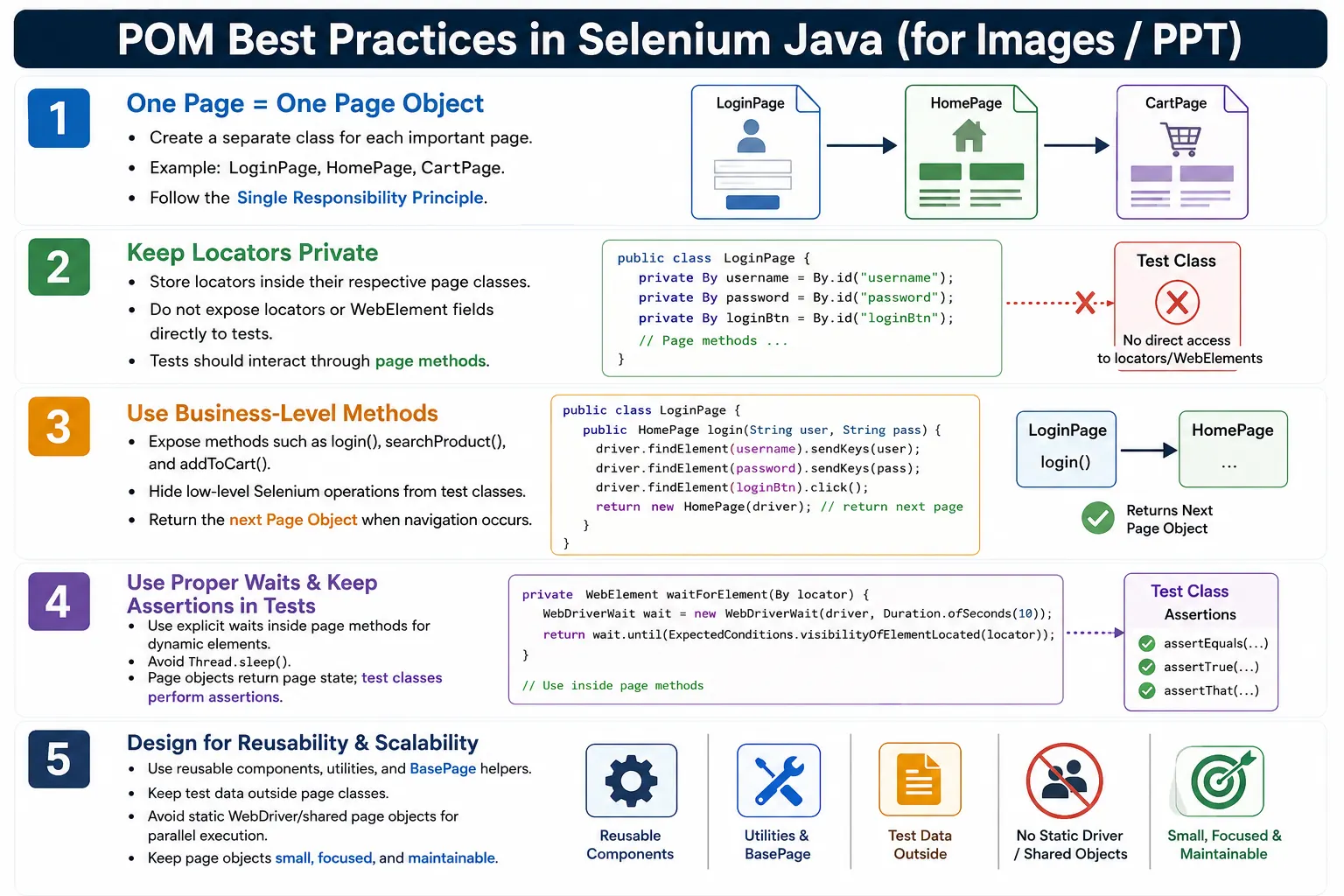
Enterprise Selenium frameworks follow a set of practical best practices to prevent page objects from becoming large, duplicated, and confusing. These practices are not theoretical rules. They come from real maintenance problems: changing locators, dynamic pages, repeated test flows, unstable waits, hardcoded data, public WebElements, mixed assertions, and overloaded page classes. A good POM framework reduces those problems by keeping design boundaries clear.
1. One Page Means One Page Object
The first best practice is simple: each important web page should have its own page object class. A login page should have LoginPage.java. A home page should have HomePage.java. A cart page should have CartPage.java. This keeps page-specific locators and actions close to the page they belong to.
pages
  LoginPage.java
  HomePage.java
  SearchPage.java
  CartPage.java
  CheckoutPage.java
A bad design creates one giant class such as ApplicationPage.java containing login, search, cart, payment, reports, and admin actions. That class becomes hard to understand and risky to modify. Page objects should provide ownership boundaries.
2. Follow Single Responsibility Principle
Each page object should represent one page or one reusable component. The login page should handle login functionality. It should not also handle search, checkout, payment, and reports. When one class has too many reasons to change, it violates the single responsibility principle.
Good POM design makes change predictable. If the search page changes, update SearchPage. If the checkout page changes, update CheckoutPage. A class named LoginPage should not change because the payment page was redesigned.
3. Keep Locators Private
Locators should be hidden inside page classes. Test classes should not directly access them. Public locators break encapsulation because they allow test classes to depend on page structure.
// Avoid this
public By username = By.id("username");
// Prefer this
private By username = By.id("username");Private locators force tests to interact through page methods. This allows the page class to change its locator, wait strategy, or implementation without changing tests.
4. Do Not Expose WebElements Directly
Just like locators, WebElements should not be public. A test should not call loginPage.username.sendKeys() or loginPage.loginButton.click(). That bypasses the page object method and spreads page mechanics into tests.
Expose behavior instead. If the page supports login, expose login(). If the page displays a logo, expose isLogoDisplayed(). If the page has an error message, expose getErrorMessage().
5. Expose Business Methods
Page objects should expose meaningful user actions, not only low-level Selenium actions. Methods such as enterUsername(), enterPassword(), and clickLogin() can exist internally, but most tests should call a business-level method such as login().
public DashboardPage login(String usernameValue, String passwordValue) {
    driver.findElement(username).sendKeys(usernameValue);
    driver.findElement(password).sendKeys(passwordValue);
    driver.findElement(loginButton).click();

    return new DashboardPage(driver);
}
Business methods make tests easier to read. A test that calls loginPage.login() communicates intent better than a test that calls three separate technical actions.
6. Keep Assertions in Test Classes
Page objects should provide page state. Test classes should assert expected behavior. This is one of the most important POM rules. A page class can return the title, error message, visible text, item count, or boolean state. The test compares the actual result with the expected result.
public String getPageTitle() {
    return driver.getTitle();
}
Assert.assertEquals(
homePage.getPageTitle(),
"Dashboard"
);This makes page methods reusable. The same method can support many tests with different expected values.
7. Return Page Objects After Navigation
If a page action opens another page, return the next page object. This models application navigation clearly. A login method can return DashboardPage. A checkout method can return PaymentPage. A payment method can return OrderConfirmationPage.
public HomePage login(String user, String pass) {
type(username, user);
type(password, pass);
click(loginButton);
return new HomePage(driver);
}Returning the next page object makes the test flow expressive and avoids manual page object creation after every navigation step.
8. Use Explicit Waits Inside Page Methods
Modern web applications are dynamic. Buttons may become clickable after loading. Results may appear after AJAX calls. Forms may render after animations. Page methods should interact safely with elements using explicit waits.
protected void click(By locator) {
WebDriverWait wait =
new WebDriverWait(driver, Duration.ofSeconds(10));
wait.until(
ExpectedConditions.elementToBeClickable(locator)
).click();
}Tests should not repeat wait logic for every page action. The page layer should handle interaction readiness.
9. Avoid Thread.sleep
Thread.sleep() pauses for a fixed time whether the page is ready or not. It makes tests slower and still does not guarantee stability. Explicit waits are better because they wait for a specific condition and return as soon as the condition is satisfied.
// Avoid
Thread.sleep(5000);// Prefer
wait.until(
ExpectedConditions.elementToBeClickable(loginButton)
);Use waits based on behavior: visibility, clickability, text presence, invisibility of loaders, or URL changes.
10. Keep Test Classes Clean
Test classes should describe the scenario and validation. They should not be filled with raw Selenium API calls. A clean test reads like a business workflow.
@Test
public void verifyLogin() {
HomePage homePage =
loginPage.login("admin", "admin123");
Assert.assertEquals(
        homePage.getPageTitle(),
        "Dashboard"
);
}This test is readable because page mechanics are hidden in page objects. The test focuses on what is being verified.
11. Avoid Duplicate Locators
A locator should have one clear owner. If the login button belongs to the login page, it should be defined in LoginPage. Duplicating the same locator in multiple pages and tests creates maintenance problems.
When a locator changes, duplicated copies may not all be updated. This creates inconsistent failures. Centralizing locators inside the correct page object keeps maintenance controlled.
12. Use Meaningful Method Names
Method names should describe user actions or page state. Avoid names such as clickBtn1(), doAction(), and process(). Prefer names such as login(), logout(), searchProduct(), addToCart(), and proceedToCheckout().
Good method names make tests readable and reduce the need to inspect implementation details. A test should communicate user behavior clearly.
13. Keep Page Objects Small
Large page objects become difficult to maintain. If one class contains login, search, orders, checkout, payment, reports, and settings, it is not a page object anymore. It is a god class.
Split functionality logically. Large pages can be divided into page objects and component objects. A dashboard page can have header, sidebar, table, filter, and modal components if those sections are complex or reusable.
14. Create Reusable Component Objects
Not every reusable UI section is a full page. Headers, footers, navigation menus, search bars, product cards, tables, and modal dialogs can be modeled as components.
public class HeaderComponent extends BasePage {

    private By profileMenu = By.id("profileMenu");
    private By logoutButton = By.id("logout");

    public HeaderComponent(WebDriver driver) {
        super(driver);
    }

    public void logout() {
        click(profileMenu);
        click(logoutButton);
    }
}
Component objects reduce duplication across pages and keep page classes smaller.
15. Use Constructor Injection
Pass WebDriver into page objects through the constructor. Do not create browser instances inside page objects. Driver creation belongs to the framework setup layer, not the page layer.
public LoginPage(WebDriver driver) {
    this.driver = driver;
}
This makes page objects reusable with local drivers, remote drivers, grid drivers, cloud drivers, and parallel execution contexts.
16. Centralize Common Utilities
Do not duplicate common technical logic across page classes. Create reusable utilities or base methods for waits, screenshots, JavaScript actions, alerts, windows, frames, and scrolling. Page objects can call these helpers when needed.
WaitUtilfor wait conditions.ScreenshotUtilfor screenshots.JavaScriptUtilfor controlled JavaScript actions.AlertUtilfor alert handling.WindowUtilfor window switching.
17. Avoid Hardcoded Test Data in Pages
Page objects should accept data, not own data. A login method should accept username and password as parameters. It should not hardcode admin and admin123 inside the page class.
public DashboardPage login(String usernameValue, String passwordValue) {
    type(username, usernameValue);
    type(password, passwordValue);
    click(loginButton);

    return new DashboardPage(driver);
}
Test data can come from DataProvider, Excel, CSV, database, JSON, API setup, or configuration. The page object should remain data-source independent.
18. Keep Locators Readable
Readable locator field names matter. A locator named loginButton is better than x or btn1. The locator value should also be stable and understandable.
private By loginButton = By.id("login");Avoid overly complex XPath expressions when simple IDs, names, CSS selectors, or test-specific attributes are available.
19. Handle Dynamic Elements Carefully
Dynamic elements can become stale after DOM updates. For such elements, prefer storing By locators and locating the element when needed. Avoid caching WebElements for elements that change frequently.
private By cartCount = By.id("cart-count");

public String getCartCount() {
    return driver.findElement(cartCount).getText();
}
This approach reduces stale element risk because the element is found at the moment the method is called.
20. Separate Framework Layers
A maintainable framework separates responsibilities by layer. Test classes should not create drivers. Page objects should not read Excel files. Utilities should not contain business assertions. Listeners should not implement page workflows.
src/test/java
  base
  pages
  components
  utilities
  listeners
  tests
  resources
This structure helps new team members understand where code belongs.
21. Design for Reusability
A reusable page method accepts parameters instead of hardcoding one user or one value. Prefer login(String username, String password) over loginAsAdmin() unless the project has a very specific reason for role shortcuts.
Reusable methods support positive tests, negative tests, role-based tests, data-driven tests, and multiple environments.
22. Avoid Business Logic Duplication
A page should not have multiple methods that do the same thing with different names, such as login(), loginAgain(), and performLogin(). Create one clear method and reuse it. Duplicate business methods lead to inconsistent behavior and maintenance confusion.
23. Make Page Objects Independent
A page object should not know unnecessary details about unrelated pages. A login page can return HomePage after login, but it should not know how to open cart, make payment, and verify order reports. Those actions belong to other page objects or workflow helpers.
Independence keeps classes focused and reduces coupling between pages.
24. Support Parallel Execution
For parallel execution, avoid static WebDriver fields and shared page objects. Each test execution should create page objects with the driver assigned to that test thread. Page objects should hold instance state, not shared mutable state.
Clean POM design makes parallel execution safer because each page object belongs to one browser session.
25. Use BasePage Carefully
Many Selenium frameworks use a BasePage class to store common interaction methods such as click, type, get text, wait for visibility, wait for clickability, and scroll into view. This is useful when the base class contains small technical helpers that every page can reuse. It prevents repeated wait code and gives the framework one consistent place to improve interaction behavior.
However, BasePage should not become a dumping ground. A common mistake is adding every possible method into the base class until it becomes a huge utility class with unrelated responsibilities. If BasePage contains login logic, checkout logic, report logic, file upload logic, database logic, API logic, and assertion logic, the design is no longer clean. It becomes difficult to know where code belongs.
A good rule is that BasePage should contain only common page interaction support. Business actions should remain in specific page objects. Technical actions that are not page-specific can be placed in focused utility classes. This keeps the base layer small and predictable.
26. Prefer By Locators for Dynamic Pages
In Selenium, a WebElement is a reference to an element at a specific moment. If the application refreshes part of the DOM, that reference can become stale. This happens often in modern applications built with React, Angular, Vue, or any framework that frequently re-renders components. Because of this, many stable frameworks prefer storing By locators and finding elements inside methods when needed.
This does not mean @FindBy is always wrong. @FindBy can be useful when the page is stable and the team uses PageFactory consistently. But for highly dynamic pages, direct By locators often give better control. They allow the framework to wait for the element again, locate it again, and reduce stale reference failures.
private By successMessage = By.cssSelector("[data-testid='success-message']");

public String getSuccessMessage() {
    return waitForVisible(successMessage).getText();
}
This pattern is especially useful for elements that appear after AJAX calls, table rows that refresh after filtering, cart counts that update after actions, and modal content that is rebuilt when opened.
27. Use Stable Locator Strategy
POM quality depends heavily on locator quality. If locators are fragile, the page object will still fail frequently. The best locator is usually one that is unique, stable, meaningful, and not tightly coupled to styling. IDs can be good when they are stable. Test-specific attributes such as data-testid, data-test, data-qa, or data-cy are often better for automation because they are intentionally created for tests.
A locator such as div:nth-child(4) > span:nth-child(2) may work today, but it is tightly tied to the page layout. A small UI change can break it even when the user-facing behavior is still correct. XPath expressions based on long absolute paths have the same problem. Good POM frameworks encourage stable attributes because maintainability starts at the HTML level.
private By loginButton =
        By.cssSelector("[data-testid='login-button']");
When the automation team can influence developers, they should request stable attributes for important controls. This is not only an automation preference. It is a maintainability contract between application code and test code.
28. Keep Negative Flows Readable
Many beginners design page methods only for happy paths. For example, login() returns HomePage after successful login. That is correct for a valid login scenario, but invalid login scenarios should also be handled cleanly. If login fails and the application stays on the login page, the method design should make that clear.
One option is to create a separate method such as loginExpectingFailure() that returns LoginPage. Another option is to use lower-level page actions in the negative test and then verify the error message. The important point is to avoid confusing method contracts. A method that returns HomePage should not be used when the expected result is to remain on LoginPage.
public LoginPage loginWithInvalidCredentials(String user, String pass) {
    type(username, user);
    type(password, pass);
    click(loginButton);

    return this;
}
This makes the test intent clear. The test can call the invalid login method and then assert the message returned by getLoginError(). The page object supports both successful and unsuccessful flows without hiding the expected navigation behavior.
29. Do Not Hide Important Test Decisions
A page object should simplify interaction, but it should not hide important test decisions. For example, a page method should not silently decide which user role to use, which environment to test, which assertion to perform, or which data set is valid for the scenario. Those decisions belong to the test layer, data layer, or configuration layer.
When page methods hide too much, tests become short but unclear. A test that calls completeOrder() may look clean, but if that method logs in, searches for a product, adds it to cart, applies a coupon, chooses shipping, makes payment, and verifies confirmation internally, the test loses transparency. It becomes hard to understand what is actually being tested.
High-level workflow methods are useful, but they should be placed carefully. If a flow is reused across many tests, a workflow helper or service class may be better than putting the entire flow inside one page object. Page objects should model pages. Workflow helpers can model multi-page journeys.
30. Use Workflow Helpers for Long Journeys
Some test scenarios naturally span many pages. An e-commerce order flow may involve login, product search, product details, cart, checkout, payment, and confirmation. If every test repeats these steps, test classes become long. If one page object owns the entire journey, page classes become bloated. A workflow helper can solve this problem by coordinating page objects without replacing them.
public class OrderWorkflow {

    private WebDriver driver;

    public OrderWorkflow(WebDriver driver) {
        this.driver = driver;
    }

    public OrderConfirmationPage placeOrder(ProductData product) {
        HomePage homePage = new HomePage(driver);
        ProductPage productPage = homePage.searchProduct(product.getName());
        CartPage cartPage = productPage.addToCart();
        CheckoutPage checkoutPage = cartPage.checkout();

        return checkoutPage.completePayment(product.getPaymentData());
    }
}
The workflow class coordinates the journey, while each page class still owns its own locators and interactions. This keeps test classes readable and page objects focused. It also gives the framework a place to store reusable business journeys without damaging page object boundaries.
31. Keep Page Methods Deterministic
A deterministic method behaves predictably when called with the same state and inputs. Page methods should not produce hidden side effects. If a method is named getErrorMessage(), it should return the error message. It should not click login, refresh the page, clear the form, or change browser state. If a method is named clickCheckout(), it should click checkout and return the next page object if navigation happens.
Predictable methods make debugging easier. When a test fails, the engineer can trace the failure from the test step to the page method. If page methods do unrelated hidden work, failure analysis becomes slow. Good POM design treats method names as contracts. The method should do what its name says and no more than necessary.
This also improves reusability. A method that only returns a page value can be used in many assertions. A method that combines reading, clicking, waiting, and asserting can be used only in a very narrow scenario.
32. Manage Page Load and Ready State
Every important page object should know how to confirm that its page is ready for interaction. This does not mean using a blind sleep after opening each page. It means waiting for a stable page-specific signal. For a login page, the signal may be the username field. For a dashboard, it may be a dashboard header or user profile menu. For a search results page, it may be the results container.
public LoginPage(WebDriver driver) {
    this.driver = driver;
    waitForVisible(username);
}
Some teams place readiness checks in constructors. Others create explicit methods such as waitUntilLoaded(). Either approach can work if it is consistent. The key idea is that page objects should not assume the page is ready immediately after navigation. Web applications load in stages, and page objects should interact only after the correct state is available.
33. Keep Error Handling Practical
POM methods should not catch every exception and hide failures. If an element is missing, the test should usually fail clearly. Catching Exception and returning false can make failures harder to understand because the real Selenium error is swallowed. Good frameworks handle expected conditions carefully and allow unexpected failures to surface with useful information.
For example, a method named isErrorMessageDisplayed() may safely return false if the message is not visible within a short wait. But a method named clickLoginButton() should not silently ignore a failed click. If the click fails because the element is covered, missing, or disabled, that is valuable failure information.
Practical error handling means distinguishing between optional checks and required actions. Optional checks can return booleans. Required actions should fail loudly when the application does not allow the action.
34. Review POM During Code Reviews
POM quality should be checked during automation code reviews. Reviewers should look for public locators, public WebElements, repeated Selenium calls in tests, hardcoded test data in page classes, assertions inside page objects, duplicate locators, unclear method names, and excessive use of Thread.sleep(). These issues are easier to fix early than after hundreds of tests depend on them.
A good review also checks whether a method belongs in the page object, component object, utility class, workflow class, or test class. Many framework problems come from code being placed in the wrong layer. The review should protect layer boundaries, not just check whether the test passes locally.
In real projects, POM standards should be documented and followed consistently by the team. A framework built by ten engineers will fail if every engineer uses a different style. Shared conventions keep the framework readable and maintainable.
35. Evolve POM Gradually
A POM framework does not need to be perfect on the first day. In real projects, it usually improves as the automation suite grows. The important point is to evolve it deliberately. When a locator is duplicated for the second or third time, move it to the right page object. When the same page section appears across multiple pages, create a component object. When the same multi-page journey appears across multiple tests, introduce a workflow helper. Refactoring should be driven by repeated pain, not by adding unnecessary layers before the framework needs them.
This gradual approach keeps the framework practical. A small project may not need many components, workflow helpers, or advanced utilities. A large enterprise project may need all of them. Good engineers do not blindly copy a complicated framework structure. They understand the reason behind each layer and introduce it when it solves a real maintenance problem.
At the same time, teams should not wait too long to clean up bad patterns. Public WebElements, mixed assertions, repeated sleeps, and hardcoded data become expensive once many tests depend on them. The best practice is to keep the design simple at the beginning, but correct problems early when they start appearing repeatedly.
36. Common Beginner Mistakes
- Creating one massive page object.
- Putting assertions inside page classes.
- Making locators and WebElements public.
- Using
Thread.sleep()instead of explicit waits. - Duplicating locators across tests.
- Hardcoding test data inside page classes.
- Returning
voidwhen navigation opens another page. - Creating WebDriver instances inside page objects.
- Mixing test logic with page logic.
37. Enterprise POM Checklist
- One page per class.
- Private locators.
- Business-level page methods.
- Assertions in tests.
- Explicit waits.
- Constructor injection.
- Navigation returns page objects.
- Reusable components.
- Externalized test data.
- Utility classes for common technical actions.
38. Real Project Flow
LoginTest
  LoginPage.login()
    HomePage.searchProduct()
      ProductPage.addToCart()
        CartPage.checkout()
          PaymentPage.pay()
            OrderConfirmationPage.getOrderNumber()
              Assert in Test Class
Each page has one responsibility. The test coordinates the scenario and performs assertions.
In a real project, this flow may be supported by both page objects and workflow helpers. The page objects handle page-level actions. The workflow helper coordinates the repeated journey. The test remains responsible for choosing data and verifying the expected result. This separation gives the framework both readability and control.
When the application changes, this structure limits the maintenance area. If the product page changes, the engineer updates ProductPage. If the checkout flow changes, the engineer updates CheckoutPage or the workflow helper. The test scenario does not need to know every low-level locator affected by the UI redesign.
39. Interview Perspective
A short interview answer is: POM best practices include creating one page object per page, keeping locators private, exposing business methods instead of low-level Selenium actions, keeping assertions in test classes, using explicit waits, returning page objects after navigation, and designing reusable page classes.
A stronger real-time answer is: in my Selenium framework, I create one class for each page, store locators as private fields, and expose reusable business methods such as login() and searchProduct(). I keep assertions only in test classes, use explicit waits inside page methods, return the next page object after successful navigation, and organize common functionality into utility and component classes. This minimizes duplication and makes the framework easier to maintain as the application grows.
If the interviewer asks why these practices matter, the practical answer is maintainability. Automation code usually lives for a long time. The application changes, the UI is redesigned, locators move, new roles are added, and test coverage grows. A clean POM framework absorbs those changes with smaller updates. A weak POM framework spreads every change across many test classes.
40. Key Takeaway
The goal of POM is not just to organize code. The goal is to create an automation framework that is easy to read, easy to maintain, and scalable enough to support large applications over time.
A well-designed POM framework uses one page per class, private locators, business-level methods, explicit waits, reusable components, clean utilities, and test-level assertions. When these practices are followed consistently, Selenium automation becomes more stable, readable, and easier to evolve with the application.