partialLinkText Locator
The partialLinkText locator identifies hyperlinks (<a> tags) using a substring of the visible link text. It offers more flexibility than linkText, but at the cost of precision and stability.
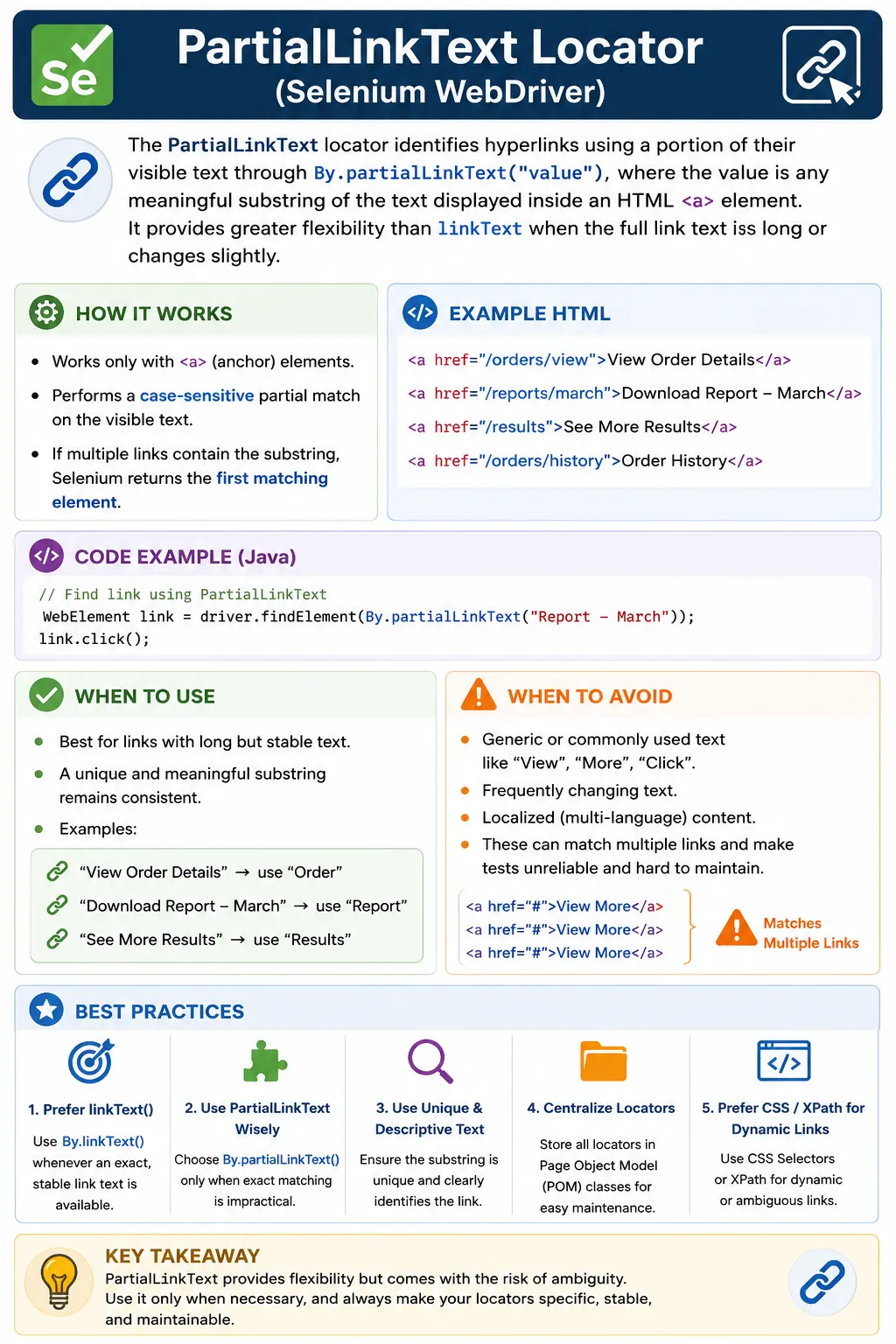
Understanding the partialLinkText Locator in Selenium WebDriver
The partialLinkText locator is a Selenium WebDriver strategy used to find hyperlinks by matching only part of their visible text. It is related to the linkText locator, but it is more flexible because the locator value does not need to equal the full link label. If a page contains a link such as <a href="/profile">View Profile Details</a>, Selenium can locate it with By.partialLinkText("Profile") or By.partialLinkText("Details"). This makes partialLinkText useful when link labels are long or include small pieces of text that may change around a stable word.
Selenium automation depends on locating elements in the browser's Document Object Model before any action can happen. The locator tells WebDriver how to search, and the WebElement returned by that search is what the test clicks, reads, or verifies. With By.partialLinkText("Profile"), Selenium searches anchor elements and returns a link whose visible text contains the word Profile. The method is concise and readable, but it must be used with discipline because partial matching can easily match the wrong link when the substring is too generic.
The first rule is that partialLinkText works only for anchor elements. In HTML, hyperlinks are represented by the a tag. A button that displays the text Submit will not be found by partialLinkText unless it is actually an anchor element. Modern applications often style anchors to look like buttons and buttons to look like links, so appearance is not enough. A tester should inspect the DOM and confirm the element type. Selenium's locator strategy is based on markup, not visual styling.
The second rule is that the match is based on visible text. If the visible link text contains the provided substring, Selenium can match it. The substring does not need to appear at the beginning. It may appear in the middle or at the end. For a link labeled View Order Details, partial text such as View, Order, or Details may match. This flexibility is useful, but it also creates the main risk. View may match many links. Details may match every details link on a listing page. Order may match order history, order status, and order details. Partial matching should therefore use the most specific stable substring available.
The third rule is that matching is case-sensitive. A locator value of profile is not the same as Profile if the page text uses uppercase P. This can surprise beginners because users may not think about case when reading a link. Selenium does. A small text mismatch can cause NoSuchElementException. When debugging partialLinkText failures, confirm the exact casing and visible text Selenium sees. It can also help to collect all anchor tags with By.tagName("a") and print their getText() values while investigating.
partialLinkText is best used when exact linkText is too strict but the visible label still has a stable, meaningful portion. For example, a report link might display Download Report - March, Download Report - April, or Download Report - May. If the month changes based on data, exact linkText would require dynamic construction. A partial locator such as By.partialLinkText("Download Report") might be acceptable if only one report link is expected in the relevant section. The stable part should describe the link's purpose clearly enough to avoid accidental matches.
Long link labels are another reasonable use case. Some content pages use full article titles as links. A link might say "Read the Complete Selenium WebDriver Setup Guide for Java Beginners." If the test only needs to verify or open that article, and a stable phrase such as Selenium WebDriver Setup Guide is enough to identify it, partialLinkText can reduce brittleness caused by small title changes. However, if the page contains several Selenium setup links, the partial text may still be ambiguous. Flexibility should never replace uniqueness.
The most dangerous use is a very short or common substring. Locators such as By.partialLinkText("Click"), By.partialLinkText("More"), By.partialLinkText("View"), By.partialLinkText("Read"), or By.partialLinkText("a") are usually weak. They can match many links, and findElement() will return the first match in the current search context. That first match may change when a new content card, footer link, menu item, or banner is added. A test that clicks the wrong link may fail later in a confusing way, or worse, it may still pass while testing the wrong path.
Because ambiguity is the central risk, partialLinkText should often be used with findElements() during locator design. A tester can collect all links matching the partial text and check the count. If the count is exactly one in the relevant scope, the locator may be acceptable. If the count is greater than one, the locator needs scoping or a more precise strategy. This check is especially important on pages with repeated actions such as Read More, View Details, Edit, Delete, Open, Learn More, or Download.
Scoping makes partialLinkText much safer. Instead of searching the whole page for a partial link text, the test can locate a parent container first and then search inside it. For example, a test can find the order row that contains order number 10045 and then find a link containing Details inside that row. A test can find the footer and then find a link containing Privacy inside the footer. A test can open the account menu and then find a link containing Sign inside that menu. The parent context narrows the search, while partialLinkText keeps the link locator readable.
This scoped pattern is useful in Page Object Model design. A page object or component should hide the details of partial matching from the test method. Instead of writing driver.findElement(By.partialLinkText("More")) in a test, a component can expose openArticleDetails(String articleTitle), clickPrivacyPolicy(), or openOrderDetails(String orderNumber). Internally, the component can locate the right section and then use partialLinkText or another locator. The test describes business intent, and the page object manages locator precision.
partialLinkText is often compared with linkText. linkText requires the exact visible text of the link, while partialLinkText requires only a substring. Exact matching gives better precision when the text is stable. Partial matching gives flexibility when the text is long or slightly variable. The tradeoff is simple: flexibility reduces precision. A professional tester should default to linkText when exact text is stable and unique, then consider partialLinkText only when there is a clear reason not to use the exact label.
XPath offers another form of partial text matching. An expression such as //a[contains(text(),'Profile')] can locate anchor elements containing Profile. XPath can also combine that text condition with attributes, parent sections, sibling relationships, normalized text, and other conditions. Because of that, XPath may be safer than partialLinkText when the page requires more precision. For example, //div[@id='footer']//a[contains(text(),'Privacy')] is more scoped than a global By.partialLinkText("Privacy"). The choice depends on how much context the locator needs.
CSS selectors cannot match visible text directly, but they are often more stable when the link has attributes. If a link has data-test="privacy-link", href="/privacy", id="privacyPolicy", or a stable aria-label, CSS may be better than partialLinkText. For example, By.cssSelector("[data-test='download-report']") is less sensitive to visible copy changes than By.partialLinkText("Download"). This is important in applications where UI copy changes often for product, SEO, localization, or A/B testing reasons.
Localization is a major limitation. In applications that support multiple languages, visible link text changes by locale. A partial English substring will not match a translated link. If the same test suite must run across locales, partialLinkText is usually not a good core locator strategy. Stable attributes are better for actions, while separate content assertions can verify translated labels when that is the purpose of the test. If the test is specifically validating the English UI, then partialLinkText may still be acceptable.
Dynamic content also needs care. A link may include a user's name, a count, a date, a month, an order number, or a generated status. Examples include "View 12 Results", "Download Report - March", "Open Order 10045", or "Welcome Suresh". partialLinkText can target the stable portion of those labels, but the test should ensure the stable portion is not shared by unrelated links. Sometimes it is better to locate by destination href, data attribute, row context, or card context instead of partial text.
Timing problems apply to partialLinkText just like other locators. A link may appear only after login, after a menu opens, after a search completes, or after a network response returns. If Selenium searches too early, the locator fails even if the text is correct. Explicit waits should be used when the link is dynamic. A test can wait for elementToBeClickable(By.partialLinkText("Profile")) before clicking, or wait for a menu container to open before searching inside it. Avoid replacing proper waits with fixed sleeps because sleeps make tests slow and still fail under unusual timing.
Navigation assertions should follow partialLinkText clicks. Clicking a partially matched link only proves that Selenium found something and clicked it. It does not prove that it clicked the intended link. After clicking, a test should verify the destination using a URL, title, heading, breadcrumb, loaded component, or business result. This is especially important with partialLinkText because false matches are possible. A post-click assertion turns a risky locator into a better-controlled test step.
Hidden duplicate links can cause confusing behavior. Many responsive pages keep both desktop and mobile navigation in the DOM. Both may contain links with similar text, but only one is visible. A global partial link search may return a hidden link or a link from the inactive menu. A framework helper can reduce this risk by collecting matching links, filtering to displayed elements, and clicking only when one visible match remains. If more than one visible match exists, the helper can fail with a clear message instead of guessing.
Stale element references are another real-world concern. If a test locates a link with partialLinkText and then the page refreshes or a single-page application re-renders the menu, the stored WebElement can become stale. The locator value may still be correct, but the old element reference is no longer attached to the DOM. The fix is to locate the element again after the page update or store the By locator and resolve it only when the action is performed. This keeps dynamic-page tests more reliable.
Frames and windows also matter. A link inside an iframe cannot be found until the driver switches into the frame. A link inside a new tab cannot be clicked until the driver switches to that window. When a partialLinkText locator fails even though the link appears on the screen, confirm the browser context before rewriting the locator. The text may be correct, but Selenium may be searching the wrong document.
Debugging partialLinkText failures should be systematic. First, verify that the target is an anchor element. Second, inspect the exact visible text and casing. Third, collect matching links with findElements() and check how many matches exist. Fourth, check whether the link is visible, inside a collapsed menu, inside a frame, or rendered after an asynchronous load. Fifth, decide whether partial text is still the right locator. Often the fix is better scoping or a stable data-test attribute, not simply choosing a different substring.
From an interview perspective, a short answer is that partialLinkText locates anchor links by matching part of their visible text. A stronger answer explains that it is more flexible but less precise than linkText, works only for a tags, is case-sensitive, and can return unintended matches when the substring is generic. A practical answer adds that it should be used sparingly, usually with scoped searches, explicit waits, page objects, and destination assertions.
The key takeaway is that partialLinkText trades precision for flexibility. It is useful when a link has long or slightly changing visible text and a stable substring can identify it. It is risky when the substring is common, repeated, localized, or unrelated to the link's business purpose. Use it when it genuinely improves readability without creating ambiguity. Otherwise, choose linkText, CSS, XPath, ID, name, or a test-friendly attribute that gives the automation suite a more stable contract.
Using partialLinkText Safely in Real Automation Frameworks
In a real automation framework, partialLinkText should usually be hidden behind page object or component methods rather than placed directly inside test methods. The test should describe what the user is doing, such as opening an order detail page, downloading a monthly report, or navigating to a profile section. The page object can decide whether partialLinkText is the right locator for that action. This design keeps the test readable and limits the impact if the visible text later changes. When partial text is scattered across many test classes, every copy change becomes a broad maintenance task.
Consider an orders page where every row contains a link labeled View Order Details. A weak test might use By.partialLinkText("View") and click the first match. That test is not connected to a specific order. A stronger test first locates the row containing the expected order number and then clicks a link inside that row using a more specific partial text such as Details. The row context provides identity, and the partial text provides the action. This pattern keeps the locator flexible without allowing it to drift toward the wrong link.
Download links are another common example. A reporting page may show Download Report - January, Download Report - February, and Download Report - March. If the scenario expects the latest report, using only By.partialLinkText("Download") is too broad. The test may need to identify the row, date, card, or section first, then locate the matching download link within that context. If the scenario expects a specific month, the month should be part of the test data and validation. partialLinkText can help with the stable words, but it should not hide the business condition the test is actually checking.
In content-heavy pages, partialLinkText may be useful for long article titles, but it should not be used as a substitute for content verification. If the test needs to confirm that an article titled "Selenium WebDriver Waits Explained for Java Testers" is present, a partial locator such as "WebDriver Waits" may find the link. The test should still verify the full visible title or destination after navigation if that title matters. A partial match is a convenient way to locate, not proof that all user-facing copy is correct.
The interaction between partialLinkText and responsive navigation deserves special care. A desktop header and a mobile drawer may both contain links with the same labels. Depending on viewport and DOM structure, both sets of links may exist at the same time, with one hidden. A global partial link search can find a hidden or inactive link. A robust navigation component should search inside the active container, or filter matches by isDisplayed() before clicking. If the test is specifically validating mobile behavior, it should open the mobile menu first and then search inside that menu.
partialLinkText can also be risky in applications with feature flags. A new feature may add a link containing a substring that was previously unique. A test using "Settings" may start matching Account Settings instead of Notification Settings after a new menu item is introduced. A test using "Report" may match Sales Report, Inventory Report, or Audit Report depending on user permissions. This is why locator uniqueness should be checked in the actual user role and environment where the test runs, not only on a developer's local page.
Teams can reduce this risk by creating defensive helper methods. A helper can collect all matches with findElements(By.partialLinkText(text)), filter by displayed state, optionally filter by parent container, and then require exactly one matching candidate before clicking. If zero matches exist, the helper reports that the link was missing. If multiple visible matches exist, it reports an ambiguous locator. This behavior is better than silently clicking the first match because ambiguity is a test design problem that should be fixed, not hidden.
Good failure messages are especially important for partial matching. A failure message should mention the partial text, the expected context, and the intended action. For example, "Expected one visible order details link containing 'Details' inside order row 10045" is far more useful than a generic NoSuchElementException. When a CI run fails, clear messages allow the tester to decide whether the issue is missing content, changed copy, wrong test data, hidden UI state, or locator ambiguity.
The best locator strategy may change depending on what the test is trying to prove. If the test verifies that a user-facing link label includes a specific word, partialLinkText is aligned with the assertion. If the test only needs to navigate to a known route, a stable href, ID, data-test attribute, or route-specific CSS selector may be better. If the test needs to identify a link based on nearby text or a table row, XPath may express the relationship more precisely. The locator should support the purpose of the test instead of forcing every link interaction through the same strategy.
In localized applications, a maintainable approach is to separate action locators from language assertions. A link can be clicked using a stable data attribute, while a separate test or assertion verifies that the visible text is correctly translated for each locale. This avoids making every navigation test depend on English text. If partialLinkText is used in a localized suite, the partial text usually needs to come from the same translation resources as the application. Hardcoding one language into the locator creates avoidable failures when the locale changes.
Security and permission-based pages can also create partial text surprises. A user with admin permissions may see more links than a regular user. A manager may see View Team Reports while an employee sees View My Reports. A support user may see impersonation links that other users do not. A partial locator that is unique for one role may be ambiguous for another. When tests run with different roles, page objects should use role-aware scoping or stronger attributes rather than assuming the same partial text behaves the same for every account.
During locator review, partialLinkText should receive more scrutiny than exact linkText. Reviewers should ask whether the substring is specific enough, whether it can match multiple links, whether the application supports localization, whether the link appears in repeated components, and whether a more stable attribute exists. The reviewer should also check whether the test verifies the destination after the click. These questions prevent partialLinkText from becoming a convenient but fragile default.
A simple checklist can guide usage. Use partialLinkText only for anchor tags. Use a meaningful substring, not a common word. Scope the search when the page contains repeated links. Prefer findElements() during locator design to check match count. Add explicit waits for dynamic links. Validate the destination or result after clicking. Move the locator into a page object or component. Reconsider the strategy if the application is localized, heavily dynamic, or frequently edited by content teams. This checklist turns a risky locator into a controlled tool.
The practical conclusion is that partialLinkText is useful but specialized. It should not be the first locator a tester reaches for on every link. Exact linkText is clearer when text is stable. CSS and data attributes are stronger when text changes. XPath is stronger when relationships matter. partialLinkText earns its place when a stable substring is the most readable and reliable way to identify a link in a known context. Used with that discipline, it can reduce brittleness for long labels without creating false matches.
For beginners, the safest habit is to treat every partial match as a question: what else could match this same text now or in the future? If the answer is unclear, inspect the page, count the matches, narrow the search, or choose another locator. That small habit prevents many flaky navigation tests and helps the automation suite fail only for meaningful product behavior.
In short, partialLinkText is valuable when it is deliberate, scoped, and verified; it becomes fragile when it is used as a shortcut for unclear link identification. The strongest tests always make that intent visible and keep maintenance predictable. Clear partial matching protects navigation coverage from accidental false positives.
In Selenium, partialLinkText is used sparingly and only when exact text matching is impractical.
1. What Is a partialLinkText Locator
Definition: The partialLinkText locator finds a hyperlink by matching any part of its visible text.
Example HTML:
<a href="/profile">View Profile Details</a>Using partial text:
- Strategy means partialLinkText
- Value means "Profile" or "Details"
2. Key Rules (Very Important)
- Works only with <a> tags
- Matches any substring of the visible text
- Case-sensitive
- Returns the first matching link if multiple matches exist
Because it's partial, ambiguity is the biggest risk.
3. When partialLinkText Works Best
Use partialLinkText when:
- Link text is long, but a stable substring exists
- The full text changes slightly (prefix/suffix)
- Exact linkText is too brittle
Common examples:
- "View Order Details"
- "Download Report - March"
- "See More Results"
4. When NOT to Use partialLinkText
Avoid partialLinkText when:
- Multiple links share similar text
- The substring is too generic (e.g., "View", "More", "Click")
- UI text changes frequently
- Localization (i18n) is enabled
These scenarios cause false matches and flaky tests.
5. partialLinkText vs linkText (Critical Comparison)
| Aspect | linkText | partialLinkText |
|---|---|---|
| Match type | Exact | Partial |
| Precision | High | Lower |
| Risk of false match | Low | High |
| Stability | Higher | Lower |
| Recommendation | Preferred | Use cautiously |
Rule: Use linkText first. Fall back to partialLinkText only if necessary.
6. partialLinkText vs CSS/XPath (Real-World Choice)
- partialLinkText means readable, but brittle
- CSS/XPath means precise, flexible, and more stable
Best practice: If partial matching is required, prefer XPath contains(text()) or CSS strategies that don't depend on full text.
7. partialLinkText in Page Object Model (POM)
- Define partialLinkText locators in page classes
- Keep the substring specific and meaningful
- Encapsulate interaction in page methods
- Avoid using it directly in tests
This minimizes blast radius if UI text changes.
8. Common Beginner Mistakes
- Using very generic substrings ("View", "More")
- Assuming uniqueness without DOM verification
- Using partialLinkText for buttons (non-<a> elements)
- Ignoring case sensitivity
9. Interview Perspective
Short Answer: partialLinkText locates hyperlinks by matching a part of their visible text.
Real-Time Answer: In Selenium, partialLinkText is used to locate <a> elements using a substring of their visible text. It provides flexibility over linkText but must be used carefully to avoid matching unintended links.
10. Key Takeaway
- partialLinkText works only for links
- Flexible but less precise
- High risk of false positives
- Use only when exact link text is unreliable
- Partial matching trades precision for flexibility-use it only when you must.
11. Practical partialLinkText Examples (Interview-Friendly)
1. Basic partialLinkText Usage
driver.findElement(By.partialLinkText("Sign"));Key Point: Matches partial visible text of an <a> tag.
2. partialLinkText with click()
driver.findElement(By.partialLinkText("Log")).click(); // matches "Login"3. Useful When Link Text Changes Slightly
// Matches: "Sign In", "Sign Up"
driver.findElement(By.partialLinkText("Sign")).click();
4. partialLinkText with Explicit Wait (Best Practice)
WebDriverWait wait =
    new WebDriverWait(driver, Duration.ofSeconds(10));

WebElement link =
    wait.until(ExpectedConditions.elementToBeClickable(
        By.partialLinkText("Profile")
    ));

link.click();
5. Safe Click Using findElements() (Avoid Exception)
List<WebElement> links =
    driver.findElements(By.partialLinkText("Read"));

if (!links.isEmpty()) {
    links.get(0).click();
}
6. Handling Multiple Matches (Important)
List<WebElement> links =
    driver.findElements(By.partialLinkText("More"));

System.out.println(links.size());
Interview Note: Can return multiple links.
7. Choose Specific Partial Text to Reduce Ambiguity
// Better than "View"
driver.findElement(By.partialLinkText("View Details")).click();
8. partialLinkText Inside a Section (Chaining)
WebElement footer = driver.findElement(By.id("footer"));
footer.findElement(By.partialLinkText("Privacy")).click();
9. partialLinkText with getText() Validation
String text =
    driver.findElement(By.partialLinkText("Contact")).getText();

Assert.assertTrue(text.contains("Contact"));
10. partialLinkText After Navigation
driver.get("https://example.com");
driver.findElement(By.partialLinkText("About")).click();

Assert.assertTrue(driver.getTitle().contains("About"));
11. partialLinkText in Menu Navigation
driver.findElement(By.partialLinkText("Prod")).click(); // "Products"
driver.findElement(By.partialLinkText("Pric")).click(); // "Pricing"
12. partialLinkText Inside Frame
driver.switchTo().frame("contentFrame");
driver.findElement(By.partialLinkText("Learn")).click();
driver.switchTo().defaultContent();
13. partialLinkText After Page Refresh (Stale Fix)
WebElement link = driver.findElement(By.partialLinkText("Dashboard"));
driver.navigate().refresh();

// link.click(); Invalid: stale
link = driver.findElement(By.partialLinkText("Dashboard"));
link.click();
14. partialLinkText Stored as By (Framework Style)
By helpLink = By.partialLinkText("Help");
driver.findElement(helpLink).click();
15. partialLinkText in Page Object Model (POM)
@FindBy(partialLinkText = "Sign")
WebElement signLink;

public void clickSignLink() {
    signLink.click();
}
16. Invalid: Common Interview Mistake (Too Generic)
driver.findElement(By.partialLinkText("a")); // Invalid: matches many linksRule: Partial text must be meaningful & unique.
17. partialLinkText vs linkText (Interview)
By.linkText("Sign In");        // exact match
By.partialLinkText("Sign");    // partial match
Tip: Prefer linkText when text is stable.
18. partialLinkText vs XPath (Equivalent)
driver.findElement(By.partialLinkText("Home"));
driver.findElement(By.xpath("//a[contains(text(),'Home')]"));
19. When NOT to Use partialLinkText
- Invalid: Many similar links exist
- Invalid: Text is very short/common
- Invalid: UI supports multiple languages
- Invalid: SEO text frequently changes
20. Accessibility-Friendly Navigation
driver.findElement(By.partialLinkText("Skip")).click(); // "Skip to Content"21. Validate URL After partialLinkText Click
driver.findElement(By.partialLinkText("Profile")).click();
Assert.assertTrue(driver.getCurrentUrl().contains("profile"));
22. partialLinkText with Actions Class (Rare)
Actions actions = new Actions(driver);
WebElement link = driver.findElement(By.partialLinkText("Settings"));
actions.moveToElement(link).click().perform();
23. Invalid: Invalid Usage on Non-Anchor Elements
driver.findElement(By.partialLinkText("Submit")); // Invalid: if not <a>Rule: Works only for <a> tags.
24. Locator Priority Context (Interview)
ID means Name means className means linkText means partialLinkText means CSS means XPath25. Interview Summary - partialLinkText Locator
driver.findElement(By.partialLinkText("PartialText"));Key Points:
- Matches partial visible link text
- Works only for <a> tags
- Useful for slightly dynamic text
- Risky if too generic
- Prefer linkText when possible