Parallel Execution with Selenium Grid (In Depth)
Parallel Execution with Selenium Grid is the process of running multiple Selenium tests at the same time across different browsers, machines, operating systems, or remote environments. Instead of executing a test suite one test after another on a single local browser, the framework creates multiple execution threads, each thread gets its own browser session, and Selenium Grid distributes those sessions to available Nodes. This is one of the most important techniques for reducing regression execution time in enterprise automation.
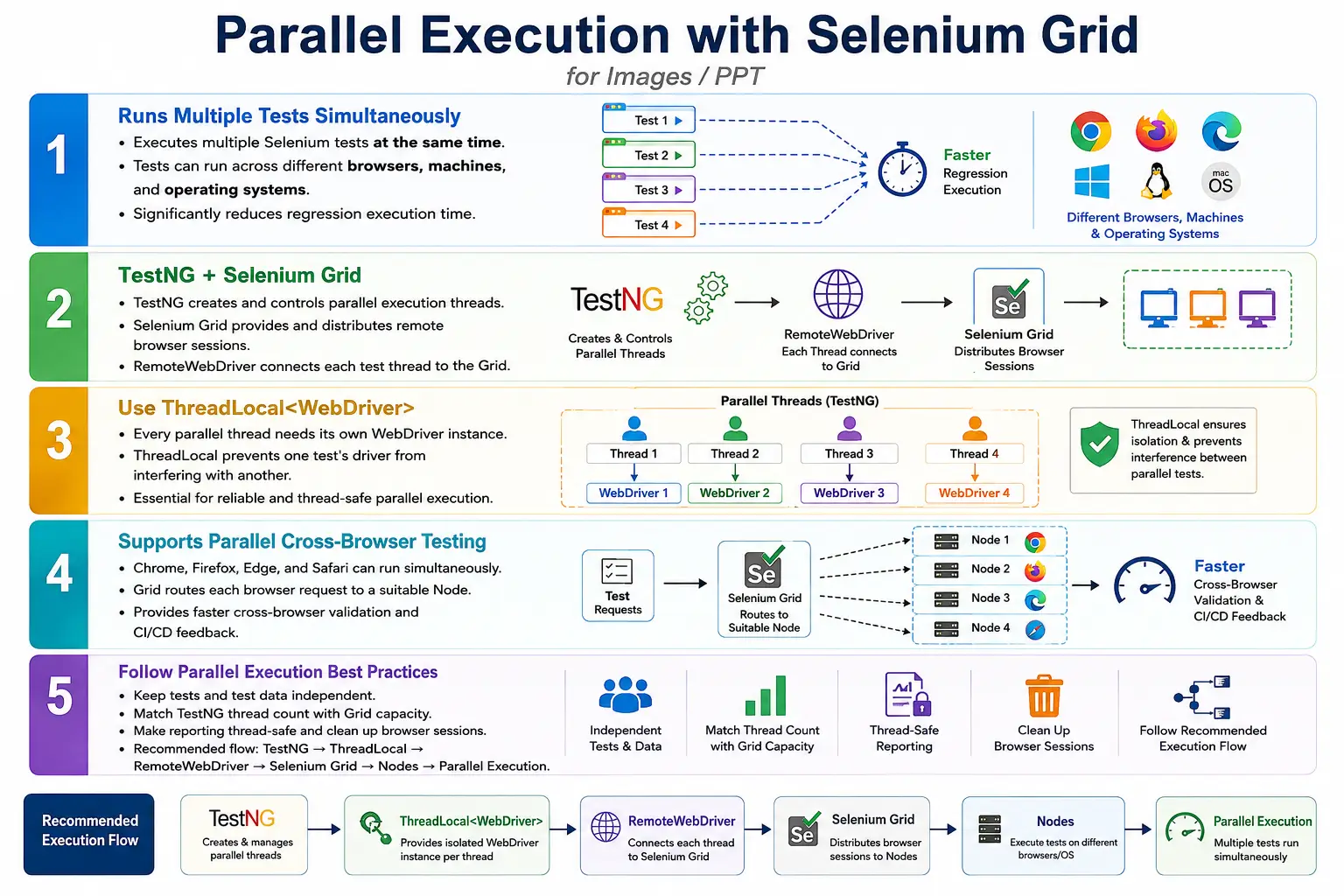
Parallel execution is not only about speed. It is also about scalability. A growing test suite eventually becomes too slow for one machine. A regression suite that takes five hours may not be practical for CI/CD feedback. By combining TestNG parallel execution, RemoteWebDriver, Selenium Grid, thread-safe driver management, and good reporting, the same suite can run faster while covering multiple browsers and platforms.
1. What Parallel Execution Means
Parallel execution means executing multiple test cases at the same time instead of executing them sequentially. In sequential execution, Test 1 finishes before Test 2 starts. In parallel execution, Test 1, Test 2, Test 3, and Test 4 may run simultaneously in separate threads, browser sessions, or machines.
Sequential Execution
  Test 1
  Test 2
  Test 3
  Test 4

Parallel Execution
  Test 1, Test 2, Test 3, Test 4
  Run at the same time
The benefit is clear when suites are large. If each test takes 20 seconds and 1000 tests run sequentially, the total execution time is very high. If those tests are distributed across multiple browser sessions and Nodes, the total cycle time can be reduced dramatically.
2. What Parallel Execution with Grid Means
Parallel Execution with Selenium Grid combines three things: a test runner such as TestNG that creates parallel threads, Selenium Grid that provides remote browser capacity, and RemoteWebDriver that connects each thread to a remote browser session. TestNG decides how many tests start together. Selenium Grid decides which available Node should run each browser session.
Without Grid, parallel execution is limited by the local machine. Running many browsers locally can quickly overload CPU and memory. With Grid, browser sessions can be distributed across multiple machines or containers. This makes parallel execution more scalable and more suitable for CI/CD pipelines.
3. Why Parallel Execution Is Needed
Regression suites grow over time. A small suite may complete in minutes, but a mature enterprise suite can contain hundreds or thousands of tests. If all tests run sequentially, feedback is slow. Slow feedback means defects are discovered late, developers wait longer, and releases become harder to validate.
Suppose 1000 test cases each take 20 seconds. Sequential execution takes around 20,000 seconds, or about 5.5 hours. If the tests are distributed across 10 stable Nodes, the total time can fall significantly. The exact number depends on setup, but the improvement is large enough to change how often teams can run regression suites.
4. Core Idea
The core idea is to avoid waiting for one browser to finish before another browser starts. Multiple browser sessions should execute different tests at the same time. Selenium Grid provides the remote browser infrastructure, while TestNG provides the parallel execution threads.
One Browser
  One Test
    Wait
      Next Test

Multiple Browsers
  Multiple Tests
    Same Time
      Faster Feedback
This approach is useful for smoke suites, regression suites, cross-browser testing, nightly runs, and release validation pipelines. It is also useful when one test suite must run across Chrome, Firefox, Edge, and Safari.
5. Architecture
The architecture starts with a TestNG suite. TestNG creates parallel threads based on configuration. Each thread requests a WebDriver instance from DriverFactory. DriverFactory creates a RemoteWebDriver. Selenium Grid receives the session request and assigns it to an available Node. The Node launches the browser and executes commands.
TestNG Suite
  Parallel Test Threads
    DriverFactory
      RemoteWebDriver
        Selenium Grid
          Node 1: Chrome on Windows
          Node 2: Firefox on Linux
          Node 3: Edge on macOS
This design keeps tests clean. Test classes do not need to know which Node executes the browser. They simply use WebDriver. The execution infrastructure handles browser allocation.
6. Components Involved
Parallel execution with Grid uses several components together. TestNG controls the execution model and thread count. Selenium Grid manages remote browser distribution. RemoteWebDriver connects test threads to Grid. DriverFactory creates the correct driver. Configuration controls browser and execution mode. Nodes provide browser capacity. Reporting tools capture results.
All of these components must be designed consistently. If TestNG is parallel but WebDriver management is not thread-safe, failures will occur. If Grid has too few Nodes, tests will wait in the queue. If reporting is not thread-safe, logs and screenshots may attach to the wrong test.
7. Execution Flow
The execution flow begins when TestNG starts the suite. TestNG creates threads. Each thread calls DriverFactory. DriverFactory creates a remote driver and stores it in a thread-local context. Selenium Grid assigns a browser. The test executes. Results return to the test framework and reports are generated.
TestNG
  Create Threads
    ThreadLocal Driver
      RemoteWebDriver
        Grid
          Available Node
            Browser
              Execute Test
                Return Result
The important part is isolation. Each test thread must get its own driver, its own browser session, and its own report entry. Without isolation, parallel execution becomes unreliable.
8. TestNG Parallel Execution
TestNG controls parallelism through testng.xml configuration. The suite can define parallel mode and thread count. For example, parallel tests mode can execute multiple <test> blocks at the same time.
<suite name="Regression Suite"
       parallel="tests"
       thread-count="4">

    <test name="Chrome Tests">
        ...
    </test>

    <test name="Firefox Tests">
        ...
    </test>

</suite>
Here, TestNG can run up to four threads concurrently. The actual speed improvement depends on Grid capacity, test duration, application performance, and test independence.
9. TestNG Parallel Modes
TestNG supports several parallel modes: methods, classes, tests, and instances. parallel="methods" runs test methods in parallel. parallel="classes" runs classes in parallel. parallel="tests" runs <test> blocks in parallel. parallel="instances" runs different instances in parallel.
The best mode depends on framework design. Many teams use parallel="tests" when running different browsers from separate TestNG test blocks. Method-level parallelism gives higher concurrency but requires stronger test data isolation and thread safety.
10. RemoteWebDriver Requirement
Grid execution requires RemoteWebDriver. A local driver such as new ChromeDriver() launches a browser locally and does not use Grid. RemoteWebDriver sends the browser request to the Grid endpoint.
WebDriver driver =
        new RemoteWebDriver(
                gridURL,
                options
        );
This is the main driver creation difference between local execution and Grid execution. Test code should not directly create either one. DriverFactory should decide based on configuration.
11. DriverFactory Example
A simple DriverFactory method can create a remote Chrome session. In real frameworks, this logic is extended for multiple browsers, platforms, options, and cloud capabilities.
public static WebDriver getDriver(
        String browser)
        throws MalformedURLException {

    if (browser.equalsIgnoreCase("chrome")) {
        return new RemoteWebDriver(
                new URL(
                        "http://localhost:4444"
                ),
                new ChromeOptions()
        );
    }

    throw new IllegalArgumentException(
            "Unsupported browser: " + browser
    );
}
This example shows the concept. A production DriverFactory should also handle Firefox, Edge, Safari, execution mode, headless options, browser version, platform, and remote provider capabilities.
12. Parallel Browser Execution
Parallel browser execution means different threads can run different browsers at the same time. Thread 1 may run Chrome, Thread 2 may run Firefox, Thread 3 may run Edge, and Thread 4 may run Safari. Selenium Grid routes each request to a suitable Node.
Thread 1: Chrome
Thread 2: Firefox
Thread 3: Edge
Thread 4: Safari
This is useful for cross-browser testing. The same test suite can validate browser compatibility without waiting for one browser to finish before starting the next.
13. Timeline Comparison
The time saving becomes clear when comparing sequential and parallel timelines. In sequential execution, four 20-second tests take around 80 seconds. In parallel execution, if four browser slots are available, the same four tests can finish in about 20 seconds.
Sequential
  0s  Test 1
  20s Test 2
  40s Test 3
  60s Test 4
  80s End

Parallel
  0s  Test 1, Test 2, Test 3, Test 4
  20s End
Real execution may not scale perfectly because tests have different durations and infrastructure has overhead. Still, the improvement is substantial when the framework and Grid are designed correctly.
14. Browser Allocation
Browser allocation happens when Grid receives a session request. If the request asks for Chrome, Grid finds a Chrome-capable Node. If the request asks for Firefox, Grid finds a Firefox-capable Node. If no matching Node is available, the session waits or fails depending on configuration and timeout.
Good browser allocation depends on accurate capabilities. If DriverFactory requests Safari but the Grid has only Chrome Nodes, the test cannot start. Capability design and Grid configuration must match.
15. Node Allocation
Node allocation is the process of assigning sessions to available Nodes. A Node may support one browser type or several browser types. It may also have a maximum session capacity. Grid uses this information to decide where to create browser sessions.
Grid
  Node 1: Chrome
  Node 2: Firefox
  Node 3: Edge
    Allocate sessions based on request
If too many requests target one browser and too few Nodes support that browser, tests will wait. This is why capacity planning must consider browser distribution, not just total Node count.
16. Thread Execution
In parallel execution, each TestNG thread runs independently. One thread may execute Login Test, another thread may execute Search Test, and another may execute Checkout Test. Each thread should use its own browser session and test data.
Independence is essential. Tests that depend on each other are poor candidates for parallel execution. Shared users, shared carts, shared files, shared static variables, and shared reports can cause false failures. A parallel-ready framework treats each test as isolated.
17. Thread Safety Problem
The most common parallel execution mistake is sharing one static WebDriver object across all tests. If all threads use public static WebDriver driver, one thread can overwrite the driver while another thread is still using it. Commands can go to the wrong browser, screenshots can be captured from the wrong session, and failures become confusing.
public static WebDriver driver;This may work in sequential execution but fail badly in parallel execution. The fix is to use thread-local driver management.
18. ThreadLocal Driver
ThreadLocal gives each thread its own driver instance. One thread's driver does not interfere with another thread's driver. This is a standard pattern in Selenium frameworks that support parallel execution.
private static ThreadLocal<WebDriver> driver =
        new ThreadLocal<>();

driver.set(
        new RemoteWebDriver(
                gridURL,
                options
        )
);

WebDriver currentDriver =
        driver.get();
After the test finishes, the thread-local driver should be quit and removed. Removing the reference helps prevent memory leaks and stale driver reuse.
19. Parallel Execution Flow with ThreadLocal
A thread-safe parallel flow starts with TestNG thread creation. Each thread requests its own driver. DriverFactory creates a remote browser session. The driver is stored in ThreadLocal. The test uses the current thread's driver. Cleanup quits and removes that driver.
TestNG
  Thread Creation
    ThreadLocal Driver
      RemoteWebDriver
        Grid
          Browser
            Quit and Remove Driver
This pattern protects the framework from driver conflicts. It is one of the most important requirements for reliable parallel execution.
20. Integration with DriverFactory
DriverFactory should be responsible for creating drivers. It should read configuration values, decide local or remote execution, create browser options, create the driver, store it in ThreadLocal, and expose a safe getter method.
ConfigReader
  DriverFactory
    ThreadLocal Driver
      RemoteWebDriver
        Selenium Grid
This keeps test code clean and prevents browser creation logic from being duplicated across test classes.
21. Integration with Hybrid Framework
In a hybrid framework, parallel execution touches BaseTest, DriverFactory, TestNG, configuration management, reports, and utilities. BaseTest calls DriverFactory during setup. Tests use the current driver. Listeners report pass and failure results. Screenshot utilities capture evidence from the current thread's browser.
TestNG
  BaseTest
    DriverFactory
      ThreadLocal
        Grid
          Browser
            Reports
Page objects should not manage thread-local drivers directly. They should receive or access the correct driver through the framework's established pattern.
22. Thread-Safe Reporting
Reporting must also be thread-safe. If all tests write to one shared ExtentTest object, logs from different tests will mix. Screenshots may attach to the wrong test. A parallel framework should use a separate report entry per test thread, often with ThreadLocal<ExtentTest>.
Thread 1
  ExtentTest 1

Thread 2
  ExtentTest 2
Thread-safe reporting is just as important as thread-safe driver management. A fast report is useless if it shows incorrect logs and screenshots.
23. Test Data Isolation
Parallel execution requires independent test data. If two tests use the same user account, one test may change the account state while the other is running. If two tests create the same order ID, upload the same file, or write to the same database record, results may become unreliable.
Good parallel test data design uses unique users, unique identifiers, isolated records, or controlled setup and cleanup. Data-driven tests should avoid shared mutable values. Static variables should not be used to store test state that changes during execution.
24. Advantages
Parallel execution with Selenium Grid provides faster execution, better hardware utilization, cross-browser testing, cross-platform testing, reduced regression cycle time, CI/CD friendliness, scalability, and distributed execution. It allows teams to get feedback faster and run broader suites more frequently.
For enterprise teams, this can directly improve release speed. A suite that previously ran overnight may become practical during the workday. A slow regression suite can be split across multiple Nodes and run as part of a pipeline.
25. Limitations
Parallel execution is more complex than sequential execution. It requires thread-safe framework design, independent test data, good reporting isolation, Grid infrastructure, network stability, and capacity planning. It can expose hidden problems in test design that were not visible in sequential mode.
It also uses more resources. More browsers running at the same time means more CPU, memory, and network usage. If infrastructure is underpowered, parallel execution can increase flakiness instead of improving reliability.
26. Sequential vs Parallel Execution
Sequential execution is simpler because one test runs at a time. It uses fewer resources and is easier to debug. Parallel execution is faster but requires stronger framework discipline. The choice is not always either-or. Developers may run tests sequentially while debugging locally, and CI/CD may run tests in parallel on Grid.
Sequential
  One test at a time
  Simpler setup
  Slower execution

Parallel
  Multiple tests at the same time
  More complex setup
  Faster execution
A mature framework supports both modes through configuration.
27. Common Beginner Mistakes
Common mistakes include sharing one static driver, ignoring ThreadLocal, running more threads than available Grid capacity, using shared static test data, writing all report logs to one report object, forgetting to quit browsers, and assuming Grid alone creates parallelism. Grid provides capacity, but TestNG must start tests in parallel.
Another mistake is increasing thread count to solve slow execution without checking infrastructure. If three Nodes are available and ten threads are started, seven requests may wait in the queue. More threads do not always mean faster execution.
28. Best Practices
Use ThreadLocal<WebDriver> for driver management. Configure TestNG thread count according to Grid capacity. Keep test cases independent. Avoid shared mutable variables. Make reporting thread-safe. Use RemoteWebDriver for Grid execution. Clean up browser sessions after every test. Monitor Node utilization. Scale Grid horizontally when execution demand increases.
Also isolate test data, include browser details in reports, capture screenshots from the correct thread's driver, and keep driver creation centralized in DriverFactory. Start with a modest thread count, observe stability, and increase gradually.
29. Grid Capacity Planning
Capacity planning means matching test thread count with available browser slots. A Grid with four stable browser slots should not be treated like it has unlimited capacity. If the framework starts too many parallel sessions, tests may queue, timeout, or fail because nodes are overloaded.
Capacity depends on CPU, memory, browser type, page complexity, test duration, and network performance. Chrome and Edge sessions may consume significant resources. Heavy pages and long workflows need more capacity. The best thread count is the one that produces stable fast execution, not the highest number that can be configured.
30. CI/CD Execution Strategy
In CI/CD, parallel Grid execution is often used for smoke, regression, and cross-browser pipelines. A commit pipeline may run a smaller smoke suite in parallel. A nightly pipeline may run a larger cross-browser regression suite. A release pipeline may run a carefully selected browser matrix.
Pipeline reports should archive results, screenshots, logs, and Grid execution context. If tests fail remotely, the team needs evidence after the browser session is gone. Reports should show browser, platform, thread, test name, and failure screenshot.
31. Troubleshooting Parallel Grid Failures
When failures appear only during parallel Grid execution, check thread safety first. Verify that each thread has its own driver. Confirm that reports use a separate test entry per thread. Check whether tests share users, files, database records, or static variables. Review Grid capacity and Node health.
If session creation fails, check Grid URL, Node registration, capabilities, and available slots. If tests fail randomly, check application stability, waits, network latency, and overloaded Nodes. If screenshots show the wrong browser state, the driver or reporting layer is probably not thread-safe.
32. Real Enterprise Architecture
A real enterprise architecture may start with a developer push to Git. Jenkins starts a TestNG parallel suite. DriverFactory creates thread-local remote drivers. Selenium Grid distributes sessions to Chrome, Firefox, Edge, and Safari Nodes. Extent Reports records thread-safe results and screenshots.
Developer Push
  Git Repository
    Jenkins Pipeline
      TestNG Parallel Suite
        DriverFactory
          ThreadLocal Drivers
            RemoteWebDriver
              Selenium Grid
                Chrome Node
                Firefox Node
                Edge Node
                Safari Node
                  Extent Reports
This architecture gives fast feedback and broad browser coverage while keeping browser sessions isolated.
33. Interview Perspective
A short interview answer is: Parallel Execution with Selenium Grid allows multiple Selenium test cases to run simultaneously across different browsers and machines. TestNG creates parallel threads, RemoteWebDriver sends requests to Selenium Grid, and Grid distributes them to available Nodes.
A stronger real-time answer is: in my Selenium hybrid framework, I use TestNG parallel execution along with Selenium Grid. TestNG creates multiple execution threads, and each thread receives its own ThreadLocal<WebDriver> instance from DriverFactory. The driver is created as RemoteWebDriver, which connects to Selenium Grid. Grid identifies an available Node matching the requested browser capabilities and executes the test remotely. Reporting is also thread-safe so logs and screenshots do not mix between tests.
34. Parallel Execution Workflow
The workflow starts with a TestNG suite. TestNG creates parallel threads. Each thread gets a thread-local driver. The driver connects to Selenium Grid using RemoteWebDriver. Grid assigns a browser. Tests run simultaneously. Reports are generated at the end.
TestNG Suite
  Create Parallel Threads
    ThreadLocal Drivers
      RemoteWebDriver
        Selenium Grid
          Chrome, Firefox, Edge, Safari
            Parallel Browser Execution
              Reports
This workflow is the foundation of scalable Selenium execution in enterprise frameworks.
35. Designing Tests for Parallel Execution
Parallel execution succeeds only when test cases are designed to be independent. A test should not depend on another test creating data first unless that dependency is explicitly controlled. A login test should not depend on a registration test that may be running in another thread. A checkout test should not use the same cart or order record as another checkout test. Each test should create or obtain the data it needs and clean up when appropriate.
Independent tests are easier to run locally, on Grid, in CI/CD, and in rerun workflows. They are also easier to debug. When tests depend on shared state, a failure may be caused by another parallel test rather than the application under test. This makes failure analysis difficult and reduces trust in automation.
Good parallel test design uses unique data, stable setup methods, isolated users, predictable cleanup, and clear assertions. If a scenario requires shared state, consider whether it belongs in a sequential workflow suite rather than a highly parallel regression suite.
36. Parallel Execution with DataProvider
TestNG DataProvider can also run data sets in parallel. This is useful for executing the same test with multiple inputs. However, DataProvider parallelism requires the same thread-safety discipline as method or class parallelism. Each data set must be independent, and each thread must use its own driver session.
For example, a login test may run with multiple users. If those users are independent, parallel DataProvider execution can reduce time. If every data row uses the same account, one test may lock the account, change password state, or affect another test. Data-driven parallelism is powerful, but data isolation is mandatory.
When DataProvider execution is combined with Selenium Grid, the number of data rows can produce many browser sessions. The framework should avoid starting more sessions than Grid capacity can handle. Thread count, DataProvider parallel settings, and Grid slots should be planned together.
37. Understanding Grid Queue Behavior
When TestNG creates more parallel requests than Grid can immediately serve, the extra requests wait in the Grid queue. Queuing is not always a problem. It simply means the Grid is controlling session allocation based on available capacity. However, long queue times indicate that the test suite is asking for more browser sessions than the infrastructure can provide.
If tests spend too much time waiting for sessions, the team has several options. Reduce thread count, add more Nodes, increase Node capacity carefully, split the suite, or move some execution to a cloud grid. The right choice depends on cost, stability, and execution goals. Blindly increasing thread count can make the queue longer and the suite less stable.
Queue behavior should be monitored in CI/CD. If a suite suddenly starts waiting longer than before, it may mean Nodes are offline, browser capabilities changed, or infrastructure is overloaded. Grid execution should be treated as a managed system, not as a black box.
38. Cleanup and Resource Management
Every parallel test must clean up its browser session. If a test fails and the browser is not quit, the Node may keep unused sessions alive and lose capacity. Over time, this can cause future tests to wait or fail. Cleanup should happen in @AfterMethod or framework teardown logic with alwaysRun=true where appropriate.
Driver cleanup should include quitting the browser and removing the thread-local driver reference. Quitting closes the browser session. Removing the thread-local reference prevents stale driver objects from being reused by later tests in the same thread. This is especially important in long CI/CD runs.
Screenshot capture should happen before driver quit. Report logging should happen before removing the report context. A clean teardown sequence is: capture failure evidence, update report, quit driver, remove thread-local driver, remove thread-local report object. This order preserves evidence and releases resources.
39. Scaling Strategy
Scaling parallel execution should be gradual. Start with a small number of threads and confirm stability. Increase thread count and observe execution time, failure rate, queue time, Node CPU, Node memory, and browser crash frequency. A stable suite with moderate parallelism is better than an unstable suite with aggressive parallelism.
Scaling can be vertical or horizontal. Vertical scaling means giving Nodes more CPU and memory. Horizontal scaling means adding more Nodes. For browser automation, horizontal scaling is often more effective because browsers are resource-heavy and isolation matters. Docker and Kubernetes can help scale Nodes in a controlled way.
The goal is not to use the highest possible thread count. The goal is to reach a practical balance between speed, cost, and reliability. If doubling thread count saves only a few minutes but doubles flaky failures, it is not a good tradeoff.
40. Key Takeaway
Parallel Execution with Selenium Grid combines TestNG's multithreading capability with Selenium Grid's distributed browser infrastructure. It reduces total execution time, supports cross-browser execution, improves CI/CD feedback, and makes large regression suites practical.
Automation Tests
  TestNG Parallel Threads
    ThreadLocal Drivers
      RemoteWebDriver
        Selenium Grid
          Chrome Node
          Firefox Node
          Edge Node
          Safari Node
            Simultaneous Test Execution
The essential practices are to use RemoteWebDriver for Grid execution, manage drivers with ThreadLocal<WebDriver>, configure TestNG thread count according to Grid capacity, keep tests independent, isolate test data, make reports thread-safe, quit browser sessions reliably, and monitor Node utilization. When implemented correctly, parallel execution with Selenium Grid provides a fast, scalable, and reliable solution for enterprise automation testing.