Parallel Execution in TestNG for Selenium Java
Parallel execution is one of the most powerful features of TestNG. It allows multiple tests to run at the same time by using multiple threads instead of executing one test after another. In Selenium automation, this can reduce execution time dramatically, especially when a regression suite contains hundreds of browser-based tests.
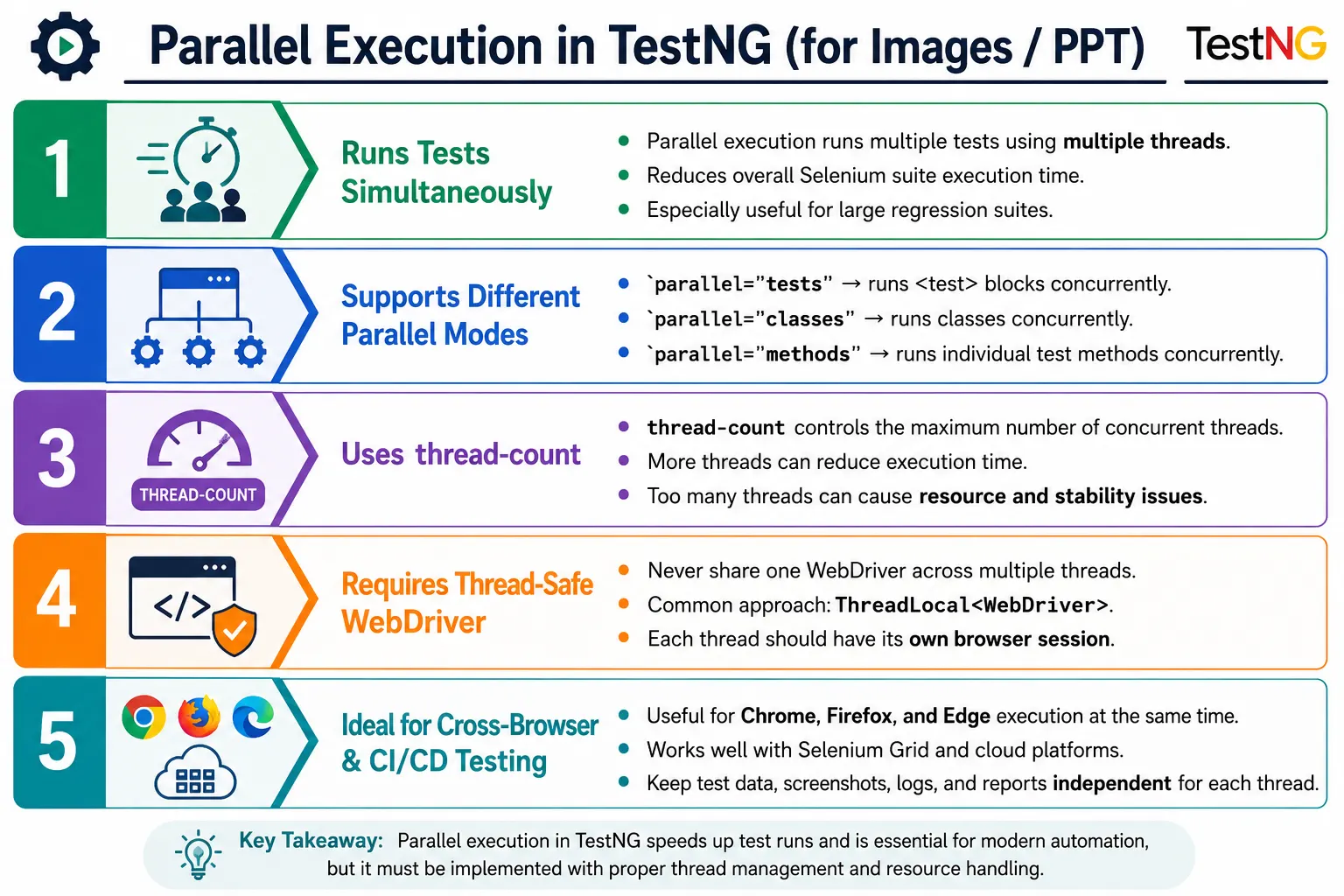
Parallel execution is important for large regression suites, cross-browser testing, CI/CD pipelines, cloud testing, Selenium Grid, BrowserStack, Sauce Labs, and enterprise automation frameworks. However, it is also one of the areas where weak framework design becomes visible quickly. Running tests in parallel is easy to configure, but running them reliably requires thread-safe WebDriver management, independent test data, clean reporting, and careful resource control.
1. What Is Parallel Execution?
Parallel execution means running multiple tests simultaneously using separate threads. In sequential execution, TestNG completes one test and then moves to the next. In parallel execution, TestNG creates a thread pool and assigns different tests, classes, methods, or instances to different threads.
Sequential:
Test 1
  Test 2
    Test 3
      Test 4

Parallel:
Thread 1 -> Test 1
Thread 2 -> Test 2
Thread 3 -> Test 3
Thread 4 -> Test 4
The goal is to reduce total execution time. If each test spends most of its time waiting for browser actions, page loads, network calls, and UI rendering, parallel execution can use machine resources more efficiently.
2. Why Parallel Execution Is Needed
Suppose a project has 100 Selenium tests and each test takes 30 seconds. Sequential execution takes around 3000 seconds, which is about 50 minutes. With 5 threads, the same suite may finish in roughly 10 minutes, assuming the machine, browser infrastructure, and application under test can handle the load.
This time saving is critical in CI/CD. A pull request build that takes one hour discourages frequent validation. A smoke suite that finishes in a few minutes gives faster feedback. Nightly regression runs also become more practical when tests can be distributed across threads or grid nodes.
3. How TestNG Runs Tests in Parallel
TestNG uses a thread pool. The thread-count attribute defines the maximum number of threads available for a suite. The parallel attribute defines what TestNG should distribute across those threads: test blocks, classes, methods, or instances.
<suite name="Parallel Suite" parallel="tests" thread-count="3">
</suite>
This configuration means TestNG can run up to three <test> blocks at the same time. If the suite has more than three test blocks, TestNG schedules them as threads become available.
4. Understanding thread-count
thread-count controls the maximum number of concurrent threads. It does not guarantee that every thread will always be busy. The actual behavior depends on the number of eligible tests and the selected parallel mode.
<suite name="Suite" parallel="classes" thread-count="5">
</suite>
A higher thread count does not always mean faster execution. If the local machine has limited CPU, memory, or browser capacity, too many threads can make tests slower and less stable. In cloud or Grid execution, the thread count should also match the available browser sessions.
5. Parallel Modes in TestNG
TestNG supports several parallel modes. The most common modes in Selenium projects are tests, classes, and methods. The instances mode is used less often and is usually relevant when class instances are created through factories or advanced data-driven designs.
parallel="tests"runs separate<test>blocks in parallel.parallel="classes"runs test classes in parallel.parallel="methods"runs test methods in parallel.parallel="instances"runs different instances of the same class in parallel.
6. Parallel by Tests
parallel="tests" is very common for cross-browser execution. Each <test> block can receive a different browser parameter, and TestNG can run those blocks simultaneously.
<suite name="Cross Browser Suite" parallel="tests" thread-count="3">
    <test name="Chrome Test">
        <parameter name="browser" value="chrome"/>
        <classes>
            <class name="tests.LoginTest"/>
        </classes>
    </test>

    <test name="Firefox Test">
        <parameter name="browser" value="firefox"/>
        <classes>
            <class name="tests.LoginTest"/>
        </classes>
    </test>

    <test name="Edge Test">
        <parameter name="browser" value="edge"/>
        <classes>
            <class name="tests.LoginTest"/>
        </classes>
    </test>
</suite>
This pattern is simple and readable. The same test class executes against different browsers, and each browser runs in a separate thread.
7. Parallel by Classes
parallel="classes" runs different test classes at the same time. This is useful when classes are independent feature modules such as login, search, cart, checkout, and payment.
<suite name="Parallel Classes" parallel="classes" thread-count="3">
    <test name="Regression Tests">
        <classes>
            <class name="tests.LoginTest"/>
            <class name="tests.SearchTest"/>
            <class name="tests.CartTest"/>
        </classes>
    </test>
</suite>
This mode works well when classes do not depend on each other. If one class creates data required by another class, parallel execution can fail because order is no longer guaranteed.
8. Parallel by Methods
parallel="methods" runs individual test methods in parallel. This can be fast, but it requires the strongest test independence. Methods inside the same class must not share mutable state, driver instances, page object instances, or test data.
<suite name="Parallel Methods" parallel="methods" thread-count="4">
    <test name="Method Tests">
        <classes>
            <class name="tests.LoginTest"/>
        </classes>
    </test>
</suite>
Use this mode carefully in Selenium UI automation. Many UI test classes were originally written assuming sequential execution. If they share fields or rely on method order, method-level parallelism can expose design problems.
9. Parallel by Instances
parallel="instances" is used when multiple instances of a test class are created. This can happen with TestNG factories or advanced data-driven patterns. It is less common in everyday Selenium frameworks, but it is useful when each instance represents a separate configuration or dataset.
The same thread-safety rules apply. Each instance should have its own state, or the shared state must be properly controlled. For most teams, tests and classes are easier starting points.
10. Cross-Browser Parallel Execution
Cross-browser execution is one of the best use cases for parallel="tests". Each browser gets a separate test block and parameter. The Java setup method reads the browser value and creates the correct driver.
@Parameters("browser")
@BeforeMethod
public void setup(String browser) {
    WebDriver driver;

    if (browser.equalsIgnoreCase("chrome")) {
        driver = new ChromeDriver();
    } else if (browser.equalsIgnoreCase("edge")) {
        driver = new EdgeDriver();
    } else {
        throw new RuntimeException("Invalid browser: " + browser);
    }

    DriverManager.setDriver(driver);
}
The browser parameter comes from XML. The driver instance should be stored in a thread-safe way so each thread uses its own browser session.
11. The Static WebDriver Problem
The most common mistake in parallel Selenium execution is using one shared static WebDriver. This works in sequential execution because only one test uses the driver at a time. In parallel execution, multiple threads try to use the same browser session, causing random failures, wrong page interactions, session conflicts, and browser switching problems.
// Bad practice for parallel execution
public static WebDriver driver;
If Thread 1 opens Chrome for a login test and Thread 2 replaces the same static driver with Edge for a search test, Thread 1 may suddenly start using the wrong browser session. The test failure may look like an element issue, but the real cause is shared driver state.
12. ThreadLocal WebDriver
ThreadLocal<WebDriver> is commonly used to give each thread its own WebDriver instance. Each thread stores and retrieves its own driver without interfering with other threads.
public class DriverManager {

    private static ThreadLocal<WebDriver> driver =
            new ThreadLocal<>();

    public static void setDriver(WebDriver webDriver) {
        driver.set(webDriver);
    }

    public static WebDriver getDriver() {
        return driver.get();
    }

    public static void removeDriver() {
        driver.remove();
    }
}
With this pattern, tests call DriverManager.getDriver() instead of using a shared static driver directly. Cleanup must call removeDriver() after quitting the browser so stale thread references are not retained.
13. Parallel Setup and Teardown
Parallel setup should create a new browser for the current thread. Teardown should quit and remove the driver for that same thread. This is commonly done in @BeforeMethod and @AfterMethod.
@BeforeMethod
public void setup() {
    WebDriver driver = new ChromeDriver();
    DriverManager.setDriver(driver);
    DriverManager.getDriver().manage().window().maximize();
}

@AfterMethod
public void tearDown() {
    DriverManager.getDriver().quit();
    DriverManager.removeDriver();
}
This ensures every test method receives a clean browser session. In cross-browser execution, the driver type can be selected from an XML parameter.
14. Parallel DataProvider Execution
TestNG DataProviders can also execute in parallel. This is configured using parallel = true in the DataProvider annotation. Each data row can be executed independently.
@DataProvider(name = "loginData", parallel = true)
public Object[][] loginData() {
    return new Object[][] {
            {"admin", "admin123"},
            {"user", "user123"},
            {"manager", "manager123"}
    };
}
Parallel DataProviders are useful for large data-driven tests, but every data row must be independent. If multiple rows use the same account, same email, same cart, or same file name, parallel execution can create data conflicts.
15. Data Provider Thread Count
TestNG also supports data-provider-thread-count at suite level. This controls the number of threads used for parallel DataProvider execution.
<suite name="DataProvider Parallel Suite" data-provider-thread-count="3">
    <test name="Login Data Tests">
        <classes>
            <class name="tests.LoginTest"/>
        </classes>
    </test>
</suite>
This setting is different from normal suite thread count. Use it when the suite has data-driven tests that are explicitly configured for parallel execution.
16. Printing Thread Information
Printing the current thread id is a simple way to confirm that tests are running in parallel. Different thread ids in output indicate that TestNG is assigning work to multiple threads.
@Test
public void testOne() {
    System.out.println(
            "Thread ID: " + Thread.currentThread().getId()
    );
}
Thread ids are also useful in logs, screenshots, and reports. They help diagnose whether a failure happened in a specific parallel execution path.
17. Selenium Grid and Parallel Execution
Parallel execution becomes more scalable when combined with Selenium Grid or a cloud provider. TestNG creates parallel threads. Each thread requests a browser session from Grid. Grid distributes sessions to available nodes such as Chrome, Firefox, and Edge machines.
TestNG Threads
  Selenium Grid Hub
    Chrome Node
    Firefox Node
    Edge Node
This avoids overloading one local machine with too many browsers. In enterprise frameworks, TestNG parallel execution and Grid are often used together for large regression and cross-browser suites.
18. CI/CD Parallel Execution
Parallel execution is valuable in CI/CD because build time matters. A Jenkins, GitHub Actions, GitLab CI, or Azure DevOps pipeline can run a TestNG suite with multiple threads and generate reports quickly.
However, CI agents have resource limits. If a build agent has only two CPU cores and limited memory, running ten local browsers may create unstable results. In CI, thread count should be chosen based on infrastructure capacity, not only the number of tests.
19. Shared Test Data Problems
Parallel tests must not fight over the same data. If two tests log in as the same user and change profile settings at the same time, one test may fail because the other changed the state. If two tests create an order with the same id, one may fail because the application prevents duplicates.
Good parallel data design uses unique records, isolated test accounts, generated emails, or environment reset utilities. Tests should be able to run in any order and at the same time without breaking each other.
20. Shared File and Screenshot Problems
Parallel execution can also cause file conflicts. If every failed test saves a screenshot as Failure.png, one thread can overwrite another thread's screenshot. Logs, downloads, reports, and temporary files have the same risk.
public String screenshotName(String testName) {
    return testName + "_Thread_"
            + Thread.currentThread().getId()
            + ".png";
}
A better naming strategy includes test name, timestamp, browser, thread id, or unique run id. This keeps evidence useful when multiple tests fail at the same time.
21. Page Objects in Parallel Execution
Page objects should not share a global driver. Each page object should receive the driver for the current thread. If page objects are static or reused across threads, one test may interact with another test's browser.
A clean approach is to create page objects inside each test or setup flow using DriverManager.getDriver(). Avoid storing page objects in static fields. Parallel-safe page objects are lightweight and tied to the current browser session.
22. Thread Count Strategy
Choosing thread count is an engineering decision. Start small, such as two or three threads, and observe stability. Increase gradually only when the framework, application, and infrastructure can support it.
Too many threads can create false failures. The application under test may throttle requests, the machine may run out of memory, browsers may slow down, and reports may become noisy. The best thread count is the one that reduces time without reducing trust in results.
23. Sequential vs Parallel Execution
Sequential execution is simpler. It uses one thread, consumes fewer resources, and avoids many thread-safety problems. Parallel execution is faster, but it requires stronger design. The decision is not simply speed versus slowness; it is simplicity versus scalability.
- Sequential execution is easier to debug and useful during development.
- Parallel execution is better for large suites and CI/CD feedback.
- Sequential execution has lower infrastructure demand.
- Parallel execution requires thread-safe driver, data, files, logs, and reports.
24. Parallel Modes Comparison
tests: best for cross-browser execution using separate XML test blocks.classes: best for independent feature modules.methods: best for highly independent methods in mature frameworks.instances: best for factory or instance-based designs.
For most Selenium teams, parallel="tests" is the safest first step, especially for cross-browser runs. parallel="classes" is also common when classes are independent.
25. Common Issues
- Using a shared static WebDriver.
- Sharing page objects across threads.
- Sharing mutable static variables.
- Using the same test data in multiple threads.
- Saving screenshots or downloads with the same filename.
- Using utilities that are not thread-safe.
- Depending on test execution order.
- Increasing thread count beyond machine or Grid capacity.
26. Common Beginner Mistakes
Beginners often enable parallel execution in XML before changing the framework design. The suite may start faster, but failures appear randomly. The root cause is usually shared state. A static driver, static test data, static page object, or shared report object can behave unpredictably when accessed by multiple threads.
Another mistake is assuming waits will fix parallel failures. If the issue is shared driver state or data collision, adding waits only hides the real problem. Thread safety must be solved directly.
27. Best Practices
- Use
ThreadLocal<WebDriver>or another thread-safe driver management pattern. - Create one browser instance per thread.
- Quit and remove the driver in teardown.
- Keep tests independent and order-free.
- Avoid shared mutable variables.
- Use unique test data for parallel runs.
- Use unique screenshot, log, and download filenames.
- Start with a small thread count and increase gradually.
- Use Selenium Grid or cloud platforms for large-scale browser parallelism.
- Monitor application and infrastructure capacity during parallel runs.
28. Real Project Example
Consider a regression suite with 500 Selenium tests. Sequential execution may take two hours. After introducing TestNG parallel execution with a stable ThreadLocal<WebDriver> design and Grid capacity, the same suite may finish in 20 or 30 minutes. This changes how the team uses automation. Instead of waiting for long feedback cycles, testers and developers can run larger validation more frequently.
The important point is that the improvement comes from both configuration and framework design. The XML starts parallel execution, but thread-safe architecture makes it reliable.
29. Driver Factory Design
A mature parallel framework usually separates driver creation from test classes. Instead of creating ChromeDriver or EdgeDriver directly inside every test, a driver factory receives the browser name and returns the correct WebDriver instance. This keeps browser selection in one place and makes it easier to add remote execution later.
public class DriverFactory {

    public WebDriver createDriver(String browser) {
        if (browser.equalsIgnoreCase("chrome")) {
            return new ChromeDriver();
        }

        if (browser.equalsIgnoreCase("edge")) {
            return new EdgeDriver();
        }

        throw new RuntimeException("Unsupported browser: " + browser);
    }
}
The test setup can call the factory, store the returned driver in ThreadLocal<WebDriver>, and continue with the test. This design avoids duplicate browser initialization code and keeps parallel execution easier to maintain.
30. Remote Driver and Cloud Execution
When the suite grows, local parallel execution may not be enough. Running many browsers on one laptop or one CI machine consumes CPU, memory, and disk quickly. Remote execution solves this by sending browser sessions to Selenium Grid or cloud platforms. The same TestNG parallel XML can create multiple threads, and each thread can create a RemoteWebDriver session.
In this model, TestNG controls concurrency, the framework controls driver creation, and Grid or the cloud provider controls browser distribution. This architecture is scalable because the CI agent does not need to host every browser locally. It only coordinates the run and collects results.
Cloud platforms also make browser and operating system combinations easier to manage. Instead of installing every browser version locally, the framework can pass capabilities such as browser name, browser version, platform name, and screen resolution. Parallel execution then becomes a practical way to validate many environments in a shorter time.
31. Reporting in Parallel Execution
Reporting needs special care in parallel execution. A report should clearly show which test ran on which thread, browser, environment, and dataset. If several tests fail at the same time, the report must keep their logs and screenshots separate. Otherwise, debugging becomes confusing.
Many frameworks include the test name, browser, timestamp, and thread id in screenshot names. Reports such as Extent Reports or Allure should attach evidence to the correct test node. If the reporting utility uses shared static objects, it must be designed carefully so parallel tests do not write into the wrong report entry.
Good reports also show configuration values. When a failure occurs only in Edge or only in a cloud browser version, that information should be visible immediately. Parallel execution saves time only when failures remain easy to diagnose.
32. Logging in Parallel Execution
Logs are more difficult to read when many threads write messages at the same time. A plain log statement such as "Clicked login button" is not enough. It should be clear which test, browser, and thread produced the message.
logger.info(
        "Thread: " + Thread.currentThread().getId()
                + " - Opening login page"
);
Some teams create separate log files per test or per thread. Others include a run id and thread id in every log line. The exact approach depends on the logging framework, but the goal is the same: parallel logs should be traceable. When a CI run fails, the team should not need to guess which browser produced which message.
33. Debugging Parallel Failures
Parallel failures should be analyzed differently from normal functional failures. First, check whether the failure is reproducible in sequential execution. If the same test passes sequentially but fails only in parallel, the likely cause is shared state, test data collision, timing pressure, environment load, or infrastructure capacity.
Next, check the WebDriver lifecycle. Confirm that every thread creates, uses, quits, and removes its own driver. Then check page objects, data utilities, screenshot utilities, and report utilities for static mutable fields. Any shared object that stores changing state can cause unstable behavior in parallel runs.
Also check whether the application itself can support the parallel load. If ten UI tests hit the same test environment at the same time, response times may increase. That can expose real performance limitations or create automation timeouts. The solution may be better waits, lower thread count, stronger test data isolation, or more stable test infrastructure.
34. Migrating from Sequential to Parallel
Teams should not convert a full suite to parallel execution in one step. A safer migration starts with a small group of stable tests. Enable parallel="tests" or parallel="classes" with a low thread count, validate the driver lifecycle, and review reports. Once the pattern is stable, expand gradually.
During migration, remove hidden dependencies between tests. If one test creates a user and another test depends on that user, those tests are not independent. If tests rely on execution order, parallel execution can break them. Independent tests can run alone, in any order, and at the same time.
Refactoring for parallel execution often improves overall framework quality. It forces cleaner setup, cleaner teardown, better data management, better reporting, and clearer test boundaries. Even if a suite continues to run sequentially sometimes, the framework becomes more robust.
35. Resource and Infrastructure Planning
Parallel execution should match available resources. On a local machine, each browser consumes memory and CPU. On a Grid, each browser consumes a node slot. On a cloud platform, each browser consumes a paid parallel session. Setting thread-count="20" when only five browser sessions are available will not produce reliable speed improvement.
Resource planning should consider the application under test as well. If the test environment has limited server capacity, very high parallel execution may slow down the application and cause timeouts. This is not always an automation problem. It may be a test environment capacity issue. A good framework lets the team tune thread count per suite and per environment.
For CI/CD, it is common to use fewer threads for pull request validation and more threads for nightly runs on stronger infrastructure. This keeps fast feedback stable while still allowing large regression suites to finish in a reasonable time.
36. When Not to Use Parallel Execution
Parallel execution is not always the best choice. During local debugging, sequential execution is often easier because logs are simpler and only one browser is active. Tests that are not independent should not run in parallel until their dependencies are removed. Suites that use fragile shared data should be stabilized first.
It is also unwise to use high parallelism against unstable environments. If the test environment is slow, frequently restarted, or shared with many teams, parallel execution may increase noise. Start with reliability, then optimize runtime. A fast suite that produces unreliable results is not useful.
37. Enterprise Readiness Checklist
- Driver management uses one WebDriver per thread.
- Driver cleanup calls quit and removes thread-local references.
- Page objects are not shared globally across tests.
- Test data is independent for each thread.
- Reports attach screenshots and logs to the correct test.
- Screenshot and download filenames are unique.
- Thread count matches machine, Grid, or cloud capacity.
- Tests do not depend on execution order.
- CI jobs clearly select the intended TestNG XML file.
- Failures are reviewed for thread-safety issues before being treated as product bugs.
38. Interview Perspective
A short interview answer is: parallel execution in TestNG allows multiple tests to run at the same time using multiple threads, reducing execution time and improving CI/CD feedback.
A stronger real-time answer is: in my Selenium framework, I use TestNG parallel execution for cross-browser and regression testing. For cross-browser execution, I use parallel="tests" in testng.xml and pass browser values as parameters. Each thread gets its own WebDriver instance using ThreadLocal<WebDriver>, and teardown quits and removes the driver. I also keep test data, screenshots, logs, and reports independent so parallel tests do not interfere with each other. For larger suites, I combine TestNG parallel execution with Selenium Grid or cloud platforms.
39. Practical Decision Guide
Choose parallel execution only after deciding what problem you are solving. If the goal is cross-browser validation, start with parallel="tests" and one browser per test block. If the goal is faster module execution, use parallel="classes" after confirming classes are independent. If the goal is maximum speed in a mature suite, consider parallel="methods", but only after removing shared state and order dependency.
Do not increase thread count blindly. Measure execution time, failure rate, machine resource usage, Grid queue time, and application response time. The best configuration is the one that gives faster feedback while preserving confidence in the result. In automation, speed is valuable only when the result remains trustworthy.
A good team treats parallel execution as a controlled framework capability, not as a quick XML switch. The XML starts concurrency, but driver lifecycle, data isolation, reporting, logging, and infrastructure planning decide whether the suite is actually production-ready.
40. Key Takeaway
Parallel execution makes Selenium automation faster by running tests simultaneously. It is configured in testng.xml using attributes such as parallel, thread-count, and data-provider-thread-count. The most common modes are tests, classes, and methods.
For Selenium, the most important rule is simple: do not share one WebDriver instance across multiple threads. Use one driver per thread, keep test data independent, avoid shared mutable state, and generate unique evidence files. Parallel execution can dramatically reduce runtime, but it is reliable only when the framework is designed for thread safety.