Page Title & URL Validation
Page Title and URL validation are basic but critical checkpoints in Selenium automation. They confirm that navigation succeeded, the correct page loaded, and the application is in the expected state before deeper interactions.
These validations are performed using Selenium WebDriver APIs and are commonly used in setup checks, navigation verification, and smoke tests.
In Selenium automation, title and URL validation are often the first guardrails after a navigation step. They help answer a simple but important question: is the browser actually on the page where the test expects it to be? Before a test clicks a button, enters data, verifies a table, or checks a message, it should have confidence that the correct page has loaded. If the browser is on a login page, error page, wrong environment, expired-session page, or unexpected redirect, deeper element checks may fail with misleading symptoms.
These validations are not meant to replace detailed functional assertions. A correct URL does not prove that every feature on the page works, and a correct title does not prove that the right data is displayed. Instead, they act as navigation checkpoints. They confirm context before the test performs more specific validations. This is why title and URL checks are common in smoke tests, login tests, redirect tests, environment sanity checks, and page-object navigation helpers.
A practical automation engineer uses title and URL validation with the right level of strictness. Exact title matching is useful when the title is stable. Partial title matching is safer when the title includes dynamic content. Exact URL matching is useful for static pages, but URL contains, starts-with, ends-with, or regular expression checks are often better for real applications that include query parameters, tokens, locale prefixes, session redirects, or environment-specific hostnames.
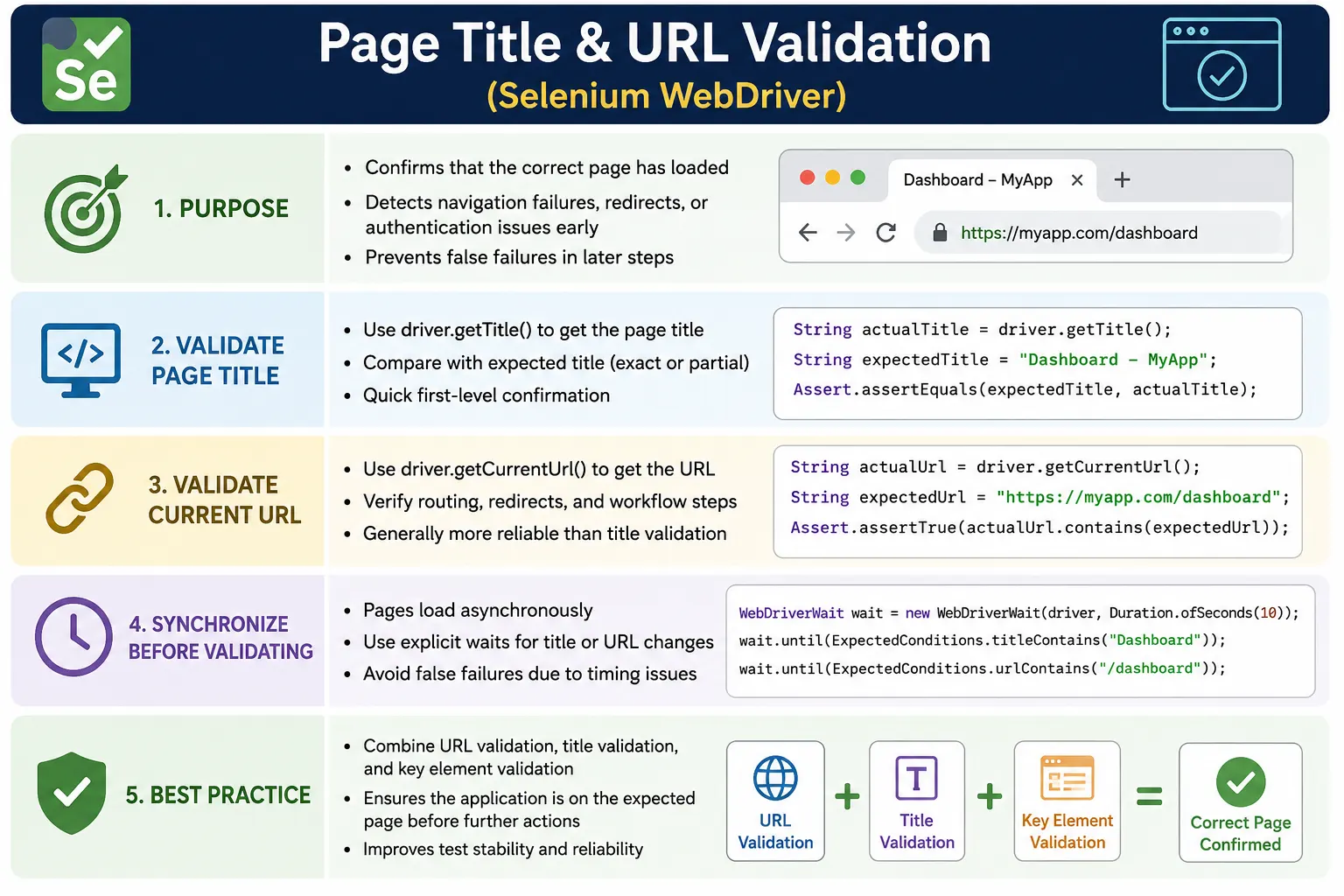
1. Why Title & URL Validation Matters
- Confirms correct navigation, such as login to dashboard or checkout to payment
- Detects redirects, auth failures, and error pages early
- Prevents false failures later due to wrong page context
- Acts as a guardrail before interacting with elements
In real projects, many flaky failures are caused by skipping this step.
Skipping navigation validation can cause false failures later in a test. Imagine a test logs in and then immediately tries to click a dashboard menu. If login silently failed and the browser stayed on the login page, the menu locator fails. The failure message may say the menu was not found, but the real issue was that the browser never reached the dashboard. A URL or title check after login would identify the true problem earlier and with a clearer error.
Title and URL validation are also useful for detecting redirects. Applications often redirect users based on authentication, authorization, environment, feature flags, user role, or route configuration. If a user lacks access, the application may redirect to an access-denied page. If a session expires, it may redirect to login. If the site enforces HTTPS, it may redirect from HTTP to HTTPS. URL validation makes these outcomes visible instead of letting the test fail later with unrelated element errors.
These checks also improve debugging. When a failure report logs the actual title and URL, the tester can immediately see where the browser was at the time of failure. This is much faster than opening a screenshot and guessing whether the page is correct. A good framework captures the actual title, actual URL, expected condition, and screenshot when a navigation validation fails.
2. Page Title Validation
2.1 What is Page Title
- The text shown in the browser tab
- Defined by the HTML <title> tag
- Often unique per page (but not always)
2.2 Getting the Page Title
- WebDriver provides a direct API to read it
- Returns a String
2.3 Validation Strategies
- Exact match: when title is static
- Contains match: when title includes dynamic parts (user name, env)
2.4 When to Use Title Validation
- After application launch
- After login
- After major navigation events
- In smoke/sanity tests
2.5 Limitations of Title Validation
- Titles may be generic across pages
- Dynamic titles can change
- Not reliable alone for deep verification
Best practice: Use title validation as a first-level check, not the only check.
The page title comes from the HTML <title> element. Browsers display it in the tab, and
Selenium reads it using driver.getTitle(). It is easy to access and easy to assert, which makes
it attractive for smoke checks. A homepage may have a title like "Example Domain", a dashboard may include
the product name, and an admin page may include the section name. When titles are maintained consistently,
they provide a quick signal that navigation worked.
Title validation becomes less reliable when applications use generic titles across many pages. Some single-page applications keep the same title for every route, such as the product name only. In that case, title validation can confirm the application shell loaded, but it cannot distinguish between dashboard, profile, settings, and reports. Some applications update titles asynchronously after route changes, which means a title assertion may need an explicit wait.
Dynamic titles require flexible assertions. A title may include the environment name, user name, record ID,
unread notification count, or localized text. Exact matching is brittle in those cases. A contains check
such as title.contains("Dashboard") may be more stable. The test should assert the meaningful
part of the title, not every incidental detail that may change outside the behavior under test.
3. URL Validation
3.1 What is URL Validation
- Verifying the browser’s current address
- Confirms routing, redirects, and environment correctness
3.2 Getting the Current URL
- WebDriver provides a direct API
- Returns the full URL as a String
3.3 Validation Strategies
- Exact match: static URLs (rare)
- Contains match: most common and stable
- Starts-with match: environment-aware (dev/qa/prod)
- Regex match: advanced routing validation
3.4 When URL Validation Is Critical
- After login (auth redirects)
- After form submission
- During multi-step workflows
- When deep links are involved
URL validation is often more reliable than title validation.
URL validation uses driver.getCurrentUrl() to read the browser's current address. This is often
more useful than title validation because URLs usually reflect routing. After login, the URL may contain
/dashboard. After opening an order, it may contain /orders/12345. After checkout,
it may contain /payment or /confirmation. These route segments are strong clues
about where the browser is.
Exact URL validation is safest when the full URL is truly stable. Public static pages may fit this pattern.
Real applications often do not. Query parameters, campaign tags, redirect tokens, CSRF state values, session
identifiers, locale prefixes, and environment hostnames can make exact matching fragile. In those cases,
partial validation is better. For example, asserting that the URL contains /dashboard is usually
more maintainable than asserting the complete URL including all parameters.
Starts-with validation helps across environments. A test may run against dev, QA, staging, and production URLs. The path may be the same, but the host changes. Conversely, the host may be fixed while the route changes. A framework can combine environment-aware base URLs with path validation. Regular expressions are useful for advanced cases, such as verifying that an order details URL ends with a numeric ID.
4. Title vs URL - Which Is Better?
| Aspect | Title | URL |
|---|---|---|
| Stability | Medium | High |
| Dynamic changes | Common | Less common |
| Routing verification | No | Yes |
| User-visible | Yes | No |
| Best usage | Initial checks | Navigation confirmation |
Real-project rule: Use URL validation as primary, title as secondary.
URL validation is usually stronger for routing because it reflects the browser address. Title validation is still useful because it checks something user-visible. A user may not inspect the URL carefully, but they do see the browser tab title. For basic page-load confidence, using both can be valuable: URL confirms route, title confirms browser-tab identity. For deeper validation, add element-level checks such as headings, breadcrumbs, page-specific controls, or success messages.
The best choice depends on the risk. If the risk is wrong routing, validate the URL. If the risk is the page title being wrong for SEO, accessibility, or usability, validate the title. If the risk is a login redirect, validate URL and a dashboard-specific element. If the risk is a stale page after refresh, validate URL, title, and a refreshed content marker. The validation should match the behavior being tested.
5. Synchronization Considerations (Very Important)
- Title/URL may not update immediately after navigation
- Validation should be done after page readiness
- Prefer explicit waits when navigation is asynchronous
Failing to wait leads to false negatives.
Navigation is not always instantaneous. After clicking a login button, the browser may submit a request, receive a redirect, load a new route, and update the title. A single-page application may change the URL before it finishes rendering the page. If the test reads title or URL too early, it may capture the previous page state and fail even though the application would have reached the correct page a moment later. This is a false negative caused by missing synchronization.
Selenium provides explicit wait conditions such as titleIs, titleContains,
urlToBe, urlContains, and urlMatches. These are better than manually
sleeping because they wait only until the expected condition is true or the timeout expires. They also make
the test intent clear. A line like wait.until(ExpectedConditions.urlContains("/dashboard"))
directly states what navigation outcome the test expects.
Even after title or URL becomes correct, the page may not be fully ready for interaction. Title and URL are navigation-level checks. Element-level readiness may still require waiting for a page heading, table, button, loading indicator, or API-driven content. A stable test often combines URL or title wait with a page-specific element wait before continuing.
6. Real-Project Usage Patterns
- Validate URL in setup to confirm correct environment
- Validate title after login to confirm landing page
- Use URL contains for stability
- Centralize validations in utility methods
In real frameworks, title and URL validation often appear in reusable places. A base test may open the
configured application URL and validate that the current URL starts with the expected environment host. A
login page object may submit credentials and wait until the URL contains /dashboard. A checkout
flow may validate that the browser moved from cart to payment to confirmation. These checks make navigation
assumptions explicit.
Centralized utilities help keep validation consistent. Instead of writing raw assertions everywhere, a
framework may provide methods such as assertUrlContains("/dashboard"),
waitForTitleContains("Dashboard"), or assertCurrentPage("Orders"). These methods
can log actual values, apply waits, and produce clearer failure messages. Good utilities do not hide the
assertion; they standardize the behavior around it.
7. Common Beginner Mistakes
- Asserting exact title for dynamic pages
- Skipping waits before validation
- Using title validation alone for critical flows
- Hardcoding full URLs (breaks across environments)
Another beginner mistake is validating too late. If a test performs many actions on the wrong page and only checks the URL at the end, the failure may be noisy and harder to diagnose. Validate important navigation transitions as they happen. After login, confirm dashboard. After clicking payment, confirm payment route. After submitting an order, confirm confirmation route. These small checkpoints make failures localized.
A second mistake is validating meaningless text. If every page title is simply the product name, asserting that title after every navigation adds little value. In that case, URL and page-specific elements are more useful. Conversely, if URLs are hidden behind hash routing or generic paths, title and element validation may become more important. The test should use the signal that actually distinguishes the page.
8. Framework Best Practices
- Keep expected titles/URL parts in constants or config
- Use soft assertions where appropriate
- Log actual title and URL on failure
- Combine with element-level validation for confidence
Expected values should be maintainable. Environment hostnames belong in configuration. Route fragments may belong in constants near page objects. Expected titles may belong in page classes if they are part of page identity. Hardcoding long URLs across many tests makes suites brittle. When a route changes, the team should update one well-known place instead of searching through dozens of test files.
Failure messages should include the actual title and URL. A weak assertion says only "expected true but was false." A useful assertion says "Expected URL to contain /dashboard, but actual URL was https://app.com/login?expired=true." That message immediately explains that the user was redirected to login because the session expired. Logging turns validation failures into actionable information.
Soft assertions can be useful when a smoke test wants to report both title and URL mismatches together. Hard assertions are better when the test cannot safely continue on the wrong page. For example, if login does not reach dashboard, stop the test immediately. If a page metadata test is checking title and URL as independent facts, soft assertions may provide a fuller report.
9. Interview Perspective
Short Answer:
Page title validation checks the browser tab title, while URL validation verifies the current page address to ensure correct navigation in Selenium.
Real-Time Answer:
In Selenium automation, we validate page titles and URLs after navigation to confirm that the expected page has loaded. URL validation is generally more reliable, especially for routing and authentication flows, while title validation is used as a quick confirmation.
A stronger interview answer adds synchronization and limitations. You can explain that getTitle()
returns the browser tab title and getCurrentUrl() returns the current address. Because modern
applications may update title and URL asynchronously after navigation, explicit waits should be used for
stable validation. You can also mention that title and URL checks are guardrails, not complete functional
proof, so they should be combined with page-specific element validation when needed.
10. Key Takeaway
- Title and URL validation are navigation checkpoints
- URL validation is more reliable
- Always synchronize before validating
- Use them as guards, not final proof
Validate where you are before testing what you do.
The core principle is context first, action second. Selenium tests interact with the page currently loaded in the browser. If that context is wrong, every later action becomes questionable. Title and URL validation give the framework a quick way to confirm context. Used well, they reduce flaky failures, improve diagnostics, and make navigation assumptions visible.
Do not overuse them as a substitute for real assertions. A dashboard URL does not prove the dashboard data is correct. A product title does not prove the product details rendered. Use title and URL validation to confirm location, then use element and data validation to confirm behavior.
11. Redirect Validation in Real Applications
Redirect validation is one of the strongest use cases for URL checks. Many applications intentionally move a user from one URL to another. A public HTTP URL may redirect to HTTPS. A protected route may redirect to login. A successful login may redirect to dashboard. A user without permission may redirect to an access denied page. A legacy route may redirect to a new route after a product redesign. Selenium can validate all of these outcomes by reading the current URL after navigation completes.
The key is to assert the expected final state. If the test opens http://app.com, it may be
correct for the final URL to start with https://. If the test opens
/admin as an unauthenticated user, it may be correct for the final URL to contain
/login. In these cases, the initially requested URL and final current URL are intentionally
different. A good test makes that expectation clear instead of assuming any redirect is a failure.
Redirect validation should usually use waits. Authentication redirects, SSO redirects, and payment redirects
can take time. Reading the URL immediately after the first request may capture an intermediate URL. Selenium
waits such as urlContains or urlMatches allow the browser to complete the redirect
chain before the assertion is evaluated. When redirect tests fail, log both the requested URL and the final
URL so the path is easier to understand.
12. Environment-Aware URL Validation
Hardcoding full URLs is fragile because most automation suites run against more than one environment. The same test may run against dev, QA, staging, and production-like systems. The hostnames differ, but the page paths may be the same. If a test asserts the full production URL while running in QA, the test fails even though the application behaved correctly. Environment-aware validation avoids that problem.
A common approach is to keep the base URL in configuration and validate route fragments separately. The
framework may assert that the current URL starts with the configured base URL and contains an expected path
such as /dashboard. This confirms both environment correctness and routing correctness without
tying the test to a single hardcoded host. For multi-tenant applications, the framework may also validate
tenant identifiers, locale prefixes, or region segments.
Query parameters require care. Some parameters are meaningful and should be asserted. Others are generated
dynamically, such as tokens, timestamps, session identifiers, or tracking codes. Exact matching a full query
string can make tests brittle. A better pattern is to parse or check only the parameters that matter to the
requirement. For example, validate that status=success exists after payment, but avoid asserting
a dynamic transaction token unless the test owns that value.
13. Title Validation and SEO Checks
Page title validation is not only useful for navigation. It can also support basic SEO and usability checks. A meaningful browser tab title helps users identify pages and helps search engines understand content. In content-heavy or public-facing applications, title validation can confirm that important pages expose the expected title text. This is especially useful after template changes, localization updates, or route migrations.
However, SEO-style title checks should be separated from functional navigation checks. A login test should not fail only because a marketing suffix changed in the title, unless that title is part of the requirement. A metadata validation test can be stricter, while a functional test can use contains matching for the stable part of the title. This separation keeps tests focused and reduces unnecessary maintenance.
Localization also affects title validation. If the same application runs in English, French, Hindi, or other languages, the title may change by locale. In that case, expected titles should come from localized test data or the test should validate route and page elements instead. A single English exact-title assertion will not work across localized environments.
14. Failure Diagnostics and Reporting
Title and URL validations are most valuable when their failures are easy to interpret. A good framework does not simply fail an assertion. It reports what was expected, what was actual, what navigation step happened before the assertion, and ideally includes a screenshot. If a test expected title to contain "Dashboard" but actual title was "Login", the failure clearly points to authentication or session state. If actual URL is a server error page, the issue may be environment health.
Logging should be consistent. Before important navigation, log the target page or action. After navigation, log the current title and URL. On failure, attach those values to the report. This is especially helpful in CI, where the tester cannot watch the browser. A single line showing the actual URL can save minutes of investigation.
Screenshots complete the picture. Title and URL show browser context, while screenshots show visual state. Sometimes the URL is correct but the page displays an error message or loading spinner. Sometimes the title is correct but the user is unauthorized. Combining title, URL, screenshot, and page-specific element checks gives the clearest failure evidence.
15. Designing Validation Utilities
Validation utilities should be small, explicit, and readable. A method named
waitForUrlContains("/dashboard") is clearer than a generic method that hides what it checks.
A utility can apply an explicit wait, log the actual URL, and throw a clear assertion message. It can also
normalize URLs if the framework needs to ignore trailing slashes or environment host differences.
Avoid making utilities too magical. If a single method validates title, URL, heading, cookies, and user role without making that obvious, failures become hard to diagnose. Prefer utilities that match one purpose: validate title, validate URL, validate route, validate page identity, or validate environment. Higher-level page checks can combine these smaller utilities when appropriate.
Page objects can expose page identity methods such as isAt() or waitUntilLoaded().
These methods may validate URL fragments, title fragments, and key elements together. That gives tests a
simple way to confirm they are on the expected page while keeping the validation logic close to the page it
describes.
16. Practical Decision Checklist
Before writing a title or URL assertion, ask what risk the assertion is meant to reduce. If the risk is wrong page route, validate URL. If the risk is wrong browser tab title or SEO metadata, validate title. If the risk is unauthorized access, validate redirect URL and access-denied or login page content. If the risk is a page not fully loaded, validate title or URL first and then wait for a page-specific element.
Next, choose the right strictness. Use exact match only when the value is stable. Use contains or starts-with when environments or dynamic pieces vary. Use regex when the route has a predictable pattern but dynamic values. Avoid asserting values that the test does not own, such as random tokens or timestamps, unless the purpose of the test is to verify them.
Finally, decide whether the assertion should stop the test. If the browser is on the wrong page, a hard assertion is usually correct because further actions are unsafe. If the test is collecting metadata quality across multiple pages, soft assertions may be better because they report all mismatches in one run. Good validation is not only about what to check; it is also about how failure should affect the test flow.
17. Combining Title, URL, and Page Identity
The strongest page confirmation usually combines more than one signal. A URL fragment confirms routing, a
title fragment confirms browser-tab identity, and a page-specific element confirms that the visible UI is
ready. For example, after login, a framework may wait for the URL to contain /dashboard, check
that the title contains Dashboard, and verify that a dashboard heading or user menu is visible.
Each signal covers a different risk.
This layered approach is especially useful in applications with shared layouts. Many pages may use the same header, sidebar, and title suffix. A URL may be correct while the page still shows a loading skeleton. A title may be correct while an error panel is displayed. A heading may be visible while the URL belongs to an unexpected route. Combining checks does not mean adding unnecessary assertions everywhere; it means choosing enough evidence for the importance of the page transition.
Page objects are a good place for this logic. A page object's waitUntilLoaded() method can wait
for URL, title, and a unique element. Test methods then stay readable: login, wait for dashboard, verify
dashboard behavior. This keeps navigation validation consistent while preventing every test from repeating
low-level title and URL code.
This approach also improves long-term maintenance because page identity rules live with the page they describe. When a route, title, or key heading changes, the update is made in one page object instead of many separate tests.
18. Page Title & URL Validation Examples
1. Validate Page Title (Exact Match)
String actualTitle = driver.getTitle();
Assert.assertEquals(actualTitle, "Example Domain");
Use When: Title is static and predictable.
2. Validate Page Title (Partial Match)
String title = driver.getTitle();
Assert.assertTrue(title.contains("Example"));
Best Practice: Prefer contains() for dynamic titles.
3. Validate Current URL (Exact Match)
String actualUrl = driver.getCurrentUrl();
Assert.assertEquals(actualUrl, "https://example.com/");
4. Validate Current URL (Contains)
String url = driver.getCurrentUrl();
Assert.assertTrue(url.contains("example"));
Use When: Query params / tokens are present.
5. Validate Title After Navigation
driver.navigate().to("https://example.com");
Assert.assertEquals(driver.getTitle(), "Example Domain");
6. Validate URL After Navigation
driver.navigate().to("https://example.com");
Assert.assertTrue(driver.getCurrentUrl().endsWith(".com/"));
7. Validate Title Using Explicit Wait (Recommended)
WebDriverWait wait = new WebDriverWait(driver, Duration.ofSeconds(10));
wait.until(ExpectedConditions.titleIs("Example Domain"));
Why: Avoids flaky tests on slow pages.
8. Validate Title Contains (Wait)
WebDriverWait wait = new WebDriverWait(driver, Duration.ofSeconds(10));
wait.until(ExpectedConditions.titleContains("Example"));
9. Validate URL Using Explicit Wait
WebDriverWait wait = new WebDriverWait(driver, Duration.ofSeconds(10));
wait.until(ExpectedConditions.urlContains("example"));
10. Validate Secure URL (HTTPS Check)
String url = driver.getCurrentUrl();
Assert.assertTrue(url.startsWith("https"));
Interview Favorite: Security & compliance check.
11. Validate Redirected URL
driver.get("http://example.com");
Assert.assertTrue(driver.getCurrentUrl().startsWith("https://"));
12. Validate Title After Login (Real Project)
driver.get("https://app.com/login");
// login steps
Assert.assertTrue(driver.getTitle().contains("Dashboard"));
13. Validate URL After Login
Assert.assertTrue(driver.getCurrentUrl().contains("/dashboard"));14. Validate URL Before & After Action
String before = driver.getCurrentUrl();
driver.findElement(By.id("profile")).click();
String after = driver.getCurrentUrl();

Assert.assertNotEquals(before, after);
15. Validate Title Is Not Empty (Smoke Test)
Assert.assertFalse(driver.getTitle().isEmpty());16. Soft Assertion for Title & URL (TestNG)
SoftAssert soft = new SoftAssert();

soft.assertTrue(driver.getTitle().contains("Example"));
soft.assertTrue(driver.getCurrentUrl().contains("example"));

soft.assertAll();
17. Validate Title in JUnit 5
Assertions.assertEquals("Example Domain", driver.getTitle());18. Validate URL in JUnit 5
Assertions.assertTrue(driver.getCurrentUrl().contains("example"));19. Page Title Validation in Utility Method
public void validateTitle(WebDriver driver, String expected) {
    Assert.assertEquals(driver.getTitle(), expected);
}
20. URL Validation in Utility Method
public void validateUrlContains(WebDriver driver, String keyword) {
    Assert.assertTrue(driver.getCurrentUrl().contains(keyword));
}
21. Validate Title After Browser Refresh
driver.navigate().refresh();
Assert.assertEquals(driver.getTitle(), "Example Domain");
22. Validate URL After Back Navigation
driver.navigate().back();
Assert.assertTrue(driver.getCurrentUrl().contains("home"));
23. Common Interview Mistake
driver.getTitle("Example"); // invalidCorrect:
driver.getTitle(); // correct24. Validation with Logging (Framework Style)
String title = driver.getTitle();
System.out.println("Page Title: " + title);
Assert.assertTrue(title.contains("Example"));
25. Interview Summary - Page Title & URL Validation
driver.getTitle();
driver.getCurrentUrl();
Key Points:
- Use contains() for dynamic pages
- Prefer explicit waits for stability
- Validate after navigation, login, redirects
- Common in smoke & sanity tests