Page Object Design Pattern in Selenium Java
The Page Object Design Pattern is a software design pattern used in Selenium automation to represent each web page, major screen, or reusable component as a separate Java class. Each page class encapsulates the page's locators, page actions, navigation behavior, and page-specific business operations. Test classes then focus on scenarios, test data, and validations instead of directly working with raw Selenium APIs.
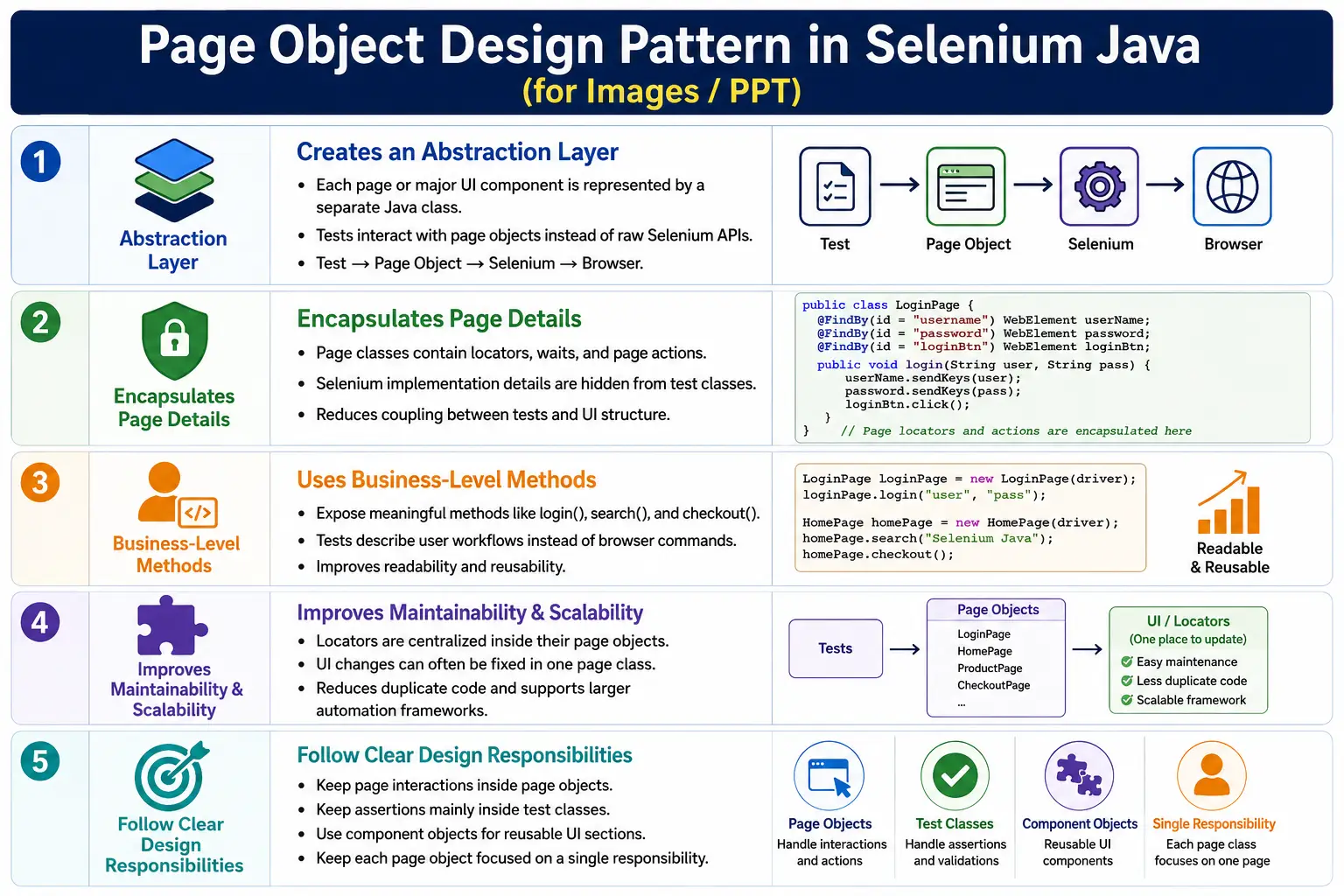
The Page Object Model, usually called POM, is the practical implementation of this design pattern in Selenium frameworks. The design pattern is the concept; POM is the way automation teams apply that concept in code. Today, this design pattern is considered a foundation for scalable Selenium Java frameworks because it separates test logic from page interaction details.
1. What Is the Page Object Design Pattern?
The Page Object Design Pattern is an approach where each page or meaningful UI component of a web application is represented by a dedicated class. This class owns the element locators and exposes methods that describe what users can do on that page. The test class does not directly locate elements. It calls page object methods.
- Page object classes contain locators.
- Page object classes contain page action methods.
- Page object classes hide Selenium implementation details.
- Test classes call page methods and perform assertions.
- Navigation methods can return the next page object.
This creates an abstraction layer between test logic and browser interaction. Tests express business intent, while page objects handle Selenium details.
2. Why This Design Pattern Was Introduced
Selenium tests often start as simple scripts. A tester writes a locator, enters text, clicks a button, and asserts a result. That works for a small proof of concept, but it becomes expensive when the same interaction is repeated across many test classes.
driver.findElement(By.id("username")).sendKeys("admin");
driver.findElement(By.id("password")).sendKeys("admin123");
driver.findElement(By.id("login")).click();
If this login code appears in 100 tests, any login page change may require 100 updates. The Page Object Design Pattern solves this by moving login locators and login actions into one LoginPage class. Tests reuse that class instead of duplicating browser interaction logic.
3. Core Idea
The core idea is simple: tests should not directly depend on page structure. Tests should depend on page objects. A page object becomes the public interface for a page. If the internal page structure changes, the page object can be updated while tests remain stable.
Without Page Object:
Test -> Selenium -> Browser

With Page Object:
Test -> Page Object -> Selenium -> Browser
The page object acts as a controlled abstraction. It exposes meaningful operations such as login(), search(), addToCart(), and checkout(), instead of forcing tests to know every locator and click sequence.
4. Real-World Analogy
Think of an ATM. A customer interacts with the ATM screen. The customer does not directly interact with the bank database, hardware controller, card reader internals, or server APIs. The screen provides a usable interface. Internally, the system performs complex operations.
In Selenium automation, the page object plays a similar role. The test interacts with LoginPage, HomePage, or CartPage. It does not need to know every selector, wait condition, or Selenium call. That complexity is hidden inside the page object.
5. Framework Architecture
A Selenium framework using this design pattern usually contains test classes, page objects, utility classes, driver management, listeners, reports, and configuration. Page objects are not the whole framework, but they are the layer that models application screens.
Automation Framework
  Test Classes
  Page Objects
  Component Objects
  Utility Classes
  Driver Manager
  Listeners
  Reports
  Selenium WebDriver
Each layer has a responsibility. Test classes validate scenarios. Page objects perform page interactions. Utilities provide reusable technical helpers. Driver manager creates and manages browser sessions. Listeners and reports handle execution evidence.
6. Test Class Responsibilities
Test classes should describe what scenario is being validated. They should prepare test data, call page methods, and perform assertions. They should not contain repeated locators or raw Selenium action chains unless there is a very specific reason.
- Define the test scenario.
- Use test data.
- Call page object methods.
- Perform assertions.
- Keep the test flow readable.
7. Page Object Responsibilities
Page objects should describe how a page is used. They contain locators, wait-aware actions, page state methods, and navigation methods. A page object should know the page it represents, not the whole application.
- Store page locators.
- Encapsulate clicks, typing, selections, and reads.
- Provide business-level page methods.
- Return page state such as messages, headings, and visibility.
- Return the next page object after navigation when appropriate.
8. Example Without the Design Pattern
The following test mixes locators, browser actions, and assertion in one method. This is simple but not scalable.
@Test
public void verifyLogin() {
    driver.findElement(By.id("username")).sendKeys("admin");
    driver.findElement(By.id("password")).sendKeys("admin123");
    driver.findElement(By.id("login")).click();

    Assert.assertEquals(driver.getTitle(), "Dashboard");
}
When every test is written this way, locator changes, wait changes, and workflow changes spread across the suite. Maintenance becomes slow and risky.
9. Example With the Design Pattern
With the Page Object Design Pattern, login behavior is moved into LoginPage.
public class LoginPage {

    private WebDriver driver;

    private By username = By.id("username");
    private By password = By.id("password");
    private By loginButton = By.id("login");

    public LoginPage(WebDriver driver) {
        this.driver = driver;
    }

    public void login(String user, String pass) {
        driver.findElement(username).sendKeys(user);
        driver.findElement(password).sendKeys(pass);
        driver.findElement(loginButton).click();
    }
}
@Test
public void verifyLogin() {
LoginPage loginPage = new LoginPage(driver);
loginPage.login("admin", "admin123");
}The test is now cleaner. It expresses the scenario without exposing login page internals.
10. Encapsulation
Encapsulation is one of the key object-oriented principles behind this pattern. The page object hides implementation details. The test does not need to know whether the login button is found by id, CSS selector, XPath, or accessibility attribute. It only calls loginPage.login().
This reduces coupling between tests and UI structure. When page implementation changes, the page object absorbs the change. Tests should change only when the business behavior changes.
11. Business Methods
A page object should expose business-level methods where possible. Low-level methods such as enterUsername(), enterPassword(), and clickLogin() may be useful internally, but tests are often clearer when they call login().
public void login(String user, String pass) {
    enterUsername(user);
    enterPassword(pass);
    clickLogin();
}
The method name should reflect what the user is doing. This makes test methods read like user workflows instead of browser command lists.
12. Navigation Between Pages
Many page actions navigate to another page. A successful login may open the home page. Clicking checkout may open the checkout page. Submitting payment may open the confirmation page. Page object methods can model this navigation by returning the next page object.
public HomePage login(String user, String pass) {
    driver.findElement(username).sendKeys(user);
    driver.findElement(password).sendKeys(pass);
    driver.findElement(loginButton).click();

    return new HomePage(driver);
}
This makes page transitions visible in the test. The returned object tells the reader what page should appear next.
13. Reusable Page Objects
A single page object can be reused by many tests. Login functionality may be used by login tests, search tests, checkout tests, order tests, admin tests, and profile tests. Instead of repeating login steps everywhere, those tests reuse LoginPage.
Reuse is one of the largest benefits of the design pattern. The more frequently a page is used, the more value the page object provides.
14. Locator Centralization
Locator centralization means each locator has one clear home. If the login button locator changes, LoginPage is updated. Tests do not need to be searched and edited one by one.
private By loginButton = By.id("btnLogin");This does not eliminate locator maintenance, but it reduces the scope of change. It also makes ownership clear: login locators belong to the login page object.
15. Explicit Waits in Page Objects
Page objects are a good place to apply explicit waits because they know which elements must be ready before an action can happen. A click method can wait for clickability. A type method can wait for visibility. A read method can wait for text to appear.
public void clickLogin() {
    WebDriverWait wait =
            new WebDriverWait(driver, Duration.ofSeconds(10));

    wait.until(
            ExpectedConditions.elementToBeClickable(loginButton)
    ).click();
}
The test does not need to repeat this wait logic. It calls the page method and trusts the page object to interact safely.
16. Assertions Should Stay in Tests
Page objects should normally not contain assertions. A page object should return information, and the test should decide what to assert. This keeps page objects reusable across many scenarios.
public String getPageTitle() {
    return driver.getTitle();
}
Assert.assertEquals(
loginPage.getPageTitle(),
"Dashboard"
);If assertions are hidden inside page objects, tests become less flexible. The same page state may need different assertions in different scenarios.
17. Page Objects Should Not Contain Test Logic
A page object should not become a full end-to-end workflow class. A method named loginAndSearchAndCheckout() inside LoginPage violates page responsibility. Login page should handle login. Search page should handle search. Cart page should handle cart actions. Payment page should handle payment actions.
When a workflow spans many pages, the test can coordinate the flow or a separate workflow layer can be introduced. The page object itself should remain focused.
18. Folder Structure
src/test/java
  base
    BaseTest.java
    BasePage.java
  pages
    LoginPage.java
    HomePage.java
    SearchPage.java
    ProductPage.java
    CartPage.java
  components
    HeaderComponent.java
    FooterComponent.java
    MenuComponent.java
  tests
    LoginTest.java
    SearchTest.java
  utilities
    DriverFactory.java
    WaitUtil.java
This structure separates responsibilities. Pages model pages, components model reusable UI sections, tests model scenarios, and utilities model reusable technical support.
19. Component Objects
Not every reusable UI area is a full page. Headers, footers, navigation menus, filter panels, modal dialogs, product cards, and tables can be represented as component objects. Component objects improve modularity and prevent page classes from becoming too large.
For example, if the same header appears on every page, place header-specific locators and methods in HeaderComponent. Page classes can use the component rather than duplicating header logic.
20. BasePage Design
A BasePage class can hold common interaction helpers such as click, type, get text, wait for visibility, wait for clickability, and scroll. Page objects can extend BasePage to reuse these methods.
public class BasePage {

    protected WebDriver driver;
    protected WebDriverWait wait;

    public BasePage(WebDriver driver) {
        this.driver = driver;
        this.wait = new WebDriverWait(
                driver,
                Duration.ofSeconds(10)
        );
    }

    protected void click(By locator) {
        wait.until(
                ExpectedConditions.elementToBeClickable(locator)
        ).click();
    }

    protected void type(By locator, String value) {
        WebElement element =
                wait.until(
                        ExpectedConditions.visibilityOfElementLocated(locator)
                );
        element.clear();
        element.sendKeys(value);
    }
}
Do not overload BasePage with unrelated utilities. It should support page interaction, not become a dumping ground for framework code.
21. PageFactory Comparison
PageFactory is a Selenium helper implementation that uses annotations such as @FindBy to initialize web elements. The Page Object Design Pattern is broader than PageFactory. You can implement the design pattern using By locators, PageFactory, or other locator strategies.
- Page Object Design Pattern is the architectural concept.
- PageFactory is one Selenium-supported implementation style.
Bylocators with explicit waits are common in modern frameworks.- PageFactory is still found in many older Selenium projects.
Many modern teams prefer By locators because they provide clearer control over element lookup timing and explicit waits.
22. Advantages
- Better code organization.
- Higher reusability.
- Centralized locator maintenance.
- Cleaner test scripts.
- Easier debugging.
- Improved framework scalability.
- Better collaboration between automation team members.
23. Disadvantages
The pattern requires more initial development effort. More classes must be created and maintained. If the team does not follow good design discipline, page objects can become oversized classes with unrelated responsibilities. This is why naming, structure, and review matter.
The disadvantage is not the pattern itself. The risk is poor implementation. A clean page object improves a framework; a badly designed page object simply moves messy code from tests into page classes.
24. Common Beginner Mistakes
- Creating one large page class for the whole application.
- Putting assertions inside page objects.
- Keeping locators public.
- Duplicating locators across pages and tests.
- Returning
voidwhen an action clearly navigates to another page. - Mixing utility logic with page interaction logic.
- Exposing raw WebElement fields to test classes.
- Using static WebDriver inside page objects.
25. Best Practices
- Use one page object for one page or major screen.
- Use private locators inside page classes.
- Expose business-level public methods.
- Keep assertions mainly in test classes.
- Return the next page object after navigation when appropriate.
- Use explicit waits inside page actions.
- Split large pages into component objects.
- Keep page objects focused on a single responsibility.
- Use
BasePageonly for common page interaction helpers.
26. Traditional Selenium vs Page Object Design Pattern
Traditional Selenium scripts keep locators and actions inside tests. That approach is quick but hard to scale. The Page Object Design Pattern moves Selenium interaction details into page classes. This makes tests more readable and reduces maintenance cost.
- Traditional Selenium: locators inside tests.
- Page Object Design Pattern: locators inside page objects.
- Traditional Selenium: duplicate browser actions.
- Page Object Design Pattern: reusable page methods.
- Traditional Selenium: low readability in large suites.
- Page Object Design Pattern: business-oriented test flow.
27. Real Project Example
In an e-commerce framework, a test may move through login, home, search, product, cart, checkout, and payment pages. Each page handles its own responsibilities.
HomePage home =
        loginPage.login("admin", "admin123");

SearchResultsPage results =
        home.search("Laptop");

ProductPage product =
        results.openFirstProduct();

CartPage cart =
        product.addToCart();

CheckoutPage checkout =
        cart.checkout();
The test reads like a workflow. The implementation details stay inside the page objects.
28. Design Pattern vs POM
The Page Object Design Pattern is the idea of representing pages as objects. POM is the common Selenium implementation of that idea. In daily automation discussions, people often use both terms interchangeably, but the distinction is useful in interviews.
You can say: the Page Object Design Pattern is the architectural principle, and Page Object Model is how we apply it in Selenium Java by creating page classes with locators and methods.
29. Applying the Pattern Incrementally
When a team already has Selenium tests with direct driver.findElement() calls, the safest way to introduce this pattern is incremental refactoring. Start with one repeated workflow such as login. Create LoginPage, move login locators into it, create a login() method, and update a few tests to use that method. Once the pattern is stable, continue with the next page.
This gradual approach is better than rewriting the whole suite at once. It allows the team to agree on naming, locator strategy, wait strategy, return types, and page object structure before the pattern spreads across the framework. A rushed rewrite often creates inconsistent page classes that are harder to maintain than the original scripts.
30. Designing Good Public Methods
The public methods of a page object are its contract with test classes. Poorly designed methods expose too much detail. Good methods describe user intent. For example, enterUsername() and clickLogin() may be useful as private helper methods, but most tests should call login(). A product page should expose methods such as addToCart(), selectSize(), and getProductPrice().
Public methods should be stable. If the internal locator changes, the method name should not change unless the business behavior changes. This is what makes the page object a useful abstraction. Test classes depend on behavior, not on internal Selenium details.
Method names should also avoid vague wording. Names such as doClick(), process(), or performAction() do not explain the user behavior. Names such as submitLogin(), applyPriceFilter(), or openCart() are much clearer.
31. Handling Page State
Page objects should expose page state in a reusable way. Instead of asserting inside the page object, return values that tests can assert. A login page can return the error message. A dashboard page can return the heading. A search results page can return the number of results. A cart page can return the cart total.
public String getErrorMessage() {
    return getText(errorMessage);
}

public boolean isLoginButtonDisplayed() {
    return driver.findElement(loginButton).isDisplayed();
}
This design allows many tests to reuse the same page methods with different expected values. The page object reports what the page shows. The test decides whether that result is correct.
32. Managing Large Pages
Some application pages are naturally large. A dashboard may contain filters, tables, charts, menus, widgets, alerts, and modal dialogs. If everything is placed into one page class, the class becomes a god object. It technically follows the pattern, but it becomes hard to understand and maintain.
Large pages should be split by responsibility. A dashboard page can own high-level page behavior and delegate sections to component objects. A table component can handle row count, cell value, sorting, and pagination. A filter component can handle dropdowns and checkboxes. A modal component can handle confirmation dialogs.
This keeps each class focused. Smaller classes are easier to test, easier to update, and easier for new team members to understand.
33. Component Object Example
A component object uses the same principle as a page object, but it represents part of a page rather than a full page. For example, a header component may contain logo, navigation links, profile menu, logout link, and cart icon.
public class HeaderComponent extends BasePage {

    private By profileMenu = By.id("profile");
    private By logoutLink = By.id("logout");

    public HeaderComponent(WebDriver driver) {
        super(driver);
    }

    public void logout() {
        click(profileMenu);
        click(logoutLink);
    }
}
Any page that displays the header can use this component. This reduces duplicate header locators across page classes.
34. Wait Strategy and the Design Pattern
Waits are part of page interaction design. If waits are scattered across tests, every test must know page timing details. A better approach is to put waits inside page methods or shared base page helpers. The page object knows when an element should be clickable, visible, or present.
For example, checkoutPage.placeOrder() can wait for the place order button to be clickable. searchResultsPage.getResultCount() can wait until result items are visible. This keeps tests readable and reduces timing duplication.
Avoid using fixed sleeps inside page objects. Fixed sleeps make tests slow and unreliable. Explicit waits based on expected conditions are more stable because they respond to actual page behavior.
35. Parallel Execution Considerations
Page objects must be designed carefully for parallel execution. Do not store WebDriver as a global static field inside a page class. Do not reuse one page object instance across tests running on different threads. Each test execution should create page objects using the driver assigned to that execution.
If the framework uses ThreadLocal<WebDriver>, the current driver can be passed into page constructors. The page object should then use only that driver instance. This prevents one test from accidentally interacting with another test's browser session.
Parallel-safe page objects are usually simple instance objects. They hold the driver reference passed to them, expose methods, and do not rely on shared mutable static state.
36. Relationship with Other Framework Layers
The Page Object Design Pattern is one layer in a larger automation architecture. It should not replace every other layer. Driver setup belongs in a base test or driver manager. Data reading belongs in data utilities. Reporting belongs in listeners or report utilities. Configuration belongs in configuration utilities. Page objects belong to page interaction.
When these responsibilities are mixed, the framework becomes hard to maintain. For example, a page object should not read Excel data, start a browser, write an Extent Report entry, and assert a business rule all in one method. That kind of method becomes difficult to reuse and difficult to test.
37. Code Review Checklist
- Does the page class represent one page or one clear component?
- Are locators private and centralized?
- Are public methods business-oriented?
- Are raw Selenium calls kept out of test classes?
- Are assertions mostly kept in test classes?
- Are waits handled consistently?
- Does navigation return the next page object when useful?
- Is the page class free from unrelated utility and reporting logic?
- Can the page object work safely in parallel execution?
38. When the Pattern Is Overused
The Page Object Design Pattern should simplify automation, not make it heavy. For a very small disposable script, creating many page classes may be unnecessary. For a long-term framework, the pattern is valuable. The decision should match the lifespan and complexity of the automation project.
The pattern can also be overused when every tiny UI element becomes a separate class. Component objects are useful for reusable or complex sections, but creating a class for every button or label creates unnecessary complexity. Use page objects and components where they reduce duplication or clarify responsibility.
39. Maintenance Strategy
Page objects should be maintained alongside application changes. When a page changes, update the related page object first. If a test fails because a locator changed, do not patch the test with a new locator. Fix the page object. This preserves the abstraction boundary.
Teams should also periodically review large page classes. If a page object keeps growing, split reusable parts into components. If methods are unused, remove them. If names are unclear, rename them. Page objects are production test code and deserve the same maintenance discipline as application code.
40. Practical Design Decision Guide
A useful design question is: who should know this detail? If the detail is a locator, the page object should know it. If the detail is how to click or type safely, BasePage or a wait helper can know it. If the detail is what result is correct for a scenario, the test should know it. If the detail is where test data comes from, the data layer should know it. This question prevents responsibility mixing.
Another useful question is: will this method be reused by multiple tests? If yes, it likely belongs in a page object or component. If the method represents a one-time special setup flow, it may belong in a test helper or workflow class instead. Not every sequence of actions should be forced into one page class.
Page object methods should also match the language of the product. If users "submit an application", name the method submitApplication(). If users "apply a coupon", name it applyCoupon(). Business-oriented names make tests easier to read, easier to review, and easier to explain in interviews.
41. Team Collaboration Benefits
The Page Object Design Pattern also helps teams collaborate. When multiple automation engineers work on the same framework, page ownership becomes clearer. One person can update CheckoutPage while another works on SearchPage. Tests that use those pages benefit from the centralized updates.
Developers and testers can also discuss automation failures more clearly. Instead of saying "the XPath failed in test 43", the team can say "the checkout page place order action failed." This shifts the conversation from low-level selectors to application behavior. That is a sign of a healthier automation design.
For onboarding, page objects make the framework easier to learn. A new tester can open the pages package and understand which screens are automated. A clean page object structure acts like a map of the application.
42. Interview Perspective
A short interview answer is: the Page Object Design Pattern is a software design pattern where each web page is represented by a separate class containing page locators and business methods. It improves code reusability, maintainability, readability, and scalability.
A stronger real-time answer is: in my Selenium framework, I implement the Page Object Design Pattern by creating one Java class for each page or reusable component. Each class encapsulates locators, waits, and business actions such as login(), search(), or checkout(). Test classes call these methods and perform assertions. When a page transition occurs, the method returns the next page object. This minimizes duplication, centralizes locator maintenance, and makes the framework easier to scale.
43. Key Takeaway
The Page Object Design Pattern introduces an abstraction layer between tests and Selenium WebDriver. Test classes communicate with page objects. Page objects communicate with WebDriver. WebDriver communicates with the browser.
Use this pattern to keep locators and page actions out of test classes, expose business-level methods, return next page objects when navigation happens, keep assertions in tests, and split reusable UI sections into component objects. The pattern is the foundation of most enterprise Selenium frameworks because it turns fragile scripts into structured, maintainable automation architecture.
The real value of the pattern is not only cleaner code today. It is lower maintenance cost tomorrow. When application pages change, a well-designed page object layer localizes the impact and keeps the test suite stable, readable, reusable, maintainable, practical, and easier to scale.