PageFactory in Selenium Java
PageFactory is a Selenium support class that simplifies one implementation style of the Page Object Model. It allows page classes to declare web elements using annotations such as @FindBy, and then initialize those elements using PageFactory.initElements(). Instead of locating an element every time with driver.findElement(), the page class can interact with annotated WebElement fields.
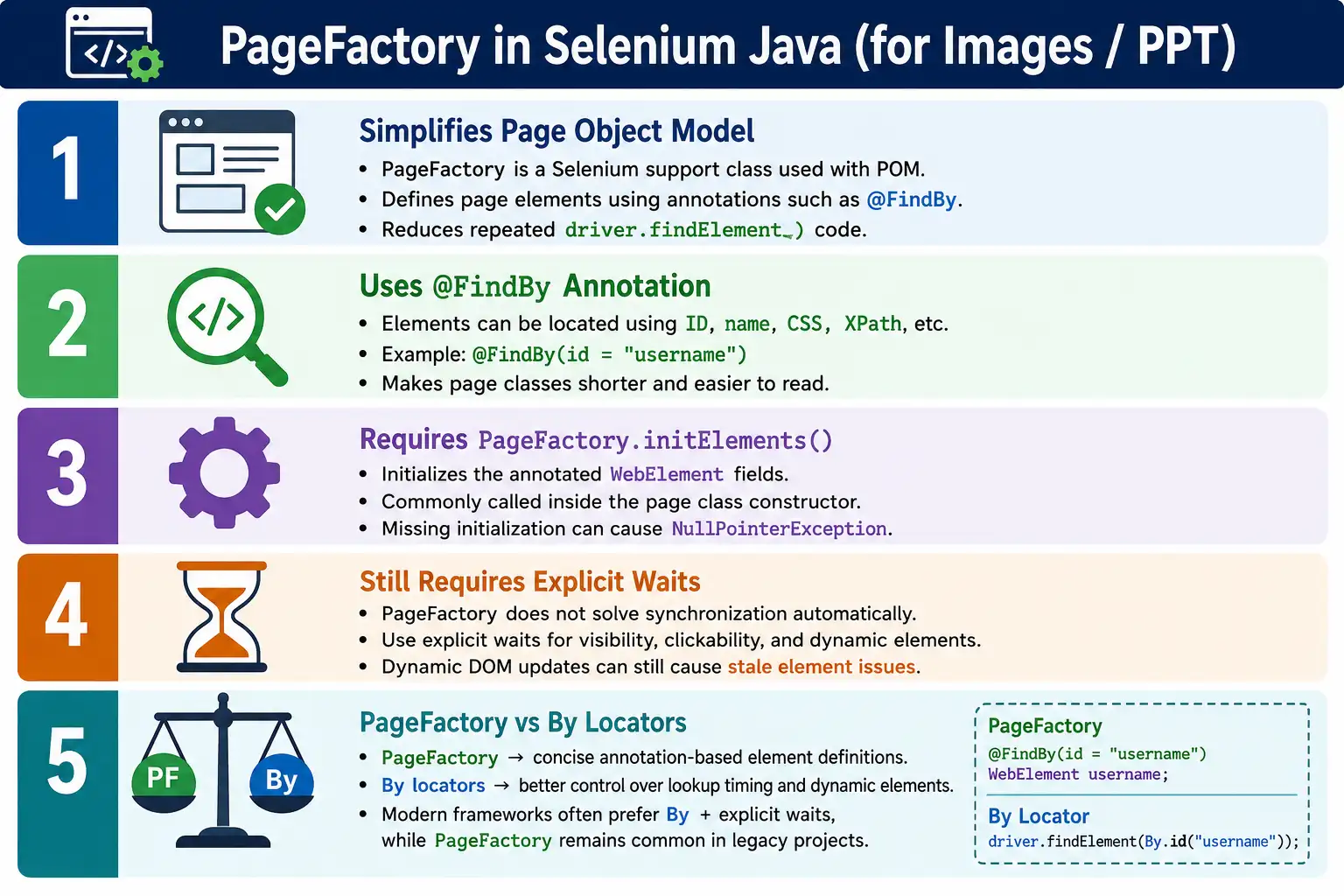
PageFactory was very popular in Selenium frameworks for many years because it made page classes look shorter and cleaner. It is still available and still appears in many real projects. However, many modern Selenium Java frameworks now prefer By locators with explicit waits because that approach gives stronger control over element lookup, synchronization, stale elements, and dynamic pages. Understanding PageFactory is still important because interviewers ask about it and many legacy automation frameworks continue to use it.
1. What Is PageFactory?
PageFactory is a helper class provided by Selenium. It initializes web elements declared with annotations such as @FindBy. In a PageFactory-based page object, fields represent elements on the page. The constructor calls PageFactory.initElements(driver, this) so Selenium can prepare those fields for use.
@FindBy(id = "username")
private WebElement username;
After initialization, page methods can call username.sendKeys("admin") instead of repeatedly calling driver.findElement(By.id("username")). This reduces visible boilerplate code inside the page class.
2. Why PageFactory Was Introduced
Before PageFactory, page object classes often contained repeated calls to driver.findElement(). Even when the Page Object Model was used, the page methods could still look verbose because every action repeated the locator lookup.
public void login() {
    driver.findElement(By.id("username")).sendKeys("admin");
    driver.findElement(By.id("password")).sendKeys("admin123");
    driver.findElement(By.id("login")).click();
}
PageFactory introduced annotation-based element definitions. The element field is declared once, initialized through PageFactory, and then used directly in methods. This made many page classes easier to read, especially in older Selenium frameworks.
3. How PageFactory Works
PageFactory scans the page object class, finds fields annotated with @FindBy, and creates proxy objects for those fields. These proxy objects are associated with the WebDriver. The actual element lookup is generally delayed until the element is used. This is why PageFactory is often described as using lazy initialization.
Test Class
  LoginPage
    @FindBy fields
      PageFactory.initElements()
        WebElement proxies
          Browser interaction
This is different from manually storing a By locator. With PageFactory, the class stores a WebElement field. With traditional POM using By, the class stores locator definitions and performs lookup when needed.
4. Required Imports
import java.time.Duration;
import java.util.List;

import org.openqa.selenium.WebDriver;
import org.openqa.selenium.WebElement;
import org.openqa.selenium.support.FindBy;
import org.openqa.selenium.support.How;
import org.openqa.selenium.support.PageFactory;
import org.openqa.selenium.support.ui.ExpectedConditions;
import org.openqa.selenium.support.ui.WebDriverWait;
The most important imports are FindBy and PageFactory. Other imports depend on whether the page uses waits, lists of elements, or the How locator style.
5. Basic PageFactory Example
public class LoginPage {

    private WebDriver driver;

    @FindBy(id = "username")
    private WebElement username;

    @FindBy(id = "password")
    private WebElement password;

    @FindBy(id = "login")
    private WebElement loginButton;

    public LoginPage(WebDriver driver) {
        this.driver = driver;
        PageFactory.initElements(driver, this);
    }
}
The constructor is important. Without PageFactory.initElements(driver, this), the annotated fields are not prepared correctly for use.
6. What initElements Does
PageFactory.initElements(driver, this) scans the current page object instance and initializes annotated fields. It checks the fields in the class, reads annotations such as @FindBy(id = "username"), creates element proxies, and connects those proxies to the WebDriver.
If this call is missing and the test calls username.sendKeys("admin"), the field may be null and cause a NullPointerException. Forgetting initElements() is one of the most common beginner mistakes with PageFactory.
7. Using PageFactory Elements
public void login(String user, String pass) {
    username.sendKeys(user);
    password.sendKeys(pass);
    loginButton.click();
}
This is the main reason PageFactory looks attractive. The page method is short and direct. The locator details are kept above the method in annotations.
8. Test Using the Page Object
@Test
public void verifyLogin() {
    LoginPage loginPage = new LoginPage(driver);
    loginPage.login("admin", "admin123");
}
The test still follows the Page Object Model. It does not know how the username field is located. It only knows that LoginPage has a login() method.
9. Supported Locator Strategies
@FindBy supports common Selenium locator strategies. These include id, name, class name, tag name, link text, partial link text, CSS selector, and XPath.
@FindBy(id = "username")
private WebElement username;

@FindBy(name = "email")
private WebElement email;

@FindBy(css = "#login")
private WebElement loginButton;

@FindBy(xpath = "//input[@id='username']")
private WebElement usernameByXpath;

@FindBy(linkText = "Forgot Password")
private WebElement forgotPassword;
The same locator quality rules apply. Prefer stable, readable locators. Avoid brittle XPath expressions when a cleaner id, name, CSS selector, or test-specific attribute is available.
10. Using the How Class
PageFactory also supports a How style. It is less common than direct annotation attributes, but it may appear in legacy frameworks.
@FindBy(how = How.ID, using = "username")
private WebElement username;
This means the same thing as @FindBy(id = "username"). Most modern code uses the shorter direct style because it is easier to read.
11. Lists of Elements
PageFactory can initialize lists of elements. This is useful for links, menu items, table rows, product cards, and search results.
@FindBy(tagName = "a")
private List<WebElement> links;
public int getLinkCount() {
return links.size();
}When working with lists, remember that dynamic pages can change after the list is first used. If the DOM updates frequently, By locators may provide better control because the framework can re-locate the list at the moment of use.
12. Complete Login Example
public class LoginPage {

    private WebDriver driver;

    @FindBy(id = "username")
    private WebElement username;

    @FindBy(id = "password")
    private WebElement password;

    @FindBy(id = "loginBtn")
    private WebElement loginButton;

    public LoginPage(WebDriver driver) {
        this.driver = driver;
        PageFactory.initElements(driver, this);
    }

    public DashboardPage login(String user, String pass) {
        username.clear();
        username.sendKeys(user);
        password.clear();
        password.sendKeys(pass);
        loginButton.click();

        return new DashboardPage(driver);
    }
}
This is a typical PageFactory page object. The page owns the element annotations and exposes a business method.
13. PageFactory with Explicit Wait
PageFactory does not remove the need for explicit waits. Dynamic applications still need synchronization. Before clicking or typing, wait until the element is in the expected state.
public void clickLogin() {
    WebDriverWait wait =
            new WebDriverWait(driver, Duration.ofSeconds(10));

    wait.until(
            ExpectedConditions.elementToBeClickable(loginButton)
    ).click();
}
This is safer than calling loginButton.click() immediately. PageFactory gives cleaner element access, but timing problems still need proper waits.
14. Lazy Initialization
PageFactory uses proxy objects. The real element is generally located when the field is used, not necessarily at the exact moment initElements() is called. This lazy behavior can be helpful, but it can also confuse beginners. The field may look initialized, but the element lookup still happens during interaction.
Lazy initialization does not mean stale element problems disappear. If the DOM changes after an element is located, the element can still become stale. Dynamic pages still require careful synchronization and sometimes re-location strategies.
15. BasePage with PageFactory
Some frameworks call PageFactory.initElements() inside a BasePage constructor. Child page classes call super(driver), and the base constructor initializes fields.
public class BasePage {

    protected WebDriver driver;

    public BasePage(WebDriver driver) {
        this.driver = driver;
        PageFactory.initElements(driver, this);
    }
}
public class LoginPage extends BasePage {
@FindBy(id = "username")
private WebElement username;
public LoginPage(WebDriver driver) {
super(driver);
}
}This reduces repeated initialization code, but the team must understand that page fields are initialized through the base constructor.
16. PageFactory and Encapsulation
Even when using PageFactory, element fields should usually be private. Test classes should not directly access page elements. The page class should expose methods that represent page behavior.
@FindBy(id = "logo")
private WebElement logo;

public boolean isLogoDisplayed() {
    return logo.isDisplayed();
}
This keeps the page object responsible for page details. Tests receive information through methods rather than handling WebElements directly.
17. Assertions and PageFactory
PageFactory does not change the normal POM rule: keep assertions in test classes. Page objects can return text, boolean state, page title, error message, or count values. Tests should compare those values with expected results.
public String getErrorMessage() {
    return errorMessage.getText();
}
Assert.assertEquals(
loginPage.getErrorMessage(),
"Invalid credentials"
);This keeps page objects reusable across many test scenarios.
18. PageFactory vs Traditional POM
Traditional POM often stores By locators. PageFactory stores annotated WebElement fields. Both are ways to implement page objects. The pattern is the same, but the element management style differs.
- Traditional POM uses
By username = By.id("username"). - PageFactory uses
@FindBy(id = "username") WebElement username. - Traditional POM calls
driver.findElement(locator)when needed. - PageFactory uses initialized WebElement fields.
19. PageFactory vs By Locators
The comparison matters in modern Selenium work. PageFactory is concise, but By locators often give more control. With By locators, a method can wait for an element and locate it at the exact moment of interaction. This is useful when the DOM changes often.
- PageFactory gives cleaner syntax for stable pages.
Bylocators give clearer control over lookup timing.- PageFactory can be more sensitive to stale element issues on dynamic pages.
Bylocators are often easier to re-locate after DOM updates.- Modern frameworks commonly prefer
Byplus explicit waits.
20. Is PageFactory Still Recommended?
PageFactory is still supported, and many existing frameworks use it. It is important to understand and maintain it when working on legacy automation projects. However, for new enterprise frameworks, many teams choose By locators with explicit waits because modern web applications are highly dynamic.
The right answer is context-dependent. If a project already uses PageFactory consistently and the application is stable, continuing with it may be reasonable. If the team is designing a new framework for a dynamic single-page application, By locators may be a better default.
21. Common Beginner Mistakes
- Forgetting to call
PageFactory.initElements(). - Declaring elements but never initializing the page object.
- Mixing
@FindByfields and duplicatedriver.findElement()calls without a reason. - Using only implicit waits and ignoring explicit waits.
- Putting assertions inside page classes.
- Making WebElement fields public.
- Assuming PageFactory prevents stale elements.
- Using brittle XPath locators inside annotations.
22. Best Practices
- Call
PageFactory.initElements(driver, this)in every PageFactory page object or base page constructor. - Keep WebElement fields private.
- Expose business methods such as
login(),searchProduct(), andcheckout(). - Use explicit waits before interacting with dynamic elements.
- Keep assertions in test classes.
- Use PageFactory consistently if the project follows this pattern.
- Prefer stable locators such as id, name, CSS, or test attributes where available.
- Evaluate
Bylocators for new dynamic frameworks.
23. Real Project Usage
In a real project, PageFactory page classes may exist for login, home, search, product, cart, checkout, and payment pages. Each page initializes its elements through PageFactory.initElements() and exposes business methods.
pages
  LoginPage
  HomePage
  SearchPage
  ProductPage
  CartPage
  CheckoutPage
This is still a Page Object Model framework. PageFactory is simply the implementation style used to declare and initialize elements.
24. Stale Element Considerations
One of the main concerns with PageFactory is stale element behavior on dynamic pages. A stale element happens when Selenium has a reference to an element that is no longer attached to the current DOM. Modern applications often rebuild sections of the page after AJAX calls, filtering, sorting, navigation, or state changes. If a previously found element is reused after the DOM has changed, Selenium can throw StaleElementReferenceException.
PageFactory uses proxies and lazy lookup, so it may not locate the real element at object construction time. That helps in some cases, but it does not guarantee immunity from stale element issues. Once an element is resolved and the DOM changes, the reference can still become stale. This is one reason many modern frameworks prefer storing By locators and locating elements inside wait-aware helper methods at the moment of interaction.
When maintaining a PageFactory framework, treat stale element failures as a design signal. The page may need better waits, more reliable locators, or a refactor toward locator-based methods for highly dynamic areas.
25. AjaxElementLocatorFactory
Selenium also provides AjaxElementLocatorFactory, which can be used with PageFactory to wait for elements before throwing an error. It is intended for pages where elements may load after some delay.
public LoginPage(WebDriver driver) {
    this.driver = driver;
    PageFactory.initElements(
            new AjaxElementLocatorFactory(driver, 10),
            this
    );
}
This approach can reduce some timing problems, but it is not a complete replacement for explicit waits. It waits for element lookup, but it does not necessarily wait for every useful state such as clickability, text change, invisibility of a loader, or completion of a business action. Explicit waits still provide clearer control.
26. PageFactory and Explicit Wait Strategy
A reliable PageFactory framework should still have a wait strategy. PageFactory can make fields cleaner, but synchronization should remain intentional. A page method should wait for the right condition before interacting with an element.
public void enterUsername(String user) {
    WebDriverWait wait =
            new WebDriverWait(driver, Duration.ofSeconds(10));

    wait.until(
            ExpectedConditions.visibilityOf(username)
    ).sendKeys(user);
}
For clicks, wait for clickability. For text checks, wait for visibility or text presence. For navigation, wait for the target page condition. Do not assume that an initialized PageFactory field is immediately ready for user interaction.
27. PageFactory and Dynamic Applications
Single-page applications and dynamic frontends often update the DOM without a full page reload. Buttons, forms, lists, modals, and tables may be destroyed and recreated. PageFactory can still work, but the framework must be careful. Cached or previously resolved elements may become unreliable if the UI re-renders frequently.
For stable pages, PageFactory can make page classes concise. For highly dynamic regions, using By locators may be safer because the framework can locate the element immediately before the action. This is especially useful for repeated actions on tables, search results, dynamic dropdowns, and modal dialogs.
A pragmatic framework can even use both styles during migration, but it should avoid mixing them randomly in the same page without a clear reason. Consistency matters because future maintainers need to understand how elements are located and synchronized.
28. PageFactory Field Visibility
PageFactory examples often show package-level or public WebElement fields because they are short for tutorials. In real frameworks, element fields should normally be private. Test classes should not directly call loginPage.username.sendKeys(). That breaks encapsulation and exposes page internals.
The page object should provide meaningful public methods. If the username field is private and the test calls loginPage.login(), the page class remains free to change the locator, wait logic, or interaction sequence without changing the test.
29. PageFactory with BasePage
A PageFactory-based framework can still use BasePage for shared behavior. The base class can store the driver, initialize PageFactory, and provide reusable wait or action helpers. Child pages then focus on elements and business actions.
public class BasePage {

    protected WebDriver driver;
    protected WebDriverWait wait;

    public BasePage(WebDriver driver) {
        this.driver = driver;
        this.wait = new WebDriverWait(
                driver,
                Duration.ofSeconds(10)
        );
        PageFactory.initElements(driver, this);
    }
}
Keep BasePage focused. It should not contain test data reading, reporting logic, environment configuration, or application-specific workflows. Its job is to support page interaction.
30. Migration from PageFactory to By Locators
Many teams maintain older PageFactory frameworks and gradually migrate to By locators. Migration does not have to happen all at once. Start with the most unstable pages, especially pages that frequently throw stale element exceptions or timing failures. Convert those elements to By locators and explicit wait helper methods.
For example, a PageFactory field such as @FindBy(id = "loginBtn") private WebElement loginButton; can become private By loginButton = By.id("loginBtn");. The click method can then call a reusable wait helper that locates the element at interaction time.
Migration should preserve public page methods. Tests should still call loginPage.login(). If tests do not change during migration, the page object abstraction is working correctly.
31. When PageFactory Is a Good Fit
PageFactory can be a good fit for stable pages where elements do not re-render frequently and the team already has a consistent PageFactory framework. It can make page classes concise, especially when many element fields are defined and interactions are straightforward.
It is also useful to understand when joining a project that already uses it. Rewriting a working legacy framework just because PageFactory is older may not be the best use of time. The better decision is based on stability, maintainability, team skill, and application behavior.
32. When to Avoid PageFactory
For new frameworks, especially those testing modern dynamic applications, By locators with explicit waits are often easier to maintain. Avoid PageFactory if the application frequently rebuilds DOM elements, if stale element errors are common, or if the team wants precise control over lookup timing.
Also avoid PageFactory if developers and testers do not understand how proxy initialization works. Misunderstanding lazy lookup, initialization, and stale behavior can lead to confusing failures. A simpler By-based design may be more transparent for the team.
33. PageFactory Review Checklist
- Does every PageFactory page call
PageFactory.initElements()? - Are WebElement fields private?
- Are page methods business-oriented?
- Are explicit waits used before important actions?
- Are assertions kept outside page objects?
- Are stale element issues reviewed carefully?
- Are dynamic lists and tables handled safely?
- Is PageFactory used consistently rather than mixed randomly with duplicate locators?
34. PageFactory in Parallel Execution
PageFactory can work in parallel execution if each test thread has its own WebDriver instance and its own page object instances. Do not share page objects across threads. Do not store WebElement fields in static variables. A page object should be created with the driver for the current test execution.
If the framework uses ThreadLocal<WebDriver>, resolve the current driver before creating the page object. Each thread should initialize its own page object with its own driver. This prevents one test from interacting with another test's browser session.
35. Legacy Framework Maintenance
Many automation engineers encounter PageFactory in existing frameworks. The practical skill is not only knowing how to write it, but knowing how to maintain it safely. When a PageFactory test fails, check whether the element was initialized, whether the locator is still valid, whether the page loaded fully, whether the DOM changed, and whether an explicit wait is missing.
Do not immediately blame PageFactory for every failure. The issue may be a poor locator, missing wait, application bug, or test data problem. But if the same page repeatedly suffers stale element issues, it may be a candidate for conversion to a By-locator approach.
36. Troubleshooting PageFactory Failures
When a PageFactory page fails, troubleshoot in a structured way. If the error is NullPointerException, first check whether PageFactory.initElements() was called and whether the page object was constructed correctly. If the error is NoSuchElementException, check whether the locator is correct, whether the page is loaded, and whether the element is inside a frame or shadow DOM.
If the error is ElementNotInteractableException, the element may exist but not be visible or ready for interaction. Add a wait for visibility or clickability. If the error is StaleElementReferenceException, the DOM may have refreshed after the element was resolved. In that case, consider using a fresh lookup through a By locator or redesigning the method to wait for the page to stabilize before interacting.
Good troubleshooting avoids random fixes. Adding sleeps, changing locators blindly, or reinitializing PageFactory everywhere may hide the real issue. Identify whether the problem is initialization, location, synchronization, DOM refresh, frame context, or application behavior.
37. PageFactory and Frames
PageFactory elements are located within the current browsing context. If an element is inside an iframe, the driver must switch into that frame before interacting with the element. PageFactory does not automatically switch frames for you.
A clean design is to handle frame switching in the page method or a dedicated component method before interacting with frame elements. After the action is complete, switch back to the default content if the next action is outside the frame. This keeps frame handling explicit and prevents confusing element-not-found errors.
For heavily frame-based applications, page object design should clearly indicate which page or component owns frame switching. Scattered frame switches across tests reduce maintainability.
38. PageFactory and Shadow DOM
Modern applications may use shadow DOM components. Standard PageFactory annotations do not automatically pierce shadow roots. If elements are inside shadow DOM, the framework may need JavaScript-based shadow root access or Selenium's shadow DOM support, depending on the Selenium version and browser support.
This is another reason PageFactory is less attractive for some modern applications. A custom helper that locates elements step by step may be clearer than annotated fields when shadow DOM is involved. PageFactory works best when elements are reachable through standard DOM lookup.
39. PageFactory and Collections
Lists of elements are common in menus, result pages, tables, and product grids. PageFactory can declare List<WebElement>, but the list should be used carefully. Dynamic lists may change after filtering, sorting, pagination, or AJAX updates.
When validating a list, wait until the expected condition is true. For example, wait until the result count is greater than zero or until a loading spinner disappears. Do not assume that the list is ready simply because the page object was constructed.
For highly dynamic lists, a By locator with a method such as getSearchResults() may be clearer because the method can re-query the DOM each time it is called.
40. Practical Decision Matrix
- Use PageFactory when maintaining a stable legacy framework that already follows this pattern.
- Use PageFactory when the application pages are stable and element lookup is straightforward.
- Prefer
Bylocators when the application is highly dynamic. - Prefer
Bylocators when stale element issues are frequent. - Prefer
Bylocators when the team wants precise control over wait and lookup timing. - Do not mix both approaches randomly without a documented reason.
41. Clean PageFactory Page Design
A clean PageFactory page still follows Page Object Model principles. It has private elements, a constructor that initializes the page, public business methods, and page state methods. It does not expose WebElements directly to tests. It does not contain large assertions. It does not read test data files. It does not start browsers.
The page should be readable from top to bottom: driver and fields, constructor, business actions, state methods, and small private helpers if needed. If a page class has unrelated workflows from many pages, the issue is not PageFactory itself; the issue is poor page object design.
42. PageFactory in Interviews
Interviewers often ask whether PageFactory is deprecated or whether it should still be used. A balanced answer is better than a one-word answer. PageFactory is still available and many projects use it, but it is less favored in newer frameworks because By locators with explicit waits provide more control for dynamic applications.
A strong answer should mention @FindBy, PageFactory.initElements(), cleaner syntax, lazy lookup, explicit waits, stale element considerations, and the modern preference for locator-based page objects. This shows practical understanding rather than memorized syntax.
43. Interview Perspective
A short interview answer is: PageFactory is a Selenium support class that simplifies the Page Object Model by initializing web elements using @FindBy annotations and PageFactory.initElements(). It reduces boilerplate code and makes page classes concise.
A stronger real-time answer is: I have worked with PageFactory in Selenium projects where page elements were defined using @FindBy annotations and initialized with PageFactory.initElements(). It makes page classes readable, but in newer frameworks I generally prefer By locators with explicit waits because they provide better control over element lookup and are easier to maintain for dynamic web applications.
44. Key Takeaway
PageFactory is a convenience implementation style for Page Object Model. It uses @FindBy annotations and PageFactory.initElements() to initialize WebElement fields inside page classes.
Use PageFactory when maintaining projects that already follow this pattern, and combine it with explicit waits for reliability. For new frameworks, evaluate whether By locators with explicit waits offer better control. Whether you use PageFactory or By locators, the core principles remain the same: encapsulate locators, expose business methods, keep assertions in tests, and separate page interactions from test logic.
The practical view is simple: PageFactory is useful knowledge for Selenium engineers because many existing frameworks still use it, but it should be applied with awareness of modern web behavior. Dynamic DOM updates, stale elements, frames, shadow DOM, and parallel execution all require careful design. A good automation engineer understands PageFactory syntax, its benefits, its limitations, and when a locator-based approach is a better engineering choice for long-term maintainable automation frameworks.
That balanced judgment is what matters most in real projects and technical interviews.