Nested Frames in Selenium Java
1. Introduction
Nested frames are frames located inside another frame. They are important in Selenium because Selenium can interact only with the currently selected document context. If an element is inside a child frame, and that child frame is inside a parent frame, Selenium must first switch into the parent frame and then switch into the child frame. It cannot reliably jump directly from the main document to a deeply nested inner frame.
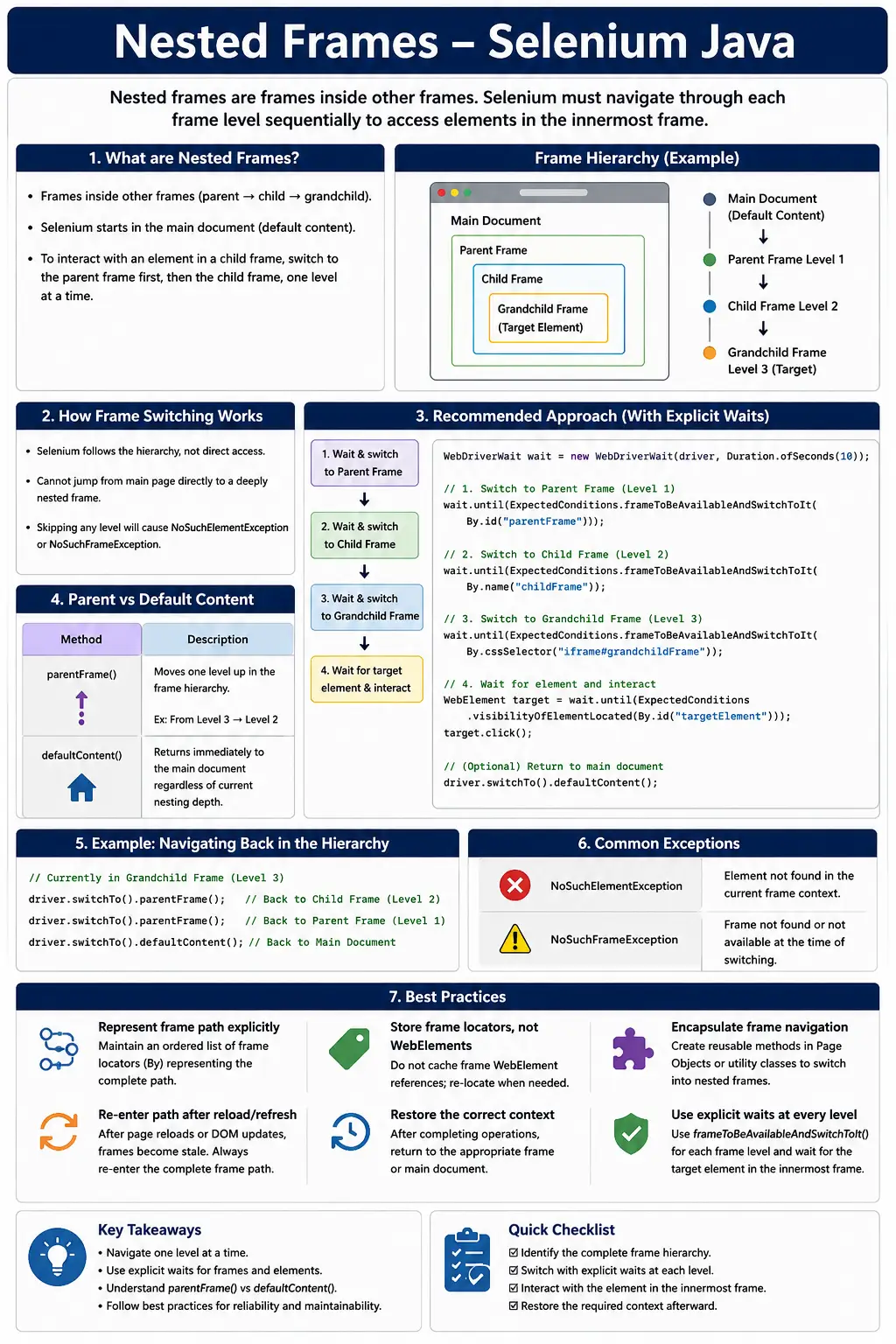
Nested frames appear in legacy enterprise applications, reporting systems, banking portals, rich text editors, embedded dashboards, document viewers, payment flows, and multi-level web applications. They are also a common Selenium interview topic because they test whether the candidate understands browser document context, not just locator syntax.
The most important rule is simple: follow the frame hierarchy one level at a time. Start from the main page, switch into the outer frame, then switch into the next inner frame, and continue until Selenium reaches the DOM that contains the target element. After the action, return using parentFrame() or defaultContent() depending on where the next action belongs.
2. What Are Nested Frames?
A nested frame is a frame that exists inside another frame. The structure can be visualized as a chain of document contexts.
Main Page
    |
    +-- Frame 1
            |
            +-- Frame 2
                    |
                    +-- Frame 3
Each frame owns its own DOM. The element inside Frame 3 is not directly available from the main page or from Frame 1. Selenium must enter each frame level before searching for the final element.
3. Nested Frame HTML Structure
A simplified nested frame structure can look like this:
<iframe id="frame1">
    <iframe id="frame2">
        <input id="username">
    </iframe>
</iframe>
The hierarchy is:
Main Page
   |
   +-- frame1
           |
           +-- frame2
                   |
                   +-- username
To type into username, Selenium must first enter frame1, then enter frame2, and only then locate the input.
4. Why Direct Access Fails
A common beginner mistake is trying to locate the inner element from the main page.
driver.findElement(By.id("username"));This fails with NoSuchElementException if username is inside frame2. The locator may be correct, but Selenium is searching the wrong DOM. It is still focused on the main page, not the nested frame document.
This is why frame failures can be misleading. The problem is not always the locator. Often, the problem is the current frame context.
5. Switching Through Nested Frames
Nested frame switching must happen sequentially.
driver.switchTo().frame("frame1");
driver.switchTo().frame("frame2");

driver.findElement(By.id("username"))
      .sendKeys("admin");
The first switch enters the outer frame. The second switch searches for frame2 from inside frame1. After the second switch, Selenium can locate username.
6. Nested Frames Using Index
Index-based switching can work, but it is not recommended for production suites because it depends on frame order.
driver.switchTo().frame(0);
driver.switchTo().frame(0);

driver.findElement(By.id("username"))
      .sendKeys("admin");
The two frame(0) calls do not refer to the same frame list. The first call selects the first frame in the main page. The second call selects the first frame inside the current parent frame. This is valid, but it is hard to read and easy to break when the page structure changes.
7. Nested Frames Using WebElement
WebElement-based switching is usually the best approach for nested frames because it makes each frame target explicit.
WebElement frame1 =
        driver.findElement(By.id("frame1"));

driver.switchTo().frame(frame1);

WebElement frame2 =
        driver.findElement(By.id("frame2"));

driver.switchTo().frame(frame2);

driver.findElement(By.id("username"))
      .sendKeys("admin");
This code is more readable than index switching. It also allows CSS selectors, XPath, source URL patterns, title attributes, and stable parent containers to be used for locating the frame elements.
8. Three-Level Nested Frame Example
Some legacy systems and dashboards may have three or more levels.
driver.switchTo().frame("frame1");
driver.switchTo().frame("frame2");
driver.switchTo().frame("frame3");

driver.findElement(By.id("textbox"))
      .sendKeys("Selenium");
Every frame switch is relative to the current context. After entering frame1, Selenium can see frames inside frame1. After entering frame2, it can see frames inside frame2. This is why the path must be followed in order.
9. Returning to Parent Frame
parentFrame() moves one level up from the current frame.
driver.switchTo().frame("frame1");
driver.switchTo().frame("frame2");

driver.switchTo().parentFrame();
After this code, Selenium is back in frame1. It is not back in the main page. This distinction matters when the next element belongs to the parent frame rather than the top-level document.
10. Returning to Main Page
defaultContent() returns Selenium directly to the main page, no matter how deeply nested the current frame is.
driver.switchTo().frame("frame1");
driver.switchTo().frame("frame2");

driver.switchTo().defaultContent();
After this call, Selenium is in the main document. Use this before interacting with headers, navigation, alerts triggered outside frames, or page-level confirmation messages.
11. parentFrame() vs defaultContent()
The difference is central to nested frame handling.
parentFrame()     = move one level up
defaultContent()  = return to main page
If Selenium is inside Frame2, parentFrame() moves to Frame1. If Selenium is inside Frame2, defaultContent() moves to the main page. Choose based on where the next element lives.
12. Required Imports
import org.openqa.selenium.By;
import org.openqa.selenium.WebDriver;
import org.openqa.selenium.WebElement;
import org.openqa.selenium.support.ui.ExpectedConditions;
import org.openqa.selenium.support.ui.Select;
import org.openqa.selenium.support.ui.WebDriverWait;
import java.time.Duration;
import java.util.List;
Nested frame handling often uses waits, WebElements, lists, and sometimes Select for controls inside the nested frame.
13. Wait and Switch to Nested Frames
The best practice is to wait for each frame level before switching.
WebDriverWait wait =
        new WebDriverWait(driver, Duration.ofSeconds(10));

wait.until(
        ExpectedConditions.frameToBeAvailableAndSwitchToIt(
                By.id("frame1")
        )
);

wait.until(
        ExpectedConditions.frameToBeAvailableAndSwitchToIt(
                By.id("frame2")
        )
);
The first wait enters frame1. The second wait runs from inside frame1 and enters frame2. This prevents timing failures when frames load asynchronously.
14. Nested Frames with WebElement and Wait
WebElement frame1 =
        wait.until(
                ExpectedConditions
                        .visibilityOfElementLocated(
                                By.id("frame1")
                        )
        );

driver.switchTo().frame(frame1);

WebElement frame2 =
        wait.until(
                ExpectedConditions
                        .visibilityOfElementLocated(
                                By.id("frame2")
                        )
        );

driver.switchTo().frame(frame2);
This style is useful when you want to inspect or log frame elements before switching. The direct frameToBeAvailableAndSwitchToIt() style is shorter, but both approaches are valid.
15. Wait for Element Inside Nested Frame
Switching into the nested frame does not guarantee that the target element is ready. Wait for the inner element after reaching the correct context.
wait.until(
        ExpectedConditions.visibilityOfElementLocated(
                By.id("username")
        )
).sendKeys("admin");
This two-stage wait is common: wait for the frame path, then wait for the target element inside the final frame.
16. Real Project Example: Payment Gateway
Some payment flows use nested security frames. The application may load a payment frame, and that frame may contain another security or OTP frame.
driver.switchTo().frame("paymentFrame");
driver.switchTo().frame("securityFrame");

driver.findElement(By.id("otp"))
      .sendKeys("123456");

driver.switchTo().defaultContent();
In payment automation, use provider-supported test data and avoid relying on unstable third-party internals when an official testing path exists.
17. Real Project Example: Rich Text Editor
Rich text editors may embed editable content in one frame and toolbars or plugin panels in another frame.
driver.switchTo().frame("editorFrame");
driver.switchTo().frame("toolbarFrame");

driver.findElement(By.id("bold")).click();

driver.switchTo().defaultContent();
Before clicking controls outside the nested frame path, return to the proper parent or main page context.
18. Real Project Example: Embedded Dashboard
Reporting dashboards can contain multiple frame layers. A parent frame may contain the dashboard shell, while child frames contain individual charts, grids, or export panels.
driver.switchTo().frame("dashboardFrame");
driver.switchTo().frame("reportFrame");

driver.findElement(By.id("export")).click();

driver.switchTo().defaultContent();
Dashboard frames often load slowly, so explicit waits are essential. After clicking export, validate the download or confirmation from the correct context.
19. Finding Total Frames
Counting frames is useful during debugging.
List<WebElement> frames =
        driver.findElements(By.tagName("iframe"));

System.out.println("Total Frames = " + frames.size());
Remember that this count belongs to the current context. If Selenium is in the main page, it counts frames visible from the main page. If Selenium is inside frame1, it counts frames inside frame1.
20. Debugging Unknown Nested Frames
When you do not know the hierarchy, inspect the page with browser DevTools. Expand the frame nodes and identify where the target element lives. Then write the switching path from the main page to that element.
It is tempting to loop through every frame recursively, but that should be a troubleshooting tool, not the normal test strategy. A clear frame path is easier to maintain than a broad search through every embedded document.
21. Loop Through Child Frames
driver.switchTo().frame("parentFrame");

List<WebElement> childFrames =
        driver.findElements(By.tagName("iframe"));

for (WebElement frame : childFrames) {
    driver.switchTo().frame(frame);

    System.out.println("Inside child frame");

    driver.switchTo().parentFrame();
}
This example shows the use of parentFrame() after each child frame. Without that call, the loop would remain inside a child context and the next switch would not happen from the intended parent.
22. Search for Element Across Nested Frames
driver.switchTo().frame("parentFrame");

List<WebElement> frames =
        driver.findElements(By.tagName("iframe"));

for (WebElement frame : frames) {
    driver.switchTo().frame(frame);

    if (driver.findElements(By.id("submit")).size() > 0) {
        driver.findElement(By.id("submit")).click();
        break;
    }

    driver.switchTo().parentFrame();
}
This can help during investigation. Once the correct frame is known, replace broad searching with a stable explicit path.
23. Read Text from Nested Frame
driver.switchTo().frame("parentFrame");
driver.switchTo().frame("childFrame");

String text =
        driver.findElement(By.tagName("h2")).getText();

System.out.println(text);

driver.switchTo().defaultContent();
Reading text from nested frames is normal after reaching the correct context. The important part is the frame path before the read.
24. Fill Form Inside Nested Frame
driver.switchTo().frame("parentFrame");
driver.switchTo().frame("childFrame");

driver.findElement(By.id("email"))
      .sendKeys("test@test.com");

driver.findElement(By.id("password"))
      .sendKeys("password");

driver.switchTo().defaultContent();
Use this pattern for forms embedded inside document viewers, authentication widgets, and legacy portal screens.
25. Dropdown and Checkbox Inside Nested Frame
driver.switchTo().frame("parentFrame");
driver.switchTo().frame("childFrame");

Select select =
        new Select(driver.findElement(By.id("country")));

select.selectByVisibleText("India");

driver.findElement(By.id("agree")).click();

driver.switchTo().defaultContent();
Standard form controls do not need special handling once Selenium is inside the correct nested frame.
26. Alert from Nested Frame
driver.switchTo().frame("parentFrame");
driver.switchTo().frame("childFrame");

driver.findElement(By.id("alertButton")).click();

driver.switchTo().alert().accept();

driver.switchTo().defaultContent();
The click happens inside the nested frame. The alert is browser-level. After handling it, restore context deliberately.
27. NoSuchFrameException
NoSuchFrameException usually means the requested frame is not available in the current context. The frame name may be wrong, the frame may not have loaded, or the test may be trying to switch to a child frame before entering the parent frame.
The fix is to verify the hierarchy, use explicit waits, and switch one level at a time.
28. NoSuchElementException
NoSuchElementException after switching can mean the locator is wrong, the element is not loaded yet, or Selenium is still in the wrong frame level.
Check the current frame path first. If the frame path is correct, add an element-specific wait inside the final nested frame.
29. StaleElementReferenceException
Nested frames can reload. If a parent frame reloads, child frame references and child elements become stale. If a child frame reloads, elements inside it become stale.
When this happens, return to default content, re-enter the frame path, and re-locate the target element. Do not keep frame WebElement references across page refreshes or component rebuilds.
30. Nested Frame Utility Method
public void switchToNestedFrame(
        String parentFrame,
        String childFrame) {

    driver.switchTo().frame(parentFrame);
    driver.switchTo().frame(childFrame);
}
This simple utility is useful for stable frame names. For dynamic frames, a locator-based utility with explicit waits is better.
31. Locator-Based Nested Frame Utility
public void switchToNestedFrame(
        By parentFrame,
        By childFrame) {

    driver.switchTo().defaultContent();

    wait.until(
            ExpectedConditions
                    .frameToBeAvailableAndSwitchToIt(
                            parentFrame
                    )
    );

    wait.until(
            ExpectedConditions
                    .frameToBeAvailableAndSwitchToIt(
                            childFrame
                    )
    );
}
This utility starts from the main page, enters the parent, then enters the child. It is safer for framework code because it controls timing and starting context.
32. Page Object Model Example
public void switchToEditorFrame() {
    driver.switchTo().frame("parentFrame");
    driver.switchTo().frame("editorFrame");
}
The test can call switchToEditorFrame() before typing into the editor. A more complete page object should include waits and context restoration.
33. Safer Page Object Action
public void typeEditorText(String text) {
    try {
        switchToNestedFrame(
                By.id("parentFrame"),
                By.id("editorFrame")
        );

        driver.findElement(By.id("editor"))
              .sendKeys(text);
    } finally {
        driver.switchTo().defaultContent();
    }
}
This exposes the business action and hides the frame navigation details from the test.
34. Deeply Nested Frames
For three or more levels, keep the path visible and intentional. Do not hide too much complexity behind vague helper names. The code should still make it clear which frame path is being followed.
driver.switchTo().frame("frame1");
driver.switchTo().frame("frame2");
driver.switchTo().frame("frame3");
For reusable code, a list of locators can represent the path. The utility can iterate through the list and switch through each frame level.
35. Why Selenium Cannot Jump Directly
Selenium frame switching is based on the current browsing context. A child frame belongs to the DOM of its parent frame, not to the main page. If Selenium is in the main page, it can see top-level frames. It cannot see the child frames inside those top-level frames until it enters the parent.
This is why nested frame handling resembles walking through folders. You enter the outer folder before you can access the inner folder. Selenium follows the same context boundary rule.
36. CI and Headless Issues
Nested frames can be more fragile in CI because each frame level may have its own loading time. A parent frame may appear, but the child frame may not be ready. In headless browsers, responsive layout differences can also affect embedded dashboards and editors.
For CI debugging, log the current URL, frame path, frame counts at each level, and screenshots. This helps identify whether the failure happened at the parent level, child level, or inner element level.
37. Frame Path Thinking
The cleanest way to reason about nested frames is to think in terms of a frame path. A frame path is the ordered route from the main page to the target element. For example, if a textbox is inside frame1, then frame2, then editorFrame, the path is frame1 to frame2 to editorFrame. Selenium must follow that exact path.
This idea is useful during debugging and code review. Instead of asking "why does Selenium not find this element?", ask "what frame path must Selenium follow before this locator becomes visible?" Once that path is clear, the code usually becomes straightforward.
Main Page
   |
   +-- applicationFrame
           |
           +-- editorShellFrame
                   |
                   +-- editableAreaFrame
A good page object can represent this path explicitly so future maintainers do not have to rediscover it from DevTools.
38. Storing Frame Paths as Locators
For dynamic applications, store frame locators rather than frame WebElements. A WebElement reference can become stale after reloads. A locator can be reused to find the fresh frame again.
private By applicationFrame =
        By.id("applicationFrame");

private By editorShellFrame =
        By.id("editorShellFrame");

private By editableAreaFrame =
        By.cssSelector("iframe.editor-body");
This approach keeps frame identification centralized and makes reload recovery easier. If the editor body frame selector changes, the fix happens in one place.
39. Generic Nested Frame Path Utility
A reusable utility can accept a sequence of frame locators and switch through them in order. This is useful when different pages have different nesting depths.
public void switchToFramePath(By... framePath) {
    driver.switchTo().defaultContent();

    for (By frame : framePath) {
        wait.until(
                ExpectedConditions
                        .frameToBeAvailableAndSwitchToIt(
                                frame
                        )
        );
    }
}
This utility starts from the main page every time, which avoids accidental context leakage. It also makes the frame path visible at the call site.
switchToFramePath(
        applicationFrame,
        editorShellFrame,
        editableAreaFrame
);
40. Running an Action Inside a Nested Frame
A stronger utility can switch through the nested path, run an action, and restore default content in a finally block.
public void insideFramePath(
        Runnable action,
        By... framePath) {

    try {
        switchToFramePath(framePath);
        action.run();
    } finally {
        driver.switchTo().defaultContent();
    }
}
This prevents the test from being left inside a deep frame after a failure. Context restoration is especially important in nested frames because the next test step may fail with a misleading error if Selenium is still inside an inner frame.
41. Reloading Parent Frames
If a parent frame reloads, every child frame under it is replaced. This means all WebElement references to child frames and child elements become stale. Retrying only the child locator is not enough if the parent context itself changed.
The safe recovery pattern is to return to default content and re-enter the complete frame path from the beginning. This may feel repetitive, but it mirrors the browser's document structure. Once a parent frame reloads, the old child context is no longer valid.
42. Reloading Child Frames
Sometimes only the child frame reloads. For example, a dashboard shell frame may stay stable while a report frame reloads after filter changes. In that case, you can remain in the parent frame, wait for the child frame again, and switch into it. However, for simpler framework logic, many teams still return to default content and re-enter the whole path.
The choice depends on complexity and reliability. Re-entering from default content is often easier to reason about, while partial navigation can be faster when the hierarchy is deep and stable.
43. Nested Frames and Alerts
A button inside a nested frame can trigger a browser alert. The click must happen inside the correct nested frame, but the alert itself is handled through the browser alert context.
driver.switchTo().frame("parentFrame");
driver.switchTo().frame("childFrame");

driver.findElement(By.id("alertButton")).click();

driver.switchTo().alert().accept();

driver.switchTo().defaultContent();
After accepting the alert, do not assume Selenium is automatically in the correct page context for your next step. Restore context explicitly and continue from a known state.
44. Nested Frames and Windows
A link inside a nested frame may open a new browser window or tab. Window context and frame context are separate. After switching to a new window, Selenium starts in that window's main document. If the new window contains frames, you must switch into those frames separately.
Do not carry frame assumptions from one window to another. Each window has its own main document and its own frame hierarchy. A clean window switch followed by a clean frame switch keeps the test easier to debug.
45. Nested Frames and Test Data
Nested frame failures are not always locator or timing problems. Sometimes the required inner frame appears only when test data exists. A report frame may appear only after a report is generated. A security frame may appear only for certain payment methods. An editor plugin frame may appear only when a specific plugin is enabled.
Before debugging the Selenium code, confirm that the test data creates the expected frame path. If the application legitimately does not render the child frame for the current data state, no frame switching code can find it.
46. Recursive Frame Searching
Advanced debugging utilities sometimes search recursively through frames to locate an element. This can help discover the unknown frame path. However, recursive frame searching should not replace clear frame navigation in production tests.
The risk is that broad searching can hide poor test design and accidentally find a similar element in the wrong frame. Use recursive searching to learn the page structure, then convert the result into an explicit frame path.
47. Naming Nested Frame Methods
Method names should describe the business area, not just the mechanics. A method named switchToEditorBody() is clearer than switchToFrame1Frame2(). A method named insidePaymentOtpFrame() tells the reader why the frame path exists.
Good names reduce the mental cost of maintaining frame-heavy tests. They also help code reviewers spot when a test is switching to a frame that does not match the intended workflow.
48. Assertions After Nested Frame Actions
After interacting with an element inside a nested frame, assert the meaningful result. If you type into an editor, verify that the content is saved. If you enter an OTP inside a security frame, verify that the payment flow advances. If you export from a report frame, verify the download or confirmation message.
Many results appear outside the nested frame path. Switch back to default content before asserting main-page behavior. Otherwise, the assertion can fail simply because Selenium is still inside the inner frame.
49. Multi-Level Wait Strategy
Nested frames require a wait strategy at every meaningful level. Waiting only for the outer frame is not enough when the child frame is loaded by JavaScript after the parent frame completes. Waiting only for the final element is also not enough if Selenium has not reached the frame context that contains that element.
A reliable strategy is sequential: wait for parent frame, switch; wait for child frame, switch; wait for inner element, interact. This sequence makes failures easier to diagnose. If the parent wait fails, the page did not load the outer frame. If the child wait fails, the parent loaded but the child did not. If the inner element wait fails, the correct frame path may be reached but the expected UI did not render.
50. Frame Maps for Large Applications
Large applications with many nested frames can benefit from a simple frame map in the page object or documentation. A frame map lists the important embedded areas and the path needed to reach them. This is not a separate tool; it can be as simple as clear constants and method names in the page object.
private By shellFrame = By.id("shellFrame");
private By reportsFrame = By.id("reportsFrame");
private By exportFrame = By.id("exportFrame");
When a test fails, the frame map helps the tester understand where the element should live. It also helps new team members avoid guessing frame paths from scratch.
51. Avoiding Over-Engineering
Although utilities are useful, not every frame problem needs a complex abstraction. If a page has one stable nested frame path, a clear page object method may be better than a generic recursive frame engine. Overly generic frame search logic can hide intent and make failures harder to understand.
The right abstraction should match the application. For a few stable nested frames, readable page methods are enough. For many pages with repeated frame patterns, a reusable frame path utility is valuable. The goal is maintainability, not cleverness.
52. Test Design Tradeoffs
Nested frame tests are slower and more fragile than ordinary DOM tests because they cross document boundaries. Use them where they provide real business value. For example, testing that a payment OTP field works inside a nested security frame may be important. Testing every styling detail inside a third-party nested frame may not be worth the maintenance cost.
When possible, combine UI tests with lower-level integration tests. UI automation can verify the critical user journey through the nested frames, while API or service tests can cover more data combinations. This keeps the UI suite focused and stable.
53. Common Beginner Mistakes
- Skipping the parent frame and trying to switch directly to the child frame.
- Using
defaultContent()when onlyparentFrame()is needed. - Using
parentFrame()but expecting to be on the main page. - Forgetting to restore context after nested frame actions.
- Using hardcoded indexes in dynamic nested layouts.
- Not waiting for each frame level.
- Storing child frame WebElements across parent frame reloads.
- Ignoring the actual frame hierarchy shown in DevTools.
54. Debugging Checklist
- Identify the full frame hierarchy from the main page to the target element.
- Confirm whether each level is an iFrame or legacy frame.
- Switch one level at a time.
- Count frames in the current context when debugging.
- Wait for the parent frame before looking for the child frame.
- Wait for target elements after reaching the final frame.
- Use
parentFrame()to move one level up. - Use
defaultContent()to return to the main page.
55. Best Practices
- Understand the frame hierarchy before writing locators.
- Prefer WebElement, name, or ID switching over index switching.
- Use explicit waits for every dynamic frame level.
- Keep nested frame navigation inside page objects or utilities.
- Restore context after frame actions.
- Re-enter the frame path after reloads.
- Avoid unnecessary frame switching.
- Make frame utility failure messages clear and specific.
- Do not replace frame waits with fixed sleeps.
- Use screenshots and frame logs for CI failures.
56. Interview Perspective
A short interview answer is: nested frames are frames inside frames, and Selenium must switch through each frame level sequentially before interacting with elements inside the innermost frame.
A stronger real-time answer is: In Selenium, nested frames require hierarchical navigation. I switch into the outer frame first, then into each child frame until I reach the required DOM context. I use explicit waits such as frameToBeAvailableAndSwitchToIt() for each level. After completing the action, I use parentFrame() to move one level up or defaultContent() to return to the main document. In frameworks, I usually encapsulate the frame path inside page object methods or reusable utilities.
57. Key Takeaway
Nested frame handling is about context. Selenium searches only inside the current document context. If the target element is inside a child frame, Selenium must first enter the parent frame and then enter the child frame.
Use switchTo().frame() for each level, parentFrame() to move one level up, and defaultContent() to return to the main page. Prefer stable frame locators and explicit waits instead of hardcoded indexes or sleeps.
The practical rule is simple: follow the frame hierarchy exactly, one level at a time, and always restore the correct context before the next action. This keeps nested-frame tests predictable.