Modular Framework in Selenium
A Modular Framework is an automation framework where the application is divided into independent functional modules, and each module is automated separately. Every module represents a meaningful area of the application, such as login, search, cart, checkout, payment, reporting, profile management, or administration. Instead of writing one large Selenium script that tries to cover the whole application, the framework separates the application into smaller, manageable pieces that are easier to understand, build, test, and maintain.
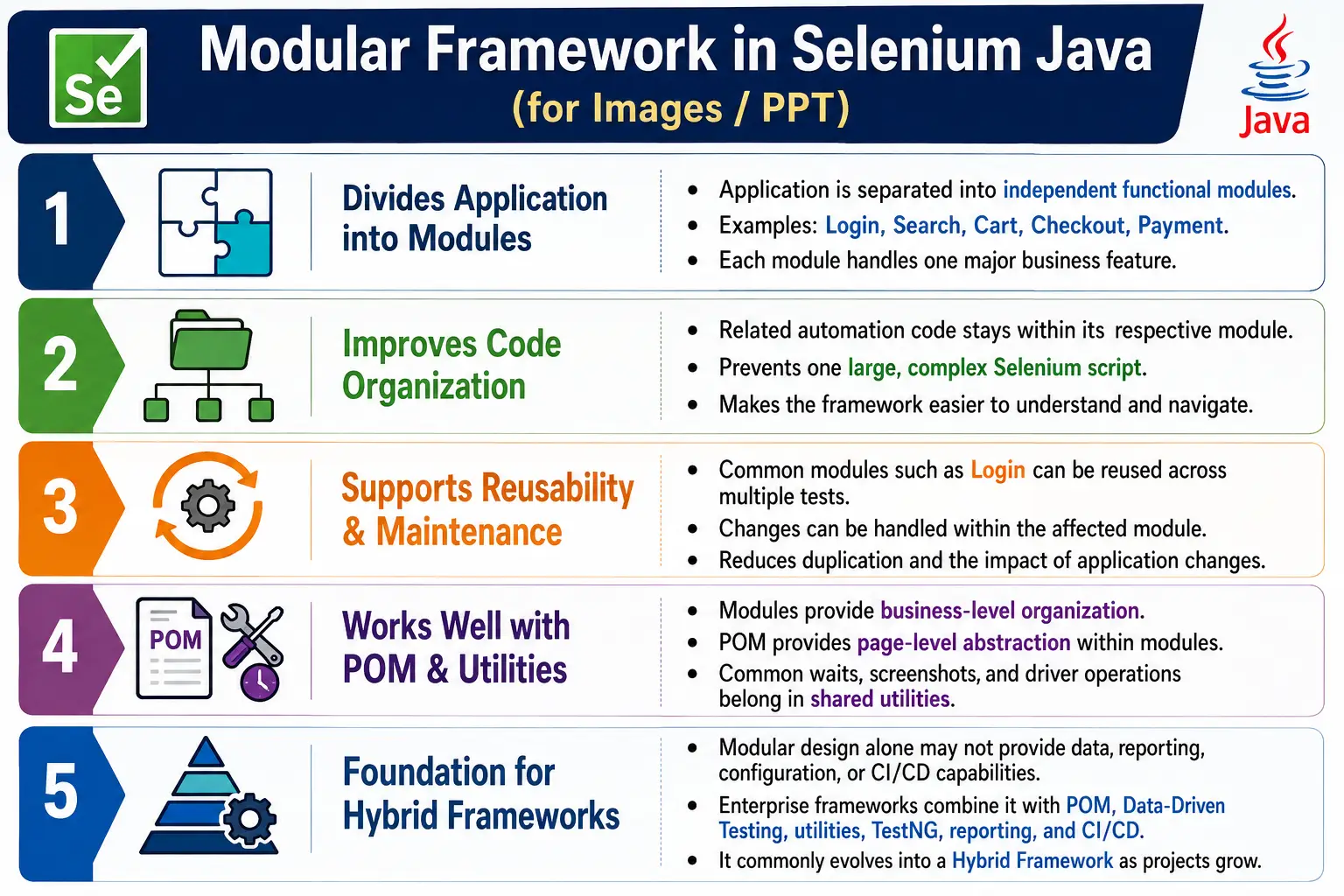
This framework type is one of the earliest structured approaches used in Selenium automation. It is more organized than a linear framework because the code is no longer written as one long script. It also becomes the foundation for more advanced designs such as Page Object Model and Hybrid Frameworks. In real projects, modular design is rarely used alone. It is usually combined with page classes, reusable utilities, data-driven testing, configuration files, reports, logs, and CI/CD execution. Still, understanding the modular framework clearly is important because most enterprise frameworks are built around the same basic idea: divide the application into logical responsibilities and keep related code together.
1. What Is a Modular Framework?
A Modular Framework is an automation design where the application is broken into logical modules, and each module is automated independently. A module is a functional section of the application. For example, in an e-commerce application, login, product search, product details, cart, checkout, payment, and order history can all be treated as separate modules. Each module may have its own page classes, test classes, test data, and supporting methods.
The core idea is simple: one module should handle one major business feature. The login module should handle login-related actions. The search module should handle searching and filtering. The cart module should handle add, remove, and update quantity operations. When the application is divided this way, the automation code becomes easier to navigate because engineers know where each feature belongs.
E-Commerce Application
  Login Module
  Product Module
  Cart Module
  Checkout Module
  Payment Module
  Order History Module
Each module owns the automation logic related to that feature. This creates a clean structure and prevents all automation code from being placed in one large class or one large package.
2. Why Do We Need a Modular Framework?
Automation suites usually start small. A tester may first automate login, then search, then cart, then checkout, and then payment. If these scripts are written without structure, the code quickly becomes difficult to maintain. Repeated login steps appear in many test scripts. Locators are copied across classes. Utility methods are duplicated. When one screen changes, many scripts break at once.
A modular framework solves this by organizing automation around application features. Each feature has a clear home. If the login page changes, the login module is updated. If checkout changes, the checkout module is updated. This reduces confusion and makes the framework easier for multiple team members to work on at the same time.
Without Modular Design
  One Huge Script
    Thousands of Lines
      Repeated Code
        Difficult Debugging
          High Maintenance Cost
With Modular Design
Separate Modules
Smaller Classes
Clear Responsibilities
Better Reuse
Easier MaintenanceModular design is especially useful when the application has many independent areas. It helps the automation team work feature by feature instead of treating the whole application as one large block.
3. Core Idea of Modular Automation
The core idea of modular automation is separation by functionality. Instead of asking, "Where should I place this Selenium code?", the framework asks, "Which application feature does this behavior belong to?" If the behavior belongs to login, it goes into the login module. If it belongs to payment, it goes into the payment module. This makes the structure natural because it follows the business structure of the application.
In a linear framework, the test flow may be written from start to finish in one class. In a modular framework, the same flow is assembled from smaller modules. The login module performs login. The search module searches for a product. The cart module adds the product to the cart. The checkout module submits shipping information. The payment module completes the transaction.
Application
  Independent Modules
    Module-Specific Page Classes
      Module-Specific Test Classes
        Shared Utilities
          WebDriver
This organization gives the framework a shape that is easier to explain, review, and expand.
4. Real-World Analogy
A simple way to understand modular design is to compare it with a hospital. A hospital does not usually ask one person to handle every medical problem. Different departments handle different responsibilities. Cardiology handles heart-related cases. Neurology handles brain and nerve-related cases. Orthopedics handles bones and joints. Ophthalmology handles eyes. The patient may move between departments, but each department has its own area of expertise.
A Selenium modular framework works in a similar way. The login module knows login behavior. The cart module knows cart behavior. The payment module knows payment behavior. A test scenario may move across several modules, but each module stays focused on its own responsibility. This reduces confusion and makes ownership clearer.
5. Example Application
Consider an online shopping website. A user opens the home page, logs in, searches for a product, views product details, adds the product to the cart, proceeds to checkout, enters address details, chooses a payment method, and places the order. This looks like one business journey, but internally it passes through several functional areas.
- Home module handles landing page actions and navigation.
- Login module handles username, password, login, logout, and forgot password.
- Search module handles search box, filters, categories, and search results.
- Product module handles product details, price, availability, and product options.
- Cart module handles add to cart, remove product, and update quantity.
- Checkout module handles shipping address, order summary, and delivery options.
- Payment module handles card payment, UPI, net banking, wallet, and payment confirmation.
When these areas are automated as modules, a large end-to-end test can reuse them without duplicating all low-level steps.
6. Modular Framework Architecture
A modular framework has a structure where packages or folders are organized around application modules. Each module contains related page classes and test classes. Shared utilities are usually kept outside module packages because utilities such as waits, screenshots, driver handling, file reading, and reporting are not specific to one module.
Automation Framework
  Login Module
  Search Module
  Product Module
  Cart Module
  Checkout Module
  Payment Module
  Utilities
  Configuration
  Reports
  Logs
This structure gives a balance between feature separation and shared support code. The module packages contain business-specific automation, while the common packages contain technical support used by many modules.
7. Module Responsibilities
The success of a modular framework depends on clear module responsibility. If modules are not defined clearly, code still becomes messy. A good module should have a clear purpose, clear boundaries, and limited responsibility. The login module should not contain cart locators. The cart module should not contain payment validation. The checkout module should not contain search filters unless the application itself forces that dependency.
The login module is responsible for username input, password input, login button, logout link, error messages, forgot password navigation, and login-related validations. The search module is responsible for search keyword entry, filters, categories, sorting, and result verification. The cart module is responsible for adding products, removing products, changing quantity, and verifying cart totals. The checkout module is responsible for shipping address, delivery options, and order summary. The payment module is responsible for payment method selection, card entry, wallet selection, transaction result, and confirmation messages.
When responsibilities are defined this way, the framework becomes easier to maintain because every engineer can quickly identify where a change should be made.
8. Folder Structure
A common folder structure for a modular Selenium framework may separate modules under test packages. Each module can have a page class and one or more test classes. The actual structure can vary by company, but the principle remains the same: keep related feature code together.
src/test/java
  login
    LoginPage.java
    LoginTest.java
  search
    SearchPage.java
    SearchTest.java
  cart
    CartPage.java
    CartTest.java
  checkout
    CheckoutPage.java
    CheckoutTest.java
  payment
    PaymentPage.java
    PaymentTest.java
  utils
    WaitUtil.java
    ScreenshotUtil.java
    DriverFactory.java
  config
    ConfigReader.java
In larger frameworks, page classes may be placed under a main source package and test classes under a test package. Some teams also create service classes or flow classes when one business process crosses multiple modules. The exact folder structure matters less than consistent responsibility.
9. Example Without Modular Framework
Without modular design, an automation class may contain every action in one place. At first this looks simple because all code is visible in one file. Over time the same file becomes large, repetitive, and difficult to debug. A single class may contain login, search, cart, checkout, payment, reporting, assertions, and cleanup logic.
public class AutomationTest {

    public void login() {
    }

    public void search() {
    }

    public void addToCart() {
    }

    public void checkout() {
    }

    public void payment() {
    }
}
The problem is not that this code cannot run. The problem is that it cannot scale cleanly. If each method grows with locators, waits, assertions, and data handling, the class becomes hard to read. If other tests need the same logic, engineers may copy methods into other classes. That duplication becomes expensive when the application changes.
10. Example With Modular Framework
With modular design, the same automation is separated into focused classes. The login page contains login behavior. The search page contains search behavior. Each class becomes easier to read because it handles one functional area.
public class LoginPage {

    public void login(String user, String password) {
    }

    public void logout() {
    }
}
public class SearchPage {
public void searchProduct(String productName) {
}
public void applyFilter(String filterName) {
}
}public class CartPage {
public void addProductToCart() {
}
public void removeProductFromCart() {
}
}The test can then use these modules to build a business flow. The code becomes more readable because each object represents a meaningful part of the application.
11. Module Reusability
One major benefit of modular frameworks is reusability. Login is a common example. Many tests need the user to be logged in before they can continue. If login code is duplicated in search tests, cart tests, checkout tests, and payment tests, any login page change may break many files. If login is implemented in one module, other modules can reuse it.
Login Module
  Used By Search Test
  Used By Cart Test
  Used By Checkout Test
  Used By Payment Test
Reusability does not mean every module should call every other module directly. It means common business actions can be reused in a controlled way. In mature frameworks, reusable business flows may be placed in a separate flow layer so test classes do not become tightly coupled to many page classes.
12. Independent Development
Modular frameworks support independent development. In a team, one engineer can work on the login module while another works on cart and another works on checkout. Because modules are separated, developers and testers have fewer merge conflicts and less confusion about ownership. Each module can progress at its own pace as long as shared standards are followed.
This is useful in Agile projects where features are developed in parallel. If the payment feature is not ready, the payment module can wait while login and search automation continue. If the cart page changes, only the cart module needs attention. The framework becomes more flexible because work can be divided by application area.
13. Independent Maintenance
Maintenance is where modular frameworks show real value. Suppose the login page changes. The username field gets a new locator, the login button changes position, and the error message format changes. In a well-designed modular framework, the automation engineer updates the login module. Search, cart, checkout, and payment tests that call login should continue to work without direct changes.
This reduces the blast radius of application changes. A change in one feature does not automatically require changes across the entire suite. The framework becomes easier to support during frequent releases because changes are localized.
14. Example Test Flow
A real end-to-end test often crosses multiple modules. For example, placing an order may require login, search, product selection, cart, checkout, and payment. In a modular framework, the test flow is assembled by calling the required modules in sequence.
Login Module
  Search Module
    Product Module
      Cart Module
        Checkout Module
          Payment Module
The key is that each module performs one responsibility. The login module does not know payment details. The payment module does not know how search filters work. The test coordinates the business journey, while each module performs its own part.
15. Advantages of Modular Framework
A modular framework improves organization because the automation suite follows the application's functional structure. New team members can understand the framework faster because each feature has a visible place. Debugging becomes easier because failures usually point to a specific module. Maintenance becomes easier because module-specific changes can be handled locally.
- Better organization of automation code.
- Easier maintenance when application features change.
- Smaller classes and packages per business area.
- Improved debugging because failures are easier to isolate.
- Higher reuse of common modules such as login.
- Better support for team-based development.
- Clear separation of feature responsibilities.
- Better foundation for Page Object Model and Hybrid Frameworks.
The biggest practical advantage is control. Instead of searching through a large script, engineers can go directly to the module that owns the feature.
16. Disadvantages of Modular Framework
A modular framework is better than a linear framework, but it is not complete by itself. If data remains hardcoded inside modules, the framework still has data maintenance problems. If common actions such as waits, screenshots, clicks, and dropdown handling are duplicated inside every module, the framework still has utility duplication. If module boundaries are unclear, related code may be scattered.
- Test data may still be hardcoded if data-driven design is not added.
- Common utility methods may be duplicated across modules.
- Cross-module flows require careful coordination.
- Large applications may need additional layers beyond modules.
- Modules can become inconsistent if coding standards are not followed.
- Module dependency can become confusing if every module calls every other module.
For these reasons, modular frameworks are usually extended with POM, reusable libraries, configuration management, and data-driven testing.
17. Modular Framework vs Linear Framework
A linear framework is the simplest automation style. Test steps are written one after another in a single script. It is easy for beginners, but it is not suitable for large suites. A modular framework improves on this by dividing the application into logical modules.
| Linear Framework | Modular Framework |
|---|---|
| One large script. | Multiple feature modules. |
| Poor organization as scripts grow. | Better organization by functionality. |
| High duplicate code risk. | Better reuse through modules. |
| Difficult maintenance. | Easier maintenance. |
| Not scalable for large projects. | More scalable than linear design. |
The modular framework is a natural next step after linear scripts. Once repeated flows appear, the team should begin extracting them into modules.
18. Modular Framework vs Library Framework
A modular framework organizes automation by application functionality. A library framework organizes reusable technical methods. These two ideas are related but different. A login module is a business module. A wait utility is a technical library. A cart module is a business module. A screenshot utility is a technical library.
| Modular Framework | Library Framework |
|---|---|
| Organizes by application modules. | Organizes reusable methods. |
| Focuses on feature separation. | Focuses on utility reuse. |
| Examples include login, search, cart, and payment. | Examples include click, wait, screenshot, and file utilities. |
| Business-oriented structure. | Technical support structure. |
Modern frameworks usually use both. Modules keep feature code organized, while libraries prevent repeated technical code.
19. Modular Framework vs Page Object Model
Modular Framework and Page Object Model are often confused because both improve structure. They operate at different levels. A modular framework divides the application into business modules. Page Object Model represents web pages as classes. A module may contain one or more page objects.
| Modular Framework | Page Object Model |
|---|---|
| Divides the application into modules. | Represents each page as a class. |
| High-level organization. | Page-level design pattern. |
| Feature-oriented. | Page-oriented. |
| Can exist without POM. | Often implemented inside modules. |
In real projects, modules and POM work well together. The checkout module may contain checkout page, address page, delivery page, and order summary page objects. The module gives business grouping, while POM gives page-level abstraction.
20. Real Project Example
In a real e-commerce project, the framework may organize code by functional area while still keeping common utilities outside modules. This makes the framework easy to expand. If a new wishlist feature is added, a wishlist module can be introduced without disturbing existing login, cart, and payment modules.
E-Commerce Automation Framework
  Login
    LoginPage
    LoginTest
  Product
    ProductPage
    ProductTest
  Cart
    CartPage
    CartTest
  Checkout
    CheckoutPage
    CheckoutTest
  Payment
    PaymentPage
    PaymentTest
  Utilities
    WaitUtil
    ScreenshotUtil
    JavaScriptUtil
  Reports
  Logs
  Config
This type of structure is understandable for both technical and non-technical people. A manager can see that automation is organized by business feature. An automation engineer can see where page classes and tests belong.
21. Common Beginner Mistakes
Beginners often understand the idea of modules but implement them inconsistently. One common mistake is putting all modules into one Java class and naming methods as login, search, cart, and payment. That is not a true modular framework. It is still one large script with many methods. Another mistake is duplicating login logic inside every module instead of reusing a login page or login flow.
- Putting all modules into one Java class.
- Duplicating login functionality across many modules.
- Mixing unrelated features in the same module.
- Sharing module-specific locators across unrelated modules.
- Ignoring reusable utility classes.
- Hardcoding data inside module methods.
- Creating too many tiny modules with unclear responsibility.
- Allowing modules to depend on each other without clear flow design.
A good modular framework needs discipline. The module boundary must be meaningful, and shared logic must be placed in the right common layer.
22. Enterprise Best Practices
In enterprise projects, modular frameworks should be designed with future growth in mind. Divide the application based on business functionality, not only based on screen names. Keep modules independent where possible. Use Page Object Model inside each module. Keep common utilities outside modules. Use data-driven testing for different input combinations. Keep configuration centralized so environments, browsers, URLs, and credentials are not hardcoded.
- Divide modules by business feature.
- Keep one module focused on one responsibility.
- Use Page Object Model for page-level abstraction.
- Keep common utilities in shared utility packages.
- Use a DriverFactory or base setup for WebDriver creation.
- Use external data for module inputs.
- Keep environment configuration centralized.
- Create module-specific test suites when needed.
- Maintain consistent naming conventions across modules.
- Review module boundaries during framework growth.
These practices make the modular framework ready to evolve into a hybrid framework when the project grows.
23. Real Project Architecture
A practical modular Selenium architecture usually has tests at the top, modules in the middle, shared utilities below them, and WebDriver at the technical base. The tests describe scenarios. Modules provide business actions. Utilities provide reusable technical support. WebDriver communicates with the browser.
Tests
  Login Module
    Search Module
      Cart Module
        Checkout Module
          Payment Module
            Utilities
              WebDriver
                Browser
This architecture should not be understood as a strict inheritance hierarchy. It is a responsibility view. Tests use modules. Modules use page objects and utilities. Utilities use Selenium WebDriver where needed. The browser is the final execution target.
24. Modular Framework and Test Data
A pure modular framework may still keep data inside tests, but real projects should avoid this. Each module often needs test data. Login needs usernames and passwords. Search needs product names and filters. Checkout needs address data. Payment needs card or payment method data. If this data is hardcoded in Java classes, maintenance becomes difficult.
For this reason, modular frameworks are often combined with data-driven design. Test data can come from Excel, CSV, JSON, properties files, databases, or TestNG DataProvider. The module should perform the action, while the data layer supplies the values. This separation makes tests easier to extend because a new dataset can be added without rewriting module logic.
25. Modular Framework and Utilities
Utilities are essential in a modular framework. If every module writes its own click, wait, screenshot, scroll, dropdown, alert, and frame methods, duplication returns. Common utilities should be kept outside modules so all modules can use the same technical behavior. This creates consistency and reduces maintenance effort.
For example, if the waiting strategy changes, the team should update the wait utility once. If screenshot naming changes, the screenshot utility should be updated once. If JavaScript scrolling needs improvement, the JavaScript utility should be updated once. Good utilities make modules cleaner because modules can focus on business behavior instead of repeated technical details.
26. Modular Framework and Reporting
Reporting is important because modular frameworks help identify where failures happen. A good report should show the test name, module involved, browser, environment, execution status, failure reason, screenshot, and logs. If a payment test fails, the report should make it clear whether the failure happened in login, cart, checkout, or payment.
This is one reason module names should be meaningful. Clear module naming improves report readability. Instead of seeing a vague failure in a long script, the team can see that the checkout module failed while submitting delivery details or that the cart module failed while updating quantity.
27. Modular Framework in CI/CD
When modular frameworks are integrated with CI/CD, teams can execute specific module suites. For example, a pipeline can run only login and search tests for a quick smoke check. Another pipeline can run cart, checkout, and payment tests before release. Module-based grouping makes selective execution easier.
This is useful when the full regression suite is large. The team may run smoke modules on every commit, critical business modules nightly, and full regression before release. Modular structure makes this strategy natural because tests are already grouped by feature.
28. When Modular Framework Is Not Enough
A modular framework gives good organization, but large enterprise automation needs more. It needs centralized driver management, reusable utilities, external data, logging, reporting, parallel execution, environment configuration, retry strategy, CI/CD integration, and sometimes BDD support. Modular design alone does not provide all of these.
This is why modular frameworks often evolve into hybrid frameworks. The modular idea remains, but additional framework layers are added. Page Object Model handles page abstraction. Data-driven design handles input variation. Library architecture handles technical reuse. TestNG handles execution. Reports and logs provide visibility. CI/CD provides repeatable execution.
29. Interview Perspective
A short interview answer is: a Modular Framework divides the application into independent functional modules, where each module contains its own automation scripts or page classes. This improves code organization, reusability, debugging, and maintainability compared with a linear framework.
A stronger real-time answer is: in my Selenium project, we organized the automation framework into modules such as login, search, cart, checkout, and payment. Each module had its own page objects and test classes. Common utilities such as waits, screenshots, JavaScript actions, driver management, and configuration handling were placed in shared packages. This allowed different team members to work independently and made maintenance easier when changes were limited to a specific application feature.
For interviews, it is useful to mention that modular design is not the final stage for large frameworks. It is a foundation. Real enterprise frameworks usually combine modular design with POM, data-driven testing, reusable libraries, reporting, logging, and CI/CD execution. This shows that you understand both the definition and practical usage.
30. Key Takeaway
A Modular Framework improves Selenium automation by dividing the application into manageable functional units. It is more maintainable than a linear framework because related code is grouped together and changes can be handled locally. It supports better organization, team collaboration, reuse, debugging, and scalability.
Application
  Independent Modules
    Reusable Components
      Easier Maintenance
        Scalable Automation
The most important rule is that one module should handle one business feature. Common modules such as login should be reused instead of duplicated. Common technical actions should be moved into utilities. Data should be externalized when test variation grows. For real enterprise projects, the modular framework becomes most powerful when combined with Page Object Model, reusable libraries, configuration management, data-driven testing, reports, logs, and CI/CD execution.