Maven Test Execution
Maven Test Execution is the process of running automated tests through Apache Maven, a build automation and dependency management tool widely used in Java projects. In Selenium automation frameworks, Maven does more than download libraries. It compiles source code, compiles test code, resolves dependencies, invokes plugins, executes TestNG or JUnit tests, generates reports, and integrates cleanly with Jenkins or other CI/CD tools. Because Maven execution is command-line driven, the same test suite can run from a developer laptop, a build server, a Docker container, or a Selenium Grid pipeline with a consistent command.
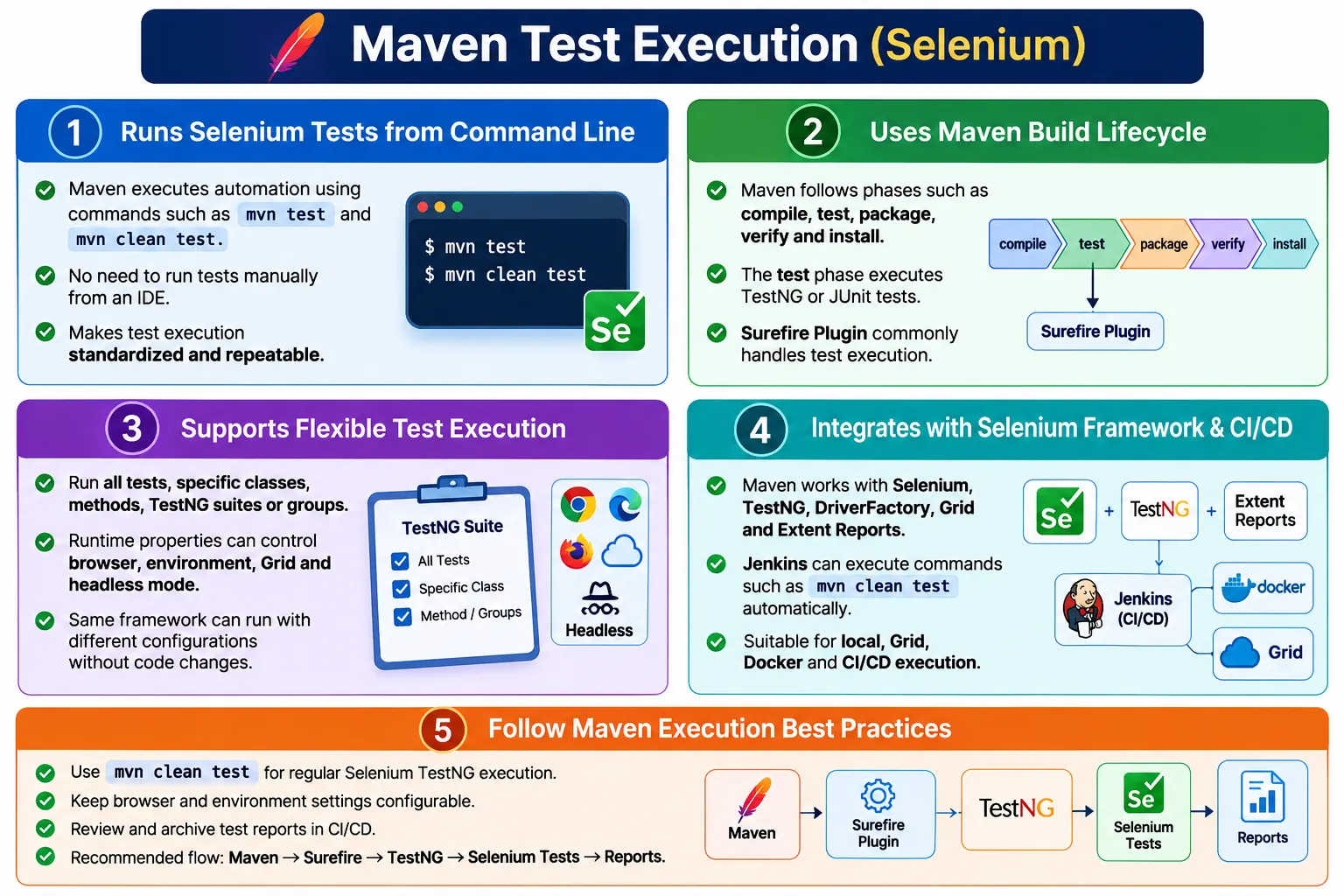
In a Selenium Java framework, Maven is commonly used with Selenium WebDriver, TestNG, JUnit, Cucumber, Maven Surefire Plugin, Maven Failsafe Plugin, Selenium Grid, headless browser execution, Extent Reports, and Jenkins. Instead of asking every tester to open an IDE and right-click a test class, Maven allows the team to run automation through commands such as mvn test, mvn clean test, and mvn clean verify. This makes execution repeatable, standardized, and suitable for enterprise automation.
1. What Maven Test Execution Means
Maven Test Execution means executing automated tests using Maven commands and the Maven build lifecycle. The test phase of the lifecycle compiles the project, prepares test classes, runs the configured test framework, and stores reports under the build output directory. For Selenium teams, this means browser-based automation can be executed without depending on an IDE.
Manual Execution
  Open IDE
    Right Click
      Run Test

Maven Execution
  mvn test
    Compile
      Execute Tests
        Generate Reports
This is important because CI/CD tools do not run tests by right-clicking in an IDE. They run shell commands. Maven provides the standard command-line execution layer for Java automation projects.
2. Why Maven Test Execution Is Needed
Manual execution is not practical for large frameworks. A team may have hundreds of Selenium tests, multiple developers, different environments, and a Jenkins pipeline. If everyone runs tests differently from the IDE, results become inconsistent. Maven provides a common execution standard.
Maven also manages dependencies. Selenium, TestNG, logging libraries, reporting libraries, JSON libraries, Apache POI, WebDriverManager, and other dependencies can be declared in pom.xml. Maven resolves them automatically. This removes the need to manually download JAR files and configure classpaths.
3. Problems Without Maven
Without Maven, teams may manually download libraries, add them to build paths, manage dependency versions by hand, run tests differently from IDEs, and struggle to integrate automation into CI/CD. This approach does not scale. It becomes difficult to reproduce builds and test executions across machines.
With Maven, the project has a standard structure and a standard build file. A new team member can clone the project and run mvn clean test. Jenkins can run the same command. A Docker container can run the same command. This consistency is one of the biggest reasons Maven is used in Selenium Java frameworks.
4. Core Idea
The core idea is to replace manual test execution with lifecycle-based execution. Maven reads pom.xml, resolves dependencies, compiles code, invokes plugins, runs tests, and produces reports. The automation framework becomes command-driven.
pom.xml
  Dependencies
    Compile
      Surefire Plugin
        TestNG or JUnit
          Selenium Tests
            Reports
This makes Maven the execution backbone for local runs, scheduled runs, CI/CD runs, and pipeline-triggered regression execution.
5. Maven Build Lifecycle
Maven uses a build lifecycle with predefined phases. Important phases include validate, compile, test, package, verify, install, and deploy. Each phase performs a specific role, and when a later phase is executed, earlier required phases are executed first.
validate
  compile
    test
      package
        verify
          install
            deploy
The test phase is the phase that executes test cases. For Selenium frameworks using TestNG or JUnit, this phase is usually handled by the Maven Surefire Plugin.
6. Maven Test Phase
The command mvn test invokes the Maven test phase. During this phase, Maven compiles source code, compiles test code, invokes the test execution plugin, runs tests, and generates test reports.
mvn test
  Compile source
    Compile tests
      Execute tests
        Generate reports
In Selenium automation, this command may open browsers, run TestNG suites, capture screenshots, generate Surefire reports, and produce Extent Reports depending on framework configuration.
7. mvn test vs mvn clean test
mvn test runs the test phase using the existing build state. mvn clean test first deletes previous build output and then runs tests. In automation projects, mvn clean test is commonly preferred because it reduces the risk of stale compiled files or old reports affecting the run.
mvn test
  Run tests

mvn clean test
  Delete target folder
  Compile again
  Run tests
For regular local debugging, mvn test may be enough. For CI/CD and formal runs, mvn clean test is safer and more repeatable.
8. Maven Surefire Plugin
The Maven Surefire Plugin executes tests during the Maven test phase. It supports JUnit, TestNG, test filtering, groups, system properties, suite XML files, reports, and parallel execution configuration. In Selenium frameworks, Surefire is often configured in pom.xml.
<plugin>
    <groupId>org.apache.maven.plugins</groupId>
    <artifactId>maven-surefire-plugin</artifactId>
    <version>3.6.0-M1</version>
</plugin>
Surefire automatically detects many test naming patterns, but Selenium TestNG frameworks often explicitly configure a testng.xml suite for better control.
9. Running All Tests
The simplest Maven test command is mvn test. It executes all tests recognized by Surefire based on naming patterns or configured test suites.
mvn testTypical test names include LoginTest.java, CheckoutTest.java, and SearchTests.java. If a framework uses TestNG XML configuration, Maven executes the suite defined in the Surefire plugin.
10. Running a Specific Test Class
Maven can run a specific test class using the -Dtest system property. This is useful during debugging or targeted execution.
mvn test -Dtest=LoginTestThe class name must match the actual test class. A common beginner mistake is using the wrong case or partial name that does not match the test class pattern.
11. Running Multiple Test Classes
Multiple test classes can be executed by separating class names with commas.
mvn test -Dtest=LoginTest,SearchTestThis is useful when a developer wants to run a small related set without executing the entire suite. For larger controlled sets, TestNG groups or suite XML files may be cleaner.
12. Running a Specific Test Method
A specific method can be executed using the class name and method name separated by #.
mvn test -Dtest=LoginTest#validLoginThis helps when debugging one failing test. It is faster than running the full class or full suite.
13. Running TestNG Suite XML
Many Selenium frameworks use testng.xml to define suites, tests, groups, listeners, parameters, and parallel execution. Surefire can be configured to run this suite file.
<plugin>
    <groupId>org.apache.maven.plugins</groupId>
    <artifactId>maven-surefire-plugin</artifactId>
    <version>3.6.0-M1</version>
    <configuration>
        <suiteXmlFiles>
            <suiteXmlFile>testng.xml</suiteXmlFile>
        </suiteXmlFiles>
    </configuration>
</plugin>
After this configuration, the command mvn clean test executes the TestNG suite. This is a standard approach in Selenium TestNG frameworks.
14. Running Suite XML from Command Line
Surefire can also accept a suite XML file from the command line. This allows the pipeline to choose which suite to run without changing pom.xml.
mvn test -Dsurefire.suiteXmlFiles=testng.xmlmvn test -Dsurefire.suiteXmlFiles=src/test/resources/suites/smoke.xmlThis is useful when the project has separate smoke, sanity, regression, and cross-browser suites.
15. Running TestNG Groups
Maven can execute TestNG groups through Surefire. For example, a smoke group can be executed with:
mvn test -Dgroups=smokeMultiple groups can also be executed:
mvn test -Dgroups=smoke,sanityGroups are useful for suite selection. A CI pipeline may run smoke tests on every commit and regression tests nightly.
16. Excluding TestNG Groups
Some runs need to exclude slow, unstable, or environment-specific tests. Surefire supports excluded groups.
mvn test -DexcludedGroups=regressionThis should be used carefully. Excluding tests can be useful, but teams should not hide real failures by excluding important groups without tracking why.
17. Passing Browser from Maven
Maven system properties allow runtime browser selection. This is one of the most useful patterns in Selenium frameworks.
mvn test -Dbrowser=chromeString browser =
System.getProperty("browser", "chrome");DriverFactory can use this value to create Chrome, Firefox, Edge, Safari, or a remote browser. This avoids hardcoding browser names in test classes.
18. Passing Environment and URL
Environment and application URL can also be passed through Maven. This allows the same framework to run against QA, staging, UAT, or local environments.
mvn test -Denv=qa -Dapplication.url=https://qa.example.comString environment =
System.getProperty("env", "qa");
String url =
System.getProperty(
"application.url",
"https://example.com"
);This pattern is useful in Jenkins because pipeline parameters can pass different runtime values to Maven.
19. Passing Properties through Surefire
Properties can be defined in pom.xml and passed to tests through Surefire system property variables. This centralizes default values while still allowing command-line overrides.
<properties>
    <browser>chrome</browser>
    <environment>QA</environment>
    <application.url>https://qa.example.com</application.url>
</properties>
<systemPropertyVariables>
<browser>${browser}</browser>
<environment>${environment}</environment>
<application.url>${application.url}</application.url>
</systemPropertyVariables>Tests can read these values with System.getProperty(). This keeps execution flexible and configuration-driven.
20. Headless Execution through Maven
Headless mode can be enabled through Maven properties. This is common in Jenkins, Docker, Linux servers, and CI/CD pipelines.
mvn test -Dheadless=trueboolean headless =
Boolean.parseBoolean(
System.getProperty("headless", "false")
);DriverFactory can use this value to add browser-specific headless arguments such as --headless=new for Chrome and Edge or -headless for Firefox.
21. Selenium Grid Execution through Maven
Maven properties can also control Grid execution. For example, the command can pass whether Grid is enabled and what Grid URL should be used.
mvn test -Dgrid=true -Dgrid.url=http://localhost:4444DriverFactory can read these values and create RemoteWebDriver instead of a local browser driver. This allows the same tests to run locally or remotely without code changes.
22. Parallel Execution with Surefire
Surefire supports parallel execution configuration. TestNG also supports parallel execution in testng.xml. For Selenium tests, parallel execution must be designed carefully because WebDriver instances must be thread-safe.
<configuration>
    <parallel>methods</parallel>
    <threadCount>4</threadCount>
</configuration>
When tests run in parallel, use ThreadLocal<WebDriver> for driver management and separate report objects for each thread. Maven can start the execution, but the framework must be parallel-safe.
23. Maven Failsafe Plugin
The Maven Failsafe Plugin is commonly used for integration-test workflows. It runs during the integration-test and verify phases rather than the normal test phase. Test classes often use naming patterns such as LoginIT.java or PaymentIT.java.
<plugin>
    <groupId>org.apache.maven.plugins</groupId>
    <artifactId>maven-failsafe-plugin</artifactId>
    <version>3.6.0-M1</version>
    <executions>
        <execution>
            <goals>
                <goal>integration-test</goal>
                <goal>verify</goal>
            </goals>
        </execution>
    </executions>
</plugin>
The command mvn clean verify executes the integration-test workflow. Surefire is usually used for normal tests, while Failsafe is used when the team wants integration tests to be handled separately.
24. Report Generation
After Maven test execution, Surefire reports are generated under target/surefire-reports. These include XML reports, text outputs, and framework-specific output depending on setup. TestNG may also generate its own output, and Extent Reports may generate separate HTML reports.
target
  surefire-reports
    XML reports
    Text reports
    TestNG output
In CI/CD, these reports can be archived and published. Jenkins can read XML reports for build status and also publish HTML reports such as Extent Reports.
25. Folder Structure
A Maven Selenium framework usually follows a standard folder structure. Source code lives under src/main/java, test code under src/test/java, resources under src/test/resources, and build output under target.
AutomationFramework
  pom.xml
  testng.xml
  src
    main
      java
    test
      java
      resources
  target
    surefire-reports
  reports
Keeping TestNG suites under src/test/resources is common in larger frameworks because it separates suite configuration from source code.
26. Integration with Hybrid Framework
In a hybrid Selenium framework, Maven starts execution, Surefire invokes TestNG, TestNG triggers BaseTest, BaseTest uses DriverFactory, DriverFactory creates the browser, page objects execute actions, assertions validate behavior, and reports capture results.
Maven
  Surefire Plugin
    TestNG
      BaseTest
        DriverFactory
          Page Objects
            Selenium
              Extent Reports
This layered flow keeps execution standardized and maintainable. Maven does not replace the framework; it coordinates execution.
27. Integration with Jenkins
Jenkins can execute Maven commands as part of a pipeline. A common command is mvn clean test. Jenkins can pass parameters such as browser, environment, Grid URL, and headless mode.
Git
  Jenkins
    mvn clean test
      Surefire Plugin
        TestNG Suite
          Reports
This makes Maven a natural bridge between Selenium automation and CI/CD. Pipeline jobs can run tests automatically after commits, nightly, or before releases.
28. Common Maven Commands
Common Maven commands include mvn compile, mvn test, mvn package, mvn install, mvn clean, and mvn clean test. Selenium teams use mvn clean test most often for normal TestNG test execution.
mvn compile
mvn test
mvn clean test
mvn package
mvn install
mvn clean verify
The command chosen depends on whether the team wants only test execution, packaging, installation to local repository, or integration-test verification.
29. Advantages
Maven provides standardized execution, easy dependency management, CI/CD integration, cross-platform command-line execution, a strong plugin ecosystem, automatic report generation, support for TestNG and JUnit, system property support, and repeatable builds. It makes automation execution consistent across machines.
For Selenium frameworks, Maven also makes it easy to pass browser, environment, Grid, and headless values at runtime. This is essential for enterprise pipelines where execution settings vary by job.
30. Limitations
Maven requires initial setup and some XML configuration. Beginners may need time to understand lifecycle phases, dependency scopes, plugin configuration, and command-line properties. Plugin versions also need maintenance. Inconsistent plugin versions across projects can create confusion.
Another limitation is that Maven cannot fix poor framework design. If tests are not thread-safe, Maven parallel execution will expose failures. If configuration is hardcoded, Maven properties will not help until the framework is refactored to read them.
31. Common Beginner Mistakes
Common mistakes include forgetting clean, using incorrect test class names, missing Surefire configuration for TestNG XML, hardcoding browser names, ignoring target/surefire-reports, and assuming tests failed because of Maven when the real issue is framework configuration.
Another mistake is placing credentials or secrets directly in pom.xml. Maven properties are convenient, but sensitive data should be handled carefully through secure CI/CD credentials or environment variables.
32. Best Practices
Use mvn clean test for normal Selenium TestNG execution. Use mvn clean verify for integration tests configured with Failsafe. Keep browser, URL, environment, Grid, and headless mode configurable with Maven properties. Use Surefire for tests and Failsafe for integration-test workflows. Avoid hardcoding credentials in pom.xml.
Keep pom.xml organized. Use consistent dependency and plugin versions. Store TestNG suite files under src/test/resources where appropriate. Use ThreadLocal<WebDriver> when executing Selenium tests in parallel. Review reports after execution and archive them in CI/CD.
33. Maven Wrapper
Maven Wrapper allows a project to run with a consistent Maven version without requiring every machine to install Maven manually. Instead of mvn, teams can use mvnw on Windows or Unix-like systems. This improves consistency across developer machines and CI agents.
For enterprise frameworks, Maven Wrapper is useful because it removes one environmental difference. The same Maven version can be used locally and in CI/CD. This reduces build differences caused by incompatible Maven versions.
34. Interview Perspective
A short interview answer is: Maven Test Execution is the process of running automated tests using Maven commands such as mvn test. Maven compiles the project, resolves dependencies, executes tests using plugins like Surefire, and generates execution reports.
A stronger real-time answer is: in my Selenium hybrid framework, Maven manages dependencies and controls test execution through the Maven lifecycle. I use mvn clean test to compile the project and execute TestNG suites using the Maven Surefire Plugin. Runtime properties such as browser, environment, Grid, and headless mode are passed using Maven system properties, allowing the same framework to run in different configurations without code changes. The execution is integrated with Jenkins, and reports are generated automatically using Surefire and Extent Reports.
35. Maven Test Execution Workflow
The workflow starts with a Maven command. Maven reads pom.xml, resolves dependencies, compiles source code, compiles test code, invokes Surefire, executes TestNG or JUnit tests, runs Selenium browser automation, and generates reports.
mvn clean test
  Compile Source Code
    Compile Test Code
      Surefire Plugin
        TestNG or JUnit
          Execute Selenium Tests
            Generate Reports
This workflow is repeatable locally and in CI/CD, which is why Maven is central to Selenium Java automation frameworks.
36. Maven Profiles
Maven profiles are useful when the same project needs different settings for different environments or execution types. A project may have a QA profile, staging profile, production-like profile, smoke profile, or regression profile. Profiles can define properties such as browser, environment, application URL, headless mode, suite XML file, or Grid URL.
For example, a profile can define default QA values, and the command line can activate that profile when running the suite. This keeps environment-specific configuration out of test code and makes pipeline execution more predictable. Profiles should still be used carefully. Too many profiles can make the pom.xml hard to read, so use them for meaningful execution differences rather than every small setting.
mvn clean test -Pqa
mvn clean test -Pregression
mvn clean test -Pgrid
Profiles are especially helpful in Jenkins because a pipeline can activate the correct profile based on branch, environment, or job parameter. This gives the team a standard way to execute the same framework under different conditions.
37. Dependency Management
One of Maven's biggest benefits is dependency management. Selenium frameworks commonly use dependencies for Selenium Java, TestNG, WebDriverManager, Extent Reports, Apache POI, JSON parsing, logging, database access, REST clients, and assertion libraries. Maven downloads these dependencies and their transitive dependencies automatically.
Dependency versions should be reviewed and controlled. Randomly updating Selenium, TestNG, or browser-related libraries can break framework behavior. On the other hand, leaving dependencies outdated for too long can cause compatibility and security problems. Enterprise teams usually upgrade dependencies intentionally, run a smoke suite, and then approve the update.
Use dependency scopes correctly. Test frameworks often declare TestNG with test scope because it is needed for test execution but not for production code. Keeping scopes clean helps avoid unnecessary dependency pollution and makes the project easier to maintain.
38. Plugin Version Management
Maven plugins should have explicit versions. If plugin versions are omitted, builds can behave differently over time or across environments. Surefire, Failsafe, Compiler Plugin, and other plugins should be defined with known versions. This improves repeatability.
For Selenium frameworks, Surefire version matters because it affects TestNG support, suite XML handling, group handling, system properties, and reporting behavior. If a project changes Surefire version and test execution changes unexpectedly, the plugin version should be part of the investigation.
Teams should also be cautious with milestone or prerelease plugin versions. They may be useful, but they should be reviewed and approved before being adopted broadly. Stable builds depend on predictable plugin behavior.
39. Command-Line Overrides
Maven command-line properties are powerful because they let teams override default values without changing source code. A default browser may be Chrome, but a Jenkins job can override it with Edge. A default environment may be QA, but a release job can override it with staging. A default headless setting may be false locally and true in CI.
mvn clean test -Dbrowser=edge -Dheadless=true -Denvironment=stagingCommand-line overrides should be documented. If every pipeline uses different property names, the framework becomes confusing. Define standard property names such as browser, environment, application.url, headless, grid, and grid.url. Use those names consistently in DriverFactory, ConfigReader, and pipeline jobs.
40. Maven in Jenkins Pipelines
In Jenkins, Maven commands are usually placed in build steps or pipeline stages. A simple pipeline may check out code, run mvn clean test, archive Surefire reports, publish Extent Reports, and mark the build based on test results. More advanced pipelines may accept parameters for browser, suite, environment, and headless mode.
Jenkins should archive both machine-readable and human-readable reports. Surefire XML reports help Jenkins understand test status. Extent Reports help testers and developers review execution details, screenshots, and logs. If Selenium runs remotely or headlessly, report artifacts become even more important because they preserve evidence after the browser session is gone.
Jenkins Pipeline
  Checkout Code
    mvn clean test
      Archive surefire-reports
        Publish Extent Report
          Notify Team
For stable CI/CD execution, Jenkins agents should have compatible Java and Maven versions, or the project should use Maven Wrapper. Browser execution settings should be controlled through parameters and not hardcoded inside tests.
41. Troubleshooting Maven Test Execution
When Maven test execution fails, first identify whether the failure is a build problem, dependency problem, plugin problem, test framework problem, or Selenium runtime problem. A compilation failure is different from a TestNG failure. A dependency resolution failure is different from a browser launch failure. Read the Maven console output carefully before changing framework code.
If tests are not running, check naming conventions, Surefire includes, suite XML configuration, group filters, and the -Dtest value. If TestNG suite XML is ignored, check the Surefire configuration. If browser properties are null, confirm that properties are passed correctly and read with the same names. If CI fails but local execution passes, compare Java version, Maven version, environment variables, paths, browser availability, and command-line parameters.
The target/surefire-reports folder is one of the first places to inspect after a Maven run. It can contain XML reports, text reports, and failure details. Maven output plus Surefire reports usually provide enough context to decide whether the failure is in execution setup or in the test itself.
42. Maven Execution Governance
Enterprise teams should standardize Maven execution commands. If one person runs mvn test, another runs a profile, and Jenkins runs a different command with different properties, results may not be comparable. Define standard commands for local smoke, full regression, CI smoke, Grid execution, and release execution.
Document these commands in a README or framework guide. Include examples for browser override, environment override, headless mode, Grid mode, groups, and suite XML execution. This reduces onboarding time and prevents command-line mistakes.
Governance also includes dependency review, plugin version review, report retention, secure property handling, and CI/CD parameter naming. Maven is flexible, but that flexibility should be controlled through clear conventions.
43. Local and CI Consistency
One of the biggest benefits of Maven is that local execution and CI execution can use the same command structure. If a tester runs mvn clean test -Dbrowser=chrome -Denv=qa locally and Jenkins runs the same command with pipeline parameters, the team can compare results more confidently. Differences still may exist because of browser versions, operating systems, data, or infrastructure, but the execution entry point remains consistent.
This consistency helps debugging. If a test fails in Jenkins, the developer can copy the Maven command, run it locally with the same parameters, and reproduce the issue more easily. If the test passes locally and fails in CI, the investigation can focus on environment differences such as headless mode, Grid URL, browser version, permissions, network access, file paths, or test data.
A good framework prints key runtime values at startup: browser, environment, URL, headless mode, Grid mode, suite name, and thread count. These values should also appear in reports. When Maven commands are parameterized and runtime configuration is visible, test execution becomes easier to audit, reproduce, and support.
44. Key Takeaway
Maven Test Execution provides a standardized, automated, and repeatable way to execute Selenium tests. It combines Maven's build lifecycle, dependency management, Surefire Plugin, TestNG or JUnit execution, system properties, and report generation into one command-driven process.
Maven Command
  Build Lifecycle
    Compile
    Test
    Package
    Install
      Surefire Plugin
        TestNG Execution
          Reports
The most important practices are to use mvn clean test for regular execution, configure Surefire for TestNG suites, pass browser and environment through Maven properties, use Failsafe for integration-test workflows when needed, review target/surefire-reports, integrate Maven with Jenkins, and keep execution configuration outside test code. With Maven, Selenium tests become easier to run locally, on Selenium Grid, in headless mode, and across CI/CD pipelines with minimal manual effort.