Locator Optimization in Selenium
Locator Optimization in Selenium is the process of designing, selecting, reviewing, and maintaining locators that identify web elements reliably and efficiently. A locator is the bridge between Selenium automation code and the application user interface. If that bridge is weak, tests become unstable, slow, hard to understand, and expensive to maintain. If that bridge is strong, tests become clearer, faster, more reliable, and easier to update when the application changes.
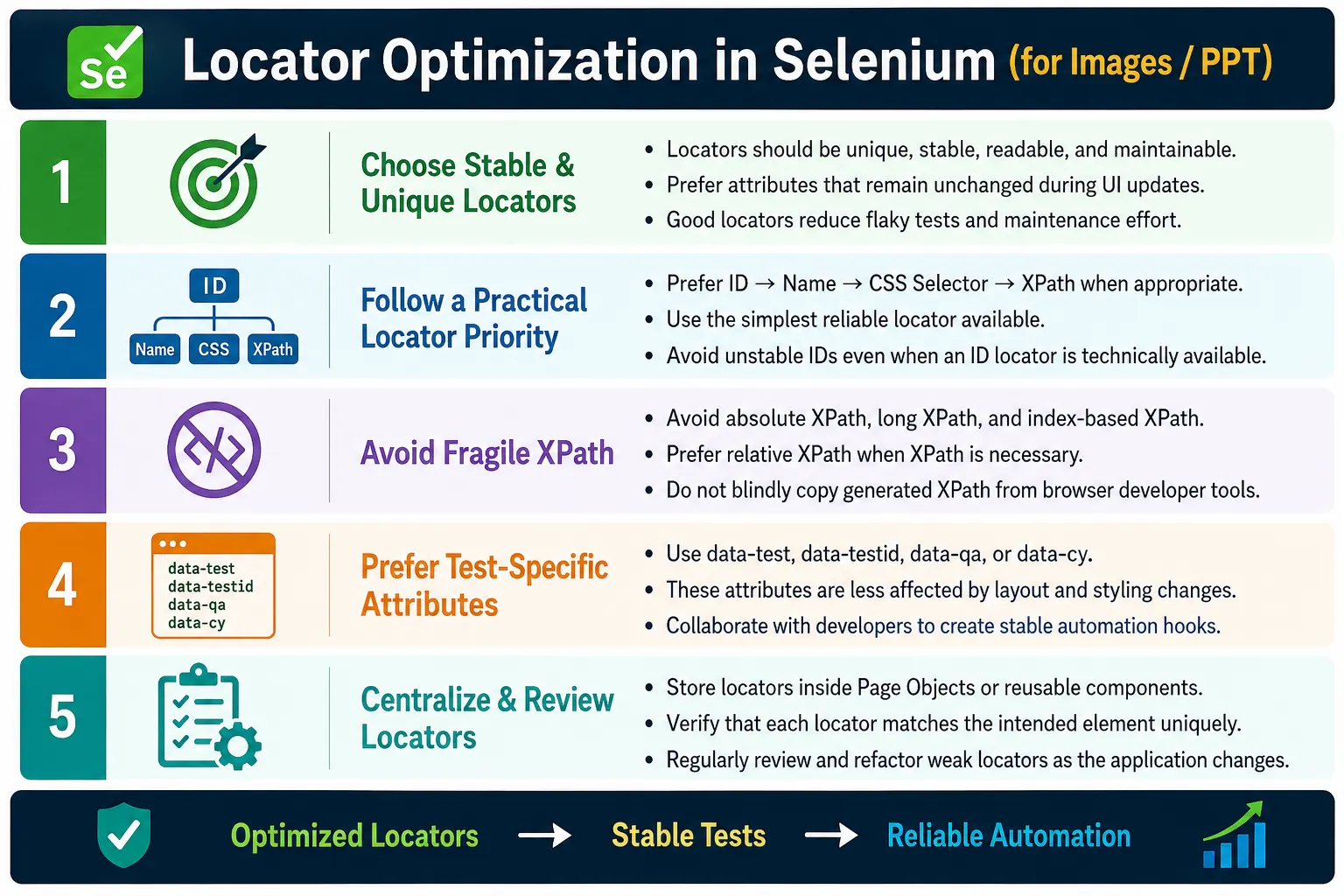
In real Selenium projects, locators are one of the most common sources of automation failure. Poor locators can cause NoSuchElementException, StaleElementReferenceException, click failures, wrong element selection, slow execution, flaky tests, and repeated maintenance after minor UI changes. Locator optimization is therefore not a small coding preference. It is a core framework quality practice that directly affects the stability of the automation suite.
1. What Locator Optimization Means
Locator Optimization means choosing the best possible locator strategy for identifying elements in a way that is unique, stable, readable, maintainable, and efficient. An optimized locator should point to the intended element without depending unnecessarily on the page layout, visual styling, or generated DOM structure.
For example, an absolute XPath such as /html/body/div[2]/div[3]/table/tr[5]/td[2]/button may work today, but it depends heavily on the current DOM structure. If a developer adds one wrapper element or changes the table layout, the locator can break. A locator such as By.id("loginButton") is much simpler, faster to read, and usually more stable.
Poor Locator
  /html/body/div[2]/div[3]/table/tr[5]/td[2]/button

Optimized Locator
  By.id("loginButton")
2. Why Locator Optimization Is Important
Locator quality has a direct impact on automation quality. When locators are weak, even a small UI change can break many tests. The application may still work correctly, but the automation suite fails because it was tied to layout details instead of stable element identifiers. This creates false failures and reduces trust in automation.
Optimized locators reduce that risk. If a page layout changes but a stable ID, name, or data-test attribute remains, the test can continue to run. This means fewer script updates, fewer flaky failures, faster debugging, and more reliable CI/CD feedback. Locator optimization is one of the simplest ways to improve Selenium framework maturity.
Poor Locator
  DOM Changed
    XPath Broken
      Test Failed

Optimized Locator
  DOM Changed
    Stable Attribute Still Valid
      Test Passed
3. Problems with Poor Locators
Poor locators create frequent failures, slow execution, difficult maintenance, flaky behavior, duplicate locator definitions, and difficult debugging. They also increase the cost of UI changes because every visual adjustment can require automation updates. When many tests fail after a minor page change, the root problem is often locator design.
Poor locators can also select the wrong element. A locator that matches several buttons may click the first one even when the intended button is elsewhere. This creates confusing failures because Selenium technically found an element, but it was not the correct one. Locator uniqueness is therefore just as important as locator existence.
4. Core Idea
The core idea is to locate elements through stable attributes rather than fragile structure. A good locator should describe the element in a way that survives harmless UI changes. Instead of asking Selenium to travel through many layers of the DOM, use the simplest reliable attribute available.
Locate Element
  Complex XPath
    Fragile Test

Locate Element
  Stable Attribute
    Reliable Test
This does not mean XPath is bad. It means XPath should be used carefully. CSS selectors and XPath are both useful when IDs and names are unavailable. The optimized approach is to choose the simplest reliable strategy for the situation.
5. Characteristics of Good Locators
A good locator should be unique, stable, readable, maintainable, fast, independent of visual layout, and easy to understand. Uniqueness means it identifies the intended element and not many similar elements. Stability means it does not change frequently. Readability means another engineer can understand it quickly. Maintainability means it can be updated in one place when needed.
Performance also matters, but it should be balanced with stability. In many projects, the difference between simple ID and simple CSS selector is less important than whether the locator breaks every sprint. The best locator is usually the one that is stable and clear while still being efficient enough for the suite.
6. Selenium Locator Priority
A practical locator priority is ID first, then name, then CSS selector, then XPath, then class name, tag name, and link text. This order is not a strict rule, but it is a useful guideline. The simplest reliable locator should usually be preferred.
Recommended Priority
  1. ID
  2. Name
  3. CSS Selector
  4. XPath
  5. Class Name
  6. Tag Name
  7. Link Text
Some projects may prefer CSS selectors over name depending on application design. Some pages may require XPath because of complex relationships. The priority list should guide decisions, not replace engineering judgment.
7. Use ID Whenever Possible
ID is usually the best locator when it is unique and stable. It is readable, direct, and often fast. A locator such as By.id("username") clearly communicates which element is being used. It is also easy to review and easy to maintain.
driver.findElement(
        By.id("username")
);
However, ID is useful only when it is stable. Some applications generate dynamic IDs such as user_785634 or framework-generated IDs that change every session. In those cases, exact ID locators can become flaky, and another strategy is needed.
8. Use Name When ID Is Unavailable
The name attribute is often stable for form fields because it is tied to form submission or backend processing. If an input does not have a stable ID but has a meaningful name, By.name() can be a good choice.
driver.findElement(
        By.name("password")
);
Name is especially useful for login forms, registration forms, search fields, and structured business forms. As with ID, verify that the locator matches exactly the intended element.
9. Prefer CSS Selectors for Practical Locators
CSS selectors are concise, readable, and widely used in Selenium automation. They work well for IDs, classes, attributes, parent-child relationships, and partial attribute matching. CSS selectors are often easier to read than complex XPath expressions.
By.cssSelector("#loginButton")
By.cssSelector(".submit-btn")
By.cssSelector("[data-test='loginButton']")
CSS selectors are a strong default when IDs and names are unavailable. They are also useful for locating elements by automation-specific attributes such as data-test or data-testid.
10. Use XPath Carefully
XPath is powerful because it can navigate up and down the DOM, match text, combine conditions, and locate elements based on relationships. This power is useful, but it can also produce fragile locators if used carelessly.
//button[@id='login']The example above is clear and relative. The problem starts when XPath becomes long, absolute, index-heavy, or dependent on unrelated layout. XPath should be used when it adds value, not because it was copied from browser developer tools without review.
11. Avoid Absolute XPath
Absolute XPath starts from the root of the document and walks through each DOM level. It is fragile because any parent structure change can break it. Generated XPath from browser tools is often absolute or overly specific, so it should be reviewed and simplified before being used in automation code.
/html/body/div/div/div/form/inputA small DOM change can break this locator even if the input itself has not changed. Prefer relative XPath or CSS selectors based on stable attributes.
12. Prefer Relative XPath
Relative XPath starts from a meaningful condition instead of the document root. It is usually more maintainable than absolute XPath. For example, //input[@id='username'] directly identifies the input by a stable attribute.
//input[@id='username']Relative XPath becomes especially useful when locating elements inside a specific form, row, card, or component. It allows the locator to express relationship without depending on the entire page structure.
13. Use Data-Test Attributes
Data-test attributes are among the best options for enterprise automation. They are created specifically to support testing and are less likely to change because of visual redesigns. Common attributes include data-test, data-testid, data-qa, and data-cy.
<button data-test="loginButton">
    Login
</button>
By.cssSelector(
"[data-test='loginButton']"
);When testers and developers agree on automation-friendly attributes, locator stability improves significantly. This is especially useful in React, Angular, Vue, and other component-based applications where generated DOM structure can change often.
14. Avoid Dynamic IDs
Dynamic IDs look stable at first but change between sessions, builds, users, or page refreshes. An ID such as user_785634 may work in one run and fail in the next. Exact locators based on dynamic IDs are a common source of intermittent failures.
If no stable attribute is available, partial matching may help. For example, a CSS selector can match IDs that start with a stable prefix. This is still less ideal than a dedicated stable attribute, but it can be useful when application code cannot be changed immediately.
By.cssSelector("[id^='user_']")15. Avoid Index-Based XPath
Index-based XPath is fragile because it depends on element order. A locator such as (//button)[5] may click the correct button today, but if another button is added above it, the same locator points to a different element. This creates failures that can be difficult to understand.
Use index only when the position itself is part of the business requirement and there is no better attribute or relationship. Even then, prefer to scope the locator to a specific container first so that the index is local and meaningful.
16. Use Meaningful Attributes
When ID, name, or data-test attributes are not available, meaningful attributes can help. Attributes such as type, placeholder, aria-label, role, and title can sometimes produce readable locators. These should be used carefully because some of them may change for design, accessibility, or localization reasons.
//input[@placeholder='Email']
//button[@type='submit']
Accessibility-related attributes can be useful when they are stable and meaningful. They also encourage better application accessibility, but test automation should not misuse accessibility attributes purely for convenience if those attributes are likely to change.
17. Combine Multiple Attributes
When one attribute is not unique, combining multiple attributes can improve uniqueness. XPath allows combining conditions with and. CSS selectors can combine tag names, classes, and attributes. This approach is useful when the page has repeated fields or components.
//input[@type='text' and @name='username']Combined locators should remain readable. If a locator needs many conditions to become unique, it may indicate that the application needs better testability attributes.
18. Use Parent-Child Relationships
Parent-child relationships help when the same element appears in multiple sections. For example, a page may have several submit buttons in different forms. Instead of selecting a generic submit button, scope the search to the correct form or component.
//form[@id='loginForm']//buttonScoping locators reduces accidental matches. It also makes locator intent clearer: the test is clicking the button inside the login form, not just any button on the page.
19. Avoid Text-Based Locators When Text Changes Often
Text-based locators are readable, but they can be fragile when the application supports localization, content changes, A/B testing, or frequent business copy updates. A locator such as //button[text()='Login'] may fail when the button text changes to Sign In or another language.
Text-based locators are acceptable when the visible text is the business assertion or stable contract. For example, verifying a specific error message may require text matching. For clicking normal controls, stable attributes are usually better.
20. Centralize Locators in Page Objects
Locators should not be repeated across test classes. If By.id("username") appears in many tests, one locator change requires many code updates. Page Objects provide a single place for locator maintenance.
private By loginButton =
        By.id("loginButton");
Tests should call page object methods instead of directly using locators. This keeps test methods focused on business scenarios and keeps UI details in the page layer.
21. Reuse Locators Correctly
Reusing locators does not mean reusing WebElement objects for too long. A locator is a strategy for finding an element. A WebElement is a reference to a specific element instance in the current DOM. In dynamic applications, storing WebElement references too early can cause stale element problems.
It is often safer to store By locators in page objects and find elements when the action is performed. This allows the framework to perform fresh lookup after the page updates.
driver.findElement(loginButton).click();22. Verify Locator Uniqueness
Before using a locator, verify that it matches the intended element and preferably only one element. A locator that matches fifteen elements is risky unless the test intentionally processes a list. Browser developer tools can test CSS selectors and XPath expressions quickly.
Good Locator
  1 Match

Poor Locator
  15 Matches
Uniqueness should also be reviewed after UI changes. A locator that was unique last month may match multiple elements after a new component is added.
23. Optimize for Performance
Locator performance matters in large suites. Simple ID, name, and CSS selectors are usually efficient. Very long XPath expressions that scan large parts of the DOM can slow execution, especially when used repeatedly across hundreds of tests.
Performance should not be optimized at the cost of correctness. A fast locator that selects the wrong element is worse than a slightly slower locator that is accurate and stable. The goal is practical performance: short, clear, scoped locators that avoid unnecessary DOM traversal.
24. Folder Structure
In a well-structured framework, locators belong inside Page Object classes. Test classes should not contain locator definitions. Utilities should not contain page-specific locators unless they represent reusable components. This keeps locator maintenance close to the page or component it represents.
AutomationFramework
  pages
    LoginPage.java
    DashboardPage.java
  tests
  utilities
  driver
For complex applications, component objects may also be useful. A reusable header, sidebar, table, modal, or date picker can have its own locator definitions and actions.
25. Locator Workflow
A strong locator workflow begins by inspecting the element, identifying stable attributes, choosing the simplest reliable locator strategy, verifying uniqueness, storing the locator in a page object, and reusing it through page methods.
Inspect Element
  Choose Stable Attribute
    Create Locator
      Verify Uniqueness
        Store in Page Object
          Reuse in Tests
This workflow prevents the common mistake of copying the first generated XPath from browser tools and pasting it directly into a test.
26. Advantages of Optimized Locators
Optimized locators create stable automation, faster execution, easier maintenance, cleaner code, better readability, reduced flaky tests, easier debugging, and improved scalability. They also make automation reviews more effective because locators are easier to understand and compare.
Optimized locators are especially valuable in CI/CD. When Jenkins runs the suite repeatedly, weak locators produce random failures and reruns. Stable locators help the pipeline provide trustworthy feedback.
27. Limitations
Not every application provides ideal locator attributes. Some pages lack unique IDs. Some frameworks generate dynamic DOM structures. Some legacy applications use repeated elements with poor markup. In these situations, automation engineers must carefully design CSS selectors or relative XPath expressions.
Locator optimization is sometimes a collaboration problem, not just a test code problem. If the application does not expose stable hooks, the best long-term solution may be to work with developers to add automation-friendly attributes.
28. Optimized vs Poor Locator
Poor locators are absolute, index-based, dynamic, duplicated, hard to read, and frequently broken. Optimized locators use stable IDs, names, CSS selectors, data-test attributes, scoped relationships, and centralized storage.
Poor Locator
  Absolute XPath
  Index-Based XPath
  Dynamic IDs
  Duplicate Definitions

Optimized Locator
  ID
  Name
  CSS Selector
  Stable Attribute
  Page Object Storage
29. Common Beginner Mistakes
Common beginner mistakes include using absolute XPath, depending on dynamic IDs, writing very long XPath expressions, copying XPath from browser developer tools without review, duplicating locators across tests, and ignoring locator quality during code reviews. These mistakes may not be obvious in a small demo, but they become expensive in enterprise frameworks.
Another mistake is using class names without understanding whether they are stable. Many CSS classes are created for styling and may change during UI redesign. Class names can be useful, but they should not be assumed stable without checking the application pattern.
30. Enterprise Best Practices
Enterprise teams should prefer ID whenever available, use name if IDs are unavailable, prefer CSS selectors over complex XPath where practical, avoid absolute XPath, prefer data-test or data-testid attributes, store locators in Page Objects, keep locators short and readable, verify uniqueness before implementation, refactor outdated locators regularly, and collaborate with developers to introduce automation-friendly attributes.
Locator standards should be documented. Teams should agree on naming conventions for data-test attributes, Page Object locator fields, and locator review expectations. Consistency matters because many automation engineers may contribute to the same framework.
31. Real Enterprise Architecture
In a real enterprise framework, automation tests call Page Object methods. Page Objects store optimized locators. WebDriver uses those locators to interact with the application. Reports capture failures with screenshots and logs. Code reviews ensure locator quality before changes reach the main branch.
Automation Tests
  Page Objects
    Optimized Locators
      WebDriver
        Application
This architecture keeps locator decisions centralized and reviewable. It also makes UI changes easier to handle because the affected locators are located in page-specific classes.
32. Locator Review in Code Reviews
Locator review should be part of automation code review. Reviewers should ask whether the locator is unique, stable, readable, scoped correctly, and stored in the right page object. They should also check whether a better attribute is available and whether the locator depends on layout or index unnecessarily.
Good reviews prevent locator debt. If weak locators are accepted repeatedly, the framework becomes flaky over time. A few minutes of review can prevent hours of future debugging.
33. Working with Developers
Locator optimization often requires collaboration with developers. Testers can ask for stable automation hooks on important elements such as login buttons, submit buttons, search fields, table rows, error messages, menu items, and workflow actions. Developers can add these attributes without changing the user interface.
This collaboration should be framed as testability, not blame. Automation-friendly markup benefits the whole delivery pipeline because tests become more stable and releases receive faster feedback. Mature teams treat testability as part of the definition of done.
34. Handling Component-Based Applications
Modern applications built with React, Angular, Vue, and similar frameworks often generate complex DOM structures. Components may be re-rendered, attributes may be generated, and class names may be transformed by build tools. In these applications, relying on DOM position is especially risky.
Data-test attributes and component-level Page Objects are very helpful here. A reusable component such as a dropdown, modal, table, or date picker can have a dedicated object that knows how to locate and interact with its internal elements. This keeps test code stable even when component internals change.
35. Interview Perspective
A short interview answer is: Locator Optimization is the practice of choosing stable, unique, readable, and efficient locators to improve Selenium test reliability, execution speed, and maintainability. Common best practices include preferring ID, using CSS selectors where appropriate, avoiding absolute XPath, and storing locators in Page Objects.
A stronger real-time answer is: in my Selenium hybrid framework, I optimize locators by prioritizing ID and name attributes whenever possible. If those are unavailable, I use concise CSS selectors or well-designed relative XPath expressions. I avoid absolute XPath, dynamic IDs, and index-based locators because they are fragile. All locators are centralized inside Page Object classes, so UI changes can be handled in one place. When working with development teams, I encourage dedicated data-test attributes to create stable automation hooks. This reduces flaky tests and simplifies long-term maintenance.
36. Locator Optimization Workflow
The locator optimization workflow starts with inspecting the element, identifying a stable attribute, choosing the best locator strategy, verifying uniqueness, storing the locator in the Page Object, reusing it across tests, and maintaining it when UI changes occur.
Inspect Web Element
  Identify Stable Attribute
    Choose Best Locator Strategy
      Verify Uniqueness
        Store in Page Object
          Reuse Across Tests
            Maintain When UI Changes
37. CSS vs XPath Decision Making
A common interview and framework question is whether CSS selectors are better than XPath. The practical answer is that both are useful, and the better choice depends on the element, the application markup, and the stability of the available attributes. CSS selectors are usually concise and easy to read for IDs, classes, and attributes. XPath is stronger when the locator must use complex relationships, ancestor traversal, or text-based conditions.
For example, if an element has a stable data-test attribute, CSS is usually a clean choice. If the test must locate a button inside the row containing a specific order number, XPath may express that relationship more naturally. The goal is not to use one technology everywhere. The goal is to choose the locator that is stable, readable, and appropriate for the scenario.
Teams should document their preferred approach. A common standard is to prefer ID, name, or data-test attributes first, use CSS for simple attribute-based selection, and use XPath for relationships that CSS cannot express cleanly. This prevents inconsistent personal preferences from making the framework difficult to maintain.
38. Locator Contracts with Development Teams
Locator optimization becomes much easier when automation engineers and developers agree on locator contracts. A locator contract is a shared agreement that important elements will expose stable automation attributes. These attributes are not used for styling and should not change unless the feature itself changes meaningfully.
For example, a login page can expose data-test="username", data-test="password", and data-test="loginButton". A checkout page can expose attributes for cart items, payment fields, submit buttons, validation messages, and confirmation numbers. These hooks give automation a stable interface into the UI.
This practice is especially useful in agile teams. If testability is considered during development, automation becomes easier to write and maintain. If testability is ignored until after the UI is complete, testers are forced to rely on fragile DOM paths, generated classes, or text that may change later.
39. Handling Tables and Repeated Components
Tables, cards, grids, and repeated components require careful locator design. A page may contain many rows with similar buttons, links, checkboxes, and status labels. A generic locator such as //button[@type='submit'] may match the wrong row. The locator must be scoped to the correct record or container.
A practical approach is to locate the row by a stable business value, such as order ID, username, product name, or invoice number, and then locate the action within that row. This makes the locator express the real user intent: find the row for this record and click its edit button.
When repeated components are common, create reusable component objects. A table component can expose methods such as getRowByText(), clickActionForRow(), or getCellValue(). This prevents every test from inventing its own table XPath.
40. Shadow DOM and Locator Limits
Some modern applications use Shadow DOM. Elements inside a shadow root are not located the same way as normal DOM elements. Traditional CSS selectors and XPath from the document root may not reach inside shadow boundaries. This can confuse testers who inspect an element and write a locator that looks correct but fails in Selenium.
When Shadow DOM is used, the framework may need specific shadow root handling. Selenium supports shadow root access in modern versions, but the approach should be wrapped in reusable utilities or component objects. Tests should not scatter shadow DOM handling everywhere.
Shadow DOM is a reminder that locator optimization is not only about syntax. It is about understanding the actual structure of the application. Frames, iframes, shadow roots, dynamic components, and virtualized lists all affect how elements should be located.
41. Virtualized Lists and Lazy Rendering
Some applications use virtualized lists, where only the visible rows are present in the DOM. A locator for an off-screen row may fail because the row has not been rendered yet. Scrolling causes the application to create and destroy row elements dynamically. This can lead to stale elements and missing elements if tests assume the full list is always present.
For virtualized lists, tests should interact through stable search, filtering, pagination, or controlled scrolling. Locators should be combined with waits that confirm the target item is actually rendered. Page objects should hide this complexity by exposing methods such as selectItemByName() or openRecord() instead of making tests manage virtual scrolling directly.
42. Locator Governance and Refactoring
Locator optimization is not a one-time activity. As the application evolves, locators should be reviewed and refactored. A locator that was acceptable during initial automation may become weak after the UI grows. A page object may accumulate duplicate locators. A new data-test attribute may become available and allow a fragile XPath to be replaced.
Locator governance means the team has standards and actively maintains them. Code reviews should catch weak locators before merge. Flaky test analysis should identify locator-related failures. Refactoring tasks should replace fragile locators with stable ones when patterns emerge. Automation quality improves when locator health is treated as part of framework maintenance.
A useful practice is to create a small checklist for locator review: is the locator unique, stable, readable, scoped, stored in the correct page object, and free from unnecessary index or absolute path dependency? If the answer is no, improve it before the test becomes part of the regression suite.
43. Debugging Locator Failures
When a locator fails, do not immediately change it randomly. First determine why it failed. Did the element not exist? Did it exist but appear late? Did the locator match multiple elements? Did the page navigate to the wrong screen? Did an iframe or shadow root prevent access? Did the element become stale after a re-render? Each cause requires a different fix.
Use browser developer tools to test the locator. Check match count. Inspect the element during the exact application state where the test failed. Review screenshots and logs from CI. Compare local and Jenkins runs if the failure happens only in the pipeline. Locator debugging should be evidence-driven.
If the locator is correct but the element appears late, the fix may be a wait, not a locator change. If the locator is fragile because of dynamic attributes, the fix may be a better attribute or developer-provided test hook. If the element is inside an iframe, the fix is switching context before locating it. Correct diagnosis prevents unnecessary churn.
44. Key Takeaway
Locator Optimization is one of the most effective ways to improve Selenium automation quality. Stable and well-designed locators reduce flaky tests, simplify maintenance, improve execution reliability, and help the framework remain robust as the application's user interface changes.
Optimized Locator
  Unique
  Stable
  Readable
  Reusable
  Maintainable
  Fast
  Easy to Debug
    Reliable Selenium Automation
The most important practices are to prefer ID and name whenever available, use CSS selectors for concise element identification, avoid absolute XPath and index-based locators, prefer dedicated data-test attributes, keep locators centralized in Page Objects, verify locator uniqueness before implementation, and review locators as part of code review. Good locators do not just make Selenium code cleaner; they make the whole automation suite more trustworthy.