Locator Best Practices
Locator quality is the single biggest factor that determines whether a Selenium suite is stable and maintainable or flaky and expensive. The goal is to create locators that are unique, resilient to UI change, readable, and easy to maintain.
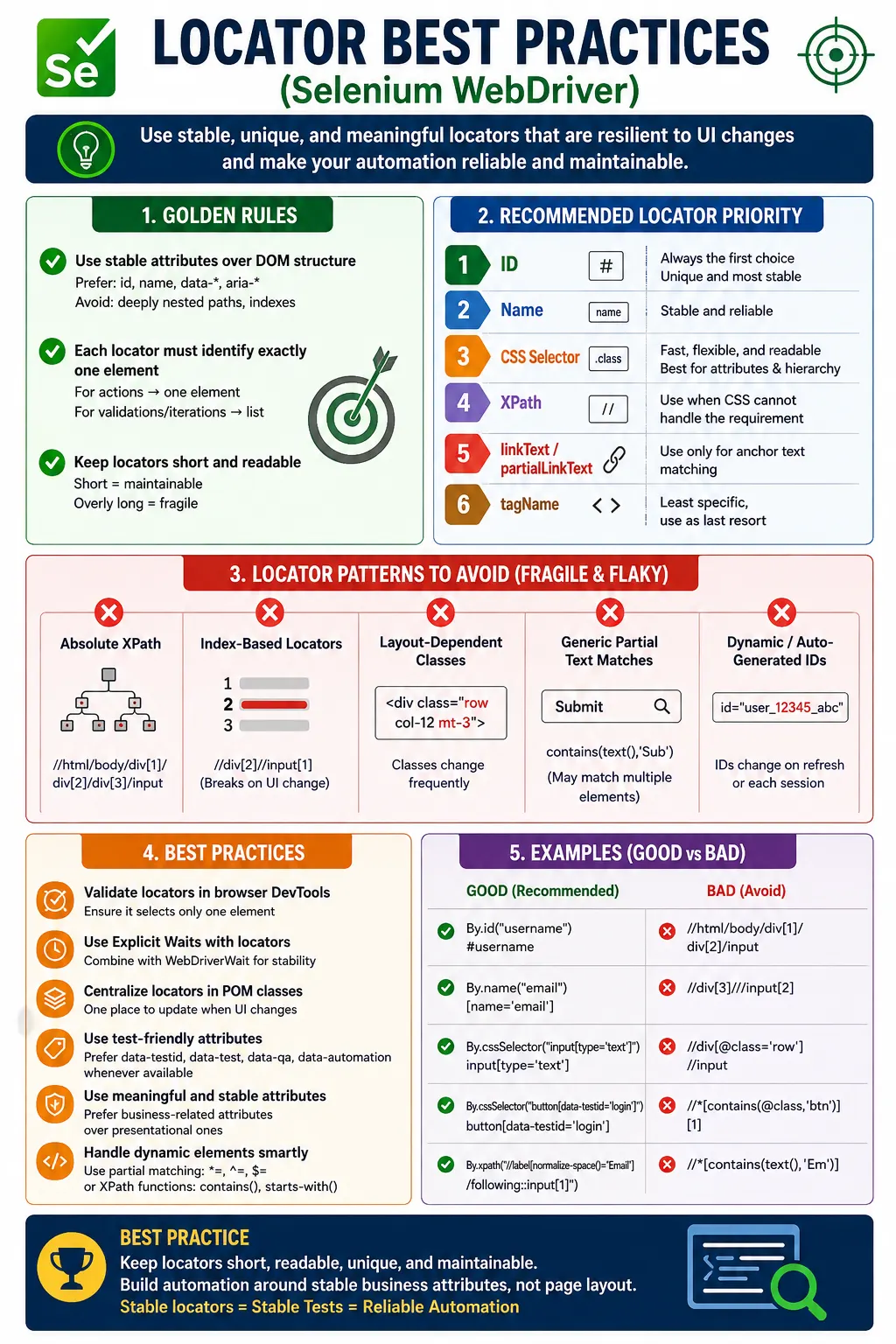
Understanding Locator Best Practices in Selenium
Locator best practices are the foundation of stable Selenium automation. Every action in a Selenium test starts with finding an element. If the locator is weak, the test becomes unreliable even when the test logic, assertions, browser setup, and framework structure are otherwise good. A flaky locator can make a correct test fail, make a wrong element receive an action, or make a suite expensive to maintain after small UI changes. This is why locator quality is not a minor coding detail. It is a core engineering decision in every Selenium framework.
A good locator has four qualities. It is unique, stable, readable, and maintainable. Unique means it identifies exactly the intended element when a single action is required. Stable means it survives ordinary changes such as layout adjustments, new wrapper elements, updated styling, and dynamic data. Readable means another tester can understand the locator's purpose without inspecting half the page. Maintainable means the locator is stored in the right place, follows team conventions, and can be changed without touching many test cases.
Selenium supports many locator strategies, including id, name, CSS selector, XPath, linkText, partialLinkText, tagName, and relative locators. The existence of many options does not mean they are equal for every case. Strong automation teams use a priority order. They prefer stable ids and names, then clean CSS selectors, then XPath when text or relationships are required. They use link text only when navigation text is stable and use tagName mainly for collections. This order keeps locators simple while preserving the power needed for complex pages.
Why Locator Quality Determines Automation Stability
Locators Are the First Point of Failure
When a Selenium test fails, the first visible error is often NoSuchElementException, TimeoutException, ElementClickInterceptedException, or StaleElementReferenceException. Some of these failures are caused by synchronization problems, but many begin with locator quality. A locator may be too broad, too narrow, tied to a generated class, dependent on an absolute DOM path, or based on an index that shifted after a UI change. If the locator does not represent the intended element clearly, the rest of the test cannot be trusted.
Locator failures are expensive because they interrupt feedback. A test suite should tell the team whether the product behavior is working. When locators are weak, the suite instead tells the team that the automation needs repair. This creates noise in regression cycles. Developers and testers begin to distrust test results, and real product defects can be hidden among automation failures. Good locators reduce this noise by making tests fail for meaningful reasons.
Locator stability also affects speed. A brittle locator can cause repeated waits and timeouts. A stable locator finds the intended element quickly. In practice, the time lost from locator failures is much greater than the small performance difference between reasonable CSS and XPath expressions. A test suite becomes faster and more useful when it avoids unnecessary locator retries and reruns.
Locators Must Express Intent
A locator should express why an element is the target. A poor locator says the button is the third button in a container. A better locator says the button is the login submit button, the Save button inside the Billing section, or the Delete action in the row for a specific product. Intent-based locators are easier to debug and more likely to survive layout changes. They are also easier to review because another engineer can tell what the locator is trying to do.
Intent can be expressed through stable attributes, meaningful class names, data attributes, visible text, labels, section headings, row values, or parent-child relationships. The exact technique depends on the page. What matters is that the locator is connected to the application behavior rather than accidental structure. Automation should follow the same meaningful clues that a user or tester would use when understanding the screen.
Stable Attributes Should Come First
ID and Name Locators
Stable id and name attributes are usually the strongest locator hooks. An id is intended to be unique in the page, and a stable id such as username, email, password, or loginBtn is easy to read and fast to locate. A name attribute can also be reliable for form fields because it often connects to server-side or form-processing behavior. When these attributes are stable and meaningful, there is usually no reason to write a complex XPath.
The important word is stable. Some applications generate ids dynamically. An id such as input-874821 or react-select-5-input may change across sessions or builds. Using that full id as a locator creates fragility. If the generated value has a stable prefix or suffix, a CSS partial attribute selector or XPath function may be appropriate. If there is no stable part, the better solution may be a test-friendly data attribute.
Data Attributes and Automation Hooks
Data attributes such as data-testid, data-test, data-qa, and data-cy are among the best practices in enterprise automation. They provide stable hooks specifically intended for tests. Unlike styling classes, they are not tied to layout or visual design. Unlike generated ids, they are controlled by the team. A selector such as [data-testid='login-button'] is readable, stable, and easy to maintain.
Test-friendly attributes require collaboration between testers and developers. This collaboration is worth it. When important screens have stable test hooks, automation becomes simpler and less fragile. The team spends less time inventing complicated locators and more time validating behavior. A dedicated test attribute is often better than a clever XPath because it creates a clear contract with the application.
ARIA Attributes and Accessibility-Friendly Locators
ARIA attributes can also support locator stability, especially for icon buttons and accessible components. An icon-only close button may not have visible text, but it may have aria-label='Close'. A CSS selector such as button[aria-label='Close'] can be both automation-friendly and accessibility-aligned. This does not mean every locator should use ARIA, but when accessibility attributes are stable and meaningful, they can be good hooks.
Teams should be careful not to misuse accessibility attributes only for testing. ARIA should describe the UI accurately for assistive technologies. When it does, Selenium can benefit from that meaningful markup. Good testability and good accessibility often support each other because both depend on clear, semantic UI structure.
Choosing Between CSS and XPath
Use CSS for Attribute-Based Locators
CSS selectors are a strong default when ids, names, classes, attributes, or simple hierarchy are enough. They are concise, browser-native, and familiar to frontend developers. CSS can match exact attributes, multiple classes, partial attribute values, descendants, direct children, and simple siblings. For many form fields, buttons, links, cards, and containers, CSS is the cleanest locator strategy.
CSS also works well in Page Object Model classes because selectors are often short and readable. A page object field such as By.cssSelector("[data-test='login-button']") is easy to understand. A selector such as form#loginForm input[name='email'] gives clear context without being long. When CSS expresses the requirement clearly, it should usually be preferred over XPath.
Use XPath for Text and Relationships
XPath should be used when CSS cannot express the requirement. The most common reasons are visible text matching and upward traversal. CSS cannot directly locate an element by visible text and cannot move from a child to a parent or ancestor. XPath can do both. It can locate a button by normalized text, move from a label to an input, identify a table row by cell content, or find an error message related to a specific field.
The best XPath locators are relative, readable, and relationship-based. They should not be copied as absolute paths from browser tools. XPath is powerful, but that power should be used to express stable relationships, not to recreate the full DOM structure. A locator such as the input following the Email label is meaningful. A locator that walks from html to body to the third div to the second form is fragile.
Avoiding Fragile Locator Anti-Patterns
Absolute XPath
Absolute XPath is one of the most fragile locator patterns. It starts at the root of the document and follows the full DOM hierarchy to the target element. A small layout change, wrapper div, new section, or component refactor can break it. Absolute XPath often appears when testers copy generated XPath from browser tools. Browser tools describe where the element is today; they do not know which part of the page is stable.
Absolute XPath should almost never be used in production automation. It is acceptable as a temporary inspection aid while exploring the DOM, but it should be rewritten into a relative locator based on stable attributes, text, or relationships before entering the framework. If a locator would break because one harmless div was added, it is not a good locator.
Index-Based Locators
Index-based locators are another common source of flakiness. Expressions such as the third button or the second input depend on element order. If a new button is inserted, the index may shift. Worse, the locator may still find an element, but it may be the wrong one. This can create false test results. Indexes should be used only when order itself is part of the requirement, such as the first search result or the last row in an activity log.
Before using an index, ask whether a better stable clue exists. Could the row be identified by text? Could the button be found inside a named section? Could a data attribute be added? Could the search be scoped to a container? Most index usage can be replaced with a clearer locator. When an index is unavoidable, keep the context narrow so the index applies only within a stable container.
Styling Classes and Layout Containers
Styling classes are risky because they change when the UI design changes. Classes such as row, col-md-6, container, flex, mt-4, text-center, or generated framework classes usually describe appearance, not behavior. A test that depends on them can break during a redesign even when the feature still works. Semantic classes such as login-button or error-message are better, but data attributes are usually stronger.
Layout containers are also fragile when overused. A long selector that includes body, main, section, div, and several layout classes is usually over-specified. Use hierarchy only when it adds meaningful context. A stable parent form or modal is useful. A chain of visual wrappers is not. Locator design should focus on identity and purpose, not layout decoration.
Handling Dynamic Elements Properly
Partial Matching with Care
Dynamic elements often have attributes that change at runtime. CSS supports partial matching with starts-with, contains, and ends-with style operators. XPath supports starts-with and contains functions. These tools are useful when a stable substring exists. For example, an id may always begin with user_ even though the suffix changes. A partial match can handle that safely if user_ is specific enough.
The risk is using a substring that is too generic. A class fragment such as active, btn, col, or item may match many elements. A good dynamic locator uses the most specific stable piece available and combines it with other meaningful conditions when needed. Dynamic locators should be flexible only around volatile values, not vague about the element's identity.
Relationship-Based Locators
Relationship-based locators are useful when attributes are missing or duplicated but the UI relationship is stable. A label-to-input relationship is a common example. The input may have no reliable id, but the label may have stable text. XPath can locate the label and move to the related input. Tables and repeated cards also benefit from relationship-based locators because the test can identify the correct row or card first and then find the action inside it.
Relationship-based locators should be used intentionally. A relationship that is stable in the DOM is useful. A visual relationship that is only created by CSS layout may not exist in the DOM. Always inspect the HTML structure before writing axes or sibling locators. Selenium follows the DOM, not the visual layout.
Validating Locators Before Coding
DevTools Verification
A locator should be tested in browser developer tools before it is added to the framework. The first question is how many elements it matches. For actions such as click and sendKeys, the locator should usually match exactly one element. For findElements, multiple matches are acceptable only when the test intends to count, iterate, or validate a collection. If a locator accidentally matches many elements, it should be narrowed.
DevTools validation should be done in the same page state where the test will run. A selector may be unique before a modal opens but not after. A locator may match hidden template elements as well as visible elements. A responsive page may render duplicate desktop and mobile navigation elements. Checking only the initial DOM can miss these issues. Reliable locator validation considers real application states.
Checking After Page Actions
Some locators work before a page action and fail afterward because the DOM changes. A component may re-render after clicking Save, filtering a table, opening a dropdown, or refreshing a panel. If the test stores a WebElement before the change and uses it afterward, a stale element error can occur. The locator may be fine, but the element reference is outdated. In dynamic applications, locate elements close to the action and re-locate them after page updates when needed.
Page Object Model and Locator Maintainability
Keep Locators Out of Test Methods
Test methods should read like business flows, not DOM navigation scripts. Page Object Model helps by storing locators and element interactions in page classes. Instead of a test method containing raw selectors for username, password, and login button, it can call loginPage.login(user, pass). The page class owns the locator details. If the UI changes, the page class is updated, and the test remains focused on behavior.
Centralizing locators also reduces duplication. If the same locator appears in five tests, a UI change requires five edits. If the locator is stored once in a page object, the change is localized. This is one of the main reasons POM remains widely used. It is not just an organizational pattern; it directly reduces locator maintenance cost.
Meaningful Methods and Locator Names
Page object methods should reveal intent. A method named clickLogin is clearer than exposing a raw login button locator to tests. A method named errorMessageForField can hide a relationship-based XPath and provide a clean API to the test. Good names reduce the need for comments. Comments are useful when a locator has an unusual reason, such as a dynamic id pattern or a known component limitation, but the preferred design is readable code and meaningful method names.
Synchronization Is Part of Locator Strategy
A Good Locator Still Needs the Right Wait
Even a perfect locator can fail if the element is not ready. Modern web applications load content asynchronously, display overlays, animate components, and re-render sections after API calls. A locator defines what Selenium should find. A wait defines when the element is ready for the intended action. Presence, visibility, and clickability are different states. Tests should wait for the state required by the next step.
Explicit waits are usually better than fixed sleeps because they wait for conditions rather than time. A sleep may be too short on a slow run and waste time on a fast run. An explicit wait can proceed as soon as the condition is met. Strong frameworks often wrap waits in utility methods so the same synchronization pattern is used consistently across page objects.
Avoid Mixing Locator Problems with Wait Problems
Debugging requires separating locator problems from synchronization problems. If a locator matches zero elements in DevTools after the page is fully loaded, the locator is wrong. If it matches the correct element in DevTools but Selenium times out during the test, the issue may be timing, frame context, visibility, or clickability. Treating every failure as a locator issue leads to overcomplicated selectors. Treating every failure as a wait issue leads to unnecessary delays. Diagnose the actual cause.
Enterprise Locator Standards
Create a Team Locator Policy
In larger teams, locator best practices should be written down. A simple policy might say: use stable id or name first, prefer data attributes, use CSS for attributes and simple hierarchy, use XPath for text and relationships, avoid absolute XPath, avoid generated classes, avoid indexes unless order is the requirement, and centralize locators in page objects. This policy gives new testers clear direction and helps reviewers evaluate locator quality consistently.
A locator policy should be practical, not rigid. Some legacy pages may lack stable hooks. Some modern components may require relationship-based XPath. Some collections may intentionally use tagName or findElements. The purpose of a standard is to guide good judgment, not block appropriate exceptions. Exceptions should be deliberate and understandable.
Review Locator Failures Over Time
Locator strategy should improve as the framework matures. If many failures come from generated classes, the team should add data attributes. If many failures come from absolute XPath, the team should review and refactor those locators. If many failures come from timing, wait utilities may need improvement. Failure analysis should feed back into better standards. A mature automation framework learns from its own instability.
Interview Perspective on Locator Best Practices
Short Interview Answer
Locator best practices in Selenium mean using stable, unique, readable, and maintainable locators. Prefer id, name, and CSS selectors when possible, use XPath only when text or relationships are required, avoid absolute XPath and indexes, use data attributes, centralize locators in Page Object Model, and combine locators with explicit waits.
Detailed Interview Answer
In real Selenium projects, locator quality directly affects test stability. The best locators are based on stable attributes such as id, name, data-testid, data-qa, data-test, or meaningful ARIA attributes. CSS selectors are preferred for simple attribute-based selection because they are fast and readable. XPath is used when the test needs visible text, parent traversal, ancestor traversal, or relationship-based selection. Bad practices include absolute XPath, index-heavy locators, generated classes, and raw locators inside test methods. Page Object Model and explicit waits make locator usage more maintainable.
Real Project Explanation
In a real framework, I would ask developers for stable data attributes on key elements, store locators inside page objects, validate uniqueness in DevTools, and write helper methods for common wait and interaction flows. I would use CSS for data attributes and simple fields, XPath for label-to-input mapping and table row actions, and avoid absolute paths or arbitrary indexes. This approach makes tests less flaky and easier to maintain when the UI changes.
Practical Locator Design Checklist
Before Adding a Locator
Before adding a locator, check whether the element has a stable id, name, data attribute, ARIA label, or semantic class. Confirm whether the locator matches exactly one element in the target page state. Decide whether CSS or XPath expresses the requirement more clearly. Avoid generated classes, visual layout classes, and full DOM paths. If no stable hook exists, consider requesting one rather than creating a fragile workaround.
Before Committing a Locator
Before committing, make sure the locator is stored in the page object or appropriate component class, not scattered in test methods. Pair the locator with the correct wait condition. Use a method name that explains the business action or element purpose. If the locator is complex, add a short comment explaining why that complexity is necessary. Verify that it remains valid after relevant page actions such as reload, filter, modal open, or component refresh.
The key takeaway is simple: good locators make Selenium automation predictable. Bad locators turn automation into a maintenance project. Prefer stable attributes, use CSS for simple locator needs, use XPath when CSS cannot express text or relationships, avoid absolute paths and indexes, centralize locators in Page Object Model, and combine every locator strategy with proper synchronization. Locator quality is framework quality.
1. Golden Rules of Locators
1.1 Prefer Stable Attributes Over DOM Structure
- Stable: id, name, data-*, aria-*
- Unstable: deeply nested DOM paths, index-based locators
Rule: If a small layout change can break it, it is not a good locator.
1.2 Make Every Locator Uniquely Identify One Element
A locator should return:
- Exactly one element for actions (click, sendKeys)
- A list only when you intend to validate or iterate (findElements)
Rule: One locator means one target.
1.3 Keep Locators Short and Readable
- Short = maintainable
- Overly long = fragile and confusing
Rule: If a locator needs a paragraph to explain, simplify it.
2. Recommended Locator Priority Order
Use this order in real projects:
- id
- name
- CSS selector
- XPath
- linkText / partialLinkText (only for stable navigation)
- tagName (only for collections)
Why: It balances stability + speed + maintainability.
3. Prefer CSS Over XPath (Unless XPath Is Required)
Use CSS when you can:
- IDs, classes, attributes are enough
- You need performance and clarity
Use XPath when you must:
- Text-based selection is required
- Parent/ancestor traversal is required
- Relationship-based selection is required
Rule: Default to CSS, escalate to XPath only when needed.
4. Use Test-Friendly Attributes (Most Important Practice)
Best practice in enterprise teams:
Ask developers to add automation hooks, for example:
- data-testid
- data-qa
- data-test
- aria-label (also helps accessibility)
These are:
- Stable
- Non-visual
- Not tied to layout/styling
Rule: A dedicated test attribute is better than any XPath.
5. Avoid Fragile Locator Patterns (Anti-Patterns)
5.1 Absolute XPath
Invalid: Breaks with any DOM change
Avoid entirely.
5.2 Index-Based Locators
Invalid: (//button)[3]
Only use as last resort.
5.3 Locating by Styling Classes
Invalid: .container .row .col-md-6
These change frequently and are not functional identifiers.
5.4 Partial Link Text (Generic)
Invalid: partialLinkText("More")
Often matches unintended links.
6. Handling Dynamic Elements Properly
Use partial matching carefully:
- CSS: id^=, id*=, id$=
- XPath: starts-with(), contains()
Rule: Use the most specific stable substring; avoid too-broad patterns.
7. Use Relationship-Based Locators Only When Stable
XPath axes are powerful:
- following-sibling::
- ancestor::
Use them when:
- The UI relationship is stable (label means input)
- Attributes are missing
Rule: Relationship-based XPath is better than index-based XPath.
8. Validate Locators Before Coding
Before using a locator:
- Test it in DevTools (Elements panel)
- Ensure it matches exactly one element
- Verify it remains valid after page actions (reload, navigation)
Rule: Validate once; avoid debugging during test execution.
9. Keep Locators Out of Test Methods (Framework Practice)
Use Page Object Model (POM)
- Store locators in Page classes
- Expose actions via methods
- Keep tests readable (business flow)
Rule: Tests should read like "what" not "how".
10. Build Locator Utilities (Enterprise Stability)
Common utilities:
- Safe presence check using findElements().size()
- Centralized wait helpers
- Wrapper methods for click/type with logging
Rule: Don't repeat locator + wait logic everywhere.
11. Synchronization Is Part of Locator Strategy
Even a perfect locator fails if:
- DOM not ready
- Element not visible/clickable
- Overlays block interaction
Rule: Combine strong locators with explicit waits.
12. Common Interview Points
Be ready to explain:
- Why ID is best
- When XPath is required
- Why index-based locators are fragile
- What data-testid is used for
- How POM improves maintainability
13. Locator Best-Practice Examples (Ready to Use)
Valid: 1. Prefer ID Over XPath
driver.findElement(By.id("email")).sendKeys("admin@test.com");Valid: 2. Use CSS Instead of Simple XPath
driver.findElement(By.cssSelector("input[name='password']")).sendKeys("admin123");Valid: 3. Avoid Absolute XPath
driver.findElement(By.xpath("//form[@id='loginForm']//button[@type='submit']")).click();Valid: 4. Use Multiple Attributes (Stable Locator)
driver.findElement(By.xpath("//input[@type='text' and @placeholder='Username']"));Valid: 5. Handle Dynamic ID Using contains()
driver.findElement(By.xpath("//input[contains(@id,'user_')]"));Valid: 6. CSS Starts-With (^=)
driver.findElement(By.cssSelector("input[id^='user_']"));Valid: 7. CSS Ends-With ($=)
driver.findElement(By.cssSelector("input[id$='_field']"));Valid: 8. CSS Contains (*=)
driver.findElement(By.cssSelector("div[class*='active']"));Valid: 9. Use data-test Attribute (Best Practice)
driver.findElement(By.cssSelector("[data-test='login-button']")).click();Valid: 10. Text Matching with normalize-space()
driver.findElement(By.xpath("//button[normalize-space()='Login']")).click();Valid: 11. Locate by Visible Text (Link)
driver.findElement(By.linkText("Forgot Password?")).click();Valid: 12. Partial Link Text
driver.findElement(By.partialLinkText("Forgot")).click();Valid: 13. Locate Parent Using XPath Axes
driver.findElement(By.xpath("//span[text()='Username']/parent::label"));Valid: 14. Locate Following Sibling
driver.findElement(By.xpath("//label[text()='Email']/following-sibling::input"));Valid: 15. Locate Preceding Sibling
driver.findElement(By.xpath("//input[@id='remember']/preceding-sibling::label"));Valid: 16. Dynamic Table Row Selection
driver.findElement(By.xpath("//table//td[text()='John']/following-sibling::td/button")).click();Valid: 17. Select Dropdown Option Without Index
driver.findElement(By.xpath("//select[@id='country']/option[text()='India']")).click();Valid: 18. Relative Locator (Selenium 4)
WebElement password = driver.findElement(
    RelativeLocator.with(By.tagName("input")).below(By.id("username"))
);
Valid: 19. Use Explicit Wait with Locator
WebDriverWait wait = new WebDriverWait(driver, Duration.ofSeconds(10));

WebElement element = wait.until(
    ExpectedConditions.visibilityOfElementLocated(By.id("dashboard"))
);
Valid: 20. Centralized Locator (POM Style)
public class LoginPage {

    private WebDriver driver;

    private By username = By.id("username");
    private By password = By.id("password");
    private By loginBtn = By.id("loginBtn");

    public LoginPage(WebDriver driver) {
        this.driver = driver;
    }

    public void login(String user, String pass) {
        driver.findElement(username).sendKeys(user);
        driver.findElement(password).sendKeys(pass);
        driver.findElement(loginBtn).click();
    }
}
Enterprise-Level Locator Principles Recap
- Prefer id
- Prefer CSS over XPath (when simple)
- Avoid absolute XPath
- Avoid index-based locators
- Use meaningful attributes
- Use data-* attributes when available
- Keep locators short
- Combine with explicit waits
- Centralize locators in Page Objects
- Make locators readable & maintainable
14. Key Takeaway
Strong locator strategy means:
- Prefer stable attributes
- Keep locators unique and readable
- Avoid absolute XPath and indexes
- Use CSS by default; XPath when necessary
- Centralize locators in POM
Good locators make automation predictable. Bad locators make automation a maintenance project.