linkText Locator
The linkText locator is used to identify hyperlinks (<a> tags) by their exact visible text. It is simple and readable, but must be used carefully because it depends entirely on UI text stability.
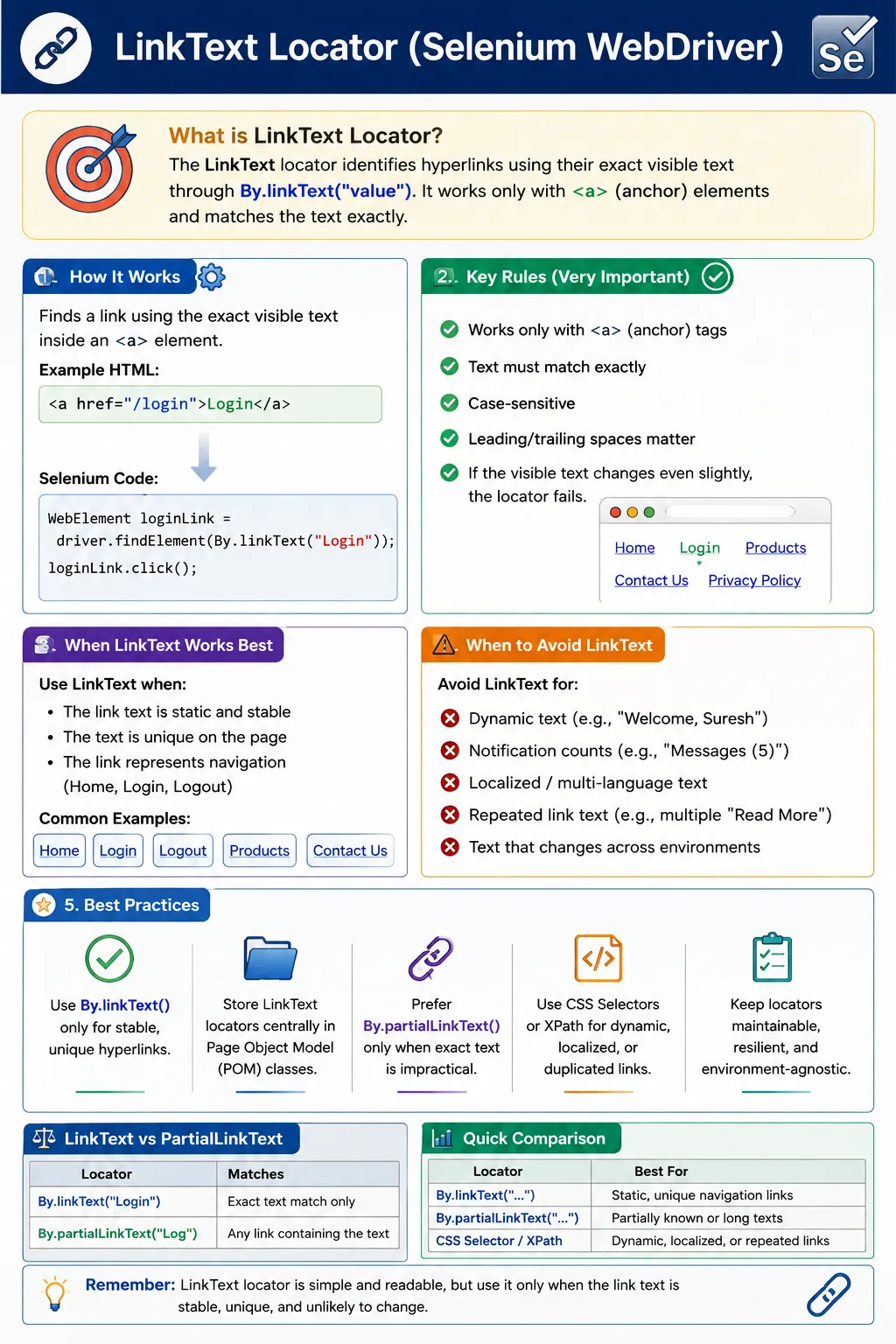
Understanding the linkText Locator in Selenium WebDriver
The linkText locator is a Selenium WebDriver strategy used to find hyperlinks by their exact visible text. It is designed for anchor elements, which are HTML elements written with the a tag. When a page contains a link such as <a href="/login">Login</a>, Selenium can locate that link with By.linkText("Login"). This makes linkText one of the most readable locator strategies because the locator value is the same text a user sees on the page. When used in the right place, it allows test code to describe navigation in a clear and human-friendly way.
Selenium automation begins with locating elements. Before WebDriver can click a navigation link, open a profile page, follow a breadcrumb, or verify a footer link, it must find the corresponding element in the browser's DOM. The locator is the instruction that tells Selenium how to search. With By.linkText("Contact Us"), the strategy is linkText and the value is the exact visible text Contact Us. Selenium asks the browser driver to find an anchor element whose visible text matches that value, and if a match is found, it returns a WebElement that the test can click or inspect.
The exact-match behavior is the most important rule. linkText does not mean "find a link that roughly looks similar." It means the visible text must match the locator value. Case matters. Spacing can matter. Text changes matter. A locator written as By.linkText("Login") is not the same as By.linkText("login"), and it is not the same as By.linkText(" Login ") if the actual visible text has no leading or trailing spaces. This precision can be a strength because it prevents accidental matches, but it can also be a weakness when UI copy changes often.
linkText works only for hyperlinks. This is a common point of confusion for beginners. If a page has a button with visible text Submit, By.linkText("Submit") will not find it unless the button is actually an anchor tag. Many modern applications style anchor links to look like buttons and buttons to look like links. Selenium's linkText locator does not care how the element looks visually. It cares whether the underlying HTML is an a element with matching visible text. A tester must inspect the DOM instead of relying only on appearance.
The best use cases for linkText are stable navigation links. Header menus, footer links, breadcrumb links, sidebar navigation, account menu links, documentation links, and simple static pages are good candidates. For example, links such as Home, Pricing, Products, Contact Us, Privacy Policy, Terms of Service, Sign In, and Logout are often stable enough to locate by exact visible text. The locator becomes easy to read and easy to review. A test step that clicks By.linkText("Pricing") communicates the same action a user would describe.
The biggest limitation is text volatility. Product teams often adjust UI copy. A link may change from Login to Sign In, from Contact Us to Contact, from Learn More to Read More, or from Products to Solutions. If the test relies on exact link text, that copy change breaks the locator even if the link still performs the same navigation. This does not mean linkText is wrong. It means the tester should use it only when the visible text is part of the stable requirement or when the team accepts that copy changes should require a locator update.
Localization is another major concern. In applications that support multiple languages, visible link text may change based on locale. A link that says Sign In in English may say a different phrase in another language. A test that uses By.linkText("Sign In") will not be portable across localized versions of the application unless it is intentionally testing the English locale. In internationalized applications, stable IDs, data-test attributes, CSS selectors, or route-based assertions may be better than linkText for core navigation automation.
Repeated link text also creates ambiguity. Many pages contain multiple links labeled Read More, Learn More, View Details, Edit, Delete, or Open. If a test uses findElement(By.linkText("Read More")), Selenium returns the first matching link in the current search context. That first match may change as content changes, cards are sorted, search results are updated, or ads and recommendation sections appear. In this situation, linkText alone is not precise enough. The test should scope the search to a specific card, row, section, or component before locating the link, or it should use a more specific CSS or XPath locator.
Scoping is one of the safest ways to use linkText on complex pages. Instead of searching the whole document for Logout, a page object can first locate the account menu and then find the Logout link inside it. Instead of clicking the first Read More link on a page, a test can locate the article card with the expected title and then find its Read More link. Instead of clicking a Terms link globally, a test can locate the checkout footer and search within that footer. This keeps the readability of linkText while reducing the risk of matching the wrong repeated link.
linkText is often compared with partialLinkText. The difference is simple: linkText requires an exact visible text match, while partialLinkText matches a portion of the visible text. By.linkText("Sign In") matches exactly Sign In. By.partialLinkText("Sign") may match Sign In, Sign Up, Sign Out, or any other link containing Sign. partialLinkText is more flexible but less precise. If the full text is stable and unique, linkText is safer. If the text contains changing suffixes or prefixes, partialLinkText may work, but the tester must watch for false matches.
XPath can also locate links by text. For example, //a[text()='Home'] is similar in intent to By.linkText("Home"). XPath becomes useful when the match needs extra conditions, such as locating a link inside a specific section, matching normalized text, checking an href value, or navigating relationships between elements. However, if the goal is simply to click a stable and unique anchor by its exact visible text, By.linkText() is usually clearer than writing an XPath expression. The best locator is the simplest stable one that communicates intent.
CSS selectors do not directly locate by visible text. They are excellent for attributes, IDs, classes, data-test hooks, hierarchy, and element types, but not text content. If a link has a stable href, data-test attribute, id, or aria-label, CSS may be more stable than linkText. For example, [data-test='nav-pricing'] is less sensitive to visible copy changes than By.linkText("Pricing"). On the other hand, linkText may be more user-focused when the exact visible label is part of what the test wants to verify. Locator choice depends on whether the test cares about the text itself or only the navigation behavior.
A useful distinction is between locating for action and asserting for content. Suppose a navigation item says Pricing. If the test's main goal is to open the pricing page, a stable data-test locator may be best for the click, and a separate assertion can verify that the visible label or page heading is correct. If the test's goal is specifically to verify that a Pricing link is present in the header, linkText may be appropriate because the visible text is the subject of the test. Separating action locators from content assertions often makes tests more resilient.
Timing still matters with linkText. A correct linkText locator can fail if the link is not yet present, visible, or clickable when Selenium searches for it. Menus may render after JavaScript loads. Account links may appear only after login finishes. Footer links may load with a content service. A dropdown menu link may not exist in the DOM until the menu opens. Explicit waits help here. A test can wait for elementToBeClickable(By.linkText("Sign In")) before clicking, or wait for visibilityOfElementLocated(By.linkText("Logout")) after opening an account menu.
The Page Object Model is the right place to manage linkText locators. A test should not repeat hardcoded link labels throughout many files. A page object or component can expose methods such as openPricingPage(), clickLogout(), openPrivacyPolicy(), or clickBreadcrumb(String label). Internally, the page object may use By.linkText(), CSS, XPath, or a combination depending on the page. This keeps tests readable and centralizes the impact of UI text changes. If the product changes Login to Sign In, the update happens in one page object, not across many tests.
Navigation components are a common place for linkText. A header component can contain methods for menu items. A footer component can validate legal links. A breadcrumb component can expose getTrailText() or clickCrumb(). A side navigation component can open sections by link label. In these reusable components, linkText can be helpful because navigation is often text-driven. The component boundary also makes scoping natural. The header searches only inside the header, and the footer searches only inside the footer.
linkText can support accessibility-friendly testing when used carefully. Links are user-facing navigation controls, and their visible text should usually communicate destination or action. If a test verifies the presence of "Skip to Content", "Privacy Policy", or "Contact Support", it is checking something meaningful to users. However, accessibility is broader than visible text. Icon-only links, aria-labels, and screen-reader-only text may require different validation methods. linkText sees visible link text as exposed to WebDriver; it is not a complete accessibility testing strategy.
Stale element references can occur after navigation or refresh. If a test locates a Dashboard link and stores it in a WebElement variable, then the page refreshes, the old WebElement becomes stale. The locator value may still be valid, but the element reference points to a DOM node that no longer exists. The fix is to locate the link again after the refresh or to store the By locator and use it inside action methods. This is especially important for dynamic single-page applications where menus and links may be re-rendered after state changes.
Frames and windows also affect linkText locators. A link inside an iframe cannot be found until the driver switches into that frame. A link in a newly opened tab cannot be clicked until Selenium switches to that window. If By.linkText("Learn More") fails even though the link is visible, the issue may be browser context rather than text matching. Before rewriting the locator, check whether the link is in the current document, the correct frame, the correct tab, and the correct menu state.
When debugging linkText failures, start by confirming the exact visible text. Inspect the link in the browser, copy the text carefully, and check for hidden whitespace, line breaks, icons, or nested spans. Next, confirm that the element is really an anchor tag. Then count how many anchors have that text. After that, check whether the link appears only after a menu opens or after data loads. Finally, consider localization and copy changes. This systematic process is faster than switching randomly between linkText, XPath, and CSS.
It is also important to understand that visible text can be affected by nested elements. A link may contain spans, icons, or hidden labels. The text WebDriver sees may not be identical to what appears visually in a simple screenshot. For example, an icon link may have no visible text but an aria-label. A link may display a line break between words. A link may include hidden text for accessibility. When exact linkText matching behaves unexpectedly, inspect the DOM and use getText() on candidate links to see what Selenium reads.
In interviews, a short answer is that linkText locates hyperlinks using exact visible text and works only with anchor tags. A stronger answer explains that it is readable and useful for stable navigation links, but fragile when text changes, localization is used, or duplicate link text exists. A practical answer adds that repeated links should be scoped to a parent section, dynamic links should use waits, and page objects should hide locator details from test methods. This answer shows more than syntax; it shows real automation judgment.
A common interview trap is confusing linkText with button text. A button that says Submit is not located by linkText unless it is actually implemented as an anchor. For a button element, use ID, name, CSS, XPath, or a test-friendly attribute. Another trap is assuming partialLinkText is always easier. It may be easier to write, but it can match the wrong element when several links share a word. Exact matching is safer when the full link text is stable and unique.
The decision to use linkText should be intentional. If the link label is stable, unique, and part of the user requirement, linkText is clean and effective. If the label changes frequently, appears in multiple locations, or varies by language, choose a more stable locator for the action and assert the text separately if needed. If the link appears inside a specific region, scope the search to that region. If the link is loaded dynamically, wait for the correct condition. These small decisions determine whether linkText becomes a useful locator or a source of maintenance noise.
In summary, By.linkText() is a precise and readable Selenium locator for anchor elements. It is best for static navigation, breadcrumbs, menus, and footer links where the visible text is stable and unique. It should be avoided for buttons, dynamic text, repeated labels, and localized applications unless the test is intentionally verifying that exact visible text. Used with scoping, waits, page objects, and meaningful assertions, linkText can make navigation tests clear while still keeping the automation suite maintainable.
Real-Project Patterns for linkText Locators
In real projects, linkText is most successful when it is used inside clear navigation components. A header component may expose methods such as openHome(), openProducts(), openPricing(), openDocs(), and openSupport(). A footer component may expose methods such as openPrivacyPolicy(), openTermsOfService(), and openContactPage(). A breadcrumb component may expose clickBreadcrumb("Orders") or getBreadcrumbLabels(). These methods can use linkText internally when the visible text is stable. The test stays readable because it talks about the user's journey, while the component controls the exact locator strategy.
A common pattern is to pair a linkText click with a URL or page-title assertion. For example, after clicking the Contact Us link, the test can assert that the current URL contains contact or that the destination page heading is Contact Us. This is stronger than only clicking the link because it verifies the result of the navigation. A Selenium test should not stop at "the click did not throw an exception." It should prove that the link took the user to the intended place. linkText identifies the link; the assertion validates the user outcome.
Another useful pattern is validating navigation menus without clicking every link in every test. A smoke test can collect expected static links and verify that each one is displayed in the header. A deeper navigation test can click a smaller set of high-value links and check their destinations. This prevents duplication while still giving confidence that the menu is rendered correctly. linkText is readable for this because the expected values are the same words a user sees in the menu.
linkText is also helpful for breadcrumb validation. Breadcrumbs are meant to show the user's current location in a hierarchy, and their text is usually part of the user interface contract. If a user navigates from Home to Products to Laptops, a breadcrumb component can verify that Home and Products are links while Laptops is the current page label. linkText can click earlier breadcrumb links when the visible labels are stable. This creates tests that reflect how users move backward through a site structure.
Repeated link labels require more care. Content cards often contain a Read More link. Product rows may contain a View Details link. Admin tables may contain Edit or Delete links for every row. In those cases, the visible text alone is not enough. The reliable pattern is to locate the surrounding card or row first, based on a product name, article title, user email, or row identifier, and then search for the link inside that parent. This scoped search expresses both parts of the intent: which item and which action. Without scoping, Selenium may interact with the first matching link and create a false result.
Long link text can also be fragile. Some links contain full article titles, marketing copy, or generated descriptions. The exact text may change for SEO, readability, personalization, or A/B testing. If the goal is to verify that a specific article link is present, exact linkText may be acceptable. If the goal is only to open a particular destination, href-based CSS or XPath may be more stable. A locator should follow the purpose of the test. When the visible copy is the requirement, linkText is meaningful. When the destination is the requirement, a stable attribute or route may be better.
Responsive layouts can also affect linkText usage. A navigation link visible in a desktop header may move into a mobile menu at smaller viewport sizes. The text may remain the same, but the element may not be present or clickable until the menu is opened. A robust page object can handle this by opening the menu when required and then locating the link inside the active navigation container. This keeps tests from failing simply because the same application presents navigation differently on mobile and desktop screens.
Some applications render links only after authentication or role checks. A Logout link appears only after login. An Admin link appears only for admin users. A Billing link appears only for users with billing access. In these cases, a linkText locator should be used with assertions that match the expected permission state. If the user is supposed to see Admin, wait for and assert that the Admin link is displayed. If the user is not supposed to see Admin, use findElements() and assert that the list is empty. The same locator strategy can support positive and negative access-control checks when used carefully.
It is also worth considering how JavaScript routers work in single-page applications. Clicking a link may update the URL and page content without a full browser reload. After a linkText click, the test may need to wait for a route change, a heading change, a content panel, or a loading indicator to disappear. The click itself may be successful, but the assertion may run too early. This is another reason linkText should be paired with explicit waits around the destination state. A navigation locator and a destination wait belong together.
In framework code, it is useful to define link-clicking helpers that avoid hidden duplicate links. A helper can collect all anchors with the expected text, filter to displayed elements, optionally filter within a container, and then click the first visible match or fail with a clear message if zero or multiple unexpected matches are found. This kind of helper is more defensive than a direct findElement() call, especially on pages that keep hidden menus or templates in the DOM. The goal is not to make every click complicated, but to handle repeated UI patterns consistently.
linkText can also be combined with link destination checks before clicking. A footer validation test may collect a link by text, read its href attribute, and assert that it points to the expected route. This catches cases where the visible text is correct but the destination is broken. For example, Privacy Policy may be displayed, but the href may accidentally point to Terms of Service. A locator alone cannot catch that defect. Reading the href and validating navigation gives the test stronger coverage.
UI copy ownership is a practical maintenance topic. If product owners frequently rename navigation labels, the automation team should decide whether linkText is still the right locator for those links. Stable data-test attributes may reduce locator churn, while separate content assertions can still verify the visible copy where needed. If copy changes are rare and intentional, linkText may be perfectly acceptable. The right choice depends on how the product is maintained and what the test is meant to protect.
During code review, linkText locators should be checked for four things. The target must be an anchor element. The text must be stable. The text should be unique in the chosen scope. The test should include a meaningful post-click assertion when navigation is expected. If any of these conditions is weak, the reviewer should ask for a better locator or better scoping. These reviews prevent flaky navigation tests before they become a daily pipeline issue.
A strong debugging habit is to print or inspect all link texts when a locator fails. Collect anchors with By.tagName("a"), loop through them, and log their visible text and href values. This quickly shows whether the expected text changed, contains extra whitespace, is hidden inside another state, or is not an anchor at all. Once the actual page output is visible, the fix is usually obvious. The tester can adjust the locator, add a wait, open the correct menu, switch frames, or request a stable test attribute.
The practical conclusion is that linkText is best treated as a readable navigation locator, not a universal text locator. It is excellent when the test is about stable links. It is weak when the page uses dynamic copy, repeated labels, localization, custom buttons, or hidden duplicate navigation. When used in the right context, it makes Selenium tests expressive. When overused, it makes tests sensitive to harmless content edits. Good automation depends on knowing that difference.
In Selenium, linkText is best suited for static navigation links and menu items.
1. What Is a linkText Locator
Definition: The linkText locator finds an element using the exact visible text of a hyperlink (<a>).
Example HTML:
<a href="/login">Login</a>Conceptually:
- Strategy means linkText
- Value means exact link text ("Login")
2. Key Rules (Very Important)
- Works only with <a> tags
- Text must match exactly
- Matching is case-sensitive
- Leading/trailing spaces matter
If the visible text changes even slightly, the locator fails.
3. When linkText Works Best
Use linkText when:
- The link text is static and stable
- The text is unique on the page
- The link represents navigation (Home, Login, Logout)
Common examples:
- Header/footer navigation
- Menu links
- Breadcrumbs
4. Limitations of linkText Locator
Avoid linkText when:
- Text is dynamic (user names, counts)
- Text changes due to localization (i18n)
- Same text appears in multiple links
- UI copy changes frequently
These conditions make tests fragile.
5. linkText vs partialLinkText
| Aspect | linkText | partialLinkText |
|---|---|---|
| Match type | Exact | Partial |
| Stability | Higher | Lower |
| Flexibility | Low | High |
| Risk of false match | Low | Higher |
Rule: Prefer linkText over partialLinkText only when text is stable and unique.
6. linkText vs CSS/XPath (Real-World Choice)
- linkText means very readable, but brittle
- CSS/XPath means more robust when text changes
Best practice: Use linkText for static menus; use CSS/XPath for dynamic UIs.
7. linkText in Page Object Model (POM)
- Define linkText locators in page classes
- Encapsulate clicks in page methods
- Avoid hardcoding link text in tests
This reduces maintenance when UI copy changes.
8. Common Beginner Mistakes
- Using linkText for dynamic links
- Ignoring case sensitivity
- Using linkText when multiple links share the same text
- Confusing linkText with button text (non-<a> elements)
9. Interview Perspective
Short Answer: The linkText locator identifies hyperlinks using their exact visible text.
Real-Time Answer: In Selenium, linkText is used to locate <a> elements by matching their exact visible text. It is readable and simple but should be used only when the link text is stable and unique, as it is sensitive to UI text changes.
10. Key Takeaway
- linkText works only for hyperlinks
- Requires exact, stable text
- Highly readable but brittle
- Use selectively for static navigation
- If the text can change, the locator will break-choose wisely.
11. Practical linkText Examples (Interview-Friendly)
1. Basic linkText Locator Usage
driver.findElement(By.linkText("Home"));Key Point: Matches the exact visible text of an <a> tag.
2. linkText with click()
driver.findElement(By.linkText("Login")).click();3. linkText for Navigation Menu
driver.findElement(By.linkText("Products")).click();
driver.findElement(By.linkText("Pricing")).click();
4. linkText with Assertion (isDisplayed())
WebElement helpLink = driver.findElement(By.linkText("Help"));
Assert.assertTrue(helpLink.isDisplayed());
5. linkText with getText()
String text =
    driver.findElement(By.linkText("Contact Us")).getText();

Assert.assertEquals(text, "Contact Us");
6. linkText with Explicit Wait (Best Practice)
WebDriverWait wait =
    new WebDriverWait(driver, Duration.ofSeconds(10));

WebElement link =
    wait.until(ExpectedConditions.elementToBeClickable(
        By.linkText("Sign In")
    ));

link.click();
7. linkText After Page Navigation
driver.get("https://example.com");
driver.findElement(By.linkText("About")).click();

Assert.assertTrue(driver.getTitle().contains("About"));
8. linkText Inside Header Section (Chaining)
WebElement header = driver.findElement(By.id("header"));
header.findElement(By.linkText("Logout")).click();
9. linkText with findElements() (Rare but Possible)
List<WebElement> links =
    driver.findElements(By.linkText("Read More"));

System.out.println(links.size());
Note: linkText can match multiple links if text repeats.
10. Safe Click Using findElements()
List<WebElement> logout =
    driver.findElements(By.linkText("Logout"));

if (!logout.isEmpty()) {
    logout.get(0).click();
}
11. linkText for Footer Links
driver.findElement(By.linkText("Privacy Policy")).click();
driver.findElement(By.linkText("Terms of Service")).click();
12. linkText Inside Frame
driver.switchTo().frame("contentFrame");
driver.findElement(By.linkText("Learn More")).click();
driver.switchTo().defaultContent();
13. linkText After Page Refresh (Stale Fix)
WebElement link = driver.findElement(By.linkText("Dashboard"));
driver.navigate().refresh();

// link.click(); Invalid: stale
link = driver.findElement(By.linkText("Dashboard"));
link.click();
14. linkText Stored as By (Framework Style)
By homeLink = By.linkText("Home");
driver.findElement(homeLink).click();
15. linkText in Page Object Model (POM)
@FindBy(linkText = "Sign Out")
WebElement signOutLink;

public void clickSignOut() {
    signOutLink.click();
}
16. Invalid: Common Interview Mistake (Extra Spaces)
// Actual link text = "Login"
driver.findElement(By.linkText(" Login ")); // Invalid: fails
Rule: Must match exact visible text.
17. linkText vs partialLinkText (Interview)
By.linkText("Sign In");        // exact
By.partialLinkText("Sign");    // partial
Tip: Prefer linkText when text is stable.
18. linkText vs CSS/XPath (Equivalent)
driver.findElement(By.linkText("Home"));
driver.findElement(By.xpath("//a[text()='Home']"));
19. When NOT to Use linkText
- Invalid: Link text changes dynamically
- Invalid: Text is very long
- Invalid: Multiple similar links exist
- Invalid: Internationalization (language changes)
20. linkText for Accessibility-Friendly Tests
// Visible text reflects user-visible navigation
driver.findElement(By.linkText("Skip to Content")).click();
21. linkText Validation with URL Check
driver.findElement(By.linkText("Profile")).click();
Assert.assertTrue(driver.getCurrentUrl().contains("profile"));
22. linkText with Actions Class (Rare)
Actions actions = new Actions(driver);
WebElement link = driver.findElement(By.linkText("Settings"));
actions.moveToElement(link).click().perform();
23. Invalid: Invalid Usage (Non-Link Element)
driver.findElement(By.linkText("Submit")); // Invalid: if not <a>Rule: Works only for <a> tags.
24. linkText Locator Priority (Interview)
ID means Name means className means linkText means CSS means XPathContext: linkText is specific to anchors.
25. Interview Summary - linkText Locator
driver.findElement(By.linkText("VisibleLinkText"));Key Points:
- Works only with <a> tags
- Matches exact visible text
- Simple & readable
- Brittle if text changes
- Prefer for stable navigation links