Keyword-Driven Framework in Selenium
A Keyword-Driven Framework in Selenium is an automation framework where test execution is controlled by predefined keywords instead of hardcoded Selenium commands inside every test script. The framework reads keywords from an external source such as Excel, CSV, XML, or another structured file, interprets each keyword, and performs the corresponding Selenium action. Keywords such as OPEN_BROWSER, NAVIGATE, CLICK, TYPE, SELECT, VERIFY, WAIT, SCREENSHOT, and CLOSE_BROWSER become the visible test steps, while the actual Selenium code remains hidden inside reusable framework methods.
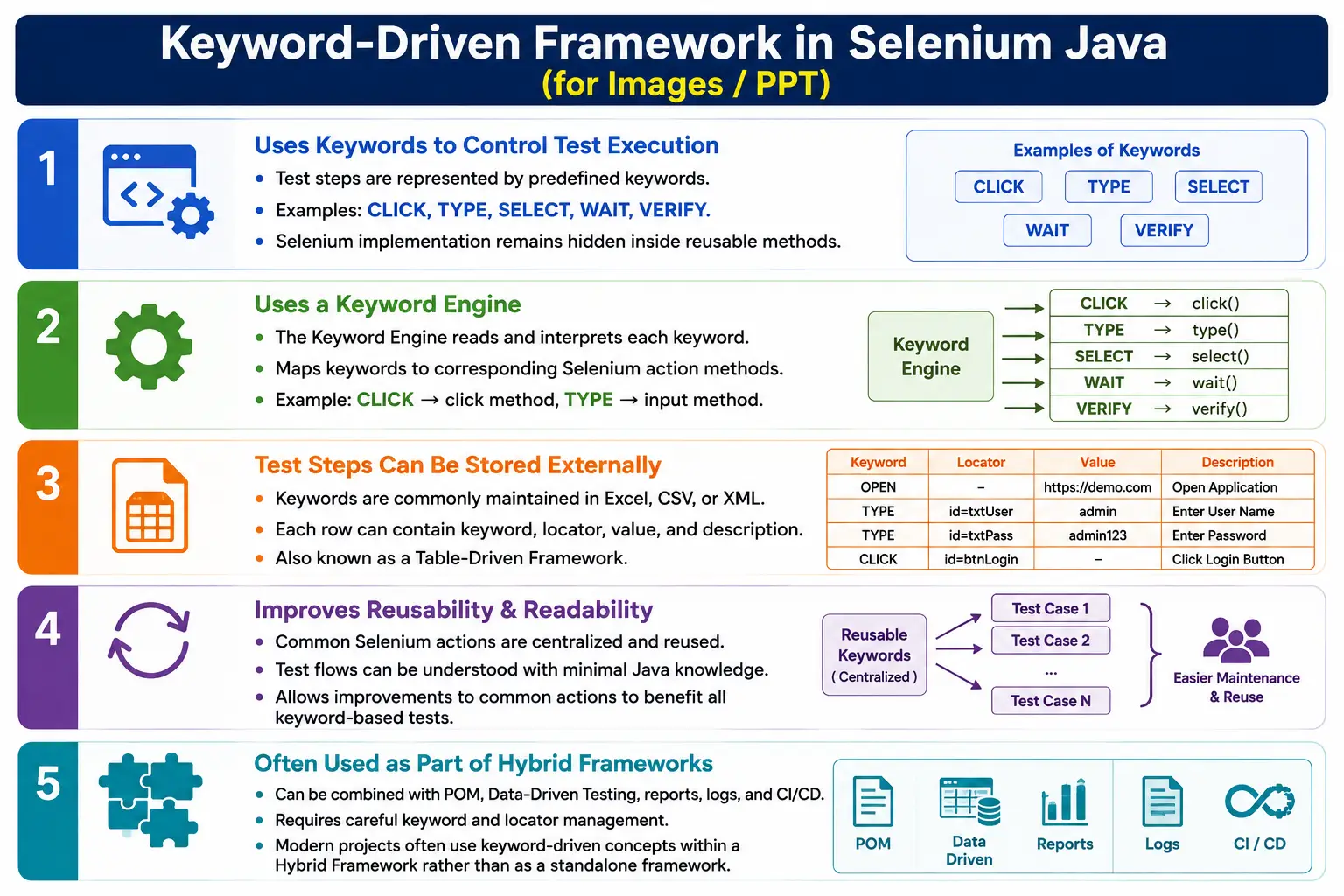
This approach is also called a Table-Driven Framework because test cases are often maintained in tabular format. A row in a spreadsheet may contain the step number, keyword, locator, value, and description. The keyword engine reads the row, identifies the keyword, maps it to a reusable method, and executes the browser action. The main idea is to make test steps readable and reusable while keeping low-level Selenium logic centralized.
1. What Is a Keyword-Driven Framework?
A Keyword-Driven Framework is an automation architecture where test actions are represented using predefined keywords. Each keyword represents an action that the framework already knows how to perform. For example, CLICK represents a click operation, TYPE represents entering text, SELECT represents selecting an option, and VERIFY_TEXT represents validating visible text. Testers define the sequence of keywords externally, and the framework executes them in order.
Instead of writing Selenium code repeatedly, the test case can describe the same action in a simpler tabular format. A coded step such as finding the username field and entering admin can be represented as a keyword row containing TYPE, username, and admin. The keyword engine knows that TYPE means it must locate the element and send the value.
Traditional Selenium Step
  Find Element
    Send Keys

Keyword-Driven Step
  TYPE | username | admin
The Selenium implementation still exists, but it is inside the framework. The external keyword file controls execution flow.
2. Why Do We Need a Keyword-Driven Framework?
Without a keyword-driven approach, every test case requires Java code. A tester must write Selenium commands to locate username, enter password, click login, wait for dashboard, verify title, and close the browser. This is manageable for engineers who are comfortable with coding, but it becomes difficult when many test cases need to be created by manual testers or business-facing QA team members.
With a Keyword-Driven Framework, the test case can be expressed through action words. The person creating the test does not need to know the exact Selenium syntax. They need to understand the supported keywords and how to provide locators and values. This can make automation more accessible in teams where not everyone writes Java code.
Without Keyword Framework
  Java Code
    Selenium Commands
      Browser

With Keyword Framework
  Keyword File
    Keyword Engine
      Reusable Selenium Methods
        Browser
The framework centralizes Selenium logic. If the click behavior needs to be improved with waits or JavaScript fallback, the click method can be updated once. All CLICK keyword steps benefit from that improvement.
3. Core Idea
The core idea is interpretation. The framework acts as an interpreter between human-readable action keywords and Selenium WebDriver commands. The keyword file describes what should happen. The engine decides how to perform it. This is similar to giving commands to a system through a controlled vocabulary.
Keywords
  Keyword Engine
    Reusable Methods
      Selenium WebDriver
        Browser
A keyword is useful only when its meaning is stable and well-defined. CLICK should always click an element. TYPE should always type into an element. VERIFY_TITLE should always compare the browser title with an expected value. If keywords are vague or inconsistent, the framework becomes difficult to maintain.
4. Real-World Analogy
A simple analogy is a remote control. A remote has buttons such as power, volume up, volume down, channel, and mute. The user does not need to know the electronic implementation behind each button. Pressing the button triggers a predefined operation. The button name is the interface, and the internal circuit performs the action.
A keyword-driven framework works similarly. CLICK, TYPE, SELECT, VERIFY, WAIT, and SCREENSHOT are like buttons. The test writer uses these keywords, and the framework performs the internal Selenium operations. The person writing the keyword file does not need to write low-level Selenium code for every step.
5. Framework Architecture
A typical Keyword-Driven Framework has a keyword file, a reader utility, a keyword engine, reusable action methods, optional page objects, Selenium WebDriver, and reports. The keyword file stores the test steps. The reader utility reads rows from the file. The engine maps each keyword to an action. Reusable methods perform browser operations. Reports capture execution results.
Excel, CSV, or XML
  Keyword Reader
    Keyword Engine
      Reusable Action Methods
        Page Objects or Locators
          Selenium WebDriver
            Browser
              Reports and Logs
The keyword engine is the heart of this framework. It decides what method to call for each keyword and how to handle failures. A strong engine logs every step, handles invalid keywords, captures screenshots on failure, and stops or continues execution based on framework rules.
6. Example Keyword File
A keyword file usually contains columns such as step number, keyword, locator, value, and description. The exact columns vary by framework, but the principle is the same. Each row represents one executable step.
| Step | Keyword | Locator | Value |
|---|---|---|---|
| 1 | OPEN_BROWSER | Chrome | |
| 2 | NAVIGATE | https://example.com | |
| 3 | TYPE | username | admin |
| 4 | TYPE | password | admin123 |
| 5 | CLICK | loginButton | |
| 6 | VERIFY_TITLE | Dashboard | |
| 7 | CLOSE_BROWSER |
No Selenium command appears in the file. The file describes the action sequence. The framework turns those rows into browser operations.
7. Common Keywords
Most Keyword-Driven Frameworks start with a small set of generic keywords. These keywords should be action-oriented and reusable across many pages. The best keywords are not tied to one specific button or one specific field. CLICK should work for any clickable element. TYPE should work for any text field. VERIFY_TEXT should work for any visible text element.
- OPEN_BROWSER starts the browser.
- NAVIGATE opens a URL.
- CLICK clicks an element.
- TYPE enters text into an element.
- CLEAR clears an input field.
- SELECT selects a dropdown option.
- CHECKBOX handles checkbox actions.
- RADIO handles radio button selection.
- WAIT waits for a condition or duration.
- VERIFY_TEXT verifies element text.
- VERIFY_TITLE verifies browser title.
- VERIFY_URL verifies current URL.
- SCREENSHOT captures evidence.
- SCROLL scrolls to an element or position.
- CLOSE_BROWSER closes the browser.
A framework becomes hard to maintain when keywords become too specific. CLICK_LOGIN_BUTTON, CLICK_SEARCH_BUTTON, and CLICK_CART_BUTTON are usually weaker than one generic CLICK keyword with different locators.
8. Keyword Execution Flow
The execution flow begins when the framework reads the keyword file. For each row, it reads the keyword, locator, value, and other required fields. Then it identifies the action associated with the keyword. It executes the corresponding reusable method. After the step completes, it logs the result and moves to the next keyword.
Read Keyword File
  Read Current Row
    Identify Keyword
      Execute Matching Method
        Log Result
          Move to Next Row
If the keyword is invalid, the engine should report a clear error. If the locator is missing for a keyword that requires a locator, the engine should fail the step with a useful message. Good error handling is essential because debugging keyword files can otherwise become frustrating.
9. Keyword Engine
The keyword engine maps keywords to reusable methods. A simple implementation may use a switch statement. A more advanced implementation may use reflection, command objects, or a map of keyword names to action handlers. The goal is the same: convert a keyword into executable Selenium behavior.
public void executeKeyword(String keyword, String locator, String value) {
    switch (keyword.toUpperCase()) {
        case "CLICK":
            click(locator);
            break;
        case "TYPE":
            type(locator, value);
            break;
        case "OPEN_BROWSER":
            openBrowser(value);
            break;
        default:
            throw new IllegalArgumentException("Unknown keyword: " + keyword);
    }
}
This example is simple, but it shows the framework idea. The engine receives a keyword and calls the matching action method. In real frameworks, the engine also handles logs, reports, screenshots, exception handling, status updates, and sometimes conditional execution.
10. Reusable Action Methods
Reusable action methods contain the actual Selenium code. These methods should be reliable because every keyword step depends on them. A click method may wait until the element is clickable before clicking. A type method may clear the field before typing. A verify method may compare actual and expected values and report meaningful failure details.
public void click(By locator) {
    driver.findElement(locator).click();
}

public void type(By locator, String value) {
    driver.findElement(locator).sendKeys(value);
}
In enterprise frameworks, these methods are usually more advanced. They include explicit waits, logging, exception handling, and screenshot hooks. The stronger the reusable action layer, the more stable the keyword framework becomes.
11. Login Example
A login workflow is a simple example of keyword-driven execution. The keyword sheet may contain TYPE for username, TYPE for password, CLICK for login button, and VERIFY_TITLE for dashboard verification. The test writer defines the flow through rows instead of Java code.
TYPE | username | admin
TYPE | password | admin123
CLICK | loginButton |
VERIFY_TITLE | | Dashboard
During execution, the engine reads TYPE and calls the type method. It reads CLICK and calls the click method. It reads VERIFY_TITLE and calls the title verification method. The file controls the sequence, while the framework performs the browser actions.
12. Sample Execution
When the keyword is CLICK, the framework resolves the locator, calls the reusable click method, and Selenium clicks the element in the browser. The keyword row is short, but the internal execution may involve locator lookup, wait condition, click action, logging, screenshot on failure, and report update.
Keyword
  CLICK

Framework Method
  click(loginButton)

Selenium Operation
  Locate Element and Click

Browser Result
  Button Clicked
This abstraction is the main strength of KDF. The visible test step remains simple, while the framework can evolve internally.
13. Folder Structure
A Keyword-Driven Framework usually has separate folders for keyword files, engine classes, utilities, page objects, test runners, reports, and resources. This separation makes it easier to maintain the framework because each area has a clear responsibility.
AutomationFramework
  keywords
    LoginKeywords.xlsx
    CheckoutKeywords.xlsx
  engine
    KeywordEngine.java
  utilities
    ExcelUtil.java
    LocatorUtil.java
    WaitUtil.java
  pages
  tests
  reports
  resources
The keyword files define test steps. The engine interprets them. Utilities support reading data, resolving locators, waiting, screenshots, and reporting. Page objects can be used when the framework is combined with POM.
14. Relationship Between Components
The relationship between components should be clean. The keyword file should not contain Selenium code. The reader should only read file content. The engine should interpret keywords. Reusable methods should execute Selenium actions. Page objects should hold page-specific locators or actions when POM is used.
Keyword File
  Reader Utility
    Keyword Engine
      Reusable Methods
        Page Objects or Locator Repository
          Selenium WebDriver
            Browser
If these responsibilities are mixed, the framework becomes difficult to maintain. For example, if the Excel reader also performs clicks, or if the keyword file contains Java snippets, the framework loses its clean separation.
15. Example Login Workflow
A complete login workflow can be described fully through keywords. The first step opens the browser. The second step navigates to the application. The next steps enter username and password. Then the login button is clicked. The dashboard title is verified. Finally, the browser is closed.
OPEN_BROWSER
  NAVIGATE
    TYPE USERNAME
      TYPE PASSWORD
        CLICK LOGIN
          VERIFY TITLE
            CLOSE_BROWSER
This workflow is readable even to someone who does not write Selenium code. That readability is one reason keyword frameworks were popular in teams with a mix of manual and automation testers.
16. Advantages
A Keyword-Driven Framework can reduce the amount of Java code needed to define test cases. Once the engine and reusable methods are built, new test flows can be created through keyword rows. This can help manual testers understand automation flows and sometimes contribute to test case creation. It also centralizes Selenium logic inside reusable methods.
- Minimal Java coding for test case definition.
- Readable test steps through action keywords.
- High reuse of common actions.
- Centralized Selenium logic.
- Consistent execution of repeated actions.
- Business-readable flow when keywords are well named.
- Good foundation for table-driven automation.
- Can be combined with POM, reports, and data-driven testing.
The biggest benefit is abstraction. Test writers use action names, while the framework handles the Selenium implementation.
17. Disadvantages
Keyword-Driven Frameworks also have serious disadvantages. The initial framework development is more complex than normal TestNG and POM automation. The keyword engine must be designed, implemented, tested, and maintained. As the application grows, the keyword library may grow too large. Debugging can be difficult because the failure may be in the keyword file, locator mapping, keyword engine, reusable method, or application itself.
- Initial framework setup is complex.
- Keyword library can become difficult to maintain.
- Debugging interpretation failures can be time-consuming.
- Adding new action types requires framework changes.
- Large keyword files can become hard to review.
- Performance overhead can occur due to interpretation.
- Poor keyword naming can create confusion.
- Over-specific keywords reduce reuse.
For these reasons, keyword-driven design must be used carefully. It should solve a real team problem, not be added only because it sounds advanced.
18. Keyword-Driven vs Data-Driven Framework
Data-Driven and Keyword-Driven frameworks are often confused because both use external files. The difference is what the external file controls. In a Data-Driven Framework, the file usually supplies input values. In a Keyword-Driven Framework, the file supplies action steps. Data-driven testing changes data. Keyword-driven testing changes execution steps.
| Data-Driven Framework | Keyword-Driven Framework |
|---|---|
| Data changes. | Actions change. |
| Same test logic with different inputs. | Execution is controlled by keywords. |
| Examples include username and password. | Examples include CLICK, TYPE, and VERIFY. |
| Focuses on input values. | Focuses on execution steps. |
Many hybrid frameworks combine both. A keyword row may contain CLICK as the action and a data value as input. The keyword controls the action, and the data controls the value.
19. Keyword-Driven vs Modular Framework
A Modular Framework organizes automation by application features. A Keyword-Driven Framework organizes execution around reusable action keywords. These designs solve different problems. Modular design answers where feature code belongs. Keyword-driven design answers how external actions trigger Selenium methods.
| Modular Framework | Keyword-Driven Framework |
|---|---|
| Organizes application modules. | Organizes reusable action keywords. |
| Examples include login, search, and checkout modules. | Examples include CLICK, TYPE, and WAIT. |
| Feature-oriented. | Action-oriented. |
A real project may use module folders and still execute some flows through keywords. The two concepts can coexist, but they should not be mixed carelessly.
20. Keyword-Driven vs Page Object Model
Page Object Model is a code design pattern where each page is represented as a class. A Keyword-Driven Framework is an execution model where external keywords drive actions. POM is developer-friendly and object-oriented. KDF can be more business-readable but requires an engine.
| Keyword Framework | Page Object Model |
|---|---|
| Keywords drive execution. | Page classes encapsulate pages. |
| Action definitions may be external. | Actions are Java methods. |
| Readable for non-programmers. | Clean for automation engineers. |
| Requires a keyword engine. | Requires disciplined page design. |
Many enterprise keyword frameworks still use Page Objects internally. The keyword file may say CLICK loginButton, but the framework may resolve loginButton through a page object or locator repository.
21. Real Enterprise Architecture
In a real enterprise architecture, keyword execution is usually not isolated. It is combined with readers, engines, utilities, page objects, reports, logs, configuration, and driver management. The keyword file controls steps, but the framework layers provide maintainability.
Keyword Excel
  Keyword Reader
    Keyword Engine
      Reusable Utilities
        Page Objects
          Selenium WebDriver
            Browser
              Reports and Logs
This type of architecture is more practical than a simple keyword switch statement. It supports reporting, debugging, screenshots, configuration, and page-level abstraction.
22. Common Beginner Mistakes
A common beginner mistake is creating too many specific keywords. For example, CLICK_LOGIN_BUTTON, CLICK_SEARCH_BUTTON, CLICK_CART_BUTTON, and CLICK_PAYMENT_BUTTON are usually unnecessary. A generic CLICK keyword with different locators is better. Another mistake is duplicating keyword logic in several places instead of centralizing it in the engine or action layer.
- Creating too many page-specific keywords.
- Duplicating keyword logic across classes.
- Hardcoding Selenium commands inside keyword files.
- Mixing test data, locators, and action rules carelessly.
- Creating keywords for every tiny action.
- Not logging each keyword execution.
- Not validating unknown keywords clearly.
- Making keyword files too large to review.
A keyword framework succeeds only when the keyword vocabulary stays clean and controlled.
23. Best Practices
Enterprise keyword frameworks should keep keywords generic and meaningful. Reuse action methods. Store locators separately from keywords when possible. Keep test data independent. Use Page Object Model internally when it improves maintainability. Create a centralized keyword engine. Log every keyword execution. Avoid unnecessary custom keywords. Validate keyword files before execution.
- Keep keyword names short, generic, and stable.
- Use CLICK instead of many button-specific click keywords.
- Use reusable action methods for Selenium operations.
- Keep locators in page objects or a controlled locator repository.
- Keep test data separate from keyword control data.
- Log keyword name, locator, value, status, and failure reason.
- Capture screenshots when keyword steps fail.
- Review keyword files regularly.
The goal is to make test flow readable without making the framework engine unmanageable.
24. Real Project Example
In a real project, a login keyword sheet may be read by an Excel utility. The rows are passed to the keyword engine. The engine resolves each keyword and calls reusable methods. The reusable methods may use page objects for locators. Reports such as Extent Reports or Allure capture each step result.
Login.xlsx
  Excel Reader
    Keyword Engine
      Page Objects
        Reusable Utilities
          Selenium WebDriver
            Browser
              Extent Reports
This kind of setup is usually part of a hybrid framework. It may combine keyword execution, Page Object Model, data-driven inputs, reports, logs, and CI/CD integration.
25. Why Keyword-Driven Frameworks Are Less Common Today
Keyword-Driven Frameworks were more popular in earlier Selenium projects because they allowed test cases to be described through spreadsheets. Today, many teams prefer Page Object Model, Data-Driven Testing, TestNG, and Cucumber-based BDD. These approaches are often easier to maintain for developers and automation engineers.
Large keyword libraries can become difficult to maintain. Debugging keyword interpretation can take time. Page Object Model provides cleaner object-oriented code. BDD frameworks such as Cucumber provide business-readable scenarios with better structure than raw keyword sheets. Hybrid frameworks that combine POM and data-driven testing are often simpler and more flexible.
Still, keyword-driven concepts remain useful. Centralized action methods, reusable commands, readable execution flow, and externalized steps continue to influence enterprise automation design. Some organizations still use keyword execution for legacy frameworks or teams with strong spreadsheet-driven processes.
26. Keyword Engine Design Considerations
The keyword engine should be designed carefully because it is the most important component of the framework. It should validate whether a keyword exists, whether required locator and value fields are present, whether the locator can be resolved, and whether the action completed successfully. A weak engine creates unclear failures. A strong engine gives precise failure messages.
The engine should also decide what happens after failure. Some frameworks stop immediately when a critical keyword fails. Others continue execution for verification steps. This behavior should be consistent and documented. The engine should not silently skip failures unless the framework explicitly supports optional steps.
27. Locator Management
Locator management is a major challenge in keyword frameworks. If locators are stored directly in Excel, non-programmers can see and update them, but the file becomes harder to maintain. If locators are stored in page objects, the keyword file stays cleaner, but engineers must maintain the page layer. If locators are stored in a separate object repository, the framework needs a reliable way to map logical names to real locators.
A practical approach is to use logical locator names in the keyword file and resolve them through page objects or a locator repository. For example, the keyword file can use username, password, and loginButton. The framework then maps those names to actual Selenium locators. This keeps keyword rows readable and prevents raw locator complexity from spreading everywhere.
28. Reporting and Debugging
Reporting is critical in Keyword-Driven Frameworks because failures pass through multiple layers. A failure may happen because the keyword name is wrong, the locator name is wrong, the data value is missing, the element is not visible, the application has a defect, or the browser state is incorrect. Reports should show enough details to identify which layer failed.
A good keyword report includes step number, keyword, locator name, value if safe to display, status, failure message, screenshot, timestamp, browser, and environment. Logs should show the exact keyword sequence. Without this information, debugging a keyword framework can become slower than debugging normal Java tests.
29. CI/CD and Parallel Execution
Keyword-driven suites can run in CI/CD pipelines, but the framework must be designed for repeatable execution. Keyword files should be version-controlled. Test selection should be configurable. Reports should be generated automatically. The framework should return the correct build status when failures occur.
Parallel execution requires additional care. If multiple keyword files use the same browser driver instance, failures will occur. Driver management should isolate tests by thread or execution context. Data values, screenshots, downloads, and reports should not overwrite each other. Keyword frameworks that were originally built for sequential spreadsheet execution often need redesign before they can scale in CI/CD.
Another CI/CD concern is traceability. When a pipeline fails, the team should know which keyword file ran, which test case ID failed, which row failed, which keyword failed, and what the browser state was at that moment. Without this evidence, keyword-driven execution becomes difficult to trust in automated builds. A good framework records the keyword file name, scenario name, row number, keyword, locator, masked value, screenshot, and exception message in the report.
Selective execution is also useful. Teams may not want to run every keyword file on every commit. The framework can support tags, suite names, test case IDs, or execution flags in the keyword file. For example, smoke keywords can run on every build, regression keywords can run nightly, and full end-to-end keyword suites can run before release. This makes keyword execution more practical in real delivery pipelines.
30. Interview Perspective
A short interview answer is: a Keyword-Driven Framework is an automation framework where test execution is controlled using predefined keywords such as CLICK, TYPE, SELECT, WAIT, and VERIFY. The framework reads these keywords from external files and maps them to reusable Selenium methods.
A stronger real-time answer is: in a Keyword-Driven Framework, business actions are stored as keywords in external files such as Excel. A keyword engine reads each row and maps the keyword to reusable Selenium methods such as click, type, select, or verify. This allows testers to define execution steps without writing Selenium code. However, in modern enterprise projects, keyword-driven execution is often used only as part of a hybrid framework because Page Object Model and data-driven testing are usually easier to maintain and scale.
In interviews, it is useful to mention both the advantage and the trade-off. KDF can improve readability and allow non-programmers to define steps, but it introduces engine complexity and can become hard to debug if keyword libraries grow without control.
31. Keyword-Driven Framework Workflow
The complete workflow starts with the keyword file. The reader loads the file. The engine reads each row. The keyword is mapped to a reusable action. The action may use page objects or locators. Selenium WebDriver executes the browser operation. Reports and logs record the result.
Keyword File
  Excel Reader
    Keyword Engine
      Reusable Action Methods
        Page Objects
          Selenium WebDriver
            Browser
              Reports
This workflow is easy to explain, but the implementation must be disciplined. Without clear keyword rules, locator management, logging, and failure handling, the framework becomes difficult to maintain.
32. Key Takeaway
A Keyword-Driven Framework separates test steps from automation code. Keywords represent actions, the keyword engine interprets them, reusable methods perform Selenium operations, and the browser executes the final behavior. Common keywords include CLICK, TYPE, SELECT, WAIT, VERIFY, SCREENSHOT, and CLOSE_BROWSER.
Keywords
  Keyword Engine
    Reusable Methods
      Selenium WebDriver
        Browser
The framework can make test flows easier to read and can reduce direct Java coding for test case creation. However, it also introduces engine complexity, keyword maintenance, debugging overhead, and locator management challenges. Modern enterprise projects often use keyword-driven concepts inside hybrid frameworks rather than relying on a standalone Keyword-Driven Framework. When implemented carefully, it provides reusable action abstraction. When implemented carelessly, it becomes harder to maintain than normal Selenium code.