Jenkins Integration (Concept) - Selenium Automation Framework
Jenkins Integration is the process of connecting a Selenium automation framework with Jenkins so that tests can be built, executed, reported, archived, and communicated automatically. Instead of a tester opening an IDE, right-clicking a test class, waiting for execution, and manually sharing results, Jenkins can trigger the same framework whenever code is pushed, a pull request is created, a scheduled build starts, or a release pipeline is triggered. This turns Selenium automation from a manual activity into a continuous testing process.
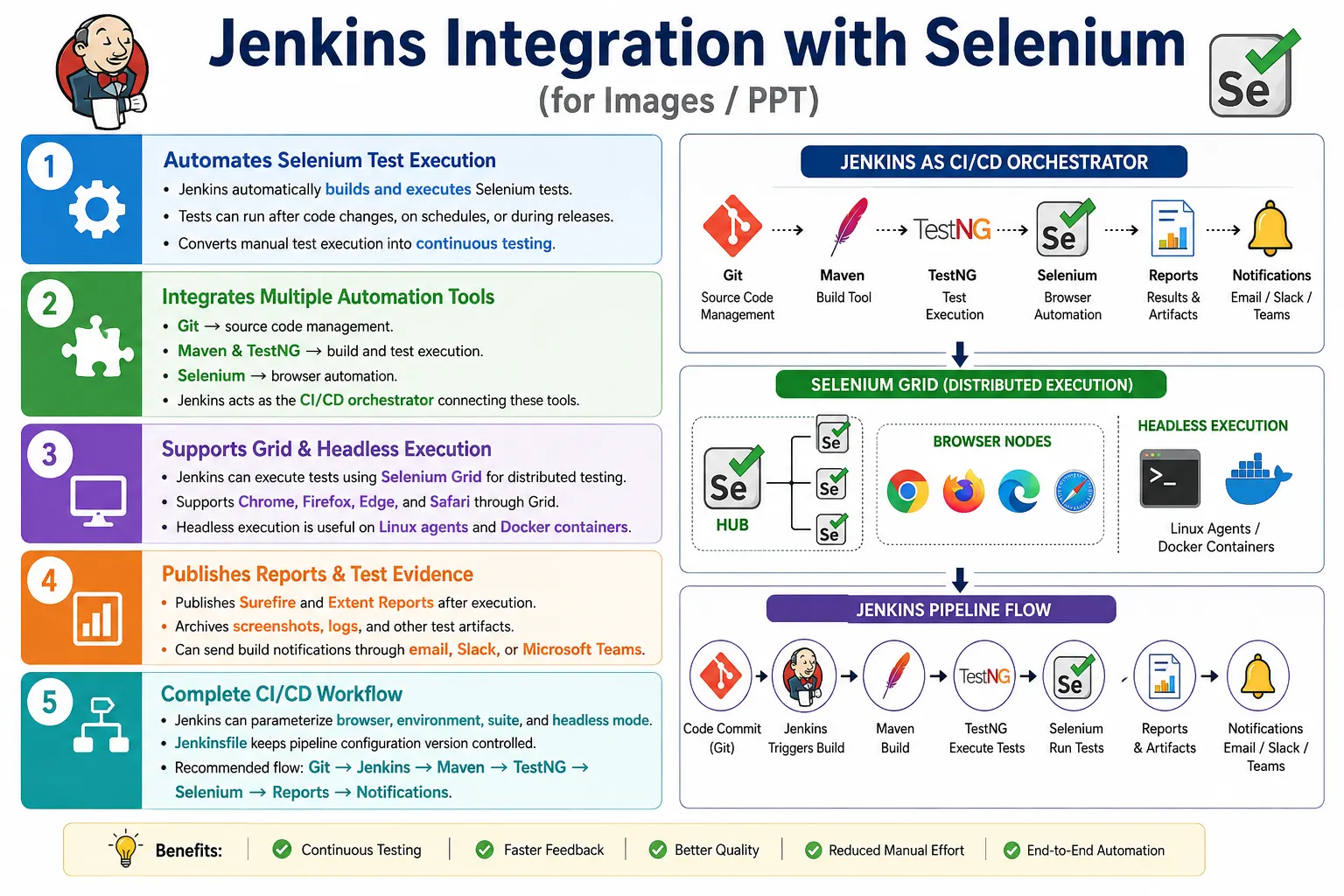
In enterprise automation, Jenkins usually works with Git, Maven, TestNG, Selenium WebDriver, Selenium Grid, headless browsers, Extent Reports, Surefire reports, and notification tools such as email, Slack, or Microsoft Teams. Jenkins does not replace Selenium or TestNG. It orchestrates the execution. Selenium interacts with browsers, TestNG organizes and runs test methods, Maven compiles and invokes tests, and Jenkins runs the whole process repeatedly and consistently in a CI/CD environment.
1. What Jenkins Integration Means
Jenkins Integration means configuring Jenkins jobs or pipelines to execute Selenium automation as part of the software delivery workflow. Jenkins checks out the latest source code, runs Maven commands, triggers TestNG suites, starts browser execution locally or on Grid, collects reports, archives artifacts, and notifies the team about the result.
Developer Pushes Code
  Jenkins Trigger
    Checkout Code
      Maven Build
        Selenium Tests
          Reports and Notifications
The main purpose is automation of execution. The same command can run the suite every time, reducing dependency on individual testers and making test execution repeatable.
2. Why Jenkins Integration Is Needed
Manual execution does not scale in active projects. If twenty developers commit code throughout the day and the project has hundreds of Selenium tests, waiting for someone to run tests manually creates delayed feedback. Bugs may be discovered late. Regression gaps may be missed. Different testers may run different configurations and produce inconsistent results.
Jenkins solves this by executing tests automatically. A commit can trigger a smoke suite. A nightly schedule can run regression. A release branch can run cross-browser validation. A pull request can run selected tests before merge. This makes testing part of the development rhythm instead of a separate manual step.
3. Problems Without Jenkins
Without Jenkins, test execution depends heavily on people. Someone must remember to run tests, choose the correct browser, select the right environment, execute the correct suite, save reports, and inform the team. This creates room for human error. Test execution may be skipped when the team is busy. Reports may be lost. Builds may move forward without enough validation.
Enterprise projects need standardized execution. Jenkins provides a controlled environment where the same build steps run every time. It also gives visibility: build history, console logs, test results, artifacts, and failure notifications are available from one place.
4. Core Idea
The core idea is to connect source code changes with automated test execution. A developer pushes code to Git. Jenkins detects the change or runs on a schedule. Jenkins checks out the code, runs Maven, executes Selenium tests, generates reports, and notifies the team.
Developer
  Git
    Jenkins
      Maven
        TestNG
          Selenium
            Reports
This flow is the foundation of continuous testing. Tests become part of the pipeline rather than a manual activity performed after development.
5. What Jenkins Does
Jenkins can download source code, build the project, execute Maven commands, run Selenium tests, publish Surefire reports, archive Extent Reports and screenshots, schedule builds, send notifications, trigger downstream jobs, and support pipeline stages such as build, test, report, and deploy.
For Selenium frameworks, Jenkins is commonly responsible for choosing the test suite, passing runtime parameters, executing mvn clean test, preserving test artifacts, and making results visible to the team. This reduces manual effort and increases feedback speed.
6. High-Level Architecture
A typical Jenkins-Selenium architecture starts with a developer push. Git stores the framework code. Jenkins checks out the repository. Maven resolves dependencies and starts TestNG. TestNG executes Selenium tests. Selenium launches browsers locally, headlessly, on Grid, or on cloud providers. Reports are generated and archived.
Developer
  Git Repository
    Jenkins
      Maven
        Selenium Tests
          Reports
This architecture can be simple for small teams and more advanced for large teams using parallel execution, Grid, Docker, and deployment pipelines.
7. Jenkins Workflow
The Jenkins workflow usually contains checkout, build, test, report, archive, and notification stages. In a freestyle job, these may be configured through the Jenkins UI. In a pipeline job, these are usually written in a Jenkinsfile stored in the Git repository.
Code Commit
  Jenkins Trigger
    Checkout Code
      Build Project
        Run Tests
          Generate Reports
            Notify Team
Keeping the workflow in a Jenkinsfile is generally better for enterprise projects because pipeline configuration becomes version controlled along with framework code.
8. Components Involved
A typical Jenkins integration includes Git for source control, Jenkins for orchestration, Maven for build and test execution, TestNG for test control, Selenium for browser automation, Extent Reports for HTML reporting, Surefire reports for machine-readable test results, and Selenium Grid for distributed browser execution when needed.
Each component has a clear role. Jenkins should not contain Selenium test logic. Selenium should not contain Jenkins logic. Maven should invoke tests. TestNG should manage test execution. Reports should explain results. This separation keeps the framework maintainable.
9. Source Code Management
Jenkins first retrieves the latest code from source control. In most projects, this means Git. Jenkins can clone a branch, pull a pull request, or checkout a specific commit. The checked-out code becomes the Jenkins workspace for that build.
Git Repository
  Clone Latest Code
    Jenkins Workspace
If the workspace is stale or contains old files, builds can behave unpredictably. Many pipelines clean the workspace before or after execution, depending on artifact needs.
10. Maven Build Step
The most common Selenium framework command in Jenkins is mvn clean test. This cleans previous build output, compiles the project, compiles tests, executes the configured test suite, and generates Maven reports.
mvn clean testThis command is easy to run locally and in Jenkins. That consistency is important. If local and CI use the same Maven command pattern, failures are easier to reproduce and compare.
11. Maven Integration
Maven reads pom.xml, resolves dependencies, compiles code, invokes Surefire, and runs TestNG or JUnit tests. Jenkins simply triggers Maven and captures the output. This is why Maven configuration must be correct before Jenkins integration can be stable.
pom.xml
  Dependencies
    Compile
      Test
        Reports
If a test fails in Jenkins because a dependency is missing or a plugin is misconfigured, the issue is often Maven setup rather than Jenkins itself. Always verify mvn clean test locally before blaming Jenkins.
12. TestNG Integration
TestNG controls suite execution, test groups, parameters, listeners, and parallel execution. Jenkins starts TestNG indirectly through Maven Surefire. The Jenkins job may choose which TestNG XML suite to run by passing a property such as -Dsurefire.suiteXmlFiles.
mvn clean test -Dsurefire.suiteXmlFiles=testng.xmlThis lets Jenkins run smoke, sanity, regression, or cross-browser suites without changing code. The suite file becomes a pipeline parameter.
13. Selenium Integration
Once TestNG starts, Selenium framework classes execute normally. BaseTest prepares the driver. DriverFactory reads browser configuration. Page objects perform actions. Test classes assert behavior. Reports capture results.
TestNG
  DriverFactory
    Browser
      Execute Tests
Jenkins should not directly control browser actions. It controls the build and passes runtime parameters. The Selenium framework should handle browser creation and test execution.
14. Selenium Grid Integration
Large projects often use Selenium Grid with Jenkins. Jenkins starts the test suite, and DriverFactory creates RemoteWebDriver sessions that connect to Grid. Grid distributes tests across Chrome, Firefox, Edge, Safari, or cloud browser nodes.
Jenkins
  TestNG
    RemoteWebDriver
      Selenium Grid
        Chrome
        Firefox
        Edge
        Safari
This reduces execution time and supports cross-browser testing. Jenkins can run Grid suites on schedules, pull requests, or release pipelines.
15. Headless Execution in Jenkins
Jenkins agents often run without a visible desktop. For this reason, headless browser execution is common. Chrome, Edge, and Firefox can run in headless mode. This avoids GUI dependencies and works well on Linux agents and Docker containers.
mvn clean test -Dheadless=trueFor Chrome in Linux agents or containers, options such as --headless=new, --window-size=1920,1080, --no-sandbox, and --disable-dev-shm-usage may be used depending on infrastructure needs.
16. Jenkins Triggers
Jenkins can start builds manually, through Git webhooks, pull request events, scheduled cron jobs, upstream jobs, or API triggers. Manual builds are useful for debugging. Webhook builds are useful for continuous integration. Scheduled builds are useful for nightly regression. Upstream triggers are useful when deployment jobs should trigger automation afterward.
Manual
Git Commit
Pull Request
Scheduled Cron
Upstream Job
API Trigger
The trigger type should match the testing goal. A smoke suite may run after every commit, while full regression may run nightly.
17. Build Status
Jenkins build status may be success, unstable, failure, or aborted. In test automation, a build can be marked unstable when tests fail but the pipeline itself completes and reports are published. This is often better than failing the pipeline immediately before reports are archived.
Using pipeline constructs such as catchError allows report publication stages to run even when tests fail. This is important because a failed test run is exactly when reports and screenshots are most needed.
18. Report Generation
After execution, Jenkins should publish and archive reports. Surefire XML reports help Jenkins understand test results. Extent Reports provide a human-readable HTML view with logs, screenshots, and failure details. Screenshots should be archived with the reports so links do not break.
Surefire Reports
  target/surefire-reports

Extent Reports
  test-output or reports folder

Screenshots
  screenshots folder
Reports are not optional in CI. Without reports, the team knows only that something failed, not why it failed.
19. Notifications
Jenkins can notify the team through email, Slack, Microsoft Teams, or other collaboration tools. Notifications are useful when builds fail, become unstable, or complete successfully after a release run. They help teams react quickly to regression failures.
Notifications should be meaningful. A message should include job name, build number, status, branch, environment, report link, and failure summary where possible. Too many noisy notifications cause teams to ignore them.
20. Scheduled Execution
Scheduled Jenkins builds are often used for nightly regression. A nightly build runs even when no one manually triggers it. This gives teams fresh quality feedback every morning. Scheduled execution is also useful for long-running suites that are too heavy for every commit.
Nightly regression should archive reports historically so failures can be compared across days. If the same test fails repeatedly, the team can identify flaky areas or persistent product defects.
21. Basic Jenkins Maven Command
A freestyle Jenkins job can run a Maven command in an Execute Shell or Execute Windows Batch Command step.
mvn clean testThis command is enough for a basic Selenium Maven framework if pom.xml and TestNG configuration are already correct.
22. Passing Browser from Jenkins
Browser selection should be passed from Jenkins as a Maven property instead of being hardcoded in the framework.
mvn clean test -Dbrowser=chromeString browser =
System.getProperty("browser", "chrome");This allows Jenkins jobs to run Chrome, Firefox, Edge, or other supported browsers by changing a parameter.
23. Passing Environment and URL
Jenkins can also pass application URL and environment. This allows the same framework to run against QA, staging, UAT, or release environments.
mvn clean test -Denvironment=qa -Dapplication.url=https://qa.example.comThe framework should read these values through System.getProperty() or a configuration reader. Hardcoding URLs in tests makes Jenkins integration less flexible.
24. Jenkinsfile Concept
A Jenkinsfile is a pipeline definition stored in the repository. It describes stages such as checkout, environment verification, test execution, report publication, and cleanup. Keeping the Jenkinsfile in Git makes pipeline changes reviewable and version controlled.
pipeline {
    agent any

    stages {
        stage('Checkout') {
            steps {
                checkout scm
            }
        }

        stage('Test') {
            steps {
                sh 'mvn clean test'
            }
        }
    }
}
For Windows agents, bat 'mvn clean test' is used instead of sh.
25. Jenkins Parameters
Pipeline parameters allow users to choose browser, environment, suite, and headless mode at build time. This makes one pipeline reusable for different execution needs.
parameters {
    choice(
        name: 'BROWSER',
        choices: ['chrome', 'edge', 'firefox'],
        description: 'Select browser'
    )

    booleanParam(
        name: 'HEADLESS',
        defaultValue: true,
        description: 'Run in headless mode'
    )
}
These values can be passed into Maven commands as system properties. Parameterized pipelines reduce duplicate Jenkins jobs.
26. Publishing Surefire Results
Jenkins can publish Surefire XML reports using the JUnit publisher. Even though the tests may be TestNG tests, the XML format can still be consumed by Jenkins when generated by Surefire.
post {
    always {
        junit 'target/surefire-reports/*.xml'
    }
}
This allows Jenkins to show test trends, failed tests, skipped tests, and build status based on test results.
27. Archiving Screenshots and Extent Reports
Selenium screenshots and Extent Reports should be archived after every run. If tests fail, screenshots and HTML reports are needed for debugging. If the workspace is cleaned without archiving, evidence is lost.
post {
    always {
        archiveArtifacts(
            artifacts: 'test-output/**/*.html, screenshots/**/*.png',
            allowEmptyArchive: true
        )
    }
}
When reports reference screenshots by relative path, archive both together so links remain valid.
28. Using catchError
If the Maven test command fails because tests fail, Jenkins may stop the pipeline before report stages execute. catchError can mark the build unstable while allowing report publication to continue.
stage('Run Tests') {
    steps {
        catchError(
            buildResult: 'UNSTABLE',
            stageResult: 'FAILURE'
        ) {
            sh 'mvn clean test'
        }
    }
}
This is useful because reports are most important when tests fail. A pipeline should preserve failure evidence before ending.
29. Parallel Cross-Browser Execution
Jenkins pipelines can run browser stages in parallel. For example, Chrome and Firefox executions can run at the same time, each with its own Maven command and report folder.
stage('Parallel Browser Tests') {
    parallel {
        stage('Chrome') {
            steps {
                sh 'mvn clean test -Dbrowser=chrome -Dheadless=true'
            }
        }

        stage('Firefox') {
            steps {
                sh 'mvn clean test -Dbrowser=firefox -Dheadless=true'
            }
        }
    }
}
Separate report folders should be used to prevent one browser execution from overwriting another browser's reports.
30. Jenkins with Selenium Grid
When Jenkins uses Selenium Grid, the Jenkins agent runs the test code, but browser sessions run on Grid Nodes. This reduces load on the Jenkins agent and allows cross-browser execution across multiple machines or containers.
Jenkins Agent
  Maven
    RemoteWebDriver
      Selenium Grid
        Browser Nodes
The framework should accept Grid URL and execution mode as parameters. This makes it easy to switch between local execution and Grid execution.
31. Jenkins Agent Requirements
A Jenkins agent running Selenium tests needs Java, Maven, project dependencies, network access, and browser capability depending on execution mode. For local browser execution, browsers and drivers must be available. For Grid execution, the agent needs network access to the Grid. For headless execution, browser options must be configured correctly.
Agents should be stable and predictable. Differences in Java version, Maven version, browser version, environment variables, and permissions can cause builds to pass locally but fail in Jenkins. Printing java -version and mvn -version in the pipeline helps diagnose environment issues.
32. Workspace Cleanup
Workspace cleanup prevents stale artifacts from affecting future runs. However, cleanup should happen after reports are archived. If Jenkins cleans the workspace before archiving reports and screenshots, failure evidence is lost.
A common pattern is to archive reports in the post section and then clean the workspace at the end. This keeps Jenkins storage controlled while preserving useful artifacts.
33. Secrets and Credentials
Do not store passwords, tokens, or secret keys directly in a Jenkinsfile, pom.xml, or test code. Jenkins credentials should be used for sensitive values. These values can be injected into the pipeline securely and passed to the framework when required.
Reports should also avoid exposing secrets. If tests log usernames, tokens, or API keys, those values can appear in archived reports. Sensitive values should be masked or omitted.
34. Common Beginner Mistakes
Common mistakes include running tests only from the IDE, hardcoding browser values, ignoring reports, running GUI browsers on headless servers, not cleaning workspaces, not archiving screenshots, stopping the pipeline before reports publish, and storing credentials in plain text.
Another common mistake is assuming Jenkins caused a failure when the real issue is Maven, TestNG, browser setup, Grid availability, or test data. Jenkins is the orchestrator. Troubleshooting should identify which layer failed.
35. Best Practices
Integrate Jenkins with Git. Execute Selenium tests through Maven. Store configuration outside code. Use Selenium Grid for large parallel suites. Prefer headless execution on build agents. Publish HTML reports after every build. Archive reports and screenshots. Configure notifications for failures. Schedule nightly regression suites. Keep Jenkins plugins updated.
Keep the Jenkinsfile in the Git repository. Pass browser, environment, suite, and headless mode as parameters. Use catchError so report stages run after test failures. Use ThreadLocal<WebDriver> for parallel execution. Use Jenkins credentials for sensitive values.
36. Real Enterprise Architecture
A real enterprise architecture starts with a developer push to Git. Jenkins triggers a pipeline, checks out code, verifies Java and Maven, runs mvn clean test, invokes TestNG, creates browser sessions locally or on Grid, generates Extent Reports, archives artifacts, and sends notifications.
Developer Push
  Git Repository
    Jenkins Pipeline
      Checkout Source Code
        mvn clean test
          TestNG
            DriverFactory
              Selenium Grid
                Extent Reports
                  Email or Slack Notification
This architecture makes Selenium execution repeatable and visible. It also enables continuous testing as part of the delivery pipeline.
37. Interview Perspective
A short interview answer is: Jenkins Integration is the process of connecting a Selenium automation framework with Jenkins so that tests are automatically built, executed, and reported whenever code changes occur or scheduled builds run.
A stronger real-time answer is: in my Selenium hybrid framework, Jenkins is integrated with our Git repository to trigger test execution whenever code is pushed or a scheduled build starts. Jenkins checks out the latest code, runs mvn clean test, and uses Maven Surefire to execute TestNG suites. The framework reads browser and environment details from configuration, creates browser instances through DriverFactory, and executes tests locally or on Selenium Grid. After execution, Jenkins publishes Surefire and Extent Reports and sends build notifications to the team.
38. Jenkins Integration Workflow
The workflow starts with a developer push or scheduled trigger. Jenkins checks out code, runs Maven, executes TestNG Selenium tests, generates reports, archives evidence, and notifies the team.
Developer Push
  Git Repository
    Jenkins
      Checkout Code
        Maven Build
          TestNG Suite
            Selenium Tests
              Generate Reports
                Notify Team
This workflow turns Selenium automation into continuous testing.
39. Build Stability in Jenkins
Jenkins integration is valuable only when the build result is trusted. If every second build fails because of environment instability, browser timing, test data conflicts, or missing dependencies, teams slowly stop paying attention to the result. A Selenium Jenkins build should therefore be treated as an engineering system, not just a button that runs tests. The framework, Jenkins agent, browser setup, data setup, reports, and cleanup process should all be designed for repeatable execution.
One important stability practice is to avoid dependencies on the tester's local machine. The build should not rely on files stored on a desktop, browser profiles created manually, paths copied from one machine, or credentials typed into code. Jenkins should be able to check out the project from Git and execute the test suite using documented configuration. If a new Jenkins agent is created, the required setup should be clear: Java version, Maven version, browser or Grid access, environment variables, and network permissions.
Another stability practice is to keep test data predictable. If two parallel builds use the same user account, same order number, same email address, or same shared record, they can interfere with each other. This creates failures that look like Selenium failures but are actually data design failures. For Jenkins execution, test data should be generated dynamically where possible, isolated by environment, cleaned up after use, or managed through controlled reusable accounts.
Build stability also depends on waits. Jenkins machines are often slower than local machines because they run multiple jobs, share CPU, or connect to remote browsers. Tests that pass locally with weak waits may fail in Jenkins. A mature framework uses explicit waits around real application states, such as element visibility, clickability, page readiness, AJAX completion, and business confirmation messages. Hard sleeps may hide timing issues temporarily, but they make CI execution slow and unreliable.
40. Troubleshooting Jenkins Failures
When a Selenium build fails in Jenkins, the first step is to identify the failing layer. The failure may come from Git checkout, Maven dependency resolution, compilation, TestNG configuration, WebDriver setup, browser launch, Selenium Grid availability, application environment downtime, test data, locator changes, or an actual product defect. Treating every failure as a test script issue wastes time and causes incorrect fixes.
Console logs usually show where the failure started. If Maven cannot download dependencies, the issue is likely repository access or network configuration. If compilation fails, the problem is in code or dependencies. If TestNG reports no tests found, the issue may be suite XML, group selection, package naming, or Maven Surefire configuration. If browser sessions cannot be created, the problem may be browser version, driver version, headless configuration, Grid URL, or node capacity.
Good Jenkins troubleshooting depends on evidence. The build should publish test reports, screenshots, logs, and environment details. A failed build should answer basic questions quickly: which browser was used, which environment was targeted, which suite ran, which test failed, what exception occurred, what page was visible, and whether the application was reachable. Without this evidence, every failure requires manual investigation and repeated execution.
A useful habit is to print key runtime values at the beginning of execution. The framework can log browser name, execution mode, application URL, suite name, Java version, OS name, Grid URL, and headless setting. These details make it easier to compare a passing local run with a failing Jenkins run.
41. Jenkins Parameters for Selenium Suites
Parameters make Jenkins jobs flexible. Instead of creating separate jobs for every browser, environment, or suite, one pipeline can accept values such as BROWSER, ENV, SUITE, HEADLESS, and GRID_URL. The pipeline passes these values to Maven, and the framework reads them using system properties.
BROWSER = chrome
ENV = qa
SUITE = regression
HEADLESS = true
GRID_URL = http://grid-server:4444
This design supports different execution needs. A developer may run a smoke suite in Chrome against QA. A nightly job may run regression in headless mode against staging. A release job may run critical tests across Chrome, Firefox, and Edge through Selenium Grid. The same framework supports all of these executions because configuration is supplied at runtime instead of hardcoded.
Parameters should be controlled. Free text values can cause mistakes such as chromee, stagin, or an invalid suite name. Jenkins choice parameters reduce this risk by allowing only valid values. The framework should still validate received parameters and fail early with a clear error message when an invalid value is supplied.
42. Reports, Artifacts, and Evidence Retention
Reporting is one of the most visible parts of Jenkins integration. A Selenium suite may run hundreds of tests, but the team needs a simple way to understand the result. Jenkins should publish machine-readable reports such as Surefire reports and human-friendly reports such as Extent Reports. Both are useful. Surefire reports help Jenkins calculate pass and fail counts. Extent Reports help testers, developers, and managers understand failure details in a readable format.
Artifacts are files preserved after the build completes. In a Selenium framework, useful artifacts include screenshots, HTML reports, logs, downloaded files, browser console logs, and sometimes videos. These artifacts should be stored with the build that produced them. If a test fails on Tuesday and someone investigates on Wednesday, the evidence should still be available from that Jenkins build.
Retention should be balanced. Keeping every artifact forever can consume storage quickly, especially screenshots and reports from large suites. Jenkins can be configured to keep artifacts for a specific number of builds or days. Critical release pipelines may keep artifacts longer than daily smoke jobs. The goal is to preserve enough evidence for debugging without filling Jenkins storage unnecessarily.
43. How Jenkins Changes Team Behavior
Jenkins integration changes automation from an individual activity into a team feedback system. Without Jenkins, one tester may know whether the suite passed. With Jenkins, the entire team can see build status, failure trends, reports, and regression health. This visibility encourages faster response to failures and reduces the chance that automation becomes disconnected from delivery.
It also creates discipline. If a commit breaks automation, the team sees it quickly. If a test is flaky, it becomes visible through repeated Jenkins failures. If a suite is too slow, the pipeline duration exposes it. If reporting is poor, investigation becomes painful. Jenkins does not automatically make a framework mature, but it reveals framework weaknesses that manual execution can hide.
For this reason, Jenkins integration should be introduced with clear ownership. Someone must monitor failures, maintain Jenkins configuration, review unstable tests, keep dependencies updated, and improve reporting. A CI pipeline that nobody owns eventually becomes noisy. A pipeline with ownership becomes a reliable quality signal.
44. Key Takeaway
Jenkins Integration transforms Selenium automation from a manually executed activity into a fully automated CI/CD process. It connects Git, Maven, TestNG, Selenium, reports, artifacts, and notifications so teams receive fast and consistent feedback.
Developer
  Git
    Jenkins
      Maven
        Selenium Automation
          Reports
            Notifications
The most important practices are to run Selenium tests through Maven, parameterize browser and environment values, publish Surefire and Extent Reports, archive screenshots, use headless mode or Grid on build agents, protect credentials, and keep the Jenkinsfile version controlled. When implemented well, Jenkins becomes the automation execution hub that supports regression testing, release confidence, and faster software delivery.