Implicit Wait
Implicit Wait is a global synchronization setting in Selenium that instructs WebDriver to poll the DOM for a specified duration before throwing a NoSuchElementException. It is simple to configure but limited in capability for modern, dynamic applications.
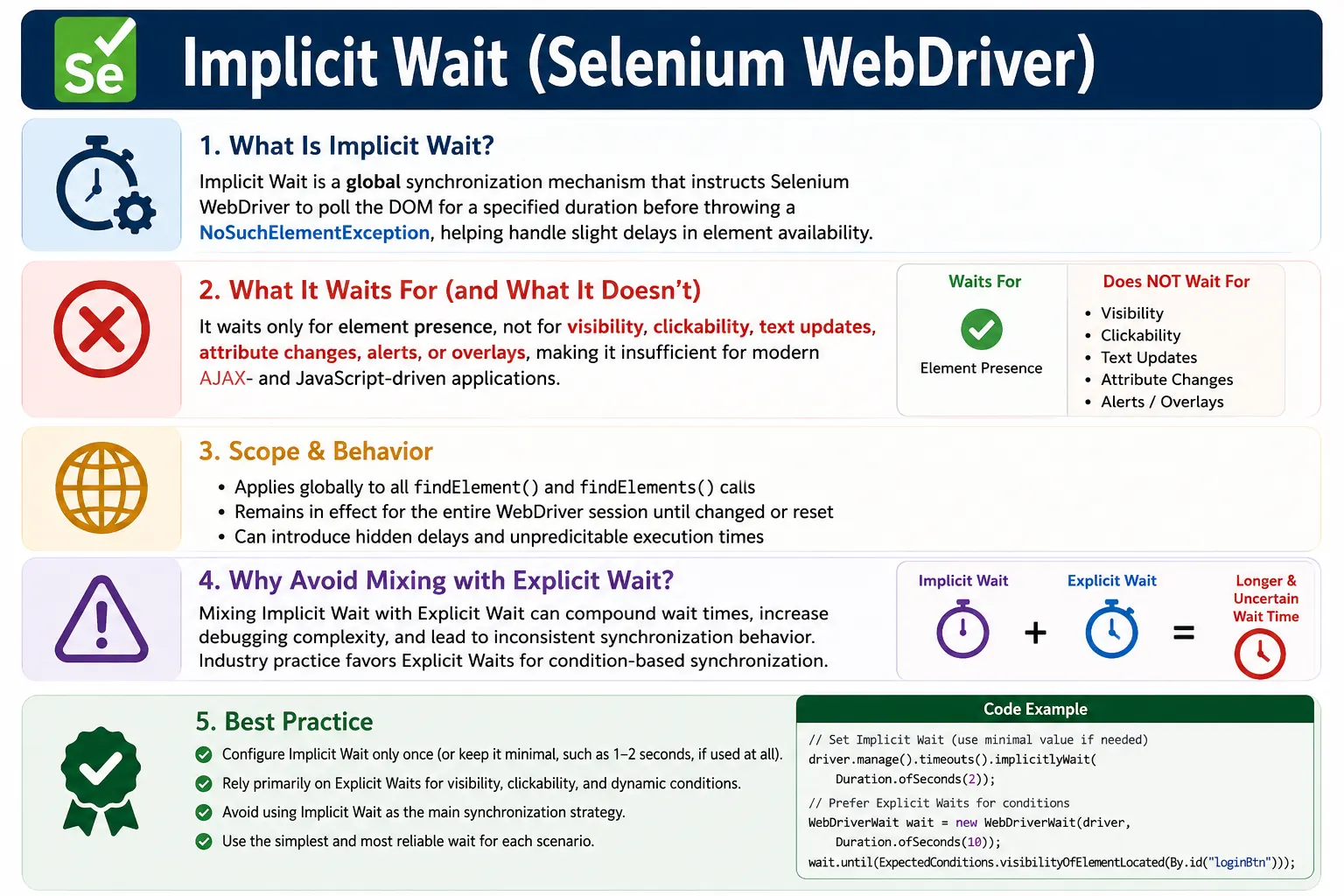
Understanding Implicit Wait in Selenium
Implicit Wait is one of the first synchronization concepts many Selenium learners encounter. It is simple to configure and easy to explain: after it is set, Selenium waits up to a defined amount of time when trying to locate an element before throwing a NoSuchElementException. This makes it useful for small delays where an element is not immediately present in the DOM. However, its simplicity is also its limitation. Implicit wait is global, condition-blind, and focused only on element finding. It does not understand whether an element is visible, enabled, clickable, updated with text, or blocked by an overlay.
The important point is that implicit wait is not a complete synchronization strategy. Modern applications are asynchronous. They load data through APIs, render components with JavaScript, show spinners, disable buttons until validation completes, refresh parts of the DOM, and animate menus and modals. In these situations, an element can exist in the DOM but still be unusable. Implicit wait can only help Selenium wait for presence during findElement calls. It cannot wait for the richer application states that most real Selenium actions require.
Because of this, mature Selenium frameworks usually rely on explicit waits for serious synchronization. Implicit wait may be avoided completely or kept very small as a fallback. The reason is not that implicit wait never works. It can work for simple pages and small timing gaps. The reason is that it hides timing behavior globally and does not express intent. A test that waits for a button to be clickable is clearer and more reliable than a framework that silently waits for every element lookup for a fixed amount of time.
How Implicit Wait Works Internally
Polling During Element Lookup
When implicit wait is configured, Selenium changes the behavior of element search operations. If findElement does not find the element immediately, WebDriver keeps trying until the element is found or the implicit wait timeout expires. If the element appears before the timeout, Selenium returns it and the test continues. If the element does not appear, Selenium throws NoSuchElementException after the timeout. This is why implicit wait can make simple delayed element loading appear more stable.
The behavior is tied to locating elements, not interacting with them. Once Selenium finds a WebElement, the implicit wait has done its job. If the next operation is click and the element is covered by a spinner, implicit wait does not help. If the next operation is sendKeys and the element is disabled or hidden, implicit wait does not help. This distinction is the most important thing to understand. Implicit wait waits for existence, not readiness.
Global and Sticky Behavior
Implicit wait is global for the WebDriver session. After it is set, it applies to all subsequent findElement and findElements calls until it is changed or reset. This is sometimes called sticky behavior. It is convenient because the tester does not need to write wait logic for each locator, but it also means every element lookup may be affected. Failures can become slower because Selenium waits before throwing an exception each time an element is not found.
The global nature can make debugging harder. If a test unexpectedly takes longer than expected, implicit wait may be one reason. A missing optional element, a negative check, or a findElements call can wait before returning. When wait behavior is invisible and global, the test timing becomes less predictable. Explicit waits are easier to reason about because they are tied to a specific condition at a specific point in the test flow.
What Implicit Wait Can Handle
Slight Delays in Element Presence
Implicit wait can handle simple cases where an element appears in the DOM shortly after Selenium starts looking for it. For example, a page may load a login form a moment after navigation. If the username field is not present immediately but appears within the implicit wait timeout, findElement can succeed without an explicit wait. This is the classic use case where implicit wait appears helpful.
It can also help with basic DOM timing in mostly static pages. If a page is not heavily dynamic and elements appear together shortly after navigation, implicit wait may reduce NoSuchElementException failures. For simple training examples and small internal tools, this can seem convenient. The problem is that many real applications are not simple enough for presence-only synchronization.
Basic findElements Behavior
Implicit wait also affects findElements. If no elements are found immediately, WebDriver may wait up to the implicit timeout before returning an empty list. This can surprise beginners. In some cases, a test may use findElements to check whether an optional element is absent. With an implicit wait, that absence check may become slow because Selenium waits before confirming the list is empty. This is another reason global implicit wait can create hidden delays.
If a test intentionally expects a collection to appear, implicit wait may help basic presence. But if the test needs a specific number of items, loaded text, visible cards, or refreshed table rows, explicit waits are better. A condition such as wait until product cards count is greater than zero communicates the intent much more clearly than relying on global polling.
What Implicit Wait Cannot Handle
Visibility and Clickability
An element can be present in the DOM but hidden from the user. It may have display none, visibility hidden, a collapsed parent, or be outside the visible area. Implicit wait does not wait for visibility. Selenium may find the element and then fail when the test tries to interact with it. For reading visible text or typing into a field, visibility matters. Explicit waits such as visibilityOfElementLocated are designed for this case.
Clickability is even more specific. A clickable element must usually be present, visible, enabled, and not blocked by another element. Implicit wait does not verify this. A button may exist and be visible but disabled until a form is valid. A save button may exist but be covered by a loading overlay. In those cases, waiting for elementToBeClickable or waiting for an overlay to disappear is a more accurate synchronization strategy.
Text, Attributes, Alerts, and Page State
Implicit wait does not wait for text to appear or change. If a status label is present immediately but updates from Pending to Completed after an API call, implicit wait provides no help because the element already exists. The test must explicitly wait for the expected text. The same applies to attribute changes, such as a disabled attribute being removed or a class changing from loading to loaded.
Implicit wait also does not wait for alerts, frames, windows, URL changes, document readiness, or JavaScript conditions. These scenarios require explicit wait conditions or custom wait logic. For example, waiting for a frame to become available and switching to it is not the same as waiting for an element to be found. Selenium offers explicit conditions for these situations because they represent application readiness, not element presence alone.
Why Mixing Implicit and Explicit Waits Is Risky
Compounded and Confusing Timeouts
A common warning in Selenium is to avoid mixing implicit and explicit waits. The reason is that explicit waits repeatedly evaluate a condition, and those evaluations may call findElement internally. If implicit wait is also active, each internal lookup can wait before failing. This can make the total wait time longer and less predictable than the explicit timeout suggests. The test may appear to hang or fail much later than expected.
This timing confusion is especially painful in CI. A test that should fail after ten seconds may take much longer because implicit wait delays are stacked inside explicit polling. Debugging becomes harder because the timeout value in the explicit wait no longer tells the whole story. Frameworks that prioritize predictability usually avoid this by setting implicit wait to zero and using explicit waits consistently.
Hidden Framework Behavior
Hidden behavior is dangerous in automation frameworks. A test should make it clear what it is waiting for and why. Implicit wait applies silently to all element searches, so the source of delay is not obvious when reading a page object method. Explicit waits make synchronization visible: wait for the dashboard to be visible, wait for the login button to be clickable, wait for the spinner to disappear. This makes the framework easier to maintain and review.
Performance Impact of Implicit Wait
Slow Failure on Missing Elements
Implicit wait can slow down failures because every missing element lookup may wait until the timeout expires. If the timeout is ten seconds and the test checks several missing elements, the total delay can add up quickly. This is especially noticeable in negative checks, optional element checks, and cleanup flows where the test is trying to confirm that something is absent. A global wait makes absence expensive.
Performance is not only about fast passing tests. Fast failure matters too. When a locator is wrong or an element is genuinely missing, the framework should report the problem clearly and quickly. Long implicit wait values can hide errors and make the feedback loop slower. Explicit waits can be tuned per condition, which provides better control over timeout behavior.
Unpredictable Test Duration
Because implicit wait affects every element lookup, test duration can become hard to predict. A page with many optional checks may run quickly when everything exists and slowly when several elements are absent. This variation can make CI execution times inconsistent. Consistent explicit wait patterns usually produce more predictable test runs because each wait is tied to a known condition and timeout.
Recommended Usage in Real Frameworks
Avoid or Keep Very Small
Many mature Selenium frameworks avoid implicit wait entirely. They set it to zero and rely on explicit wait utilities. This keeps synchronization precise and avoids hidden interactions between wait types. Some teams set a very small implicit wait, such as one or two seconds, as a mild buffer for tiny DOM delays, but still use explicit waits for real readiness. The key is that the choice should be intentional and documented.
If implicit wait is used, it should usually be configured once during driver setup and not changed frequently during test execution. Dynamically changing implicit wait can create confusing behavior because later parts of the test may inherit a value that was set for a special case. A framework standard should define whether implicit wait is used, what value it has, and when explicit waits are required.
Prefer Explicit Waits for Real Synchronization
Explicit waits are preferred because they wait for specific conditions. They can wait for visibility, clickability, invisibility, text, alert presence, frame availability, URL changes, and custom application states. These conditions match real user interactions better than presence-only waiting. A user cannot click a hidden or disabled button, so the test should not continue merely because the button exists in the DOM.
Strong frameworks often wrap explicit waits in helper methods. A page object may call waitForVisible, waitForClickable, waitForText, or waitForOverlayToDisappear. This keeps tests readable and avoids duplicated wait code. Implicit wait cannot provide that level of clarity because it does not know which condition matters for each action.
Implicit Wait and Page Object Model
Where Configuration Belongs
If implicit wait is part of the framework, it should be configured in the driver setup or driver factory, not inside individual page objects. Putting implicit wait inside a page object constructor can surprise other tests because it changes global driver behavior when that page object is created. A global setting should be managed globally. Page object methods should focus on page-specific actions and explicit readiness checks.
Page Object Model should hide synchronization details from test methods, but not through global implicit waiting. A method such as login should wait for the username field to be visible, enter credentials, click the login button, and wait for the next page to be ready. Those are explicit states. This makes the test flow reliable and understandable. The page method says what the application should be ready for, not just that Selenium should wait while finding elements.
Avoid Storing WebElements Too Early
Implicit wait only affects the moment an element is located. If a page object stores WebElements early and the page later re-renders, those references can become stale. This is common in JavaScript frameworks. A better approach is to store By locators and find the element close to the action, often through a wait helper. This design works better with explicit waits and reduces stale element issues.
Common Misunderstandings About Implicit Wait
It Does Not Pause Every Step
Some beginners think implicit wait pauses the script before every command. It does not. It only applies when Selenium tries to locate elements. If the element is found immediately, Selenium proceeds immediately. If the element is already present but not ready, implicit wait does not continue waiting. This is why tests can still fail with ElementNotInteractableException even when an implicit wait is set.
It Is Not the Same as Explicit Wait
Implicit wait and explicit wait solve different levels of synchronization. Implicit wait is global and only helps with locating elements. Explicit wait is local and condition-based. It can wait for the exact state the test needs. Treating them as interchangeable leads to weak synchronization. A test that needs clickability should not rely on implicit wait, because implicit wait cannot verify clickability.
It Does Not Fix Bad Locators
If a locator is wrong, implicit wait only delays the failure. It does not make the locator better. This is important during debugging. If an element never appears because the selector is incorrect, increasing implicit wait just wastes time. Always validate locators in developer tools and confirm whether the element appears in the expected page state. Synchronization cannot compensate for inaccurate locators.
Debugging Implicit Wait Problems
Identify Whether the Issue Is Presence or Readiness
When a test fails despite implicit wait, ask what state was actually needed. If the element was not in the DOM yet, implicit wait may have been relevant. If the element was present but hidden, disabled, stale, or blocked, implicit wait was the wrong tool. This diagnosis helps determine whether the fix is a better locator, an explicit wait, an overlay wait, a frame switch, or a page readiness method.
Screenshots and logs are helpful. A screenshot showing a visible spinner indicates that the test acted too early. A screenshot showing the element disabled indicates that waiting for presence was not enough. A log showing several slow absent element checks may reveal implicit wait performance cost. Good debugging is based on observed state, not random timeout increases.
Check Framework-Level Wait Configuration
If test timing seems unpredictable, inspect the framework setup. Look for implicit wait configured in driver factories, setup methods, page constructors, or utility classes. Make sure it is not being changed dynamically in different pages. Confirm whether explicit waits are also being used. Hidden wait configuration can explain why tests take longer than expected or why failures are hard to reproduce.
Interview Perspective on Implicit Wait
Short Interview Answer
Implicit wait tells Selenium WebDriver to wait up to a specified time while locating elements before throwing NoSuchElementException. It is global for the driver session and applies to element-finding operations.
Detailed Interview Answer
In Selenium, implicit wait is a global synchronization setting that makes WebDriver poll for an element during findElement and findElements calls. It waits only for element presence in the DOM. It does not wait for visibility, clickability, text changes, attribute changes, alerts, overlays, or frame availability. Because it can create hidden delays and conflict with explicit waits, real-world frameworks use it minimally or avoid it and rely on explicit waits for precise synchronization.
Real Project Explanation
In a real automation framework, I would not depend on implicit wait for dynamic applications. I would configure it to zero or a very small value in the driver setup, then use explicit wait utilities in page object methods. For example, I would wait for username visibility before typing, wait for a submit button to be clickable before clicking, and wait for a spinner to disappear before interacting with the next control. This gives more reliable synchronization than a global presence-only wait.
Practical Guidelines for Implicit Wait
Use It Only with Clear Intent
If your framework uses implicit wait, define why it exists and what value is acceptable. Avoid large global values that slow down failures. Avoid changing it in page methods. Avoid using it as the primary strategy for AJAX-heavy pages. Treat it as a basic element-presence buffer, not as a readiness solution.
Use Explicit Waits for Application Readiness
Use explicit waits when the next step requires a specific condition. Wait for visibility before reading text or typing. Wait for clickability before clicking. Wait for invisibility when overlays block the UI. Wait for text or attribute changes when the application updates state. Wait for frames, alerts, windows, and URLs when the browser context changes. These are real synchronization needs that implicit wait cannot express.
Keep Wait Strategy Consistent
A framework should have one clear synchronization philosophy. If implicit wait is avoided, enforce explicit waits consistently. If a small implicit wait is allowed, document it and prevent it from being changed unpredictably. Consistency matters because timing behavior affects every test. Unclear wait strategy produces flaky tests, slow failures, and confusing debugging sessions.
The key takeaway is that implicit wait is a basic Selenium feature, not a complete synchronization solution. It waits globally while locating elements, but it does not understand the real readiness states that modern web applications require. Use it carefully, avoid mixing it with explicit waits, keep it small or disabled in mature frameworks, and rely on explicit waits for stable, condition-based automation.
Implicit Wait in CI and Large Test Suites
Why Global Waiting Becomes Expensive at Scale
The drawbacks of implicit wait become more visible as a Selenium suite grows. In a small script with a few element lookups, a global wait may not seem harmful. In a large framework with hundreds or thousands of findElement calls, the hidden cost becomes real. Every missing optional element, every wrong selector, and every negative check can wait before failing or returning. This slows down feedback, especially in CI pipelines where browsers may already run more slowly than on local machines.
CI environments also expose timing assumptions that remain hidden locally. A local run may be fast enough that elements appear before Selenium searches for them. A CI run may have slower CPU, slower browser startup, shared resources, or delayed network calls. A framework that relies on implicit wait may pass sometimes and fail other times because it is waiting for presence but not for real readiness. This creates flaky behavior that is hard to diagnose from the test code alone.
Framework Standards for Implicit Wait
A professional framework should define a clear standard for implicit wait. The standard should answer whether implicit wait is used at all, what timeout is allowed, who owns the configuration, and whether explicit waits are the primary synchronization method. Without a standard, one page object may set implicit wait to ten seconds, another utility may reset it to zero, and another test may change it again for a slow page. That kind of hidden global state makes the framework unpredictable.
A cleaner standard is to configure implicit wait once in the driver factory, usually as zero or a very small value, and never change it during test execution. Explicit wait helpers then handle actual application states. This keeps timing behavior visible and intentional. When a test waits, the code says what it is waiting for: visibility, clickability, text, URL, frame, alert, overlay disappearance, or a custom condition. That is far easier to maintain than a global delay attached to every element lookup.
How to Explain the Choice to a Team
The easiest way to explain implicit wait to a team is to call it a presence-only safety net. It can help with tiny delays in element creation, but it cannot confirm that the user can interact with the element. If the team understands this limitation, they are less likely to misuse it. A button that is present but disabled needs an explicit wait. A spinner that blocks the page needs an invisibility wait. A label that updates after an API call needs a text wait. A frame that loads late needs a frame wait. Implicit wait does not replace any of these.
This distinction also improves code reviews. When a reviewer sees a test relying only on implicit wait for a dynamic action, they can ask what condition proves the page is ready. If there is no condition, the test is probably fragile. If the condition is known, it should be implemented as an explicit wait or page readiness method. Over time, this review habit produces more predictable automation and fewer timing-related failures.
In summary, implicit wait is useful to understand but dangerous to overvalue. It is simple, global, and limited. It is not wrong as a concept, but it is rarely enough for modern Selenium frameworks. Treat it as a basic feature for element presence, document its usage clearly, and build real synchronization around explicit waits that describe the application state Selenium needs before it proceeds.
In Selenium, implicit wait is generally not the primary synchronization strategy.
1. What Is Implicit Wait
Definition:
Implicit wait tells Selenium to wait up to a fixed time while trying to locate an element before failing.
- Applied once
- Affects all element-finding operations
- Uses polling under the hood
2. How Implicit Wait Works
When implicit wait is set:
- Selenium repeatedly checks for the element
- Stops immediately if the element is found
- Throws exception only after timeout expires
Key point:
It waits only for element presence, not for visibility or clickability.
3. Scope and Behavior
- Global: Applies to the entire WebDriver session
- Sticky: Remains active until changed or reset
- Silent: No condition awareness (just presence)
Because of its global nature, it can cause unpredictable delays.
4. What Implicit Wait Can Handle
- Slight delays in element appearance
- Basic DOM load timing
- Simple static or semi-dynamic pages
5. What Implicit Wait Cannot Handle
Implicit wait does NOT wait for:
- Element visibility
- Element clickability
- Text to appear
- Attribute changes
- Overlays or spinners to disappear
This makes it insufficient for AJAX-heavy UIs.
6. Common Pitfalls (Very Important)
6.1 Mixing Implicit and Explicit Waits
- Causes compounded waits
- Leads to unexpected long delays
- Makes failures harder to debug
Rule:
Do not mix implicit and explicit waits.
6.2 False Sense of Stability
- Tests pass locally
- Fail intermittently in CI
- Mask real synchronization issues
7. Performance Impact
- Every findElement() may wait up to the timeout
- Slows down failures significantly
- Makes test runs less predictable
8. Recommended Usage (Industry Practice)
- Either do not use implicit wait at all
- Or set it to very small value (e.g., 1-2 seconds)
- Rely on explicit waits for real synchronization
Most mature frameworks avoid implicit waits entirely.
9. Implicit Wait in Framework Design
If used:
- Configure once during driver setup
- Never change it dynamically
- Document clearly in framework standards
But again-explicit waits are preferred.
10. Interview Perspective
Short Answer
Implicit wait tells Selenium to wait for a specified time while locating elements before throwing an exception.
Real-Time Answer
In Selenium, implicit wait applies globally and waits only for element presence. Because it cannot handle visibility or clickability and can conflict with explicit waits, it is used minimally or avoided in real-world automation frameworks.
11. Key Takeaway
- Implicit wait = global, basic, limited
- Waits only for presence
- Can cause hidden delays
- Do not mix with explicit waits
- Prefer explicit waits for stability
Implicit wait is a blunt tool-modern automation needs precision.
12. Practical Implicit Wait Examples (Interview Ready)
Valid: 1. Basic Implicit Wait Setup
driver.manage().timeouts().implicitlyWait(Duration.ofSeconds(10));
driver.findElement(By.id("username")).sendKeys("admin");
Valid: 2. Works for Delayed Element Loading
driver.manage().timeouts().implicitlyWait(Duration.ofSeconds(8));
driver.findElement(By.id("delayedButton")).click();
Valid: 3. With CSS Selector
driver.manage().timeouts().implicitlyWait(Duration.ofSeconds(5));
driver.findElement(By.cssSelector("input[name='email']")).sendKeys("test@test.com");
Valid: 4. With XPath
driver.manage().timeouts().implicitlyWait(Duration.ofSeconds(6));
driver.findElement(By.xpath("//button[text()='Login']")).click();
Valid: 5. For Dynamic Table Row
driver.manage().timeouts().implicitlyWait(Duration.ofSeconds(10));
driver.findElement(By.xpath("//td[text()='John']")).click();
Valid: 6. For Dropdown Option
driver.manage().timeouts().implicitlyWait(Duration.ofSeconds(7));
driver.findElement(By.xpath("//select[@id='country']/option[text()='India']")).click();
Valid: 7. Works with findElements() (returns empty list after timeout)
driver.manage().timeouts().implicitlyWait(Duration.ofSeconds(5));
List<WebElement> items = driver.findElements(By.className("product"));
System.out.println(items.size());
Valid: 8. After Page Navigation
driver.get("https://example.com");
driver.manage().timeouts().implicitlyWait(Duration.ofSeconds(10));
driver.findElement(By.id("dashboard")).click();
Valid: 9. After Page Refresh
driver.navigate().refresh();
driver.manage().timeouts().implicitlyWait(Duration.ofSeconds(8));
driver.findElement(By.id("profile")).click();
Valid: 10. Before Switching Frame
driver.manage().timeouts().implicitlyWait(Duration.ofSeconds(10));
driver.switchTo().frame("paymentFrame");
driver.findElement(By.id("cardNumber")).sendKeys("4111111111111111");
Valid: 11. Before Switching Window
driver.manage().timeouts().implicitlyWait(Duration.ofSeconds(10));
driver.findElement(By.id("openWindow")).click();
Valid: 12. For Element Inside Modal
driver.manage().timeouts().implicitlyWait(Duration.ofSeconds(10));
driver.findElement(By.id("modalSave")).click();
Valid: 13. With Partial Link Text
driver.manage().timeouts().implicitlyWait(Duration.ofSeconds(5));
driver.findElement(By.partialLinkText("Forgot")).click();
Valid: 14. For Login Flow
driver.manage().timeouts().implicitlyWait(Duration.ofSeconds(10));
driver.findElement(By.id("username")).sendKeys("admin");
driver.findElement(By.id("password")).sendKeys("admin123");
driver.findElement(By.id("loginBtn")).click();
Valid: 15. Changing Implicit Wait During Execution
driver.manage().timeouts().implicitlyWait(Duration.ofSeconds(15));
// Perform slow-loading page actions

driver.manage().timeouts().implicitlyWait(Duration.ofSeconds(5));
// Reset shorter wait
Valid: 16. Setting Implicit Wait Once in Setup (Best Practice)
@BeforeMethod
public void setup() {
    driver = new ChromeDriver();
    driver.manage().timeouts().implicitlyWait(Duration.ofSeconds(10));
}
Valid: 17. With Data-Test Attribute Locator
driver.manage().timeouts().implicitlyWait(Duration.ofSeconds(10));
driver.findElement(By.cssSelector("[data-test='checkout']")).click();
Valid: 18. For Elements Loaded After Ajax
driver.manage().timeouts().implicitlyWait(Duration.ofSeconds(12));
driver.findElement(By.id("ajaxContent")).getText();
Valid: 19. Removing Implicit Wait (Set to Zero)
driver.manage().timeouts().implicitlyWait(Duration.ofSeconds(0));Useful before using explicit waits to avoid delay stacking.
Valid: 20. Combined with Page Object Model (POM)
public class LoginPage {

    WebDriver driver;

    public LoginPage(WebDriver driver) {
        this.driver = driver;
        driver.manage().timeouts().implicitlyWait(Duration.ofSeconds(10));
    }

    public void login(String user, String pass) {
        driver.findElement(By.id("username")).sendKeys(user);
        driver.findElement(By.id("password")).sendKeys(pass);
        driver.findElement(By.id("loginBtn")).click();
    }
}
Important: Important Implicit Wait Limitations
- Applies globally to all findElement() calls
- Does NOT wait for element to be clickable
- Does NOT wait for element to be visible
- Does NOT wait for text changes
- Does NOT wait for alerts
- Avoid mixing with explicit wait (can cause unpredictable delays)