ID Locator
The ID locator is the fastest, simplest, and most reliable way to locate elements in Selenium. Whenever a stable id attribute is available, it should be your first choice.
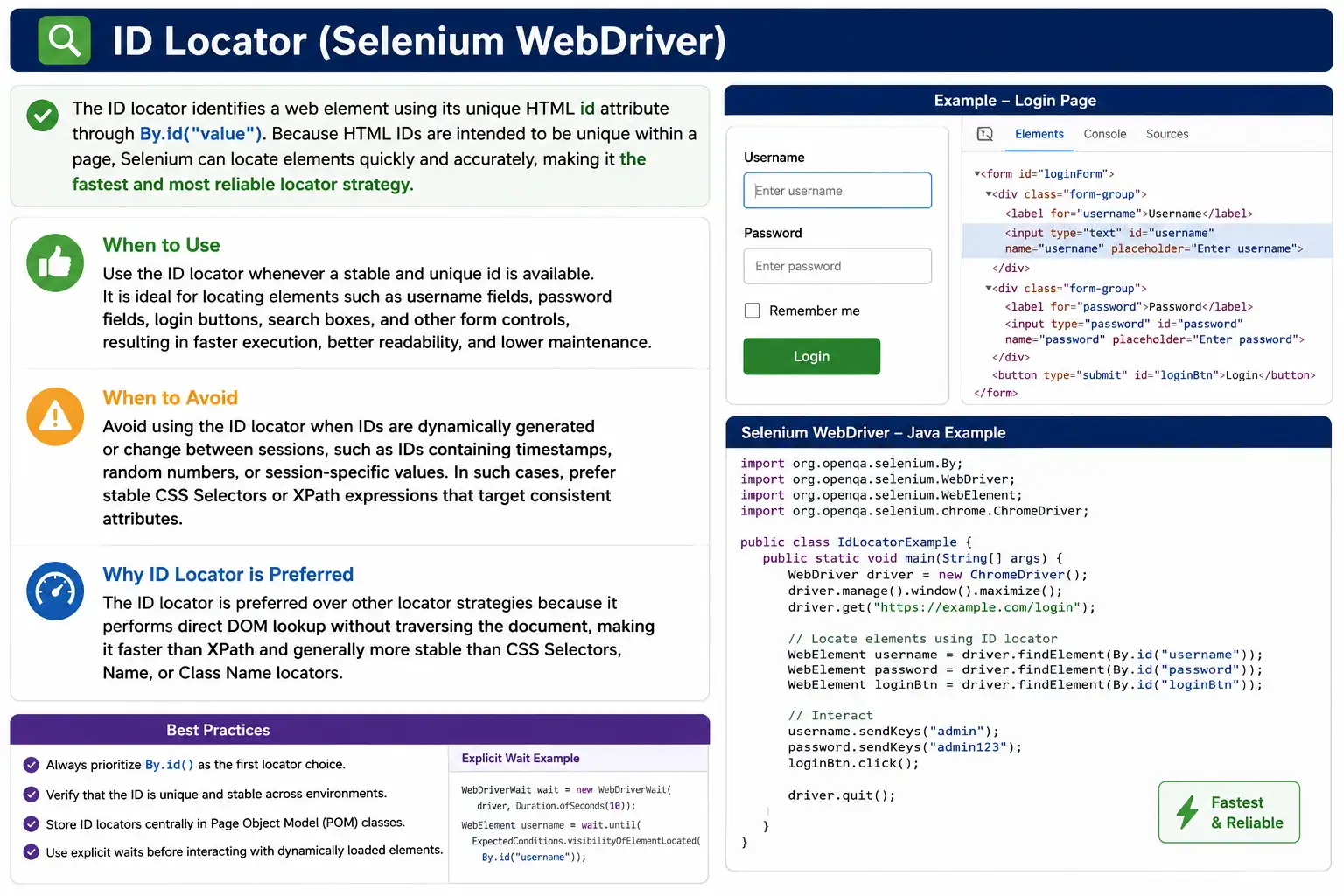
Understanding the ID Locator in Selenium WebDriver
The ID locator is one of the most important locator strategies in Selenium WebDriver because it is simple, direct, readable, and usually very stable. In a Selenium test, every user action begins with finding an element. Before WebDriver can type a username, click a login button, clear a search box, read a success message, or verify a checkbox, it must first locate the correct element in the browser's DOM. The ID locator tells Selenium to find that element by the value of its HTML id attribute.
In HTML, the id attribute is intended to uniquely identify one element within a page. That uniqueness is what makes the ID locator so useful for automation. If a text box has id="username", a Selenium statement such as driver.findElement(By.id("username")) clearly communicates the target. There is very little ambiguity. Another tester reading the code can immediately understand that the test is locating the username field. The locator is short, the intent is clear, and the browser can find the element efficiently.
Locator quality has a direct impact on test reliability. A weak locator can make a working application look broken because the test fails before it reaches the actual business validation. A strong locator helps the test focus on real behavior. This is why ID locators are usually placed at the top of the locator preference order. When a stable and unique ID exists, it is commonly better than a long XPath, a styling-based class selector, or an index-based expression. The ID locator does not depend on where the element appears in the layout, how many wrapper div elements surround it, or whether the visual design changes slightly.
The basic syntax is straightforward. Selenium uses the By class to describe locator strategies. By.id("loginBtn") creates a locator strategy that says, "Find an element whose id attribute is loginBtn." The findElement() method then sends that instruction through WebDriver to the browser driver. The browser searches the DOM and returns the matching element as a WebElement. Once the WebElement is returned, the test can interact with it using methods such as click(), sendKeys(), clear(), getText(), getAttribute(), isDisplayed(), isEnabled(), or isSelected(). The ID locator identifies the element; the WebElement methods perform or verify behavior.
The main advantage of the ID locator is stability when the ID is intentionally designed. A login form may move from the center of the page to the right side. A CSS class may change from btn-primary to button-main. A wrapper div may be added for responsive design. None of these changes should affect By.id("loginBtn") if the actual button keeps the same ID. This makes ID locators resistant to many harmless UI changes. Stable tests should not fail simply because the page layout was adjusted, and good ID usage helps prevent that kind of unnecessary maintenance.
ID locators are also readable. Readability matters because test automation is long-lived code. The person who debugs a failure later may not be the person who originally wrote the locator. A locator such as By.id("email") is easy to review. A locator such as By.xpath("/html/body/div[3]/div[2]/form/div[1]/input") forces the reader to reconstruct the page structure mentally. Even if both locators work today, the ID locator is usually easier to maintain. Automation suites become healthier when locators explain themselves.
Speed is another benefit, although it should be understood practically. Browser engines are optimized for element lookup by ID, and WebDriver can often use efficient native DOM search behavior. In most individual test steps, the performance difference between a good ID locator and a good CSS selector may not be noticeable to a human. However, across large suites with thousands of element lookups, clear and efficient locators help reduce overhead. More importantly, they reduce debugging time because failures are less likely to come from fragile selector logic.
The ID locator works best when three conditions are true. First, the ID should be unique on the page. Second, the ID should be static across page loads, sessions, browsers, and environments. Third, the ID should be meaningful enough to describe the element. Values such as username, password, searchBox, loginButton, submitOrder, and accountMenu are good examples because they are tied to the element's purpose. Values such as input_348921, react-select-9-input, or user_20260801155233 may technically be IDs, but they are often generated values and may not be stable enough for reliable automation.
This is the most important warning about ID locators: an ID is not automatically a good locator just because it exists. Many modern frontend frameworks generate IDs dynamically. The value may include a counter, random suffix, component instance number, timestamp, or environment-specific prefix. A tester should verify ID stability before relying on it. Refresh the page, log in again, open the page in another browser, or run the test in another environment if needed. If the ID changes frequently, a direct By.id() locator will become flaky. In that situation, a CSS selector, XPath expression, accessible attribute, or test-specific data attribute may be better.
Duplicate IDs are another practical problem. According to HTML rules, IDs should be unique, but real applications sometimes violate this rule. A page may have duplicate elements after a component is reused, a modal is hidden but still present, or a template accidentally repeats the same ID. When duplicate IDs exist, findElement(By.id("item")) may return the first matching element, which may not be the visible or intended one. This can lead to confusing test failures. If duplicate IDs cannot be fixed immediately, the test may need a more specific locator that searches within a known parent container or visible section.
The best long-term solution for duplicate or unstable IDs is collaboration with developers. Testers should not always compensate for poor markup with complex locators. If an important control needs to be automated, the team can add a stable ID or a test-friendly attribute. This is especially useful for login fields, primary buttons, navigation items, filters, important form controls, table actions, and modal controls. Adding stable hooks to the DOM is not only an automation convenience; it is part of designing testable software.
In real projects, ID locators are often used with Page Object Model design. Instead of writing driver.findElement(By.id("username")) in every test class, the locator is stored in a page class such as LoginPage. The page object may expose methods like enterUsername(), enterPassword(), clickLogin(), and isErrorMessageDisplayed(). This keeps test methods focused on business flow and keeps locator details in one place. If the username field changes from id="username" to id="userNameInput", only the page object needs to be updated.
Some frameworks store locators as By objects rather than WebElement fields. For example, a page class may have private By usernameInput = By.id("username"). The method enterUsername() then calls driver.findElement(usernameInput) when it needs the element. This approach can be useful for dynamic pages because it locates the element at the moment of use. A WebElement reference can become stale after a page refresh or component re-render, but a By locator can be reused to find the current element again. Both approaches are used in real frameworks; the important point is to centralize locator ownership and avoid scattering raw IDs throughout test code.
ID locators are frequently combined with waits. A locator only describes how to find an element; it does not guarantee that the element is present, visible, enabled, or ready when the test runs. If a page loads data asynchronously, driver.findElement(By.id("save")) may fail if it runs too early. The correct solution is not a fixed sleep. A better approach is to use WebDriverWait with conditions such as presenceOfElementLocated, visibilityOfElementLocated, or elementToBeClickable. The same ID locator can be used inside the wait condition, but the wait describes the state the test needs before continuing.
Choosing the right wait condition depends on the action. If the test only needs to confirm that a hidden field exists in the DOM, presenceOfElementLocated may be enough. If the test needs to read visible text or verify that a message appears to the user, visibilityOfElementLocated is usually better. If the test needs to click a button, elementToBeClickable is commonly used because it checks visibility and enabled state. The ID locator is the stable handle; the wait condition is the timing rule. Reliable Selenium automation needs both.
The ID locator is also useful when working with WebElement state methods. A test may locate a logo by ID and assert isDisplayed(). It may locate a submit button by ID and assert isEnabled(). It may locate a terms checkbox by ID and assert isSelected(). It may locate a status message by ID and read getText(). In each case, the ID locator provides a clean way to reach the element, while the assertion verifies behavior. This separation makes tests easier to understand: first locate the element, then validate the expected state or perform the expected user action.
For form automation, ID locators can make test steps especially clear. A typical login test might locate username, password, and loginButton. A search test might locate searchInput and searchSubmit. A checkout test might locate shippingAddress, paymentMethod, termsCheckbox, and placeOrderButton. When IDs are semantic, the automation code resembles the user workflow. This is valuable because test scripts should communicate intent, not just browser mechanics.
There are cases where CSS selector by ID and By.id() appear equivalent. For example, By.id("username") and By.cssSelector("#username") may both find the same element. In most cases, By.id() is preferable because it is more direct and expresses the chosen strategy clearly. CSS becomes useful when the ID alone is not enough, such as when duplicate IDs exist inside different containers or when the test needs to combine ID with another attribute. For example, form#loginForm input#username is more specific than #username, but the better solution is usually to fix duplicate IDs if the team can do so.
XPath can also locate elements by ID, as in //input[@id='username']. This works, but it is usually unnecessary when a simple By.id("username") is available. XPath should be reserved for situations where its extra power is actually needed, such as locating an element by text, moving through parent-child relationships, or handling a structure that cannot be expressed cleanly with ID or CSS. Using XPath for everything is a common beginner habit, but professional automation favors the simplest stable locator that solves the problem.
ID locators can fail in frames if the driver is searching the wrong document. If an input with id="username" is inside an iframe, driver.findElement(By.id("username")) will not find it while the driver is focused on the main page. The test must switch to the frame first, find and interact with the element, and then switch back to the default content if needed. The locator itself may be perfect, but Selenium can only search the current browsing context. This distinction is important when debugging pages that contain embedded login forms, payment widgets, chat windows, or third-party content.
ID locators can also be affected by shadow DOM boundaries. A normal By.id() search does not automatically pierce every shadow root in all contexts. If an element is inside a web component's shadow DOM, the test may need to get the shadow root and then search inside it. This is not a weakness of ID locators; it is a browser DOM boundary. When a direct ID locator unexpectedly fails even though the element is visible in developer tools, inspect whether the element is inside a shadow root or iframe before rewriting the locator.
Stale elements are another practical issue. Suppose a test locates a Save button by ID and stores it in a WebElement variable. Then the page refreshes, a modal closes, or a frontend component re-renders. The original DOM node may be replaced with a new node that has the same ID. The old WebElement reference is now stale, even though the ID locator is still valid. The fix is to locate the element again after the DOM update. This is why storing By locators and resolving them inside action methods can make dynamic page automation more resilient.
From an interview perspective, candidates should be able to explain both the benefit and the limitation of ID locators. A short answer is that an ID locator finds an element by its HTML id attribute and is usually the fastest and most reliable Selenium locator when the ID is unique and stable. A stronger answer mentions that IDs should be unique by HTML rules, that dynamic or duplicate IDs should be avoided, that By.id() is clearer than XPath when a stable ID exists, and that locators should be managed inside page objects in real frameworks.
Interviewers often ask why ID is preferred over XPath. The answer is not simply "because ID is faster." The deeper answer is that ID is direct, unique by design, less dependent on DOM structure, easier to read, and easier to maintain. XPath is powerful, but poorly written XPath can depend on layout position, indexes, or long parent chains. A stable ID stays closer to the element's identity. That is why teams usually use ID first, then name, CSS selector, and XPath only when simpler strategies are not available or not sufficient.
Another interview trap is assuming every ID is unique and stable. Real-world testers know that applications do not always follow ideal HTML rules. They check for duplicate IDs, generated IDs, hidden duplicate components, and environment-specific markup. They also know when to escalate the issue to the development team instead of building fragile workarounds. This practical judgment separates someone who only knows locator syntax from someone who can maintain a real automation suite.
ID locator usage should also be reviewed during pull requests. If a test uses a long XPath even though the element has a stable ID, the review should ask why. If a test uses an ID that appears generated, the review should ask whether it remains stable. If raw locators are repeated in multiple test classes, the review should suggest moving them into page objects or reusable components. Locator review may seem small, but it prevents many flaky tests before they reach the pipeline.
In automation reporting, ID locators make failures easier to understand. A message such as "Unable to locate element By.id: loginBtn" gives a clear clue. A message containing a long absolute XPath is harder to diagnose. The person investigating can quickly inspect the page and check whether the element ID changed, whether the button failed to render, or whether the test reached the wrong page. Clear locators improve debugging even when failures are caused by application defects rather than automation defects.
The best mental model is to treat the ID locator as a stable contract between the page and the test. When the ID is meaningful and intentionally maintained, tests can rely on it. When the ID is generated, duplicated, or unrelated to business purpose, it is not a contract; it is an implementation detail. Good testers learn to tell the difference. They use ID locators confidently when the IDs are strong, and they choose other strategies when the page does not provide a trustworthy ID.
In summary, the ID locator is the first locator strategy to consider in Selenium WebDriver. It is concise, readable, efficient, and resilient when the ID is unique and stable. It works very well for important fields, buttons, messages, checkboxes, upload controls, menus, and other elements that the application intentionally identifies. It should be avoided when IDs are random, session-based, duplicated, or likely to change. Used with waits, page objects, and proper locator review, By.id() becomes one of the simplest ways to make Selenium tests reliable and maintainable.
ID Locators in Real Automation Frameworks
In a real automation framework, ID locators are rarely used as isolated one-line examples. They become part of a larger design that includes page objects, reusable actions, waits, assertion helpers, reporting, and test data. A login page object, for example, may define locators for username, password, login button, error message, and forgot password link. The test does not need to know these IDs directly. It calls loginPage.loginAs(user), and the page object uses By.id() internally to find the fields and button. This gives the test a clean business flow while keeping the technical locator details close to the page structure.
This organization becomes more valuable as the application grows. Suppose one hundred tests use the login page. If each test hardcodes By.id("username"), changing that ID later requires editing many files. If the ID is stored in one page object, the update is small and controlled. Centralized locators also make code review easier. A reviewer can inspect one page object and understand which DOM hooks the automation suite depends on. This is why good teams treat locator management as framework design, not as a minor implementation detail.
ID locators are also useful for reusable utility methods. A framework may provide methods such as type(By locator, String value), click(By locator), getText(By locator), waitUntilVisible(By locator), and waitUntilClickable(By locator). These methods accept the locator, apply the right wait, perform the action, and log useful information. When the locator is an ID, the logs are usually easy to read. A report line such as "Clicked element By.id: loginBtn" is much easier to investigate than a long generated selector. Clear locators improve both automation execution and failure analysis.
Another real-world concern is environment consistency. A locator can work in a local development environment but fail in QA, staging, or production-like builds if the frontend code differs. Stable IDs should be part of the same application code shipped across environments. If IDs are added only in one environment or removed by a build process, automation becomes unreliable. For this reason, test-friendly IDs and data attributes should be treated as normal markup, not as temporary debugging aids. They should go through the same review and release process as other UI changes.
A good ID naming convention helps both developers and testers. Names such as login-username, login-password, checkout-place-order, profile-save, and settings-email-notifications describe purpose clearly. Names such as input1, button2, container5, and field_new do not. The best names are stable because they describe behavior, not layout. If a login button moves from a form footer to a sticky header, login-submit can remain valid. If an ID describes position, such as rightPanelButton, it may become wrong when the design changes. Semantic naming is a quiet but important part of locator stability.
Troubleshooting ID locator failures should be systematic. If By.id("submit") fails, first confirm the test is on the expected page. A navigation failure can make a correct locator look wrong. Next, confirm the element is present in the DOM at the moment Selenium searches for it. If the application renders slowly, use an explicit wait. Then check whether the element is inside an iframe, a shadow root, or a modal that has not opened yet. After that, inspect whether the ID changed, became duplicated, or belongs to a hidden element. This sequence usually finds the cause faster than immediately replacing the ID locator with a broad XPath.
There are also situations where an ID locator should be combined with a parent context for safety. Although IDs should be unique, a page with hidden templates or repeated components may accidentally contain the same ID more than once. If the development team cannot fix it immediately, a scoped search can reduce risk. The test can first locate a visible form, modal, table row, or section, and then search within that parent. This is not ideal HTML, but it is a practical automation technique while the markup is being improved. The long-term goal should still be unique and stable IDs.
ID locators also help when tests validate accessibility-related behavior. Many accessible forms connect labels to inputs using the for attribute and the input's ID. A label such as <label for="email">Email</label> points to an input with id="email". This relationship benefits users, screen readers, and automation. When a page uses meaningful IDs consistently, tests can find fields reliably, and accessibility checks can verify that labels and controls are correctly connected. Good IDs therefore support more than Selenium; they support overall page quality.
Finally, ID locators should be chosen with the user's journey in mind. The test is not trying to prove that an element has an ID; it is trying to prove that a user can complete a meaningful action. The ID locator is a means to reach the element reliably. Once the element is found, the test still needs meaningful assertions. For a login flow, that might be a dashboard heading or account menu. For a checkout flow, it might be an order confirmation. For a settings page, it might be saved preferences after reload. Strong locators make these validations possible without distracting the suite with avoidable element-finding failures.
In Selenium, well-chosen ID locators dramatically reduce flakiness and maintenance.
1. What Is an ID Locator
Definition: An ID locator identifies a web element using the HTML id attribute.
- HTML rule: IDs must be unique within a page
- Selenium leverages this uniqueness for fast lookups
Conceptually:
- Strategy means ID
- Value means value of the id attribute
2. Why ID Is the Best Locator
Key Advantages:
- Uniqueness (by HTML standard)
- Fastest lookup in the DOM
- Most stable against UI layout changes
- Highly readable and maintainable
Industry rule: If a stable ID exists, use it without hesitation.
3. How Selenium Uses the ID Locator
When Selenium searches by ID:
- The browser directly queries the DOM by ID
- No DOM traversal or pattern matching is required
- Performance is optimal compared to XPath/CSS
This is why ID is preferred over XPath.
4. When ID Locator Works Best
Use ID locator when:
- The id is static (does not change between sessions)
- The id is unique
- The id is meaningful (e.g., loginButton, usernameInput)
Common examples:
- Username field
- Password field
- Login / Submit buttons
- Search boxes
5. When NOT to Use ID Locator
Avoid ID locator when:
- IDs are auto-generated (random numbers/UUIDs)
- IDs change on every page load
- IDs contain timestamps or session data
Example of bad ID:
- id="user_1738292929"
- id="input_45_987"
Such IDs cause frequent failures.
6. ID Locator vs Other Locators (Quick Comparison)
| Locator | Stability | Speed | Preference |
|---|---|---|---|
| ID | Very High | Very Fast | ***** |
| Name | High | Fast | **** |
| CSS Selector | Medium-High | Fast | **** |
| XPath | Medium | Slower | *** |
ID clearly ranks at the top.
7. ID Locator in Page Object Model (POM)
Best practice:
- Define ID locators inside page classes
- Never hardcode them in test classes
This ensures:
- Centralized locator management
- Minimal code changes when UI updates
8. Common Beginner Mistakes
- Using ID without checking uniqueness
- Using dynamic/auto-generated IDs
- Ignoring better ID in favor of XPath
- Hardcoding IDs directly in tests
These mistakes reduce reliability.
9. Real-Project Best Practices
- Ask developers to add test-friendly IDs
- Prefer semantic IDs (business-meaningful)
- Validate ID stability across environments
- Use ID as the first locator strategy
Many teams actively collaborate with developers to add stable IDs for automation.
10. Interview Perspective
Short Answer: An ID locator uses the HTML id attribute to uniquely identify a web element and is the fastest and most reliable locator in Selenium.
Real-Time Answer: In Selenium, the ID locator is preferred because IDs are unique in the DOM and allow fast, stable element identification. In real projects, we always use ID locators first when they are stable and available.
11. Key Takeaway
- ID is the best locator in Selenium
- Fast, unique, and stable
- Use it whenever possible
- Avoid dynamic or auto-generated IDs
- Strong automation starts with strong locators-and ID is the strongest of them all.
12. ID Locator Examples (Interview-Ready)
1. Basic ID Locator Usage
driver.findElement(By.id("username"));Key Point: Locates element using unique id attribute.
2. ID Locator with sendKeys()
driver.findElement(By.id("username"))
      .sendKeys("admin");
3. ID Locator with click()
driver.findElement(By.id("loginBtn"))
      .click();
4. ID Locator with clear() + sendKeys()
WebElement email = driver.findElement(By.id("email"));
email.clear();
email.sendKeys("test@example.com");
5. ID Locator with Assertion (isDisplayed())
Assert.assertTrue(
    driver.findElement(By.id("logo")).isDisplayed()
);
6. ID Locator with Assertion (isEnabled())
WebElement submit = driver.findElement(By.id("submit"));
Assert.assertTrue(submit.isEnabled());
7. ID Locator with Assertion (isSelected() - Checkbox)
WebElement checkbox = driver.findElement(By.id("agree"));
Assert.assertFalse(checkbox.isSelected());
8. ID Locator with getText()
String msg =
    driver.findElement(By.id("successMsg")).getText();

Assert.assertEquals(msg, "Login Successful");
9. ID Locator with getAttribute()
String value =
    driver.findElement(By.id("username"))
          .getAttribute("value");
10. ID Locator with Explicit Wait (Best Practice)
WebDriverWait wait =
    new WebDriverWait(driver, Duration.ofSeconds(10));

WebElement loginBtn =
    wait.until(ExpectedConditions.elementToBeClickable(
        By.id("loginBtn")
    ));

loginBtn.click();
11. ID Locator with findElements() (Safe Check)
if (driver.findElements(By.id("popup")).size() > 0) {
    driver.findElement(By.id("popup")).click();
}
Why: Prevents NoSuchElementException.
12. ID Locator Inside a Form (Chaining)
WebElement form = driver.findElement(By.id("loginForm"));
form.findElement(By.id("username")).sendKeys("admin");
13. ID Locator Inside Frame
driver.switchTo().frame("loginFrame");
driver.findElement(By.id("username")).sendKeys("admin");
driver.switchTo().defaultContent();
14. ID Locator After Page Refresh (Stale Fix)
WebElement btn = driver.findElement(By.id("save"));
driver.navigate().refresh();

// btn.click(); Invalid: stale
btn = driver.findElement(By.id("save"));
btn.click();
15. ID Locator in Page Object Model (POM)
@FindBy(id = "username")
WebElement username;

public void enterUsername(String value) {
    username.clear();
    username.sendKeys(value);
}
16. ID Locator Stored as By (Framework Style)
By username = By.id("username");
driver.findElement(username).sendKeys("admin");
17. ID Locator for Dynamic UI Validation
String status =
    driver.findElement(By.id("status"))
          .getText();

Assert.assertTrue(status.contains("Success"));
18. Invalid: Common Interview Mistake
By.id("username").sendKeys("admin"); // Invalid:Correct:
driver.findElement(By.id("username")).sendKeys("admin"); // Valid:19. ID Locator vs CSS Selector (Equivalent)
driver.findElement(By.id("username"));
driver.findElement(By.cssSelector("#username"));
Interview Note: By.id() is clearer and preferred.
20. When ID Locator Fails (Duplicate IDs - Bad HTML)
driver.findElement(By.id("item")); // may return first match onlyFix: Use CSS/XPath with parent context.
21. ID Locator with Actions Class
Actions actions = new Actions(driver);
WebElement btn = driver.findElement(By.id("submit"));
actions.moveToElement(btn).click().perform();
22. ID Locator for File Upload
driver.findElement(By.id("fileUpload"))
      .sendKeys("C:\\files\\resume.pdf");
23. ID Locator for Auto-Generated IDs (Partial Match Invalid:)
// ID = user_12345 means Invalid: ID locator not suitableUse Instead:
By.xpath("//input[starts-with(@id,'user_')]");24. ID Locator Priority (Interview Question)
Why: Fast, stable, readable.
25. Interview Summary - ID Locator
driver.findElement(By.id("elementId"));Key Points: Best locator when ID is unique & stable, faster than XPath, most readable, avoid when IDs are dynamic or duplicated.