Hub and Node Concept in Selenium Grid
The Hub and Node concept belongs primarily to Selenium Grid 3, but it remains one of the most commonly discussed Selenium Grid topics in interviews and real project conversations. Many organizations used Grid 3 for years, and even after Selenium Grid 4 introduced a new distributed architecture, the basic idea of centralized request routing and remote browser execution is still easiest to understand through the Hub and Node model.
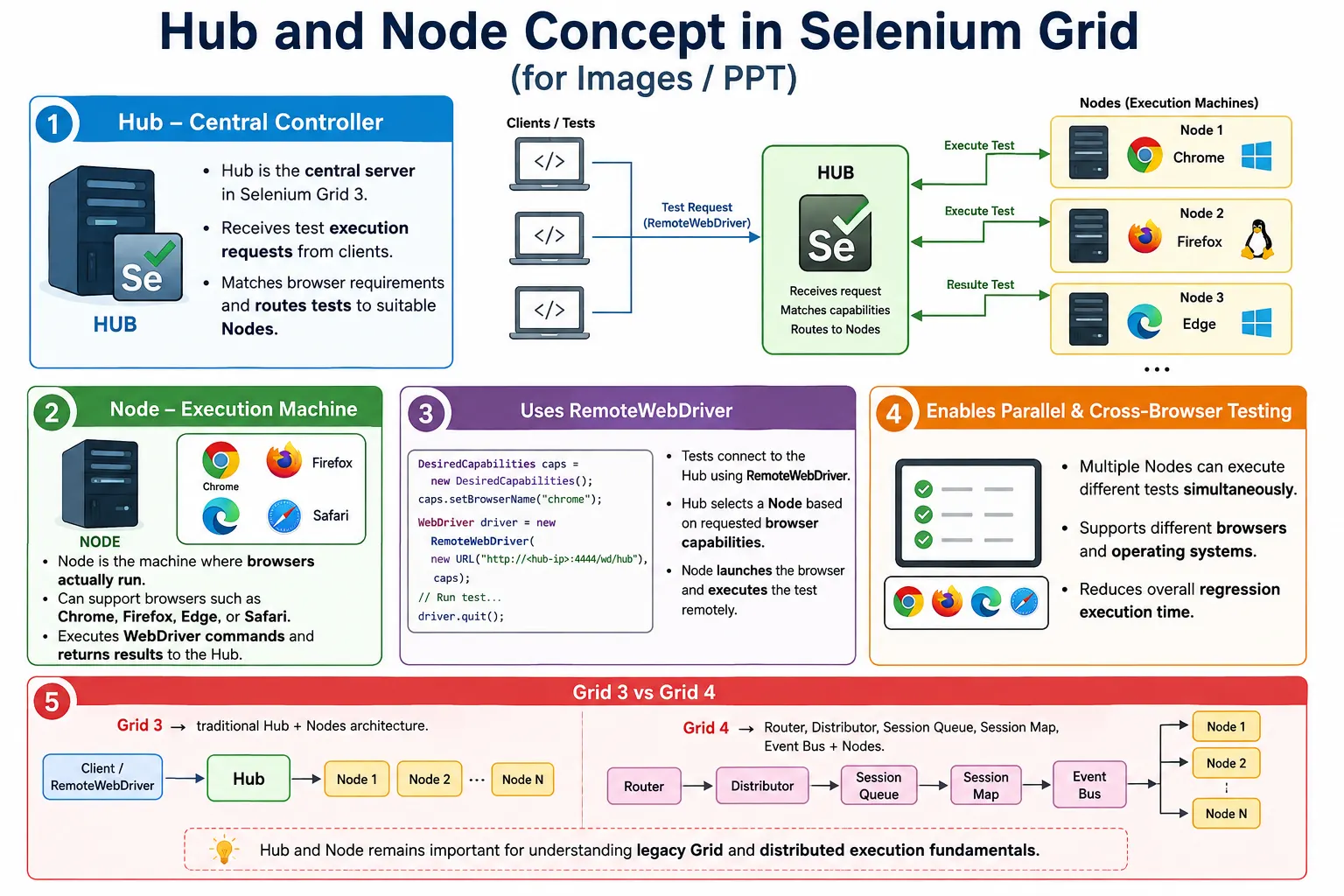
In Selenium Grid 3, the Hub acts as the central server that receives test requests, manages registered Nodes, matches requested browser capabilities, and routes sessions to suitable Nodes. A Node is the machine that actually runs the browser and executes Selenium commands. The Hub does not execute browser actions by itself. It behaves like a traffic controller. The Nodes are the execution machines where browsers open, commands run, and results return.
1. Why This Concept Still Matters
Selenium Grid 4 no longer uses the old Hub as a single central component in the same way. Grid 4 distributes those responsibilities across Router, Distributor, Session Queue, Session Map, Event Bus, and Nodes. However, the Hub and Node concept remains important because it explains the foundation of remote execution. It also helps understand why Grid 4 evolved. Many interviewers still ask what a Hub is, what a Node is, and how test requests are routed.
If you understand Hub and Node clearly, Selenium Grid becomes easier to reason about. You understand why RemoteWebDriver is required, why browser capabilities matter, why nodes must be registered, why session routing is important, and why parallel execution needs both Grid capacity and TestNG configuration.
2. What Is a Hub?
A Hub is the central server in Selenium Grid 3. It receives test execution requests from client test scripts and distributes those requests to appropriate Nodes. The Hub maintains information about registered Nodes and their browser capabilities. When a test asks for Chrome, Firefox, Edge, Safari, Windows, Linux, or another configuration, the Hub checks registered Nodes and chooses a suitable one.
The Hub does not launch browsers directly. It does not click buttons, type text, or validate UI elements. Its job is coordination. It receives the session request, finds a matching Node, routes commands, monitors sessions, and returns responses to the test client. Because the Hub controls routing, it is the central coordination point in Grid 3.
3. Hub Responsibilities
The Hub accepts test requests, manages registered Nodes, identifies requested browser requirements, finds an available Node, assigns tests to Nodes, monitors active sessions, and routes commands between the client and the Node. This makes the Hub responsible for orchestration but not execution.
Hub Responsibilities
  Receive test requests
  Track registered Nodes
  Match browser capabilities
  Route sessions
  Monitor active sessions
  Return execution responses
A useful analogy is a traffic controller. The traffic controller does not drive vehicles. It decides which route each vehicle should take. Similarly, the Hub does not run the browser. It directs the test request to a Node that can run the requested browser.
4. What Is a Node?
A Node is a machine registered with the Hub and capable of executing Selenium tests. A Node can be a physical machine, virtual machine, or server that has browsers, browser drivers, operating system support, and Selenium Server configuration. Unlike the Hub, the Node actually launches browsers and executes commands.
A Node may support one browser or multiple browsers. For example, a Windows Node may support Chrome and Edge. A Linux Node may support Firefox. A macOS Node may support Safari. When the Hub receives a request, it selects a Node that has the requested browser and available capacity.
5. Node Responsibilities
Nodes register with the Hub, announce their browser capabilities, receive assigned sessions, launch browsers, execute WebDriver commands, return command responses, and close browser sessions when tests finish. If a Node goes offline, it can no longer execute tests until it is restored and registered again.
Node Responsibilities
  Register with Hub
  Provide browser capabilities
  Launch browser sessions
  Execute Selenium commands
  Return results
  Close sessions
A Node is the real execution environment. If a test fails because a browser crashes, an element is not visible, or a page behaves differently on a platform, that behavior happens on the Node's browser, not on the Hub.
6. Why Hub and Node Are Needed
Without Grid, a test suite usually runs on one machine. If the application must be tested on Chrome, Firefox, Edge, and Safari, tests may run one browser after another. That increases execution time and limits browser coverage. With Hub and Nodes, multiple machines can execute tests at the same time.
Without Grid
  One Machine
    Chrome
    Firefox
    Edge
    Safari
      Sequential Execution

With Hub and Nodes
  Hub
    Chrome Node
    Firefox Node
    Edge Node
    Safari Node
      Parallel Execution
This model enables cross-browser and cross-platform testing at scale. A regression suite that takes hours locally can complete faster when distributed across several Nodes.
7. Hub and Node Architecture
The architecture is straightforward. Test scripts send requests to the Hub through RemoteWebDriver. The Hub checks browser requirements and chooses a matching Node. The selected Node launches the browser and executes Selenium commands. Results flow back from the Node through the Hub to the client test.
Test Scripts
  Hub Server
    Node 1: Chrome on Windows
    Node 2: Firefox on Linux
    Node 3: Edge on macOS
      Browser Execution
This architecture separates test control from browser execution. The test can run from one machine while browsers run on several different machines.
8. Practical Example
Suppose Node 1 is a Windows machine with Chrome and Edge. Node 2 is a Linux machine with Firefox. Node 3 is a macOS machine with Safari. If a test requests Firefox, the Hub checks registered capabilities and sends the request to Node 2. If a test requests Safari, it sends the request to Node 3.
Request: Firefox

Registered Nodes:
  Node 1: Chrome, Edge
  Node 2: Firefox
  Node 3: Safari

Selected Node:
  Node 2
This matching process is the heart of Selenium Grid. Tests do not need to know the exact machine details. They specify browser capabilities, and the Grid handles assignment.
9. Hub Workflow
The Hub workflow begins when a test requests a new browser session. The Hub receives the request, reads the desired browser details, checks registered Nodes, identifies an available Node, assigns the session, and then routes commands until the session ends.
Receive Request
  Check Browser Requirements
    Find Available Node
      Assign Test
        Route Commands
          Wait for Result
If no matching Node is available, the request cannot start immediately. Depending on configuration, it may wait or fail. This is why accurate Node registration and capacity planning are important.
10. Node Workflow
The Node workflow starts when the Hub assigns a session. The Node receives the test request, launches the requested browser, executes Selenium commands, returns results, and closes the browser when the session ends.
Receive Test
  Launch Browser
    Execute Selenium Commands
      Return Results
        Close Browser Session
Nodes can execute one or more sessions depending on configuration and machine capacity. Overloading a Node with too many browser sessions can create slow execution or flaky behavior.
11. Test Execution Flow
The complete execution flow includes TestNG, RemoteWebDriver, Hub, Node, browser, execution, and result reporting. TestNG starts the test. The framework creates a remote driver. The request goes to the Hub. The Hub selects a Node. The Node launches the browser. The test executes and returns results.
TestNG Test
  RemoteWebDriver
    Hub
      Node
        Browser
          Execution
            Result
From the test code perspective, WebDriver commands still look familiar. The main difference is the driver creation mechanism and the fact that the browser is remote.
12. Browser Matching
Browser matching is the process where the Hub compares the requested capabilities with Node capabilities. If the test requests Chrome on Windows, the Hub searches for a registered Node with Chrome on Windows and available capacity.
Test Requests:
  Chrome
  Windows

Hub Checks:
  Node 1 has Chrome and Windows
  Node 1 is available

Result:
  Test assigned to Node 1
If the test requests Safari but only Chrome Nodes are registered, the request cannot be matched. This is one of the most common beginner issues in Grid execution.
13. Multiple Nodes
A Grid can have many Nodes. Each Node can represent a different browser, operating system, browser version, or execution environment. More Nodes usually mean more parallel capacity and better browser coverage, assuming the network and machines are stable.
Hub
  Node 1: Chrome
  Node 2: Firefox
  Node 3: Edge
  Node 4: Safari
Multiple Nodes allow different tests to run at the same time. This reduces total execution time and supports cross-browser validation.
14. Parallel Execution
Parallel execution is one of the main reasons teams use Hub and Node architecture. Without Grid, tests may run sequentially. With Grid, several Nodes can execute different tests at the same time. However, the test runner must also start tests in parallel. Grid provides infrastructure, but TestNG controls parallel execution in many Selenium Java frameworks.
Without Hub:
  Test 1
  Test 2
  Test 3

With Hub:
  Test 1, Test 2, Test 3 run together
To benefit from Grid, configure TestNG thread count carefully and make sure the Grid has enough Node capacity. Too many threads and too few Nodes create queues and timeouts.
15. RemoteWebDriver Connection
Tests connect to the Hub using RemoteWebDriver. Instead of creating new ChromeDriver(), the framework creates a remote driver using the Hub URL and browser options.
ChromeOptions options =
        new ChromeOptions();

WebDriver driver =
        new RemoteWebDriver(
                new URL(
                        "http://localhost:4444/wd/hub"
                ),
                options
        );
This request goes to the Hub. The Hub selects a compatible Node and creates the browser session. In Selenium Grid 4, the URL format is often simplified, but the concept remains the same: test code connects remotely instead of launching a local driver directly.
16. Node Registration
Node registration is the process where a Node connects to the Hub and announces its capabilities. The Hub stores information such as browser name, platform, version, and availability. Without registration, the Hub does not know that the Node exists.
Node Starts
  Registers with Hub
    Hub Stores Capabilities
      Browser
      Platform
      Version
      Availability
If a Node is not registered correctly, tests may remain waiting because the Hub cannot find a matching execution machine. Registration issues are common when network settings, ports, browser drivers, or Grid commands are misconfigured.
17. Session Creation
When the Hub matches a request to a Node, a browser session is created. The session receives a session ID. Future Selenium commands use that session ID so the Grid knows which browser instance should receive the command.
Request
  Hub
    Available Node
      Browser Session
        Session ID
Session tracking is critical in parallel execution. Many browsers may run at the same time, and every command must go to the correct browser session.
18. Communication Flow
The communication flow moves from client to Hub, from Hub to Node, from Node to browser, and then back through the same path. The client test sends a command. The Hub routes it. The Node executes it in the browser. The result returns to the client.
Client
  Hub
    Node
      Browser
    Node
  Hub
Client
This communication adds network dependency. If the network is slow or unstable, remote execution can become slower or less reliable. This is one reason Grid infrastructure must be monitored.
19. Hub Failure
In Grid 3, the Hub is a central point. If the Hub stops, no new sessions can be routed. Nodes may still exist, but they cannot receive new work from the Hub. This centralized design is one reason Grid 4 introduced a more distributed architecture.
For Grid 3 users, Hub monitoring is important. If the Hub is unavailable, CI/CD executions may fail even though Nodes are still online. Restarting Nodes will not solve the problem if the Hub itself is down.
20. Node Failure
If one Node fails, only the browser capacity on that Node is affected. For example, if the Firefox Node goes offline, Firefox requests cannot run unless another Firefox Node is available. Other Nodes, such as Chrome or Edge Nodes, may continue working.
Node failure reduces capacity and browser coverage. The Hub can route around the failed Node only if another matching Node exists. This is why enterprise grids often have more than one Node for important browser combinations.
21. Project Flow in Frameworks
In a Selenium Java framework, Hub and Node usage usually appears in the driver creation layer. TestNG starts tests. DriverFactory reads configuration. If execution mode is remote, DriverFactory creates RemoteWebDriver and points it to the Hub. The Hub routes to a Node.
TestNG
  DriverFactory
    RemoteWebDriver
      Hub
        Chrome Node
          Chrome Browser
This keeps test classes clean. Tests should not contain Hub or Node details. They should simply ask for a driver and execute business scenarios.
22. Recommended Folder Structure
A framework that supports Grid execution usually has separate packages for driver management, configuration, tests, pages, and utilities. DriverFactory handles local versus remote execution decisions.
AutomationFramework
  driver
    DriverFactory.java
  config
    config.properties
  tests
  pages
  utilities
Configuration may include execution mode, browser name, Hub URL, platform, browser version, thread count, and environment. This allows the same framework to run locally or on Grid without code changes.
23. Advantages
The Hub and Node model enables parallel execution, cross-browser testing, cross-platform testing, centralized request management, better resource utilization, faster execution, scalable test infrastructure, and easier Node management. It allows one test suite to execute across multiple machines instead of depending on one local machine.
This model is especially useful for large regression suites. It also helps teams validate browser compatibility without forcing every tester to maintain every browser environment locally.
24. Limitations
The biggest Grid 3 limitation is that the Hub is a single point of failure. If it fails, test routing stops. Grid 3 also requires infrastructure setup, network connectivity, Node maintenance, browser-driver compatibility, and more complex debugging than local execution.
These limitations helped drive the redesign in Selenium Grid 4. Grid 4 distributes responsibilities across more components and improves scalability. Still, the Hub and Node model remains useful as a foundational explanation of distributed browser execution.
25. Hub and Node vs Local Execution
Local execution runs a local browser on one machine. Hub and Node execution runs browsers remotely on registered Nodes. Local execution is simpler and useful for development. Grid execution is better for parallel execution, browser coverage, and CI/CD scalability.
Local Execution
  Local browser
  One machine
  ChromeDriver
  Limited coverage

Hub and Node Execution
  Remote browser
  Multiple machines
  RemoteWebDriver
  Cross-browser coverage
A mature framework supports both. Developers can debug locally, while CI/CD pipelines run broader suites through Grid.
26. Selenium Grid 3 vs Grid 4
Grid 3 uses Hub and Nodes. Grid 4 replaces the traditional Hub with distributed components such as Router, Distributor, Session Queue, Session Map, and Event Bus. Nodes still exist in Grid 4, but session routing is more modular.
Grid 3
  Hub
  Nodes

Grid 4
  Router
  Distributor
  Session Queue
  Session Map
  Event Bus
  Nodes
For new projects, Selenium Grid 4 is recommended. For interviews, it is useful to explain that Hub and Node terminology belongs to Grid 3, while Grid 4 distributes the Hub's responsibilities across multiple components.
27. Common Beginner Mistakes
A common mistake is confusing Hub and Node. The Hub routes tests. The Node executes tests. Another mistake is using new ChromeDriver() while expecting Grid execution. Grid execution requires RemoteWebDriver. Beginners also use incorrect Hub URLs, register Nodes incorrectly, or request browser capabilities that no Node supports.
Another frequent mistake is assuming the Hub launches browsers. It does not. Browser launch happens on the Node. Also, running tests against a Hub without enabling TestNG parallel execution does not provide the full benefit of Grid.
28. Enterprise Best Practices
Use Selenium Grid 4 for new implementations, but understand Hub and Node for legacy projects and interviews. Use RemoteWebDriver for Grid execution. Register Nodes with accurate capabilities. Keep browsers and drivers synchronized. Monitor Node health. Configure TestNG parallel execution properly. Use Docker or Kubernetes for scalable Node management. Consider cloud-based Grid providers for broader browser coverage.
Centralize driver creation in DriverFactory. Store Hub URL and browser configuration outside test code. Keep the framework thread-safe. Avoid shared static driver state. Archive reports and screenshots so remote failures can be debugged after execution.
29. Capacity Planning
Hub and Node architecture works well only when Node capacity matches test demand. If TestNG starts too many parallel tests but the Grid has too few browser slots, tests wait or time out. If each Node is overloaded with too many browser sessions, execution becomes slow and unstable.
Plan capacity based on CPU, memory, browser type, page weight, and test duration. Start with a safe thread count, monitor Node usage, and increase gradually. Reliable parallel execution is better than aggressive parallel execution that creates flaky failures.
30. Reporting and Debugging
Remote execution requires strong reporting. Since the browser runs on another machine, testers may not see the failure directly. Reports should capture screenshots, exception details, browser name, platform, Hub URL, and execution time. Without these details, Grid failures are harder to diagnose.
When debugging, separate application failures from infrastructure failures. If session creation fails, check Hub and Node status. If only one browser fails, check browser-specific behavior. If failures are random, check node resources, network stability, and thread safety in the framework.
31. Real Enterprise Architecture
A real enterprise architecture may start from a developer push to a Git repository. Jenkins triggers a TestNG suite. DriverFactory creates a RemoteWebDriver. The Hub receives the request and routes it to Chrome, Firefox, Edge, or Safari Nodes. Tests execute remotely, and Extent Reports capture the results.
Developer Push
  Git Repository
    Jenkins Pipeline
      TestNG Suite
        DriverFactory
          RemoteWebDriver
            Hub
              Chrome Node
              Firefox Node
              Edge Node
              Safari Node
                Extent Reports
This architecture reduces execution time and improves coverage. It also keeps heavy browser execution away from developer machines and places it in controlled infrastructure.
32. Interview Perspective
A short interview answer is: in Selenium Grid 3, the Hub is the central server that receives test execution requests and routes them to appropriate Nodes. A Node is a machine that hosts browsers and actually executes Selenium tests. Tests communicate with the Hub using RemoteWebDriver.
A stronger real-time answer is: in Selenium Grid 3, I configure a central Hub that manages multiple Nodes running different browsers and operating systems. My Selenium framework uses RemoteWebDriver instead of browser-specific local drivers. When a test starts, the Hub receives the requested browser capabilities, identifies an available Node that matches the requested configuration, and forwards the session for execution. The Node launches the browser, runs the commands, and returns results through the Hub. In modern projects, I prefer Selenium Grid 4, where Hub responsibilities are distributed across components like Router and Distributor.
33. Hub and Node Workflow
The Hub and Node workflow begins with the TestNG test and RemoteWebDriver. The request reaches the Hub. The Hub selects a matching Node. The Node launches the browser and executes the test. Results return through the Hub to the client.
TestNG Test
  RemoteWebDriver
    Hub
      Matching Node
        Browser
          Execute Test
            Return Results
This workflow explains how Selenium Grid enables remote and parallel browser execution. It also explains why correct capabilities, Node registration, and framework thread safety are essential.
34. Migrating from Grid 3 to Grid 4
Teams that previously used Hub and Node architecture often migrate to Selenium Grid 4 to get better scalability and modern support. The main conceptual change is that the old Hub responsibilities are no longer concentrated in a single component. Grid 4 separates routing, distribution, queuing, session mapping, event communication, and node execution into different responsibilities. This improves flexibility and makes the architecture more suitable for modern infrastructure.
From a framework point of view, the migration is usually less dramatic than the architecture diagram suggests. Most tests still use RemoteWebDriver. Browser options are still passed to the remote endpoint. TestNG still controls parallel execution. DriverFactory still decides local versus remote execution. The biggest changes are usually Grid setup, endpoint format, configuration, container deployment, and operational monitoring.
When migrating, do not change all tests first. Start by updating the driver creation layer and Grid infrastructure. Run a small smoke suite on Grid 4. Confirm browser matching, screenshots, reports, parallel execution, and CI/CD publishing. Once the execution layer is stable, expand to regression suites. A careful migration avoids confusing framework issues with Grid infrastructure issues.
35. Node Health and Monitoring
Node health is critical in distributed execution. A Node may be registered but still unhealthy. It may have low memory, outdated browser versions, stale driver binaries, network issues, or browser startup failures. If the Hub routes tests to an unhealthy Node, failures may look like application defects even though the real issue is infrastructure.
Enterprise teams should monitor Node availability, browser session capacity, CPU, memory, disk usage, browser versions, and test failure patterns. If one Node causes repeated failures while other Nodes are stable, that Node should be inspected. Good Grid management includes restarting unhealthy Nodes, keeping browser versions aligned, cleaning temporary files, and avoiding overloaded machines.
Reports should help identify Node-related issues. If possible, include browser, platform, execution mode, and Grid endpoint details. For cloud grids, include session links, video links, or provider execution IDs when available. This evidence makes remote failures much easier to investigate after the browser session has ended.
36. Capability Design
Capability design is a common source of Grid issues. The test requests a browser and platform, and the Hub must find a Node that matches. If requested capabilities are too specific, sessions may not start because no Node matches exactly. If capabilities are too vague, tests may run on an unexpected environment. A good framework balances clarity and flexibility.
For example, requesting Chrome is usually enough for a simple Grid. In a larger Grid, the framework may also specify platform, browser version, or additional options. Cloud grids often require provider-specific capabilities such as project name, build name, session name, resolution, or operating system version. These should be centralized in DriverFactory or capability builder classes rather than scattered across tests.
Capability mismatch should be one of the first checks when sessions do not start. If the request asks for Safari but only Chrome Nodes are registered, the Hub cannot route the test. If the request asks for a browser version not available on any Node, the session may remain pending or fail. Clear configuration and logging help identify these problems quickly.
37. Remote Execution Design
Remote execution should be designed as a first-class framework capability, not as a temporary change to driver creation. A framework should support execution mode, browser name, Grid URL, platform, browser version, thread count, and report path through configuration. The test code should not contain hardcoded Hub URLs or Node assumptions.
A good design keeps tests independent from execution infrastructure. The same test should run locally during development, on self-hosted Grid in CI, and on a cloud Grid for cross-browser validation. Only configuration should change. This design is possible when driver creation is centralized and page objects do not create browser drivers directly.
Remote execution also requires disciplined test design. Tests should not depend on local files unless those files are available to the remote browser environment. Downloads may happen on the remote Node, not the test machine. Browser profiles, certificates, file uploads, and network access may behave differently on remote machines. Framework utilities should account for these differences.
38. Hub and Node in Interview Answers
In interviews, it is not enough to say that the Hub is the server and the Node is the client. A strong answer explains responsibility separation. The Hub receives requests, manages Nodes, matches capabilities, and routes commands. The Node registers with the Hub, launches browsers, executes commands, and returns results. Tests connect through RemoteWebDriver, not local browser drivers.
A strong answer also mentions the Grid 3 versus Grid 4 difference. Hub and Node terminology is from Grid 3. Grid 4 replaces the central Hub model with distributed components, but Nodes still exist. This shows that you understand both legacy terminology and modern Selenium architecture.
If asked for a real-time example, describe a TestNG suite running in Jenkins. DriverFactory reads remote execution mode and creates RemoteWebDriver. The request goes to the Hub. The Hub selects a Chrome Node or Firefox Node based on capabilities. The Node launches the browser. Extent Reports capture results and screenshots. This practical explanation is stronger than memorizing definitions.
39. Key Takeaway
The Hub and Node architecture introduced the foundation of distributed browser execution in Selenium Grid. The Hub receives and routes test requests, while Nodes execute Selenium commands in real browsers. Multiple Nodes allow cross-browser, cross-platform, and parallel execution.
Client Test
  Hub
    Chrome Node
    Firefox Node
    Edge Node
    Safari Node
      Parallel Browser Execution
Although Selenium Grid 4 has evolved beyond the traditional Hub model, understanding Hub and Node remains essential. It explains how remote execution works, why RemoteWebDriver is used, how browser matching happens, why Nodes must register capabilities, and how Grid reduces execution time. For interviews and legacy Grid 3 projects, this concept is still one of the most important Selenium Grid fundamentals.