get() vs navigate().to()
Both get() and navigate().to() are used to open a URL in Selenium WebDriver. At first glance they look almost identical because both can take a web address and load it in the current browser window. In many simple scripts, replacing one with the other appears to work. That similarity is the reason this topic becomes a frequent interview question and a common source of confusion for beginners. The real difference is not only about opening a URL. It is about intent, readability, browser navigation control, framework design, and how clearly the automation code communicates what the test is trying to do.
In practical Selenium automation, get() is usually the default choice for opening the
application under test. It is direct, simple, and easy to read. When a test setup says
driver.get(baseUrl), most automation engineers immediately understand that the browser is
being sent to the starting page of the application. navigate().to(), on the other hand,
belongs to Selenium's navigation API. It is normally used when the test cares about browser navigation
behavior, such as moving to another URL during a flow, using back and forward history, refreshing a
page, or simulating a more browser-like journey across pages.
The distinction matters because good automation is not only about making the browser perform actions.
It is also about writing tests that clearly express user intent. If the goal is to launch the
application, get() is usually cleaner. If the goal is to verify how a browser moves
between pages, then navigate().to(), navigate().back(),
navigate().forward(), and navigate().refresh() make the intention obvious.
Understanding this difference helps testers write more stable, readable, and interview-ready Selenium
code.
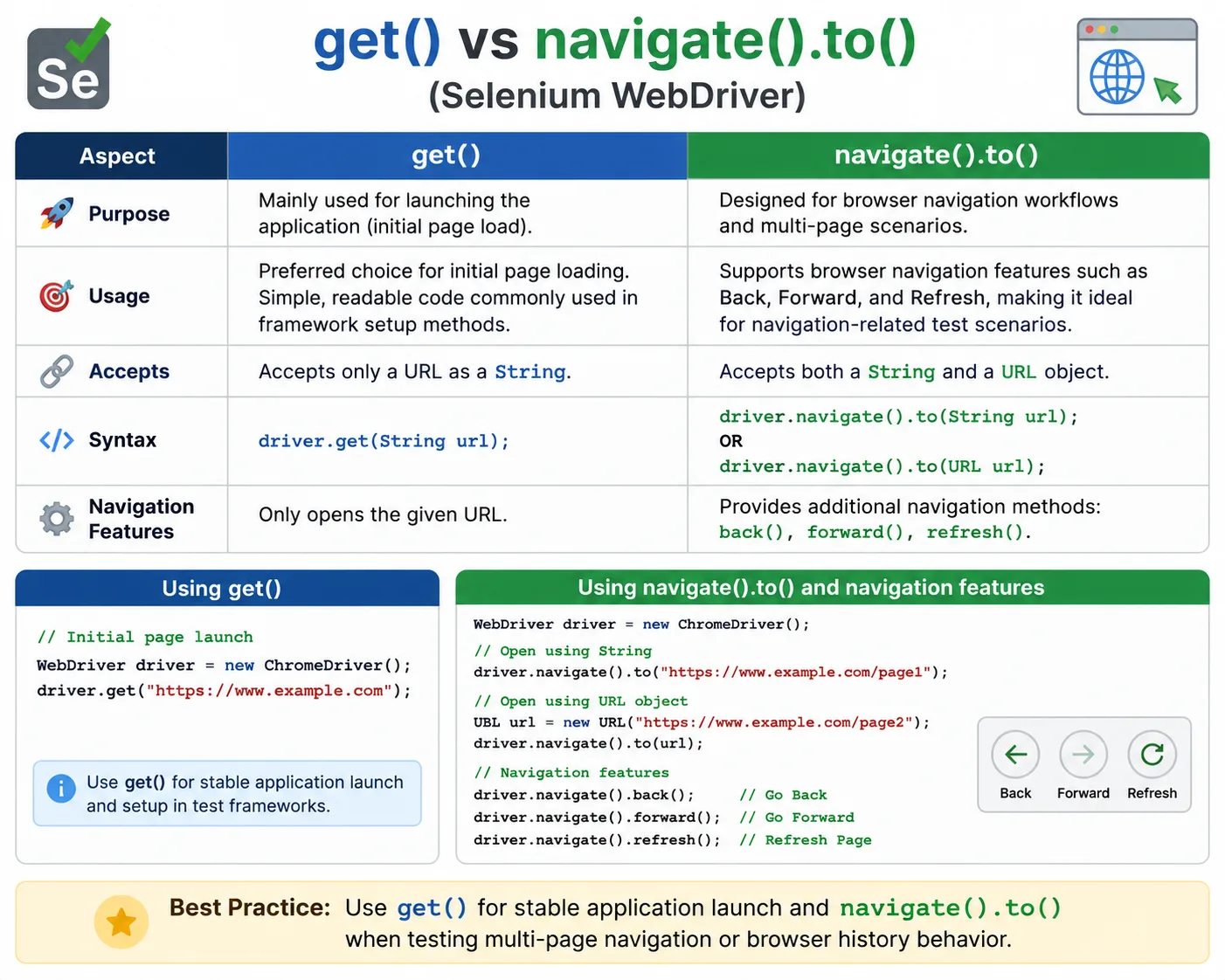
1. What get() Means in Selenium
The get() method is a core method of the WebDriver interface. Its purpose is
straightforward: load a new web page in the current browser window. When Selenium code calls
driver.get("https://example.com"), WebDriver instructs the browser to navigate to that
URL. For most test frameworks, this is the first navigation command after the browser is launched.
The browser opens the login page, home page, dashboard, or whichever base URL the test suite is
configured to use.
The strength of get() is its clarity. It reads like an instruction to open a page. That
makes it especially useful in setup methods, base test classes, smoke tests, and simple workflows
where the test does not care about browser history. In a TestNG framework, for example, a setup method
may launch the browser, maximize the window, apply timeouts, and call driver.get(baseUrl).
The test then starts from a known page. This pattern is common because it makes the initial condition
of each test easy to understand.
get() also works well when a test needs to jump directly to a page instead of modeling
every intermediate click. For example, after login is handled by an API or session helper, a test may
open a deep link directly using get(). This is not always a replacement for end-to-end
navigation, but it can make focused tests faster and more reliable. The key is that get()
communicates direct page loading rather than navigation history testing.
2. What navigate().to() Means in Selenium
navigate().to() is part of Selenium's navigation interface. The call begins with
driver.navigate(), which returns a navigation object, and then to() is used
to load a URL. The syntax is slightly longer, but it belongs to a broader group of navigation commands
that includes back(), forward(), and refresh(). That grouping is
the main reason navigate().to() is useful in tests that care about browser movement.
When a test uses navigate().to(), the code reads as part of a navigation flow. For
example, a test may open one page, move to another page, go back, go forward, and refresh. These are
actions users perform in real browsers, and Selenium exposes them through the navigation API. If a
web application relies on browser history, redirects, cached state, single-page application routing,
or refresh behavior, navigate() commands become more expressive than repeatedly calling
get().
Another practical difference is that navigate().to() can accept a java.net.URL
object in addition to a String URL. This is a small detail, but it often appears in interviews because
get() accepts a String, while navigate().to() has overloads that support both
String and URL forms. In normal framework code, String URLs are more common, but knowing this
difference shows that you understand the API rather than only memorizing syntax.
3. High-Level Difference
The simplest interview answer is this: get() is mainly used to open a URL directly, while
navigate().to() is used as part of browser navigation control. Both can open a URL, but
navigate().to() belongs to a richer navigation API that also supports back, forward, and
refresh. In most automation frameworks, get() is preferred for the initial application
launch, and navigate().to() is preferred when the scenario is specifically about
navigation behavior.
| Aspect | get() | navigate().to() |
|---|---|---|
| Primary intent | Open a URL directly | Navigate as part of browser movement |
| API location | Core WebDriver method | Navigation interface method |
| Common setup usage | Very common | Less common |
| Back and forward support | Not provided by get() itself | Part of the same navigation API |
| Refresh support | No direct refresh method | Supports navigate().refresh() |
| URL object support | String URL | String URL and URL object |
4. Page Load Behavior
Many beginners learn that get() waits for the page to load, while
navigate().to() may be described as navigation-oriented. In practice, both commands cause
browser navigation and are affected by WebDriver's page load strategy. The important testing lesson is
not to assume that either command automatically guarantees that every element you need is ready for
interaction. A browser page can finish its main load event while JavaScript continues to render
components, request data, update DOM nodes, or show loading indicators.
This is why stable Selenium tests should use explicit waits for application-specific readiness. After
driver.get() opens a login page, the test should wait for the username field, sign-in
button, or a page-specific marker. After driver.navigate().to() moves to a dashboard, the
test should wait for the dashboard header, menu, table, or API-driven content. The URL loading method
starts navigation; waits confirm that the page is actually ready for the next test action.
Page load behavior is especially important in modern web applications. Single-page applications may
update the URL without a full browser-level page reload. Some pages use client-side routing, lazy
loading, animations, skeleton screens, and asynchronous API calls. In those cases, the difference
between browser navigation complete and application ready becomes significant. Whether you use
get() or navigate().to(), the framework should not click elements blindly
immediately after navigation.
5. Browser History and Navigation Control
Browser history is the area where navigate() becomes clearly useful. A normal user can
move from one page to another, press the back button, press the forward button, and refresh the
current page. Selenium models these actions through driver.navigate().back(),
driver.navigate().forward(), and driver.navigate().refresh(). If the test
scenario is about validating this type of behavior, navigate().to() fits naturally with
the rest of the flow.
Suppose a user opens a product listing page, clicks a product details page, goes back to the listing,
and expects filters or scroll position to remain correct. This is a browser history scenario. Another
example is a user who logs in, lands on a dashboard, navigates to a profile page, refreshes, and
expects the session to remain active. These are not just URL loading examples. They test how the
application behaves during browser navigation. The navigate() API makes that intent
explicit.
Calling get() multiple times can still load multiple pages in the same browser session.
Cookies, local storage, and session state generally remain unless the test clears them or the
application changes them. However, get() itself does not express the idea of back,
forward, or refresh. It is best understood as direct navigation to a requested URL. When history
behavior is part of the requirement, use the navigation API and follow it with clear assertions.
6. Framework Design Perspective
In a well-designed Selenium framework, get() often appears in one or two central places:
the setup method, the base page opener, or a navigation helper that opens the application base URL.
This is intentional. The initial application launch should be consistent across tests. The framework
may read the base URL from a properties file, Maven profile, TestNG XML file, environment variable, or
CI secret. Then it calls driver.get(baseUrl) to place the browser at the starting point.
navigate().to() may appear in tests or page flows that specifically model browser
movement. For example, a test may use a navigation helper to open an external payment redirect page,
then return to the application. Another test may validate refresh behavior on a report page. A third
may verify that the browser back button returns a user from details to search results. These flows
are different from simply launching the app, so using navigate() makes the code more
descriptive.
The main framework rule is to choose based on intent, not habit. If every URL change is written with
navigate().to(), the code becomes unnecessarily verbose and may imply navigation testing
where none exists. If every URL change is written with get(), tests that are supposed to
validate history and refresh behavior may not communicate their purpose clearly. A good framework
uses the simple method for simple page loading and the navigation API for navigation scenarios.
7. Real-World Usage Recommendations
Use get() when the test is launching the application, opening a base URL, starting from a
known page, or jumping directly to a deep link as part of setup. These are direct page-loading
actions. They are common in smoke tests, regression tests, setup methods, and data-driven tests where
the starting URL is controlled by configuration. The code stays short and readable.
Use navigate().to() when the test is intentionally exercising browser navigation. This
includes back and forward scenarios, refresh scenarios, user-like movement between multiple URLs,
redirects, browser history validation, URL object usage, and workflows where the navigation chain
matters. In these cases, the longer syntax is worth it because it places the command inside the
navigation family of operations.
In real projects, both methods may appear in the same test suite. A login setup may use
get() to open the login page. Later in the same scenario, the test may use
navigate().to() to move to a profile URL and navigate().refresh() to verify
session persistence. There is nothing wrong with mixing them when each call has a clear reason. The
mistake is using one everywhere without understanding what the scenario needs.
8. Timing, Waits, and Stability
Selenium stability depends less on choosing get() versus navigate().to() and
more on waiting for the right condition after navigation. Beginners often expect a navigation method
to solve synchronization by itself. That expectation leads to flaky tests. A page may load quickly on
a local machine but slowly in CI. A button may be present in the DOM but disabled. A table may appear
before its data is populated. A route may change before the main panel finishes rendering.
The reliable pattern is: navigate, wait for a meaningful condition, then interact. For a login page,
wait for the username field or login button. For a dashboard, wait for a stable dashboard heading or
a loaded widget. For a details page, wait for the record identifier. For a refresh scenario, wait for
the old loading state to disappear and the refreshed content to be visible. This approach works
regardless of whether the navigation started with get() or navigate().to().
Explicit waits are especially important after navigate().back() and
navigate().forward(). Browsers may restore pages from cache, re-request content, or let a
single-page application handle routing. The test should not assume that the previous page is ready
immediately after the back command returns. It should wait for the expected URL, title, element, or
page-specific state.
9. Common Beginner Mistakes
One common mistake is using navigate().to() everywhere because it looks more advanced.
Advanced-looking code is not automatically better code. If the test only needs to open the
application, get() is cleaner. Another mistake is expecting get() itself to
provide back or forward behavior. Back and forward are available through navigate(), not
through get(). A third mistake is ignoring waits after navigation and blaming the URL
loading method when the real issue is asynchronous application behavior.
Another beginner mistake is confusing browser session with browser history. Both methods operate in the same WebDriver session. Navigating to another page does not automatically create a new browser, clear cookies, or reset local storage. If the test needs a clean state, it must explicitly clear cookies, clear storage, create a new session, or perform logout depending on the framework strategy. The navigation method does not replace session management.
A subtle mistake is using direct URL navigation to skip steps that the test is actually supposed to
validate. If a test is meant to verify that clicking a menu item opens a settings page, directly
calling get(settingsUrl) avoids the very behavior under test. Direct navigation is useful
for setup and focused tests, but user journey tests should exercise the relevant UI actions. Good test
design decides whether the navigation itself is part of the requirement.
10. Interview Perspective
A short interview answer is: both get() and navigate().to() open a URL, but
get() is a direct WebDriver method commonly used for initial page loading, while
navigate().to() belongs to the navigation API and is preferred when back, forward,
refresh, URL object usage, or browser navigation behavior is part of the scenario.
A stronger real-time answer adds context. In a Selenium framework, driver.get(baseUrl) is
normally used in setup to launch the application from a configured base URL. The navigation API is used
when the test needs to simulate real browser movement, such as moving from one page to another,
refreshing after login, or validating back and forward behavior. In both cases, explicit waits should
be used after navigation to verify that the application is ready.
Interviewers may also ask whether navigate().to() is faster than get(). The
practical answer is that speed is not the main distinction. Both trigger navigation. Performance
depends on browser, network, page load strategy, application behavior, caching, and waits. Choose the
method based on intent and API capability, not on an assumption that one is automatically faster.
11. Key Takeaway
The default choice for opening an application URL is usually get(). It is direct, simple,
and widely used in framework setup. The right choice for browser navigation scenarios is
navigate().to(), especially when the same flow uses back(),
forward(), or refresh(). Both are valid. The difference is the purpose of the
action and the readability of the test.
- Use
get()for initial page launch and direct URL loading. - Use
navigate().to()for browser navigation flows and history-based testing. - Use explicit waits after either method when the next step depends on application readiness.
- Choose the method based on test intent, not habit.
12. How This Applies to Modern Web Applications
The difference between URL loading and application readiness becomes even more important in modern
web applications. Many applications are no longer built as simple server-rendered pages where every
navigation produces a full document load. Single-page applications can update the browser URL,
replace sections of the page, fetch data in the background, and render views without a traditional
full page reload. In such applications, both get() and navigate().to() may
appear to complete while the application is still preparing the view that the test actually needs.
For example, a dashboard may load its HTML shell quickly, but the widgets may depend on several API
calls. A route may change from /login to /dashboard, but a spinner may remain
visible until user data is loaded. A table may be created in the DOM before its rows appear. In these
situations, the URL method is only the first part of the story. The test should wait for the
application's meaningful state, such as a dashboard heading, a completed loading indicator, a stable
URL, or a visible record count.
This is why experienced Selenium engineers do not describe get() as a complete
synchronization strategy. It starts navigation and participates in WebDriver's page load behavior, but
it does not understand business readiness. navigate().to() has the same practical
limitation. Selenium can know that the browser completed a navigation command, but only the test
design can decide what "ready" means for the current page. That decision should be encoded in page
objects, wait helpers, or assertion utilities.
13. Redirects, Authentication, and Session State
Real applications often redirect after navigation. A user may request a protected URL and be sent to a login page. After login, the application may redirect to the original target page. A logout flow may redirect from a dashboard to a public home page. A payment flow may move the browser from the application to a payment provider and then back to a confirmation page. In all of these scenarios, the method used to open the first URL is less important than verifying the final expected state.
If a test calls driver.get("https://app.com/admin") while no user is logged in, the
browser may end on /login. That does not mean get() failed. It means the
application redirected the browser according to its security rules. Similarly,
navigate().to() may trigger redirects, route guards, or authentication checks. The test
should assert the final URL or page content that matches the expected behavior. Navigation commands
request a URL; the application decides what response the user receives.
Session state also remains important. Both get() and navigate().to() operate
inside the active browser session. Cookies, local storage, session storage, cache, and authentication
state can influence the result. Opening the same URL in a logged-in session may show a dashboard,
while opening it in a clean session may show login. This is why setup and teardown strategy matter.
The navigation method does not guarantee a clean user state.
14. Page Load Strategy and Why It Matters
Selenium WebDriver supports page load strategy settings that influence how navigation commands wait.
A normal strategy generally waits for the document load event. An eager strategy may return after the
initial HTML document is loaded but before all subresources finish. A none strategy returns sooner and
leaves more responsibility to the test code. These settings can affect both get() and
navigate().to(), so page load behavior should not be explained only as a difference
between the two methods.
Most beginner frameworks use the default strategy, which is usually suitable for standard web tests. Advanced teams may adjust page load strategy when testing very slow pages, pages with long-running resources, or applications where explicit waits are more reliable than waiting for every browser load event. This should be done carefully. Returning too early can make tests faster, but it also makes the framework more dependent on strong explicit waits. Returning too late can slow execution, especially when third-party scripts delay the load event.
The practical takeaway is that navigation methods, page load strategy, and waits work together.
get() and navigate().to() initiate movement. Page load strategy influences
when WebDriver considers that movement complete. Explicit waits verify that the application state is
ready for the test. A stable framework treats these as separate layers instead of expecting one method
call to solve all timing problems.
15. Choosing the Method in Different Test Types
Smoke tests usually prefer get() because they often begin from a known application URL and
verify that core pages open successfully. Regression tests also use get() heavily for
setup because it keeps the starting point predictable. Data-driven tests may call get()
repeatedly with different URLs when validating public pages, product pages, documentation pages, or
route availability. In these cases, direct URL loading is not only acceptable; it is often the most
efficient design.
End-to-end user journey tests require more judgment. If the purpose is to validate a user path, the
test should navigate the way the user navigates, often through clicks and links rather than direct URL
loading. However, navigate().to() can still be useful inside such tests when browser-level
behavior is part of the scenario. For example, after the user opens a details page, the test may call
navigate().back() to verify that the search results page restores correctly.
Negative tests and security tests may use both methods. A test may call get() to open a
restricted page directly and verify that an unauthenticated user is redirected. Another test may use
navigate().to() to move through an authentication redirect chain. The correct choice
depends on what the test is trying to prove: direct access control, navigation behavior, session
persistence, redirect correctness, or page readiness.
16. Maintainability and Readability
Readability is a practical engineering concern. Automation suites grow over time, and tests are often
maintained by people who did not write the original code. A clear navigation method helps future
maintainers understand the purpose of a step. driver.get(baseUrl) clearly says, "open the
configured application URL." driver.navigate().back() clearly says, "use browser history
to return to the previous page." That clarity reduces unnecessary investigation when a test fails.
It is also helpful to wrap navigation in page or framework methods when the action has business
meaning. For example, a page object may expose openLoginPage(), which internally calls
driver.get(loginUrl). A browser utility may expose refreshCurrentPage(),
which internally calls driver.navigate().refresh() and then waits for a page-ready
condition. Wrappers should not hide intent; they should make repeated behavior consistent and easier
to read.
Avoid writing navigation code that looks clever but communicates poorly. Direct string concatenation
scattered through tests, hardcoded URLs in many classes, and inconsistent use of get()
and navigate().to() all create maintenance cost. Centralize base URLs, use meaningful
helper methods where appropriate, and keep browser history commands visible when the test is actually
validating history behavior.
17. Practical Decision Checklist
When deciding between get() and navigate().to(), ask what the test is trying
to express. If the answer is "open this page as a starting point," use get(). If the
answer is "move through browser navigation," use navigate().to() and the related
navigation commands. If the answer is "verify a user click opens the next page," use the UI action
instead of direct URL loading. If the answer is "verify direct access to a protected URL," direct
loading with get() may be the clearest approach.
Also consider what the assertion will verify. If the assertion is about page content after direct
opening, get() is usually enough. If the assertion is about back button behavior, refresh
behavior, restored state, or navigation history, then navigate() is the natural choice.
If the assertion is about whether a link works, click the link. Good Selenium design starts with the
user behavior or requirement, then chooses the API that best represents that behavior.
18. Basic Usage - get()
WebDriver driver = new ChromeDriver();
driver.get("https://example.com");
This is the simplest and most common way to open a URL in Selenium. In a real framework, the URL is
usually not hardcoded. It is read from configuration and then passed to get() during
setup or at the start of a focused test.
19. Basic Usage - navigate().to()
WebDriver driver = new ChromeDriver();
driver.navigate().to("https://example.com");
This also opens the URL, but the syntax places the action under the navigation API. Use this form when the test flow is about navigation or when the next steps involve back, forward, or refresh commands.
20. navigate().to() with URL Object
import java.net.URL;

URL url = new URL("https://example.com");
driver.navigate().to(url);
navigate().to() can accept a URL object. get() does not accept a URL object
directly. This is a common interview detail and a useful API distinction to remember.
21. Page Navigation Flow
driver.get("https://google.com");
driver.navigate().to("https://example.com");
driver.navigate().back();
driver.navigate().forward();
driver.navigate().refresh();
This example shows where navigate() is most expressive. The test opens a page, moves to
another page, then controls browser history and refresh behavior. Assertions should be added after
each navigation command to verify the expected URL, title, or page content.
22. Using get() Only
driver.get("https://site1.com");
driver.get("https://site2.com");
Calling get() multiple times loads different URLs in the same browser session. This is
valid when the test needs direct page loading. It does not express browser back or forward behavior,
so it should not be used as a substitute for history validation.
23. Using navigate() for Real Browser Simulation
driver.navigate().to("https://site1.com");
driver.navigate().to("https://site2.com");
driver.navigate().back();
This flow better represents a user moving between pages and pressing the browser back button. It is useful for scenarios involving saved filters, route changes, cached pages, and browser history.
24. Refresh Page with navigate()
driver.navigate().refresh();
Selenium does not provide a get().refresh() style command. Refresh belongs to the
navigation API. After refreshing, wait for the page or component to reach a stable state before
continuing with assertions.
25. Framework Usage Example
// Preferred for initial launch
driver.get(baseUrl);

// Preferred when navigation behavior matters
driver.navigate().to(nextPageUrl);
driver.navigate().back();
driver.navigate().refresh();
This pattern keeps framework intent clear. The base URL is opened directly, while navigation commands are used for flows that need browser movement or refresh behavior.
26. Timing Behavior Example
driver.get("https://slow-site.com");
// wait for page-specific element

driver.navigate().to("https://slow-site.com");
// wait for page-specific element
The important lesson is not that one command is always faster. The important lesson is that both commands should be followed by meaningful waits when the page renders asynchronously.
27. Mixing Both Methods
driver.get("https://home.com");
driver.navigate().to("https://profile.com");
driver.navigate().back();
Mixing both methods is valid when each command has a clear purpose. Here, get() opens the
starting page, and navigate() is used for a browser navigation flow.
28. Interview Trap
driver.get(new URL("https://example.com")); // compile errorCorrect
driver.navigate().to(new URL("https://example.com"));
This is a useful interview distinction. get() expects a String, while
navigate().to() can work with a URL object.
29. WebDriver Interface Hierarchy Context
WebDriver
  Navigation navigate()
get() is a direct WebDriver method. navigate() exposes a navigation helper
object that provides URL navigation, back, forward, and refresh commands.
30. Real-World Login Flow Example
driver.get("https://app.com/login");
// login steps
driver.navigate().to("https://app.com/dashboard");
driver.navigate().refresh();
This example uses get() for the initial login page and navigate() for later
movement and refresh behavior. A real test should add waits and assertions after each meaningful
navigation step.
31. Final Interview Summary - get() vs navigate().to()
driver.get("url");
driver.navigate().to("url");| Aspect | get() | navigate().to() |
|---|---|---|
| Loads URL | Yes | Yes |
| Accepts URL object | No | Yes |
| Back and forward | No direct support | Supported through navigate() |
| Refresh | No direct method | Supported through navigate().refresh() |
| Best use | Initial application launch | Navigation-heavy scenarios |