Fluent Wait
Fluent Wait is an advanced form of explicit wait that provides fine-grained control over timeout duration, polling frequency, and exception handling. It is designed for highly dynamic or unstable UI behavior where standard waits are insufficient.
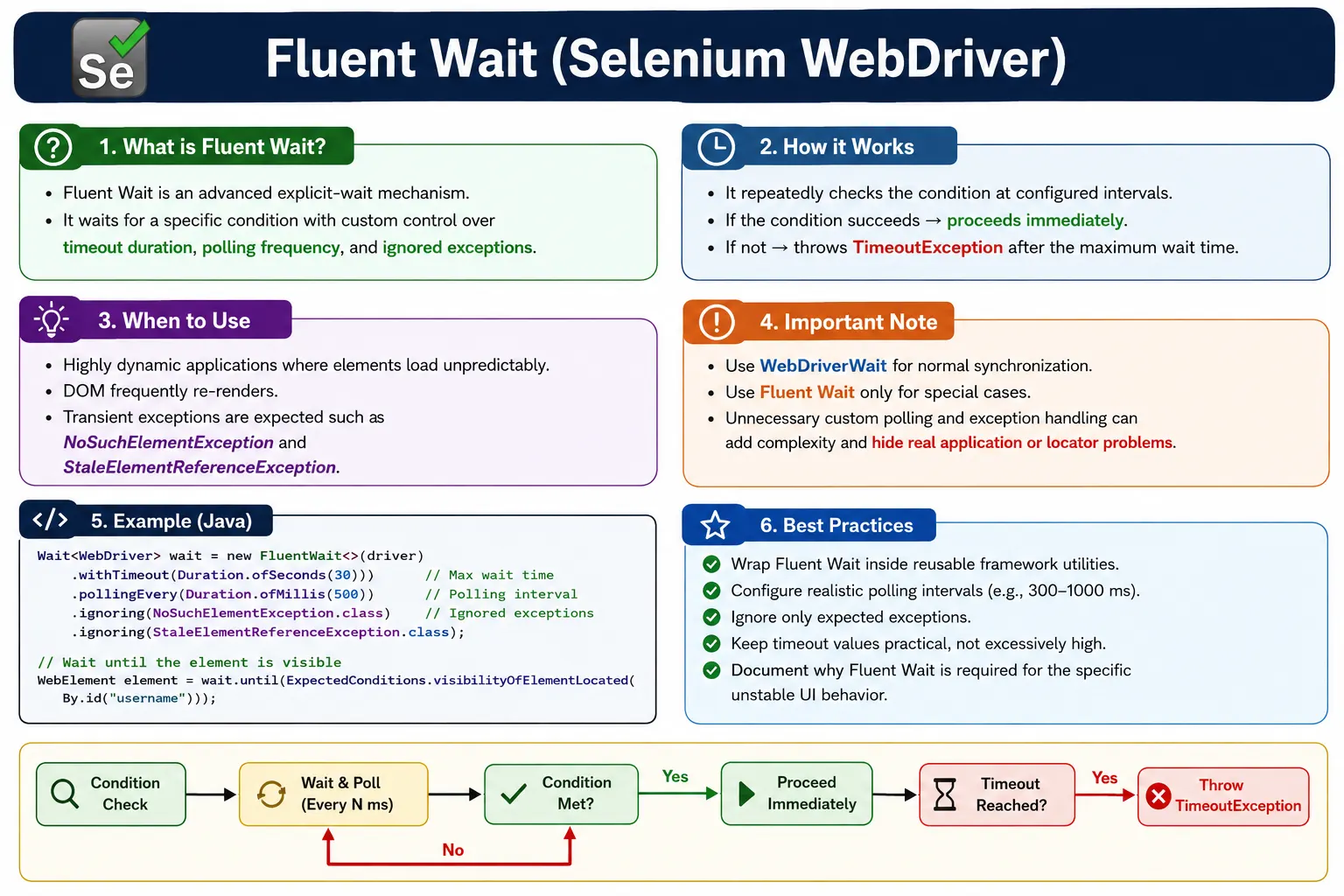
Understanding Fluent Wait in Selenium
Fluent Wait is an advanced synchronization mechanism in Selenium WebDriver that gives automation engineers detailed control over how waiting should happen. Like other explicit waits, it waits for a condition before allowing the test to continue. What makes Fluent Wait different is the amount of control it provides. It lets you decide the total timeout, how often Selenium should poll the browser, which exceptions should be ignored during polling, and what custom condition should determine success. This makes it useful for difficult timing problems where normal WebDriverWait usage is not precise enough.
Fluent Wait should not be treated as the default answer to every Selenium synchronization issue. Most test automation scenarios are handled well by WebDriverWait with ExpectedConditions. Fluent Wait becomes valuable when the application behaves unpredictably, the DOM refreshes frequently, elements appear and disappear during polling, or a condition needs retry behavior that is specific to the page. It is a precision tool. Used well, it can stabilize difficult tests. Used carelessly, it can make a framework complicated and hide real problems.
The best way to understand Fluent Wait is to see it as explicit wait with full configuration. A normal explicit wait says, "wait until this condition is true." Fluent Wait says, "wait until this condition is true, check at this interval, tolerate these temporary exceptions, and give up after this timeout." That extra control is the reason Fluent Wait is powerful, but it is also the reason it should be used intentionally.
Why Fluent Wait Exists
Standard Waits Are Not Always Enough
Standard explicit waits solve most Selenium timing problems. They can wait for visibility, clickability, presence, invisibility, text, alerts, frames, windows, URLs, and titles. However, some applications have timing behavior that is less predictable. A live dashboard may refresh data every few seconds. A table may re-render while Selenium is trying to locate a row. A search page may show intermediate states while the final results are still being calculated. In these situations, a normal condition may fail because temporary exceptions occur during the transition.
Fluent Wait exists for these advanced cases. It allows the framework to keep polling even when certain exceptions are expected. For example, if a React component is re-rendering, a stale element exception may be a temporary condition rather than a real failure. If an element is injected after an AJAX response, a no such element exception may be expected during the first few polling attempts. Fluent Wait lets the test ignore those expected transient failures until the timeout expires.
Dynamic Applications Need State-Aware Retrying
Modern applications often change state in small steps. A user clicks a filter, the old results disappear, a loader appears, the API responds, the component renders, and then the new results become visible. During that process, the same locator may temporarily match nothing, match stale elements, or match elements that are not yet ready. A fixed sleep guesses how long the process will take. Fluent Wait checks repeatedly for the state the test actually needs.
This retry behavior is especially useful when the condition is custom. Instead of waiting for a single element, the framework may wait until a product list contains at least one item, a status becomes Completed, a chart finishes rendering, a row count increases, or a document ready check returns complete. Fluent Wait gives the framework a clean way to express those conditions while controlling how polling and exception handling work.
Core Parts of Fluent Wait
Timeout Duration
The timeout duration is the maximum time Fluent Wait will spend trying to satisfy the condition. If the condition succeeds before the timeout, the test continues immediately. If the condition never succeeds, Fluent Wait throws TimeoutException. The timeout should be chosen based on the expected behavior of the application, not randomly. A simple button should not need a long timeout. A report generation page or external payment flow may legitimately need more time.
Clear timeout categories help keep frameworks maintainable. A team may define short, normal, and long wait values. Fluent Wait should usually use a timeout that is specific to the problem being solved. If a page uses Fluent Wait because a dashboard refreshes unpredictably, the timeout should reflect how long that dashboard normally takes to stabilize. Large timeouts everywhere make failures slow and hide performance problems.
Polling Interval
The polling interval controls how often Fluent Wait checks the condition. A shorter interval checks more frequently and may continue sooner when the condition appears. A longer interval checks less often and may be easier on the browser and application. Choosing the polling interval is a tradeoff. Polling every few milliseconds is usually unnecessary and can create overhead. Polling too slowly can make tests feel sluggish.
In most real projects, a polling interval of a few hundred milliseconds is enough for UI conditions. For slower backend-driven operations, polling every one second may be acceptable. The goal is not to poll as fast as possible. The goal is to check at a reasonable rhythm that matches the behavior being observed. Fluent Wait gives you that control when the default polling behavior is not ideal.
Ignored Exceptions
Ignored exceptions are one of the main reasons teams use Fluent Wait. During polling, Selenium may encounter exceptions that are expected while the UI is changing. NoSuchElementException can occur before an element is added to the DOM. StaleElementReferenceException can occur when a component re-renders. NoSuchFrameException can occur before a dynamic frame becomes available. Fluent Wait can ignore selected exceptions during polling and continue checking until the timeout.
Ignoring exceptions must be done carefully. Ignoring too many exceptions can hide real automation or product issues. For example, ignoring every WebDriver exception may make the wait retry through serious browser problems that should fail quickly. A good Fluent Wait ignores only the exceptions that are expected for that specific condition. The ignored exception list should explain the behavior of the page, not act as a blanket safety net.
Custom Condition Logic
Fluent Wait often uses custom condition logic written as a lambda or function. This is where the framework defines the state it is waiting for. The condition might return a WebElement, a Boolean, a list, or another meaningful object. If the condition returns a successful value, Fluent Wait stops. If it returns false or null, polling continues until the timeout.
Custom condition logic should be readable and focused. A condition that checks many unrelated things can become hard to debug. It is better to create helper methods with names that describe the application state, such as waitForResultsToLoad, waitForCartCountToIncrease, waitForChartToRender, or waitForButtonToBecomeEnabled. Fluent Wait is most useful when the custom condition clearly describes the business or UI state that matters.
How Fluent Wait Works Step by Step
The Waiting Cycle
Fluent Wait starts by recording the timeout and configuration. It then evaluates the condition. If the condition succeeds, it returns immediately. If the condition fails by returning false or null, Fluent Wait waits for the polling interval and tries again. If the condition throws an exception that has been configured as ignored, Fluent Wait treats that exception as a temporary failure and continues polling. If the condition throws an exception that is not ignored, the wait may fail immediately.
This cycle continues until the condition succeeds or the timeout expires. The important point is that Fluent Wait is not simply sleeping. It is actively checking the application at controlled intervals. This makes it efficient when the condition appears quickly and resilient when the condition takes longer because of dynamic UI behavior.
Successful and Failed Waits
A successful Fluent Wait returns the value produced by the condition. If the condition returns a WebElement, the calling code can interact with that element. If the condition returns true, the calling code can continue with the next step. If the condition returns a list, the framework can use that list for validation or interaction. The return value should be chosen based on what the caller needs next.
A failed Fluent Wait throws TimeoutException. The timeout should not be viewed only as a technical failure. It means the expected state did not appear within the allowed time. The reason may be a locator problem, a synchronization problem, an environment problem, or a real product defect. Good frameworks add useful messages, screenshots, and logs so the timeout points to the condition that did not become true.
When to Use Fluent Wait
Frequently Re-Rendering Components
Fluent Wait is useful when the page frequently replaces DOM elements. React, Angular, Vue, and other front-end frameworks may re-render components after state changes. Selenium may locate an element, but before it can interact with it, the component is replaced and the old reference becomes stale. A Fluent Wait that ignores StaleElementReferenceException and relocates the element during polling can handle this transition more gracefully.
This does not mean every stale element should be ignored automatically. Stale exceptions can also indicate weak test design, storing elements too early, or interacting at the wrong time. Fluent Wait is appropriate when the re-render is part of the expected behavior and the framework waits for the final stable state.
Unpredictable Loading Patterns
Some pages load data unpredictably because they depend on backend services, third-party systems, large datasets, or background processing. Examples include dashboards, analytics screens, report pages, product searches, file processing, and workflow queues. The page may show intermediate content before the final state is available. Fluent Wait can poll for a more specific condition, such as the final row count, a status label, or a completed progress indicator.
In these cases, Fluent Wait should wait for the state that matters to the user. Waiting only for document ready may not be enough. Waiting only for a container to be visible may not be enough. A better condition waits until the container has the expected data or the loading state has finished. This makes the automation reflect the actual workflow.
Transient Exceptions During Polling
Fluent Wait is also useful when temporary exceptions are normal during a transition. For example, a dynamic dropdown may not exist until a search term is typed. A modal may be removed and recreated after validation. A frame may not be available until an external widget finishes loading. During the wait, Selenium may briefly throw exceptions that should not fail the test immediately. Fluent Wait allows those exceptions to be ignored while the condition is still within the timeout window.
The ignored exceptions should be specific. If the problem is that the element is not initially present, ignore NoSuchElementException. If the problem is a re-render, ignore StaleElementReferenceException. If the problem is a frame that appears later, ignore NoSuchFrameException. Avoid broad exception ignoring because it can hide real browser, locator, or framework defects.
Fluent Wait vs WebDriverWait
Use WebDriverWait First
WebDriverWait should remain the standard synchronization tool for most Selenium tests. It is simpler, familiar, readable, and works well with ExpectedConditions. If a button must be clickable, WebDriverWait with elementToBeClickable is usually enough. If a spinner must disappear, WebDriverWait with invisibilityOfElementLocated is usually enough. Introducing Fluent Wait for every interaction makes the framework more complex without providing real benefit.
A good rule is to start simple and escalate only when evidence shows that more control is needed. If a standard wait fails because of transient stale elements, unusual polling needs, or application-specific state checks, Fluent Wait may be appropriate. If the standard wait fails because the locator is wrong, the element is blocked, or the application is not behaving correctly, Fluent Wait is not the right fix.
Fluent Wait Provides More Control
The main difference is configurability. Fluent Wait allows custom polling intervals and ignored exceptions. WebDriverWait is itself a specialized wait built for WebDriver, and in modern Selenium versions it is closely related to Fluent Wait behavior. For interview and practical purposes, WebDriverWait is the everyday explicit wait, while Fluent Wait is used when the framework needs lower-level control over polling and exception handling.
This distinction matters because overengineering waits can make tests harder to maintain. Fluent Wait code is usually longer than a simple WebDriverWait condition. It should earn its place by solving a real problem. When it does, it can make difficult dynamic screens stable. When it does not, it adds noise.
What Fluent Wait Is Not
It Is Not a Fix for Bad Locators
Fluent Wait cannot make an unstable locator reliable. If a locator depends on fragile layout position, generated class names, changing text, or the wrong element hierarchy, polling more often will not solve the root problem. It may only make the test retry a weak locator until timeout. Good locators are still required. Fluent Wait should work with stable locators, not compensate for poor ones.
Before using Fluent Wait, inspect the locator in browser DevTools. Confirm that it uniquely identifies the intended element and remains stable after the UI updates. If the locator is wrong, fix that first. Fluent Wait should be reserved for real timing instability after the locator strategy is sound.
It Is Not a Replacement for Understanding the UI
Fluent Wait is most effective when the automation engineer understands the page lifecycle. You need to know what signal represents readiness. Does the loader disappear? Does a table row appear? Does a button become enabled? Does an attribute change? Does a status move from Processing to Complete? Without that understanding, Fluent Wait becomes guesswork.
A strong Selenium framework waits for meaningful states. Fluent Wait gives you the flexibility to express those states, but it does not choose them for you. The tester must still analyze the application and decide what the test should wait for.
Common Mistakes with Fluent Wait
Overusing Fluent Wait Everywhere
One common mistake is replacing all explicit waits with Fluent Wait. This makes test code longer and harder to read without improving stability. Most actions only need standard ExpectedConditions. Fluent Wait should be used selectively for specific edge cases. If every element requires Fluent Wait, the framework probably has a larger design issue, such as weak locators, poor page objects, missing readiness methods, or unstable test data.
Selective use also makes maintenance easier. When Fluent Wait appears in code, it should signal that the page has a special timing behavior. If it appears everywhere, that signal is lost. Teams should document where and why Fluent Wait is used.
Polling Too Frequently
Very small polling intervals can create unnecessary overhead. Polling every few milliseconds may look like a way to make tests faster, but it can put pressure on the browser, driver, and application. Most UI changes do not require such aggressive polling. A reasonable interval, such as a few hundred milliseconds, is usually enough. For slower operations, one second may be appropriate.
Polling should match the nature of the condition. A button becoming enabled after client-side validation can be checked more frequently than a report generation process that depends on backend processing. Fluent Wait gives control, but good engineering means using that control thoughtfully.
Ignoring Too Many Exceptions
Another serious mistake is ignoring broad exception types. If a wait ignores too many exceptions, it may hide actual framework failures. For example, a driver session problem, invalid selector, or unexpected browser error should not be silently retried until timeout. Ignored exceptions should be limited to temporary states that are expected during the wait.
A clean Fluent Wait configuration explains itself. If NoSuchElementException is ignored, it should be because the element is expected to appear later. If StaleElementReferenceException is ignored, it should be because the DOM is expected to re-render. If the reason is not clear, the wait may be hiding the wrong problem.
Fluent Wait in Page Object Model
Keep It Behind Page Methods
Fluent Wait should usually be hidden inside page objects or utility classes. Test cases should not contain long wait configuration blocks. A test should describe the user action, while the page object handles the timing needed for that action. For example, a method named waitForLiveDashboardToStabilize can contain the Fluent Wait logic needed for a dashboard that refreshes asynchronously.
This keeps tests readable and prevents duplication. If the dashboard behavior changes, the Fluent Wait logic is updated in one place. If the polling interval or ignored exception list needs adjustment, the framework can change it centrally. Page Object Model is not only about storing locators; it is also about hiding page-specific synchronization rules.
Document Why Fluent Wait Is Used
Because Fluent Wait is more advanced than standard waits, it should be documented when used for unusual behavior. A short comment or method name can explain the reason. For example, a method can indicate that a table re-renders during refresh, or that an external widget creates a frame after a delay. This helps future maintainers understand that the Fluent Wait is intentional rather than accidental complexity.
Documentation is especially useful in teams where multiple testers contribute to the framework. Without clear guidance, people may copy Fluent Wait patterns into unrelated pages. With clear guidance, Fluent Wait remains a controlled solution for known problem areas.
Debugging Fluent Wait Failures
Read the Final Timeout Carefully
When Fluent Wait fails, the final timeout tells you that the custom condition was never satisfied. The next step is to understand why. Did the locator ever match? Did the element appear but remain hidden? Did the page keep refreshing? Was the ignored exception expected or masking a real issue? Was the timeout too short for the operation? The answer depends on the condition and page behavior.
Good logging makes this process easier. A framework should log the condition name, locator, timeout, polling interval, ignored exceptions, current URL, and screenshot. If the wait is for a list size to increase, log the final observed count. If the wait is for an attribute to change, log the final attribute value. These details turn a complex wait failure into a clear investigation path.
Separate Timing Problems from Product Problems
Fluent Wait can reveal real product issues. If a loading indicator never disappears, the application may be stuck. If a dashboard never reaches the expected row count, data may not have loaded. If a button never becomes enabled, validation may have failed or the application may have a bug. Do not assume every wait timeout is an automation problem. Sometimes the wait is correctly reporting that the product did not reach the expected state.
The best automation engineers use waits as diagnostic tools. They design waits around meaningful states and read failures as evidence. Fluent Wait is especially useful here because it can express advanced states, but the same discipline applies: the condition must be meaningful, and the failure message must be useful.
Interview Perspective on Fluent Wait
Short Interview Answer
Fluent Wait is an advanced explicit wait in Selenium that lets you configure timeout, polling frequency, and exceptions to ignore while waiting for a condition.
Detailed Interview Answer
In Selenium WebDriver, Fluent Wait provides fine-grained control over synchronization. It repeatedly evaluates a condition until the condition is satisfied or the timeout expires. Unlike basic wait usage, Fluent Wait allows custom polling intervals and ignored exceptions such as NoSuchElementException or StaleElementReferenceException. It is useful for dynamic pages where elements appear unpredictably, DOM nodes re-render, or transient exceptions are expected during polling.
Real Project Explanation
In a real project, I would use Fluent Wait only for specific unstable or highly dynamic areas, such as auto-refreshing dashboards, dynamically rendered tables, delayed frames, or components that frequently re-render. I would wrap it in a page object or wait utility, document why it is needed, and avoid using it as the default wait for every element. For normal visibility and clickability checks, I would still use WebDriverWait with ExpectedConditions.
The key takeaway is that Fluent Wait gives Selenium maximum control over advanced synchronization. It lets you tune timeout, polling, ignored exceptions, and custom conditions. That power should be used carefully. Start with simple explicit waits, use strong locators, understand the page behavior, and apply Fluent Wait only when standard waiting tools do not express the required timing behavior clearly enough.
Practical Rule for Daily Use
A useful daily rule is simple: choose the least complex wait that accurately describes the required state. If an ExpectedCondition clearly solves the problem, use it. If the page has a repeated re-render, transient exception, or custom readiness signal that standard waits cannot express well, then use Fluent Wait. This keeps the framework stable without making ordinary actions harder to read and maintain.
In Selenium, Fluent Wait is used selectively for edge cases, not as a default.
1. What Is Fluent Wait
Definition:
Fluent Wait is a configurable wait mechanism that:
- Waits for a specific condition
- Polls the DOM at custom intervals
- Ignores specified exceptions during polling
- Fails only after the timeout expires
Think of it as: Explicit wait with full control.
2. Why Fluent Wait Exists
Standard explicit waits:
- Poll at a default interval
- Stop on certain exceptions
- Offer limited tuning
Fluent Wait is needed when:
- Elements appear/disappear unpredictably
- DOM refreshes frequently
- Transient exceptions are expected
- You want tighter performance control
3. Key Components of Fluent Wait
Fluent Wait allows you to configure:
- Maximum timeout
- Polling interval (how often Selenium checks)
- Ignored exceptions
- Custom condition logic
This flexibility makes it powerful-but also easy to misuse.
4. How Fluent Wait Works (Conceptual Flow)
- Start waiting
- Poll the DOM at the configured interval
- If condition fails means retry
- If ignored exception occurs means continue polling
- If condition succeeds means proceed immediately
- If timeout expires means throw TimeoutException
5. When to Use Fluent Wait (Real Scenarios)
Use Fluent Wait when:
- Elements load inconsistently
- UI re-renders cause StaleElementReferenceException
- AJAX responses are highly variable
- You need to retry after transient failures
Examples:
- Live dashboards
- Auto-refreshing tables
- Progressive loading UIs
- Intermittent overlays
6. Fluent Wait vs WebDriverWait
| Aspect | WebDriverWait | Fluent Wait |
|---|---|---|
| Configuration | Limited | Full control |
| Polling interval | Default | Custom |
| Exception handling | Limited | Configurable |
| Complexity | Low | High |
| Usage frequency | High | Low |
Rule: Use WebDriverWait first. Escalate to Fluent Wait only if required.
7. What Fluent Wait Is NOT
- Not a replacement for all explicit waits
- Not a fix for bad locators
- Not meant for every element
- Not a shortcut to avoid understanding UI behavior
Fluent Wait solves timing instability, not design problems.
8. Common Pitfalls
- Overusing Fluent Wait everywhere
- Setting very small polling intervals (performance hit)
- Ignoring too many exceptions (masks real issues)
- Using Fluent Wait instead of fixing locators
- Adding unnecessary complexity to the framework
9. Fluent Wait in Framework Design
Best practices:
- Wrap Fluent Wait in utility methods
- Use only for specific problem areas
- Document why it's used
- Keep default waits simple
Enterprise frameworks often restrict Fluent Wait usage via coding standards.
10. Interview Perspective
Short Answer:
Fluent Wait is an advanced explicit wait that allows configuring timeout, polling frequency, and ignored exceptions.
Real-Time Answer:
In Selenium, Fluent Wait provides more control than WebDriverWait by allowing custom polling intervals and exception handling. It is used in scenarios where elements behave unpredictably and standard waits are not sufficient.
11. Key Takeaway
- Fluent Wait = maximum control
- Use for unstable or unpredictable UI behavior
- Not a default wait strategy
- Simplicity first, complexity only when needed
Fluent Wait is a precision instrument-use it only when standard tools fall short.
12. Fluent Wait Practical Examples
Below are ready-to-use Fluent Wait snippets for common real-time automation scenarios.
Valid: 1. Wait for Element Presence
Wait<WebDriver> wait = new FluentWait<>(driver)
        .withTimeout(Duration.ofSeconds(10))
        .pollingEvery(Duration.ofMillis(500))
        .ignoring(NoSuchElementException.class);

WebElement element = wait.until(d -> d.findElement(By.id("username")));
element.sendKeys("admin");
Valid: 2. Wait for Element Visibility
Wait<WebDriver> wait = new FluentWait<>(driver)
        .withTimeout(Duration.ofSeconds(15))
        .pollingEvery(Duration.ofMillis(300))
        .ignoring(NoSuchElementException.class);

WebElement element = wait.until(d -> {
    WebElement el = d.findElement(By.id("loginBtn"));
    return el.isDisplayed() ? el : null;
});
element.click();
Valid: 3. Wait for Clickable Element
Wait<WebDriver> wait = new FluentWait<>(driver)
        .withTimeout(Duration.ofSeconds(10))
        .pollingEvery(Duration.ofMillis(400))
        .ignoring(NoSuchElementException.class);

WebElement btn = wait.until(d -> {
    WebElement el = d.findElement(By.id("submit"));
    return el.isEnabled() ? el : null;
});
btn.click();
Valid: 4. Ignore StaleElementReferenceException
Wait<WebDriver> wait = new FluentWait<>(driver)
        .withTimeout(Duration.ofSeconds(15))
        .pollingEvery(Duration.ofMillis(500))
        .ignoring(StaleElementReferenceException.class);

WebElement el = wait.until(d -> d.findElement(By.id("profile")));
Valid: 5. Wait for Text Change
Wait<WebDriver> wait = new FluentWait<>(driver)
        .withTimeout(Duration.ofSeconds(10))
        .pollingEvery(Duration.ofMillis(500));

wait.until(d -> d.findElement(By.id("status"))
        .getText().equals("Completed"));
Valid: 6. Wait for Attribute Change
Wait<WebDriver> wait = new FluentWait<>(driver)
        .withTimeout(Duration.ofSeconds(10))
        .pollingEvery(Duration.ofMillis(300));

wait.until(d -> d.findElement(By.id("saveBtn"))
        .getAttribute("class").contains("active"));
Valid: 7. Wait for Element Count > 0
Wait<WebDriver> wait = new FluentWait<>(driver)
        .withTimeout(Duration.ofSeconds(10))
        .pollingEvery(Duration.ofMillis(500));

wait.until(d -> d.findElements(By.className("product")).size() > 0);
Valid: 8. Wait for List Size Increase
int initial = driver.findElements(By.className("item")).size();

Wait<WebDriver> wait = new FluentWait<>(driver)
        .withTimeout(Duration.ofSeconds(15))
        .pollingEvery(Duration.ofMillis(500));

wait.until(d -> d.findElements(By.className("item")).size() > initial);
Valid: 9. Wait for URL Change
Wait<WebDriver> wait = new FluentWait<>(driver)
        .withTimeout(Duration.ofSeconds(10))
        .pollingEvery(Duration.ofMillis(500));

wait.until(d -> d.getCurrentUrl().contains("dashboard"));
Valid: 10. Wait for Title Change
Wait<WebDriver> wait = new FluentWait<>(driver)
        .withTimeout(Duration.ofSeconds(10))
        .pollingEvery(Duration.ofMillis(400));

wait.until(d -> d.getTitle().equals("Home Page"));
Valid: 11. Wait for Frame Availability
Wait<WebDriver> wait = new FluentWait<>(driver)
        .withTimeout(Duration.ofSeconds(15))
        .pollingEvery(Duration.ofMillis(500));

wait.until(d -> {
    try {
        d.switchTo().frame("paymentFrame");
        return true;
    } catch (NoSuchFrameException e) {
        return false;
    }
});
Valid: 12. Wait for Alert
Wait<WebDriver> wait = new FluentWait<>(driver)
        .withTimeout(Duration.ofSeconds(10))
        .pollingEvery(Duration.ofMillis(500));

wait.until(d -> {
    try {
        d.switchTo().alert();
        return true;
    } catch (NoAlertPresentException e) {
        return false;
    }
});
Valid: 13. Wait for Window Count
Wait<WebDriver> wait = new FluentWait<>(driver)
        .withTimeout(Duration.ofSeconds(10))
        .pollingEvery(Duration.ofMillis(500));

wait.until(d -> d.getWindowHandles().size() == 2);
Valid: 14. Wait for Element to Disappear
Wait<WebDriver> wait = new FluentWait<>(driver)
        .withTimeout(Duration.ofSeconds(10))
        .pollingEvery(Duration.ofMillis(500));

wait.until(d -> d.findElements(By.id("loader")).isEmpty());
Valid: 15. Wait for Document Ready
Wait<WebDriver> wait = new FluentWait<>(driver)
        .withTimeout(Duration.ofSeconds(10))
        .pollingEvery(Duration.ofMillis(300));

wait.until(d -> ((JavascriptExecutor)d)
        .executeScript("return document.readyState")
        .equals("complete"));
Valid: 16. Wait for jQuery Ajax Complete
Wait<WebDriver> wait = new FluentWait<>(driver)
        .withTimeout(Duration.ofSeconds(15))
        .pollingEvery(Duration.ofMillis(500));

wait.until(d -> (Boolean)((JavascriptExecutor)d)
        .executeScript("return window.jQuery != null && jQuery.active == 0"));
Valid: 17. Wait for Enabled Button
Wait<WebDriver> wait = new FluentWait<>(driver)
        .withTimeout(Duration.ofSeconds(12))
        .pollingEvery(Duration.ofMillis(400));

wait.until(d -> d.findElement(By.id("checkoutBtn")).isEnabled());
Valid: 18. Wait with Multiple Exceptions Ignored
Wait<WebDriver> wait = new FluentWait<>(driver)
        .withTimeout(Duration.ofSeconds(15))
        .pollingEvery(Duration.ofMillis(300))
        .ignoring(NoSuchElementException.class)
        .ignoring(StaleElementReferenceException.class);

WebElement el = wait.until(d -> d.findElement(By.id("confirm")));
Valid: 19. Custom Polling 1 Second
Wait<WebDriver> wait = new FluentWait<>(driver)
        .withTimeout(Duration.ofSeconds(20))
        .pollingEvery(Duration.ofSeconds(1));

wait.until(d -> d.findElement(By.id("result")).isDisplayed());
Valid: 20. Framework Utility Method Using FluentWait
public WebElement fluentWait(By locator, int timeout) {
    Wait<WebDriver> wait = new FluentWait<>(driver)
            .withTimeout(Duration.ofSeconds(timeout))
            .pollingEvery(Duration.ofMillis(500))
            .ignoring(NoSuchElementException.class);

    return wait.until(d -> d.findElement(locator));
}
Usage:
fluentWait(By.id("loginBtn"), 10).click();🚀 Why FluentWait?
- ✔ Custom polling interval
- ✔ Ignore specific exceptions
- ✔ Best for dynamic SPA apps (React/Angular)
- ✔ Better control than Explicit Wait