Extent Reports in Selenium (In Depth)
Extent Reports is one of the most widely used reporting libraries in Selenium automation frameworks. It converts raw test execution information into a readable, interactive, and professional HTML report. A Selenium test run may produce hundreds or thousands of pass, fail, and skip results, but those results are useful only when the team can understand them quickly. Extent Reports solves that problem by presenting execution status, logs, screenshots, exception details, categories, authors, devices, system information, and timing data in a report that is much easier to review than a plain console log or a basic TestNG output.
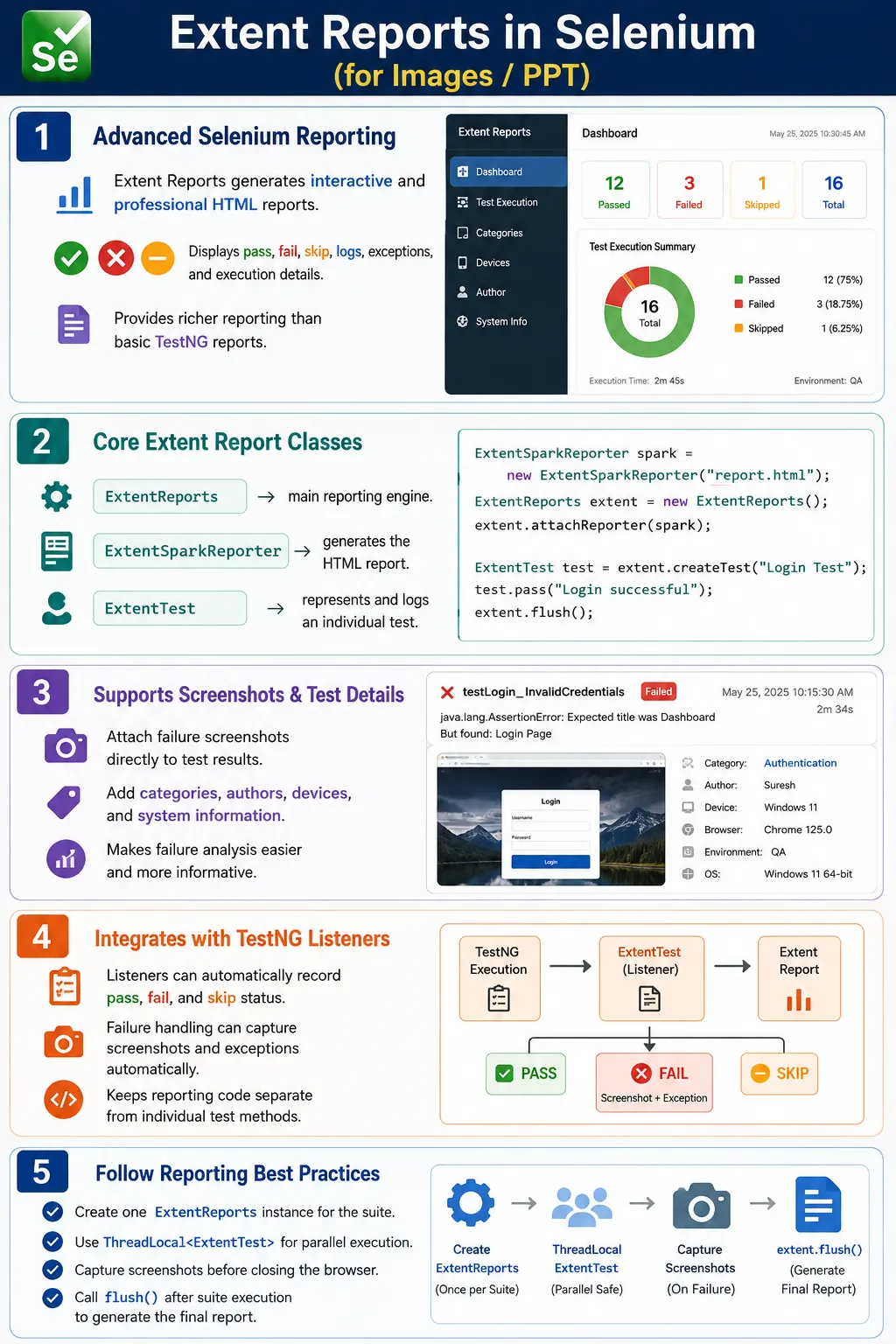
In real projects, reporting is not a decorative feature. It is part of the automation framework's communication layer. Developers use reports to debug failures, testers use them to analyze coverage and stability, leads use them to understand release risk, and managers use them to see whether a regression cycle is healthy. TestNG default reports are useful for basic execution results, but Extent Reports provides a richer dashboard that is more suitable for enterprise Selenium projects, hybrid frameworks, CI/CD pipelines, and stakeholder review.
1. What Extent Reports Means
Extent Reports is an external Java reporting library that can be integrated with Selenium and TestNG to generate advanced HTML reports. It does not execute tests by itself. Selenium interacts with the browser, TestNG controls test execution, and Extent Reports records and presents what happened during that execution. This separation is important because it shows where Extent Reports fits in the framework. It is not a replacement for Selenium or TestNG. It is a reporting layer built on top of the execution flow.
The main object, ExtentReports, acts as the reporting engine. The ExtentSparkReporter class creates the HTML report output. The ExtentTest object represents an individual test entry inside the report. With these classes, a framework can create tests, log steps, mark pass or fail states, attach screenshots, assign categories, add authors, record device information, and finally write everything to an HTML file.
2. Why Selenium Frameworks Need Better Reports
A simple automation script may not need a rich report. If one developer runs one test locally, the console output may be enough. However, a real Selenium framework usually runs many tests across browsers, environments, modules, and data sets. Once the execution size grows, the reporting requirement changes. The team needs to know which tests failed, why they failed, where they failed, whether screenshots are available, which module is unstable, and whether the failure is related to application behavior, test data, environment issues, or automation code.
Without a clear report, failure analysis becomes slow. A tester may need to open logs, inspect console output, reproduce the test manually, check screenshots separately, and ask the automation owner for context. Extent Reports reduces that effort by keeping execution evidence in one place. A failed test can show the test name, step logs, failure message, screenshot, exception stack trace, browser, environment, author, and category. That makes the report useful for both technical and non-technical readers.
3. Limitation of Default TestNG Reports
TestNG generates default reports automatically under the test-output folder. These reports are useful because they require no extra setup, and they provide basic pass, fail, skip, XML, and rerun information. But default reports are intentionally simple. They are not designed to be polished dashboards for release review. They do not provide rich visual charts, structured screenshot attachment, category filtering, author tracking, device tracking, or detailed business-step logging in the same way Extent Reports does.
This does not mean TestNG reports are bad. They remain valuable for debugging and CI/CD artifacts. The practical approach is to understand their role. TestNG default reports provide execution output. Extent Reports provides a better presentation layer. In many enterprise frameworks, both are kept. TestNG produces its standard files, while Extent Reports generates a stakeholder-friendly HTML report with better visibility.
4. Core Reporting Flow
The basic flow is simple. The framework initializes Extent Reports before execution, creates a report entry for each test, logs the important steps while the test runs, captures screenshots when needed, records final status after execution, and flushes the report at the end. The flush operation is important because it writes the collected information into the final HTML file.
Start Suite
  Initialize ExtentReports
    Create ExtentTest for each test
      Execute Selenium steps
        Log information, pass, fail, warning, or skip
          Attach screenshots when required
            Flush report
              ExtentReport.html
This workflow fits naturally with TestNG annotations and listeners. A report can be initialized in @BeforeSuite, individual tests can be created in @BeforeMethod or listener callbacks, failures can be handled in @AfterMethod or onTestFailure, and the final report can be flushed in @AfterSuite or onFinish.
5. Maven Dependency
Extent Reports is usually added to a Maven project through the pom.xml file. The exact version may change over time, but the concept remains the same: add the library dependency so the project can use the reporting classes.
<dependency>
    <groupId>com.aventstack</groupId>
    <artifactId>extentreports</artifactId>
    <version>5.1.2</version>
</dependency>
After adding the dependency, Maven downloads the required library, and the framework can import classes such as ExtentReports, ExtentSparkReporter, ExtentTest, and Status. In a mature framework, this dependency is part of the automation project setup and is managed along with Selenium, TestNG, WebDriverManager, Apache POI, logging libraries, and other framework dependencies.
6. Main Classes in Extent Reports
The most important class is ExtentReports. It represents the main report engine. You normally create one instance for the complete suite execution. Creating multiple report engine objects unnecessarily can produce fragmented reports, overwritten files, or inconsistent output. A framework should centralize report creation and reuse the same report engine during the run.
ExtentSparkReporter is responsible for the HTML report output. It defines where the report file will be created and can also configure report name, document title, theme, and other display options. ExtentTest represents a test case or a node in the report. It is used to log messages, mark steps as passed or failed, assign categories, assign authors, attach screenshots, and add additional details.
7. Creating the Report Engine
The simplest starting point is to create an ExtentReports object. This object stores test execution information until the report is flushed.
ExtentReports extent = new ExtentReports();On its own, this object does not know where the report should be written. That is why a reporter such as ExtentSparkReporter is attached to it. The report engine manages test data, and the Spark reporter turns that data into an HTML file.
8. Creating the Spark Reporter
The Spark reporter creates the HTML file. The path can point to a dedicated reports directory, a test-output directory, or a timestamped report folder. A common beginner setup looks like this:
ExtentSparkReporter spark =
        new ExtentSparkReporter(
                "test-output/ExtentReport.html"
        );
For enterprise frameworks, using a dedicated and predictable folder is better. Many teams create a reports folder and store execution reports with a timestamp. This prevents old reports from being overwritten and helps CI/CD pipelines archive each run separately.
9. Attaching the Reporter
After creating the report engine and Spark reporter, the reporter must be attached to the engine. This connection tells Extent Reports where to write the final output.
ExtentReports extent = new ExtentReports();
ExtentSparkReporter spark =
        new ExtentSparkReporter(
                "test-output/ExtentReport.html"
        );

extent.attachReporter(spark);
If the reporter is not attached properly, the framework may create test logs in memory but fail to generate the expected HTML output. This is one reason reporting setup is usually placed in a dedicated manager class and tested early in framework development.
10. Creating a Test Entry
Every test method should have a corresponding ExtentTest entry. This entry becomes the visible test section inside the report. The test name should be meaningful. A name such as validLoginTest is better than test1 because it gives immediate context to anyone reading the report.
ExtentTest test =
        extent.createTest("Valid Login Test");
Once the test entry is created, the framework can add logs to it. These logs should explain important business actions and validation points rather than every small technical command. Good reporting describes the test journey in a way that helps failure analysis.
11. Logging Test Steps
Extent Reports supports different log statuses. The most commonly used ones are info, pass, fail, warning, and skip. Info messages are useful for execution context, pass messages are useful for completed validation steps, fail messages are used when an assertion or action fails, warning messages are used for non-blocking concerns, and skip messages are used when a test is skipped.
test.info("Chrome browser launched");
test.info("Login page opened");
test.pass("Username entered successfully");
test.pass("Password entered successfully");
test.fail("Login button was not clickable");
test.warning("Page response was slower than expected");
The goal is not to flood the report. A report with too many low-level messages becomes noisy. A good report records the actions and checkpoints that help someone understand what happened. For example, logging every findElement call is rarely useful, but logging that the login page opened, credentials were submitted, and dashboard validation failed is useful.
12. Using Status Directly
Extent Reports also allows logging through the Status enum. This is useful when the framework wants to decide status dynamically.
test.log(Status.INFO, "Opening login page");
test.log(Status.PASS, "Username field accepted input");
test.log(Status.WARNING, "Dashboard took longer than expected");
test.log(Status.FAIL, "Expected profile menu was not visible");
In a reusable framework, wrapper methods can hide direct Extent API calls from test classes. For example, a reporting utility may expose methods such as logInfo, logPass, and logFailure. This keeps report usage consistent across the automation suite.
13. Flushing the Report
The flush() method writes all collected reporting information into the final report file. Forgetting to call flush() is one of the most common beginner mistakes. Tests may execute correctly, logs may be created in code, but the HTML report may be missing or incomplete because the report was never written to disk.
extent.flush();In most TestNG frameworks, flush() is called once at the end of the suite. Calling it after every test is usually unnecessary and can slow execution. The preferred approach is to initialize once, create test entries during execution, and flush once after all tests complete.
14. Complete Basic Example
A minimal setup creates the Spark reporter, creates the ExtentReports engine, attaches the reporter, creates a test, logs a few messages, and flushes the report.
ExtentSparkReporter spark =
        new ExtentSparkReporter(
                "test-output/ExtentReport.html"
        );

ExtentReports extent = new ExtentReports();
extent.attachReporter(spark);

ExtentTest test =
        extent.createTest("Login Test");

test.info("Launching browser");
test.pass("Login completed successfully");

extent.flush();
This example is enough to prove the integration. However, production frameworks should not keep reporting code directly inside every test method. They should centralize report initialization, test creation, screenshot attachment, and final flushing through reusable reporting classes or TestNG listeners.
15. Configuring Report Title and Name
Extent Reports can be customized to show a meaningful document title and report name. This helps when reports are archived or shared with teams. A report named Automation Report is less useful than a report named Selenium Regression Execution - QA Environment.
ExtentSparkReporter spark =
        new ExtentSparkReporter(
                "test-output/ExtentReport.html"
        );

spark.config().setDocumentTitle(
        "SoftwareTips4U Automation Report"
);

spark.config().setReportName(
        "Selenium Regression Execution"
);
These values appear in the report and browser title. They make the output look more professional and help stakeholders understand which suite or environment the report represents.
16. Configuring Theme
Extent Spark reports can use standard or dark themes. Theme configuration is mostly a presentation choice, but a consistent report theme gives the framework a polished appearance.
spark.config().setTheme(Theme.STANDARD);Some teams prefer a dark theme for dashboards, while others prefer the standard theme for readability when reports are emailed or viewed in browsers with default settings. The important point is consistency. Choose one theme for the project and avoid changing it randomly across suites.
17. Adding System Information
System information makes reports more useful because it records execution context. A failed test is easier to analyze when the report shows environment, browser, operating system, application version, framework version, and tester or pipeline name.
extent.setSystemInfo("Application", "SoftwareTips4U");
extent.setSystemInfo("Environment", "QA");
extent.setSystemInfo("Browser", "Chrome");
extent.setSystemInfo("Operating System", "Windows 11");
extent.setSystemInfo("Framework", "Selenium Java TestNG");
This information is especially important in CI/CD pipelines and cross-browser testing. When a failure appears only on Firefox in staging but not on Chrome in QA, the report metadata helps the team identify that difference quickly.
18. Assigning Categories
Categories allow reports to group and filter tests. Common categories include smoke, regression, sanity, login, checkout, payment, search, user management, UI, API, and critical. In large suites, categories help teams focus on specific areas.
test.assignCategory("Regression");
test.assignCategory("Checkout", "Critical");
Categories should match the framework's test organization. If TestNG groups already use names such as smoke and regression, Extent categories can follow the same naming. This keeps execution configuration and reporting language aligned.
19. Assigning Authors
Author assignment helps large teams identify ownership. It does not mean the author caused a failure. It simply shows who owns or maintains a test area. This can be useful in distributed teams where different testers own different modules.
test.assignAuthor("Suresh");In enterprise frameworks, author information can be supplied from annotations, configuration files, TestNG XML parameters, or custom metadata. The reporting layer should make ownership visible without forcing every test method to repeat the same reporting code manually.
20. Assigning Devices or Browsers
The device field can represent the browser, platform, device type, or test execution target. For web automation, teams often assign Chrome, Firefox, Edge, mobile browser, tablet, or remote grid details.
test.assignDevice("Chrome");
test.assignDevice("Windows 11");
Device assignment becomes more valuable when the same suite runs across multiple browser and platform combinations. Instead of searching through logs, the report itself can show where each test ran.
21. Adding Screenshots
Screenshots are one of the most important reasons teams adopt Extent Reports. A failed Selenium test without a screenshot often requires manual reproduction. A failed test with a screenshot gives immediate visual evidence. Screenshots help identify whether the application showed an error message, a loader, a blank screen, a wrong page, a popup, an overlay, or a layout issue.
test.fail("Login test failed")
    .addScreenCaptureFromPath(
            "screenshots/LoginFailure.png"
    );
For screenshots to work well, the framework should capture them before quitting the browser. If the browser is closed first, screenshot capture will fail. This is why failure handling is usually placed before driver cleanup in @AfterMethod or TestNG listener methods.
22. Screenshot Utility Example
A reusable screenshot utility keeps screenshot logic out of test classes. It creates a screenshots directory, builds a unique filename, captures the browser image, copies it to the target path, and returns that path to the reporting layer.
public String captureScreenshot(
        WebDriver driver,
        String testName) throws IOException {

    Path folder = Paths.get("screenshots");
    Files.createDirectories(folder);

    String path = folder.resolve(
            testName + "_" +
            System.currentTimeMillis() + ".png"
    ).toString();

    File source = ((TakesScreenshot) driver)
            .getScreenshotAs(OutputType.FILE);

    Files.copy(
            source.toPath(),
            Paths.get(path),
            StandardCopyOption.REPLACE_EXISTING
    );

    return path;
}
Once the path is returned, it can be attached to the report. Good screenshot naming matters because reports and screenshots may be archived for later debugging. A name that includes the test name and timestamp is usually better than a generic file such as screenshot.png.
23. Base64 Screenshots
Extent Reports also supports screenshots as Base64 strings. This approach can be useful when you want the screenshot embedded directly into the report rather than stored as a separate file path. It may simplify artifact sharing in some pipelines, but it can also make report files larger.
String base64Screenshot =
        ((TakesScreenshot) driver)
                .getScreenshotAs(OutputType.BASE64);

test.fail("Test failed")
    .addScreenCaptureFromBase64String(
            base64Screenshot,
            "Failure Screenshot"
    );
File-based screenshots are common because they keep report size smaller and make screenshot folders easier to manage. Base64 screenshots are convenient when portability is more important than file size.
24. TestNG Annotation Integration
Extent Reports can be integrated directly with TestNG annotations. A simple approach initializes the report in @BeforeSuite, creates a test in @BeforeMethod, logs results in @AfterMethod, and flushes the report in @AfterSuite.
public class LoginTest {
    private WebDriver driver;
    private static ExtentReports extent;
    private ExtentTest test;

    @BeforeSuite
    public void reportSetup() {
        ExtentSparkReporter spark =
                new ExtentSparkReporter(
                        "test-output/ExtentReport.html"
                );

        spark.config().setDocumentTitle(
                "Automation Report"
        );
        spark.config().setReportName(
                "Login Test Execution"
        );

        extent = new ExtentReports();
        extent.attachReporter(spark);
        extent.setSystemInfo("Environment", "QA");
    }

    @BeforeMethod
    public void setup(Method method) {
        test = extent.createTest(method.getName());
        driver = new ChromeDriver();
        test.info("Chrome browser launched");
    }

    @AfterSuite
    public void reportCleanup() {
        extent.flush();
    }
}
This structure is fine for learning, but it can become repetitive in large frameworks. As the framework matures, reporting code should move out of individual test classes and into listeners or reporting managers.
25. Handling Test Results
TestNG provides ITestResult, which contains the final status of a test method. The framework can use this object to decide whether to log pass, fail, or skip status. If a test fails, the framework can also attach the exception and screenshot.
@AfterMethod
public void tearDown(ITestResult result)
        throws IOException {

    if (result.getStatus() == ITestResult.FAILURE) {
        test.fail(result.getThrowable());

        String screenshot =
                captureScreenshot(
                        driver,
                        result.getName()
                );

        test.addScreenCaptureFromPath(screenshot);
    } else if (result.getStatus() == ITestResult.SUCCESS) {
        test.pass("Test passed");
    } else if (result.getStatus() == ITestResult.SKIP) {
        test.skip("Test skipped");
    }

    if (driver != null) {
        driver.quit();
    }
}
This is one of the most practical reporting patterns. The test method focuses on test actions and assertions, while the teardown method handles status reporting. The important detail is that the screenshot is captured before the driver quits.
26. Listener-Based Reporting
A stronger framework design uses TestNG listeners. A listener can automatically create report entries when tests start, log passed tests, capture screenshots for failed tests, mark skipped tests, and flush the report at the end. This avoids repeating report code in every test class.
Test Starts
  Create ExtentTest
Test Passes
  Log pass status
Test Fails
  Capture screenshot
  Attach exception
  Log fail status
Test Skips
  Log skip status
Suite Finishes
  Flush report
Listeners are especially useful in hybrid frameworks because they centralize reporting behavior. When screenshot handling or log formatting changes, the team updates one listener class instead of modifying many test classes.
27. Extent Manager Class
A reporting manager class creates and returns the shared ExtentReports instance. It prevents duplicate setup code and helps enforce a single report configuration across the framework.
public final class ExtentManager {
    private static ExtentReports extent;

    private ExtentManager() {
    }

    public static synchronized ExtentReports getInstance() {
        if (extent == null) {
            ExtentSparkReporter spark =
                    new ExtentSparkReporter(
                            "test-output/ExtentReport.html"
                    );

            spark.config().setDocumentTitle(
                    "SoftwareTips4U Test Report"
            );
            spark.config().setReportName(
                    "Selenium Automation Results"
            );
            spark.config().setTheme(Theme.STANDARD);

            extent = new ExtentReports();
            extent.attachReporter(spark);
            extent.setSystemInfo(
                    "Environment",
                    "QA"
            );
            extent.setSystemInfo(
                    "Framework",
                    "Selenium Java TestNG"
            );
        }

        return extent;
    }
}
This manager keeps reporting setup clean. Tests and listeners can request the shared report instance without knowing all configuration details. It also makes report configuration easier to maintain when paths, themes, or system information change.
28. Thread Safety in Parallel Execution
Parallel execution introduces an important reporting problem. If multiple tests share a single mutable ExtentTest variable, logs from one test can appear under another test. This causes confusing and unreliable reports. The solution is to use ThreadLocal so each executing thread has its own test entry.
public final class ExtentTestManager {
    private static final ThreadLocal<ExtentTest> tests =
            new ThreadLocal<>();

    private ExtentTestManager() {
    }

    public static void createTest(String testName) {
        ExtentTest test =
                ExtentManager.getInstance()
                             .createTest(testName);
        tests.set(test);
    }

    public static ExtentTest getTest() {
        return tests.get();
    }

    public static void unload() {
        tests.remove();
    }
}
Thread-safe reporting is not optional when the framework runs tests in parallel. Without it, the report may become misleading. A failed step from one browser thread could appear under a different test, which wastes debugging time and reduces trust in automation output.
29. Using the Thread-Safe Manager
The thread-safe manager is usually called from @BeforeMethod, listener onTestStart, test methods, and cleanup logic. Each test creates its own report entry, logs through the thread-local reference, and removes the reference after execution.
@BeforeMethod
public void createReportTest(Method method) {
    ExtentTestManager.createTest(
            method.getName()
    );
}

@Test
public void loginTest() {
    ExtentTestManager.getTest()
                     .info("Starting login");

    driver.get("https://example.com");

    ExtentTestManager.getTest()
                     .pass("Application opened");
}

@AfterMethod
public void cleanup() {
    ExtentTestManager.unload();
}
This pattern keeps the report stable during parallel execution. It also allows reusable components, page objects, and utility classes to log messages without passing the ExtentTest object through every method call.
30. Integration with Hybrid Frameworks
In a Selenium hybrid framework, Extent Reports usually sits beside the base test class, listeners, page objects, utilities, and configuration managers. The base test launches and quits browsers. Page objects perform actions. TestNG manages execution. Listeners observe test status. Utilities capture screenshots and read configuration. Extent Reports receives execution data and produces the report.
TestNG Suite
  Base Test
    Browser Setup
      Page Objects
        Test Methods
          Listener
            Screenshot Utility
              Extent Report
This design keeps responsibilities clear. Test methods should not be overloaded with reporting plumbing. Page objects should not decide final test status. The listener should handle reporting outcomes, and reporting utilities should handle output formatting. This makes the framework easier to maintain as test coverage grows.
31. Recommended Folder Structure
A clean project structure makes reporting easier to maintain. Reports, screenshots, listeners, utilities, and tests should have predictable locations.
AutomationFramework
  src/test/java
    tests
    pages
    listeners
    utilities
      ExtentManager.java
      ExtentTestManager.java
      ScreenshotUtil.java
  reports
    ExtentReport.html
  screenshots
  test-output
The exact folder names can vary, but the principle is the same. Keep reporting logic separate from test logic. Store generated outputs in dedicated folders. Make sure CI/CD pipelines archive reports and screenshots together so screenshot links do not break.
32. What to Log in Reports
A useful report should show business-level steps and important validations. For example, in a login test, meaningful report lines may include: login page opened, valid credentials entered, login button clicked, dashboard displayed, and user profile verified. These logs tell a readable story.
Unhelpful logs include every locator lookup, every wait call, every internal variable assignment, and every utility method entry. Too much logging makes reports harder to read. The best reports are detailed enough to debug failures but concise enough for quick review.
33. Screenshots on Failure
The most common screenshot strategy is to capture screenshots only when tests fail. This keeps report size reasonable while preserving evidence for debugging. Some teams also capture screenshots for major completed business steps, but this can increase storage usage significantly.
When capturing failure screenshots, store them with unique names and attach them to the failed test entry. The screenshot file should exist at the path referenced by the report. If reports are moved to another machine or archived by Jenkins, the screenshots should be archived with them. Broken screenshot links reduce report value.
34. Report Path Strategy
Report path strategy matters more than beginners expect. If every execution writes to the same file, previous reports are overwritten. That may be acceptable for local debugging but not for CI/CD history. In pipelines, a timestamped report folder is better.
reports
  2026-07-10_10-30-15
    ExtentReport.html
    screenshots
      LoginTest_1720611015000.png
A timestamped folder keeps each execution self-contained. The report and screenshots can be archived as one artifact. This helps compare failures between builds and gives teams traceability when investigating release issues.
35. Extent Reports and CI/CD
Extent Reports works well with CI/CD tools when reports are generated into a known artifact directory. Jenkins, GitHub Actions, Azure DevOps, and other pipeline tools can archive the generated HTML report and screenshot folder after execution. This allows team members to open the report without accessing the test machine.
The important CI/CD rule is to keep report paths consistent. If the report file references screenshots using relative paths, the screenshots must remain in the expected relative location. If screenshots are outside the archived folder, the report may open but images will not display.
36. Advantages of Extent Reports
The biggest advantage of Extent Reports is readability. It turns raw test execution data into a clean dashboard. It supports pass, fail, skip, warning, and info logs. It supports screenshots, categories, authors, devices, system information, and exception traces. It also provides a professional output that can be shared with teams after regression execution.
Another advantage is framework friendliness. Extent Reports can be integrated with TestNG annotations, TestNG listeners, Page Object Model frameworks, hybrid frameworks, data-driven frameworks, and CI/CD pipelines. It does not force one framework design. Instead, it adapts to the structure the team already uses.
37. Limitations of Extent Reports
Extent Reports is powerful, but it is still an external dependency. It requires setup, version management, configuration, and framework maintenance. Screenshots are not magically captured; the framework must capture and attach them. Parallel execution requires thread-safe reporting. Poor report path design can produce broken screenshot links. Excessive logging can make reports noisy.
These limitations are manageable when the framework is designed carefully. The reporting layer should be treated as a real framework component, not an afterthought added at the end. A clean reporting design improves trust in automation results.
38. Extent Reports vs TestNG Reports
TestNG default reports are built-in, simple, and automatic. They are good for quick debugging, XML artifacts, failed test reruns, and basic result review. Extent Reports is an external reporting library with richer visual output, screenshots, dashboard views, categories, authors, devices, and stronger stakeholder presentation.
TestNG Reports
  Built in
  Basic HTML
  XML output
  Simple result summary

Extent Reports
  External library
  Interactive HTML
  Screenshot support
  Rich logs and dashboard
  Categories, authors, and devices
A strong framework can use both. TestNG remains the execution and default artifact provider. Extent Reports becomes the readable reporting dashboard for daily analysis and stakeholder visibility.
39. Common Beginner Mistakes
The first common mistake is forgetting extent.flush(). Without flushing, the report may not be generated correctly. The second mistake is creating multiple ExtentReports objects across test classes. This can split report data or overwrite output. The third mistake is logging without creating an ExtentTest entry first. The fourth mistake is capturing screenshots after quitting the browser.
Another common mistake is adding reporting code directly into every test method. That creates duplication and makes future changes painful. A better approach is to use listeners and reporting utilities. Beginners also sometimes log sensitive data such as passwords, tokens, or customer information into reports. Reports are often shared or archived, so sensitive values should be masked or omitted.
40. Best Practices
Create one ExtentReports instance for the complete suite. Attach the Spark reporter before creating test logs. Create a separate ExtentTest for every test method. Use TestNG listeners for automatic reporting. Capture screenshots for failures before quitting the browser. Use ThreadLocal for parallel execution. Assign categories, authors, and devices when they help filtering. Add system information to show execution context.
Keep report logs meaningful. Avoid logging secrets. Store reports and screenshots in predictable folders. Archive reports in CI/CD pipelines. Keep reporting classes separate from page objects and test classes. Review reports regularly and improve them based on what the team actually needs during failure analysis.
41. Interview Perspective
A short interview answer is: Extent Reports is an external reporting library used with Selenium to generate interactive HTML reports. It provides execution status, logs, screenshots, categories, authors, device details, system information, and dashboards, making it richer than TestNG default reports.
A stronger real-time answer is: in my Selenium hybrid framework, I integrate Extent Reports with TestNG listeners. I initialize one ExtentReports instance before the suite, create one ExtentTest entry for each test method, log meaningful business steps during execution, capture screenshots on failures, attach exception details, assign categories and browser information, and call flush() at the end of the suite. For parallel execution, I use ThreadLocal<ExtentTest> so logs from different tests do not mix.
42. Real Enterprise Workflow
A real enterprise workflow usually starts with a TestNG suite execution. The base test reads configuration and launches the browser. The listener creates the Extent test entry. Page objects perform actions. Assertions validate expected behavior. If the test passes, the listener logs pass status. If it fails, the listener captures a screenshot, attaches the exception, and marks the test as failed. At the end of the suite, the report is flushed and archived by the pipeline.
TestNG Suite
  Listener starts test entry
    BaseTest opens browser
      Page Objects execute workflow
        Assertions validate result
          Listener records pass, fail, or skip
            Screenshot utility captures evidence
              ExtentReports flushes HTML output
                CI/CD archives report artifacts
This workflow gives the team a clear and repeatable reporting process. Every test produces consistent evidence, and every failure can be analyzed from the report without guessing what happened during execution.
43. Extent Report Workflow
The report workflow can be remembered as initialize, create, log, capture, flush, and review. Initialize the report once. Create a test entry for each test. Log meaningful steps. Capture screenshots for failures. Flush the report at the end. Review the output to identify failures, patterns, unstable modules, and environment issues.
Initialize ExtentReports
  Create ExtentTest
    Log steps
      Capture screenshots
        Add categories and metadata
          Flush report
            Review dashboard
When this flow is built into the framework properly, reporting becomes automatic. Test authors do not need to think about report plumbing in every test. They can focus on writing clear test scenarios while the framework handles evidence collection.
44. Key Takeaway
Extent Reports transforms Selenium execution results into professional, interactive HTML reports. It adds value by showing dashboards, pass and fail summaries, step logs, screenshots, exception details, execution context, categories, authors, devices, and system information. It is especially useful in TestNG-based Selenium frameworks where teams need readable reporting beyond default TestNG output.
Selenium Execution
  TestNG
    Listener
      ExtentReports
        Logs
        Screenshots
        Categories
        Authors
        Devices
        System Information
          Professional HTML Report
The best way to use Extent Reports is to centralize it inside the framework. Initialize it once, create separate test entries, use listeners for automatic status logging, capture screenshots before browser cleanup, protect parallel execution with ThreadLocal, and flush the report after suite execution. When implemented correctly, Extent Reports gives developers, testers, managers, and CI/CD pipelines a clear view of automation quality and failure evidence.