Execution Time Optimization in Selenium Automation
Execution Time Optimization in Selenium Automation is the process of reducing the total time required to execute an automation test suite without reducing reliability, accuracy, or meaningful test coverage. A fast test suite gives the team quick feedback. A slow test suite delays releases, increases infrastructure cost, and eventually discourages teams from running automation frequently. The goal is not to make tests fast by skipping important validations. The goal is to remove waste from test design, framework behavior, browser execution, infrastructure usage, and CI/CD strategy.
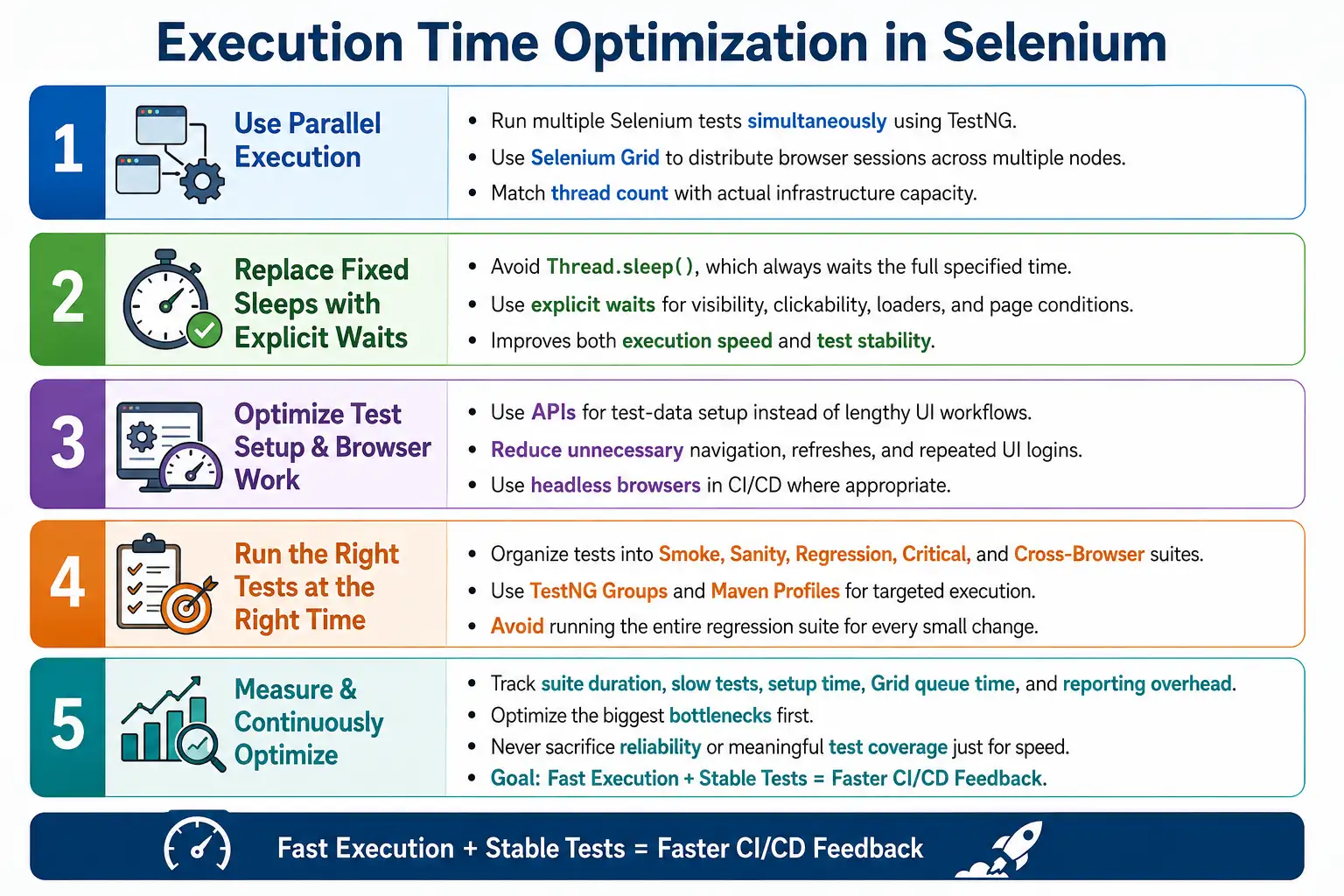
In enterprise Selenium projects, execution time directly affects developer feedback speed, CI/CD pipeline duration, release frequency, debugging cycles, hardware usage, cloud browser cost, and team productivity. A regression suite that takes five hours may be too slow for every commit. A suite that completes in forty-five minutes through parallel execution, optimized waits, targeted suite selection, API-based setup, and scalable infrastructure can become a practical quality gate.
1. What Execution Time Optimization Means
Execution Time Optimization means minimizing the runtime of Selenium automation while keeping the tests stable and trustworthy. It is not only about running tests in parallel. It includes better test design, efficient setup, smart synchronization, stable locators, browser configuration, suite organization, reporting discipline, and pipeline planning.
Regression Suite
  Before Optimization
    5 Hours

Regression Suite
  After Optimization
    45 Minutes
This improvement usually comes from many small changes working together. Parallel execution may give the largest reduction, but explicit waits, API setup, fewer unnecessary navigations, better suite selection, and cleaner reports also matter.
2. Why Execution Time Optimization Is Important
Slow automation creates slow feedback. If a developer pushes code and waits hours to know whether regression passed, the team loses momentum. Failures are discovered late, context is lost, and releases become harder to coordinate. Faster execution makes automation more useful because teams can run it more often.
Speed also affects cost. Selenium tests use browsers, machines, Grid nodes, containers, and sometimes paid cloud browser sessions. If every suite takes too long, the same infrastructure supports fewer builds. Optimized execution reduces resource usage and improves pipeline throughput.
3. Problems with Slow Automation
Slow automation causes delayed releases, long CI/CD pipelines, increased infrastructure costs, reduced developer productivity, longer debugging cycles, and less frequent regression execution. When a suite is too slow, teams may start running only a small subset of tests, not because it is the right risk-based decision, but because the full suite is too expensive to run.
Slow suites also hide failures until late in the process. If a nightly regression starts at midnight and finishes in the morning, a failure may not be investigated until the next day. Faster suites make quality signals available while changes are still fresh.
4. Core Idea
The core idea is to remove unnecessary waiting, unnecessary setup, unnecessary browser work, unnecessary navigation, and unnecessary full-suite execution. Then distribute the remaining meaningful work across parallel browser sessions and suitable infrastructure.
Sequential Execution
  Long Waits
    Slow Tests

Parallel Execution
  Optimized Framework
    Fast Feedback
Optimization should be evidence-based. Measure suite duration, identify slow tests, review setup cost, inspect wait usage, and analyze pipeline stages before changing the framework randomly.
5. Factors Affecting Execution Time
Execution speed depends on number of tests, browser startup time, wait strategy, network latency, Selenium Grid capacity, test design, page load speed, test data setup, hardware resources, reporting overhead, screenshots, logging volume, and parallel execution design. A slow suite rarely has only one bottleneck.
For example, a suite may be slow because every test logs in through the UI, creates data through the UI, uses Thread.sleep(), takes screenshots after every step, and runs sequentially on one browser. Fixing only one of these issues helps, but real improvement comes from improving the full execution flow.
6. Use Parallel Execution
Parallel execution is one of the most effective ways to reduce total suite duration. Instead of running Test 1, then Test 2, then Test 3, the framework runs multiple tests at the same time across separate browser sessions. TestNG supports parallel execution at suite, test, class, method, or instance level depending on configuration.
<suite parallel="methods" thread-count="4">
</suite>
Parallel execution requires thread-safe framework design. Each test thread should have its own WebDriver instance, test data, report node, and screenshot context. If the framework uses shared driver variables or shared mutable data, parallel execution can create random failures.
7. Use Selenium Grid
Selenium Grid allows tests to run across multiple browser nodes. Instead of one machine handling all browser sessions, Grid distributes sessions across available nodes. This is essential for large regression suites and cross-browser execution.
One Machine
  All Tests
    Slow Execution

Selenium Grid
  Multiple Nodes
    Parallel Browsers
      Faster Execution
Grid must be sized correctly. If a suite requests twenty parallel sessions but Grid has capacity for five stable sessions, tests will queue, slow down, or fail. Execution time optimization requires matching thread count with real infrastructure capacity.
8. Use Headless Browsers
Headless browsers run without a visible browser window. In CI/CD environments, headless mode can reduce resource usage and improve startup performance. It is useful for Jenkins agents, Docker containers, Linux servers, and remote execution where visible UI is unnecessary.
Headless execution should still be validated. Some applications behave slightly differently in headless mode because of viewport size, graphics behavior, downloads, or browser permissions. Use consistent window size and options to reduce differences between headed and headless execution.
9. Optimize Browser Startup
Browser startup is expensive. If every small validation opens a new browser, logs in, navigates, performs one check, and closes the browser, suite duration grows quickly. Browser lifecycle should be designed thoughtfully. Test independence is important, but unnecessary browser restarts can be wasteful.
Some teams use one browser per test for maximum isolation. Others use one browser per class or workflow where safe. The right decision depends on application state, test risk, parallel strategy, and cleanup capability. Do not reuse sessions blindly, but also do not restart browsers unnecessarily without reason.
10. Replace Thread.sleep
Thread.sleep() is one of the biggest sources of wasted time. If a suite has hundreds of sleeps, total duration increases even when the application is ready earlier. A five-second sleep always waits five seconds. Explicit waits continue as soon as the condition is satisfied.
WebDriverWait wait =
        new WebDriverWait(driver, Duration.ofSeconds(10));
Replacing fixed sleeps with explicit waits improves both speed and reliability. Tests become faster when the application responds quickly and more stable when it responds slowly within the configured timeout.
11. Use Explicit Waits
Explicit waits synchronize tests with real application state. They can wait for clickability, visibility, invisibility of loaders, text updates, URL changes, title changes, alert presence, or custom conditions. Because they wait only as long as necessary, they are better for performance than fixed delays.
Avoid long implicit waits across the entire framework. Long implicit waits can slow down negative checks and make element lookup delays harder to reason about. Many mature frameworks rely mainly on explicit waits with reusable wait utilities.
12. Optimize Locators
Efficient locators reduce element lookup time and improve reliability. Simple ID, name, and CSS selectors are usually faster and clearer than long absolute XPath expressions. Optimized locators also reduce retries and failure investigation time because they are less likely to break after UI changes.
By.id("login")Poor locators such as /html/body/div/table/tr/td/div/button are fragile and harder to maintain. Locator optimization supports execution time indirectly by reducing flaky failures and reruns.
13. Reduce Unnecessary Navigation
Navigation is expensive. Opening pages, logging in, logging out, refreshing, and moving through long workflows takes time. If every test repeats the same navigation steps without need, the suite becomes slow. Tests should be organized to reduce waste while preserving independence.
For example, if multiple tests need a logged-in state, the framework can use API login, token injection, or a fast setup path when appropriate. Avoid repeating a slow UI login for every validation if the purpose of the test is not login itself.
14. Optimize Test Data
Test data setup can be a major bottleneck. Creating large datasets through the UI, resetting databases manually, or calling slow setup APIs repeatedly can increase runtime. Use lightweight, isolated data. Create only what the test needs. Reuse read-only reference data when safe.
Data should be optimized without creating dependencies. Shared mutable data can cause flaky tests, especially in parallel execution. The best data strategy is fast, isolated, predictable, and easy to clean up.
15. Reduce Browser Refreshes
Browser refresh reloads the page and can trigger network calls, JavaScript initialization, authentication checks, and rendering work. Avoid driver.navigate().refresh() unless the test specifically needs to verify refresh behavior or recover from a known state.
Many refreshes are added as quick fixes for synchronization problems. Replace those with explicit waits or better page state handling. Refreshing is usually a sign that the framework is not waiting for the right condition.
16. Use API for Test Setup
APIs are usually much faster than UI workflows for setup. If a test needs a user, order, product, or configuration before verifying a UI behavior, create that data through an API when available. Then open the UI directly at the relevant page.
Slow Setup
  Login UI
    Create User UI
      Create Order UI

Fast Setup
  API Creates User
    API Creates Order
      Open UI
This does not reduce UI coverage if the API setup is used only for preconditions. UI tests should still verify UI behavior, but they do not need to use the UI for every setup step.
17. Execute Only Required Tests
Not every pipeline stage needs the full regression suite. A commit build may need smoke tests. A pre-release build may need regression tests. A bug fix may need impacted tests plus a focused regression subset. Running all 3,000 tests for every small change is usually inefficient.
Organize suites into smoke, sanity, regression, cross-browser, critical path, and feature-specific groups. This allows pipelines to run the right tests at the right time.
18. Use Maven Profiles
Maven profiles can define different execution configurations. A smoke profile can run a small suite. A regression profile can run the full suite. A Grid profile can enable remote execution. Profiles make execution selection consistent and CI-friendly.
mvn test -Psmoke
mvn test -Pregression
mvn test -Pgrid
Profiles should be documented. If the team does not know which profile to use, execution becomes inconsistent across local and CI environments.
19. Use TestNG Groups
TestNG groups allow tests to be categorized and selected at runtime. Groups such as Smoke, Sanity, Regression, Payment, Login, and Critical can help pipelines execute targeted sets.
@Test(groups = "Smoke")<groups>
<run>
<include name="Smoke"/>
</run>
</groups>Groups should be meaningful and maintained. If every test is placed into every group, the grouping strategy stops helping.
20. Disable Unnecessary Logging
Logging is useful, but excessive logging slows execution and produces large reports. Logging every mouse movement, every minor click, and every internal helper call creates noise. Logs should focus on meaningful business actions, important technical checkpoints, failures, and environment details.
Good logs help debugging without overwhelming reports. Poor logs make reports slower to generate and harder to read.
21. Optimize Screenshots
Screenshots are valuable evidence, but capturing screenshots after every successful step can significantly increase execution time and storage usage. For large suites, thousands of screenshots can slow down report generation and artifact archiving.
A practical strategy is to capture screenshots on failure, at important checkpoints, or for final validation in critical scenarios. This keeps evidence useful without making reports too heavy.
22. Efficient Reporting
Reporting should be useful but efficient. Very large HTML reports with thousands of embedded screenshots can become slow to generate and slow to open. Reports should include pass summary, failure details, exception messages, screenshots for failures, environment details, browser details, and execution duration.
Reports should support debugging without becoming the performance bottleneck. Store heavy artifacts only when they add value. Archive reports in Jenkins, but avoid generating unnecessary files for every minor action.
23. Driver Management
Centralized DriverFactory improves execution consistency and optimization. Browser selection, headless mode, Grid mode, capabilities, timeouts, download paths, window size, and browser options should be managed in one place. This avoids repeated driver initialization logic across test classes.
DriverFactory
  Chrome
  Firefox
  Edge
  RemoteWebDriver
Centralized driver management makes it easier to tune execution for local runs, Jenkins, Grid, and cloud execution.
24. Use Configuration Files
Configuration files and runtime properties allow execution behavior to change without code changes. Browser, environment, headless mode, Grid URL, thread count, retry count, report path, and timeout values should be configurable.
browser=chrome
headless=true
grid=true
thread.count=4
This supports optimization because teams can tune execution per environment. Local debugging may run headed with one thread. Jenkins may run headless on Grid with multiple threads.
25. Optimize CI/CD Pipeline
Execution time optimization is not only a framework task. The pipeline matters. A good CI/CD flow may run unit tests first, then smoke UI tests, then deploy, then run targeted regression, and finally run full regression on schedule or before release. Running the entire UI regression suite after every small commit may not be necessary.
Git Push
  Build
    Smoke Tests
      Deploy
        Regression
Pipeline stages should match risk. Fast feedback should happen early. Longer suites should run when they provide meaningful release confidence.
26. Advantages
Execution time optimization provides faster execution, shorter regression cycles, better CI/CD performance, reduced infrastructure cost, faster feedback, improved productivity, and more frequent testing. It also improves automation adoption because teams are more likely to run suites that finish quickly.
Faster execution can also improve quality. When feedback is quick, defects are found closer to the change that caused them. This makes debugging easier and reduces release risk.
27. Limitations
Optimization should not reduce meaningful coverage, skip important validations, hide failures, or sacrifice reliability. Speed is valuable only when the results remain trustworthy. A fast suite that misses critical defects is not optimized; it is weakened.
Some tests are naturally slow because they verify complex workflows. Optimize setup and execution, but do not remove business-critical checks simply to improve runtime numbers.
28. Slow vs Optimized Framework
A slow framework runs sequentially, uses Thread.sleep(), depends on GUI browsers in CI, creates setup data through the UI, runs full regression for every commit, uses poor locators, captures too many screenshots, and repeats navigation unnecessarily. An optimized framework runs in parallel, uses explicit waits, supports headless execution, uses APIs for setup, organizes suites, uses efficient locators, and keeps reports focused.
Slow Framework
  Sequential Execution
  Thread.sleep()
  GUI Browsers
  UI-Based Setup
  Long Regression

Optimized Framework
  Parallel Execution
  Explicit Waits
  Headless Browsers
  API-Based Setup
  Targeted Suites
29. Common Beginner Mistakes
Common mistakes include using Thread.sleep(), running everything sequentially, launching a new browser for every small task without thought, using slow UI setup, capturing thousands of screenshots, running full regression for every commit, and ignoring performance bottlenecks.
Another mistake is increasing thread count without checking framework thread safety or infrastructure capacity. More threads do not always mean faster execution. If machines are overloaded, tests may become slower or flaky.
30. Enterprise Best Practices
Enterprise teams should use TestNG parallel execution, run tests on Selenium Grid, enable headless mode in CI/CD where appropriate, replace Thread.sleep() with explicit waits, optimize locators, keep test cases independent, use APIs for test setup whenever possible, execute only required suites, optimize logging and reporting, and continuously monitor execution duration.
They should also review the slowest tests regularly. A small number of slow tests often contributes a large percentage of total runtime. Fixing those tests can produce meaningful gains.
31. Real Enterprise Architecture
A real enterprise architecture starts with a developer push to Git. Jenkins triggers a pipeline. A smoke suite runs first. Tests run in parallel through Selenium Grid. Browser sessions execute across Chrome, Firefox, Edge, and headless Chrome nodes. Reports are generated and archived. Longer regression suites run when required by release policy.
Developer Push
  Git Repository
    Jenkins Pipeline
      Smoke Suite
        Parallel Execution
          Selenium Grid
            Chrome
            Firefox
            Edge
            Headless Chrome
              Extent Reports
32. Measure Before Optimizing
Optimization should start with measurement. Record total suite duration, average test duration, slowest test methods, browser startup time, setup time, teardown time, report generation time, Grid queue time, and pipeline overhead. Without measurement, teams may optimize the wrong area.
For example, if most time is spent in test data setup, increasing thread count may not help. If Grid queue time is high, infrastructure capacity may be the bottleneck. If report generation takes twenty minutes, screenshot and report strategy should be reviewed.
33. Optimize Slow Tests First
Not all tests contribute equally to runtime. A few slow tests may dominate suite duration. Identify the top slow tests and review them carefully. They may contain unnecessary sleeps, repeated login, slow UI setup, repeated refreshes, excessive screenshots, or inefficient waits.
Improving the slowest tests often gives faster results than making small changes everywhere. Once major bottlenecks are removed, continue with broader framework improvements.
34. Balance Speed and Independence
Test independence is important, but it can increase setup time if implemented poorly. The answer is not to create dependencies between tests. The answer is to make independent setup faster. Use APIs, reusable fixtures, isolated accounts, seeded data, and efficient cleanup strategies.
Dependent tests may appear faster at first, but they create hidden costs through cascading failures and difficult debugging. Optimized automation should be both fast and independent.
35. Thread Count Tuning
Thread count should be tuned based on actual infrastructure. Running four threads on a machine that can handle four browsers may improve speed. Running twenty threads on the same machine may overload CPU, memory, network, and browser sessions. Overloaded systems often create flaky failures and slower execution.
Start with a moderate thread count, measure duration and stability, then increase gradually. Watch CPU, memory, Grid queue, browser failures, and test reliability. The best thread count is the one that gives faster execution without reducing stability.
36. Interview Perspective
A short interview answer is: Execution Time Optimization is the process of reducing the time required to execute Selenium automation while maintaining reliability. Common techniques include parallel execution, Selenium Grid, headless browsers, explicit waits, optimized locators, API-based test setup, and efficient test suite organization.
A stronger real-time answer is: in my Selenium hybrid framework, I optimize execution time by running TestNG tests in parallel on Selenium Grid using RemoteWebDriver. Browser creation is centralized through DriverFactory, and CI/CD pipelines usually use headless execution to reduce resource usage. I replace Thread.sleep() with explicit waits, use optimized locators, and create test data through APIs instead of the UI whenever possible. Test suites are organized into smoke, sanity, and regression groups so only the necessary tests run for each pipeline stage.
37. Execution Time Optimization Workflow
The workflow begins by measuring current execution time, identifying bottlenecks, optimizing test design, enabling parallel execution, using Selenium Grid, using headless browsers where appropriate, improving waits and locators, keeping reports efficient, and continuously monitoring results.
Automation Suite
  Measure Runtime
    Optimize Test Design
      Parallel Execution
        Selenium Grid
          Headless Browsers
            Efficient Waits and Locators
              Fast Reports
                Reduced Execution Time
38. Optimize Login Strategy
Login is one of the most repeated actions in Selenium suites. If every test opens the login page, enters credentials, waits for authentication, lands on the dashboard, and then navigates to the feature under test, a large suite can lose a significant amount of time before real validation even starts. Optimizing login strategy can produce meaningful runtime improvement.
This does not mean login should never be tested through the UI. Login itself should have dedicated UI tests. But tests that are not about login can use faster setup approaches when the application supports them. Examples include API authentication, session token setup, pre-authenticated test users, or direct navigation after controlled setup. The correct choice depends on security design and application architecture.
When optimizing login, preserve test clarity. A test should still start from a known authenticated state. Avoid hidden dependencies where one test logs in and another test assumes the session is still valid. Fast setup must still be reliable and isolated.
39. Optimize Page Object Methods
Page Object methods can quietly become runtime bottlenecks. A page method may wait too long, refresh unnecessarily, locate the same element many times, scroll repeatedly, or perform extra validation that the calling test does not need. Because page methods are reused across many tests, inefficient code inside one method can affect the entire suite.
Review frequently used page methods such as login, search, add to cart, open menu, select dropdown option, and wait for page load. Check whether they use efficient waits, stable locators, and minimal browser actions. If a method waits for ten seconds every time even when the element is ready immediately, it should be rewritten to wait conditionally.
Page Object optimization should not remove necessary synchronization. It should remove unnecessary work. The best page methods are fast when the application is fast and patient only when the application is still legitimately loading.
40. Manage Grid Queue Time
Selenium Grid can reduce execution time, but only when capacity matches demand. If the framework starts many threads and the Grid has too few available nodes, tests wait in queue before receiving browser sessions. The suite may appear parallel, but actual execution is delayed by session creation wait time.
Grid queue time should be measured. If tests spend a long time waiting for browser sessions, increase Grid capacity, reduce thread count, distribute runs by browser, or schedule suites at different times. Blindly increasing thread count can make execution slower because the infrastructure becomes overloaded.
High Thread Count
  Low Grid Capacity
    Session Queue
      Slow Execution
Good optimization balances thread count, node count, browser mix, memory, CPU, network, and application environment capacity. The fastest stable configuration is usually not the highest possible thread count.
41. Avoid Over-Testing Through UI
UI tests are valuable, but they are also expensive. A common mistake is validating every rule through the browser even when many validations can be covered faster at API, service, unit, or integration level. Selenium should focus on user workflows, browser behavior, UI integration, and end-to-end confidence. It should not carry the entire testing burden.
For example, if a business rule has twenty data combinations, the API layer may validate most combinations quickly while Selenium validates the most important UI paths. This testing pyramid approach reduces UI suite time without reducing overall coverage. The goal is to test at the right layer.
Execution time optimization often requires test strategy decisions, not just code changes. Moving suitable validations to faster layers allows Selenium to stay focused and efficient.
42. Split Suites by Feedback Purpose
Different suites should answer different questions. A smoke suite answers whether the build is basically usable. A sanity suite answers whether recent changes are working. A regression suite answers whether existing behavior remains stable. A release suite may include cross-browser and critical path coverage. Running the same huge suite for every purpose is inefficient.
A practical CI/CD strategy runs a fast smoke suite on every commit, a broader suite after deployment, and full regression on schedule or before release. This gives fast feedback early and deeper confidence at the right time.
Commit Pipeline
  Build
  Unit Tests
  Smoke UI Tests

Nightly Pipeline
  Regression UI Tests
  Cross-Browser Tests

Release Pipeline
  Critical Workflows
  Full Regression
  Reports
43. Reduce Teardown and Cleanup Cost
Cleanup is necessary, but inefficient cleanup can slow the suite. If every test performs long UI cleanup steps, total runtime grows. Whenever possible, cleanup should use fast APIs, database-safe utilities approved by the team, or isolated disposable data that does not require immediate cleanup.
For example, if a test creates an order only for validation, cleanup through an API may be faster than navigating through the UI to cancel it. If the environment is reset nightly, certain test data may not need immediate cleanup as long as it is unique and does not affect other tests. The cleanup strategy should protect test independence while avoiding unnecessary browser work.
44. Monitor Runtime as a Quality Metric
Execution duration should be monitored like pass rate and failure rate. If the regression suite grows from forty-five minutes to ninety minutes over several sprints, the team should know why. New tests may have been added, setup may have become slower, application pages may have degraded, reports may have grown too large, or Grid capacity may no longer match demand.
Track total suite duration, average test duration, slowest tests, setup time, browser startup time, and report generation time. These metrics make optimization objective. They also help justify infrastructure changes when the team needs more Grid nodes or better CI agents.
45. Optimization Governance
Optimization should be governed by standards. New tests should avoid fixed sleeps, unnecessary UI setup, weak locators, excessive screenshots, and repeated navigation. Code reviews should include runtime awareness. If a test adds several minutes to the suite, reviewers should ask whether the same validation can be done more efficiently.
Governance also means protecting reliability. A change that reduces runtime but increases flaky failures is not a good optimization. Measure both speed and stability. The best automation frameworks improve execution time while keeping failure signals trustworthy.
46. Key Takeaway
Execution Time Optimization is a continuous process of improving the efficiency of a Selenium automation framework without weakening quality. It combines parallel execution, scalable infrastructure, optimized synchronization, efficient test design, API-driven setup, targeted suites, and meaningful reporting.
Execution Time Optimization
  Parallel Execution
  Selenium Grid
  Headless Browsers
  Explicit Waits
  Optimized Locators
  API Test Setup
  TestNG Groups
  Efficient Reporting
  CI/CD Optimization
    Fast and Scalable Automation
The most important practices are to use parallel execution with TestNG and Selenium Grid, prefer headless browsers for CI/CD when appropriate, replace fixed sleeps with explicit waits, optimize locators, avoid unnecessary page refreshes, use APIs to prepare test data, organize tests into smoke, sanity, and regression suites, keep logging and reporting efficient, and measure execution time regularly. Speed matters, but reliable speed matters more.