Exception Handling Best Practices in Selenium Java
Exception handling in Selenium means handling unexpected failures in a controlled, useful, and honest way. A Selenium test can fail because an element is missing, a wait times out, the DOM refreshes, a click is intercepted, an alert appears, a frame is unavailable, a browser crashes, or the application itself has a defect. Good exception handling does not hide these failures. It explains them, captures evidence, preserves the real error, and helps the team understand what happened.
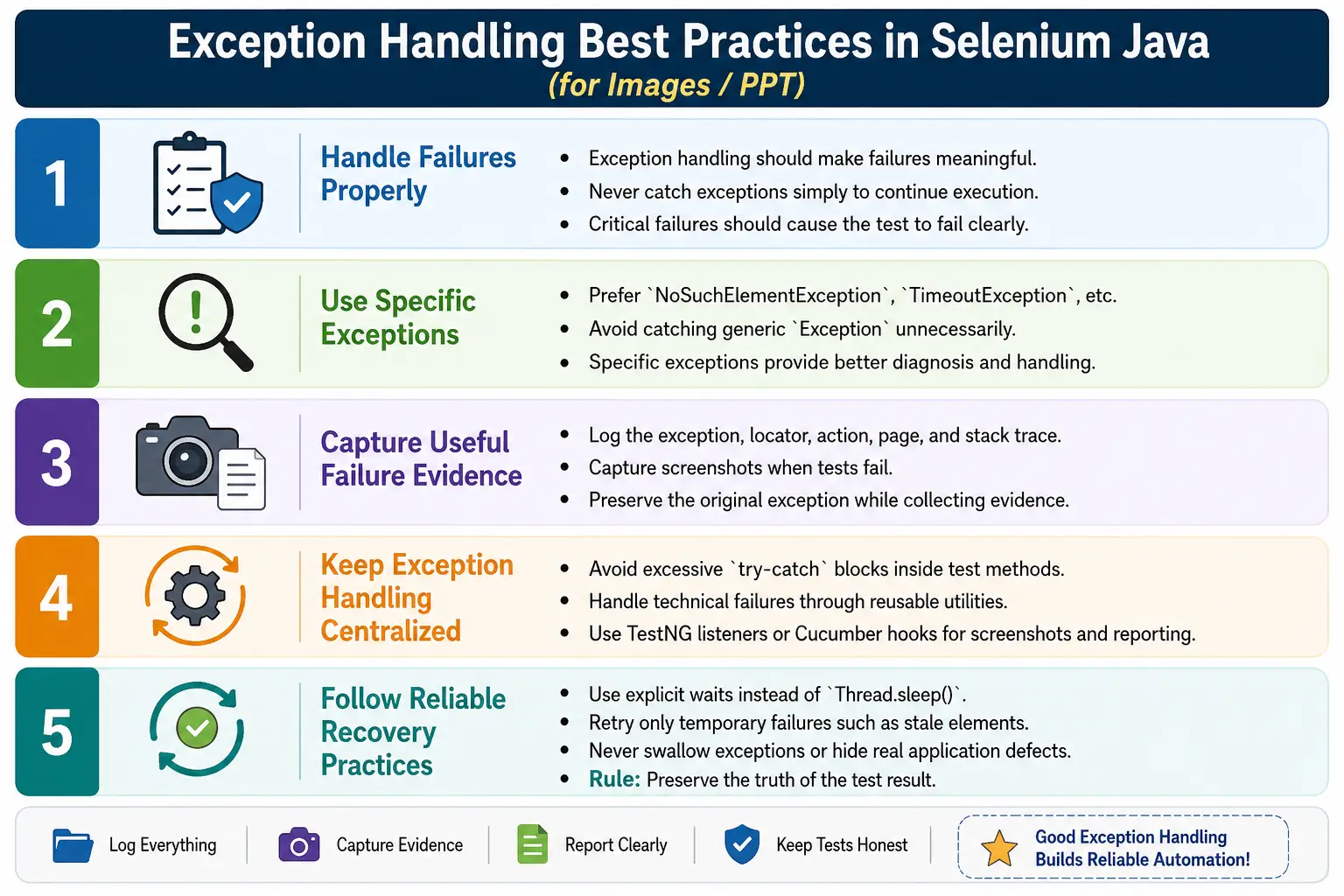
In real automation frameworks, exception handling is not about making every test continue. It is about making failures meaningful. A test that fails with a clear log message, screenshot, stack trace, locator, page name, and action name is much easier to debug than a test that fails blindly. At the same time, a test that catches exceptions and continues as if nothing happened is dangerous because it can create false passes. A false pass is worse than a clear failure because it hides product defects and weakens trust in automation.
The best Selenium frameworks use exception handling at the right layer. Test methods stay clean and readable. Page Objects express business actions. Reusable utility methods handle waits, clicks, typing, screenshots, and logging. TestNG listeners or Cucumber hooks capture evidence when a scenario fails. Framework-level wrappers add step names and context. This article explains how to apply those practices in Selenium Java without turning tests into large blocks of try-catch code.
1. Why Exception Handling Is Important
Selenium tests interact with real browsers and dynamic web applications. The browser may load content slowly. JavaScript may re-render elements. A locator may become outdated. A popup may cover a button. A frame may not be available yet. The browser driver may lose connection. Because so many layers are involved, failures are inevitable in a large automation suite.
Good exception handling helps separate the reason for failure. A missing element is different from a timeout. A stale element is different from a browser crash. A click interception is different from an application assertion failure. When the framework reports these differences clearly, the team can fix the correct layer instead of guessing.
- Wrong or outdated locators.
- Timing issues caused by slow loading or asynchronous requests.
- Dynamic DOM changes caused by React, Angular, Vue, or AJAX updates.
- Browser or driver communication problems.
- Frames, windows, alerts, popups, and overlays.
- Application defects that break expected behavior.
- Environment and CI configuration issues.
2. The Golden Rule
The golden rule is simple: do not catch exceptions just to continue the test. If an important action fails, the test should fail correctly. Exception handling should add information, not erase the failure.
This is a bad pattern:
try {
    driver.findElement(By.id("login")).click();
} catch (Exception e) {
    // ignore
}
This code hides a real failure. If the login button is missing, the test continues. Later steps may fail for confusing reasons, or worse, the test may pass without actually logging in. That makes the automation report unreliable.
A better pattern logs the failure, captures evidence, and rethrows the exception:
try {
    driver.findElement(By.id("login")).click();
} catch (Exception e) {
    logger.error("Failed to click Login button.", e);
    ScreenshotUtil.captureScreenshot(
            driver,
            "LoginClickFailure"
    );
    throw e;
}
The action still fails, but the failure is now useful. The report explains what the test was trying to do, and the screenshot shows the browser state at the time of failure.
3. Prefer Specific Exceptions
Specific exceptions communicate intent. If the login button is not found, catch NoSuchElementException. If a click is blocked by another element, catch ElementClickInterceptedException. If a wait condition fails, catch TimeoutException. A broad Exception catch should be reserved for framework-level fallback situations where you genuinely want to handle every unexpected failure in one place.
try {
    driver.findElement(By.id("login")).click();

} catch (NoSuchElementException e) {
    logger.error("Login button not found.", e);
    throw e;

} catch (ElementClickInterceptedException e) {
    logger.error(
            "Login button click was intercepted.",
            e
    );
    throw e;
}
This gives better diagnostics than a generic catch block. It also helps future maintainers understand what failures the code expects and how each one should be handled.
4. Always Log Useful Details
Logging only the exception message is usually not enough. A useful Selenium log should identify the element name, locator, page name, action attempted, current URL, and full stack trace. Without these details, debugging becomes slow because the developer or tester must reproduce the failure just to learn what the test was doing.
catch (TimeoutException e) {
    logger.error(
            "Timed out waiting for dashboard page.",
            e
    );
    throw e;
}
In framework utilities, include the locator in the error message. For example, "Click failed for locator: By.id: submit" is more useful than "Click failed." For Page Object methods, include the business action name, such as "Failed to submit login form."
5. Capture Screenshots on Failure
Screenshots are one of the most valuable forms of evidence in UI automation. They show whether the page loaded, whether a popup appeared, whether an error message was displayed, whether a cookie banner blocked the button, or whether the browser was on the wrong page.
catch (Exception e) {
    ScreenshotUtil.captureScreenshot(
            driver,
            "Failure"
    );
    throw e;
}
The best place to capture screenshots is often not every individual catch block. TestNG listeners, Cucumber @After hooks, or framework-level exception handlers can capture screenshots consistently for all failures. This avoids repeating screenshot code in every test.
6. Do Not Overuse Try-Catch in Test Methods
Test methods should read like business scenarios. If every line is wrapped in try-catch blocks, the test becomes hard to read and hard to maintain. Exception handling should live mostly in reusable utilities, Page Objects, listeners, hooks, and framework infrastructure.
This is poor test design:
@Test
public void loginTest() {
    try {
        driver.findElement(By.id("username"))
              .sendKeys("admin");
        driver.findElement(By.id("password"))
              .sendKeys("admin123");
        driver.findElement(By.id("login"))
              .click();
    } catch (Exception e) {
        e.printStackTrace();
    }
}
A cleaner test delegates the work to Page Objects:
@Test
public void loginTest() {
    loginPage.login("admin", "admin123");
    Assert.assertTrue(
            dashboardPage.isDisplayed()
    );
}
If login fails, the Page Object or framework helper can log the action and capture evidence. The test remains focused on behavior.
7. Use Explicit Waits Instead of Catching Timing Failures
Many beginners use try-catch to handle timing issues. They try to click an element, catch NoSuchElementException, sleep, and try again. This is not good synchronization. It mixes timing logic with error recovery and often creates flaky tests.
Bad approach:
try {
    driver.findElement(By.id("submit")).click();
} catch (NoSuchElementException e) {
    Thread.sleep(5000);
    driver.findElement(By.id("submit")).click();
}
Better approach:
WebElement submit =
        wait.until(
                ExpectedConditions
                        .elementToBeClickable(
                                By.id("submit")
                        )
        );

submit.click();
Explicit waits express the real requirement: wait until the element is clickable. They are cleaner, faster, and more reliable than catch-and-sleep logic.
8. Retry Only Temporary Issues
Retry is useful only for failures that are naturally temporary. A stale element caused by a quick DOM refresh may succeed after re-locating the element. A click intercepted by a short animation may succeed after a small wait. But retrying a real product defect or a wrong locator will not fix anything. It only wastes time and hides the true problem.
public void clickWithRetry(By locator) {

    for (int i = 0; i < 3; i++) {
        try {
            driver.findElement(locator).click();
            return;
        } catch (StaleElementReferenceException e) {
            logger.warn(
                    "Stale element. Retrying click..."
            );
        }
    }

    throw new RuntimeException(
            "Unable to click after retries: " + locator
    );
}
Retry should be limited, logged, and tied to a known temporary condition. Infinite retry is a framework defect. It can make CI slow and hide serious application issues.
9. Use finally for Cleanup
The finally block is useful for cleanup because it runs whether the try block succeeds or fails. In Selenium, cleanup often means closing or quitting the browser. However, in modern test frameworks, cleanup is usually handled in @AfterMethod, @After hooks, or teardown fixtures rather than inside each test.
try {
    driver.get("https://example.com");
} catch (WebDriverException e) {
    logger.error("Browser failure.", e);
    throw e;
} finally {
    driver.quit();
}
Be careful with screenshots and cleanup order. If you call driver.quit() before taking a screenshot, the screenshot will fail because the browser session is already closed.
10. Framework-Level Architecture
A good Selenium framework places exception handling at multiple layers, but each layer has a clear responsibility. Tests should describe scenarios. Page Objects should describe page actions. Utilities should perform reliable interactions. Listeners and hooks should capture reports, screenshots, and failure metadata.
Test Class
   ↓
Page Object
   ↓
Reusable Utilities
   ↓
Logger + Screenshot + Reports
   ↓
Listener or Hook
This design keeps tests clean while still producing strong diagnostics. It also prevents the same try-catch code from being copied into hundreds of test methods.
11. Handling NoSuchElementException
NoSuchElementException means Selenium could not find the element at the time of the search. The cause may be a wrong locator, slow page loading, wrong frame, wrong window, or conditional UI. Do not immediately catch and ignore it. First decide whether the element is mandatory or optional.
For mandatory elements, use an explicit wait and fail clearly if the element does not appear. For optional elements, use findElements() because it returns an empty list instead of throwing an exception.
List<WebElement> elements =
        driver.findElements(By.id("username"));

if (!elements.isEmpty()) {
    elements.get(0).sendKeys("admin");
}
This pattern is good for optional popups, optional announcements, and optional close buttons. It is not a replacement for asserting required page elements.
12. Handling TimeoutException
TimeoutException occurs when an explicit wait condition does not become true within the configured time. It usually means the expected page state did not happen. The root cause may be slow loading, wrong locator, application error, or incorrect wait condition.
try {
    WebDriverWait wait =
            new WebDriverWait(
                    driver,
                    Duration.ofSeconds(5)
            );

    wait.until(
            ExpectedConditions
                    .visibilityOfElementLocated(
                            By.id("profile")
                    )
    );
} catch (TimeoutException e) {
    logger.error(
            "Profile element not visible within timeout.",
            e
    );
    throw e;
}
When a timeout occurs, capture the current URL and screenshot. The browser may be on the wrong page, an error page, or still loading behind a spinner.
13. Handling StaleElementReferenceException
StaleElementReferenceException means the element reference you stored is no longer attached to the current DOM. This happens when the page re-renders after AJAX calls, JavaScript updates, navigation, or component refreshes. The correct fix is usually to re-locate the element after the DOM update.
By submitBtn = By.id("submit");

try {
    driver.findElement(submitBtn).click();
} catch (StaleElementReferenceException e) {
    driver.findElement(submitBtn).click();
}
In production framework code, add limited retry and logging. Do not store WebElements for long periods on dynamic pages. Prefer storing locators in Page Objects and finding elements when needed.
14. Handling ElementClickInterceptedException
ElementClickInterceptedException occurs when another element receives the click instead of the target. Common blockers include loading overlays, cookie banners, modals, sticky headers, and animations. The best fix is to handle the blocker, not to blindly JavaScript-click the target.
try {
    driver.findElement(By.id("checkout")).click();
} catch (ElementClickInterceptedException e) {
    ScreenshotUtil.capture(
            driver,
            "CheckoutClickFailed"
    );
    throw e;
}
Framework helpers can wait for overlays to disappear, scroll elements into the center of the viewport, and retry only when the blocker is temporary.
15. Handling Alerts, Frames, and Windows
Alerts, frames, and windows are context-related Selenium areas. If an expected alert is missing, Selenium throws NoAlertPresentException. If a frame is not available, Selenium throws NoSuchFrameException. If a window handle is invalid, Selenium throws NoSuchWindowException. These exceptions should be handled with context-specific logic.
try {
    Alert alert = driver.switchTo().alert();
    alert.accept();
} catch (NoAlertPresentException e) {
    System.out.println("No alert displayed.");
}
try {
driver.switchTo().frame("paymentFrame");
} catch (NoSuchFrameException e) {
logger.error("Payment frame not found.", e);
throw e;
}try {
driver.switchTo().window(childWindow);
} catch (NoSuchWindowException e) {
logger.error("Child window not available.", e);
throw e;
}Do not treat these as generic failures. They usually mean the expected browser context is not ready or not present.
16. Centralized Click Method
A centralized click method is one of the most useful framework utilities. It can wait for clickability, perform the click, log failures, capture screenshots, and rethrow exceptions. This keeps every Page Object from duplicating the same code.
public void click(By locator) {
    try {
        WebDriverWait wait =
                new WebDriverWait(
                        driver,
                        Duration.ofSeconds(10)
                );

        wait.until(
                ExpectedConditions
                        .elementToBeClickable(locator)
        ).click();
    } catch (WebDriverException e) {
        logger.error(
                "Click failed for locator: " + locator,
                e
        );
        ScreenshotUtil.capture(
                driver,
                "ClickFailure"
        );
        throw e;
    }
}
This method should not hide failure. It should add context and fail correctly.
17. Centralized Type Method
Typing into fields also benefits from centralized handling. A good type method waits for visibility, clears the field if needed, sends keys, logs failures, captures screenshots, and rethrows exceptions.
public void type(By locator, String value) {
    try {
        WebDriverWait wait =
                new WebDriverWait(
                        driver,
                        Duration.ofSeconds(10)
                );

        WebElement element =
                wait.until(
                        ExpectedConditions
                                .visibilityOfElementLocated(
                                        locator
                                )
                );

        element.clear();
        element.sendKeys(value);
    } catch (WebDriverException e) {
        logger.error(
                "Typing failed for locator: " + locator,
                e
        );
        ScreenshotUtil.capture(
                driver,
                "TypingFailure"
        );
        throw e;
    }
}
This approach improves consistency. Every typing failure is reported in the same way, with the same evidence and locator details.
18. TestNG AfterMethod Failure Handling
In TestNG frameworks, @AfterMethod can inspect the test result and capture screenshots on failure. This is a clean way to keep screenshot logic outside test methods.
@AfterMethod
public void tearDown(ITestResult result) {
    if (result.getStatus() == ITestResult.FAILURE) {
        ScreenshotUtil.capture(
                driver,
                result.getName()
        );
        logger.error(
                "Test failed: " + result.getName()
        );
    }

    driver.quit();
}
The order matters. Capture the screenshot before quitting the driver. If the driver is already closed, screenshot capture will fail.
19. Cucumber Hook Failure Handling
In Cucumber frameworks, an @After hook can check whether the scenario failed and attach a screenshot to the report. This keeps scenario steps clean and provides consistent reporting.
@After
public void afterScenario(Scenario scenario) {
    if (scenario.isFailed()) {
        byte[] screenshot =
                ((TakesScreenshot) driver)
                        .getScreenshotAs(
                                OutputType.BYTES
                        );

        scenario.attach(
                screenshot,
                "image/png",
                scenario.getName()
        );
    }

    driver.quit();
}
This hook-based model is easier to maintain than adding screenshot code to every step definition.
20. Framework-Level Safe Action Wrapper
A safe action wrapper can add step logging and failure evidence around any WebDriver action. It is useful when you want reports to show the exact business step that failed.
public void executeStep(
        String stepName,
        Runnable action
) {
    try {
        logger.info(
                "Starting step: " + stepName
        );

        action.run();

        logger.info(
                "Completed step: " + stepName
        );
    } catch (WebDriverException e) {
        logger.error(
                "Failed step: " + stepName,
                e
        );

        ScreenshotUtil.capture(
                driver,
                stepName.replace(" ", "_")
        );

        throw e;
    }
}
executeStep(
"Click login button",
() -> driver.findElement(
By.id("loginBtn")
).click()
);This pattern should be used carefully. It improves reporting, but the wrapper must preserve the original exception and stack trace.
21. Do Not Swallow Exceptions Silently
Silent catch blocks are one of the most harmful practices in Selenium automation. They make failures invisible. A test may skip an important action and continue, producing a misleading report. If an exception is expected and harmless, document why. If it is not expected, log it and fail.
try {
    driver.findElement(By.id("submit")).click();
} catch (NoSuchElementException e) {
    logger.error("Submit button not found.", e);
    throw e;
}
The only common exception is optional UI. Even then, use findElements() rather than catching a failure as normal control flow.
22. Keep Optional Elements Separate
Optional elements should be handled differently from mandatory elements. A close button for a popup may or may not appear. A required Submit button must appear. Treating both the same way creates weak tests.
List<WebElement> popups =
        driver.findElements(By.id("closePopup"));

if (!popups.isEmpty()) {
    popups.get(0).click();
}
This pattern is clear: if the popup exists, close it. If it does not exist, continue. There is no exception because absence is an accepted condition.
23. Preserve Original Failure
Exception handling code should not replace the real failure with a secondary failure. For example, if screenshot capture fails after a Selenium exception, the report should still show the original Selenium exception. Wrap evidence collection safely and rethrow the original exception.
catch (WebDriverException e) {
    try {
        ScreenshotUtil.capture(
                driver,
                "Failure"
        );
    } catch (Exception screenshotError) {
        logger.warn(
                "Screenshot capture failed.",
                screenshotError
        );
    }

    throw e;
}
This is especially important when the browser has crashed. Screenshot capture may be impossible, but the original browser failure should remain visible.
24. Avoid Catching Generic Exception Too Early
Java catch blocks run from top to bottom. If you catch Exception before specific Selenium exceptions, the specific catch blocks will never execute. Always catch specific exceptions first and broad exceptions last.
try {
    driver.findElement(By.id("submit")).click();
} catch (ElementClickInterceptedException e) {
    logger.error("Click intercepted.", e);
    throw e;
} catch (WebDriverException e) {
    logger.error("WebDriver failure.", e);
    throw e;
}
This structure lets you apply precise recovery or logging where appropriate while still having a broader fallback.
25. Exception Handling and Assertions
Do not confuse exception handling with assertions. Exceptions usually mean the test could not perform an action or reach the expected state. Assertions verify that the application behavior matches expectations. Both are necessary, but they serve different purposes.
For example, if the dashboard never appears, a wait may throw TimeoutException. If the dashboard appears but displays the wrong username, an assertion should fail. Good reports should make this distinction clear.
26. Reporting and Root Cause Information
Reports should help teams understand failures quickly. A good Selenium failure report includes the test name, step name, exception type, message, stack trace, screenshot, current URL, browser name, browser version, environment, and timestamp. Without these details, teams waste time recreating failures.
For important failures, include locator details and page object action names. "Failed to click checkout button on CartPage using By.id: checkout" is much better than "WebDriverException occurred."
27. Parallel Execution Considerations
Exception handling becomes more important in parallel execution. Screenshots must have unique names. Logs must identify the test thread. Driver instances must be isolated. A failure in one test should not quit another test's browser.
Use thread-safe driver management when running tests in parallel. Avoid shared static driver objects unless they are properly wrapped with ThreadLocal. Many mysterious Selenium exceptions in parallel execution come from tests accidentally using the wrong driver instance.
28. Fail Fast vs Recover Safely
One of the most important exception handling decisions is whether the framework should fail fast or recover safely. Fail fast means the test stops as soon as a critical action fails. This is the right choice for mandatory actions such as login, checkout, payment submission, record creation, and navigation to a required page. If login fails, the rest of the test is no longer meaningful. Continuing would only create misleading errors.
Recovery is appropriate only when the failure is expected, temporary, and safely recoverable. For example, an optional popup may appear and can be closed. A stale element may be re-located after a DOM refresh. A click may be retried after a short animation. Recovery should be intentional and limited. If the same recovery keeps happening in many tests, it may indicate that the application or framework needs a better synchronization strategy.
A useful rule is this: recover only when the test can still prove the original business behavior honestly. If recovery changes the scenario, skips a required step, bypasses application logic, or hides a defect, fail the test instead.
29. Exception Handling by Layer
Different framework layers should handle exceptions differently. A test method should rarely catch Selenium exceptions directly. It should call business methods such as loginPage.login() or cartPage.checkout(). A Page Object may catch an exception only when it can add page-specific context. Utility methods can handle technical details such as waits, screenshots, and locator logging. Listeners and hooks can capture evidence after a test failure.
This layered approach prevents duplication. If every test catches NoSuchElementException, screenshot logic and logging style will become inconsistent. If a central utility catches and logs click failures, every click failure has the same useful format. If a listener captures screenshots on test failure, every failed test gets evidence without adding boilerplate to each method.
The key is to avoid too much intelligence in the wrong layer. A generic click utility should not know business rules. A test method should not know every technical wait condition. A listener should not decide whether a business step is valid. Each layer should add the context it owns.
30. Screenshot and Log Naming Strategy
Exception handling is only useful if the evidence can be found later. Screenshot and log names should be predictable, unique, and meaningful. A file named Failure.png is not useful when many tests run in parallel. A better name includes the test name, step name, timestamp, browser, and sometimes thread id.
LoginTest_ClickLoginButton_20260707_143015_chrome.pngFor Cucumber, include the scenario name. For TestNG, include the method name and data provider values if possible. For retries, include the retry attempt. This avoids overwriting evidence from earlier failures. It also helps match screenshots with logs and reports.
Logs should follow the same principle. A good log line says what action started, what locator was used, what page was involved, and what failed. If logs and screenshots share a common step name, debugging becomes much faster.
31. Do Not Convert All Exceptions to RuntimeException
Some frameworks catch every Selenium exception and throw a new generic RuntimeException. This usually makes debugging worse because the original exception type becomes less visible. If a stale element becomes "Action failed," the report loses useful information. If a timeout becomes "Framework error," the team has to open logs to learn the real cause.
If you wrap exceptions, preserve the original cause. Java allows you to pass the original exception into the new exception constructor. This keeps the stack trace and exception chain intact. Better yet, only wrap when the new exception adds real framework context, such as page name, step name, and locator.
throw new RuntimeException(
        "Click failed on LoginPage for locator: " + locator,
        e
);
This is better than throwing a new exception without the original cause. The framework context is added, but the Selenium exception remains available for diagnosis.
32. When Screenshots Are Not Enough
Screenshots are valuable, but they do not explain every failure. A screenshot cannot show a stale element reference after the DOM changed. It may not show a network request that failed. It may not show that the browser driver version was wrong. It may not show a hidden JavaScript console error. For strong diagnostics, combine screenshots with logs, page source when appropriate, browser console logs, network logs, and environment metadata.
For example, if login fails because an API returns a server error, the screenshot may only show a generic error message. Browser console logs or network logs may reveal the actual response failure. If a browser session crashes, screenshot capture may fail entirely, so driver logs and CI logs become more important.
The best automation reports provide multiple evidence types. They show what the user saw, what the test attempted, what Selenium reported, and what the environment looked like.
33. Common Mistakes
- Catching
Exceptioneverywhere. - Ignoring exceptions silently.
- Using try-catch instead of explicit waits.
- Retrying every failure blindly.
- Taking screenshots after
driver.quit(). - Not logging locator, page, and action details.
- Continuing the test after a critical action fails.
- Replacing the original failure with a screenshot failure.
- Using fixed sleeps as recovery logic.
- Mixing framework exception handling directly into every test method.
34. Best Practices
- Catch specific Selenium exceptions when specific handling is needed.
- Use explicit waits to prevent timing-related failures.
- Log full exception details, including stack trace.
- Capture screenshots and attach them to reports.
- Rethrow exceptions after logging and evidence collection.
- Avoid empty catch blocks.
- Use retry logic only for temporary conditions.
- Centralize common actions in reusable framework methods.
- Use listeners or hooks for failure evidence.
- Keep tests readable and focused on business behavior.
35. Interview Perspective
A short interview answer is: exception handling in Selenium should use specific exceptions, clear logging, screenshots, and rethrowing so the test fails correctly and provides useful failure evidence.
A stronger real-time answer is: in my framework, I avoid unnecessary try-catch blocks inside test methods. I use explicit waits to reduce timing failures, catch specific exceptions in reusable utilities when needed, log the locator and action, capture screenshots through TestNG listeners or Cucumber hooks, and rethrow exceptions so failures are not hidden. I use retry only for temporary issues such as stale elements or short click interceptions, not for real defects.
36. Key Takeaway
Good Selenium exception handling should explain the failure, capture evidence, keep tests clean, avoid hiding defects, and fail the test correctly. It should make debugging easier without making broken tests look successful.
The most important rule is to preserve truth. If a required action fails, the test should fail. Add logs, screenshots, page context, locator details, and reports, but do not swallow the exception. Automation is valuable only when the team can trust its results.
Strong frameworks treat exception handling as part of design: tests stay readable, Page Objects stay focused, utilities perform reliable actions, listeners capture evidence, and reports show root-cause information clearly.