Environment Configuration in Selenium Framework
Environment configuration in a Selenium framework means managing execution settings for different environments without changing Java code. Real applications usually run in multiple environments such as DEV, QA, UAT, STAGE, and PROD. Each environment may have a different application URL, browser preference, test account, timeout value, API base URL, database connection, download path, or execution mode. A strong automation framework externalizes these values so the same test code can run across environments safely and consistently.
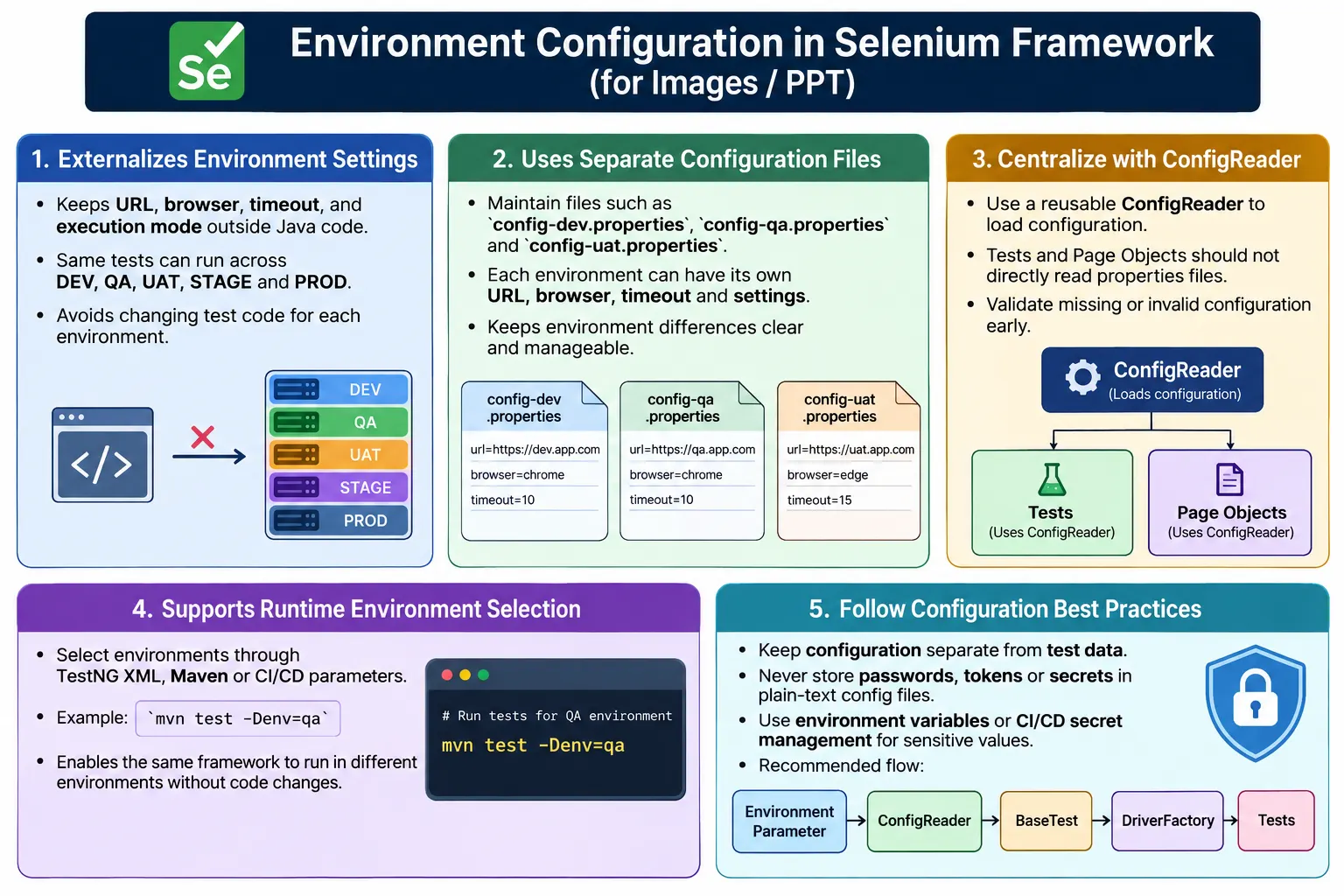
Without environment configuration, automation becomes fragile. Engineers may hardcode URLs inside test classes, change Java files before every run, or accidentally execute tests against the wrong environment. This is risky in local execution and unacceptable in CI/CD pipelines. Proper environment configuration gives the framework a controlled way to switch target environments through properties files, TestNG parameters, Maven command-line values, CI variables, or secret management.
1. What Is Environment Configuration?
Environment configuration is the practice of keeping environment-specific values outside automation code. The test logic remains the same, but the configuration changes depending on where the suite is executed. For example, the login test should not care whether it is running against QA or UAT. It should open the URL supplied by configuration and then execute the same scenario.
DEV  - https://dev.example.com
QA   - https://qa.example.com
UAT  - https://uat.example.com
PROD - https://example.com
The test code should not be edited when moving from QA to UAT. Only the selected configuration should change. This makes execution safer, more repeatable, and easier to automate.
2. Why Environment Configuration Is Needed
A bad approach is to hardcode the URL directly in the test or setup method.
driver.get("https://qa.example.com");This creates several problems. The code must be changed for every environment. A developer may forget to change it back. The same build cannot easily run against different environments. CI jobs become harder to parameterize. Code reviews become polluted with environment-only changes. A better approach reads the URL from configuration.
driver.get(
        ConfigReader.get("url")
);
Now the framework behavior is driven by configuration. The test code stays stable while the execution target changes.
3. Common Environment Files
A common design is to maintain separate properties files for each environment. Each file contains the values needed for that environment.
config-dev.properties
config-qa.properties
config-uat.properties
config-prod.properties
A QA file may contain QA URL, QA test users, and QA timeout values. A UAT file may contain UAT URL, UAT users, and slightly different timeouts. This keeps environment differences explicit and easy to review.
4. Project Structure
Environment files should live in a predictable resources folder. A typical Selenium Java framework may use the following structure.
AutomationFramework
  src/test/resources/config
    config-dev.properties
    config-qa.properties
    config-uat.properties
    config-prod.properties
  pages
  tests
  utilities
  testng.xml
This structure keeps configuration separate from page objects and test classes. It also makes the configuration files available during Maven and CI execution.
5. QA Configuration Example
environment=QA
url=https://qa.example.com
browser=chrome
timeout=20
headless=false
username=qa_user
password=qa_password
This file represents QA execution settings. The browser is Chrome, the application URL points to QA, timeout is 20 seconds, and headless mode is disabled.
6. UAT Configuration Example
environment=UAT
url=https://uat.example.com
browser=edge
timeout=30
headless=false
username=uat_user
password=uat_password
UAT may use a different URL, browser, timeout, and user account. The framework should load the correct file based on the selected environment.
7. ConfigReader Utility
A reusable ConfigReader centralizes configuration loading and lookup. Tests should not open properties files directly. Page objects should not load configuration files. The framework should load configuration once and expose values safely.
public class ConfigReader {

    private static Properties properties;

    public static void loadConfig(String env) {
        String path =
                "src/test/resources/config/config-"
                + env.toLowerCase()
                + ".properties";

        try (FileInputStream file =
                     new FileInputStream(path)) {

            properties = new Properties();
            properties.load(file);

        } catch (IOException e) {
            throw new RuntimeException(
                    "Unable to load config file: " + path,
                    e
            );
        }
    }

    public static String get(String key) {
        String value =
                properties.getProperty(key);

        if (value == null) {
            throw new RuntimeException(
                    "Missing config key: " + key
            );
        }

        return value;
    }
}
This utility builds the file path based on the selected environment. It also fails clearly if a required key is missing. In real frameworks, this class can be extended with typed getters for integer, boolean, and URL values.
8. Loading Environment from TestNG XML
TestNG XML can pass the environment name to the framework. This is useful when suites are controlled through XML files.
<suite name="AutomationSuite">
    <parameter name="env" value="qa"/>

    <test name="SmokeTests">
        <classes>
            <class name="tests.LoginTest"/>
        </classes>
    </test>
</suite>
@BeforeSuite
@Parameters("env")
public void beforeSuite(String env) {
ConfigReader.loadConfig(env);
}When the suite starts, the framework loads the matching configuration file. Tests can then use ConfigReader values throughout execution.
9. Using Configuration in BaseTest
BaseTest is usually responsible for browser setup and teardown. It can read browser and URL values from configuration and create the correct WebDriver instance.
@BeforeMethod
public void setup() {
    String browser =
            ConfigReader.get("browser");

    String url =
            ConfigReader.get("url");

    if (browser.equalsIgnoreCase("chrome")) {
        driver = new ChromeDriver();
    } else if (browser.equalsIgnoreCase("edge")) {
        driver = new EdgeDriver();
    }

    driver.manage().window().maximize();
    driver.get(url);
}
This keeps tests clean. Individual test classes do not need to know which environment or browser is selected. They receive a ready browser session from the framework setup.
10. Reading Timeout Values
Timeouts often differ across environments. A local machine may be fast, while CI or UAT may be slower. Store timeout values in configuration and use them in wait utilities.
timeout=20int timeout =
Integer.parseInt(
ConfigReader.get("timeout")
);
WebDriverWait wait =
new WebDriverWait(
driver,
Duration.ofSeconds(timeout)
);A typed method such as ConfigReader.getInt("timeout") is even better because parsing and validation are centralized.
11. Reading Headless Mode
Headless mode is commonly controlled through configuration. Local runs may use visible browsers, while CI runs often use headless mode.
headless=trueboolean headless =
Boolean.parseBoolean(
ConfigReader.get("headless")
);
ChromeOptions options =
new ChromeOptions();
if (headless) {
options.addArguments("--headless=new");
}
driver = new ChromeDriver(options);This design lets the CI pipeline switch execution mode without changing browser setup code.
12. Running from Maven Command Line
Maven system properties are very useful for environment selection. A command can pass the target environment at runtime.
mvn test -Denv=qaString env =
System.getProperty("env", "qa");
ConfigReader.loadConfig(env);The second argument, qa, is a default value. If no environment is provided, the framework uses QA. This is useful for local execution.
13. Configuration Priority Order
A strong framework may support multiple ways to provide configuration. The priority should be clear. A common order is command-line system property first, TestNG parameter second, default value third.
Command Line Value
  TestNG XML Parameter
    Default Config
This order allows CI pipelines to override local defaults while preserving a simple default for developer machines. Document this priority so engineers know which value wins when multiple sources are present.
14. Environment Configuration in CI/CD
CI/CD pipelines such as Jenkins, GitHub Actions, Azure DevOps, and GitLab CI often pass environment values to Maven commands. A Jenkins job may run the same framework against QA or UAT based on a pipeline parameter.
mvn test -Denv=uat -Dbrowser=chromeJenkins Parameter
Maven Command
System Property
ConfigReader
Framework ExecutionThis makes automation pipeline-ready. The same codebase can support different scheduled jobs, smoke suites, release checks, and environment-specific validations.
15. What Should Go in Config?
Good configuration values control how the framework runs. Common examples include URL, browser, environment, timeout, headless flag, API base URL, database connection name, download path, retry count, screenshot path, grid URL, and report settings.
urlbrowserenvironmenttimeoutheadlessapiBaseUrldownloadPathretryCount
Large test datasets should not go into configuration files. Production passwords, real credit card data, sensitive tokens, and personal data should also be avoided.
16. Environment Config vs Test Data
| Environment Configuration | Test Data |
|---|---|
| URL | Username combinations |
| Browser | Product names |
| Timeout | Login datasets |
| Headless flag | Search keywords |
| API base URL | Payment test cases |
Configuration is usually stored in properties files. Test data is usually stored in DataProvider, Excel, CSV, JSON, database, or API setup.
17. Browser Override
Sometimes the environment file says browser=chrome, but a CI job wants to run the same suite in Edge. A runtime override can support this. The framework can check System.getProperty("browser") first and fall back to the config file value.
public static String getBrowser() {
    String browser =
            System.getProperty("browser");

    if (browser != null && !browser.trim().isEmpty()) {
        return browser;
    }

    return get("browser");
}
This gives the framework flexible execution without editing files for every run.
18. Remote and Grid Configuration
Modern Selenium frameworks often support local and remote execution. Environment configuration can decide whether tests run locally or on Selenium Grid.
execution=remote
gridUrl=http://localhost:4444/wd/hub
browser=chrome
If execution is local, DriverFactory creates a local browser. If execution is remote, DriverFactory creates a RemoteWebDriver using the grid URL. Configuration controls the mode, and test code remains unchanged.
19. API and Database Configuration
End-to-end frameworks may need API and database values in addition to UI values. API base URLs, service endpoints, database aliases, and test data setup flags can be environment-specific. QA may use one API host while UAT uses another.
Keep these values in config, but be careful with secrets. Database passwords, API tokens, and access keys should come from secure environment variables or CI secrets, not committed plain text files.
20. Handling Secrets
Environment configuration often touches sensitive values. Do not commit production passwords, tokens, or real customer credentials into properties files. Use CI/CD secret variables, operating system environment variables, encrypted configuration, or secret managers.
A safe pattern is to store non-sensitive keys in the file and resolve sensitive values at runtime. For example, username may be safe for a test account, but password may come from a CI secret.
21. Validation at Startup
Configuration should be validated before tests run. If the selected environment file is missing, fail immediately. If a required key is missing, fail immediately. If a value is invalid, such as browser=chromee, fail with a clear message.
Early validation prevents confusing failures later. A missing URL should not become a browser navigation error halfway through the suite. A wrong timeout value should not become a number format error inside a page object.
22. Classpath Loading
Configuration files can be loaded from the classpath instead of file paths. This is useful when files are stored under resources and tests run from different working directories.
InputStream input =
        ConfigReader.class
                .getClassLoader()
                .getResourceAsStream(
                        "config/config-qa.properties"
                );
If the input stream is null, the file was not found. The framework should throw a clear error with the requested resource path.
23. Environment-Specific Test Data
Some test data is environment-specific. QA and UAT may have different users, products, account balances, or feature flags. Keep environment-specific test data organized separately from configuration. The configuration can identify the environment, and the data utility can choose the matching data folder.
testdata
  qa
    login.csv
  uat
    login.csv
This avoids mixing all environment data into one file and makes maintenance clearer.
24. Environment Configuration and Page Objects
Page objects should not load environment files directly. A page object should model page behavior, not framework configuration. BaseTest, DriverFactory, API utilities, and data utilities can use configuration. Page objects should receive a WebDriver and interact with the page.
This keeps Page Object Model clean. If page objects start reading URLs, usernames, passwords, and environment values, responsibilities become mixed and maintenance becomes harder.
25. Configuration for Local Execution
Local execution should be simple for developers and testers. A new engineer should be able to clone the project, choose a default environment, and run a smoke test without editing Java files. For this reason, frameworks often provide a sensible local default such as env=qa, browser=chrome, and headless=false. These defaults make local debugging easier.
At the same time, local defaults should not hide how the framework really works. If the framework supports command-line overrides, document them clearly. A developer should know how to run mvn test -Denv=uat or mvn test -Denv=qa -Dbrowser=edge without searching through source code. Good configuration is not only about code design. It is also about usability for the team.
Local execution may also require developer-specific paths such as download folders or browser profiles. Avoid committing personal machine paths into shared config files. If local-only settings are required, use ignored local config files or environment variables.
26. Configuration for Smoke and Regression Runs
Different suites may need different configuration values. A smoke suite may run with a small timeout and a stable browser. A full regression suite may use a longer timeout, remote grid execution, screenshots on failure, retries, and detailed reporting. Environment configuration can support these execution modes through properties or command-line parameters.
suiteType=smoke
retryCount=0
screenshotOnFailure=true
For regression runs, the framework might use a different configuration.
suiteType=regression
retryCount=1
screenshotOnFailure=true
This allows the same framework to support fast feedback and deeper coverage without code changes. The execution mode is controlled by configuration, while the test code remains focused on scenarios.
27. Configuration for Downloads and Uploads
File download and upload tests often require environment-specific paths. A local machine may use one download folder, while a CI agent uses another. Hardcoding these paths inside tests creates portability problems. Store download paths, upload file locations, and output directories in configuration or build them from a known project path.
downloadPath=target/downloads
uploadFile=src/test/resources/files/sample.pdf
When running in remote browsers or containers, file paths must be handled carefully. A path that exists on the test runner may not exist inside the browser container. Configuration should make these assumptions visible so the framework can handle local and remote execution correctly.
28. Environment Configuration and Reports
Reports should include environment information. When a test fails, the first questions are usually: which environment was tested, which browser was used, was it headless, which build was deployed, and which suite ran? If the report includes these details, debugging is faster.
A good framework can add environment values to reports during startup. For example, the report can show Environment: QA, Browser: Chrome, Execution: Remote, and Base URL: https://qa.example.com. This helps stakeholders understand whether a failure belongs to QA, UAT, staging, or a browser-specific condition.
Reports should not expose secrets. Do not print passwords, tokens, or private connection strings. Safe configuration values should be visible; sensitive values should be masked.
29. Configuration and Feature Flags
Modern applications often use feature flags. A feature may be enabled in QA but disabled in UAT, or enabled only for specific users. Automation may need to know whether a feature is expected to appear. Configuration can include safe feature flags when they control test behavior.
newCheckoutEnabled=true
betaSearchEnabled=false
Use feature flags carefully. Tests should not become full of conditional logic that hides real issues. If a feature is expected in an environment, the config should make that expectation explicit. If the application behavior changes, the environment configuration and test expectations should be updated together.
30. Configuration and Test Data Selection
Environment configuration can help select the correct test data set. For example, QA and UAT may use different login users, product IDs, or account numbers. The config can provide the environment name, and the data utility can load files from a matching folder.
src/test/resources/testdata
  qa
    login.csv
    products.json
  uat
    login.csv
    products.json
This keeps configuration and test data separate while still allowing them to work together. The config says which environment is active. The data utility chooses the correct data source for that environment. The test remains unchanged.
31. Runtime Override Strategy
Runtime overrides are powerful, but they need rules. If command-line values, TestNG XML values, environment variables, and properties files all exist, the framework must define which source wins. Without a clear strategy, two engineers may run the same command and get different behavior.
A practical order is: system property first, environment variable second, TestNG parameter third, properties file fourth, and default value last. Not every framework needs all five levels, but whatever order is chosen should be documented and implemented consistently.
This matters in CI/CD because pipelines often inject values at runtime. A pipeline override should not be accidentally ignored because a properties file has an older value. The framework should make runtime decisions predictable.
32. Configuration Validation Checklist
Before tests start, validate the selected environment name, config file existence, required keys, supported browser value, URL format, numeric timeout values, boolean flags, and sensitive-key handling. If any of these checks fail, stop execution immediately with a clear message.
- Environment name is supported.
- Config file exists.
- Required keys are present.
- URL is not blank.
- Browser value is supported.
- Timeout values are valid numbers.
- Boolean values are true or false.
- Sensitive values are not logged.
This checklist prevents avoidable failures. Configuration errors should be caught before browser launch, not after several tests have already failed.
33. Configuration Naming Conventions
Good key names make configuration readable. A key named explicitWaitSeconds is clearer than wait. A key named apiBaseUrl is clearer than api. Use consistent naming across files. If QA uses url, UAT should also use url, not baseUrl or applicationURL.
Consistency allows the same ConfigReader to load every environment file. If different files use different key names, environment switching becomes fragile. Treat configuration keys as a contract between the config file and the framework.
34. Environment Configuration in Parallel Execution
Configuration is usually read-only during execution, so it can be shared safely across parallel tests if it is loaded once and not modified. Problems appear when tests try to change global configuration while other tests are running. Avoid mutable global config during parallel execution.
If different environments must run at the same time, use separate test processes, separate suites, or isolated configuration contexts. One global static ConfigReader is simple and works for one selected environment per run. It is not designed for multiple environments in the same JVM unless the framework is built for that explicitly.
35. Layered Configuration Design
Large frameworks often use layered configuration. One file contains common defaults, and environment-specific files override only the values that differ. For example, config-common.properties may contain default timeout, retry, screenshot, and report settings. config-qa.properties may contain only QA URL, QA users, and QA API endpoints. This reduces duplication across files.
config-common.properties
  timeout=20
  retryCount=0
  screenshotOnFailure=true

config-qa.properties
  environment=QA
  url=https://qa.example.com
Layering is useful when many environments share most values. However, it should be implemented carefully. If too many layers exist, engineers may struggle to determine the final value. Keep layering simple and document override rules clearly.
36. Fail-Safe Environment Rules
Some environments require extra protection. Production or production-like environments should not run destructive tests by accident. If the framework supports PROD configuration, it should include guardrails. For example, it can block tests tagged as destructive, require an explicit confirmation flag, or allow only read-only smoke checks.
This is especially important in automation because the same test code can create users, place orders, delete records, or update data. Environment configuration should help prevent accidental damage. A safe framework knows which environment it is running against and can apply restrictions based on that environment.
allowDestructiveTests=false
readOnlyMode=true
These flags should not replace good test design, but they add another layer of protection for high-risk environments.
37. Configuration and Release Pipelines
Release pipelines often run the same automation suite at different stages. A commit may trigger tests in DEV. A deployment may trigger smoke tests in QA. A release candidate may trigger regression tests in UAT. Before production release, the pipeline may run a limited validation suite against staging. Environment configuration makes this sequence possible without branching the test code.
Each pipeline stage can pass a different environment value. The framework loads the matching configuration, starts the correct browser mode, uses the correct base URL, and reports the environment. This creates a repeatable release process. The automation suite becomes a reusable asset across the delivery pipeline instead of a QA-only local script.
38. Configuration and Logging
Logs should include safe configuration context. At the start of execution, log the selected environment, browser, execution mode, headless flag, grid usage, and base URL. This helps engineers debug failures. If a test fails because it ran against UAT instead of QA, the log should make that obvious.
Do not log sensitive values. Passwords, tokens, database credentials, and secret keys should be masked or omitted. A mature framework logs enough context to debug execution while protecting confidential information.
39. Environment Drift
Environment drift happens when DEV, QA, UAT, and STAGE no longer behave similarly. URLs may be correct, but feature flags, data, services, permissions, or API versions may differ. Automation failures can then be caused by environment differences rather than test defects. Configuration helps identify the target environment, but teams must still manage environment consistency.
When a test passes in QA and fails in UAT, compare environment configuration first. Check URL, API base URL, database connection, feature flags, user roles, and test data. The failure may be a real defect, but it may also be an environment setup issue. Clear configuration reduces the time needed to diagnose this.
40. Versioning Configuration
Configuration files should be version controlled when they contain non-sensitive defaults. This allows changes to be reviewed. If a URL, timeout, browser setting, or feature flag changes, the team can see when and why it changed. Configuration changes can affect many tests, so they deserve review.
For sensitive values, commit a sample file instead of real secrets. A file such as config-qa.sample.properties can show required keys without exposing passwords or tokens. CI can inject the real values at runtime. This balances documentation with security.
Versioned configuration also helps rollback. If a pipeline starts failing after a configuration change, the team can compare the previous file and quickly identify whether the failure came from code, environment setup, or configuration drift.
41. Common Beginner Mistakes
- Hardcoding URLs in test classes.
- Using one config file for all environments without clear separation.
- Storing real passwords in plain text.
- Not validating missing keys.
- Changing Java code to switch environments.
- Mixing test data with configuration data.
- Loading configuration repeatedly in every test method.
- Letting page objects read configuration files directly.
- Not documenting configuration priority order.
- Using local-only file paths that fail in CI.
42. Enterprise Best Practices
Use separate configuration files per environment. Load the environment using Maven, TestNG, or CI parameters. Keep URLs, browser values, timeouts, and execution flags outside Java code. Validate required keys during startup. Use environment variables or CI secrets for sensitive data. Keep test data separate from configuration. Use a default environment only for local execution.
Also document the configuration strategy. Engineers should know how to run QA, UAT, headless, local, remote, Chrome, Edge, smoke, and regression runs without reading the framework source code.
Review configuration changes carefully because they can affect the entire suite. A wrong base URL, timeout, grid URL, or feature flag may make many unrelated tests fail even when the application and automation code are correct.
43. Real Project Flow
Maven or TestNG env parameter
  ConfigReader loads config file
    BaseTest reads browser and URL
      DriverFactory creates WebDriver
        Tests execute scenarios
          Reports show environment details
This flow makes execution traceable. When a test fails, the report should show which environment, browser, and configuration were used. This helps debugging and release decisions.
44. Interview Perspective
A short interview answer is: environment configuration is the process of externalizing environment-specific values such as URL, browser, timeout, and credentials so the same automation framework can run on DEV, QA, UAT, STAGE, or PROD without code changes.
A stronger real-time answer is: in my Selenium framework, I maintain separate properties files such as config-qa.properties and config-uat.properties. The environment is selected through TestNG XML, Maven command-line parameters, or CI/CD pipeline variables. A reusable ConfigReader loads the correct file, and BaseTest uses those values to launch the browser and open the correct application URL. Sensitive data is handled through CI secrets or environment variables instead of plain-text files.
45. Key Takeaway
Environment configuration makes Selenium frameworks flexible, maintainable, and CI/CD-ready. The same test code can execute on different environments by changing configuration rather than changing Java code.
The core idea is simple: same test code plus different configuration file equals execution on different environments. Keep configuration external, validate it early, separate it from test data, protect secrets, and let framework layers such as BaseTest and DriverFactory consume it in a controlled way.