Dynamic XPath
Dynamic XPath is used to locate elements whose attributes or text change at runtime (IDs with timestamps, auto-generated classes, dynamic labels, etc.). It is a core skill for stabilizing Selenium tests against modern, JavaScript-driven UIs. In Selenium, dynamic XPath is not optional-it is mandatory.
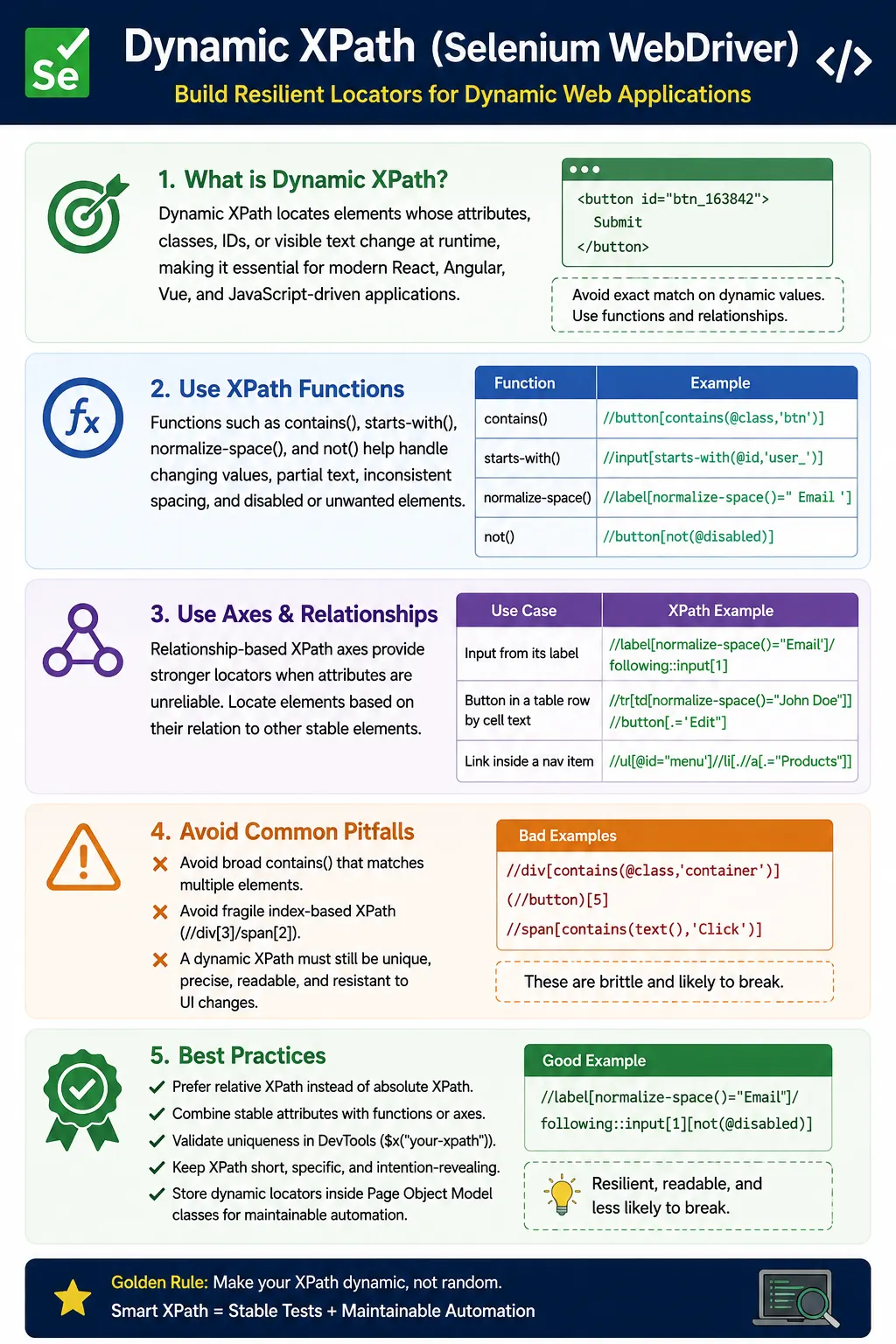
Understanding Dynamic XPath in Selenium
Dynamic XPath is the practice of writing XPath expressions that continue to locate the correct web element even when parts of the page change at runtime. In a simple static page, a locator can often rely on a fixed id, fixed name, or fixed text. In modern applications, that assumption frequently fails. Frontend frameworks generate ids, CSS classes may include build-time hashes, table rows change order, messages include user names or dates, and components re-render after API responses. A static XPath that depends on the exact value of a changing attribute may work today and fail tomorrow. Dynamic XPath is used to avoid that problem by focusing on stable patterns, relationships, and meaningful conditions.
The word dynamic does not mean vague. A good dynamic XPath is not a broad expression that accepts almost anything. It is a locator that understands which part of the DOM is stable and which part is temporary. For example, if an input id changes from user_105 to user_884 but always begins with user_, the stable clue is the prefix. If a button text changes from Submit to Submit Order, the stable clue may be the word Submit or a nearby section title. If a table row moves from one position to another, the stable clue may be the cell value inside the row. Dynamic XPath uses these stable clues while ignoring accidental variation.
In Selenium automation, this skill is essential because locators are the foundation of every action and assertion. A test can have good assertions, clean test data, and a strong framework, but if the locators are brittle, the suite will still be unreliable. Dynamic XPath helps reduce false failures caused by routine UI updates. It also helps tests interact with the right element when the same type of control appears many times on the page. The goal is not only to make Selenium find an element; the goal is to make Selenium find the intended element for the right reason.
Why Dynamic XPath Is Needed in Modern Web Applications
Many modern applications are built with React, Angular, Vue, Material UI, Bootstrap, Tailwind, and other component systems. These tools make frontend development faster, but they can also produce markup that is less predictable for automation. Some frameworks generate ids dynamically to avoid conflicts. Some libraries attach multiple classes based on state. Some components create nested spans, wrapper divs, hidden elements, and repeated structures. A locator copied directly from developer tools may include details that are not stable across builds, sessions, browsers, or data sets.
Dynamic data is another common reason static XPath fails. A dashboard may display a count, a date, a user name, or an order number inside the same message. If the test uses exact text for the entire message, it may fail whenever the dynamic value changes. A dynamic XPath can target the stable part of the message, such as the words created successfully or payment failed. This keeps the locator focused on the message type rather than the runtime value. The test can still validate exact values separately when those values are part of the assertion.
Repeated UI patterns also require dynamic XPath. Tables, product cards, search results, menus, and grid rows often contain repeated buttons and labels. A static locator for the first Edit button is rarely enough. The test usually needs the Edit button for a specific row or card. Dynamic XPath can locate the row by its content and then locate the button inside that row. This approach is more stable than index-based XPath because it follows the data in the scenario instead of the position of the element on the screen.
Dynamic XPath Starts with Stable Clues
The first step in writing dynamic XPath is identifying stable clues in the DOM. Stable clues are values or relationships that are unlikely to change during normal UI updates. A stable clue may be a data-testid attribute, a data-qa attribute, a readable name, a consistent prefix, a label, a heading, or a row value. A volatile clue is something likely to change, such as a timestamp, session-specific id, generated suffix, randomized class, or visual index. Dynamic XPath works by building the expression around stable clues and avoiding volatile clues.
This is why inspection matters. A tester should not simply copy XPath from the browser and paste it into the framework. Browser-generated XPath often describes the current DOM path, including wrapper divs and indexes. It does not know which attributes are stable or which element matters to the business scenario. A human tester must inspect the element, compare it with nearby elements, understand how the page is structured, and decide which clue best identifies the target. Dynamic XPath is a thinking process before it is a syntax choice.
A useful rule is to prefer direct stable attributes first. If the element has a reliable id, name, aria-label, data-testid, or data-qa value, use it. If only part of the attribute is stable, use a function such as contains or starts-with. If attributes are not reliable, use visible text or relationship-based XPath from a nearby label or heading. If the page has repeated structures, scope the search to the correct section or row. Indexes should be used only after these better options are exhausted.
Using contains for Partial Matches
The contains function is one of the most common tools for dynamic XPath. It checks whether an attribute or text includes a particular value. This is helpful when an attribute has a stable part and a changing part. For example, an input id such as user_1689321 may change every session, but the word user may remain consistent. A contains-based XPath can locate the input based on that stable substring. This avoids tying the locator to a runtime-generated suffix.
contains is also useful for dynamic class names, but it requires care. A class value may include many tokens, such as btn primary active submit-button. Matching a specific class fragment can work well if the fragment is meaningful. Matching a generic fragment such as btn, col, row, or text can be too broad because those words may appear all over the page. The most common misuse of contains is making the locator so flexible that it no longer identifies one target. Dynamic XPath must still be unique enough for the scenario.
Text-based contains is useful for messages and links that include changing values. A message such as Welcome John can be matched by the stable word Welcome if the test only needs to confirm that a welcome message appeared. If the test must confirm that John is displayed, then the assertion should check John explicitly. The locator and the assertion do not always need to do the same job. The locator finds the element; the assertion verifies the expected behavior. Keeping that distinction clear leads to cleaner automation.
Using starts-with for Predictable Prefixes
starts-with is useful when a dynamic value always begins with the same prefix. It is often more precise than contains because it limits where the stable value must appear. If ids always begin with order_, invoice_, or menu_, starts-with communicates that pattern clearly. This is common in applications where a frontend library creates unique element ids by appending generated numbers or strings after a fixed prefix.
The benefit of starts-with is readability and intent. When another engineer reads the locator, they can see that the attribute is expected to begin with a known pattern. This is different from contains, which only says that the value appears somewhere. In pages with many similar values, starts-with can reduce accidental matches. However, it should still be combined with other conditions when the prefix is shared by several elements.
A common example is a menu system where multiple divs begin with menu_. If the locator only checks the prefix, it may find the wrong menu. A stronger expression may combine starts-with with text, role, aria-expanded, or a parent container. Dynamic XPath is often strongest when it uses more than one stable clue. One condition gets close; a second condition confirms the exact target.
Handling Text and Whitespace with normalize-space
Text is one of the most readable ways to identify an element, but text in the DOM is not always as clean as it appears in the browser. HTML formatting can add spaces, line breaks, or indentation around a word. A button may visually display Save while the DOM contains new lines before and after the text. An exact text comparison may fail even though the user sees the correct label. normalize-space solves this by trimming leading and trailing spaces and reducing repeated internal whitespace.
normalize-space is especially useful for buttons, labels, menu items, tabs, and headings. It makes text locators more stable without making them vague. A locator using normalize-space equal to Submit is still exact in meaning, but it ignores formatting noise. This is often better than contains(text(),'Submit') when the text should be exactly Submit. contains is flexible; normalize-space is clean. Choosing between them depends on whether the text value itself is dynamic or only the whitespace around it is inconsistent.
Nested elements can complicate text matching. A button may contain an icon span and a text span, or a label may include required-field indicators. In these cases, direct text() may not always match the full visible text. Using normalize-space on the element can be more reliable than comparing a single text node. The important point is to inspect how the browser represents the visible text in the DOM. Dynamic XPath is not guesswork; it is based on understanding the markup.
Using Multiple Conditions for Precision
Dynamic XPath often needs more than one condition. A single contains expression may match many elements. By adding another condition with and, the locator becomes more precise. For example, an input can be identified by a stable class fragment and a type, or a button can be identified by text and by the absence of a disabled attribute. Multiple conditions help the locator remain flexible where the DOM changes and strict where the element identity matters.
The and operator is usually preferred when improving uniqueness because it requires all conditions to be true. It narrows the result set. The or operator should be used only when the UI legitimately has alternative values for the same intent. For example, a button may display Save in one flow and Submit in another flow because the same page component is reused. In that case, or may be acceptable. But using or to cover many possible matches can hide unclear locator design. If the test is not sure what should appear, the automation should be clarified instead of making the XPath overly permissive.
Exclusion with not is another useful technique. A page may contain enabled and disabled versions of a button, hidden templates, inactive rows, or old elements left in the DOM during transitions. not can exclude disabled, inactive, or hidden-state elements based on attributes or classes. It should still be paired with Selenium waits when interaction readiness matters, because XPath can identify structural conditions but cannot fully replace visibility and clickability checks.
Relationship-Based Dynamic XPath
When attributes are unreliable, relationships often provide the strongest locator. A label-to-input relationship is a classic example. The input may have a generated id, but the label text may be stable. A dynamic XPath can locate the label by normalized text and then move to the following input. This matches how a user understands the field. The user does not care about the generated id; the user sees the Email label and enters text in the associated field.
Relationship-based XPath is also powerful for validation messages. After entering invalid data, a test may need to verify the error message related to a specific input. A broad locator for any error message may pass even if the wrong field shows the error. A better locator starts from the target input or form group and moves to the related error span. This makes the assertion more accurate because it validates the message in context.
Headings and section titles can also anchor dynamic XPath. A settings page may have several Save buttons, one in each section. Instead of clicking the first Save button, the test can locate the Billing section and then find the Save button inside or after that section. This is much more maintainable than relying on page-level indexes. The locator expresses business structure rather than DOM position.
Dynamic XPath in Tables and Lists
Tables are one of the most common places where dynamic XPath is needed. Row order changes with sorting, filtering, pagination, and new data. An index-based row locator may pass in a static test environment but fail in a real data-driven run. A stronger approach is to identify the row by cell content. If the row contains John Doe, an order id, or an invoice number, the XPath should anchor on that value and then locate related cells or buttons in the same row.
This pattern also prevents false actions. Suppose a test needs to delete Product A. If it clicks the first Delete button on the page, it may delete the wrong product after sorting changes. If it finds the row containing Product A and then clicks the Delete button inside that row, the action remains tied to the test data. This is the difference between automation that follows the scenario and automation that follows an accidental screen position.
Dynamic lists and cards follow the same principle. Search results, shopping carts, task boards, notification lists, and user management pages often repeat the same structure. Dynamic XPath should first identify the item by meaningful content and then select the control inside that item. Scoped locators are safer and easier to debug than global locators because they reduce the area of the page being searched.
Dynamic XPath and Page Object Model
Dynamic XPath belongs naturally in Page Object Model classes. Test methods should not be filled with long XPath strings or string concatenation. The page object can expose methods such as getUserRow, clickDeleteForProduct, selectCountry, or readErrorForField. These methods accept dynamic values and build the appropriate locator internally. This keeps test cases readable while centralizing locator maintenance.
Parameterized locators are common in real frameworks. A method may accept a user name and return the row that contains that user. Another method may accept a product name and return the Add to Cart button for that product. This is a good use of dynamic XPath because the dynamic part comes from the test data, while the relationship pattern remains stable. The method name explains the intent, and the XPath handles the DOM traversal.
Dynamic XPath values must be built carefully when input contains quotes or special characters. If a user name, product name, or option text can contain apostrophes, direct string concatenation can break the XPath syntax. A robust framework may need helper methods for escaping XPath string literals. This is a more advanced detail, but it matters in enterprise projects where test data can include real names, addresses, and product labels.
Dynamic XPath vs CSS Selectors
Dynamic XPath and CSS selectors both have a place in Selenium automation. CSS selectors are often concise and fast for simple attribute, id, class, and descendant matching. XPath is stronger when the locator needs visible text, parent traversal, ancestor lookup, or relationship-based movement from one element to another. The best automation frameworks use both strategies pragmatically. They do not force every locator into XPath or every locator into CSS.
If an element has a clean data-testid, a CSS selector may be simpler than XPath. If the test must locate an input next to a label or a button inside the row containing a specific value, XPath is often clearer. The decision should be based on readability, stability, and intent. Performance differences between reasonable CSS and reasonable XPath are usually less important than locator reliability. A brittle CSS selector is worse than a stable XPath, and a broad XPath is worse than a simple stable CSS selector.
Dynamic XPath should not be used as a replacement for good application markup. If a page is difficult to automate because every attribute is generated and no stable hooks exist, it may be better to request automation attributes from developers. Data attributes create a clear contract between the application and the test suite. Dynamic XPath is powerful, but collaboration with developers can make locators simpler and more reliable.
Avoiding Overly Broad Dynamic XPath
The biggest risk with dynamic XPath is over-flexibility. A locator such as any div whose class contains col may match dozens of elements. It may work only because Selenium returns the first match, which happens to be the desired element today. That is not reliable automation. A dynamic locator must still be specific enough to find exactly the intended element or a controlled set of elements. Flexibility should ignore unstable parts, not ignore identity.
Another risk is stacking many weak conditions together. A long XPath with several contains conditions may look sophisticated, but if each condition is generic, the locator is still weak. Strong locators use meaningful conditions. A stable label, row value, aria attribute, data attribute, or section heading is better than a collection of layout classes. The question to ask is: would this locator still make sense to another tester who reads it six months later?
Indexes should be treated as a last resort. There are valid uses for indexes, such as selecting the last row in a log when the test specifically verifies newest activity. But indexes are fragile when they are used only to force uniqueness. If an XPath needs [2] to work, inspect why two elements match. It may need better scoping, a parent context, a text condition, or a more specific attribute.
Debugging Dynamic XPath Failures
When a dynamic XPath fails, start by checking the expression in browser developer tools. Determine whether it matches zero elements, too many elements, or the wrong element. If it matches zero elements, the stable clue may not be present yet, the page may still be loading, the element may be inside an iframe, or the text may include whitespace that requires normalize-space. If it matches too many elements, the locator needs additional conditions or a smaller context. If it matches the wrong element, the chosen clue is not specific enough.
Timing problems are often mistaken for locator problems. A correct dynamic XPath can still fail if the element has not rendered yet. React, Angular, and Vue applications may update the DOM after API calls or state changes. Selenium tests should combine dynamic XPath with explicit waits. The locator defines what to find; the wait defines when it is ready. Presence, visibility, and clickability are different states, and tests should wait for the state required by the action.
StaleElementReferenceException is another common issue in dynamic pages. If a component re-renders after the element is located, the WebElement reference becomes outdated. The fix is not usually to make the XPath longer. The fix is to locate the element again after the DOM update. Dynamic XPath helps because it can re-identify the correct element in the new DOM, but the framework must avoid reusing stale references across refreshes or re-renders.
Interview Perspective on Dynamic XPath
In interviews, dynamic XPath is a common topic because it connects Selenium syntax with real project experience. A short answer is that dynamic XPath is used to locate elements whose attributes or text change at runtime by using functions such as contains, starts-with, normalize-space, and relationship-based axes. A stronger answer explains that dynamic XPath should be flexible but still unique, and that indexes should be avoided unless position is part of the requirement.
A strong interview example is a dynamic table. Instead of selecting the second row, the XPath should locate the row containing a specific name and then find the Edit button inside that row. Another good example is a dynamic id. Instead of matching the full generated id, the XPath can use starts-with or contains on the stable part. These examples show practical thinking because they focus on how pages change in real applications.
Interviewers may also ask about mistakes. The best answer mentions overusing contains, using generic substrings, copying long absolute XPath from DevTools, relying on indexes, and failing to validate uniqueness. A candidate should also mention Page Object Model because dynamic XPath should be centralized and reused, not scattered across test methods. This demonstrates both locator knowledge and framework design awareness.
Practical Guidelines for Writing Dynamic XPath
A practical dynamic XPath strategy begins with a simple question: what part of this element or its surrounding context is stable? If there is a stable data attribute, use it. If there is a stable prefix or substring, use starts-with or contains. If text is stable but whitespace is inconsistent, use normalize-space. If the element itself lacks stable attributes, anchor the locator on a nearby label, heading, row value, or parent section. If the page repeats similar components, scope the search to the correct component first.
Keep dynamic XPath readable. A locator that is too long may become hard to maintain even if it works. When a relationship is complex, split the logic into steps in the page object. Find the container first, then find the element inside it. This is often clearer than one large XPath that moves across the page in several directions. Automation code is read more often than it is written, so locator readability has real long-term value.
The key takeaway is that dynamic XPath is not about writing complicated expressions. It is about writing resilient locators that survive normal UI change. Dynamic XPath uses functions, partial matches, multiple conditions, axes, and scoped searches to locate elements by stable identity and meaningful relationships. When used well, it reduces brittle tests, improves maintainability, and makes Selenium automation practical for modern web applications.
1. What Is Dynamic XPath
Definition: Dynamic XPath is an XPath expression designed to handle changing attributes or text by using:
- XPath functions (
contains,starts-with,normalize-space) - Partial matches
- Relationship-based axes
- Multiple conditions
The goal is resilience, not exact matching.
2. Why Dynamic XPath Is Needed
Modern applications often use:
- Auto-generated IDs (user_1689321)
- CSS framework classes (MuiButton-root-123)
- Dynamic text (user names, dates, counts)
- Virtual DOM updates (React/Angular/Vue)
Static locators break; dynamic XPath adapts.
3. Core Techniques for Dynamic XPath
3.1 contains() (Most Used)
Use when a stable substring exists.
Attribute example:
//input[contains(@id,'user')]Text example:
//button[contains(text(),'Submit')]Why it works: It ignores volatile suffixes/prefixes.
3.2 starts-with()
Use when values share a fixed prefix.
//div[starts-with(@id,'order_')]Ideal for: Auto-generated IDs with consistent starts.
3.3 normalize-space()
Use to handle extra or inconsistent whitespace.
//button[normalize-space(text())='Save']Prevents failures due to formatting changes.
3.4 Multiple Conditions with and
Use to improve uniqueness when one attribute isn't enough.
//input[@type='text' and contains(@class,'username')]Best practice: Prefer and over or.
3.5 Exclusion with not()
Use to avoid disabled/hidden elements.
//button[contains(text(),'Submit') and not(@disabled)]4. Relationship-Based Dynamic XPath (Very Powerful)
When attributes are unreliable, relationships are stable.
- Label means Input
//label[normalize-space()='Email']/following-sibling::input- Input means Error Message
//input[@name='email']/following-sibling::span[contains(@class,'error')]- Header means Section Content
//h3[text()='Billing']/following::div[contains(@class,'section')][1]Rule: Prefer axes over indexes.
5. Handling Dynamic Lists & Tables
Row by Cell Text (No Indexes)
//tr[.//td[normalize-space()='John Doe']]//button[contains(text(),'Edit')]Why this is strong: Targets the row by content, not position.
6. Avoiding Index-Based XPath (Anti-Pattern)
Fragile:
(//button[@class='btn'])[2]Robust:
//button[contains(@class,'btn') and normalize-space()='Save']Indexes should be last resort only.
7. Dynamic XPath vs CSS Selector (Quick Guidance)
- Dynamic text required means XPath
- Parent/ancestor traversal needed means XPath
- Simple attribute match means CSS
- Performance-critical, simple DOM means CSS
XPath offers more control; use it responsibly.
8. Real-Project Best Practices
- Prefer relative XPath only
- Keep expressions short and readable
- Use functions instead of indexes
- Validate uniqueness in DevTools
- Encapsulate in Page Object Model
- Comment complex XPath for maintainability
9. Common Beginner Mistakes
- Overusing
contains()(too broad) - Using generic substrings ("btn", "text")
- Mixing multiple fragile functions together
- Copy-pasting long XPath from DevTools
- Using indexes instead of relationships
10. Interview Perspective
Short Answer: Dynamic XPath is used to locate elements whose attributes or text change at runtime by using functions like contains() and relationship-based axes.
Real-Time Answer: In Selenium, dynamic XPath helps handle auto-generated attributes and dynamic content by using partial matches, multiple conditions, and axes like following-sibling. This makes locators resilient to UI changes in modern applications.
11. Key Takeaway
- Dynamic XPath is essential for modern UIs
- Functions + axes > indexes
- Precision beats complexity
- Readability equals maintainability
- Write XPath to survive UI change-not to mirror today's DOM.
12. Dynamic XPath Examples (Interview Ready)
1. Dynamic ID Using contains()
driver.findElement(
    By.xpath("//input[contains(@id,'user')]")
).sendKeys("admin");
Use case: ID like user_12345.
2. Dynamic ID Using starts-with()
driver.findElement(
    By.xpath("//div[starts-with(@id,'menu_')]")
);
3. Dynamic Class Using contains()
driver.findElement(
    By.xpath("//button[contains(@class,'primary')]")
).click();
4. Dynamic Text Using contains()
driver.findElement(
    By.xpath("//span[contains(text(),'Welcome')]")
);
Matches: "Welcome John", "Welcome Admin".
5. Dynamic Button Using normalize-space()
driver.findElement(
    By.xpath("//button[normalize-space()='Submit']")
).click();
Handles: Extra spaces/newlines.
6. Dynamic Row Selection (Table)
driver.findElement(
    By.xpath("//tr[td[text()='John']]")
);
Find row dynamically by name.
7. Dynamic Column Value
driver.findElement(
    By.xpath("//td[text()='John']/following-sibling::td[1]")
).getText();
8. Dynamic Label means Input Mapping
driver.findElement(
    By.xpath("//label[text()='Email']/following-sibling::input")
).sendKeys("test@example.com");
9. Dynamic Element Based on Partial Attribute
driver.findElement(
    By.xpath("//a[contains(@href,'profile')]")
).click();
10. Dynamic XPath Using Multiple Conditions
driver.findElement(
    By.xpath("//input[contains(@id,'user') and @type='text']")
).sendKeys("admin");
11. Dynamic XPath for Last Element
driver.findElement(
    By.xpath("(//button[contains(@class,'delete')])[last()]")
).click();
12. Dynamic XPath with Index
driver.findElement(
    By.xpath("(//input[contains(@class,'form-control')])[2]")
);
Warning: Use index only if no better option.
13. Dynamic XPath Stored in Variable (Framework Style)
String name = "John";

driver.findElement(
    By.xpath("//td[text()='" + name + "']")
);
14. Dynamic XPath Parameterized Method
public WebElement getUserRow(String userName) {
    return driver.findElement(
        By.xpath("//tr[td[text()='" + userName + "']]")
    );
}
15. Dynamic XPath Using not()
driver.findElement(
    By.xpath("//button[not(@disabled)]")
).click();
16. Dynamic XPath Inside Context (.)
WebElement card = driver.findElement(By.className("product-card"));

card.findElement(
    By.xpath(".//button[contains(text(),'Add')]")
).click();
17. Dynamic XPath for Dynamic Dropdown
String option = "India";

driver.findElement(
    By.xpath("//select[@id='country']/option[text()='" + option + "']")
).click();
18. Dynamic XPath After Page Refresh (Stale Fix)
WebElement btn =
    driver.findElement(
        By.xpath("//button[contains(text(),'Save')]")
    );

driver.navigate().refresh();

btn =
    driver.findElement(
        By.xpath("//button[contains(text(),'Save')]")
    );
btn.click();
19. Dynamic XPath for Dynamic Error Message
driver.findElement(
    By.xpath("//span[contains(@class,'error') and contains(text(),'Invalid')]")
);
20. Dynamic XPath in Page Object Model (POM)
public By deleteButton(String productName) {
    return By.xpath(
        "//tr[td[text()='" + productName + "']]//button[contains(@class,'delete')]"
    );
}
21. Invalid: Common Interview Mistake
// Too generic
By.xpath("//div[contains(@class,'col')]"); // Invalid: may match many
Rule: Dynamic XPath must still be unique.
22. Dynamic XPath vs Absolute XPath (Interview)
- Absolute XPath means brittle & static
- Dynamic XPath means flexible & stable
23. Best Dynamic XPath Functions (Industry)
contains()starts-with()normalize-space()not()following-siblingancestor
24. When Dynamic XPath Is Required
- Valid: Dynamic IDs
- Valid: Dynamic text
- Valid: Auto-generated classes
- Valid: Table-based apps
- Valid: Modern React/Angular apps
25. Interview Summary - Dynamic XPath
- Valid: Handles dynamic attributes
- Valid: Uses functions for flexibility
- Valid: Reduces brittle locators
- Valid: Very common in real projects
- Valid: Must-know for SDET interviews