DataProvider in TestNG for Selenium Java
DataProvider is one of the most powerful features of TestNG. It enables data-driven testing by allowing the same test method to run multiple times with different sets of input data. Instead of writing separate test methods for every data combination, you write one reusable test method and supply different rows of data through a DataProvider.
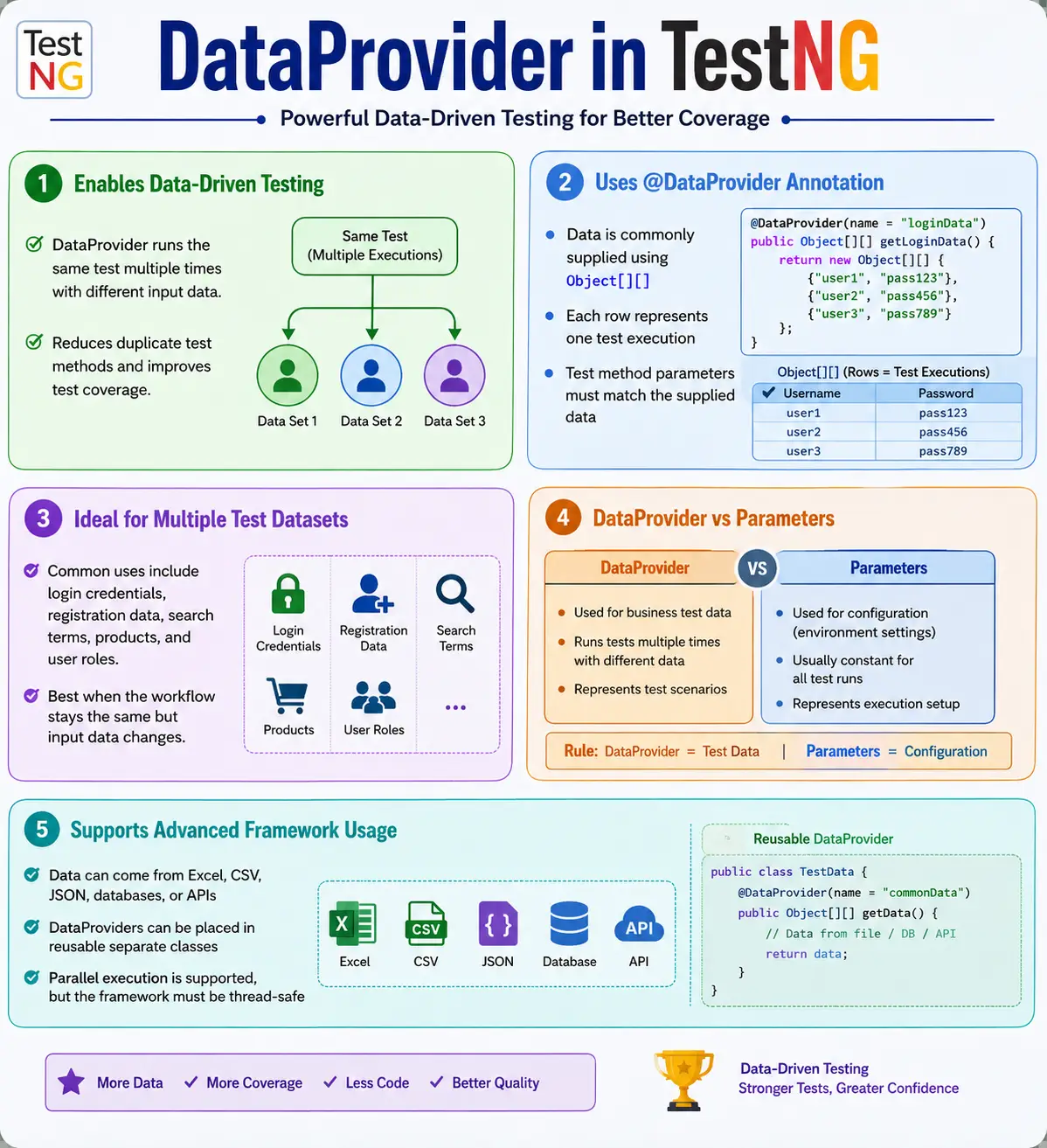
In Selenium automation, DataProvider is commonly used for login credentials, registration forms, search keywords, product details, payment data, user roles, API payloads, localization checks, and form validation scenarios. It reduces duplicate test code and makes test coverage easier to expand. If the workflow is the same and only the input values change, DataProvider is usually a good fit.
DataProvider should not be confused with TestNG Parameters. Parameters are mainly for configuration values such as browser, URL, environment, language, timeout, and headless mode. DataProvider is mainly for business test data. This separation helps keep automation frameworks clean: configuration controls how the test runs, while DataProvider controls what data the test uses.
1. What Is DataProvider?
A DataProvider is a TestNG method annotated with @DataProvider. It supplies data to a test method. The test method executes once for each row of data returned by the DataProvider. Each row maps to one test invocation.
DataProvider
      ↓
Returns data rows
      ↓
TestNG reads row 1
      ↓
Runs test method
      ↓
TestNG reads row 2
      ↓
Runs test method again
For example, instead of writing separate login tests for admin, user, and guest, you can write one login test and provide three rows of username and password data. TestNG runs the same method three times.
2. Why DataProvider Is Needed
Suppose you want to test login using multiple credentials. Without DataProvider, you may create separate methods such as loginAdmin(), loginUser(), and loginGuest(). Each method performs the same steps with different values. That creates duplicate code.
@Test
public void loginAdmin() {
}

@Test
public void loginUser() {
}

@Test
public void loginGuest() {
}
With DataProvider, the test method receives username and password as arguments. The method stays the same, and the data changes.
@Test(dataProvider = "loginData")
public void login(
        String username,
        String password
) {
}
This design is cleaner and easier to maintain. If the login flow changes, you update one method, not many duplicate methods.
3. How DataProvider Works
DataProvider returns data in a structure TestNG can understand. TestNG reads the data and invokes the test method once per row. The number of values in each row must match the number of parameters in the test method.
Data row: admin, admin123
      ↓
login("admin", "admin123")

Data row: user, user123
      ↓
login("user", "user123")
If the DataProvider returns two values per row, the test method must accept two parameters. If the DataProvider returns three values per row, the test method must accept three parameters. Mismatch causes TestNG execution errors.
4. Basic Syntax
The most common DataProvider return type is Object[][]. Each inner array is one row of data. Each value inside that row is passed to the test method.
@DataProvider(name = "loginData")
public Object[][] getData() {

    return new Object[][] {
            {"admin", "admin123"},
            {"user", "user123"}
    };
}

@Test(dataProvider = "loginData")
public void login(
        String username,
        String password
) {

    System.out.println(username);
}
The test runs twice: once with admin and once with user. This is data-driven testing in its simplest form.
5. Understanding Object Arrays
Object[][] means a two-dimensional object array. The outer array represents all rows. Each inner array represents one execution row. Since the values are stored as Object, different data types can be used, such as strings, integers, booleans, custom objects, or combinations of them.
return new Object[][] {
        {"admin", "admin123"},
        {"user", "user123"},
        {"guest", "guest123"}
};
In this example, there are three rows. Each row contains two values. Therefore, the test method should accept two parameters.
6. Execution Flow
If the DataProvider contains admin, user, and guest credentials, TestNG invokes the same method three times. Each invocation is treated as a separate test execution in the report.
login(admin, admin123)
        ↓
login(user, user123)
        ↓
login(guest, guest123)
This improves reporting because each data row can pass or fail independently. If the guest login fails, the admin and user rows can still pass.
7. Login Example
Login testing is one of the most common DataProvider examples. The workflow is the same: enter username, enter password, click login, and verify the result. Only the input data changes.
@DataProvider(name = "users")
public Object[][] users() {

    return new Object[][] {
            {"admin", "admin123"},
            {"user", "user123"}
    };
}

@Test(dataProvider = "users")
public void login(
        String username,
        String password
) {

    driver.findElement(By.id("username"))
          .sendKeys(username);

    driver.findElement(By.id("password"))
          .sendKeys(password);

    driver.findElement(By.id("login"))
          .click();
}
In a real test, you would also add assertions to verify whether login succeeded or failed according to the dataset.
8. Multiple Data Types
DataProvider can pass different data types. For example, an employee test may need an integer id, a string name, and a boolean active flag.
@DataProvider(name = "employee")
public Object[][] employeeData() {

    return new Object[][] {
            {101, "John", true},
            {102, "Mary", false}
    };
}

@Test(dataProvider = "employee")
public void verifyEmployee(
        int id,
        String name,
        boolean active
) {
}
This flexibility makes DataProvider useful beyond simple string values.
9. DataProvider with Three Parameters
A product test may need product name, quantity, and expected price. Each row can contain three values.
@DataProvider(name = "productData")
public Object[][] products() {

    return new Object[][] {
            {"Laptop", 2, 1500},
            {"Phone", 1, 800}
    };
}
The test method must accept three parameters in the same order. This alignment is essential for stable execution.
10. Naming a DataProvider
A DataProvider can be given a name using name. The test method references this name through the dataProvider attribute.
@DataProvider(name = "loginData")
public Object[][] loginData() {
    return new Object[][] {
            {"admin", "admin123"}
    };
}

@Test(dataProvider = "loginData")
public void login(
        String username,
        String password
) {
}
The names must match exactly. DataProvider names are case-sensitive.
11. Default DataProvider Name
If no name is supplied, the method name becomes the DataProvider name. This is convenient for simple cases.
@DataProvider
public Object[][] loginData() {
    return new Object[][] {
            {"admin", "admin123"}
    };
}

@Test(dataProvider = "loginData")
public void login(
        String username,
        String password
) {
}
For clarity in large frameworks, many teams prefer explicitly naming DataProviders.
12. DataProvider in a Separate Class
When data is reused across multiple test classes, it is better to move DataProvider methods into a separate class. This keeps test classes cleaner and improves reuse.
public class TestData {

    @DataProvider(name = "users")
    public static Object[][] loginData() {

        return new Object[][] {
                {"admin", "admin123"},
                {"user", "user123"}
        };
    }
}
@Test(
dataProvider = "users",
dataProviderClass = TestData.class
)
public void login(
String username,
String password
) {
}This pattern is common in enterprise frameworks where many classes need the same login data, role data, or search data.
13. Reading Data from Excel
Many enterprise frameworks read large datasets from Excel. The DataProvider method can call an Excel utility and return the data as Object[][].
@DataProvider(name = "excelData")
public Object[][] readExcel() {

    return ExcelUtil.getTestData("Login");
}

@Test(dataProvider = "excelData")
public void login(
        String username,
        String password
) {
}
Excel is common because manual testers and business users are familiar with it. However, Excel should be managed carefully because large spreadsheets can become difficult to maintain.
14. DataProvider with Iterator
TestNG also supports Iterator<Object[]>. This is useful for large or dynamically generated datasets because data can be supplied row by row.
@DataProvider(name = "users")
public Iterator<Object[]> getUsers() {

    List<Object[]> data =
            new ArrayList<>();

    data.add(new Object[] {"admin", "admin123"});
    data.add(new Object[] {"user", "user123"});

    return data.iterator();
}
Iterator-based providers can be useful when data is loaded from APIs, databases, or generated at runtime.
15. Parallel DataProvider
DataProvider can run rows in parallel using parallel = true. This can reduce execution time for large data-driven suites, but it should be used only when the framework is thread-safe.
@DataProvider(
        name = "users",
        parallel = true
)
public Object[][] users() {

    return new Object[][] {
            {"admin"},
            {"manager"},
            {"guest"}
    };
}
If the test uses Selenium WebDriver, each parallel invocation must have its own driver instance or thread-safe driver management. Shared browser sessions can create random failures.
16. Complete Example
The following example shows one class with a DataProvider and one test method. The method executes once for each row.
public class LoginTest {

    @DataProvider(name = "loginData")
    public Object[][] loginData() {

        return new Object[][] {
                {"admin", "admin123"},
                {"user", "user123"},
                {"guest", "guest123"}
        };
    }

    @Test(dataProvider = "loginData")
    public void login(
            String username,
            String password
    ) {

        System.out.println(
                username + " " + password
        );
    }
}
The output displays each username and password pair because the test runs three times.
17. Real Project Example
In an e-commerce application, the same login test may validate admin, customer, and vendor users. The workflow is the same, but roles and credentials differ.
@DataProvider(name = "users")
public Object[][] users() {

    return new Object[][] {
            {"admin", "admin123"},
            {"customer", "cust123"},
            {"vendor", "vendor123"}
    };
}
The test can also assert different expected outcomes based on role. For example, admin may see an admin dashboard, vendor may see inventory management, and customer may see order history.
18. DataProvider vs Parameters
DataProvider and Parameters are both useful, but they should not be mixed up. Use TestNG Parameters for runtime configuration. Use DataProvider for business test data that should execute the same method multiple times.
- DataProvider usually causes multiple test executions.
- Parameters usually configure one execution.
- DataProvider data comes from Java or external data sources.
- Parameters usually come from
testng.xml. - DataProvider is best for usernames, search values, products, forms, and API payloads.
- Parameters are best for browser, URL, environment, language, and headless mode.
19. DataProvider vs Hardcoding
Hardcoding test data directly inside the test method makes tests rigid. If data changes, the test code changes. DataProvider separates the test logic from data, which makes maintenance easier.
driver.findElement(By.id("username"))
      .sendKeys(username);
The variable username comes from the DataProvider. The same code works for every row.
20. Reading from CSV, JSON, Database, or API
Excel is common, but it is not the only external source. DataProvider can read from CSV files, JSON files, databases, APIs, or generated data utilities. The DataProvider only needs to return data in a TestNG-supported format.
@DataProvider(name = "csvData")
public Object[][] csvData() {

    return CSVUtil.read("users.csv");
}
@DataProvider(name = "apiData")
public Object[][] apiData() {
return ApiDataUtil.getUsers();
}This flexibility makes DataProvider suitable for large frameworks where test data may come from many systems.
21. DataProvider with Method Parameter
A DataProvider can receive the Java reflection Method object. This allows one DataProvider to return different data based on the test method name.
@DataProvider(name = "dynamic")
public Object[][] data(Method method) {

    if (method.getName().equals("login")) {
        return new Object[][] {
                {"admin", "admin123"}
        };
    }

    return new Object[][] {
            {"Guest"}
    };
}
This technique can be useful, but avoid making one DataProvider too complex. If the logic becomes difficult to understand, separate DataProviders may be cleaner.
22. DataProvider with Objects
DataProvider can pass custom objects. Instead of passing many separate parameters, you can create a data model such as User, Employee, Product, or PaymentDetails.
@DataProvider(name = "employees")
public Object[][] employees() {

    Employee emp =
            new Employee("John", 1001);

    return new Object[][] {
            {emp}
    };
}
Using objects can make tests cleaner when the data has many fields. It also improves readability compared with long parameter lists.
23. DataProvider and Assertions
Data-driven tests should still have clear assertions. Each row should have an expected result or the test should derive the expected result from the data. For example, invalid login data should expect an error message, while valid login data should expect successful navigation.
A common improvement is adding an expected outcome column:
return new Object[][] {
        {"admin", "admin123", "success"},
        {"baduser", "wrongpass", "failure"}
};
The test then asserts based on the expected outcome. This makes positive and negative scenarios possible in one data-driven test when the workflow is similar.
24. DataProvider and Reports
When a DataProvider runs the same test many times, reports must show which data row failed. Otherwise, debugging becomes difficult. TestNG reports usually include parameter values, but custom reports should also show meaningful data such as username, role, product, or scenario name.
For large datasets, add a scenario name or test case id to each row. This makes failures easier to identify in CI reports.
return new Object[][] {
        {"TC_LOGIN_001", "admin", "admin123"},
        {"TC_LOGIN_002", "guest", "guest123"}
};
The scenario id can be logged at the start of the test and included in screenshots.
25. DataProvider and Test Independence
Each DataProvider row should be independent. If row two depends on row one creating data, the test becomes fragile. Data-driven tests are easier to run, retry, and parallelize when each row can execute on its own.
For example, a registration dataset should use unique emails for every row. A payment dataset should avoid reusing state that another row may modify. If the data source creates dependencies, parallel execution becomes risky.
26. Designing Good DataProvider Rows
A strong DataProvider is not only a method that returns data. It is a small contract between the data source and the test method. Every row should represent one clear scenario, and every column should have a clear purpose. When a row contains only values such as username and password, the test can execute, but the report may not explain why that row exists. Adding a scenario name, expected result, or test case id often makes the dataset much easier to maintain.
For example, a login DataProvider can contain username, password, expected status, and expected message. That structure tells the test what to do and what to verify. It also helps the tester understand whether a row is a positive case, negative case, boundary case, locked-user case, or role-based case. Without that clarity, a DataProvider can become a table of random values that is difficult to debug.
return new Object[][] {
        {"TC_LOGIN_001", "admin", "admin123", "success"},
        {"TC_LOGIN_002", "lockedUser", "pass123", "locked"},
        {"TC_LOGIN_003", "badUser", "badPass", "failure"}
};
The test method can now log the test case id, enter the username and password, and assert based on the expected status. This makes the test reusable without making it vague. Good data design also prevents the common mistake of using one DataProvider for scenarios that actually require different workflows.
27. External Data Governance
In many real projects, DataProviders are connected to Excel, CSV, JSON, database tables, or API responses. This is useful, but it also introduces a maintenance responsibility. External data should be treated like test code. It needs naming rules, ownership, review, and cleanup. If nobody owns the external dataset, the automation suite can start failing because of stale usernames, expired passwords, changed roles, deleted products, or invalid environment-specific records.
A practical approach is to keep small stable datasets inside Java code and move only larger or frequently updated datasets outside. For example, three login roles can stay inside a Java DataProvider. Hundreds of product search terms or address combinations may belong in Excel, CSV, or JSON. The decision should be based on maintainability, not on the idea that every test must read from Excel.
External data files should also avoid sensitive information. Do not keep real passwords, customer records, payment details, or production personally identifiable information in test datasets. Use masked, synthetic, or environment-specific test data. If the automation suite runs in CI, the data must also be available to the build agent without relying on a tester's local machine path.
28. Parallel DataProvider Safety
Parallel DataProvider execution can reduce runtime, but it exposes weak framework design quickly. When parallel = true is enabled, multiple rows can execute at the same time. If all tests share the same static WebDriver instance, same user account, same browser session, same files, or same mutable data objects, failures may become inconsistent. The issue may not be the application; it may be the automation framework sharing state incorrectly.
Before enabling parallel DataProviders, each test execution should have its own driver context, independent data row, and predictable cleanup. In Selenium Java frameworks, this usually means using ThreadLocal<WebDriver> or another thread-safe driver management pattern. It also means screenshots, downloaded files, logs, and reports should use unique names so that one data row does not overwrite another row's evidence.
Parallel execution also changes how test data should be prepared. If ten rows create users with the same email address at the same time, several rows may fail because the application correctly rejects duplicate data. The fix is not a bigger wait. The fix is unique test data generation or isolated test records. DataProvider parallelism is useful only when the tests and the data are designed for concurrent execution.
29. When Not to Use DataProvider
DataProvider is powerful, but it is not the right solution for every repetition. If each dataset requires a completely different workflow, different page sequence, or different assertion strategy, separate tests may be clearer. A test method with many conditional branches based on data values is a warning sign. The goal of data-driven testing is to reuse the same behavior with different values, not to hide many unrelated tests inside one method.
DataProvider is also not ideal for environment configuration. Browser name, base URL, grid URL, environment name, and execution mode are usually better handled through TestNG Parameters, system properties, Maven properties, or CI variables. Those values configure the test run; they are not business test data. Mixing configuration and test data makes frameworks harder to understand.
Another case to avoid is very large data execution without a clear testing purpose. Running thousands of rows through a UI test may create a slow and unstable suite. Large data validation may be better handled at API, service, database, or unit level. UI DataProviders should focus on representative scenarios that validate user-facing behavior.
30. Maintaining DataProvider Tests
DataProvider tests should be reviewed whenever requirements change. If the login rule changes, the login DataProvider may need new rows for password policy, locked accounts, expired accounts, or multi-factor authentication. If a checkout workflow changes, payment datasets may need new expected outcomes. DataProvider tests are easy to expand, but uncontrolled expansion can make execution slow and reports noisy.
A useful maintenance habit is to keep the number of rows intentional. Each row should earn its place by covering a business rule, boundary condition, role, validation, or defect scenario. Duplicate rows with different-looking but equivalent values should be removed unless they serve a specific purpose. This keeps the suite meaningful and easier to troubleshoot.
When DataProviders are used across many test classes, place them in clearly named data classes or utilities. For example, LoginData, RegistrationData, SearchData, and PaymentData are easier to understand than one large class called TestData with dozens of unrelated methods. Clear grouping improves reuse without creating a data dumping ground.
Another maintainability point is failure diagnosis. A DataProvider test can fail because of application behavior, bad automation code, invalid test data, unavailable environment records, or changed business rules. The test should give enough information to identify which one happened. Logging only "login failed" is not enough when the same method ran with twenty different users. Logging the scenario id, role, expected result, and sanitized input values makes the failure actionable.
Teams should also decide how DataProvider rows are reviewed. If test data lives in Java, it naturally goes through code review. If it lives in Excel or CSV, it may bypass review unless the project has a rule for it. For reliable automation, test data changes should be versioned, reviewed, and linked to requirement changes when possible. Otherwise, a harmless-looking data file edit can change the meaning of a regression suite.
Reusable data utilities should return clean data structures, not force every test to understand file paths, sheet names, parsing rules, or database queries. A good utility hides the reading mechanism and returns rows in the shape expected by the DataProvider. This keeps test classes focused on browser actions and assertions. When the data source changes from Excel to JSON, the test method should not need a rewrite.
For long-term stability, separate generated data from fixed data. Fixed data is useful for stable roles, application configuration, and reusable reference records. Generated data is useful for unique emails, order numbers, user names, and records that must not collide during repeated execution. Many DataProvider failures come from reusing data that was valid during the first run but invalid during the second run because the application already consumed it.
Finally, keep DataProvider methods small enough to understand. If a DataProvider contains business rules, environment branching, file reading, object conversion, random generation, and filtering all in one method, it becomes hard to debug. Move complex work into named helper methods and keep the DataProvider itself as the final supplier of rows. The simpler the DataProvider method looks, the easier it is for another tester to trust and maintain it.
31. Common Mistakes
- Returning two values per row while the test method expects three parameters.
- Using a DataProvider name that does not match the test reference.
- Using TestNG Parameters for large business datasets.
- Hardcoding large datasets directly inside test classes.
- Enabling
parallel = truebefore the WebDriver framework is thread-safe. - Creating datasets without expected results.
- Using unclear data rows that make reports hard to debug.
- Letting external Excel or CSV files become outdated.
32. Best Practices
- Use DataProvider for business test data and repeated execution.
- Keep test logic separate from test data.
- Use meaningful DataProvider names such as
loginData,searchData, andregistrationData. - Keep each data row consistent with the test method parameter list.
- Move reusable DataProviders into separate utility or data classes.
- Read large datasets from Excel, CSV, JSON, databases, or APIs.
- Use
parallel = trueonly after ensuring thread safety. - Add expected results or scenario names to rows when useful.
- Use TestNG Parameters for configuration and DataProvider for varying test data.
33. Common Uses
- Login credentials.
- Registration form data.
- Search keywords.
- Product details.
- API payloads.
- Employee records.
- Payment data.
- Multiple user roles.
- Language and localization scenarios.
- Negative validation inputs.
34. DataProvider vs Parameters vs Excel
DataProvider is the TestNG mechanism that supplies data to tests. Parameters are TestNG XML configuration values. Excel is an external data source that can feed a DataProvider. These are not interchangeable concepts.
DataProvider: Java-based data supply mechanism for repeated test execution.Parameters: XML-based configuration values for runtime setup.Excel: external file source often read by a DataProvider.
In enterprise frameworks, Excel, CSV, JSON, database, or API utilities often return data into DataProvider methods. The test method does not need to know where the data came from.
35. Interview Perspective
A short interview answer is: a DataProvider is a TestNG feature used for data-driven testing. It supplies multiple sets of data to a single test method, allowing the test to execute repeatedly with different inputs.
A stronger real-time answer is: in my Selenium framework, I use DataProviders to execute the same test with multiple datasets, such as usernames, passwords, search terms, form values, and user roles. Small datasets can be returned directly as Object[][]. Larger datasets are read from Excel, CSV, databases, APIs, or reusable data utilities. I use TestNG Parameters for browser, URL, and environment configuration, and DataProvider for business test data.
36. Key Takeaway
DataProvider enables data-driven testing in TestNG. It allows one test method to run multiple times with different datasets, reducing duplicate code and making Selenium automation more scalable and maintainable.
Use DataProvider when the workflow is the same and the input data changes. Use Parameters for configuration values. Use external files or services when data becomes too large to keep in Java code. Most importantly, keep every data row clear, independent, and aligned with the test method parameters.
In a mature Selenium framework, DataProvider is best treated as a controlled data delivery layer. It should make repeated testing easier, not hide confusing logic. Clear row design, reliable data sources, useful reporting, and thread-safe execution are what turn DataProvider from a simple annotation into a dependable enterprise testing practice.