Data Driven Testing Concept in Selenium Java
Data-Driven Testing, often called DDT, is a software testing approach where the same test logic is executed multiple times with different sets of input data. Instead of hardcoding values directly inside the automation script, the test receives data from a separate source such as TestNG DataProvider, Excel, CSV, JSON, XML, a database, an API, or a configuration file. This separation makes automation more reusable, maintainable, and scalable.
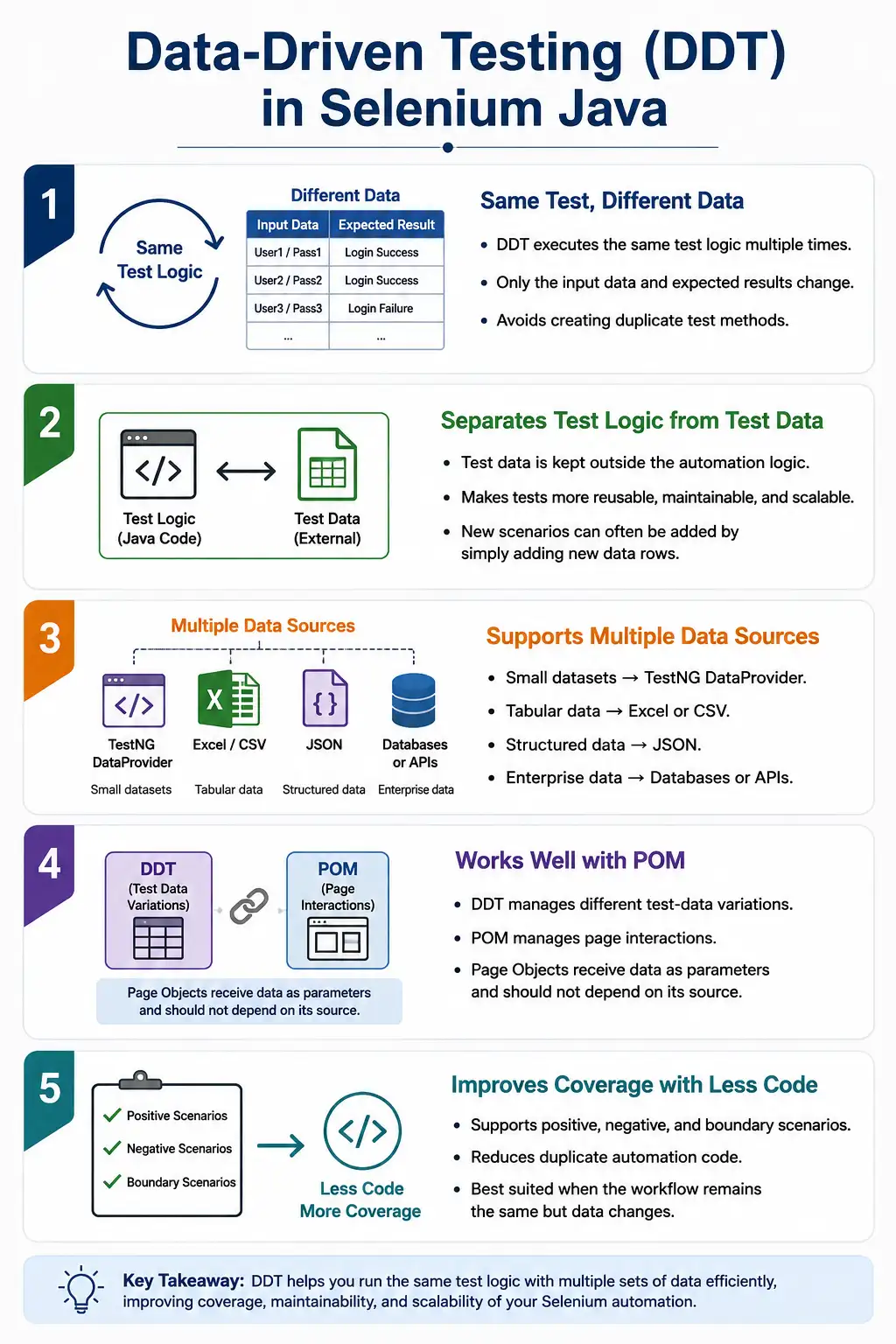
DDT is one of the most widely used techniques in Selenium automation because many application features need to be validated with multiple inputs. Login must be tested with different users. Search must be tested with different keywords. Registration forms must be tested with valid, invalid, boundary, and duplicate values. Payment flows must be tested with different cards, currencies, and expected outcomes. Without DDT, teams often create duplicate tests that perform the same steps with different values. With DDT, one well-designed test can cover many scenarios.
1. What Is Data-Driven Testing?
Data-Driven Testing is a testing methodology where the test logic remains the same, but the test data changes for each execution. The automation script is written once and then executed repeatedly with different rows or records of data. Each row represents a scenario, input combination, or expected outcome.
For example, a login test may always perform the same steps: open login page, enter username, enter password, click login, and verify the result. The username, password, and expected result can change from one execution to another. That is the core idea of DDT: the script stays reusable while the data drives the variations.
Test Logic
  Read Data
    Pass Data to Test
      Execute Scenario
        Move to Next Data Set
          Generate Result
2. Why Data-Driven Testing Is Needed
Suppose an application has four login users: admin, standard user, guest user, and invalid user. Without DDT, a beginner may create four different test methods. Each method opens the same page, enters values into the same fields, clicks the same button, and verifies a result. The only difference is the data. This creates duplicate code and increases maintenance effort.
With DDT, the team creates one login test and supplies four data rows. The test runs four times. If the login page locator changes, only the page object changes. If a new user role is added, only a new data row is added. The test method does not need to be duplicated.
One Login Test
  Data Row 1: admin / admin123
  Data Row 2: user / user123
  Data Row 3: guest / guest123
  Data Row 4: invalid / wrong123
This approach improves coverage without multiplying test code. It is especially useful when the same workflow must be validated with many combinations of input values.
3. Traditional Testing vs Data-Driven Testing
In traditional automation, engineers often create separate test methods for each data variation. A login test for admin, a login test for user, and a login test for guest may all contain similar logic. This is easy to start but painful to maintain. When the login flow changes, each test may need updates.
In Data-Driven Testing, the test is designed once and data is supplied externally. The same method executes for admin, user, guest, manager, invalid user, locked user, and any future data rows. Maintenance becomes easier because behavior is in one place and data is in another place.
| Traditional Testing | Data-Driven Testing |
|---|---|
| Multiple similar test methods | One reusable test method |
| Data often hardcoded | Data supplied separately |
| More duplication | Less duplication |
| Harder to add scenarios | Add rows to add scenarios |
| Maintenance increases quickly | Maintenance stays controlled |
4. How DDT Works
A Data-Driven Testing flow starts with a data source. The data source can be simple or complex depending on the project. TestNG DataProvider can be enough for small datasets. Excel is common in enterprise projects because non-technical users can edit rows. CSV is useful for lightweight tabular data. JSON is useful when the data has structure. Databases and APIs are useful when test data must come from real enterprise systems.
The automation framework reads the data, converts it into a format the test can consume, passes the values into the test method, executes the test, records the result, and repeats the process for the next row. In TestNG, this is commonly done through Object[][] or an iterator returned by a DataProvider.
External Data Source
  Read Test Data
    DataProvider
      TestNG Test
        Page Object
          Selenium WebDriver
            Browser
              Test Report
5. Simple TestNG DataProvider Example
TestNG DataProvider is the simplest way to understand DDT in Selenium Java. The DataProvider method returns data, and TestNG executes the test once for each data row.
@DataProvider(name = "loginData")
public Object[][] loginData() {
    return new Object[][] {
            {"admin", "admin123"},
            {"user", "user123"},
            {"guest", "guest123"}
    };
}

@Test(dataProvider = "loginData")
public void loginTest(String username, String password) {
    System.out.println(username + " - " + password);
}
This example does not yet use Selenium, but it shows the concept. The test method receives different username and password values in each execution. TestNG handles the repeated execution automatically.
6. Selenium Login Example With DataProvider
In a Selenium test, the same idea can be applied to the login page. The test receives the username and password from the DataProvider and passes them to the page object. The page object performs the login action.
@Test(dataProvider = "loginData")
public void loginTest(String username, String password) {
    driver.get("https://example.com/login");
    driver.findElement(By.id("username")).sendKeys(username);
    driver.findElement(By.id("password")).sendKeys(password);
    driver.findElement(By.id("loginBtn")).click();
}
This example works, but in a clean framework, the raw Selenium calls should be moved into a page object. Data-driven testing and Page Object Model work best together because DDT supplies the data and POM handles page interaction.
@Test(dataProvider = "loginData")
public void loginUsingPOM(String username, String password) {
    LoginPage loginPage = new LoginPage(driver);

    DashboardPage dashboard =
            loginPage.login(username, password);

    Assert.assertTrue(dashboard.isDashboardDisplayed());
}
7. DDT With Expected Result
A good data-driven test usually includes expected results, not only input values. For login, some users may be valid and some may be invalid. If the dataset includes expected outcome, the same test can validate both success and failure scenarios.
@DataProvider(name = "loginCases")
public Object[][] loginCases() {
    return new Object[][] {
            {"admin", "admin123", true},
            {"admin", "wrong", false}
    };
}

@Test(dataProvider = "loginCases")
public void loginTest(String user,
                      String pass,
                      boolean expectedSuccess) {
    boolean actualSuccess = performLogin(user, pass);

    Assert.assertEquals(actualSuccess, expectedSuccess);
}
Including expected results makes the dataset more complete. It also makes the test easier to expand. New scenarios can be added by adding rows, not by writing new test methods.
8. Common Data Sources
Data can come from many places. The right source depends on dataset size, team workflow, maintenance needs, and security requirements. Small fixed datasets can live inside a DataProvider. Larger datasets may be placed in Excel, CSV, or JSON files. Enterprise systems may use databases or APIs to create or retrieve test data dynamically.
- TestNG DataProvider for small and medium datasets.
- Excel for business-readable tabular data.
- CSV for lightweight structured rows.
- JSON for nested or object-like data.
- XML for legacy or integration-style data.
- SQL databases for enterprise datasets.
- REST APIs for dynamic test data creation and retrieval.
- Properties files for configuration-like values.
Configuration data and test data should not be confused. Browser name, application URL, environment name, timeout, and language are usually configuration values. Username, password, search keyword, product name, quantity, and expected message are usually test data values.
9. Excel-Based DDT
Excel-based DDT is common in enterprise Selenium projects because Excel is easy for testers, business users, and non-developers to understand. A file such as LoginData.xlsx can contain columns for username, password, user role, expected result, and expected message. The automation framework reads the sheet using a library such as Apache POI and converts rows into test data.
LoginData.xlsx

Username    Password     ExpectedResult
admin       admin123     Dashboard
user        user123      Dashboard
invalid     wrong123     Invalid credentials
The usual flow is Excel to Apache POI, then to Object[][], then to DataProvider, then to the TestNG test method. Excel is useful when datasets are large or edited often, but it also requires disciplined maintenance. Duplicate rows, outdated data, hidden columns, and invalid formatting can create unreliable tests.
10. CSV-Based DDT
CSV is simpler than Excel. It stores tabular data in plain text, which makes it lightweight and easy to version control. CSV is useful when the dataset is simple and does not need formulas, multiple sheets, formatting, or business-user editing.
username,password,expected
admin,admin123,Dashboard
user,user123,Dashboard
invalid,wrong123,Invalid credentials
A CSV utility can read each row, split values safely using a parser, and return the data to the DataProvider. CSV is a good choice for automation teams that want simple, transparent, and source-control-friendly test data.
11. JSON-Based DDT
JSON is useful when test data is nested or object-based. For example, registration data may include user details, address details, preferences, and expected messages. JSON maps naturally to Java objects when libraries such as Jackson or Gson are used.
[
  {
    "username": "admin",
    "password": "admin123",
    "expected": "Dashboard"
  },
  {
    "username": "invalid",
    "password": "wrong123",
    "expected": "Invalid credentials"
  }
]
JSON is especially useful for API and UI automation frameworks that share test data models. A JSON file can represent a complete business object more clearly than a flat spreadsheet row.
12. Database-Driven Testing
Database-driven testing reads test data from a database table. This is common in enterprise systems where test data already exists in a controlled environment or must be generated through backend processes. A query retrieves rows, the framework converts them into Java objects or arrays, and the test executes with those values.
Employee Table
  SQL Query
    Java ResultSet
      DataProvider
        Test Method
Database-driven testing is powerful, but it also creates dependencies. If data changes unexpectedly, tests may fail. Teams should control test data, clean up after execution, and avoid relying on unstable production-like records unless the environment is designed for that purpose.
13. API-Based Test Data
In modern frameworks, APIs are often used to create data before a UI test runs. For example, a test can call an API to create a user, create an order, or prepare an account balance before opening the browser. This is faster and more reliable than using UI steps to prepare every state.
API-based data can also be read from backend services. A REST API returns JSON, the framework maps it to Java objects, and the UI test uses that data. This approach is useful when test data changes frequently or when the system provides official endpoints for test setup.
14. DDT With POM
DDT and POM complement each other. Data-driven testing separates data from test logic. Page Object Model separates page interaction from test logic. Together, they create clean and reusable automation.
Excel or DataProvider
  LoginTest
    LoginPage.login(username, password)
      Browser
The page object should not know where the data came from. It should simply accept parameters. The test or DataProvider decides whether the values came from Excel, CSV, JSON, database, API, or inline data. This keeps page objects stable even when the data source changes.
15. Registration Form Example
Registration forms are excellent candidates for DDT because they involve many input fields and validation rules. A single form can be tested with valid data, missing required fields, invalid email formats, weak passwords, duplicate usernames, boundary length values, and special characters.
@DataProvider(name = "registrationData")
public Object[][] registrationData() {
    return new Object[][] {
            {"John", "Smith", "john@test.com"},
            {"David", "Lee", "david@test.com"}
    };
}

@Test(dataProvider = "registrationData")
public void register(String firstName,
                     String lastName,
                     String email) {
    registrationPage.register(firstName, lastName, email);
}
As the dataset grows, it can be moved from inline DataProvider to Excel, CSV, or JSON. The test method can remain the same if the DataProvider continues to supply the same values.
16. Search Testing Example
Search functionality often needs to be tested with multiple keywords. One keyword may return results, another may return no results, another may include special characters, and another may check case sensitivity. DDT allows the same search test to run across all of these inputs.
@DataProvider(name = "searchData")
public Object[][] searchData() {
    return new Object[][] {
            {"Selenium"},
            {"TestNG"},
            {"Java"}
    };
}

@Test(dataProvider = "searchData")
public void searchTest(String keyword) {
    searchPage.searchProduct(keyword);
    Assert.assertTrue(searchPage.areResultsDisplayed());
}
This is much cleaner than creating separate test methods for each keyword. If another keyword must be tested, add another row.
17. DDT With Custom Objects
For larger datasets, passing many separate parameters can make test signatures hard to read. A custom data object can improve clarity. For example, LoginData can contain username, password, expected result, and role.
public class LoginData {
    private final String username;
    private final String password;
    private final String expectedResult;

    public LoginData(String username,
                     String password,
                     String expectedResult) {
        this.username = username;
        this.password = password;
        this.expectedResult = expectedResult;
    }

    public String getUsername() {
        return username;
    }

    public String getPassword() {
        return password;
    }

    public String getExpectedResult() {
        return expectedResult;
    }
}
The DataProvider can return LoginData objects. This makes the test cleaner and reduces parameter confusion when datasets have many fields.
18. DDT With Iterator
TestNG DataProvider can also return an iterator. This is useful when data is built dynamically or read from a source that should be streamed instead of fully loaded into memory at once.
@DataProvider(name = "cities")
public Iterator<Object[]> cityData() {
    List<Object[]> data = new ArrayList<>();
    data.add(new Object[]{"Chicago"});
    data.add(new Object[]{"New York"});

    return data.iterator();
}
Iterator-based data providers are less common for beginners but useful in advanced frameworks where test data is generated dynamically.
19. Parallel DataProviders
TestNG supports parallel DataProvider execution. This can reduce execution time when a test must run against many data rows. However, parallel DDT must be used carefully. The WebDriver setup must be thread-safe. Test data should not share mutable objects. Reports and logs should correctly identify each data row.
@DataProvider(name = "users", parallel = true)
public Object[][] users() {
    return new Object[][] {
            {"admin"},
            {"manager"},
            {"guest"}
    };
}
Parallel DataProviders are useful in mature frameworks, but they should not be enabled casually. If the driver is static or shared incorrectly, parallel tests can interfere with each other.
20. Data-Driven vs Keyword-Driven Testing
Data-driven and keyword-driven testing are different framework concepts. Data-driven testing focuses on running the same logic with different data. Keyword-driven testing uses keywords to control actions, such as CLICK, TYPE, SELECT, and VERIFY. Keyword-driven frameworks are usually more complex because the test flow itself is controlled by external keywords.
| Data-Driven Testing | Keyword-Driven Testing |
|---|---|
| Focuses on data | Focuses on actions or keywords |
| Same logic, different inputs | Different actions controlled externally |
| Often uses DataProvider, Excel, CSV, JSON | Often uses action keywords and object repositories |
| Easier to implement | More complex to design |
21. Data-Driven Testing vs Parameterization
Parameterization is a technique for passing values into a test. Data-Driven Testing is a broader testing approach where test execution is driven by multiple datasets. In practice, parameterization is one way to implement DDT. TestNG DataProvider, XML parameters, method parameters, and external file values are all parameterization mechanisms.
For example, browser name and URL passed from testng.xml are usually configuration parameters. Username, password, product name, quantity, and expected result supplied for repeated test execution are test data. Both involve passing values, but their purpose is different.
22. Advantages of Data-Driven Testing
DDT reduces duplicate code because one test method can support many data rows. It improves maintainability because test logic and test data are separated. It increases coverage because new scenarios can be added by adding data. It supports reusable page objects because the same page methods are called with different values. It also improves reporting because each data row can be tracked as a separate execution.
- Eliminates duplicate test scripts.
- Improves test reusability.
- Separates test logic from test data.
- Increases coverage with less code.
- Makes adding new scenarios easier.
- Supports large datasets.
- Works well with POM and TestNG.
- Reduces long-term maintenance effort.
23. Limitations of Data-Driven Testing
DDT is powerful, but it is not free. Initial setup takes time. Data reading utilities must be built or reused. Large datasets require maintenance. Poor-quality data can cause false failures. Excel files can become slow or messy when they grow too large. Sensitive credentials should not be stored in plain text files.
Another limitation is that not every scenario should be data-driven. If two tests have different business logic, forcing them into one data-driven test can make the test confusing. DDT is best when the workflow is mostly the same and only the input data or expected result changes.
24. Designing Good Test Data
Good Data-Driven Testing depends on good test data design. A dataset should not be just a random collection of values. Each row should have a clear purpose. One row may represent a valid user. Another row may represent invalid credentials. Another row may represent a locked user. Another row may represent a boundary value. When test data is designed with intent, failures are easier to understand and coverage is easier to explain.
A strong dataset usually includes positive, negative, and boundary values. For a login feature, positive data verifies valid users. Negative data verifies wrong passwords, empty fields, disabled accounts, and invalid usernames. Boundary-style data may verify username length or password length if those rules exist. For a registration form, the dataset may include valid emails, invalid emails, duplicate users, weak passwords, maximum-length names, and missing mandatory fields.
Expected results should also be part of the dataset when different rows produce different outcomes. Without expected results, the test may assume that every row should pass. That is not always true. Many DDT scenarios intentionally include invalid data to verify error handling. A row should clearly state whether success, failure, dashboard navigation, error message, or validation warning is expected.
25. Separating Test Data and Configuration Data
A common mistake is mixing test data and configuration data. Test data drives the scenario. Configuration data controls the environment. Username, password, search keyword, quantity, payment amount, and expected message are test data. Browser name, application URL, timeout value, environment name, and grid URL are configuration data.
This distinction matters because configuration data usually applies to the entire test run, while test data changes from one execution to another. Browser name should not usually be repeated in every login row unless the test is intentionally validating browser-specific behavior. Similarly, application URL should not be stored in the login data file. It belongs in a configuration file, environment variable, CI parameter, or TestNG XML configuration.
Keeping these separate makes the framework easier to maintain. When the test environment changes from QA to staging, update configuration. When a new login scenario is added, update test data. The two concerns should not be tangled in the same file unless there is a specific project reason.
26. DDT and Reporting
Reporting is especially important in data-driven tests because the same test method runs many times. If a report only says loginTest failed, it is not enough. The report should identify which data row failed, which user was used, what expected result was supplied, and what actual result occurred. Without row-level reporting, debugging DDT failures becomes frustrating.
Good reporting may include the test method name, data set name, row number, username or business identifier, expected result, actual result, screenshot, browser, and environment. Sensitive data such as passwords, tokens, and personal information should be masked. Reports should help debugging without exposing secrets.
In TestNG, the data values often appear in execution details depending on reporting configuration. Advanced frameworks may create custom test names based on data values or attach data-row information to logs. This is useful when a data-driven test has dozens or hundreds of executions.
27. DDT and Test Maintenance
Data-driven tests reduce code duplication, but they can create data maintenance challenges if not managed carefully. A large Excel file with hundreds of rows can become difficult to trust if nobody reviews it. Duplicate rows, obsolete users, wrong expected messages, and environment-specific values can produce unstable results. Test data should be reviewed just like code.
One practical approach is to keep data files small and focused. Instead of placing every scenario into one giant spreadsheet, separate data by feature or purpose. For example, login-positive, login-negative, registration-validation, search-keywords, and checkout-payment can be separate files or sheets. This makes ownership clearer and reduces accidental changes.
Another approach is to use meaningful column names. A column named expectedMessage is clearer than value3. A column named userRole is clearer than type. Clear data structure helps both automation engineers and manual testers understand what each row is validating.
28. DDT With Positive and Negative Scenarios
Data-driven testing is not only for happy paths. It is also useful for validation and error-handling scenarios. A login test can include valid credentials, wrong passwords, empty username, empty password, locked account, expired password, and unauthorized role. A form test can include invalid email, missing phone number, duplicate email, weak password, and invalid date format.
The important design question is whether the workflow is still the same. If the test steps are mostly identical and only data or expected result changes, DDT is a good fit. If each scenario requires a completely different flow, separate test methods may be clearer. DDT should improve readability, not hide meaningful differences between scenarios.
For mixed success and failure cases, include an expected status column. The test can then decide whether to verify dashboard navigation or verify an error message. This avoids writing separate tests for every variation while still keeping expectations explicit.
29. DDT With Page Object Model
In a mature Selenium framework, DDT should not weaken POM design. The test receives data and calls page object methods. Page objects should not read Excel files, parse JSON, query databases, or decide which dataset to use. Their job is to interact with pages using values passed from the test.
This separation gives flexibility. Today the login data may come from a TestNG DataProvider. Tomorrow it may come from Excel. Later it may come from an API. The page method remains the same because it only accepts username and password. The data source can evolve without forcing page object changes.
This is one of the main reasons DDT and POM are used together in enterprise automation. DDT improves coverage through data variation. POM improves maintainability through page abstraction. Together, they reduce duplication in both test logic and page interaction logic.
30. DDT Execution Strategy
When a data-driven test has many rows, execution strategy matters. Running all rows in every build may be unnecessary if the dataset is large. Teams often divide data into smoke, regression, negative, boundary, and full-suite datasets. Smoke datasets contain a small number of critical rows. Regression datasets contain broader coverage. Full datasets may run nightly or before major releases.
This strategy prevents the suite from becoming too slow. DDT can easily expand test coverage, but uncontrolled datasets can also increase execution time. A good framework gives teams a way to choose which data groups to run based on pipeline stage, release risk, and execution budget.
Data tagging can help. A column such as testType or runGroup can identify smoke, regression, or negative cases. The DataProvider or utility can filter rows based on the current execution mode. This makes DDT more practical in CI/CD pipelines.
31. Common Beginner Mistakes
- Hardcoding test data inside test methods.
- Creating separate tests for every user or input value.
- Mixing data reading logic directly inside test methods.
- Using Excel for very small static datasets when DataProvider is enough.
- Storing sensitive credentials in plain text files.
- Not including expected results in the dataset.
- Using parallel DataProviders without thread-safe WebDriver handling.
- Allowing duplicate or outdated data rows.
32. Enterprise Best Practices
In enterprise frameworks, test data should be treated as a managed asset. It should be readable, organized, versioned, and reviewed. Data should be separated from page objects. Sensitive values should be stored securely using environment variables, encrypted configuration, CI secrets, or secret managers. Expected results should be part of the dataset when the same test validates multiple outcomes.
For small and medium datasets, TestNG DataProvider is often enough. For large datasets, Excel, CSV, JSON, databases, or APIs may be better. The framework should keep data-reading utilities reusable and independent from test logic. Page objects should accept data as method parameters and should not care where the data originated.
33. Real Enterprise Flow
Excel or JSON
  Data Utility
    DataProvider
      TestNG
        Page Objects
          Selenium WebDriver
            Browser
              Report
This is one of the most common enterprise automation architectures. The data utility reads and prepares data. TestNG supplies data to test methods. Page objects perform UI interactions. Selenium controls the browser. Reports show which data rows passed or failed.
34. Interview Perspective
A short interview answer is: Data-Driven Testing is a testing approach where the same test script executes multiple times using different input data stored separately from the test logic.
A stronger real-time answer is: in my Selenium framework, I use Data-Driven Testing to execute the same test with multiple datasets such as usernames, passwords, product names, search keywords, and expected results. For small datasets, I use TestNG DataProvider. For larger datasets, I read data from Excel using Apache POI, CSV, JSON, databases, or APIs. The page objects remain unchanged because they accept data as parameters, which keeps the framework maintainable and scalable.
If the interviewer asks why DDT matters, the answer is reusability and coverage. Instead of writing many similar tests, one reusable test can validate many input combinations. This reduces duplicate code and makes it easier to add new scenarios by adding new data rows.
35. Key Takeaway
Data-Driven Testing separates test logic from test data. The test script remains reusable, while different datasets drive multiple executions. This makes automation frameworks more scalable, easier to maintain, and better suited for large test coverage.
Use DDT when the workflow is the same but the input data changes. Use DataProvider for smaller datasets, Excel or CSV for tabular data, JSON for structured data, and databases or APIs for enterprise data. Combine DDT with POM so that data drives the test and page objects handle UI interaction. A good DDT design gives you one clean test script, multiple datasets, better coverage, and much lower duplication.